Zhongyifeng Xingmei Road Project: Sharing Experience of QR Code Inspection Implementation
Customer Introduction
- Company: Zhongyifeng Construction Group Co., Ltd.
- Project department: Xingmei Road Section 2
- Person in charge: Director Ma
- Department: Safety and Quality Department
Use Case
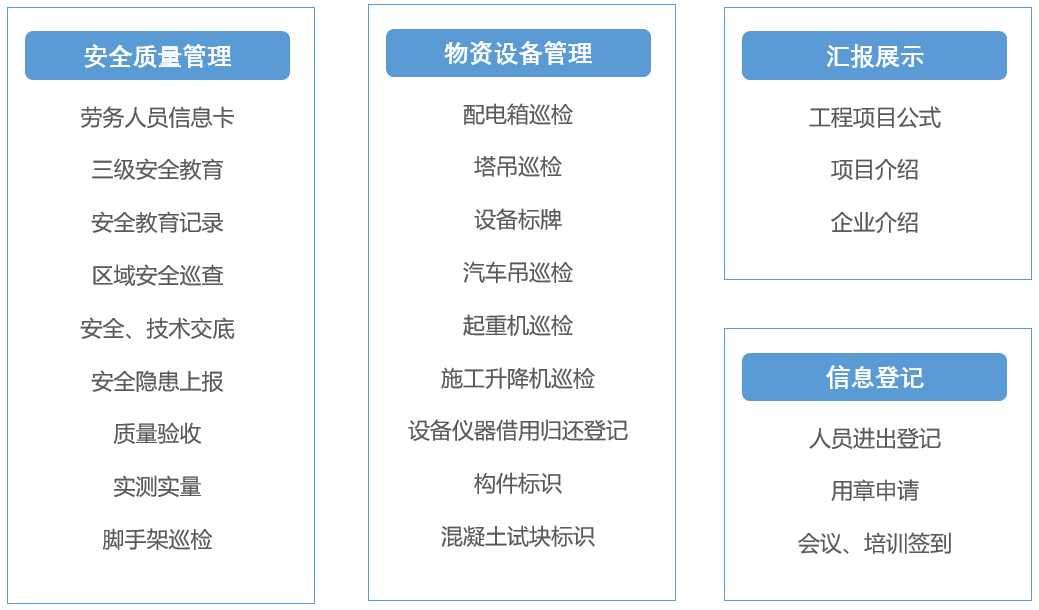
Implementation Steps
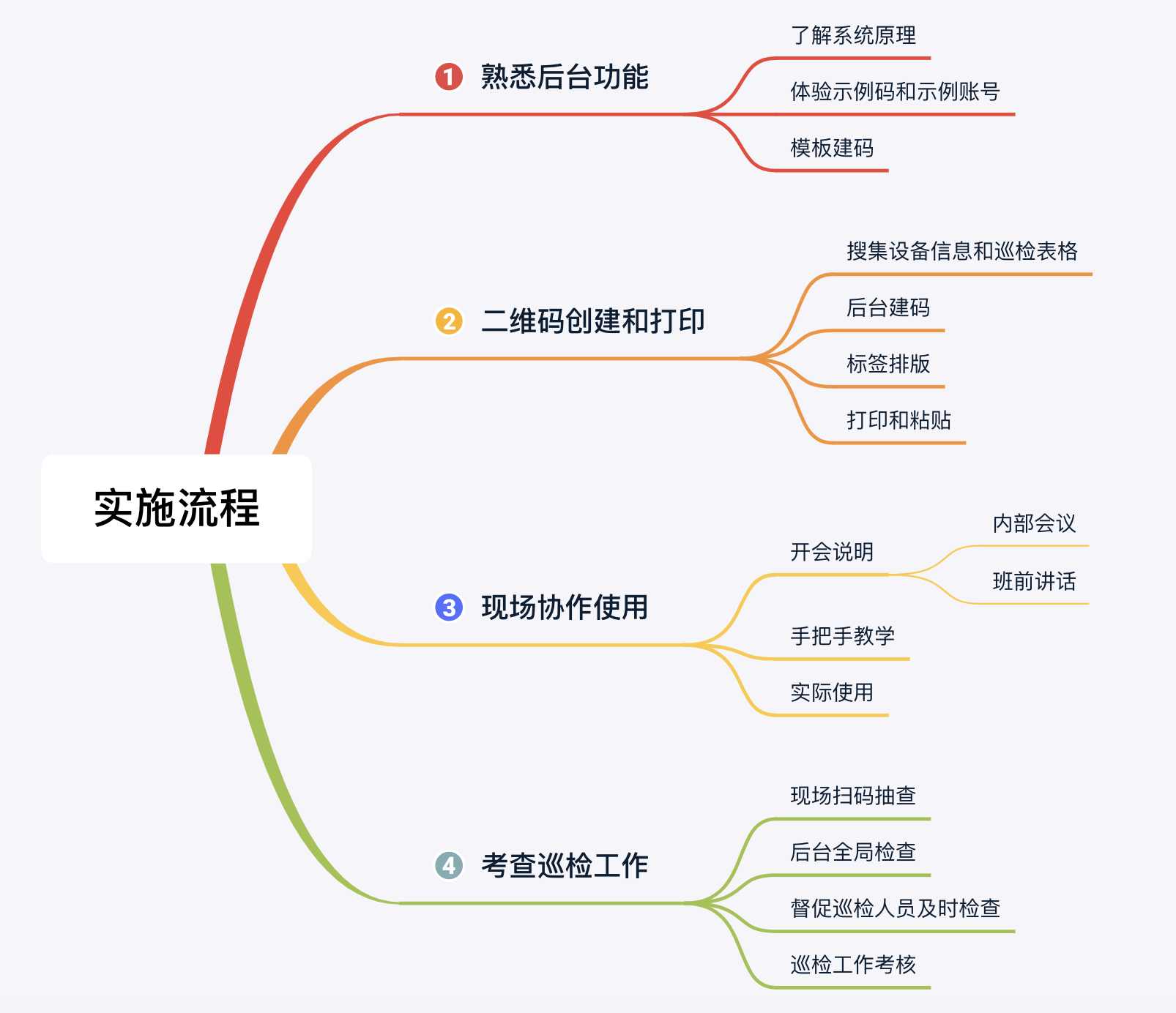
1. Get Familiar with the Platform Features
Learn CaoLiao's basic features, enter the workbench to use a system template, and learn how to make a QR code with inspection functions.
2. Making the QR Codes
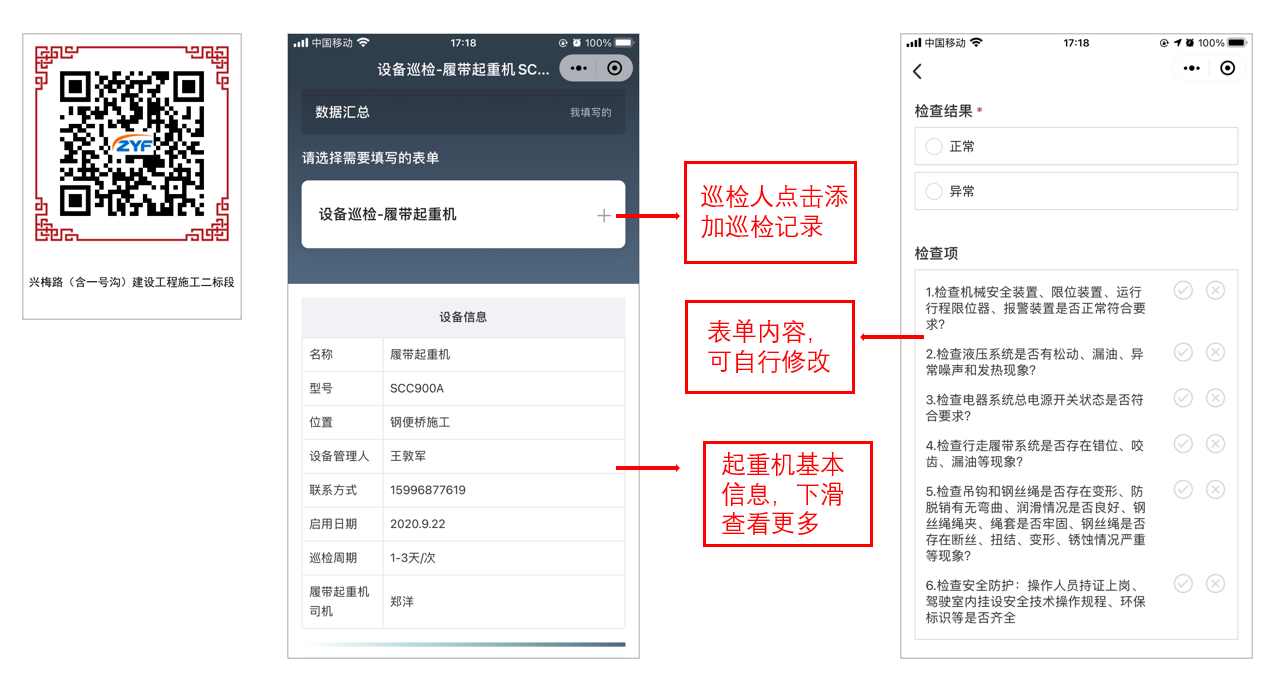
Machinery QR codes: take a crawler crane as an example, with the content including the equipment's basic information and an equipment inspection form. Other scenarios work in a similar way. (For more code-making tutorials, see the Construction Implementation Guide)
2.1 Create Directories in the Workbench
For easy management later, directories were created by scenario: a machinery inspection directory was created, with cranes, tower cranes, truck cranes, and other equipment set up under it.
2.2 Collect the Crane Information
- Basic information/qualification files: in the one machine, one file kept in the office.
- Driver information: ask the driver for certificates and photos.
- Inspection content table: ask the crane's machinery manager for it, to make the crane inspection form.
2.3 Make the QR Code
- Edit the equipment information: fill in the equipment name, specifications and model, place of use, operating driver, and more, and upload the basic information collected (document files, drivers' ID photos, and so on)
- Create a new form: following the crane inspection table items, edit the check items in the form, then add fields such as photo, location, and inspector.
- Set form permissions: designate the inspectors and other managers for the equipment; set reminders so the person in charge is notified of abnormalities. (Designated member permission requires the Advanced Edition or above)
- Set the QR code label: save the content, and when downloading, choose a label and change the label style.
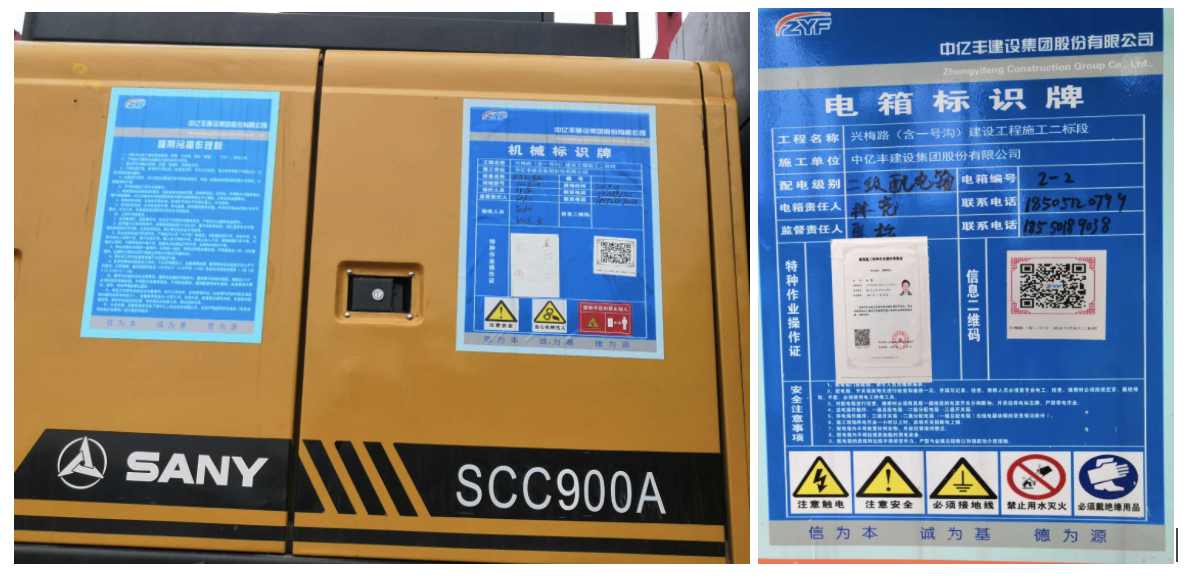
2.4 Print and Stick On Site
- Material: A4 adhesive paper
- Printing method: ordinary laser printer
- How to buy: CaoLiao's designated Taobao store
Crane and distribution box sign templates
2.5 Making Time
Making one device, from collecting information to printing the QR code, takes about half an hour. With bulk templates, QR codes for the same type of equipment only need a few basic details entered, and you can also upload in bulk to generate many codes at once.
Attached: Bulk Template Tutorial
3. On-Site Guidance on How to Use It
3.1 Hold a Meeting to Explain
Organize a meeting for all inspection staff and the people responsible, and briefly explain that QR codes will replace the former paper inspection records, that inspection information can be added by WeChat scan, and that scanning also shows past inspections. Let everyone understand the convenience the new way brings and the whole QR code picture.
3.2 On-Site Demonstration and Teaching
Staff: demonstrate the whole process of scanning to add inspection records on site, let staff try it themselves once, and answer questions.
Managers: scan to view history and do daily spot checks.
Attached: internal meeting PPT, click to download: On-Site Implementation Report.pptx
4. Reviewing the Inspection Work
4.1 Daily Inspection
Go to the site every day to see how machinery is being used, and scan to view inspection records for missed checks, faults, and so on. If there is a problem, talk directly with the staff and have it corrected in time.
4.2 Regular Summary
In the first half month, check the inspection data in the workbench every day, export the data every few days, count the missed checks, look at how faults are handled, and set assessment rules to penalize missed checks, unhandled faults, and similar cases
Assessment rules:
- Adaptation period: in the first half month, people aren't used to the new method and missed checks easily occur, so you need to urge inspections daily and notify people promptly of equipment not inspected that day. After that, apply the management rules strictly: deduct points where points should be deducted and fine where fines should be imposed.
- Point deduction system (internal staff): a simple point deduction system, with those losing many points criticized in a notice, which also affects monthly and annual bonuses.
- Fines (outsourced units): when inspections are found not done in time or not done well, issue a penalty ticket and have it signed and fined. The fine ranges from hundreds to thousands depending on how serious it is.
Implementation Summary
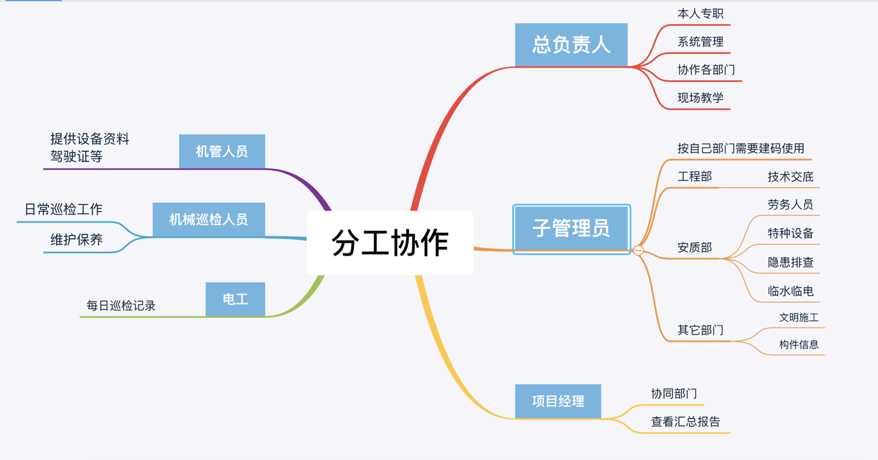
1. Dedicated Person in Charge and Division of Work
Designate one full-time person to be responsible for the overall implementation and coordinate all the work. When obstacles come up, he coordinates and pushes things forward. In assigning work, make clear who is responsible for what.
2. How to Get Inspectors to Accept the New Inspection Method
2.1 Explain at a Meeting
You can hold a special meeting or use a pre-shift talk to tell people that the new electronic inspection is officially replacing the traditional paper way.
Advantages explained:
QR code information management replaces paper office work, saves the tedious process of writing machinery ledger materials, manages all kinds of on-site machinery in a more standardized, visual, and timely updated way, and lets you keep dynamic control of how construction machinery on site is working.
2.2 Hands-On Teaching
On-site staff don't easily accept new things quickly and worry about extra workload. On site, demonstrate scanning to fill in information and uploading photos. Make sure everyone experiences it once, so they know it really is simple and easy to use.
2.3 Supervision and Assessment
- Adaptation period: at first people aren't used to the new method and missed checks easily occur, so you need to urge inspections daily and notify people promptly of equipment not inspected that day. After that, apply the management rules strictly: deduct points where points should be deducted and fine where fines should be imposed.
- Point deduction system (internal staff): a simple point deduction system, with those losing many points criticized in a notice, which also affects monthly and annual bonuses.
- Fines (outsourced units): when inspections are found not done in time or not done well, issue a penalty ticket and have it signed and fined. The fine ranges from hundreds to thousands depending on how serious it is.
3. Getting the Project Leaders' Support
3.1 Early in the Project (Be Clear)
Since the project department itself required the informatization, support is strong, and you only need the project manager to greet each department. When implementing, cooperate with other departments, and make clear the work the other side is to do and the deadline, to ensure fast progress.
3.2 Regular Reports (Show Results)
Summarize work regularly and report what has improved in inspections compared with before, for example missed checks, whether inspections are done properly, and problems found in use, so leaders see the results of the rollout and keep it moving.
3.3 Share the Summary Code and Mobile Management (Get Involved)
To let leaders see the site situation at any time, make an inspected-equipment summary code so leaders can view inspection records at any time; they can also open the Mini Program to see the inspection records of all QR codes and filter the data.

Special thanks to Director Ma of the Zhongyifeng Xingmei Road Section 2 project
for the QR code usage experience above