Can I Stick QR Code Labels Before the Ledger Is Ready?
Even if the ledger isn't organized yet, you can stick QR codes first. CaoLiao QR Code's "preprinted dynamic QR code labels" are QR code labels made without specifying a device, then scanned and bound after being stuck on site: they can be made in bulk in advance, and on site, staff take a label, stick it, and then scan to bind it to a device or enter the device's information on the spot. This mainly solves the problem that when sticking codes on large numbers of devices, the information isn't fully settled yet, or finding the matching label one by one on site takes time.
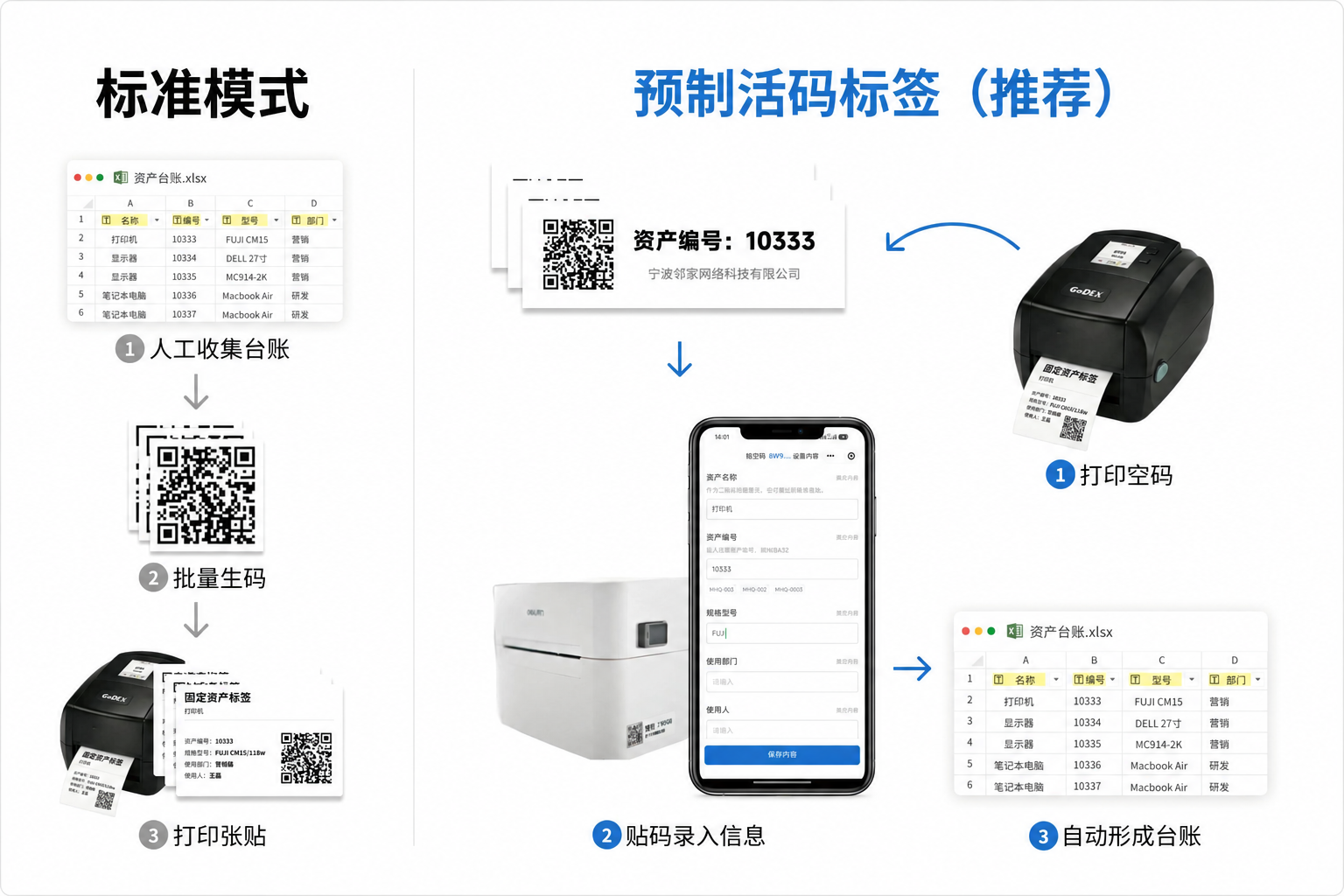
In the regular approach, when using CaoLiao QR Code to manage equipment, assets, fire facilities, or inspection points, you generally organize the ledger first, then bulk-generate QR codes and print labels, and finally stick them on site all at once.
For example, to stick QR codes on 500 devices, you can first organize equipment name, number, model, location, and other information, and generate 500 QR codes at once in the CaoLiao QR Code workbench. When printing, the equipment name, number, and QR code can be laid out together on the label, and then stuck on according to the equipment on site.
1. With Hundreds or Thousands of Devices, the Regular Approach Costs Time in Two Places
The regular approach has no problem when equipment information is already settled and the on-site matching is fairly clear. But once the numbers reach hundreds or thousands, two kinds of situations often come up in actual deployment.
One is that the information isn't fully ready.
Some companies originally had no complete equipment or asset ledger, and have to go on site first to go over the equipment and organize names, numbers, locations, and other information, then generate QR codes and print labels, and then go back to the site to stick them.
Some equipment is installed in batches, and where exactly it goes, which department it belongs to, or even which customer it is finally delivered to isn't settled until on site. Without the information settled, labels are hard to match to devices one by one in advance.
The other is that finding and checking labels on site takes time.
If every label is already bound to a device in advance, then when a staff member walks up to device A-127, they need to find A-127 among the printed labels, check it is right, and then stick it.
At the next device, they look for the next label.
Sorting in advance by workshop, area, or number can cut search time, but as long as labels already correspond to specific devices, the on-site process of "look at the device, find the label, check, then stick" can't be avoided. The more there are, the more obvious this work becomes.
What preprinted dynamic QR code labels change is when the device-to-label relationship gets established.
Labels can be printed together first, and on site there's no need to tell which label belongs to which device. Staff stick whichever label they pick up and then scan to bind it to the current device. That way, organizing information, printing labels, and sticking on site don't have to follow the strict order of "organize the whole ledger, then generate labels, then match them one by one on site".
For projects with an incomplete original ledger, equipment arriving in batches, or hundreds or thousands of points to deploy at once, this approach can cut early preparation and the work of finding and checking codes on site.
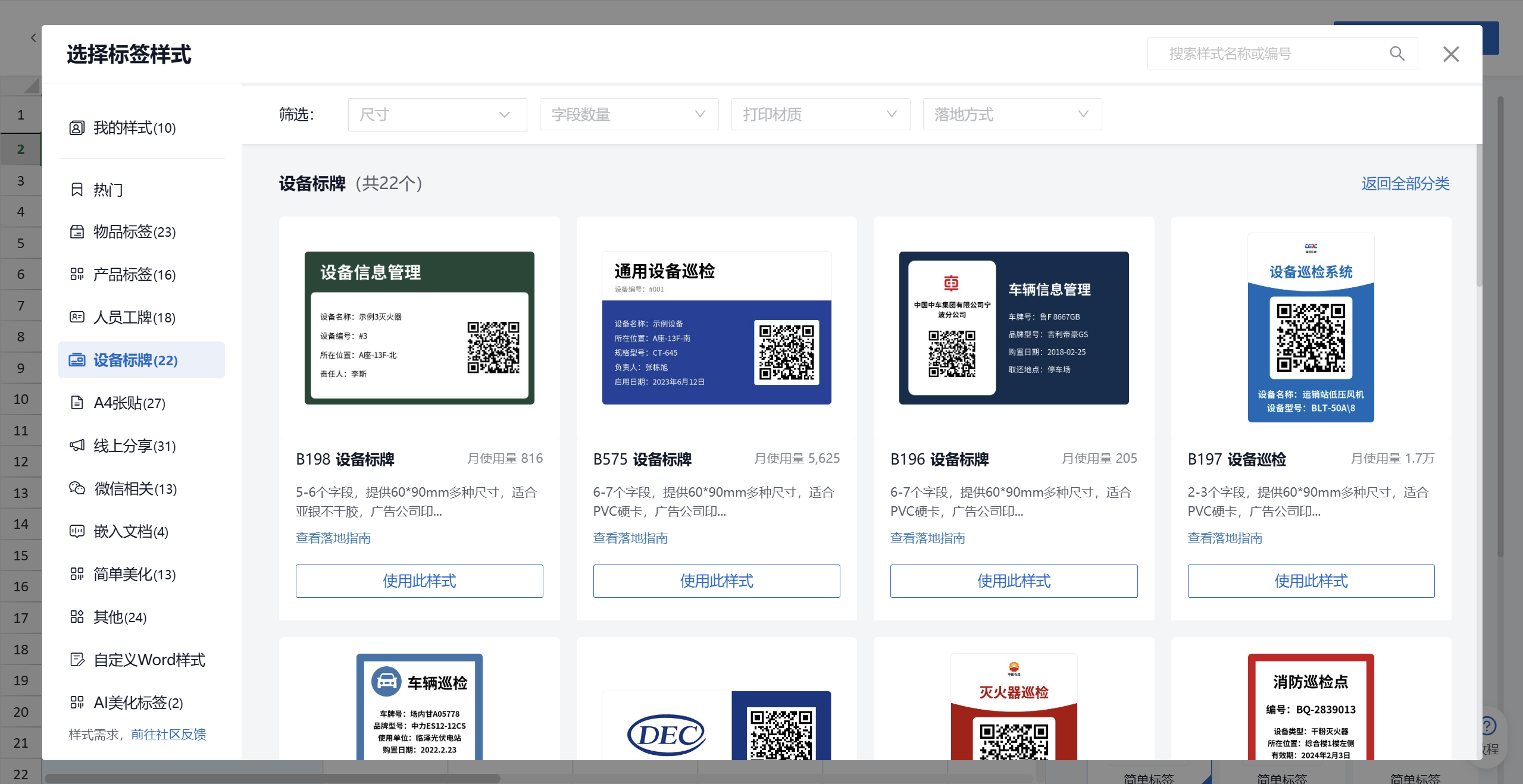
Whichever approach you use, once the QR codes are on site, you still need to think about how to print the labels and how to use them long-term. CaoLiao QR Code currently offers over 150 label styles, covering item labels, equipment plates, A4 sticking, and more, with matching layout and printing methods for A4 paper, die-cut adhesive, and label printers; for different use conditions such as indoor, outdoor, metal surfaces, and humid environments, you can also choose matching label materials and production methods. For details, see the QR Code Label Printing Guide.
2. Make the Labels First, Bind to Equipment on Site
The preprinted dynamic QR code label approach is: first generate a batch of labels in the CaoLiao QR Code workbench, for example Nos. 001-500, print or make them in advance, but don't yet specify which device each label will end up matching.
On site, take a label, stick it, then scan with your phone and bind it to the device in front of you.
For the next device, take the next label.
The regular bulk code approach is:
Settle equipment information → generate matching QR codes → print labels → on site, find the matching label → check and stick
With preprinted dynamic QR code labels, it can become:
Bulk-make the labels first → on site, grab one and stick it → scan to bind to the device
Both approaches can be used for deploying hundreds or thousands of devices, and what preprinted dynamic QR code labels mainly improve is the efficiency of sticking codes on site.
In the regular approach, each label is matched to a specific device in advance, so sticking requires finding and checking labels one by one.
With preprinted dynamic QR code labels, on-site staff can go along the equipment sticking as they go, sticking whichever label they pick up and then scanning to bind it, without repeatedly searching a batch of labels for a specific one.
The more devices there are, the more obvious this efficiency difference.
3. Even If the Ledger Isn't Organized, You Can Start Rolling Out On Site
Another practical point of preprinted dynamic QR code labels: you don't have to wait until all equipment information is ready before you start sticking codes.
If the company never had a complete ledger, it can take a batch of ready-made labels straight to the site.
See a device, stick a label first, then scan and fill in the device name, number, model, location, person in charge, and other information.
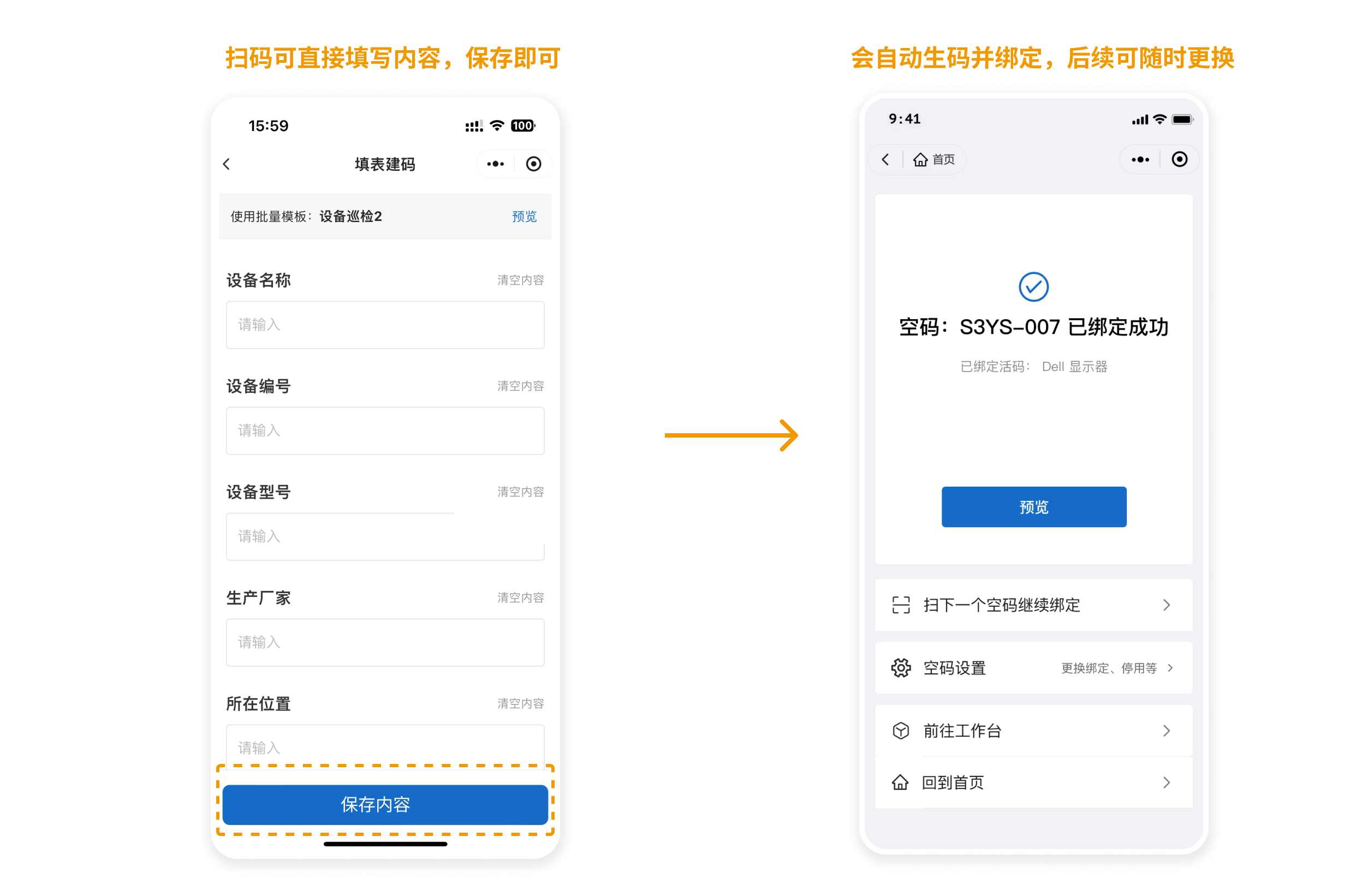
Move to the next device, and stick the next label.
That way equipment inventory, filing, and sticking QR codes can be done in the same on-site job, with no need to inventory all the equipment first, go back to organize information and make labels, and then return to the site to find each device again.
If equipment information has already been set up in the workbench, there's no need to enter it again.
After sticking the label on site, you can scan directly and pick the matching content from existing equipment QR codes to bind.
So preprinted dynamic QR code labels can be used both for "no ledger yet, build as you inventory" and for "the ledger exists, but labels haven't been stuck on the devices yet".
It's the same when equipment is installed in batches.
If the exact installation location, user department, and customer information aren't final yet, labels can still be prepared in advance. Once the equipment is really in place, bind on site.
4. You Can Make Extra Labels in Advance and Take Them Later
Preprinted dynamic QR code labels aren't bound to a specific device when made, so you can make an extra batch ahead according to expected usage.
For example, if a project will end up with 800 devices, you can first make 1,000 labels with consecutive numbers.
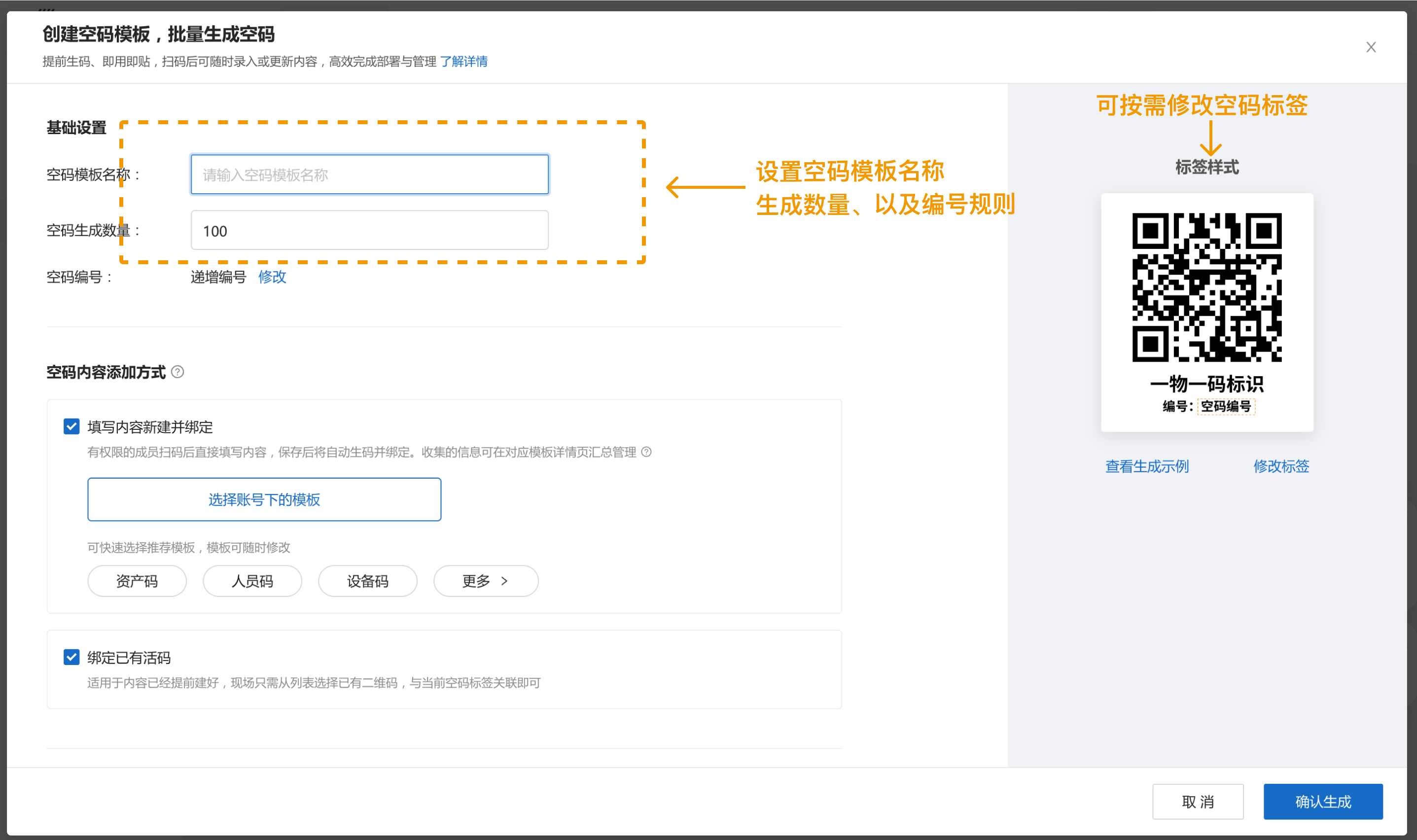
If a point is missed on site or a new device is added, just take a label from the remainder, with no need to re-lay-out and remake for a few labels.
For labels that need to be produced in advance, like aluminum plates, stainless steel plates, and weatherproof PET, this is even more obvious.
You can make a batch at once and keep it in the warehouse, and take them directly when new equipment arrives.
Installers and equipment makers can also prepare labels in advance. When staff go to a customer site, they don't have to match each label to a specific customer and device beforehand, and can scan to bind after the equipment is installed.
That makes the label itself more like a standard material that can be prepared ahead.
5. When Equipment Changes, Labels Can Keep Being Used
After a preprinted dynamic QR code label is bound, it can be unbound or rebound as needed, so when equipment is replaced or assets are transferred, labels don't need to be remade.
On site, equipment and assets don't stay the same forever; equipment may be replaced and assets may be transferred.
For example, if the label at some location was originally bound to device A, after the device is replaced you can rebind that label to the new device's content.
If a label is bound wrongly on site, you can likewise unbind it and bind again.
6. Hundreds or Thousands of Points Can Be Rolled Out by Several People Together
Binding hundreds or thousands of points can be done by several on-site staff at once: assign them by floor, workshop, or area, and each completes label binding on their own phone, and a batch with the same content can also be assigned by continuous scanning.
Who can bind can be set in advance, errors in binding can be corrected afterward, and the related operations leave records.
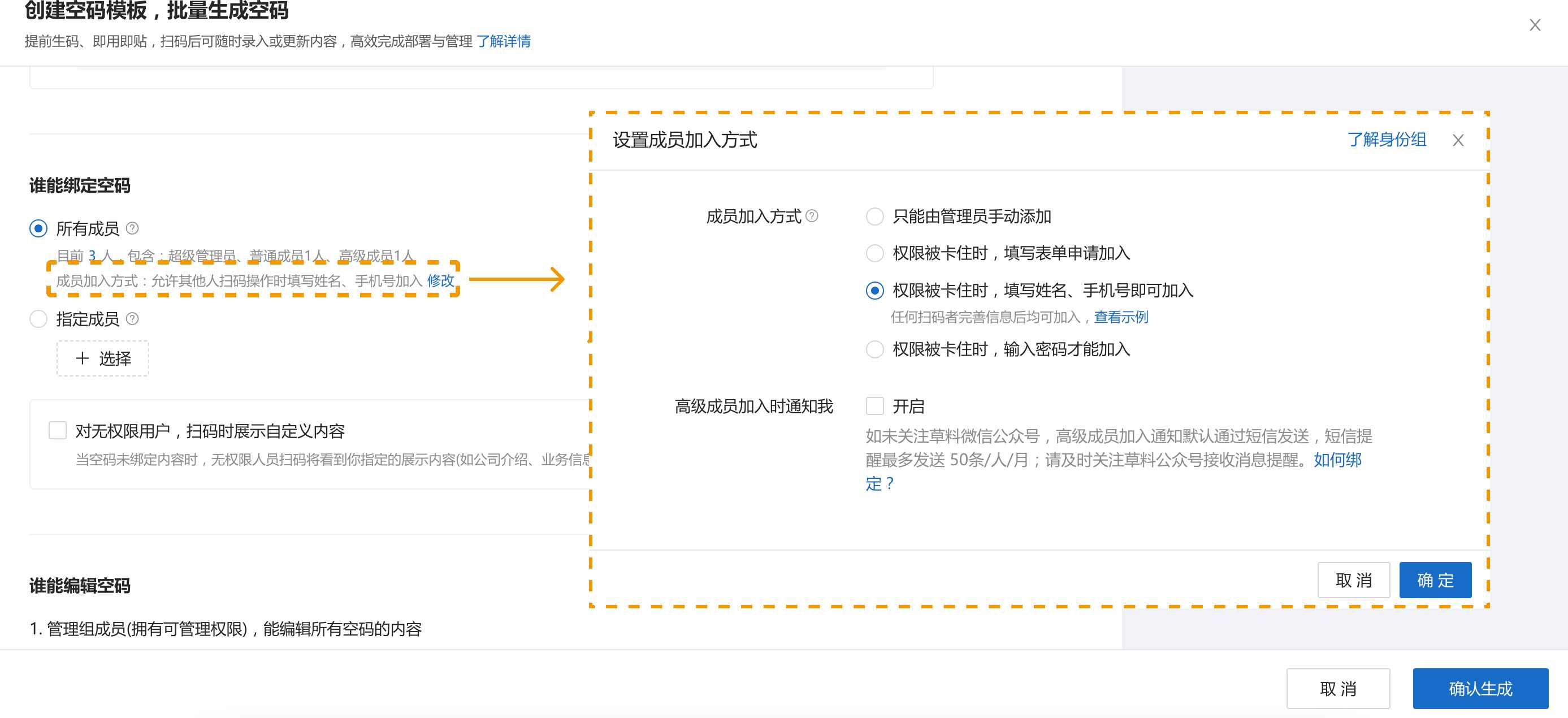
That way several people can move forward in different areas at once, and not every device needs to be handled one by one by a single admin.
For hundreds or thousands of points, besides allowing "stick first, bind later", preprinted dynamic QR code labels also make code sticking, filing, and on-site division of labor easier to carry out.
7. Which Projects Suit Preprinted Dynamic QR Code Labels Better
Preprinted dynamic QR code labels suit the following situations better:
- Many devices, assets, or inspection points, where you want to cut the time spent finding and checking labels one by one on site;
- The ledger isn't fully organized yet, and you want to inventory, stick codes, and build files at the same time;
- Equipment arrives in batches, and installation location, user department, and similar information can only be finalized on site;
- Equipment will keep being added later, and you want to prepare an extra batch of QR code labels in advance;
- You use aluminum plates, stainless steel plates, and other labels with longer production cycles and want to make them in one batch;
- Installation, construction, and maintenance staff need to take labels to different sites and then decide which device each finally matches.
If the equipment information is all settled and you want the label to print the equipment name, asset number, and so on directly, you can bulk-generate QR codes directly and then print and stick them according to the equipment information. For a comparison of the two deployment approaches, you can also see How Preprinted Dynamic QR Code Labels Improve Rollout Efficiency.
What preprinted dynamic QR code labels change isn't the QR code itself but the way codes are stuck on site.
Labels can be prepared in advance, stuck directly on arrival at the site, and then bound to devices by scanning.
For a few dozen points, the difference may not be obvious; at hundreds or thousands of points, the searching, checking, waiting for information, and repeated production saved all show up in on-site deployment efficiency.