Preprinted Dynamic QR Code Labels: Dramatically Improve Deployment Efficiency
Feature Overview
Preprinted dynamic QR code labels (formerly "empty QR codes") are not a new type of QR code. They are a new deployment method: generate and print labels before their content is determined, post them on-site, and let frontline staff scan to bind an existing dynamic QR code or enter information to create a new one.
Preprinted dynamic QR code labels are not a different type of QR code — they represent a new deployment method:
- Traditional approach: Compile all information → Generate QR codes → Post codes
- Preprinted dynamic QR code label approach: Generate preprinted labels → Post codes → Scan on-site to bind existing codes or fill in information
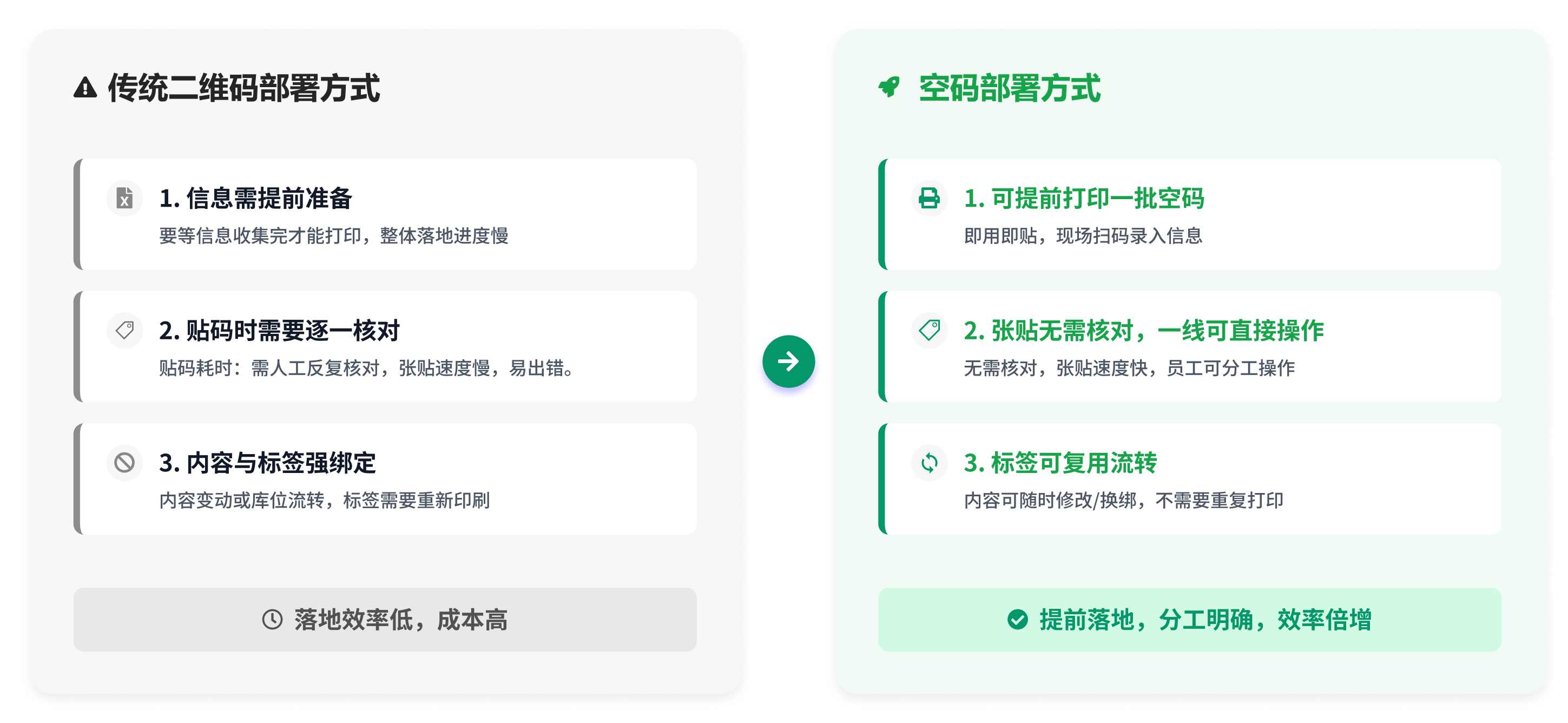
Preprinted dynamic QR code labels let you post codes and move forward without waiting for all information to be ready. Staff scan on-site to bind an existing dynamic QR code or enter information to create and bind a new one. Content can be maintained and swapped at any time — no need to reprint. Combined with permissions and operation logs, multi-person collaboration stays clear and controlled.
Core Value of Preprinted Dynamic QR Code Labels
1. Post first, fill in later — no more waiting on information
- Even when content hasn't been finalized, you can post QR codes immediately without holding up construction, setup, or deployment.
2. Scan on-site and you're ready to go — extremely efficient
Staff only need to scan with their phone to:
- Bind an existing dynamic QR code, or
- Fill in information to automatically create a new code and bind it
3. Rebind, reuse, and manage long-term with ease
- Rebind or unbind at any time
- Support for scheduled automatic unbinding for cycling reuse
- One code, multiple uses — reduces reprinting and maintenance costs
- Supports bulk binding for high-efficiency operations
4. Print in advance for more predictable rollout cost
QR code labels usually get cheaper per piece as the print quantity increases. With preprinted dynamic QR code labels, even if the exact on-site quantity is not fully predictable, you can print a batch of general-purpose preprinted labels in advance based on the expected rollout scale.
Keeping a reasonable buffer generally does not add much to the overall rollout cost. When labels need to be added or replaced later, you can use the preprinted labels already on hand directly instead of placing another print order and waiting.
Typical Use Cases
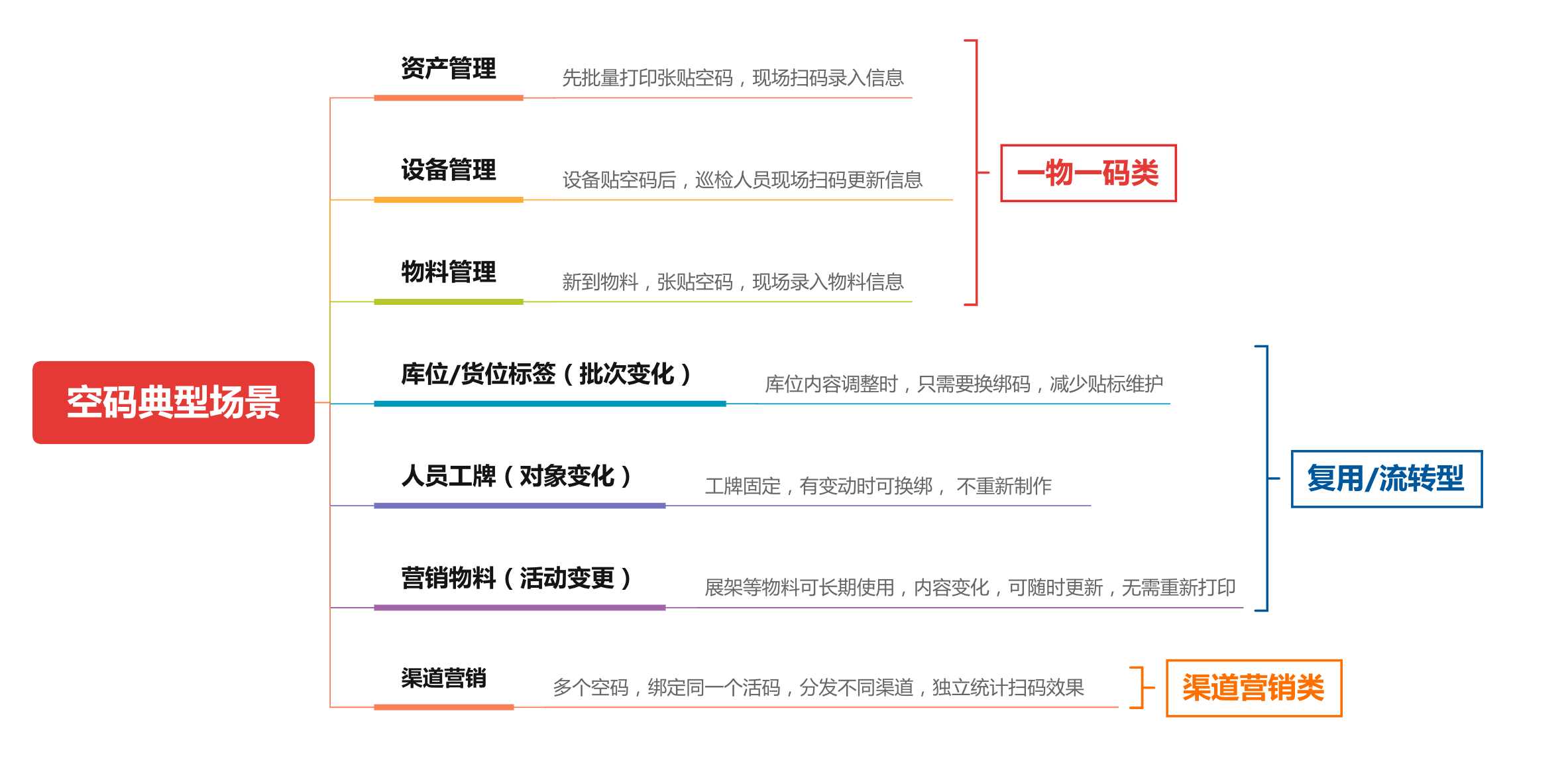
Preprinted dynamic QR code labels are ideal for "post first, add content later" or "label stays, content changes" deployment scenarios. There are three common usage patterns:
1) One-item-one-code: For example, fixed assets, equipment inspection, and materials acceptance. Labels can be posted first, then staff scan on-site to enter information — no waiting until everything is collected.
2) Cycling reuse (label stays, content changes often): For example, storage locations, workstations, tote bins, and pallets — where the location never changes but the contents do. Keep the label in place; when content changes, scan to rebind. No reprinting or relabeling needed.
3) Channel marketing analytics: For example, a marketing campaign where multiple preprinted labels are all bound to the same content page, distributed across different channels, with independent scan tracking per code.
View preprinted dynamic QR code label use case examples
Permissions and Collaboration: Safer On-Site Deployment
To support multi-person collaboration and on-site operations, preprinted dynamic QR code labels provide clear permission tiers and traceable operations.
1. Who can create or delete preprinted dynamic QR code labels
- Only the admin group (with manage permissions) can create or delete preprinted dynamic QR code labels in the desktop workbench.
2. Who can bind content to preprinted dynamic QR code labels
- Default: all members in the organization can bind
- Can be changed to designated members only
- The admin group and advanced members can bind content on either desktop or mobile; basic members can only bind on mobile.
3. Content can be changed later
- The admin group can rebind at any time
- The member who bound a preprinted label can change the bound content within 24 hours; after that, only the admin group can make changes.
4. All operations are logged
- All bind, modify, and unbind actions are logged. Who did it, when it was changed — all clearly visible in the workbench.
How to Use Preprinted Dynamic QR Code Labels
Deploying preprinted dynamic QR code labels generally involves 3 steps:
-
Create and configure:
- Generate a batch of preprinted dynamic QR code labels
- Set the binding rule for when the code is scanned (bind an existing code, or fill in information to create and bind a new one)
- Set binding permissions (who can add content to preprinted labels)
-
Print and post: Bulk download labels, print them, and post them on-site.
-
On-site binding: Staff scan and enter information or bind existing content. Bulk binding is also available.
Advanced Usage
1. What Does Someone See When Scanning a Preprinted Label That Hasn't Been Bound Yet?
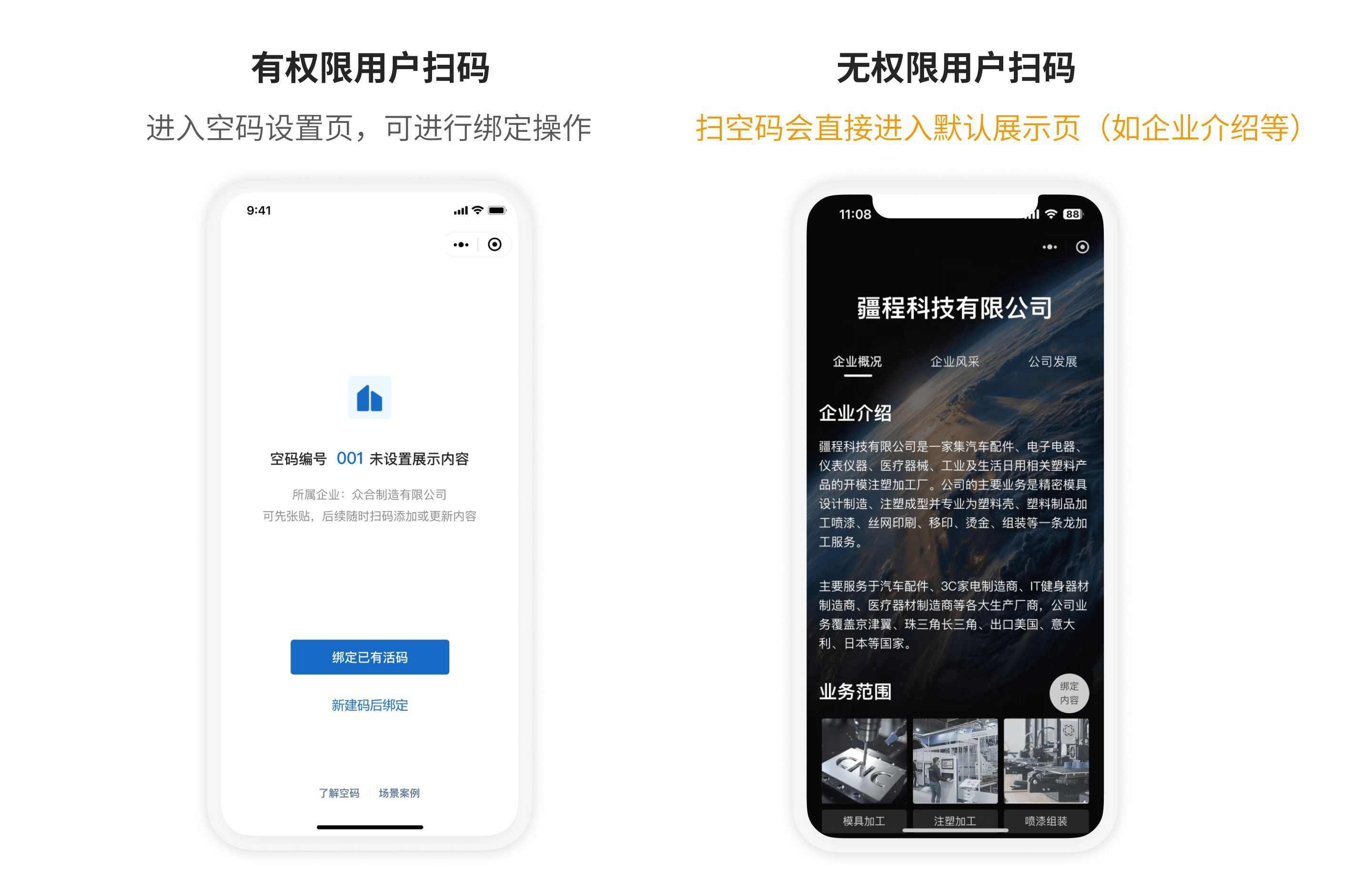
Before a preprinted dynamic QR code label is bound to any content, you can set a default display page. This lets preprinted labels serve both internal management purposes and external brand presentation.
- Users without binding permissions will see this page when scanning
- Can be used to display company information, project details, contact info, and more
Example: A security equipment company posts preprinted labels on demo units in their showroom. External customers scanning the code see the company's business introduction and contact information. Internal staff scanning the same code can access the option to set the preprinted label's content.
2. Cycling Reuse: Scheduled Automatic Unbinding
You can set an automatic unbinding interval for preprinted labels (e.g., 1 day, 3 days, 7 days, half a month). Once the specified time has passed, bound preprinted labels under the template will automatically unbind and revert to their initial unbound state. Automatic unbinding and reuse reduces manual maintenance and keeps preprinted labels clean and usable long-term.
Examples:
1) Warehouse and logistics cycling: Tote bins and pallets cycle through multiple production stages. They unbind automatically on schedule and are ready for the next cycle.
Example: A manufacturing plant posts preprinted labels on production line tote bins. Each time a shipment goes out, the new batch is bound to the code. After 7 days, it unbinds automatically, clearing the old data so the bin is ready for the next round.
2) Temporary ID badges / passes: Temporary visitors scan to register, and access automatically expires after a set period.
Example: A construction site assigns preprinted label passes to temporary workers with a 15-day validity period. After expiry, the code unbinds automatically. The next group of workers can reuse the same badge — no reprinting or manual cleanup needed.
FAQ
Q: What's the difference between preprinted dynamic QR code labels, dynamic QR codes, and sub-codes?
- Preprinted Dynamic QR Code Label: Generate an empty shell → Print and post → Scan on-site to bind content. Staff scan the preprinted label and bind an existing dynamic QR code, or fill in information to create a new one. The linked content can be swapped at any time without reprinting.
- Dynamic QR code: Add content directly → Generate QR code. Scanners can view the content immediately; the content can be edited at any time.
- Bulk sub-codes: Design a template → Generate codes in bulk. Like staff ID badges — design one universal template (with fields for name, photo, department, etc.), import an Excel file, and the system generates 1,000 QR codes with different content at once — consistent structure, high efficiency.
Q: Can a preprinted dynamic QR code label be bound to a static QR code?
No. Currently, only dynamic QR codes can be bound.
Q: Will gifted batch preprinted labels conflict with ones I create myself?
No. Gifted codes are distinguished by a batch number, so they can be used freely without conflict.
Q: Can I switch the opening method for a preprinted dynamic QR code label individually?
Preprinted labels on the free version open via the CaoLiao Mini Program; paid versions open via "View QR Code," consistent with the account's global opening method. Individual switching per preprinted label is not currently supported.
Q: Can preprinted dynamic QR code labels be divided by partition?
The preprinted dynamic QR code label menu is visible in all partitions, but organizing preprinted labels by partition is not currently supported.