Forms Features
In the digital age, a QR code is no longer just "scan to view information". More and more companies use QR codes to connect things, people, and scenes, and the "form" is an important tool that gives a QR code the ability to collect and manage data.
This article starts from the most basic concepts and walks you through what a form does, how it relates to QR codes, and how to build your own "smart information collection system" with CaoLiao.
I. What Is a Form?
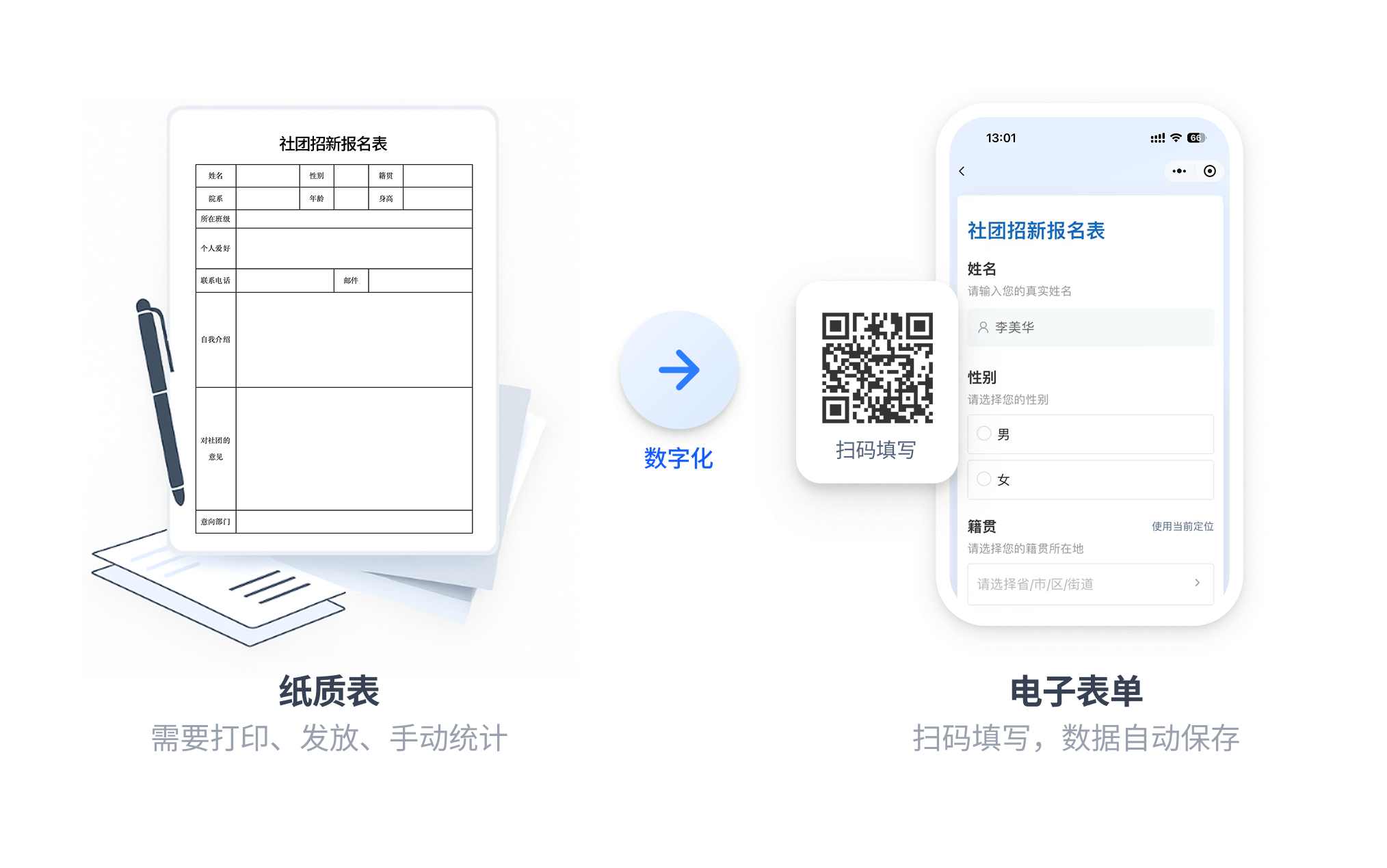
A form is like the paper registration sheet in your hand, which lets others fill in information, such as an employee sign-in sheet, a visitor registration sheet, or an equipment inspection sheet.
Except that paper forms need to be printed, handed out, collected, and counted by hand, while an electronic form can be filled in directly on a phone and the data is saved automatically.
II. Why Use a QR Code as the Entry for Filling in a Form?
| Sending a link to fill in a form | Using a QR code form |
|---|---|
| ❌ You have to add them on WeChat | ✔ No need to add friends |
| ❌ The link gets lost or can't be found | ✔ No URL to type |
| ❌ You explain the entry again and again | ✔ No app to install |
| Suits online spreading | Suits instant on-site collection offline, scan and fill in right there |
To make scan-to-fill smoother, CaoLiao keeps investing in performance optimization, so forms open faster from a WeChat scan, interaction is smoother, and filling in runs without lag.
For companies, this means: a smoother process, a higher fill rate, and more centralized data.
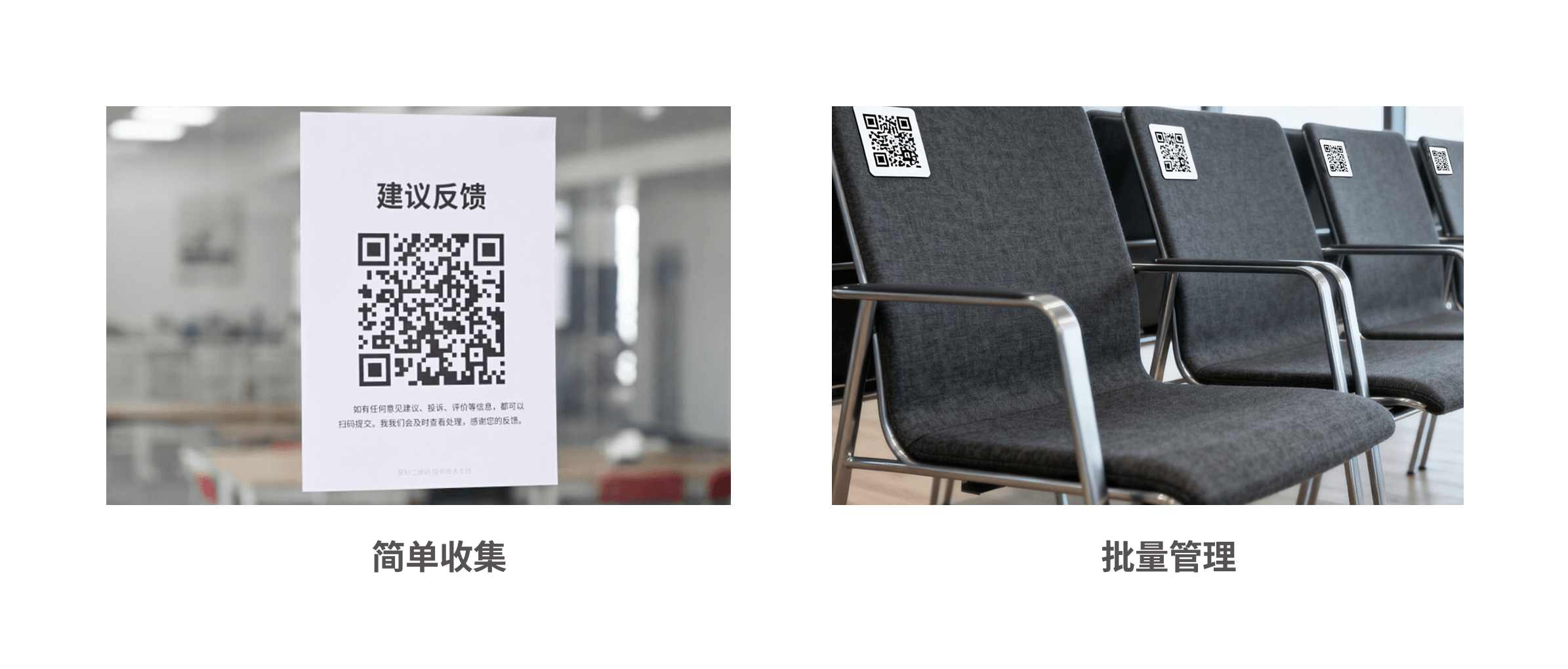
III. Simple Collection vs Bulk Management
| Collection method | Notes | Suitable for |
|---|---|---|
| Simple collection | Just create one QR code and let everyone scan and fill in; efficient and quick | Event sign-up, surveys, meeting check-in, feedback collection, and more |
| Bulk management | Needed when you manage many objects over the long term. For example: a property company has hundreds of elevators to inspect. After putting an independent QR code on each elevator: 1. Employees scan and fill in the inspection form 2. The system recognizes which elevator it is 3. Inspection records are filed by elevator 4. Each elevator builds a complete electronic archive |
If your need is simple collection, you can go straight to the next section. To understand more deeply how QR codes and forms work together for bulk management, read: "The Relationship Between Forms and QR Codes"
IV. The Form Editor: Build It Like Stacking Blocks
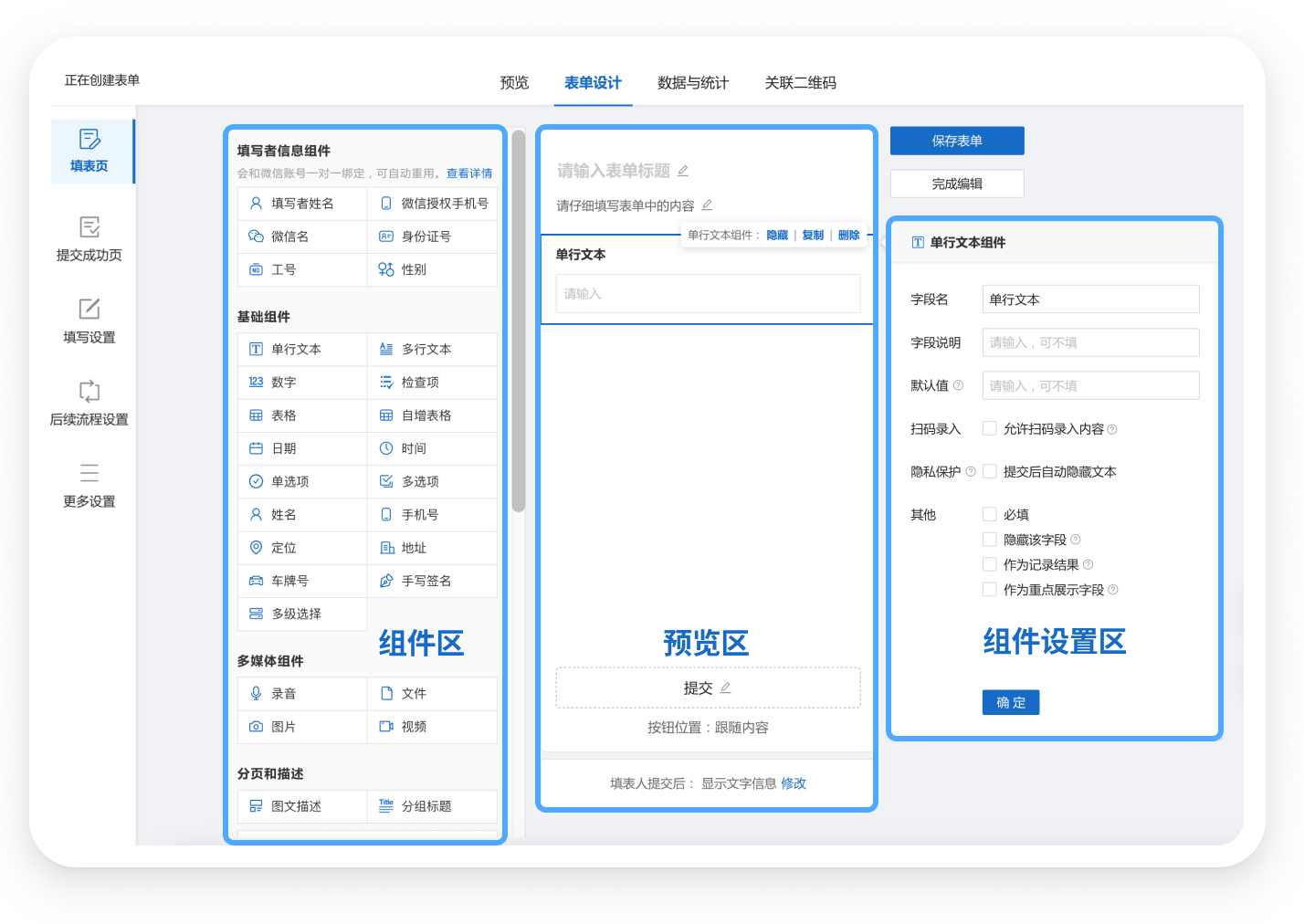
CaoLiao's form editor is very intuitive:
- On the left is the [Component Area]
- In the middle is the [Preview Area]
- On the right is the [Component Settings Area]
Making a form is very simple: click the "information items" you need, such as name, date, photo, and signature components, or drag them into the preview area.
CaoLiao forms have 48 collection components to meet the needs of many scenarios, and each component has some settings that help you get the job done better. Learn about form components
V. What Else Can CaoLiao Forms Do? Make Them "Smarter"
A CaoLiao form is not just a tool for collecting data; it is more like a smart information flow system. The eight capabilities are introduced in detail below.
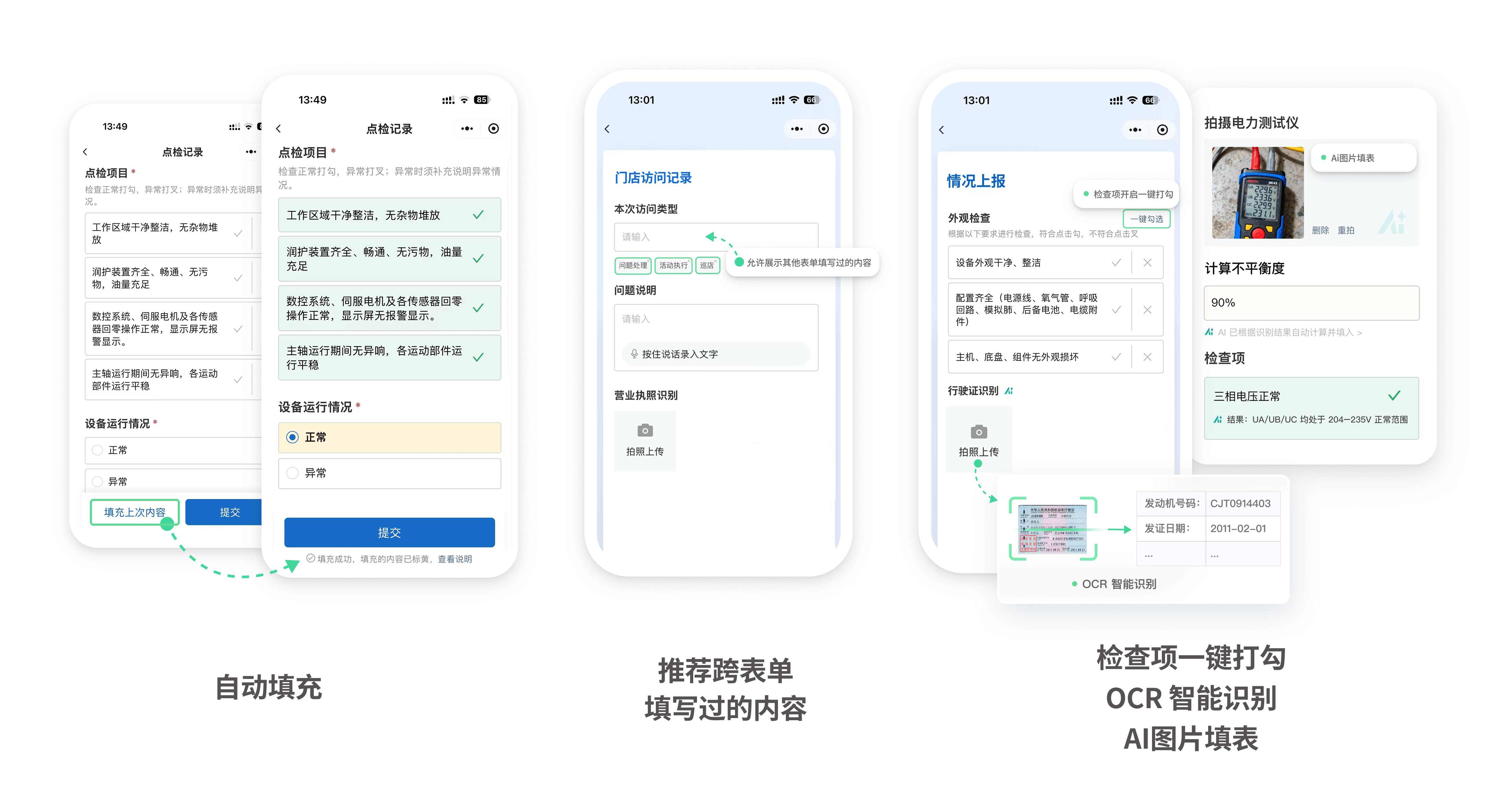
1. Improve Fill-in Efficiency So Frontline Staff Fill in Faster
| Feature | Description | Suitable for |
|---|---|---|
| Auto fill | When the same person fills in the same form repeatedly, one tap brings in the last content. Learn more | Inspections and patrols, duty logs, daily reports, equipment checks, and other cases where the same form is filled in every day or often |
| Suggest content filled in other forms | Automatically suggests information the submitter has filled in on other forms, which can be reused with one tap. Learn more | Components for personal fixed information, such as name, department, license plate, employee number, and ID number |
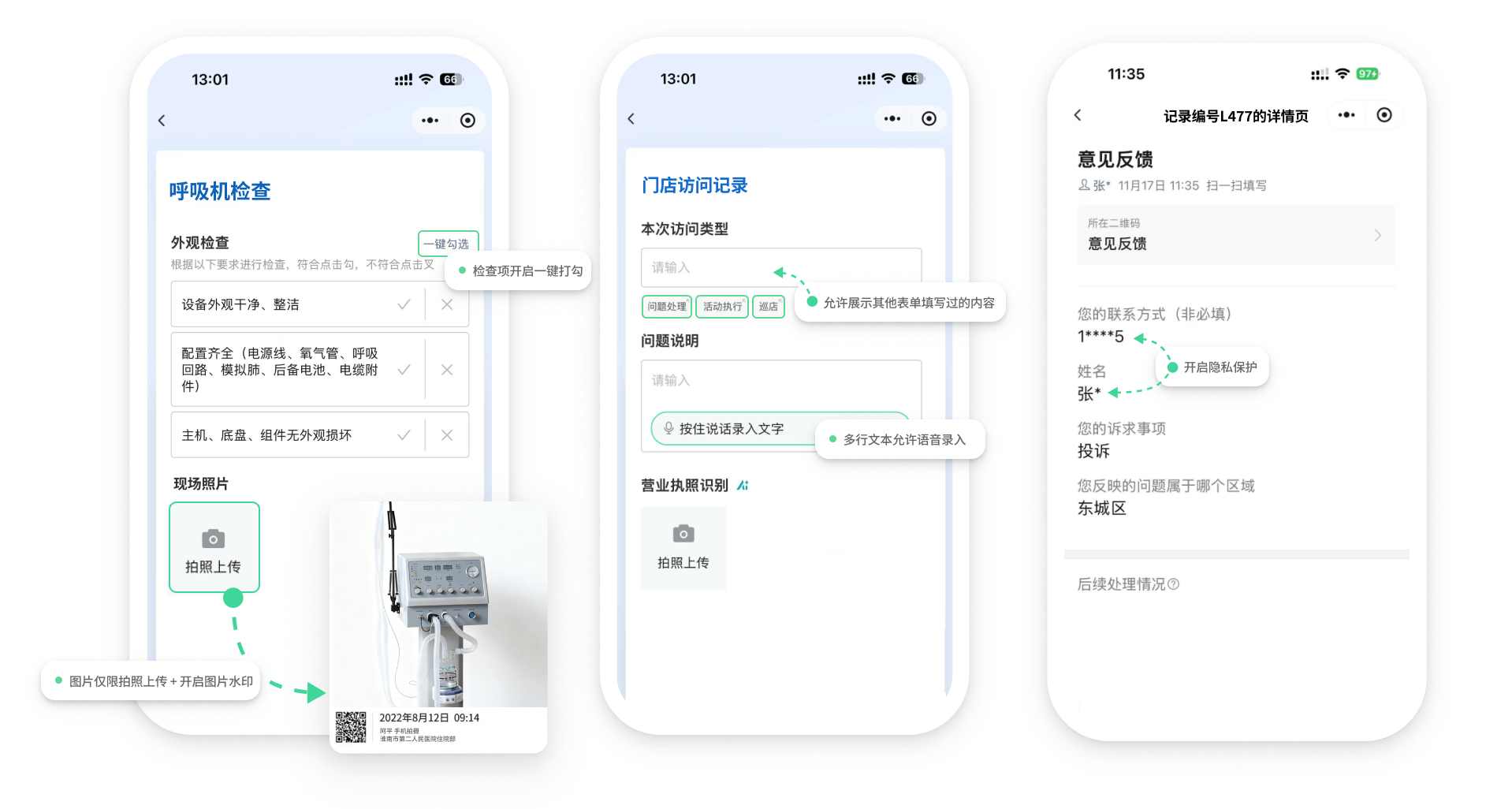
| One-tap ticking of check items | Inspection forms can tick everything at once with "one-tap tick", cutting repeated taps. Learn more | Inspection sheets, check sheets, spot-check sheets, and other cases with many check items, where common options can be ticked in bulk |
| OCR smart recognition | After a photo is uploaded, text or numbers are recognized automatically, avoiding manual typing. Learn more | Cases where text or numbers need to be recognized from photos of receipts, gauges, equipment nameplates, documents, contracts, and so on and filled into the form |
| AI image form filling | Photos are parsed automatically and the content is filled into the form. Learn more | Reading gauge readings and judging whether they are in the acceptable range, or recognizing on-site conditions (such as stacking or damage) and filling in the check conclusion automatically |
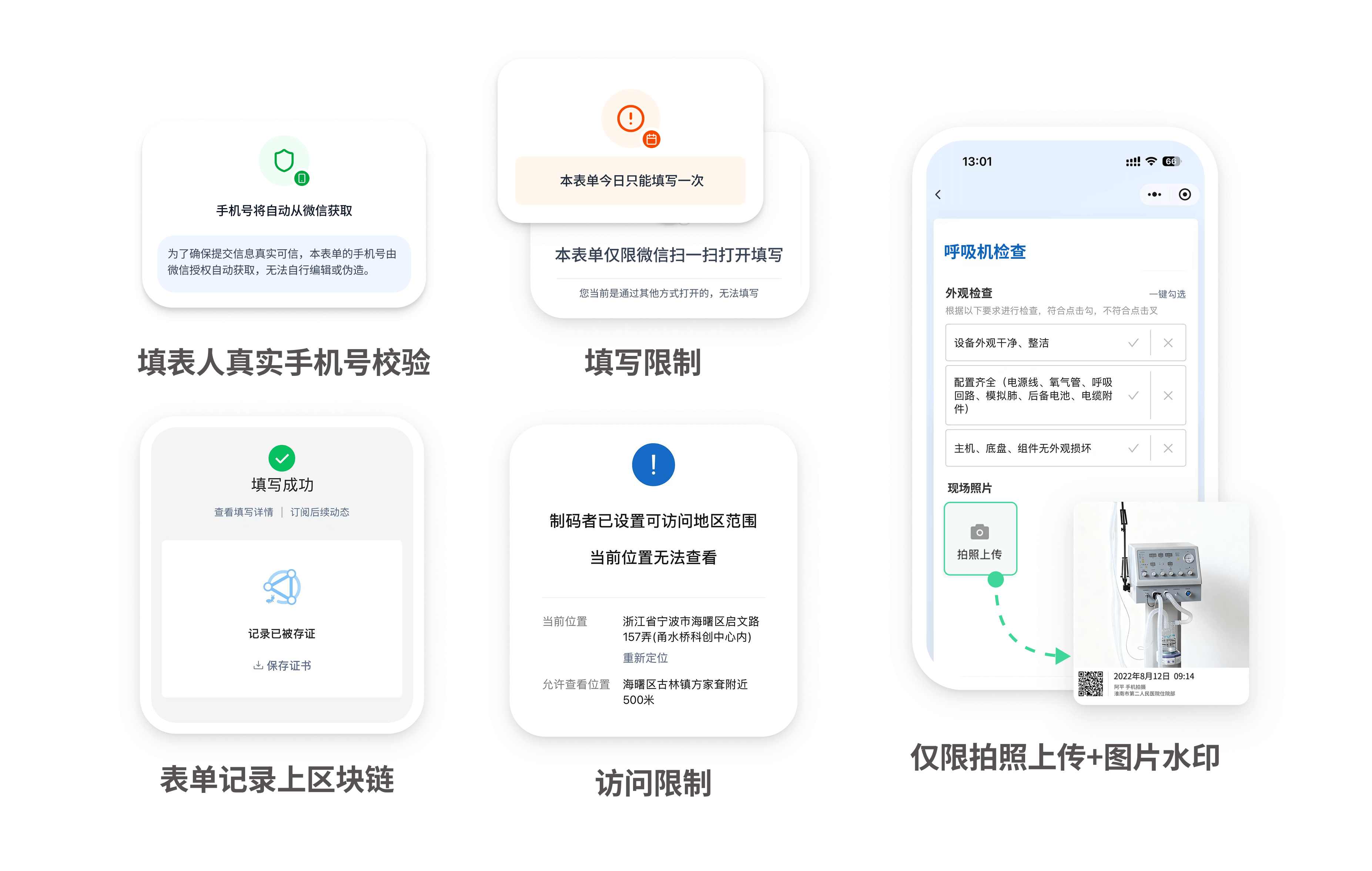
2. Prevent Faking and Proxy Filling for More Trustworthy Data
| Feature | Description | Suitable for |
|---|---|---|
| Real identity verification | Use the "WeChat authorized phone number" component to get the phone number bound to WeChat, avoiding fake identities. Learn more | Event check-in, exam registration, employee onboarding, visitor registration, and more, avoiding management risks from false information |
| Fill restrictions | Limit time periods and daily fill counts, and allow entry only through WeChat Scan. Learn more | Preventing outsiders from submitting maliciously or filling in casually when not on site, for example internal checks and time-limited event sign-up. |
| Scan restrictions | Require scanning in a specified area to fill in, preventing remote false filling. Learn more | All on-site business such as equipment inspection and construction site check-in, to prevent remote proxy filling |
| Image authenticity protection | Set "photo upload only" and automatically add watermarks such as shooting time and location. Learn more | Users can't change them, which greatly reduces room for faking. Suits acceptance photos, inspection records, incident reports, equipment status archives, and more |
| Blockchain notarization | Each record can be put on the blockchain to keep it traceable. (Provided by Ant Group) Learn more | Demanding cases such as archiving important records, putting contracts and vouchers on the chain, and notarizing compliance data |
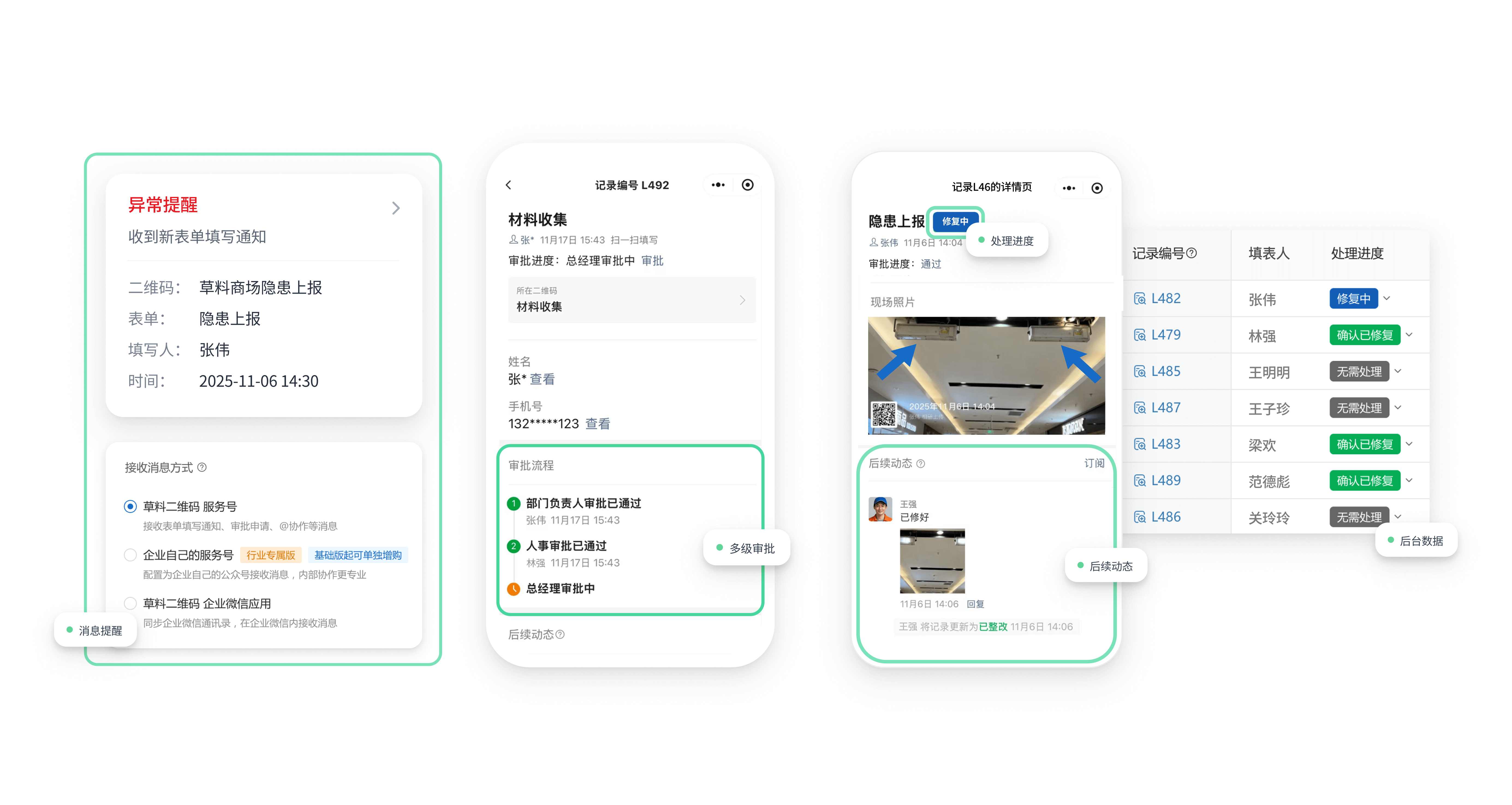
3. Collaboration, Follow-Up, and Closed-Loop Management of Records
Each record generates a record detail page once submitted, where you can:
- View the filled-in content, photos, location, and submitter information
- Comment and add supplementary information
- Update the processing progress (In progress / Completed / Awaiting verification, etc.)
- View and carry out the approval flow
- View information such as linked QR codes
The detailed collaboration features include:
| Feature | Description | Suitable for |
|---|---|---|
| Message reminders | Related members are notified automatically after submission (Official Account / enterprise Official Account / WeCom app). Learn more | Cases that need to know reported information at once, such as exception reports and repair requests |
| Multi-level approval flow | Supports approval in order such as "person in charge → finance → leader", with clear approval comments. Learn more | Expense approval, item requisition, requests for approval, contract review, and more |
| Follow-up actions | Leave messages, add materials, and @mention the people handling it right below the record. Learn more | Cases that need to add materials and communicate around the same record, such as repair progress collaboration and exception handling |
| Processing progress | Label each record's status clearly with tags, and the workbench can count the overall progress. Learn more | Cases that need to track the handling status of tasks, such as work order flow, closing out issues, rectification after checks, and verification handling |
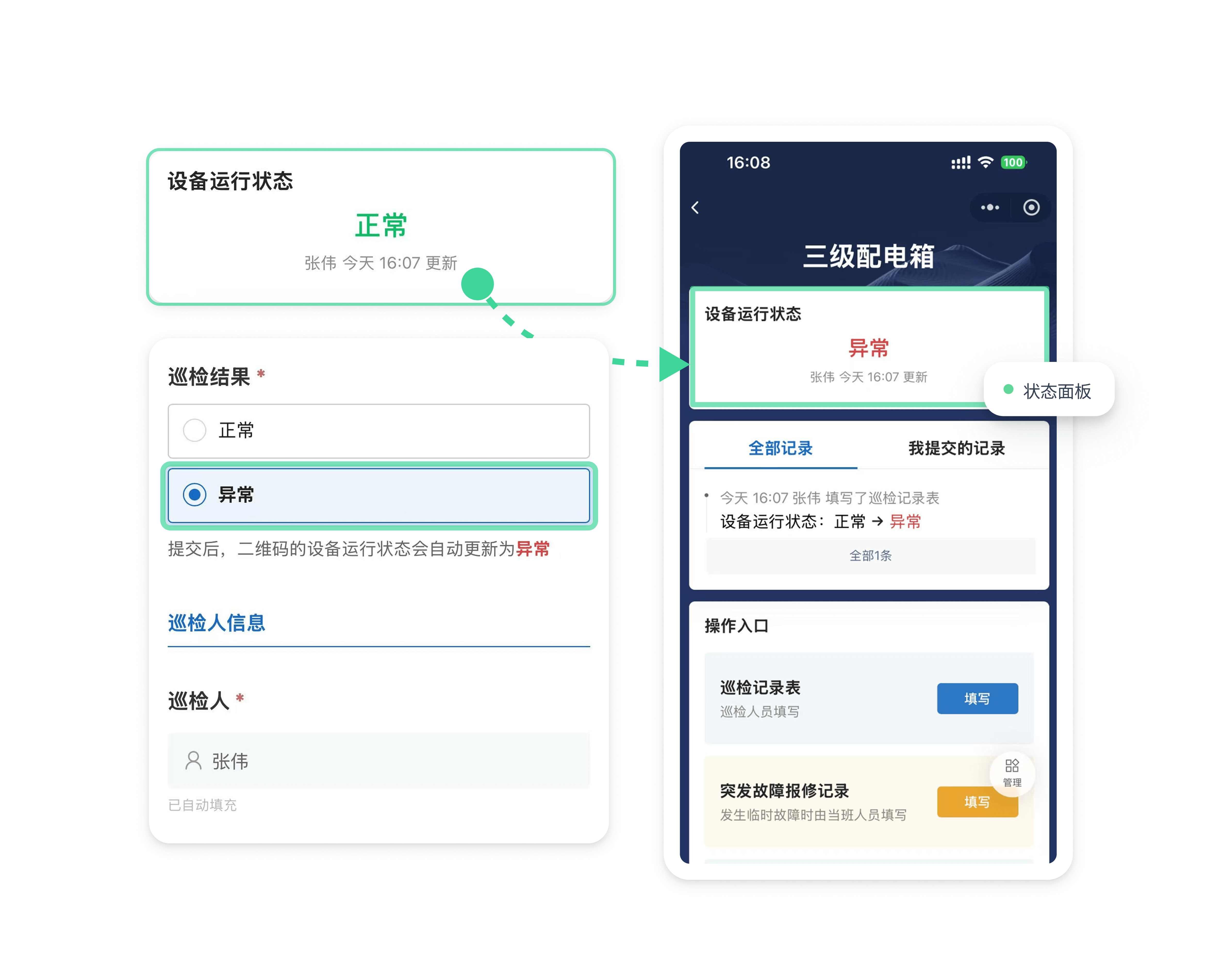
4. Link with the QR Code Status Panel: Update On-Site Status in Real Time
A QR code's "status panel" can serve as the real-time status display entry for equipment, assets, areas, and so on.
- What is filled in the form can directly drive a QR code status change:
- Fill in "Abnormal" → the QR code shows abnormal
- Submit a repair form → it returns to normal automatically It suits equipment status, cleaning patrols, project rectification, and more. Learn more
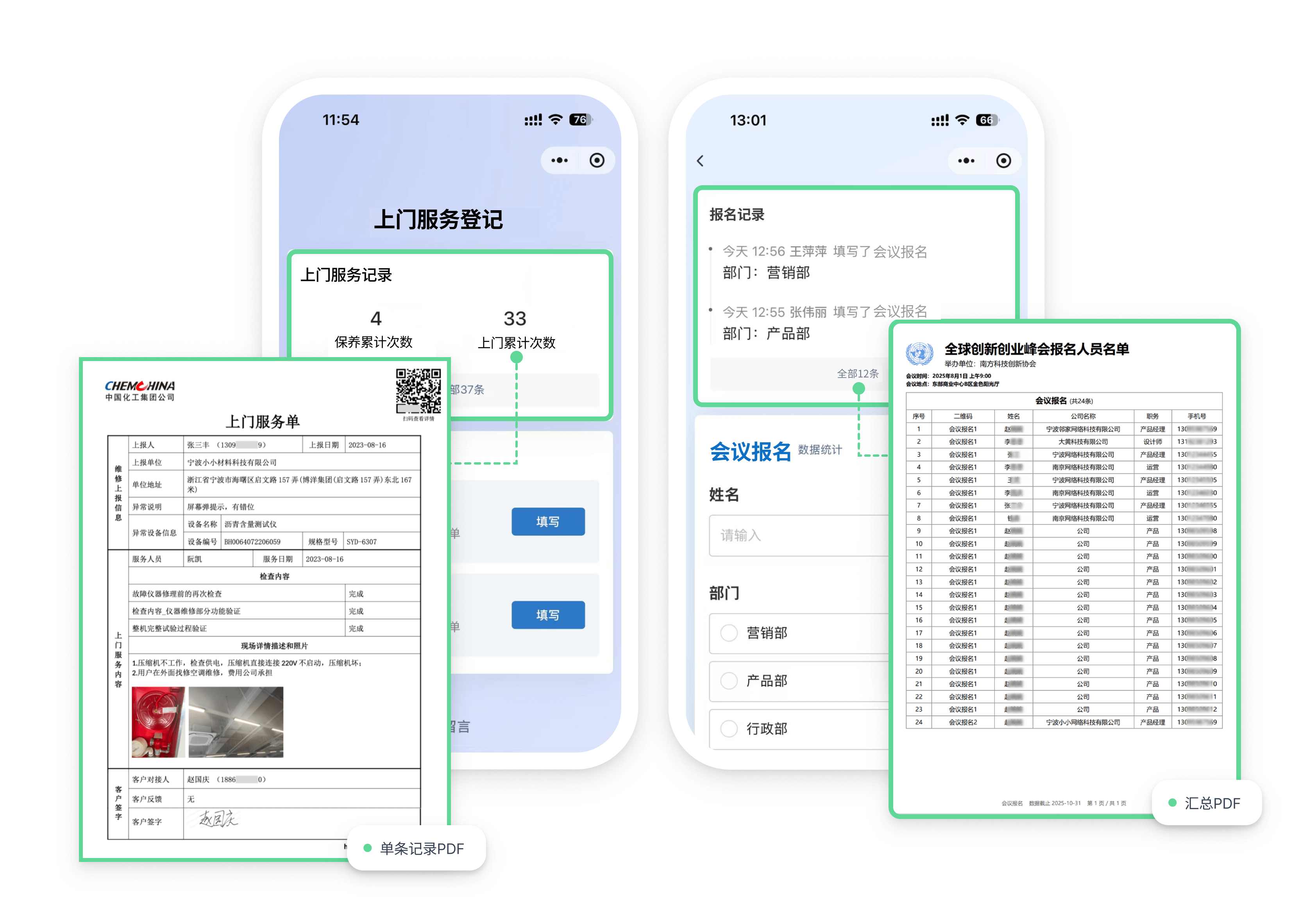
5. Smart Document Generation: Single-Record PDF / Summary PDF
| Feature | Description | Suitable for |
|---|---|---|
| Single-record PDF | Upload a Word template to generate a PDF of a single record in your format automatically. Learn more | Cases that need printing for the file, review signatures, or receipts, such as hot work applications, sign-up receipts, and repair work orders |
| Summary PDF | Export a summary PDF by "week / month / all", with one record per row. Learn more | Cases that need summary files exported in bulk, such as training sign-in summaries, event sign-up lists, weekly and monthly inspection reports, and check record summaries |
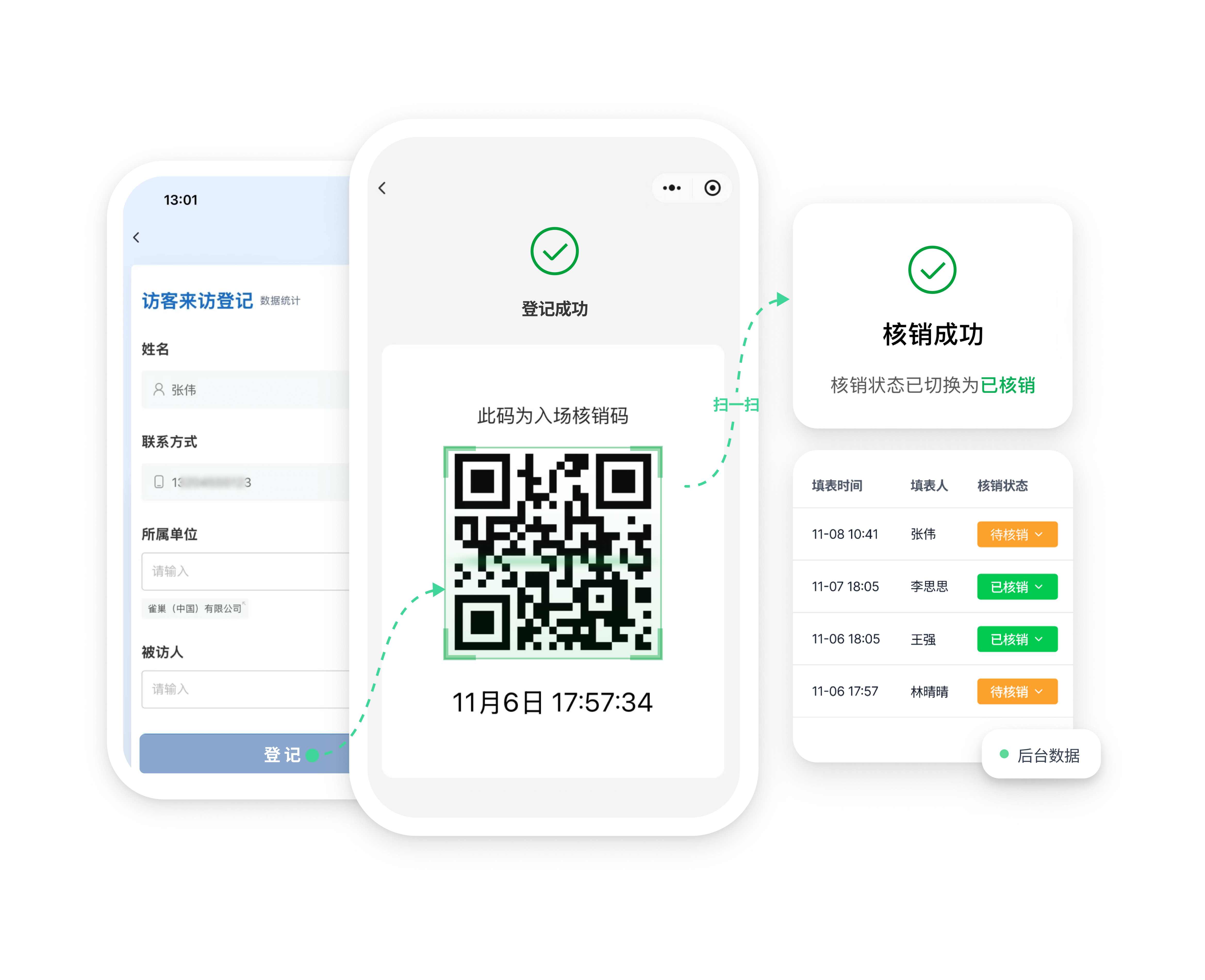
6. Get a Verification Code Automatically After Filling in: Submission Success Page × Processing Progress Linkage
In sign-in, sign-up, item pickup, event verification, and similar cases, after filling in a form you often need a "voucher" to check later whether something was handled, picked up, or attended.
- A verification QR code is generated automatically after a successful fill-in
- An admin scans to verify, and the processing progress changes to "Verified" automatically
- The workbench counts verified and unverified items, with details clear at a glance
7. Data Flow to Other Systems: API, Auto Sync, Bot Reminders
| Feature | Description | Suitable for |
|---|---|---|
| Official database | Each CaoLiao account can open an official cloud database (an independent instance), which you can query directly without building a server. Learn more | Companies with no database of their own that need data analysis, such as small and mid-size teams doing reports (BI), statistics, and data retention, without building a server. |
| Private database | Sync data in real time or on a schedule to an internal company database, a self-built system, or a data lake. MySQL 5.7 only. Learn more | Companies that already have a data platform and need to feed form data into MySQL in real time for unified data management, reports, or business system integration. |
| Webhook | Push the data as JSON to a specified API when something is submitted, updated, or its processing progress changes. Learn more | Companies with internal or external business systems that need data in sync, such as work order systems, OA, and HR systems, which can trigger system flows on submit or update. |
| Push to WeCom / DingTalk / Feishu groups | Sync on-site records to group chats automatically, good for repair groups and duty groups. Learn more | Cases where the team needs to receive reported information in real time, such as maintenance groups, duty groups, inspection groups, and project management groups |
| Sync to Tencent Docs smart sheets / WPS / Feishu | Supports multi-person collaborative editing and further processing. Learn more | Teams that need several people to work on data, process it further, or build reports, such as organizing event sign-up lists and sorting inspection records |
8. Member Groups and Permission Control: Keep Data and Flows Safer
CaoLiao lets you bring team members into the system and create groups by department or role, such as an inspection group, a security group, and an HR group. You can configure each member's permissions flexibly according to business needs, so different members can do different things:
- Who can fill in
- Who can update the processing progress
- Who can see which data
- Who receives reminders
VI. Industry Cases:
1. From Paper Inspection Sheets to Digital Archives
"We used paper forms for inspections before, which got lost easily and were hard to look up. Later we put a QR code on each piece of equipment and scanned to fill in the inspection form. Photos, locations, and signatures are all recorded, and now the archive of every piece of equipment can be looked up on a phone." — Manager Fu, Lilai Auto Parts Complete equipment inspection setup tutorial
2. Using Forms for Event Sign-Up and On-Site Check-In
"For event sign-up we used to set up a group in advance, confirm the list again and again, and people often went through the wrong process. Now we just send a sign-up QR code, the system recognizes the phone number automatically, and there is one record per person with no duplicates. On the day of the event we put a 'check-in QR code' at the door and count attendees in real time, and the whole process is much smoother." — Teacher Li, a youth activity center Check-in and sign-up QR code tutorial
3. Visitor Management Goes from "Handwritten Registration" to "Scan for Quick Entry"
"Visitor registration used to mean writing name, phone, and reason by hand, which was slow in the queue and often hard to read or incomplete. Now there is a visitor registration QR code at the door, visitors scan to fill in, the information is verified automatically, and photos and reasons for visiting are synced to the person being visited. Our front desk handles things at least three times faster." — Supervisor Zhao, administration department of a business park Visitor management setup tutorial
4. Property Fault Repair Scenario
"Residents used to report repairs by phone and WeChat, with messy content and inconsistent images. Now there is a repair QR code on each floor, and scanning to submit the problem records the photos and location, and the engineering staff get a reminder and go straight over, making the whole process half as fast again." — Master Wang, engineering team lead at a property company Fault repair scenario
5. Feedback Handling Scenario
"We put feedback codes in the lobby and meeting rooms, and employees and customers scan to fill in their comments. The system reminds the person in charge automatically, and feedback that used to take a week to handle is now basically resolved the same day." — Wang Shanshan, customer service lead at a group Feedback handling scenario
6. Borrow and Return Scenario
"We used to track supply borrowing and returning in a logbook and often couldn't remember who borrowed what and when it was returned. Now the items have QR codes, scanning to fill in borrowing and returning, and the system records the time, photos, and handler automatically, so office supplies are finally in order." — Supervisor Chen, general affairs department of a business park Borrow and return scenario
VII. How Do I Link a Form to a QR Code to Collect Data?
CaoLiao offers several ways to create a form and link it to a QR code. Whether you want to quickly use a ready-made template or design from scratch, you can find a fitting path.
Method 1: Create from the Code Template Library (Recommended)
CaoLiao's QR code template library has many preset industry scenario templates, which is the quickest and most recommended way for beginners.
Each template includes not only a QR code but also the matching form, status, and features such as reminders and approvals already configured. You can pick a template and create a single code from it, or generate a batch of QR codes from a template (for example, all the fire hydrant inspection codes for a building at once)
Go to the code template library
Method 2: Start Completely Blank
If you want to design the business logic from scratch, you can choose to start blank. This suits users who know the system well or whose business flow is unusual.
There are two orders you can follow:
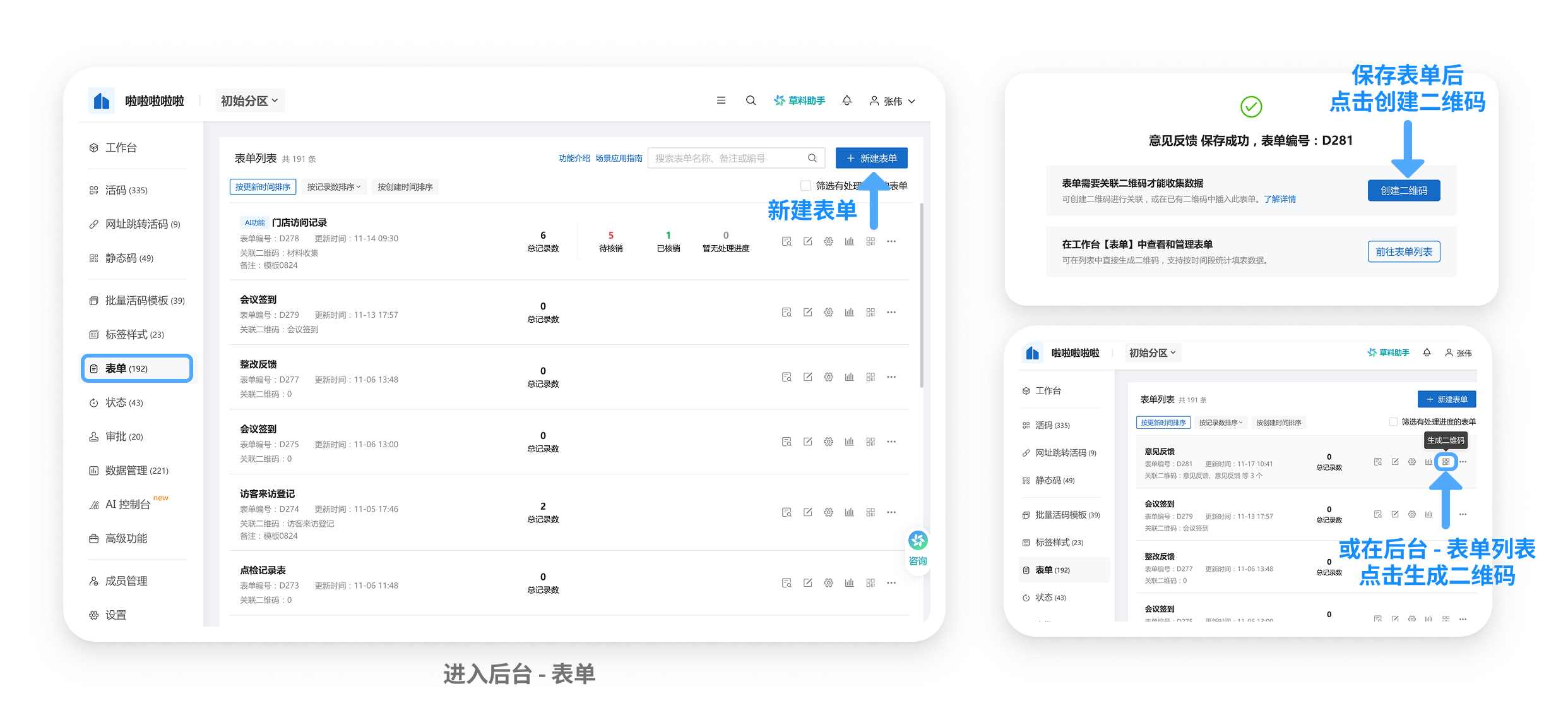
1: Create the Form First → Then the QR Code (Good for Quickly Making a Single QR Code)
Step 1. Create a new form from [Workbench] - [Form List]; Step 2. After the form design is done, the system prompts you to "Generate QR code". Click it to create a single-code QR code automatically for scan-to-fill.
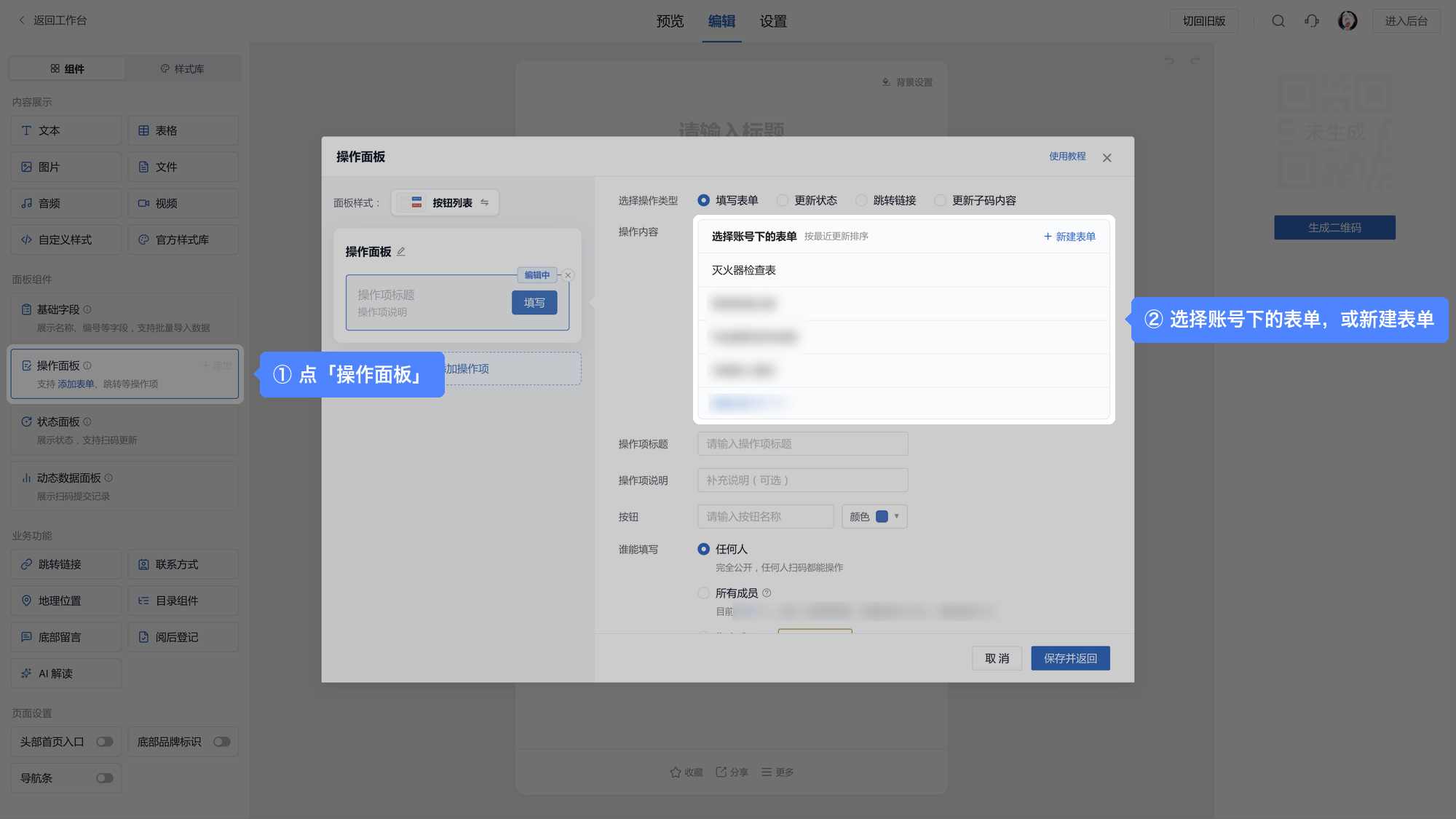
2: Create the Code First → Then Add a Form
Step 1. Create a new QR code: you can choose a single code or bulk codes (note: bulk codes mean generating many QR codes at once, for scenarios such as one item one code, one person one code, and one place one code). Step 2. While making the code, in the editor, add a "form", in either of two ways: create a brand new form, or reuse an existing form under the account.
Whether you "create the code first" or "create the form first", the final result is exactly the same:
- The QR code and the form are both bound successfully, and users scan the code to go straight into the form
Just choose whichever is more convenient for your scenario and habits. Related reading: Complete tutorial on creating codes in bulk
VIII. Summary: Make QR Codes Truly the Information Entry for Enterprises
Scanning can not only show information but also collect data; data can not only be reported in real time but also be summarized, approved, and counted automatically.
One QR code can carry a complete business process. From the field to the backend, from filling in to decision-making, let information flow and make management more efficient and transparent.