Sync Form Data to Tencent Docs
Form data can be connected to Tencent Docs, syncing CaoLiao's data into Tencent Docs smart sheets in real time.

Below are example templates made by CaoLiao that you can click to see:
Equipment Inspection and Maintenance
If you need to sync data to WPS Docs, click here to read
To sync to Feishu Bitable, click here to read
I. How to Sync
On the [Data Page] of a bulk template, single code, or form, click Real-Time Sync to Tencent Docs to start syncing

II. How Do I Access It on Mobile?
If you synced to Tencent Docs from a QR code's data page, you can view it on mobile through the path shown below.

If you synced to Tencent Docs from the form entry, you can view it on the form data screen on mobile.
III. Why Choose Tencent Docs Smart Sheets?
- Real-time data sync: with real-time sync, you don't need to download and upload form data again and again, and all data updates automatically so you always work with the latest information.
- Dynamic dashboards and multi-dimensional reports: with a few mouse clicks you can make dynamic dashboards and multi-view reports, handy for daily monitoring and reporting to leaders.
- Flexible collaboration: supports multiple permission settings, keeping data safe and making teamwork easy.


Collaboration
Tencent Docs supports several people editing at the same time, and all updates sync in real time, so the team can collaborate efficiently in the same document.


Grouped Viewing
With a smart sheet, you can group data quickly. Click "Group Options" on the toolbar, and a grouping sidebar pops up; click Add Condition and choose the column to group by, and the data is grouped by the content of that column.

Creating Kanban Boards
The traditional table view doesn't suit every scenario. Smart sheets offer a [Kanban View] that visualizes workflows across different groups and makes management easier. Take a submitter kanban as an example. First change the type of the submitter column to single choice, because a Tencent Docs smart sheet kanban can only be generated from a single-choice column


Creating Dashboards Automatically
Create a dashboard to show smart sheet data intuitively and get business insight easily With a few simple mouse clicks, you can also make polished data dashboards

Making tutorial:


Linking Data from Other Smart Sheets
The relation column type builds a relationship between records of two tables and stores that relationship in the column's cells. With a "Relation" column, you can use one column of a smart sheet to access one or more rows of related data in another table.

IV. Sync Rules
- Column names sync automatically: if you rename a column by hand in Tencent Docs, the column name is restored to the title in the CaoLiao form when new data is pushed, so the two stay consistent.
- Component changes trigger data updates: if fields (components) in the CaoLiao form are added, deleted, or modified, the historical data in Tencent Docs adjusts automatically to match the latest form structure. For example, after a field is deleted, the matching column in Tencent Docs is cleared and the other data stays unchanged.
- CaoLiao actions take priority: only actions in the CaoLiao form trigger updates to the data structure. Editing data in Tencent Docs doesn't affect pushing new data, which keeps sync stable.
- Component sync limits: syncing video, audio recording, file, and similar fields isn't supported at the moment, please note. Images are synced as links.
- Approval results and processing progress sync: approval results and processing progress are pushed to Tencent Docs, but the content of follow-up actions isn't synced.
V. Notes After Syncing
- Do not delete columns: deleting causes sync errors, and if one is deleted by mistake you need to sync again
- Limit changes to column types: only swapping between text and single choice is allowed, and other changes may cause sync errors
- About changing sub-code names: if your bulk sub-code names use variable content, then after that variable content is changed, the sync rule for the form data sheet is: newly submitted data for that sub-code after the change shows the new sub-code name. Data submitted before the change keeps the old name and isn't updated automatically.
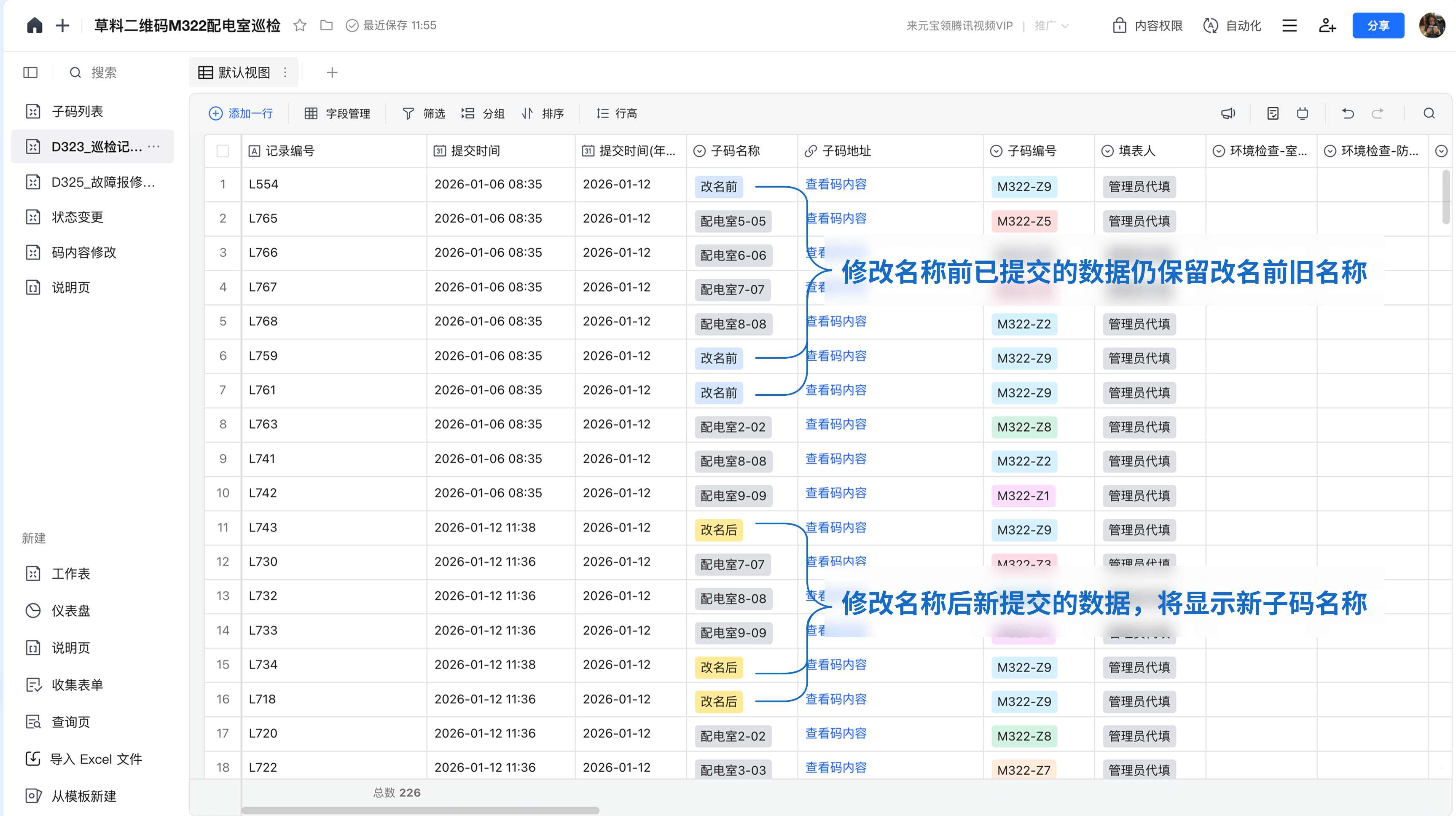
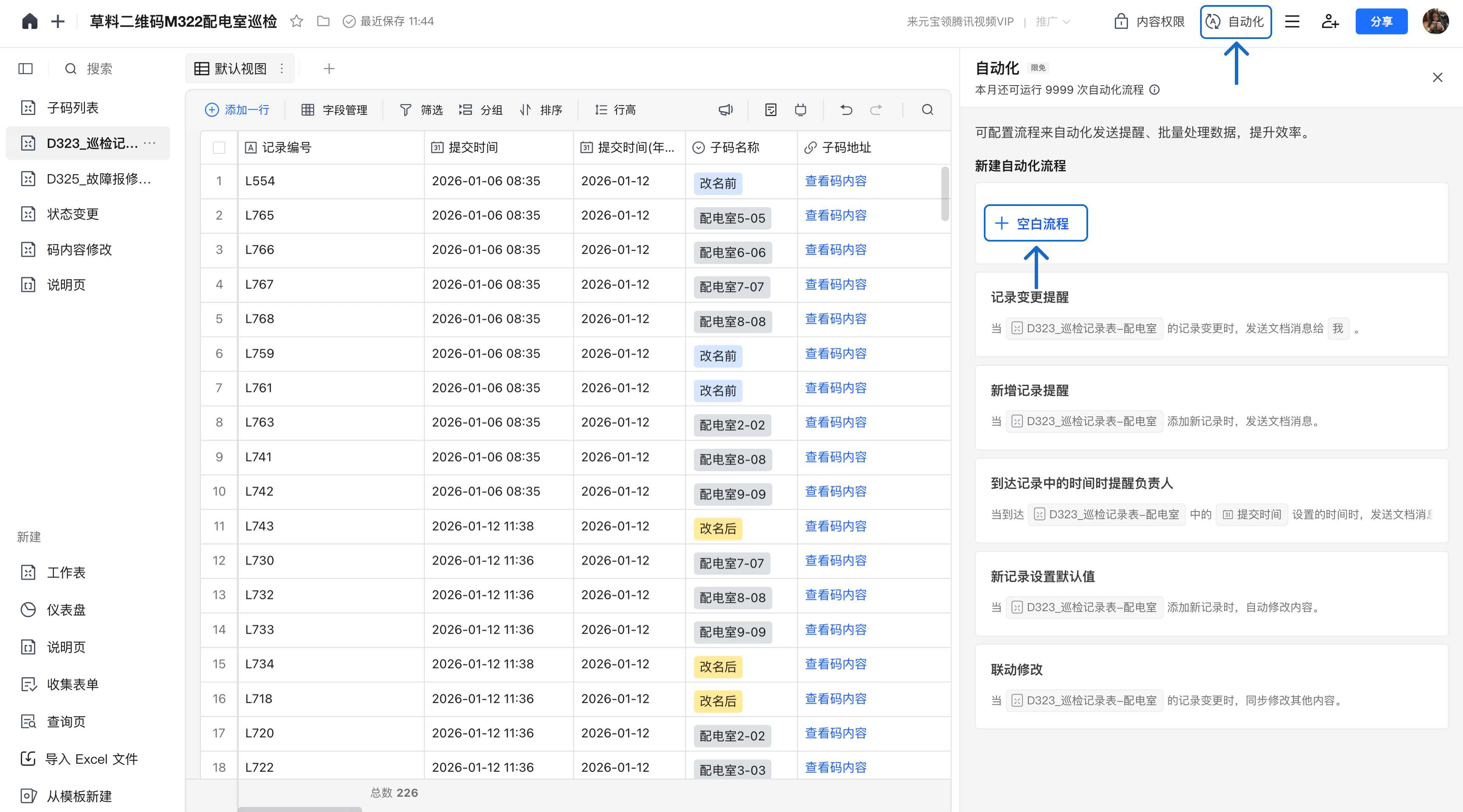
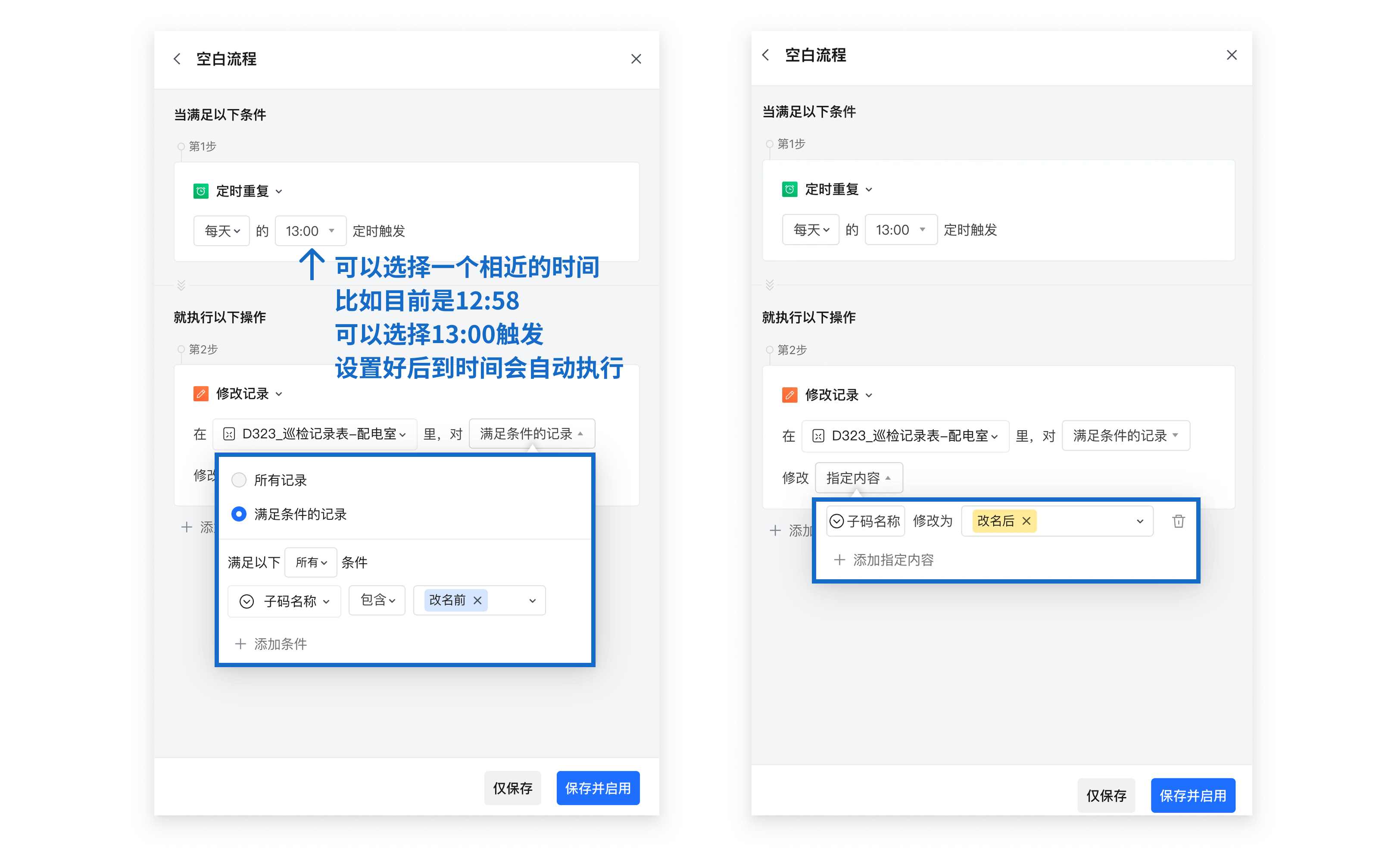
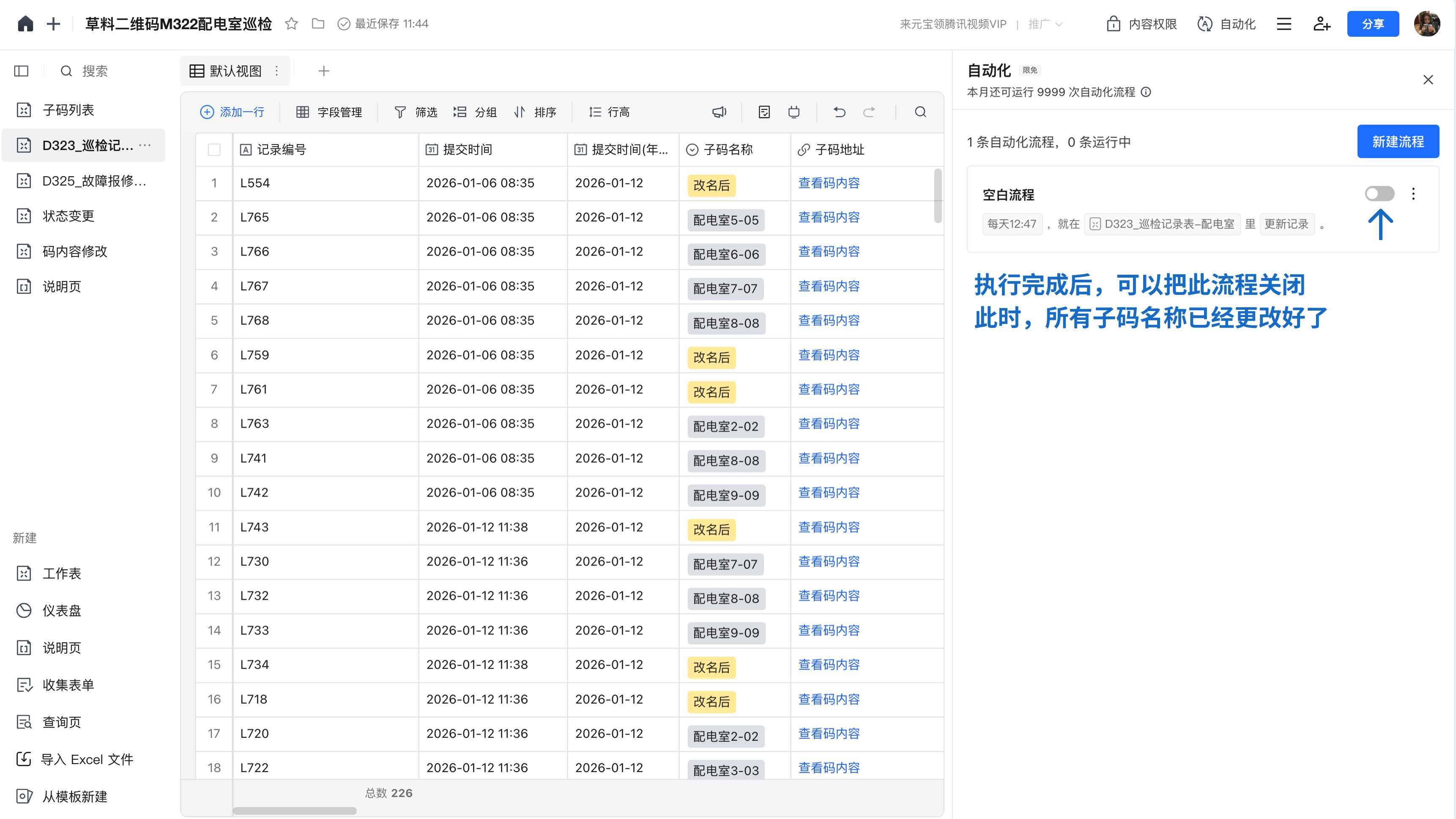
So: if you change a sub-code's variable content, do the following to change the historical data:
VI. Result After Syncing
Take the sync result of a bulk template as an example. After syncing to Tencent Docs it includes a "Sub-Code List sheet" with the details of all sub-codes; each form on the QR code is one sheet holding all its form records; and there are also Status Changes and Code Content Changes sheets.
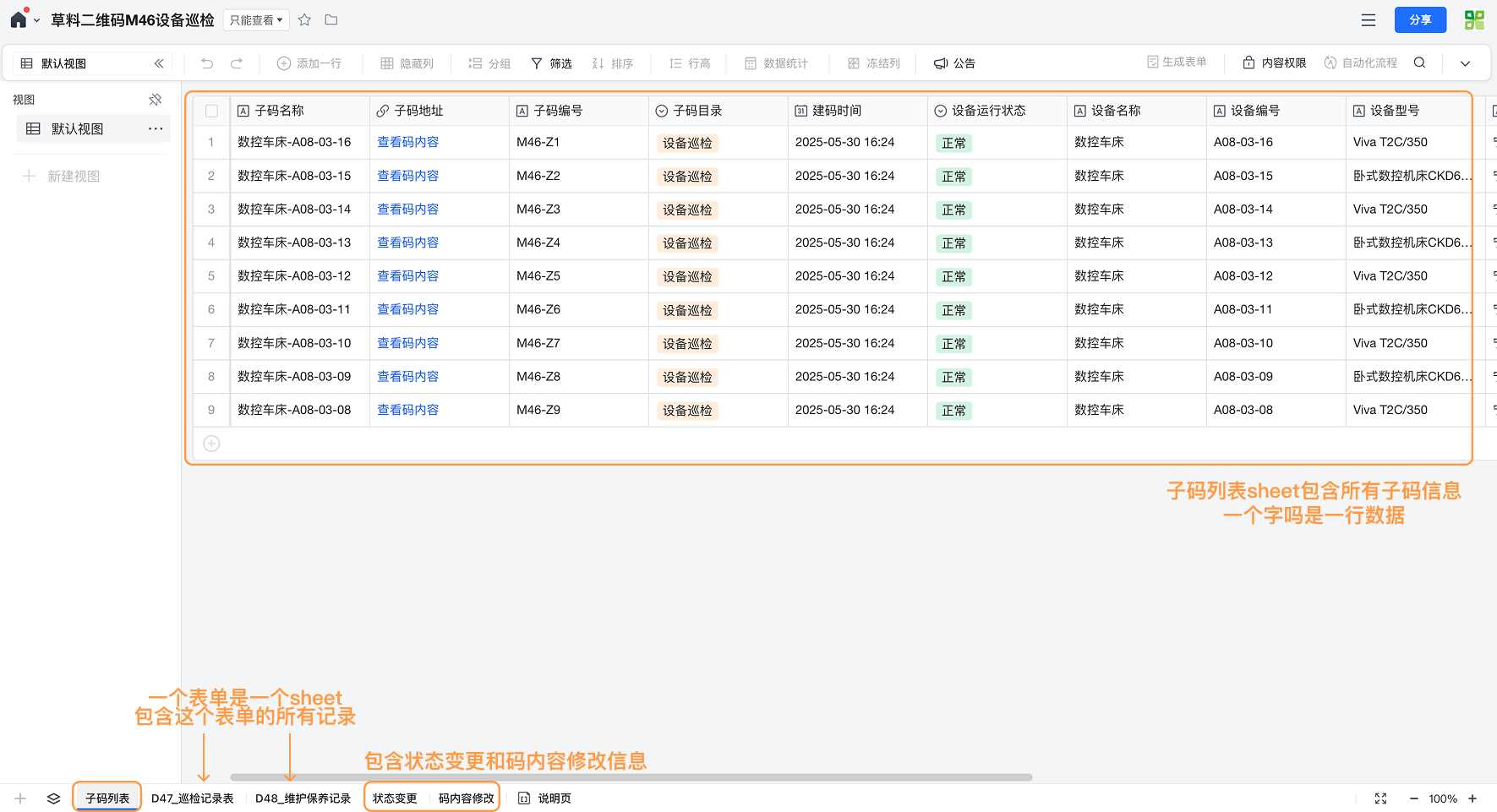
Suggestion: use the Tencent Docs smart sheet as a dashboard for displaying data. For in-depth data analysis, we recommend a professional analysis tool, to avoid mistakes that cause sync errors.
VII. Sync by Template
On top of the existing "Sync to Blank Document" feature, a new "Sync by Template" capability has been added.
- With "Sync by Template", the system offers several visual dashboards and reports based on the template you choose, and generates the matching dashboard automatically once the data has synced. You don't need to create data tables or dashboards by hand.

- Templates currently supported: Bulk templates: Equipment Inspection, Fire Extinguisher Inspection. Single-code templates: Visitor Registration, Meeting Sign-in
Note: at the moment this feature supports only the templates above, and QR codes made from other templates or started blank don't support it for now. Click to see more instructions
VIII. How Do I Recover Data Deleted by Mistake in Tencent Docs
- Open the CaoLiao workbench and select Data in the left navigation.
- Open Data API settings, find the sync you want to restore, and select Cancel Sync.
- Select Start Sync to resume syncing.
Note: Close ends this API sync entirely. If you set up the sync again, it creates a new Tencent Docs file.
IX. Tutorials on Making Visual Dashboards
Data API + SugarBI: Build a Visual Dashboard: use the Data API feature to push the data CaoLiao collects to SugarBI, where you can use the data freely and build the dashboard content you want. SugarBI is a visualization tool developed by Baidu and requires an extra payment.
X. Data Push Limits
For syncing data to Tencent Docs, Tencent charges an interface fee. This fee was previously covered by the CaoLiao platform, but now that sync volume is growing fast, to keep costs under reasonable control we will make the following change to this feature effective from July 1, 2025: Tencent Docs sync will be included in API call billing
API data push limits:
| Edition | Sync push limit, counted anew on the 1st of each month |
|---|---|
| Free version / Basic Edition / Advanced Edition | 1,000 per month |
| Flagship Edition | 20,000 per month |
| Industry Edition | Unlimited |
A "sync count" is each automatic push of a form record (including the filled-in content, status updates, and so on). If you set a form's data to sync automatically to both a private database and Tencent Docs, one record submitted on that form counts as 2 sync calls (one database push plus one Tencent Docs sync). Click to learn more
Notes:
- After the limit is exceeded, automatic sync pauses, and you can still export data through Excel. To keep syncing, consider upgrading your edition.
- This change doesn't affect viewing, exporting, or downloading form data as normal.