Form Application Scenarios
Scenario Applications
By combining components such as text, images, and check items into an electronic form, you can use the form feature in place of offline paper forms to collect information and record data. The data is saved under the account as dynamic data, can be exported to Excel or PDF for archiving, and you can also customize the PDF export format to your company's requirements. Learn about the form feature
On top of a form, combining form settings lets you build more advanced scenario applications to meet deeper needs. Learn about form settings
Basic Applications
Sign-in and Sign-Up
When a company holds meetings or training, attendees need to sign in on site in real time; when an organizer holds an event and publishes event information, it needs to collect participants' sign-up information. Admins can generate a form and link it to a QR code, and scanning to fill it in completes sign-in and sign-up quickly.
Suitable for: meeting sign-in, training sign-in, event sign-up, course sign-up, recruitment sign-up, and similar scenarios. Go to the template library to generate codes
You can use these form settings in this scenario:
- Fill restrictions: limit the time period, the total number of submissions, how many times each person can fill in, and more.
- Submission success page settings: in sign-up scenarios, you can set the submission success page to show a number or a sign-up voucher QR code.

Entry and Exit Registration
In daily life there are many entry and exit registration needs, for example: companies and parks need to register and keep records of visitor appointments, people coming and going, and vehicles coming and going; construction sites collect and keep staff information when laborers enter the site. Admins can generate a form and link it to a QR code, and scanning completes entry and exit registration, with form components to get the location automatically, recognize ID card information, upload images, and more.
Suitable for: visitor registration, visitor appointments, entry and exit registration, scenic area entry registration, vehicle entry and exit registration, on-site worker information registration, and similar scenarios. Go to the template library to generate codes
You can use these form settings in this scenario:
- Submission success page settings: after a visitor fills in the appointment, an appointment voucher QR code is generated.
- Mark processing progress: you can name the processing progress items Booked, Entered, Left, and so on, and the guard can scan the appointment voucher QR code to change them in real time.

Requisition and Borrow and Return
Companies managing fixed assets have a lot of requisition and borrow and return needs, and equipment use also needs to be recorded. This used to be done with paper forms; now admins can turn the paper forms into electronic forms, and scanning handles requisition, borrowing, and returning. Forms can also record goods in and out.
Suitable for: item borrow and return registration, goods in and out registration, vehicle use registration, office supply requisition registration, file borrow and return registration, and similar scenarios. Go to the template library to generate codes
You can use these form settings in this scenario:
- Status update: you can set Change QR Code Status so the QR code status changes automatically based on submitted form data, for example after a borrow registration is submitted, the QR code status changes to "Borrowed"

Equipment Inspection and Maintenance
For common equipment spot-check and inspection problems such as unclear equipment status, inefficient paper records, and late fault reports, admins can turn the company's equipment inspection sheets into electronic forms and link them to equipment QR codes. Scanning to fill in the form completes spot checks, inspections, repair requests, repairs, and maintenance, with form components for uploading images and videos and marking check item content.
Suitable for equipment inspection and maintenance in all industries, including production equipment, special equipment, fire extinguishers, and medical equipment. Go to the template library to generate codes
You can use these form settings in this scenario:
- Image watermark: uploaded images get a watermark with the submitter's information and location obtained automatically. Good for preventing faked inspections.
- Message reminder: you can set message reminder rules so that when a new record, or a record meeting a condition, is submitted, a specified person is reminded through WeChat
- Custom PDF export format: customize the PDF export format to your company's own requirements.

Area Patrols
For problems such as incomplete management rules, late repairs, and easily lost paper forms, the CaoLiao form feature lets you scan to record patrol results, report hazards and rectification information, and feed back abnormal problems to the people in charge promptly once found. Form components allow uploading images, videos, and more.
Suitable for: site patrols, hygiene inspections, grid-based street patrols, and similar scenarios. Go to the template library to generate codes
You can use these form settings in this scenario:
- Image watermark: images uploaded when filling in a form get a watermark with the submitter's information and location obtained automatically. Good for preventing faked inspections.
- Message reminder: you can set message reminder rules so that when a new record, or a record meeting a condition, is submitted, a specified person is reminded through WeChat
- Custom PDF export format: customize the PDF export format to your company's own requirements.

Others
Beyond the scenarios above, combining form components also fits scenarios such as feedback, commitment letters, check and inventory, and process flow.
Advanced Applications
Voucher Verification
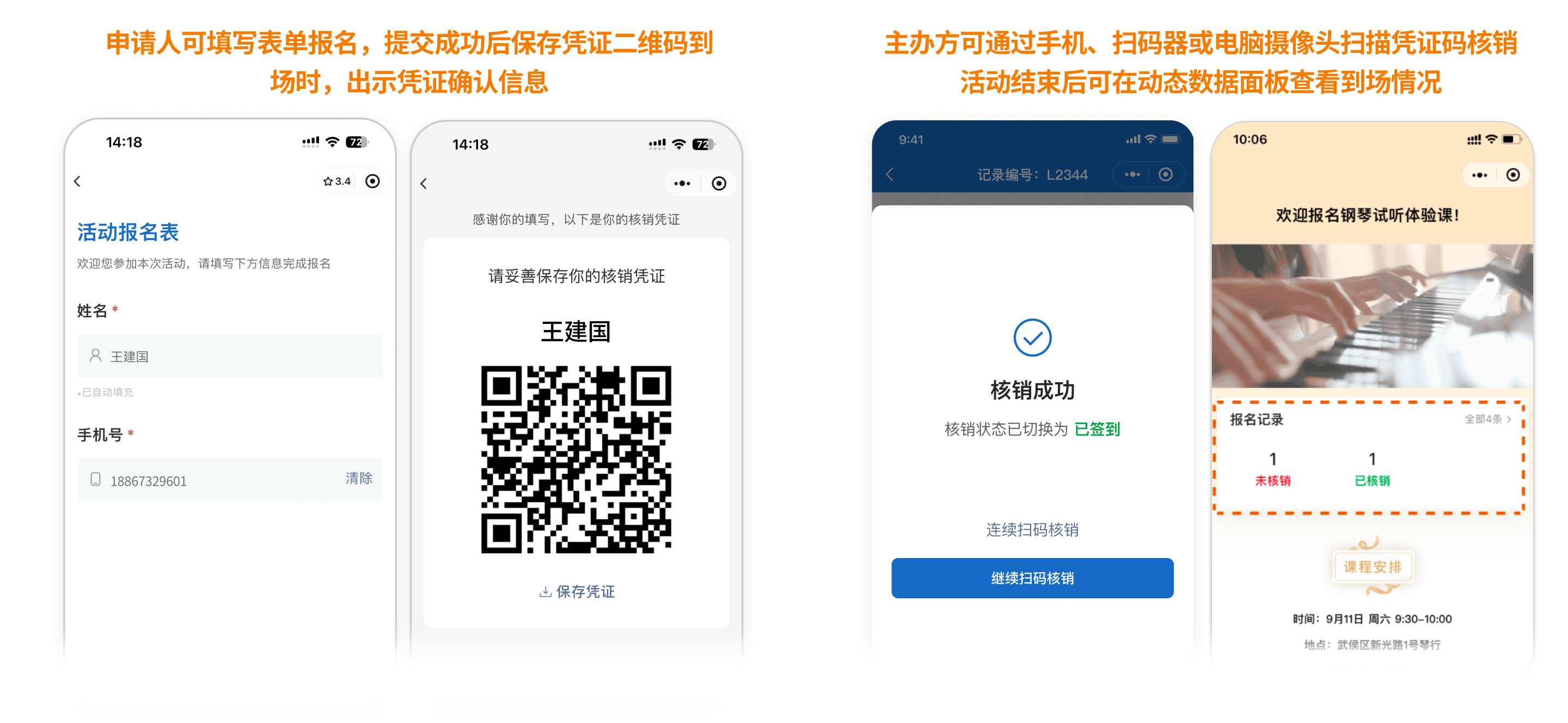
Combine the "record detail QR code voucher of a submitted form" with the "update follow-up processing progress" feature to verify booking records by hand. Suitable for event bookings, sign-up confirmation, product reservations, gift pickup, coupon redemption, and similar scenarios.
Turn on the following form settings to achieve voucher verification:
- Submission page settings - Get a QR code voucher, and choose the submitted record's detail QR code.
- Mark processing progress.
Multi-Level Approval
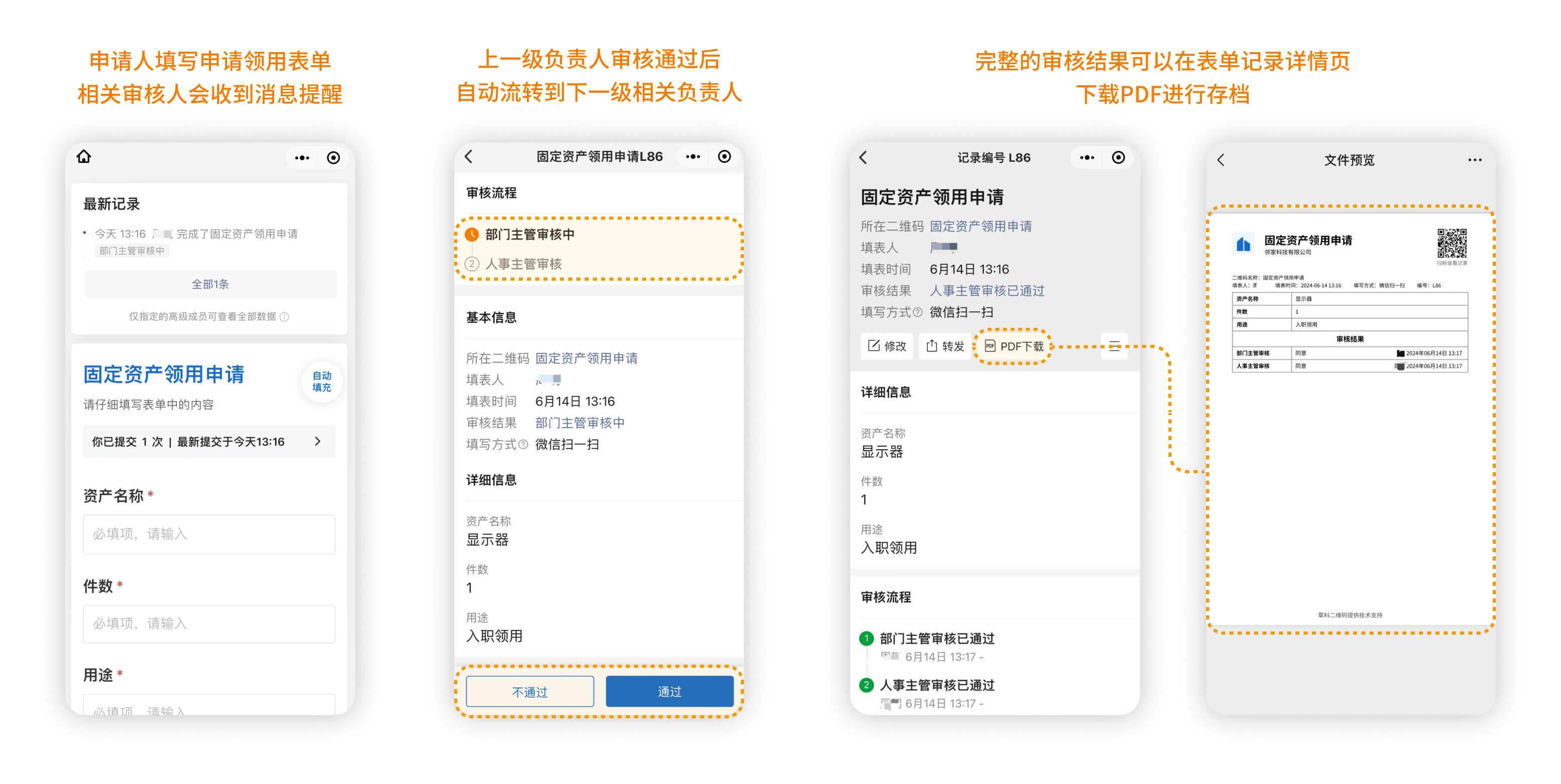
The data review feature in the form settings handles multi-level approval: after the applicant fills in the form, the first-level reviewer is reminded; after the first-level reviewer reviews it, it passes to the next-level reviewer, and so on until all have approved, and then the review result goes back to the applicant.
Take an asset requisition form as an example. The asset requisition flow is: Individual applies ---> Department supervisor approves ---> HR supervisor approves ---> Individual goes to the warehouse to collect.
- When the applicant fills in the application form, the application message can remind the department supervisor to review.
- After the department supervisor approves, the application passes to the HR supervisor automatically with a message reminder
- After the HR supervisor approves, the applicant receives a notice that it was approved. If any level rejects it, the applicant receives a rejection notice directly.
- The whole review process can be exported as a PDF for archiving.
Fixed Asset Inventory
By generating asset label QR codes in bulk and combining them with the bulk add inventory records feature, you get these results in an asset inventory scenario:
- Labels show more asset information, so you can scan to view it any time.
- Scanning is inventorying, completing inventory records efficiently and leaving a trace
- Based on the inventory results, asset information can be updated quickly on mobile
- Statistics are summarized and inventory records exported, forming a physical asset inventory list
Turn on the following form settings to achieve fixed asset inventory:
- Status update. Set rules to change status automatically based on the data submitted in the form.
- Advanced members use the bulk add records feature in the mobile workbench, where scanning is inventorying.

Hazard Reporting
Link a hazard reporting form to a QR code and, through form settings, get these results in a hazard reporting scenario:
- Report hazards any time, simplifying the process
- Remind repair staff promptly to handle hazards
- Track the whole rectification process, with easy export for archiving
- Count the hazard handling progress and follow up promptly
- Also fits hazard rectification, fault repair, area patrols, and similar scenarios
Turn on the following form settings to achieve hazard reporting:
- Message reminder. Remind a specified person to receive submitted form records.
- Mark processing progress.
- Add follow-up actions.

Fault Repair
You can make a repair reporting QR code with CaoLiao QR Code to manage fault repair as a closed loop. Scan anywhere, any time to fill in a fault repair request form, mark the processing progress in the record details, and record the current status. You can also add follow-up actions to record the handling process.
Suitable for facility repair in a property park, dormitory repair at schools and companies, and similar scenarios.
Turn on the following form settings to achieve fault repair:
- Message reminder. Remind a specified person to receive submitted form records.
- Mark processing progress.
- Add follow-up actions.

External Business Application Handling
An enterprise can make a business application QR code with CaoLiao QR Code and show it to outsiders. External people scan to fill in an application, and check the progress of its handling in the form record details.
Examples: specialized equipment rental and installation applications, monthly parking applications for a park, after-sales service requests, telecom service handling, and other external business application scenarios.
Turn on the following form settings to achieve external business application handling:
- Message reminder. Remind a specified person to receive submitted form records.
- Mark processing progress.
- Add follow-up actions.

Feedback Handling
Government and public institutions can make a feedback QR code with CaoLiao QR Code to collect opinions or complaints from the public day to day, and let the public see how their feedback is being handled.
Examples: reporting illegal vehicles, complaints about unpaid migrant worker wages, feedback on city appearance problems, and similar scenarios.
Turn on the following form settings to achieve feedback handling:
- Message reminder. Remind a specified person to receive submitted form records.
- Mark processing progress.
- Add follow-up actions.


Internal Approval Progress
Small and mid-size companies often lack an internal OA approval tool. You can make an internal approval QR code with CaoLiao QR Code for scenarios such as reimbursement approval, contract payment approval, item requisition approval, and asset purchase approval, handle submitted applications promptly, and keep track of the processing progress.
Turn on the following form settings to achieve internal approval progress:
- Message reminder. Remind a specified person to receive submitted form records.
- Mark processing progress.
- Add follow-up actions.


Visual Dashboard Applications
After you make a form and turn on the Data API feature, CaoLiao platform data can be pushed to you automatically. You can connect other applications to use this data for the following.
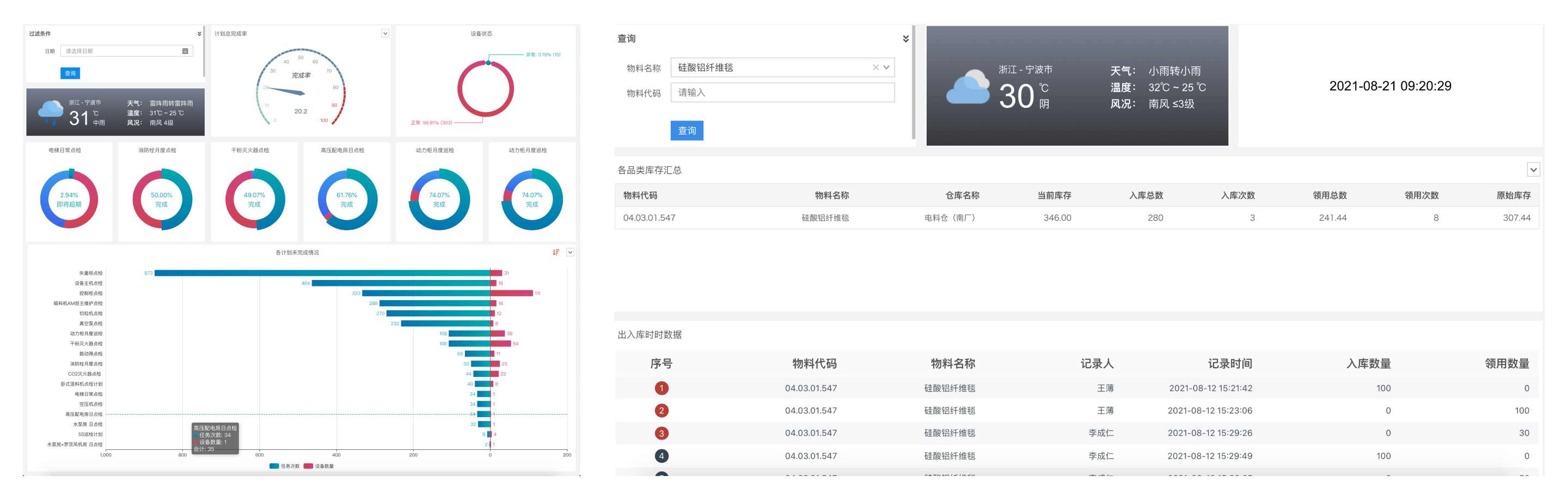
Build an Equipment Inspection Dashboard
Build an online archive for equipment with QR codes, record details by scanning during daily spot checks and maintenance, and on that basis use the Data API and visualization tools to show equipment status, daily spot-check results, abnormal equipment details, repair status, and more.
Click for the detailed tutorial
Build an Order Process Flow Dashboard
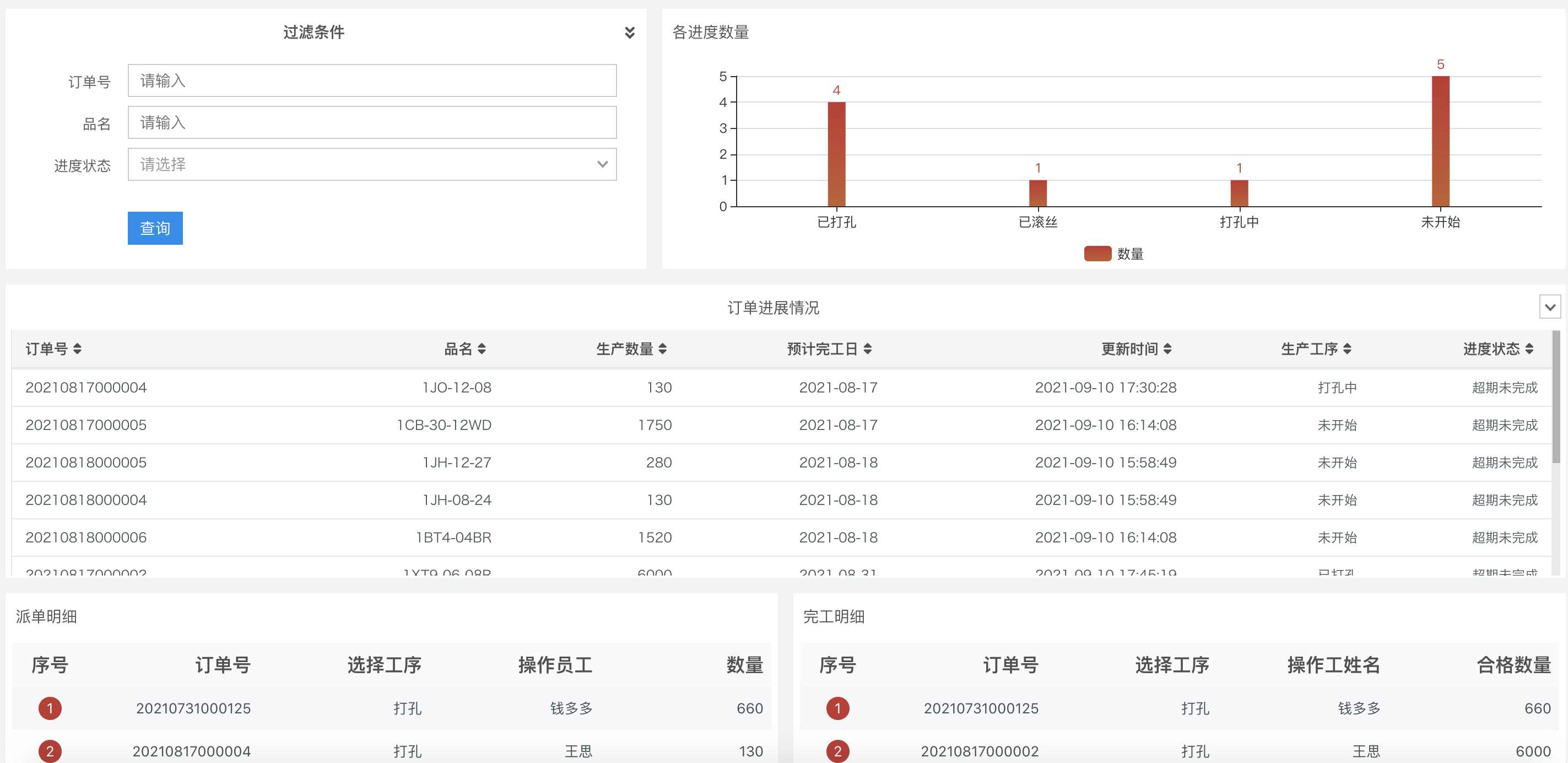
We build reports to learn the latest progress and status of each order, which means having the order information and the order status information; to also learn the dispatch details and completion details, we need the dispatch record data for each process and the completion record data for each process.
You can quickly look up the latest progress of each order and whether it is overdue, and keep an eye on orders about to become overdue.
Click for the detailed tutorial
Build an Inventory In/Out Dashboard
The CaoLiao platform doesn't support automatic calculation, so you can't see real-time stock quantities. But you can use an external data analytics tool, SugarBI, to connect to CaoLiao's official database and do all kinds of calculations freely, including real-time inventory.
Click for the detailed tutorial

For more dashboard cases, go to the case collection page
If you have more scenario needs, you can go to the community to give us feedback and discuss.