Integration and Connection Overview
CaoLiao QR Code offers several connection options, including MCP, data APIs, QR code and label creation APIs, and third-party integrations. You can use CaoLiao QR Code in AI tools to create and manage QR codes or read their public information. You can also connect data collected through scans to existing business systems, or use CaoLiao QR Code features directly in your everyday office software.
For detailed explanations, setup tutorials, and developer documentation, visit the CaoLiao QR Code Open Platform.
1. Use CaoLiao QR Code in AI Tools
CaoLiao QR Code provides two MCP services: Management MCP and Scan MCP. They let AI tools call CaoLiao QR Code features or read public information from QR codes.
1. Management MCP: Let AI Create and Manage QR Code Applications
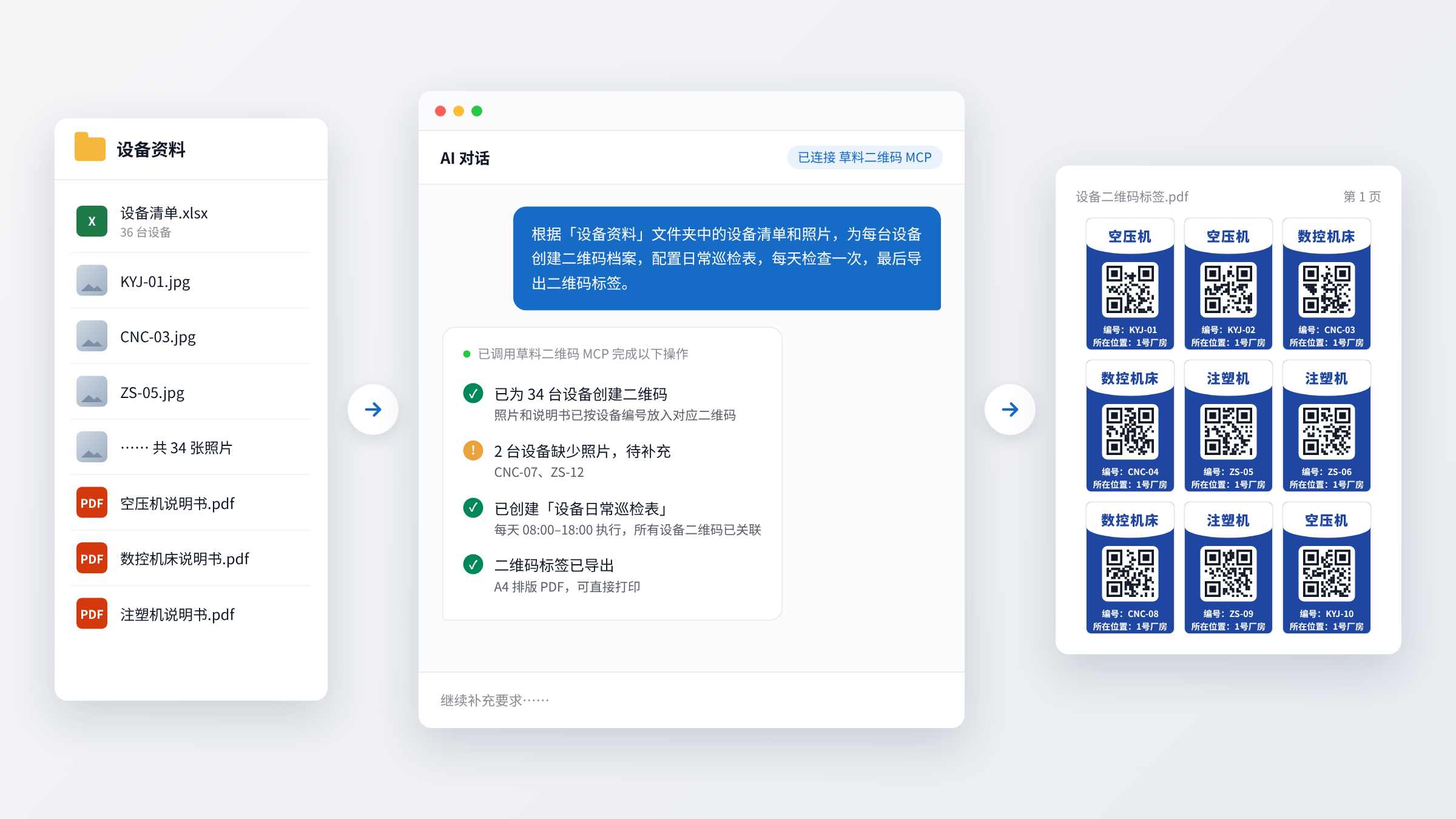
Connect CaoLiao QR Code to an AI tool that supports MCP, such as WorkBuddy, Qwen Work, Doubao Work, or Claude. You can then use conversation to:
- Create QR codes: Create QR codes in bulk from Excel files, equipment lists, and other materials to build equipment or asset registers.
- Build applications: Create forms and configure recurring tasks for equipment inspection, information registration, and other applications.
- Query and analyze data: Query form records, scan data, and inspection progress, and ask AI to summarize the data and generate reports.
- Create QR code labels: Generate label files in bulk for download and printing.
The QR codes and related settings are saved to the CaoLiao QR Code organization you authorize, where you can continue managing them in the workbench.
How do I connect?
Send the following setup documentation link to your AI tool and ask it to help you configure the connection. You need to log in to your CaoLiao account and authorize an organization. The exact steps depend on the AI platform you use.
https://cli.im/open-api/agent/open-platform-mcp.html
To configure it manually, follow the platform-specific steps in the Management MCP Setup Guide.
2. Scan MCP: Let AI Read QR Code Content
Scan MCP is for reading QR code information. Give an AI tool a CaoLiao QR code link, and it can use MCP to retrieve the public information associated with that code, including equipment details, status, historical records, and available actions.
For example, send an equipment QR code to AI and ask what the equipment is, what its current status is, and which maintenance records are publicly available.
Scan MCP can read public content without logging in to a CaoLiao account. It does not support modifying QR codes or submitting records.
2. Connect to Your Business Systems
If your company already uses business systems such as ERP, MES, or CRM, you can use CaoLiao QR Code's data APIs and OpenAPI to sync, query, and work with business data.
1. Data Sync
CaoLiao QR Code supports Webhook, an official database, and a private database for data sync. Choose the option that fits your needs.
| Method | How It Works | Best For |
|---|---|---|
| Webhook | Pushes data to a specified system when a form record is added, edited, or reviewed | Triggering notifications and follow-up business processes |
| Official Database | Syncs CaoLiao business data to an officially provided database that you can connect to BI tools such as Baidu SugarBI, Feishu Bitable, and WPS multidimensional tables | Creating reports and visual dashboards; see the Data Reporting Tutorial |
| Private Database | Syncs data to your company's own database | Combining and analyzing it with other business data |
For example, when a company uses CaoLiao QR Code for equipment inspection, field staff scan codes and submit inspection records. Webhook can send new records to the company's system, or database sync can bring the inspection data together.
2. OpenAPI
In addition to syncing data, CaoLiao QR Code provides OpenAPI endpoints that business systems can call directly.
The APIs currently support:
- Querying QR code, bulk template, and sub-code information
- Retrieving form structures, submitted records, and statistics
- Adding records to CaoLiao forms
- Redeeming form record vouchers
For example, a company can query equipment inspection records collected by CaoLiao from its own management system, or write business data from an external system into CaoLiao forms.
API integration requires development work by technical staff. See the Open Platform documentation for available capabilities, calling methods, and permission requirements.
View the OpenAPI Documentation
3. Generate QR Codes and Labels in Your Own System
CaoLiao QR Code provides a QR Code Image API and a Label Creation API. You can integrate QR code generation, recognition, and label creation into your own business system or website.
1. QR Code Image API
Use the API to generate QR code images from URLs, text, and other content, or to read the encoded content in QR code images.
This is useful for adding QR code generation or recognition to your website or business system without developing your own encoding and decoding programs.
This API generates QR code images. To create CaoLiao dynamic QR codes with management features such as forms and statuses, use Management MCP.
View the QR Code Image API Documentation
2. Label Creation API
Use the CaoLiao QR Code Label Creation API to call CaoLiao label styles from your own system and generate QR code labels with different information in bulk.
For example, select a group of assets in your asset management system and call the Label API to generate labels from fields such as asset number and name. Download and print them directly, without exporting the data and importing it into CaoLiao.
You can use public label styles or private label styles already configured in your account.
View the Label Creation API Documentation

4. Use CaoLiao QR Code in Everyday Office Software
If you do not need to develop your own API integration, use CaoLiao QR Code's third-party applications and plugins to access its features directly in your existing office software.
1. WeCom Edition
Install the CaoLiao QR Code app in the WeCom workbench to sync WeCom contacts, manage members centrally, and set permissions for viewing QR codes, filling out forms, and managing data based on WeCom member identities.
This is suitable for teams that use WeCom for internal collaboration and want to manage members and permissions in one place.
2. Tencent HiFlow
Connect CaoLiao QR Code to other office applications through Tencent HiFlow without writing your own integration code.
For example, sync form data collected by CaoLiao to Tencent Docs, or automatically send messages to work groups in WeCom, Feishu, DingTalk, and other apps when new records arrive.

Learn About Tencent HiFlow Integration
3. Tencent Docs Plugin
The CaoLiao QR Code plugin is available in Tencent Docs. Create and beautify QR codes in your documents, use ready-made QR code style templates, and adjust the logo, colors, text, and other content.
Learn About the Tencent Docs Plugin
4. Feishu Bitable Plugin
Install the CaoLiao QR Code plugin in Feishu Bitable to convert multiple rows of spreadsheet data into QR code labels in bulk.
Select a label style and match the spreadsheet fields, then generate labels in bulk and save them to the corresponding attachment column for easy preview and download.
Learn About the Feishu Bitable Plugin
5. Embed in a WeChat Official Account
Besides opening through a scan, dynamic QR codes can be embedded in WeChat Official Account articles and menus. Readers can click to view the dynamic QR code content.
Learn About Embedding in a WeChat Official Account
5. Choose a Connection Method for Your Needs
Different connection methods suit different needs. Use the table below to choose:
| What You Want to Do | Recommended Method | Documentation |
|---|---|---|
| Let AI create QR codes, build applications, and analyze data | Management MCP | Setup Guide |
| Let AI read public information from QR codes | Scan MCP | Setup Guide |
| Send new records collected through scans to your business system in real time | Webhook | Data Sync |
| Connect CaoLiao data to a database or BI dashboard | Database sync | Data Sync |
| Query or submit CaoLiao business data from your business system | OpenAPI | API Documentation |
| Generate or recognize QR code images in a website or system | QR Code Image API | API Documentation |
| Generate QR code labels in bulk in your own system | Label Creation API | API Documentation |
| Manage members and permissions in WeCom | WeCom Edition | Feature Introduction |
| Connect CaoLiao to other office software | Tencent HiFlow and office plugins | Connection Options Overview |
For business partnerships involving product integration or platform connections with CaoLiao QR Code, contact: mkt@nears.cn