Official Database Guide
The official database provides CaoLiao users with a dedicated cloud database that syncs your workbench data. You can connect data analytics software to this cloud database to create reports, or write code to actively query the data and integrate it with other systems.
- The official database is read-only and cannot be edited.
- Database type: MySQL 5.7.
- Syncs QR code information, form records, processing progress actions, todos, status details, and plan completion details according to the enabled sync configuration and scope.
- Data tables are only created when there is actual submission data — creating bulk templates and forms without any submitted data will not create tables.
How to Use
In the CaoLiao workbench navigation bar, go to [Data Management] > [Data API] and select [Official Database]. After filling in the application information, the feature will be activated automatically and data will be pushed. The initial sync needs to process existing data. Completion time depends on the data volume and sync progress.
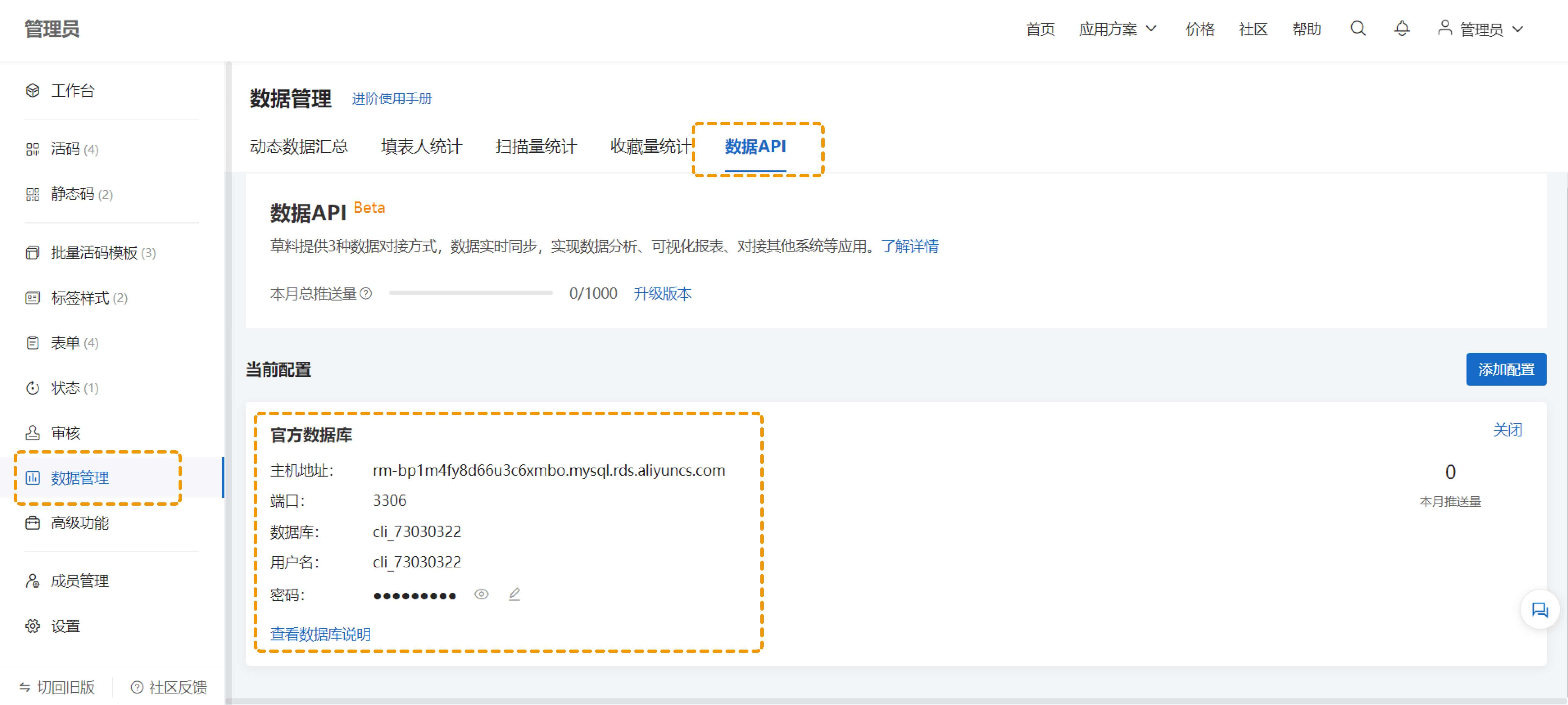
Database Example
- Type: MySQL 5.7
- Host: rm-bp1m4fy8d66u3c6xmbo.mysql.rds.aliyuncs.com
- Port: 3306
- Database name: cli_202112111 (example)
- Username: cli_202112111 (example)
- Password: eiadk289djlgj (example)
Data Report Examples
You can push data from the official database to multidimensional spreadsheets or BI tools to build custom dashboards. BI tools have a steeper learning curve than multidimensional spreadsheets. The following tools are all third-party applications that require additional payment; choose based on your business needs.
1. Push Data to Feishu, WPS, and Other Multidimensional Spreadsheets to Build Basic Dashboards
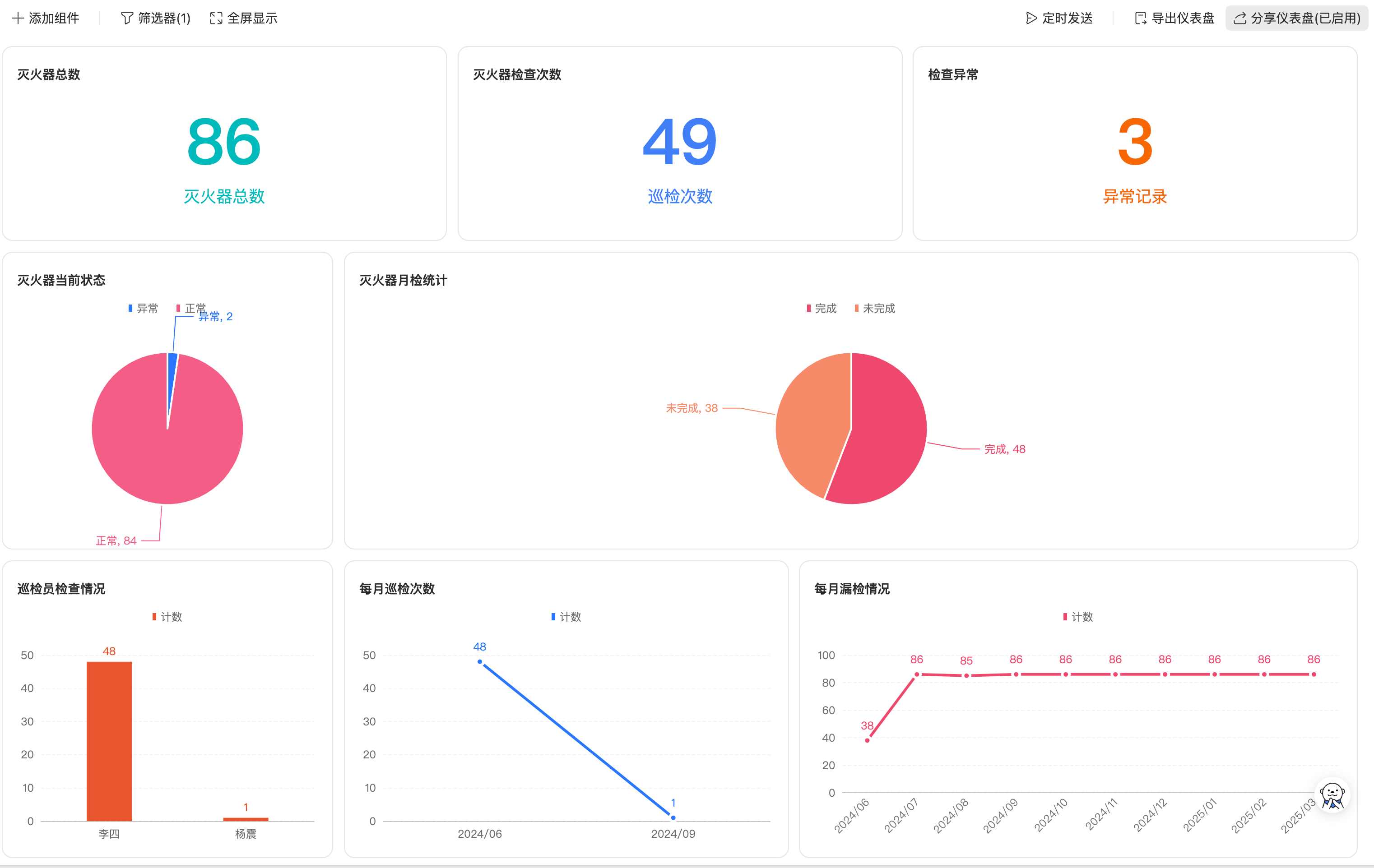
2. Push Data to Baidu SugarBI, Power BI, and Other BI Tools for Richer Dashboards

More case examples: Visualization Dashboard Case Collection
Common Field Descriptions
Note: These fields are key identifiers, primarily used to link data across tables.
| Field | Type | Description | Example |
|---|---|---|---|
| code_id | int | Unique identifier for the QR code | 54349863 |
| tpl_code_id | int | Unique identifier for the bulk template. If not a template-generated code, tpl_code_id equals code_id | 54349863 |
| member_id | int | Unique identifier for the member | 2091263 |
| auth_id | int | Unique identifier for the submitter | 12789054 |
| record_id | int | Unique identifier for the form data record | 16759806 |
Common Data Models
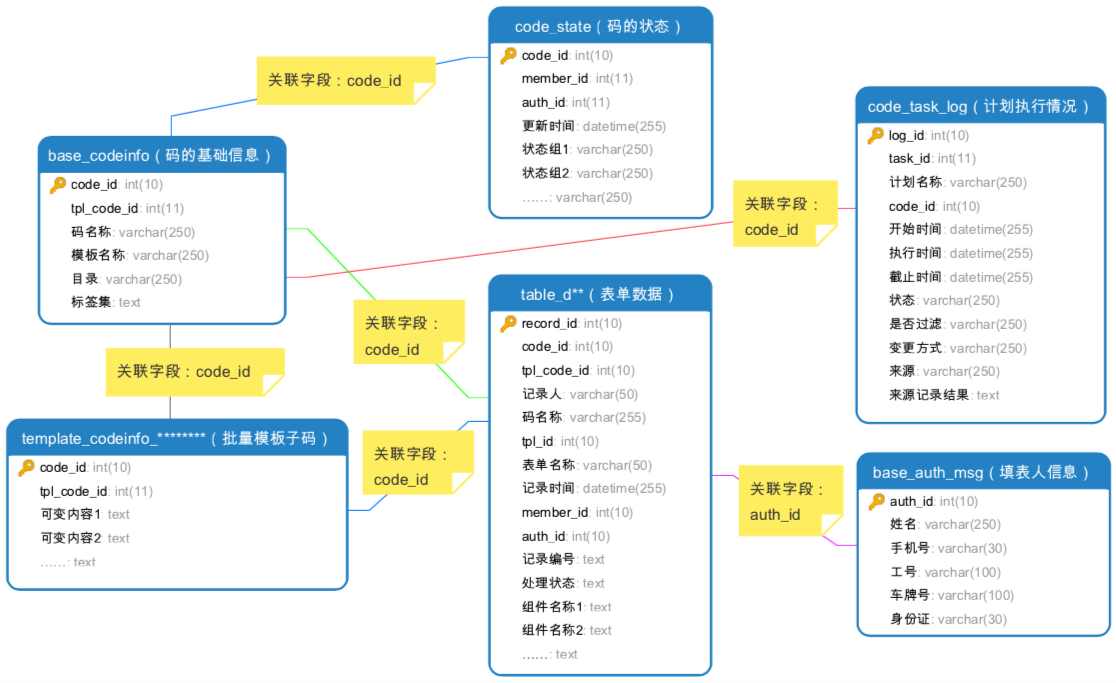
Model 1: Device Status Analysis
Inner join base_codeinfo (QR code basic info table) with code_state (QR code status table) on code_id to get the status value and update time for each device and analyze status distribution.

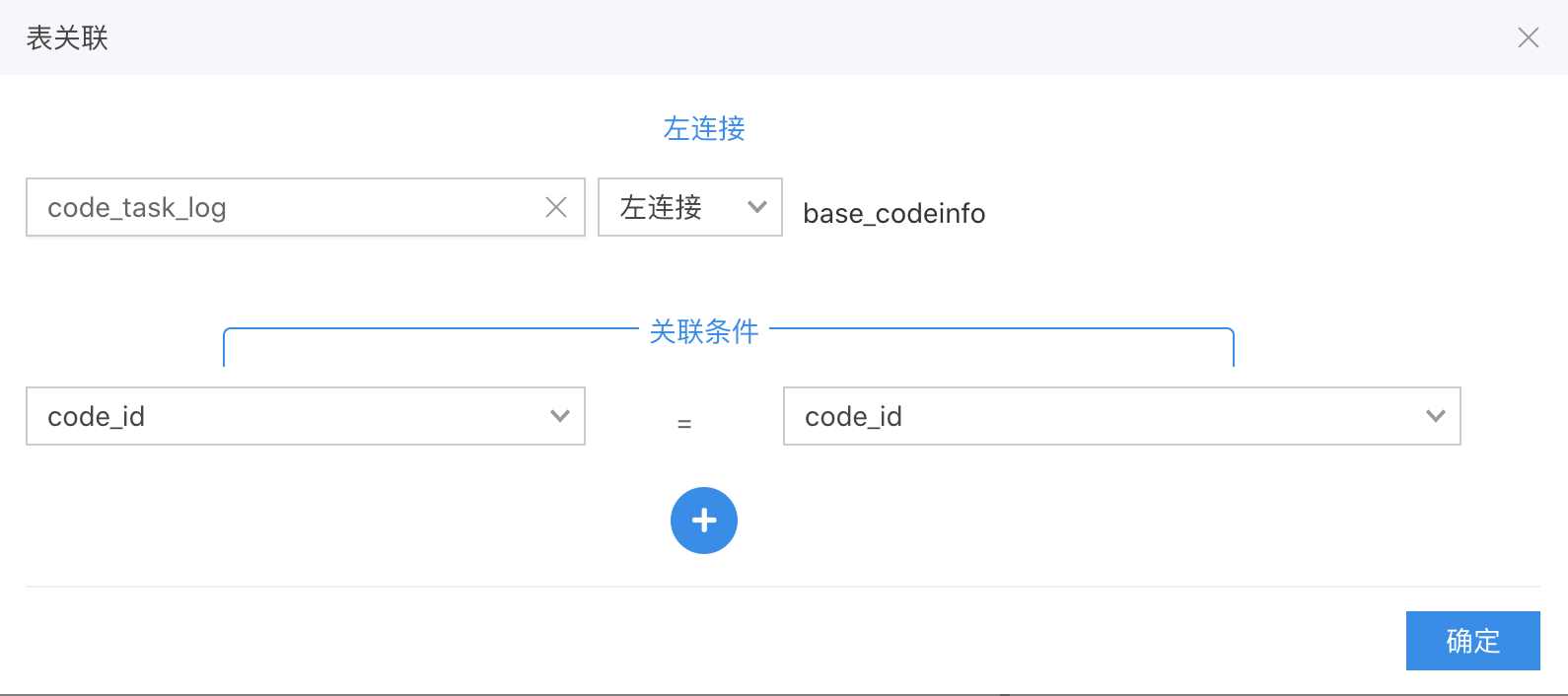
Model 2: Plan Completion Status
Left join code_task_log (plan execution log table) with base_codeinfo (QR code basic info table) to get plan completion status along with the corresponding QR code information.
Model 3: Bulk Code Analysis
Left join template_XXXXXX (bulk code info table) with table_dXX (form data table) and code_state (QR code status table). template_XXXXXX provides the variable content of sub-codes.

Model 4: Chaining Follow-Up Form Records
For example, if a fault report record has a repair record form attached, join the two records to get the complete picture. Learn about follow-up actions
Left join table_dxx (fault report table) with table_dxx (repair record form) on record serial number and source serial number. For additional follow-up forms, continue left joining.
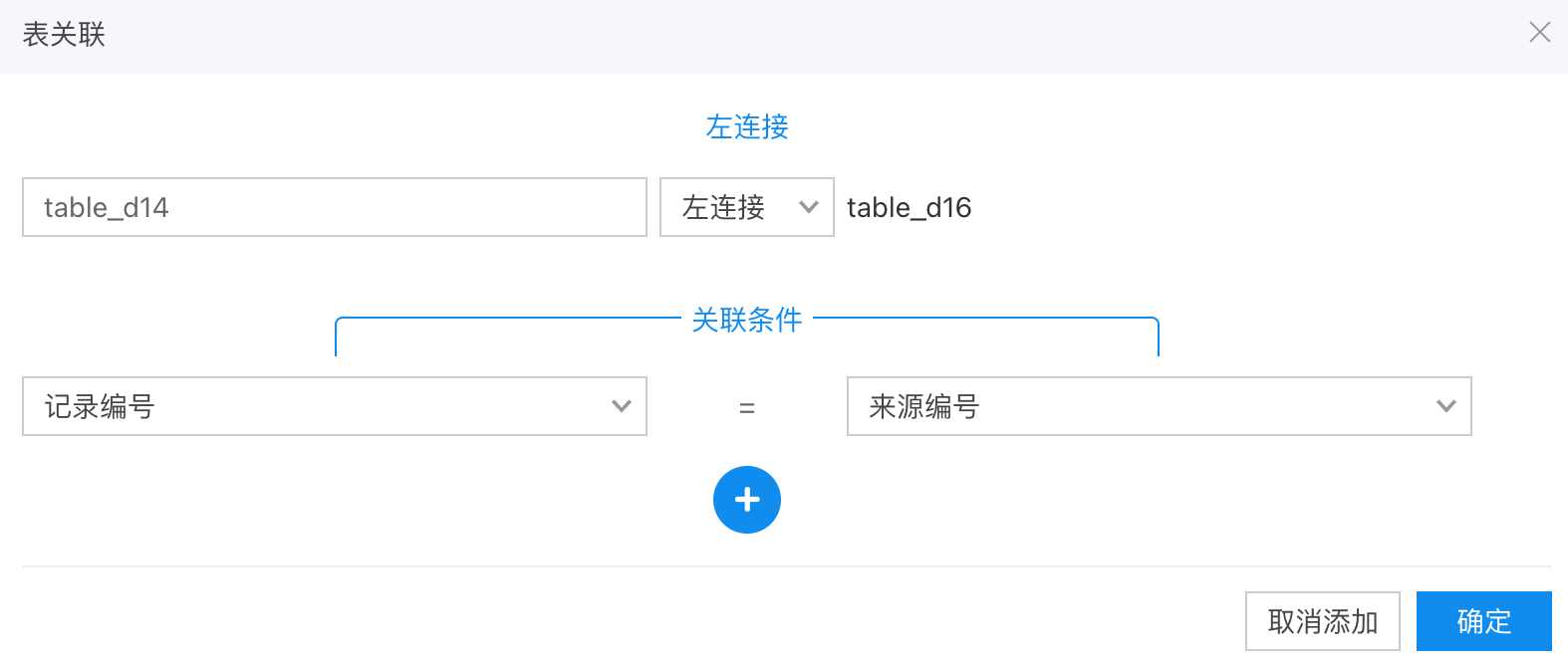
Data Table Field Descriptions
1. base_codeinfo — QR Code Basic Info Table
Note: This table is pushed when there are QR codes in the account, including dynamic QR codes and bulk template sub-codes.
| Field | Type | Description | Example |
|---|---|---|---|
| code_id | int | Unique identifier for the QR code | 67654543 |
码名称 (QR code name) | string | QR code name | Fire Hydrant 01 |
码类型 (QR code type) | string | Types include: dynamic QR code, bulk template sub-code, template code | Bulk sub-code |
| url | string | QR code URL | http://qr61.cn/o2eikt/q85Q8KL |
| tpl_code_id | int | Bulk template ID for sub-codes. For non-template codes, equals code_id | 56335353 |
模板名称 (template name) | string | Bulk template name for sub-codes. For non-template codes, equals the QR code name | Fire Hydrant |
目录 (directory) | string | The last-level directory name where the QR code resides; parent directories are not included | Fire Safety Equipment |
标签集 (tag set) | string | Collection of groups the QR code belongs to | Fire Safety, Equipment |
Directory info: shows only the last-level directory; parent directory levels are not displayed.
2. code_state — QR Code Status Table
Note: This table is pushed when QR codes have associated status. View status feature Historical status data from before activation will not be pushed. If you need that data, contact online support and a technician will manually sync it for you.
| Field | Type | Description | Example |
|---|---|---|---|
| code_id | int | Unique identifier for the QR code | 67654543 |
| member_id | int | Unique identifier for the member | 2091263 |
| auth_id | int | Unique identifier for the submitter | 12789054 |
更新时间 (update time) | datetime | Status update time | 2020-11-20 15:00:00 |
Device Operating Status_720 | string | Status group name; the suffix "_720" is a system-generated deduplication identifier | Normal |
| ...... | string | All status groups in the account are listed here | Abnormal |
3. code_state_log — QR Code Status Change Log Table
Note: This table is pushed when QR codes have associated status. Every status change is recorded here. Historical status change data from before the database was activated will not be pushed.
| Field | Type | Description | Example |
|---|---|---|---|
| code_id | int | Unique identifier for the QR code | 67654543 |
| member_id | int | Unique identifier for the member | 2091263 |
| auth_id | int | Unique identifier for the submitter | 12789054 |
更新时间 (update time) | datetime | Status update time | 2020-11-20 15:00:00 |
状态组 (status group) | string | Name of the status group | Device Status |
状态值 (status value) | string | The current value for this status group | Normal |
变更方式 (change method) | string | How the status was changed — includes updating via form submission and manually editing status | Record / Edit |
来源 (source) | string | When the change method is "Record", this is the unique identifier of the corresponding form data | 12220988 |
4. table_dXX — Form Data Detail Table
Note: This table is pushed when form data has been submitted to the account. Form data tables are a group of tables prefixed with "table_", followed by a number representing the form's unique ID (e.g., table_d45). One form corresponds to one table. View forms feature

| Field | Type | Description | Example |
|---|---|---|---|
| record_id | int | Unique identifier for the form data record | 12220988 |
| code_id | int | Unique identifier for the QR code | 67654543 |
| tpl_code_id | int | For bulk sub-codes: the corresponding bulk template ID. For non-template codes: equals code_id | 54349863 |
码名称 (QR code name) | string | Name of the QR code | Fire Hydrant 01 |
| tpl_id | int | Unique identifier for the form | 346636 |
记录单名称 (form record name) | string | Name of the form | Fire Hydrant Inspection |
记录时间 (record time) | datetime | Time the form data was submitted | 2020-11-20 15:20:00 |
状态 (status) | string | Current status of this record: includes whether it is deleted and whether it passed review | Normal / Deleted / Pending Review / Review Approved / Review Rejected |
| member_id | int | Unique identifier for the member | 2091263 |
| auth_id | int | Unique identifier for the submitter | 12789054 |
记录编号 (record serial number) | string | Serial number of the form data record | L1234 |
处理状态 (processing status) | string | Processing status of the form data record | Pending / Completed / Not Required / Not Yet Marked |
创建来源 (creation source) | string | Includes: scanned via mobile, added via notes (follow-up actions) | Mobile scan / Added via notes |
来源编号 (source serial number) | string | When the creation source is "added via notes", this is the serial number of the original record | L1235 |
提交编号 (submission number) | string | Custom submission number defined in the CaoLiao workbench | 11 |
处理状态变更时间 (processing status change time) | datetime | Time when the follow-up progress was last changed | 2020-11-20 15:20:00 |
例:设备名称 (e.g. Device Name) | string | Name of the form component | Inspection Item 1 |
| ...... | string | All form component names are listed here |
Notes on Form Component Push Behavior:
- Numeric components are pushed without units.
- For inspection item components, the values represent: 0 = not filled; 1 = checked (√); 2 = crossed (×); 3 = not selected. If the "√" and "×" labels have been customized, the custom names will not be pushed — the values remain 0, 1, 2, 3.
- Descriptions and images added in inspection item notes will not be pushed.
- Location components push three fields: location (Chinese address text), latitude, and longitude.
- Description components are pushed; the field name is the description component's title, and the value is the content added to the description.
- Group title components are not pushed.
- ID card components are pushed as split fields: ID card info, ID number, name, gender, ethnicity, date of birth, and address. The "ID card info" field value is empty; the other fields are populated with the corresponding values.
- Multimedia components (including images, files, videos, and audio) are all pushed as URLs. Click the URL to view the content.
5. base_table_data — Form Data Summary Table
Note: This table is pushed when form data has been submitted to the account. It is a summary of all form records, containing fields common across all forms, such as QR code name, submitter, and form name. Use case: For example, if you have two separate forms for inbound and outbound entries, you can use this table to retrieve all records without needing to aggregate two separate data tables.
| Field | Type | Description | Example |
|---|---|---|---|
| record_id | int | Unique identifier for the form data record | 12220988 |
| code_id | int | Unique identifier for the QR code | 67654543 |
| tpl_code_id | int | For bulk sub-codes: the corresponding bulk template ID. For non-template codes: equals code_id | 56335353 |
| tpl_id | int | Unique identifier for the form | 346636 |
码名称 (QR code name) | string | QR code name | Fire Hydrant 01 |
记录单名称 (form record name) | string | Form name | Fire Hydrant Inspection |
记录时间 (record time) | datetime | Time the form data was submitted | 2020-11-20 12:01:02 |
记录人 (submitter) | string | Name of the person who filled the form | Li Si |
| member_id | int | Unique identifier for the member | 2091263 |
| auth_id | int | Unique identifier for the submitter | 12789054 |
状态 (status) | string | Current record status: includes whether it is deleted and whether it passed review | Normal / Deleted / Pending Review / Review Approved / Review Rejected |
记录编号 (record serial number) | string | Record serial number | L1234 |
6. template_codeinfo_XXX — Bulk Template Sub-Code Info Table
Note: This table is pushed when the account has sub-codes generated from bulk templates. It primarily shows the variable content of bulk sub-codes. View bulk QR code generation feature The table name starts with "template_" followed by the bulk template's identifier. There are two historical naming conventions.
6.1 Naming Conventions:
- Method 1: Suffix is dXX, where the number after "d" is the bulk template number. For example, if the workbench bulk template number is M312, the corresponding data table name is template_codeinfo_D312.
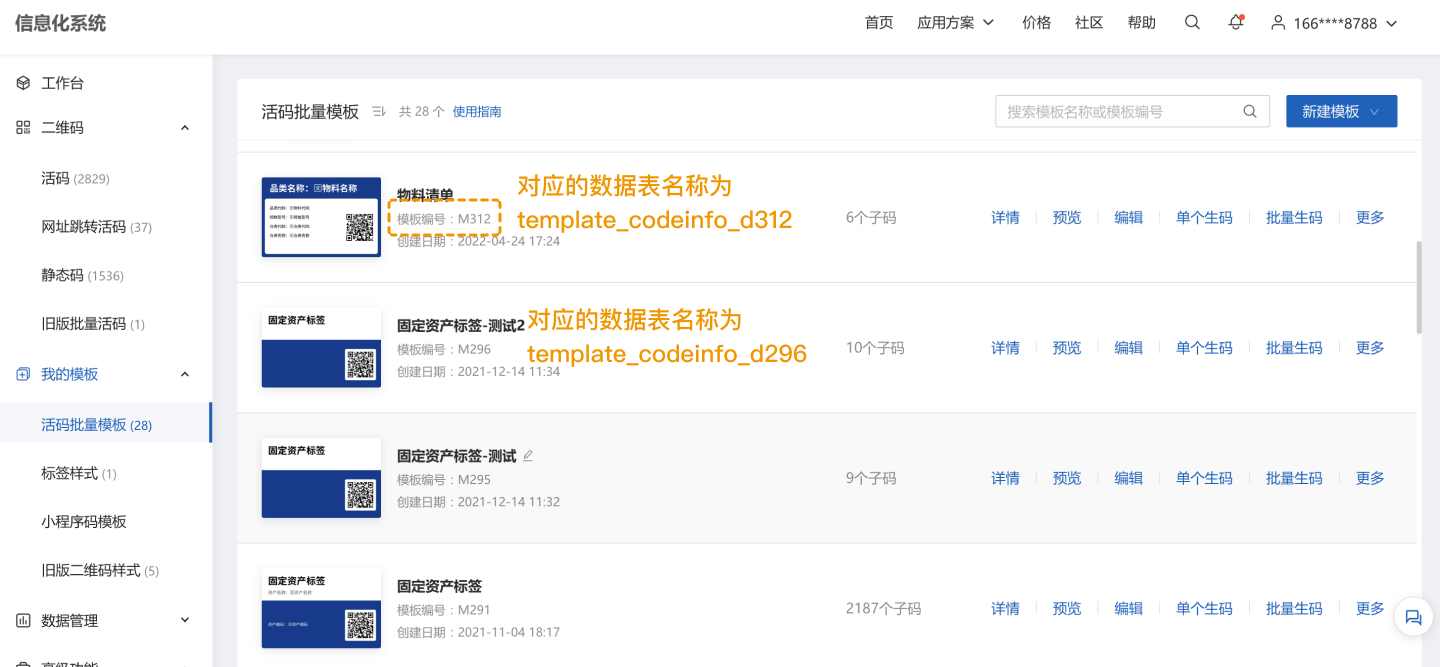
- Method 2: Suffix is the internal bulk template ID. Edit the bulk template and get the ID from the URL.
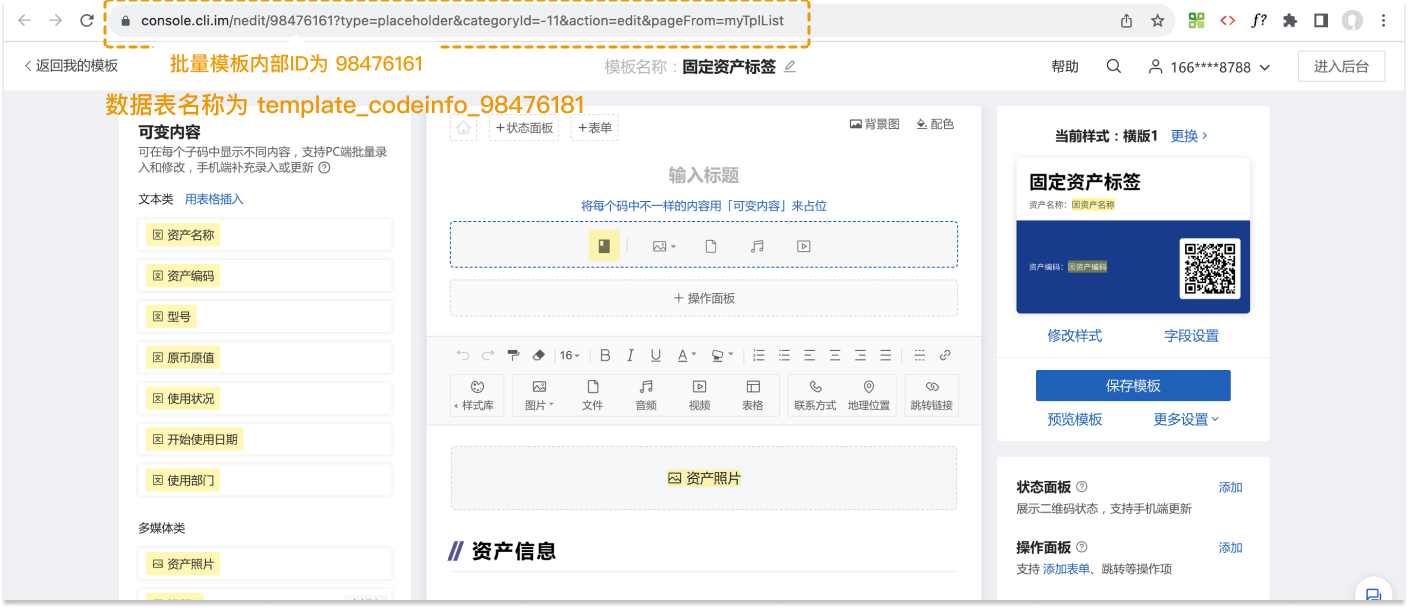
6.2 Data Field Descriptions:
| Field | Type | Description | Example |
|---|---|---|---|
| code_id | int | Unique identifier for the QR code | 67654543 |
| tpl_code_id | int | Unique identifier for the bulk template | 56335353 |
状态 (status) | string | Whether the bulk sub-code has been deleted | Normal |
| ... | string | The following fields are the variable content from the bulk template |
7. record_review_data — Follow-Up Actions Data Table
record_review_data is the existing follow-up actions data table. Actions added to form records and changes to processing progress are stored in this table. Learn About Follow-Up Actions.
Once official database sync is configured and enabled, notes and attachments entered when changing processing progress are synced automatically with that action. No separate switch is needed to sync notes and attachments. The related records must still fall within the existing sync scope.
Each processing progress change corresponds to one action, with review_id as its primary key and record_id linking it to the source record. Syncing the same action again updates its existing row. Multiple attachments are stored in the same row; each attachment does not create a separate progress action.
| Column | Meaning |
|---|---|
review_id | Action ID; primary key |
record_id | Associated source record ID |
状态 | Data status of the action, such as normal or deleted; not business processing progress |
来源 | How the action was added. A processing progress change has the value “变更处理状态” (changed processing status); other actions may come from manual entry, form record submission, and other sources |
文本内容 | Status change description, plus the notes and attachment placeholders entered for this action |
关键内容 | The new progress name for a processing progress change; the numeric form record ID when a follow-up form is submitted |
附件 | A JSON array of attachment URLs and types, stored as text |
填写人 | Information about the person performing the action; may be empty |
手机 | That person's phone number information; may be empty |
填写时间 | Creation time of this action |
更新时间 | Update time of this action |
Note: To query the progress name after this change, read
关键内容(key content), not状态(status). Submitter and phone information depend on the completeness of the original data.
How Notes and Media Are Displayed
The first line of 文本内容 (text content) is 将记录更新为 [状态名称] (record updated to [status name]). If details were added, a new line follows with the text and media placeholders concatenated in the order they were saved. If there are no notes or attachments, only the status change description is kept.
For example, in an equipment repair scenario, the person handling the repair changes progress to “已完成” (completed), enters “Damaged parts replaced”, and uploads an on-site photo and a signature. The synced 文本内容 is:
将记录更新为 [已完成]
Damaged parts replaced[图片][签名]
In this case, 关键内容 is 已完成 (completed). This is an illustrative example, not a real customer case.
The media placeholders are [图片] (image), [签名] (signature), [文件] (file), [视频] (video), and [语音] (audio). When audio has been successfully transcribed, the text may include the transcript. Not all audio has a transcript.
Attachment Format
附件 (attachments) stores attachment URLs and types, not file binaries. These URLs are structural examples only:
[
  { "url": "https://example.com/repair-photo.jpg", "type": "image" },
  { "url": "https://example.com/signature.png", "type": "signature" }
]
type | Attachment Type |
|---|---|
image | Image |
signature | Signature |
file | File |
video | Video |
audio | Audio |
When there are no attachments, the column may contain an empty string rather than []. Check whether it is empty before parsing the JSON.
Historical Content and Verification
This improvement to processing progress sync does not automatically backfill all historical notes and attachments. Only new actions, or old actions that are actually synced again, generate notes and attachment content under the new rules.
Choose a record within the sync scope, change its processing progress, enter a note, and upload an image. After sync completes, find the action in record_review_data by its source record_id and check 来源 (source), 关键内容 (key content), 文本内容 (text content), and 附件 (attachments). Sync takes time; data missing from a query immediately after the action does not mean that the content has been lost.
8. base_task — Plan Basic Info Table
Note: This table is pushed when a plan is created and execution begins. Plan management feature
| Field | Type | Description | Example |
|---|---|---|---|
| task_id | int | Unique identifier for the plan | 33886 |
计划名称 (plan name) | string | Plan name | Monthly Fire Extinguisher Inspection |
描述 (description) | string | Plan description |
9. code_task_log — Plan Execution Log Table
Note: This table is pushed when a plan is created and execution begins. After the database is activated, only plan cycle data for cycles that start executing after activation is pushed. Historical cycles and the cycle currently in progress at activation are not pushed.
This table does not contain QR code names. You can join base_codeinfo or template_XXX to enrich the data with QR code details.
| Field | Type | Description | Example |
|---|---|---|---|
| log_id | int | Unique identifier for the current plan task | 239168567 |
| task_id | int | Unique identifier for the plan | 33886 |
计划名称 (plan name) | string | Plan name | Monthly Fire Extinguisher Inspection |
| code_id | int | Unique identifier for the QR code | 67654543 |
状态 (status) | string | Execution status for this cycle | Options: Completed / Not Completed / About to Expire / Completed Late / Expired and Not Completed |
开始时间 (start time) | datetime | Start time of the plan cycle | 2020-12-10 12:00:00 |
执行时间 (execution time) | datetime | Time when the status was changed | 2020-12-10 13:00:00 |
截止时间 (deadline) | datetime | End time for this QR code in the current cycle | 2020-12-10 18:00:00 |
是否过滤 (filtered) | string | Indicates whether the code was filtered based on "no inspection needed" conditions | Options: Yes / No |
变更方式 (change method) | string | How the status was changed | Record |
来源 (source) | int | When the change method is "Record", the unique identifier of the corresponding form data | 12220988 |
来源记录结果 (source record result) | string | When the change method is "Record", the result of the corresponding form data record | Device Normal |
10. code_tags — QR Code Group Table
Note: This table is pushed when the group management feature is used and QR codes are added to groups. View group management feature
| Field | Type | Description | Example |
|---|---|---|---|
| code_id | int | Unique identifier for the QR code | 67654543 |
例:1号楼灭火器 (e.g. Building 1 Fire Extinguisher) | int | Group name; value is 1 if the QR code belongs to this group | 1 |
例:2号楼灭火器 (e.g. Building 2 Fire Extinguisher) | int | Group name | 1 |
| ...... | int | All groups in the account are listed here |
11. base_members — Member Info Table
Note: This table is pushed when advanced members are added to the account. Currently, only advanced member information is synced; basic member information is not pushed. View member feature
| Field | Type | Description | Example |
|---|---|---|---|
| member_id | int | Unique identifier for the member | 2091263 |
姓名 (name) | string | Member name | Zhang San |
手机号 (phone number) | string | Member phone number | 135xxxx8934 |
12. base_auth_msg — Submitter Info Table
Note: This table is pushed when a form record is submitted or a status update record occurs. The submitter is the person who filled out the form or changed the status. View submitter component
- If no form was filled, only auth_id is shown.
- If a form was filled but the submitter component was not used, only auth_id is shown; the name will be "WeChat User XXXX".
- If a form was filled and submitter components such as name, phone number, employee ID, license plate, or ID card were used, the corresponding field data is shown.
| Field | Type | Description | Example |
|------|------|------|------|
| auth_id | int | Unique identifier for the submitter | 12789054 |
|
姓名(name) | string | Submitter name | Li Si | |手机号(phone number) | string | Submitter phone number | 135xxxx8934 | |工号(employee ID) | string | Submitter employee ID | D234 | |车牌号(license plate) | string | Submitter license plate number | 浙A.12342 | |身份证(ID card) | string | Submitter ID card number | 343xxxxxxxxxxxxx |
13. record_audit_data — Record Approval Ticket Table
Note: This table is pushed when a pending-approval record is submitted or a record is reviewed. View approval feature
| Field | Type | Description | Example |
|---|---|---|---|
| auth_id | int | Unique identifier for the approval ticket | 9001 |
| record_id | int | Unique identifier for the record linked to the approval ticket | 1001 |
状态 (status) | string | Whether the ticket has been reviewed | Pending / Approved / Rejected |
审核标题 (review title) | string | Title set for multi-level review; empty for single-level approval | Finance Review |
指定审核人 (designated reviewer) | string | Reviewer designated by the submitter or previous reviewer; empty if not designated | Zhang San |
审核人 (reviewer) | string | Actual reviewer who performed the review | Zhang San |
审核时间 (review time) | datetime | Actual time the review was performed | 2024-09-20 15:20:00 |
审核签名 (review signature) | string | Signature image URL signed by the reviewer; empty if not signed | https://ncstatic.clewm.net/rsrc/2024/1015/15/c12d5af513b275ba2465f923557a1f7c.png |
审核回复 (review reply) | string | Reply message written by the reviewer during approval; empty if not provided | The submitted content does not meet requirements |
创建时间 (creation time) | datetime | Time the approval ticket was created | 2024-09-20 10:20:00 |
14. base_todo — Todo Data Table
The todo data API supports syncing todos created from records to CaoLiao's official database and a customer's self-hosted MySQL database for external reporting or business systems to read. The destination table is base_todo, with todo_id as the primary key.
This table stores the latest state of currently visible todos, including pending and completed todos. Each todo_id corresponds to one row. Subsequent syncs overwrite it with the latest data instead of storing each operation as a separate historical entry.
Activation and Update Rules
First configure and enable a database sync destination. Todos enter the destination database within the existing form and QR code sync scope. You do not need to select separate “todo push triggers” individually. Todo creation, completion, information changes, and related status changes trigger sync updates.
Member notification switches in todo rules and group robot notifications for creation or completion are separate from database sync. This section describes database sync, not an HTTP query API.
Basic Information Fields
| Column | Data Type | Description |
|---|---|---|
todo_id | BIGINT | Todo ID; primary key |
编号 | VARCHAR(31) | Display number, such as T123 |
标题 | VARCHAR(255) | Todo title |
状态 | VARCHAR(31) | “待完成” (pending) or “已完成” (completed) |
紧急度 | VARCHAR(31) | “紧急” (urgent), “普通” (normal), or “低” (low); synced as normal if not set |
处理时限 | DATETIME | Deadline; empty means no deadline |
创建人 | VARCHAR(127) | Creator's name; may be empty if unavailable |
创建时间 | DATETIME | Creation time of the current round of the todo |
更新时间 | DATETIME | Most recent status change time; not the sync time |
Completion Information Fields
| Column | Data Type | Description |
|---|---|---|
完成人 | VARCHAR(127) | Name of the person who completed the todo; may be empty if unavailable |
completer_member_id | BIGINT | Member ID of the person who completed the todo; can be used to join member data |
完成时间 | DATETIME | Completion time for a completed todo |
完成方式 | VARCHAR(31) | “直接完成” (complete directly), “填写补充信息” (provide additional information), or “填写表单” (fill out a form) |
完成记录ID | VARCHAR(255) | IDs of records associated with completion by form submission; multiple values are separated by ASCII commas |
完成说明 | TEXT | Text details submitted when completing the todo; multiple text segments are joined with newlines |
完成附件 | TEXT | JSON array text containing attachments submitted when completing the todo |
Before completion, completion information is usually empty, and the member ID may be 0. Do not treat all missing values as null. 完成人 is the person who actually completed the todo, which is different from the assignee responsible for handling it. This table currently has no assignee or handling group columns.
Related Information Fields
| Column | Data Type | Description |
|---|---|---|
record_id | BIGINT | ID of the source record that created the todo |
来源记录编号 | VARCHAR(127) | Display number of the source record |
code_id | BIGINT | Associated QR code ID; can be joined to base_codeinfo |
tpl_id | BIGINT | Source form ID; can be joined to base_tables |
表单编号 | VARCHAR(31) | Display number of the source form |
sync_time | DATETIME | Time of the current sync write |
Numeric database IDs, display numbers, and form numbers are different concepts. For example, record_id links data, while 来源记录编号 is for display. They are not interchangeable.
QR code and form names can be queried from existing basic information tables using their IDs. They are not separate columns in base_todo. Columns for assignee source, most recent reminder time, completion duration in seconds, and similar information are also not currently provided.
Completion Methods and Records
| Completion Method | How to Read Completion Content |
|---|---|
| Complete directly | Does not automatically create a completion form record |
| Provide additional information | Submitted text and attachments can be stored in 完成说明 (completion notes) and 完成附件 (completion attachments), respectively |
| Fill out a form | Use 完成记录ID (completion record IDs) to find the corresponding records and read the business content of the completion form |
record_id identifies the source record that created the todo. 完成记录ID identifies records submitted or associated when completing the todo. They have different meanings. The business fields of the completion form are not all expanded into separate base_todo columns.
完成记录ID is a comma-separated string, such as 12220988,12220989, not a JSON array or a single number. When it contains multiple values, split them first and look up each record separately. Do not use the entire string as a single record ID in an equality join.
完成说明 and 完成附件 contain details from the completion action, not the todo's complete message history. When there are multiple historical completion actions, the details from the last completion action are used.
Completion Attachment Format
完成附件 stores JSON array text, with type and url in each element. These URLs are structural examples only:
[
  { "type": "图片", "url": "https://example.com/completion-photo.jpg" },
  { "type": "文件", "url": "https://example.com/completion-report.pdf" }
]
Types are in Chinese: 图片 (image), 签名 (signature), 文件 (file), 音频 (audio), 视频 (video). When there are no completion attachments, the value may be an empty string rather than []. Attachment links are synced, not file binaries.
Note: Types in
base_todo.完成附件use Chinese values such as “图片”;record_review_data.附件uses English values such asimage. Parse them separately.
Deletion, Hiding, and Restoration
| Situation | Behavior in the Destination Database |
|---|---|
| The todo is currently visible | Keeps the row and syncs its latest information |
| The user deletes the todo | Deletes the corresponding todo row |
| A completed todo is replaced by a new round and becomes hidden history | Deletes the old todo's row |
| The source record is deleted, hiding the todo | Deletes the corresponding todo row |
| The source record and its associated todo are restored | Writes the corresponding data again during sync |
| The source todo no longer exists | Deletes the corresponding todo row |
Narrowing the sync scope later does not automatically remove all old rows that fall outside the new scope. After changing the scope, do not assume that all old data in the database matches the new filters.
Creating Tables, Adding Columns, and Full Sync
When a todo is first written, the sync program creates base_todo as needed if the destination table does not exist. Missing required columns are also added automatically during writes. You do not need to run table creation SQL manually, but the table may not appear if sync is enabled and no todo has actually been written yet.
For self-hosted MySQL, ensure the connection works and the sync account has write permissions and the necessary permissions to create and alter tables.
A full sync includes backfilling current todos after records and other data, so it may need to wait for earlier steps to finish. Backfill includes todos that are still valid, visible, and within the sync scope. It does not restore deleted or hidden historical todos. Check actual sync results to determine whether backfill has finished for existing accounts.
This is different from historical processing progress details: a full todo backfill does not mean that this improvement to processing progress sync automatically backfills all historical content.
Todo current-state sync events do not count toward the data API push quota. This does not mean that the database service is free or that other data sync has no limits. View Push Quota Details.
How to Verify Sync Results
Choose a todo within the sync scope and use todo_id to check its 编号 (number), 状态 (status), and source record_id. Complete the todo, wait for sync, then check completion information and sync_time in the same row. If it was completed by filling out a form, also split 完成记录ID and check the corresponding records.
If no data is found, check in order whether the sync destination is enabled, whether the source is within the sync scope, whether the todo is hidden or deleted, and whether full sync is still processing the preceding record data. For self-hosted MySQL, also check the connection and permissions to write, create tables, and alter tables.
Event Push Descriptions
1. Dynamic QR Codes
| Event | Pushed? | Affected Tables | Data Behavior |
|---|---|---|---|
| single code created | Yes | base_codeinfo | A new QR code record is added to base_codeinfo |
| single code created — with status association | Yes | base_codeinfo, code_state, code_state_log, table_d[x], table_relation, base_table_data | A new record is added to each data table |
| single code edited | Yes | base_codeinfo | The changed data is updated in base_codeinfo, overwriting the original |
| single code deleted | Yes | base_codeinfo | A QR code record is deleted from base_codeinfo |
| single code deleted — with form data | Yes | base_codeinfo, table_d[x], base_table_data | A record is deleted from each data table |
| single code deleted — with status association | Yes | base_codeinfo, code_state, table_d[x], code_state_log, base_table_data | A record is deleted from each data table |
2. Bulk Templates
| Event | Pushed? | Affected Tables | Data Behavior |
|---|---|---|---|
| bulk template created | No | - | - |
| bulk template created — with status association | Yes | code_state, code_state_log | A new status record for the template code is added to code_state; an initial status change record is added to code_state_log |
| bulk template title edited | No | - | - |
| bulk template variable content edited — no sub-codes | No | - | - |
| bulk template variable content edited — with sub-codes | No | - | - |
| bulk template deleted — with sub-codes | Yes | base_codeinfo, template_codeinfo_[x] | The corresponding records are deleted from each data table |
| bulk template deleted — with sub-codes and form data | Yes | base_codeinfo, template_codeinfo_[x], base_table_data, table_d[x] | The corresponding records are deleted from each data table |
| bulk template deleted — with sub-codes and status association | Yes | base_codeinfo, template_codeinfo_[x], code_state, code_state_log | The corresponding records are deleted from each data table |
| sub-code created | Yes | base_codeinfo, template_codeinfo_[x] | New records are added to each data table |
| sub-code created — with status association | Yes | base_codeinfo, template_codeinfo_[x], code_state, code_state_log | New records are added to each data table |
| sub-code deleted | Yes | base_codeinfo, template_codeinfo_[x] | Records are deleted from each data table |
| sub-code deleted — with status association | Yes | base_codeinfo, template_codeinfo_[x], code_state, code_state_log | Records are deleted from each data table |
| sub-code deleted — with form data | Yes | base_codeinfo, template_codeinfo_[x], base_table_data, table_d[x] | Records are deleted from each data table |
| sub-code edited | Yes | base_codeinfo, template_codeinfo_[x] | If the sub-code name is changed, the corresponding record in base_codeinfo is updated. If variable content is changed, the corresponding sub-code record in template_codeinfo_[x] is updated |
3. Forms
The following events all assume that form data exists; if no form data exists, nothing is pushed.
| Event | Pushed? | Affected Tables | Data Behavior |
|---|---|---|---|
| form deleted | Yes | table_d[x], base_table_data | All records in table_d[x] for this form are deleted (table structure is retained); corresponding form records are deleted from base_table_data |
| form component added | Yes | table_d[x] | A new component field with an empty value is added to table_d[x] |
| form component edited | Yes | table_d[x] | The original component field is retained with an empty value, and a new field for the edited component is added |
| form component deleted | Yes | table_d[x] | The original component field is retained with an empty value |
| form name changed | Yes | table_d[x], table_relation | The form name is updated in table_d[x]; the corresponding form name is updated in table_relation |
| form data submitted | Yes | base_table_data, table_d[x], table_relation, base_auth_msg | New records are added to each data table |
| form data pending review | Yes | base_table_data, table_d[x], table_relation, base_auth_msg | New records are added; unlike a regular submission, base_table_data and table_d[x] include an additional review status field |
| form data review approved or rejected | Yes | table_d[x], base_table_data | The review status field is updated in table_d[x] and base_table_data |
| form data edited | Yes | table_d[x], base_table_data | The specified data is updated and overwrites the original in table_d[x] and base_table_data |
| form data deleted | Yes | table_d[x], base_table_data | The specified data is deleted from table_d[x] and base_table_data (table structure is retained) |
4. Status
Status-related data syncs with a 60-second delay.
| Event | Pushed? | Affected Tables | Data Behavior |
|---|---|---|---|
| status group added | No | - | - |
| status group name changed | No | - | - |
| status item name changed | No | - | - |
| status item added or deleted | No | - | - |
| status group deleted | No | - | - |
| status group deleted | Yes | table_d[x], table_relation, base_table_data, code_state, code_state_log, base_auth_msg | code_state: if a record for the corresponding code exists, it is overwritten; otherwise a new record is created |
| status group deleted | Yes | table_d[x], table_relation, base_table_data, code_state, code_state_log | code_state: if a record for the corresponding code exists, the original status group field is retained with an empty value, and the modified status group field and its value are added |
| QR code status changes after status item is edited | Yes | table_d[x], table_relation, base_table_data, code_state, code_state_log, base_auth_msg | code_state: the corresponding status item field value is updated; code_state_log: a new status change record is added |
5. Plan Management
Plan data is pushed only after a plan has been created or modified and execution begins.
| Event | Pushed? | Affected Tables | Data Behavior |
|---|---|---|---|
| plan added | No | - | - |
| plan started | Yes | base_task, code_task_log | New records are added to each data table |
| plan overdue | Yes | code_task_log | The status field value in code_task_log is updated; the execution time field is auto-populated with the time of the status change |
| plan deleted | Yes | base_task, code_task_log | Records are deleted from each data table |
| plan deleted | Yes | base_task, code_task_log | If the plan name was changed, the corresponding record in base_task is updated and overwrites the original |
6. Follow-Up Actions
| Event | Pushed? | Affected Tables | Data Behavior |
|---|---|---|---|
| follow-up actions feature enabled | No | - | - |
| follow-up actions feature disabled | No | - | - |
| follow-up action submitted | Yes | record_review_data | A new follow-up action record is added to record_review_data |
| follow-up action [form] submitted | Yes | record_review_data, base_table_data, table_d[x], table_relation, base_auth_msg | A new follow-up action record is added to record_review_data; the form submission logic also runs, and in table_d[x], the source serial number field contains the serial number of the linked form record |
| a record linked to a follow-up action is deleted | Yes | record_review_data | The corresponding record in record_review_data is retained; the status field is changed to "Deleted" |
| processing progress marked | Yes | record_review_data | Adds or updates the current action by review_id, including the new progress name and the notes and attachments for this action |
7. Directory
| Event | Pushed? | Affected Tables | Data Behavior |
|---|---|---|---|
| directory renamed | No | - | - |
| QR code moved to another directory | Yes | base_codeinfo | The directory field value in base_codeinfo is updated |
| directory deleted | Yes | base_codeinfo, template_codeinfo_[x], table_d[x], base_table_data, code_state_log, code_state, code_task_log | All table data for codes in the directory is deleted; table structure and fields are retained with empty values |
8. Members
| Event | Pushed? | Affected Tables | Data Behavior |
|---|---|---|---|
| basic member added | No | - | - |
| advanced member added | Yes | base_members | The new member data is added to base_members |
| advanced member name changed | Yes | base_members | The corresponding member data is updated in base_members |
| advanced member deleted | No | - | - |
9. Todos
Todo creation, completion, and information changes update base_todo by todo_id. Deletion, hiding, and restoration follow the todo sync rules.
FAQ
1. After a QR Code Name Is Changed, Why Isn't the Name Updated in the Form Data Table?
The QR code name in form records is not updated retroactively. If you need the latest QR code name, do a left join with the base_codeinfo table using code_id as the join key.
2. After a Form Component Name Is Changed, There Are Two Components in the Data Table — One Before and One After the Change. Is This Expected?
Yes, this is expected. When a component is renamed, the original field is retained.
3. The Plan Has Been Set to Filter Out Codes with Abnormal Status Values, but They Still Appear in the Data Table.
The data table includes all plan task records. Use the [是否过滤] (Is Filtered) field to determine whether a given plan task has been filtered. (Note: filtering only takes effect in the next cycle after a status change.)
4. Why Is the Data Incomplete After I Connect to the Database Shortly After Activating It?
First check whether the data is within the sync scope and whether its data type supports syncing the relevant historical data. Full sync proceeds in stages. Todo backfill happens after records and other data, so it may still be waiting. If sync is not progressing normally, contact online support for troubleshooting.
5. Why Aren't the Database Fields Updated After I Edit a Form Field?
Editing a form does not trigger a database update. Only new or edited form data submissions will trigger an update to the data table. Simply submit a new record to trigger the update.
6. How Do I Connect Power BI to the Database?
Our database is MySQL. When connecting, select MySQL as the database type. View how-to
7. Why Is There No Dynamic Data Table?
Dynamic data is an aggregation of multiple data types, including form data and status change data. There is no dedicated dynamic data table in the pushed data. Select the form data table or status change data table based on your needs.
8. Can I Push to Multiple Platforms at the Same Time?
There is no limit on the number of platforms. Multiple platforms can connect to your official database simultaneously, and doing so does not count extra push records.
9. Multiple Image URLs in the Image Component Are Concatenated Together. How Can I Get Individual Image URLs?
Image component data is stored in the format urls_1,urls_2,..., and the number of URLs can vary.
Use the following functions to extract individual image URLs. Replace 照片_233233 with your own data field name.
urls_1: SUBSTRING_INDEX(照片_233233, ',', 1)
urls_2: if( LENGTH(照片_233233) - LENGTH(REPLACE(照片_233233, ',', '')) >= 1, SUBSTRING_INDEX(SUBSTRING_INDEX(照片_233233, ',', 2), ',', -1) ,'')
urls_3: if( LENGTH(照片_233233) - LENGTH(REPLACE(照片_233233, ',', '')) >= 2, SUBSTRING_INDEX(SUBSTRING_INDEX(照片_233233, ',', 3), ',', -1) ,'')
urls_3: if( LENGTH(照片_233233) - LENGTH(REPLACE(照片_233233, ',', '')) >= 3, SUBSTRING_INDEX(SUBSTRING_INDEX(照片_233233, ',', 4), ',', -1) ,'')
Continue the same pattern for additional images.
10. Do I Need to Enable Notes and Attachment Sync Separately?
No. Configure and enable official database sync first. Processing progress actions within the sync scope include their notes and attachments when synced.
11. Which Table Stores Processing Progress? How Do I Query the New Progress?
Query record_review_data, filter actions where 来源 (source) is “变更处理状态” (changed processing status), and read 关键内容 (key content). The 状态 (status) column indicates the data status of the action, not business processing progress.
12. Does the Attachment Column Store Files or Links?
It stores JSON array text containing links and types, not file binaries. When there are no attachments, it may be an empty string. Follow-up action attachment types are in English, while todo completion attachment types are in Chinese. Distinguish them when parsing.
13. Are Historical Processing Progress Details Automatically Backfilled?
No. This improvement does not automatically backfill historical details. Only new actions or old actions that are actually synced again generate content under the new rules.
14. Which Databases Support Todo Sync? Does base_todo Only Store Pending Todos?
Both the official database and self-hosted MySQL are supported. base_todo stores currently visible pending and completed todos, not a complete operation history.
15. Why Is There No Assignee Column in the Database?
base_todo does not currently sync assignees or handling groups. 完成人 is the person who performed the completion action and cannot be used as a substitute for the assignee.
16. What Is the Difference Between the Source Record ID and Completion Record IDs?
record_id identifies the source record that created the todo. 完成记录ID identifies records submitted or associated when completing it. The latter may contain multiple comma-separated IDs, which should be split and queried individually.
17. What Happens to the Database Row When a Todo Is Deleted?
It is deleted during sync. The row is also deleted when a todo is hidden because a new round replaces it, hidden because its source record is deleted, or no longer exists at the source. When the source record and todo are restored, the data is written again during sync.
18. Is Old Data Automatically Removed After the Sync Scope Is Narrowed?
Not all old data is automatically removed. Narrowing the scope and deleting a source todo are different situations. Be aware that old rows may remain in the destination database when querying.