Private Database Guide
Prerequisites
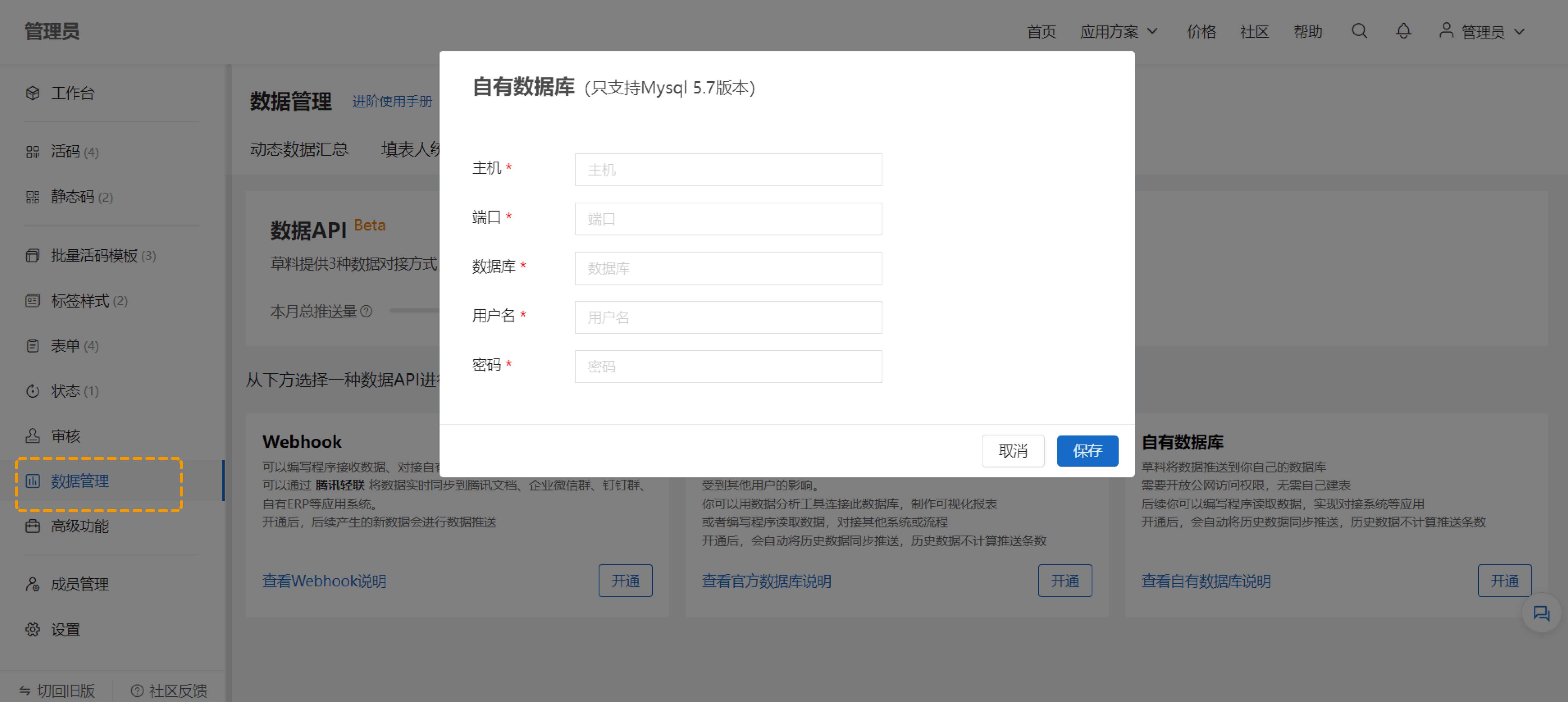
You provide the host/port/database/username/password, and we push your account data to this database in real time.
This push method automatically creates tables in your database, and requires your database to allow public internet access.
- CaoLiao maintains the synced tables. Storing your own additional data in the same synced table is not supported. Todos update their corresponding rows by
todo_id. - Do not create tables in the database with the same names as CaoLiao tables — they will be treated as CaoLiao data tables and overwritten in full.
- Database type: MySQL 5.7
- QR code information, form records, todos, status details, and plan completion details are synced according to the enabled sync configuration and scope.
- If only bulk templates and forms are created with no submitted data, no data tables will be created.
- If you have a firewall or other access restrictions, add the IP allowlist
Attachment: MySQL 5.7 download page
How to Use
In the CaoLiao workbench navigation bar, go to [Data Management] > [Data API], select [Private Database], and enter your database host, port, credentials, and other details.
Data Table Reference
1. base_codeinfo — QR Code Basic Info Table
Description: This table is pushed when your account has QR code data. Includes dynamic QR codes and bulk sub-codes.
| Field | Type | Description | Example |
|---|---|---|---|
| code_id | int | Unique QR code identifier | 67654543 |
| 码名称 | string | QR code name | Fire Hydrant 01 |
| 码类型 | string | Types include: dynamic QR code, bulk sub-code, and bulk template code | bulk sub-code |
| url | string | QR code URL | http://qr61.cn/o2eikt/q85Q8KL |
| tpl_code_id | int | The bulk template ID associated with the sub-code. For non-sub-codes, this is the same as code_id | 56335353 |
| 模板名称 | string | The bulk template name associated with the sub-code. For non-sub-codes, this is the same as the QR code name | Fire Hydrant |
| 目录 | string | The name of the last-level directory containing the QR code (parent directories not included) | Fire Equipment |
| 标签集 | string | Set of groups assigned to the QR code | Fire,Equipment |
Directory info shows only the deepest-level directory; parent directories are not shown.
2. code_state — QR Code Status Table
Description: This table is pushed when a QR code has associated statuses. View Status feature
Status data from before activation will not be pushed. If you need this historical data, contact online support and a technician can manually sync it for you.
| Field | Type | Description | Example |
|---|---|---|---|
| code_id | int | Unique QR code identifier | 67654543 |
| member_id | int | Member unique identifier | 2091263 |
| auth_id | int | Submitter unique identifier | 12789054 |
| 更新时间 | datetime | Time the status was last updated | 2020-11-20 15:00:00 |
| e.g. Device Operating Status_720 | string | Status group name; the trailing number (e.g. "_720") is a system-generated deduplication identifier | Normal |
| ...... | string | All status groups in your account will appear here | Abnormal |
3. code_state_log — QR Code Status Change Log Table
Description: This table is pushed when a QR code has associated statuses. Every status change is recorded here. Status change data from before activation will not be pushed when the database is first activated.
| Field | Type | Description | Example |
|---|---|---|---|
| code_id | int | Unique QR code identifier | 67654543 |
| member_id | int | Member unique identifier | 2091263 |
| auth_id | int | Submitter unique identifier | 12789054 |
| 更新时间 | datetime | Time the status was updated | 2020-11-20 15:00:00 |
| 状态组 | string | Name of the status group | Device Status |
| 状态值 | string | The current status value for this status group | Normal |
| 变更方式 | string | How the status was changed: via form submission or manual edit | Record/Edit |
| 来源 | string | When changed via form submission, the unique identifier of the corresponding form record | 12220988 |
4. table_dXX — Form Data Detail Table
Description: This table is pushed when form data is submitted. Form data tables are named with the "table_" prefix, followed by the form's unique number (e.g., table_d45). Each form corresponds to one table. View Forms feature

| Field | Type | Description | Example |
|---|---|---|---|
| record_id | int | Unique form record identifier | 12220988 |
| code_id | int | Unique QR code identifier | 67654543 |
| tpl_code_id | int | For sub-codes: the bulk template ID. For non-sub-codes: same as code_id | 54349863 |
| 码名称 | string | QR code name | Fire Hydrant 01 |
| tpl_id | int | Unique form identifier | 346636 |
| 记录单名称 | string | Form name | Fire Hydrant Inspection |
| 记录时间 | datetime | Time the form record was added | 2020-11-20 15:20:00 |
| 状态 | string | Current status of this record: includes deletion status and review status | Normal/Deleted/Pending Review/Approved/Rejected |
| member_id | int | Member unique identifier | 2091263 |
| auth_id | int | Submitter unique identifier | 12789054 |
| 记录编号 | string | Record serial number | L1234 |
| 处理状态 | string | Follow-up processing status | Pending/Completed/No Action Needed/Not Marked |
| 创建来源 | string | Submission source: mobile scan submission, or submitted via follow-up actions | Mobile scan/Via follow-up actions |
| 来源编号 | string | When source is "via follow-up actions", this is the record serial number of the original record | L1235 |
| 提交编号 | string | Custom submission number assigned in the CaoLiao workbench | 11 |
处理状态变更时间 (Processing status change time) | datetime | Time the follow-up processing status was last changed | 2020-11-20 15:20:00 |
| e.g. 设备名称 | string | Form component name | Inspection Item 1 |
| ...... | string | All form component names are shown here |
Form Component Push Notes:
- Number components are pushed without their unit labels.
- For inspection item components, the values mean: 0 = not filled; 1 = checked (√); 2 = crossed (×); 3 = not selected. If the √ and × labels have been customized, the push will still use 0, 1, 2, 3 — not the custom names.
- Notes (descriptions and images) added to inspection items are not pushed.
- Location components push three fields: location name (in Chinese), latitude, and longitude.
- Description components are pushed; the field name is the description component's title, and the field value is its content.
- Group header components are not pushed.
- ID card components are split into multiple fields: ID card info (empty), ID number, name, gender, ethnicity, date of birth, and address.
- Multimedia components (images, files, videos, audio) are pushed as links that can be clicked to view the content.
5. base_table_data — Form Data Summary Table
Description: This table is pushed when form data is submitted. It is a summary table of all form records, containing fields common to all form records — such as QR code name, submitter name, and form name. Use case: For example, if you have check-in and check-out forms, you can use this table to retrieve all entry/exit data without needing to aggregate across two separate tables.
| Field | Type | Description | Example |
|---|---|---|---|
| record_id | int | Unique form record identifier | 12220988 |
| code_id | int | Unique QR code identifier | 67654543 |
| tpl_code_id | int | For sub-codes: the bulk template ID. For non-sub-codes: same as code_id | 56335353 |
| tpl_id | int | Unique form identifier | 346636 |
| 码名称 | string | QR code name | Fire Hydrant 01 |
| 记录单名称 | string | Form name | Fire Hydrant Inspection |
| 记录时间 | datetime | Time the form record was added | 2020-11-20 12:01:02 |
| 记录人 | string | Submitter name | Li Si |
| member_id | int | Member unique identifier | 2091263 |
| auth_id | int | Submitter unique identifier | 12789054 |
| 状态 | string | Current status of this record: includes deletion status and review status | Normal/Deleted/Pending Review/Approved/Rejected |
| 记录编号 | string | Record serial number | L1234 |
6. template_codeinfo_XXX — Bulk Template Sub-Code Info Table
Description: This table is pushed when your account has sub-codes generated from bulk templates. It shows the variable content of each bulk sub-code. View Bulk QR Code Generation feature
The table name starts with "template_" followed by the template's identifier. There are two historical naming versions.
6.1 Naming Rules:
- Version 1: Suffix is "dXX", where the number after "d" is the bulk template number. For example, if the bulk template number in the workbench is M312, the corresponding table name is template_codeinfo_D312.
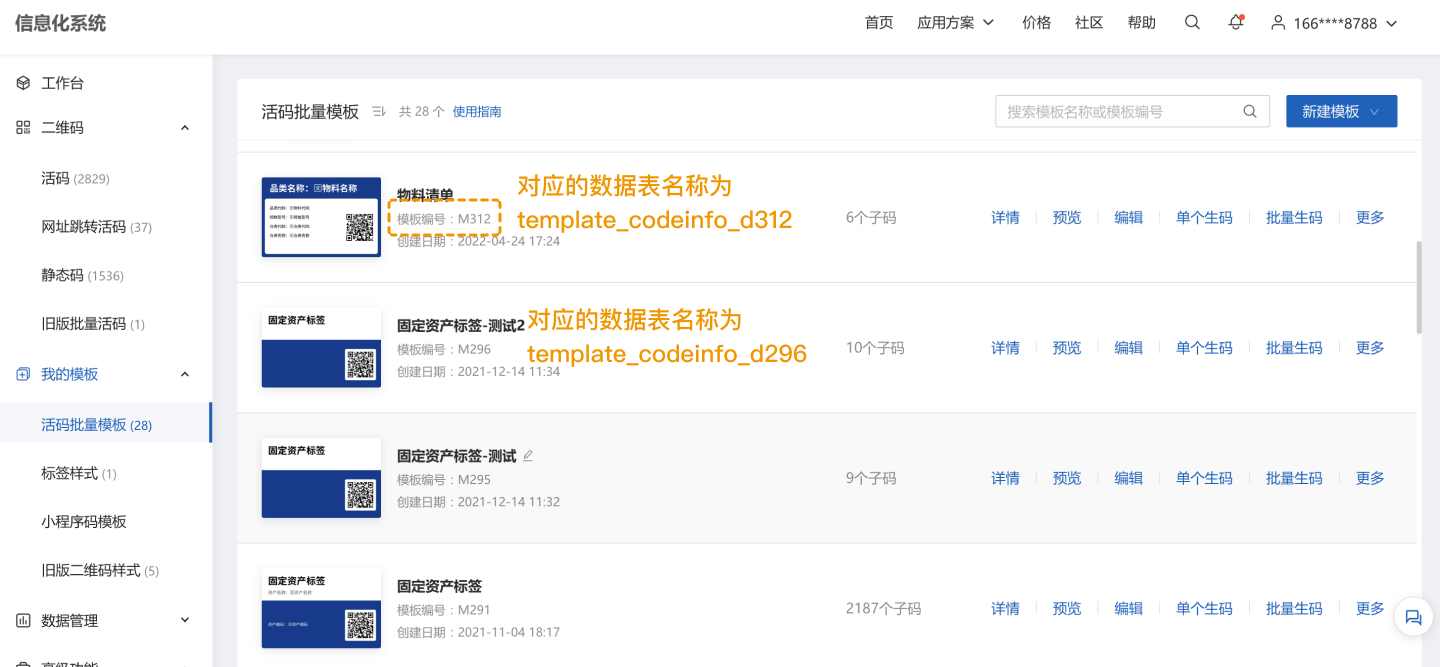
- Version 2: Suffix is the internal bulk template ID. Edit the bulk template and get the ID from the URL, as shown below.
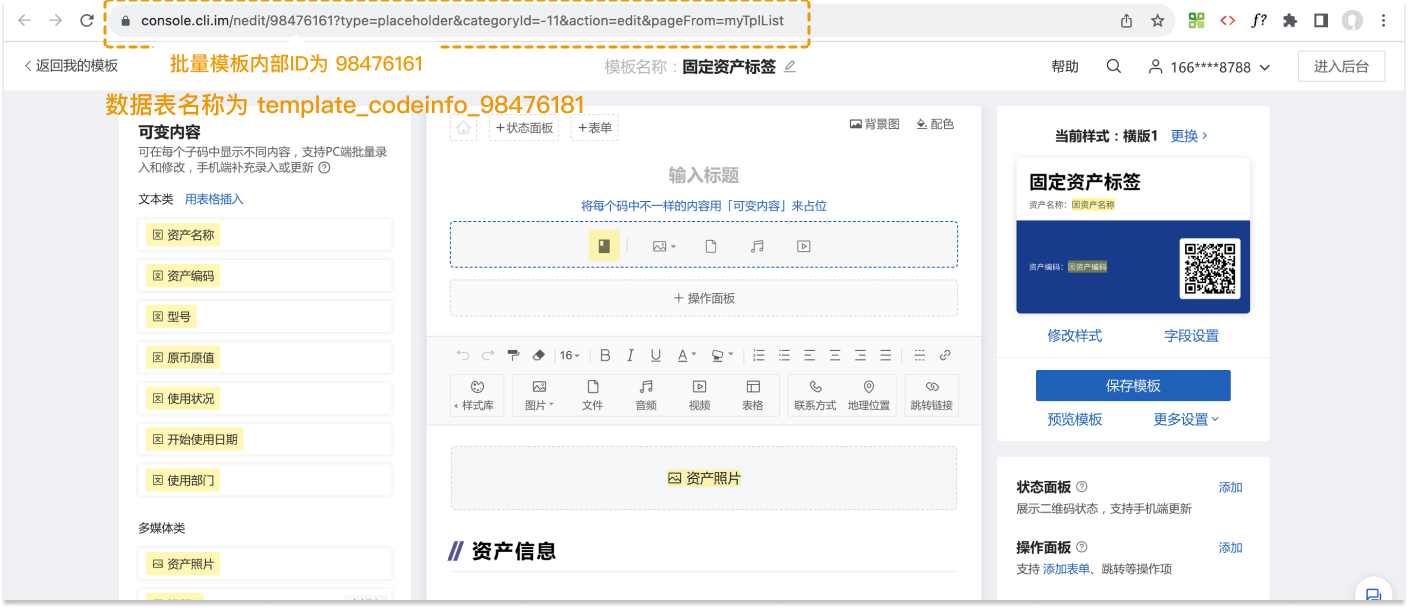
6.2 Field Descriptions:
| Field | Type | Description | Example |
|---|---|---|---|
| code_id | int | Unique QR code identifier | 67654543 |
| tpl_code_id | int | Unique bulk template identifier | 56335353 |
| 状态 | string | Whether the bulk sub-code has been deleted | Normal |
| ... | string | The following fields are the variable content from the bulk template |
7. record_review_data — Follow-Up Actions Data Table
Description: This table is pushed when follow-up actions are added to a form record, or when the follow-up processing status is marked. View Follow-Up Actions feature
| Field | Type | Description | Example |
|---|---|---|---|
| review_id | int | Unique identifier for the follow-up action record | 67654543 |
| record_id | int | Unique identifier of the form record this follow-up is linked to | 12220988 |
| 状态 | string | Whether this follow-up record has been deleted | Normal/Deleted |
| 来源 | string | How the follow-up record was added | Manual entry/Forwarded record/Forwarded to WeCom colleague/Changed processing status/Submitted form record/Sent notification/Replied to comment |
| 文本内容 | string | The specific content of the comment / the processing status change log | Updated record to [Completed]/@Zhang San/[Image]... |
| 关键内容 | string | The updated processing status / when a form is submitted via follow-up actions, key content shows the unique identifier of the corresponding form record | Completed/12220988 |
| 附件 | string | Multimedia files submitted via follow-up actions (images, audio recordings, handwritten signatures, etc.) | |
| 填写人 | string | Submitter name | Zhang San |
| 填写时间 | datetime | Time the follow-up record was added | 2020-11-20 15:20:00 |
8. base_task — Plan Basic Info Table
Description: This table is pushed when a plan has been created in your account and execution has begun. Plan Management feature
| Field | Type | Description | Example |
|---|---|---|---|
| task_id | int | Unique plan identifier | 33886 |
| 计划名称 | string | Plan name | Monthly Fire Extinguisher Inspection |
| 描述 | string | Plan description |
9. code_task_log — Plan Execution Log Table
Description: This table is pushed when a plan has been created and execution has begun. After the database is activated, only plan cycle data for cycles that start executing after activation is pushed. Historical cycles and the cycle currently in progress at activation are not pushed.
This table does not include QR code name information. To get code details, join it with base_codeinfo or template_XXX.
| Field | Type | Description | Example |
|---|---|---|---|
| log_id | int | Unique identifier for this plan task entry | 239168567 |
| task_id | int | Unique plan identifier | 33886 |
| 计划名称 | string | Plan name | Monthly Fire Extinguisher Inspection |
| code_id | int | Unique QR code identifier | 67654543 |
| 状态 | string | Execution status for this cycle | Options: Completed/Incomplete/About to Expire/Completed Late/Expired Incomplete |
| 开始时间 | datetime | Plan cycle start time | 2020-12-10 12:00:00 |
| 执行时间 | datetime | Time the status was last changed | 2020-12-10 13:00:00 |
| 截止时间 | datetime | Deadline for this QR code in the current cycle | 2020-12-10 18:00:00 |
| 是否过滤 | string | Whether the QR code is filtered based on "no inspection required" conditions | Options: Yes/No |
| 变更方式 | string | How the status was changed | Record |
| 来源 | int | When changed via form submission, the unique identifier of the corresponding form record | 12220988 |
来源记录结果 (Source record result) | string | When changed via form submission, the recorded result from the corresponding form record | Device Normal |
10. code_tags — QR Code Group Table
Description: This table is pushed when groups are in use and QR codes have been added to groups. View Group Management feature
| Field | Type | Description | Example |
|---|---|---|---|
| code_id | int | Unique QR code identifier | 67654543 |
| e.g. Building 1 Fire Extinguishers | int | Group name. If the QR code belongs to this group, the value is 1 | 1 |
| e.g. Building 2 Fire Extinguishers | int | Group name | 1 |
| ...... | int | All groups in your account will appear here |
11. base_members — Member Info Table
Description: This table is pushed when advanced members are added to your account. Only advanced member information is synced; basic member information is not pushed. View Member feature
| Field | Type | Description | Example |
|---|---|---|---|
| member_id | int | Unique identifier for the collaborating member | 2091263 |
| 姓名 | string | Collaborating member name | Zhang San |
| 手机号 | string | Collaborating member phone number | 135xxxx8934 |
12. base_auth_msg — Submitter Info Table
Description: This table is pushed whenever a form record is submitted or a status update is recorded. The submitter is the person who filled out the form or changed the status. View Submitter Component
- If no form was filled out, only auth_id is shown.
- If a form was filled out but the submitter component was not used, only auth_id is shown; the name will be "WeChat User XXXX".
- If a form was filled out using submitter components (name, phone, employee ID, license plate, ID card, etc.), the corresponding field data will be shown.
| Field | Type | Description | Example |
|---|---|---|---|
| auth_id | int | Unique submitter identifier | 12789054 |
| 姓名 | string | Submitter name | Li Si |
| 手机号 | string | Submitter phone number | 135xxxx8934 |
| 工号 | string | Submitter employee ID | D234 |
| 车牌号 | string | Submitter license plate | 浙A.12342 |
| 身份证 | string | Submitter ID card number | 343xxxxxxxxxxxxx |
13. record_audit_data — Record Approval Ticket Table
Description: This table is pushed when a record pending approval is submitted, or when a record is reviewed. View Approval feature
| Field | Type | Description | Example |
|---|---|---|---|
| auth_id | int | Unique approval ticket identifier | 9001 |
| record_id | int | Unique identifier of the record linked to this approval ticket | 1001 |
| 状态 | string | Approval status | Pending/Approved/Rejected |
| 审核标题 | string | Title of the approval stage (multi-level approvals); empty for single-level approvals | Finance Review |
| 指定审核人 | string | Reviewer designated by the submitter or a previous approver; empty if none designated | Zhang San |
| 审核人 | string | Actual reviewer who performed the review | Zhang San |
| 审核时间 | datetime | Actual review time | 2024-09-20 15:20:00 |
| 审核签名 | string | Signature image URL signed by the actual reviewer; empty if no signature | https://ncstatic.clewm.net/rsrc/2024/1015/15/c12d5af513b275ba2465f923557a1f7c.png |
| 审核回复 | string | Reply message filled in by the reviewer during approval; empty if not filled | The submitted content does not meet requirements |
| 创建时间 | datetime | Approval ticket creation time | 2024-09-20 10:20:00 |
14. base_todo — Todo Data Table
Self-hosted MySQL supports syncing todos created from records. First configure and enable a database sync destination. Todos are written to base_todo within the existing form and QR code sync scope. You do not need to select separate todo push triggers, and the switches for member notifications and group robot notifications do not affect this sync.
| Item | Rule |
|---|---|
| Primary key | todo_id; the same todo always updates its corresponding row |
| Stored scope | Currently visible pending and completed todos; not a complete history |
| Completion content | 完成说明 (completion notes) and 完成附件 (completion attachments) preserve details of the completion action; 完成记录ID (completion record ID) links to the record submitted to complete the todo |
| Deletion and hiding | The row is deleted when the todo is deleted, hidden because a new round of todos replaces it, hidden when its source record is deleted, or no longer exists at the source |
| Restoration | When the source record and its associated todo are restored, the row is written again during sync |
| Narrowing the sync scope | Old rows that no longer fall within the new scope are not all automatically removed |
The official database and self-hosted MySQL use the same public todo fields and data rules. View the complete fields, attachment format, completion record links, and FAQ.
The table is created as needed when a todo is first written. Missing required columns are added automatically during writes. The sync account needs write permissions and the necessary permissions to create and alter tables. You do not need to create the table manually; the absence of an empty table immediately after enabling sync does not indicate a failure.
A full sync backfills currently valid, visible todos within the sync scope after records and other data. It does not restore deleted or hidden historical todos. Whether backfill has finished for an existing account depends on the actual results.
Select a todo and check its data in the destination database by todo_id. After completing it, wait for sync and check the completion information and sync_time in the same row. If it has not synced, check whether the destination is enabled, the data scope, the todo's visibility, sync progress, and the database connection and permissions.
Event Push Reference
1. Dynamic QR Codes
| Event | Pushed | Affected Tables | Behavior |
|---|---|---|---|
| Single code created | Yes | base_codeinfo | A new QR code record is added to base_codeinfo |
| Single code created — with status | Yes | base_codeinfo, code_state, code_state_log, table_d[x], table_relation, base_table_data | A new record is added to each affected table |
| Single code edited | Yes | base_codeinfo | The modified data in base_codeinfo is updated, overwriting the original |
| Single code deleted | Yes | base_codeinfo | A QR code record is deleted from base_codeinfo |
| Single code deleted — with form data | Yes | base_codeinfo, table_d[x], base_table_data | A record is deleted from each affected table |
| Single code deleted — with status | Yes | base_codeinfo, code_state, table_d[x], code_state_log, base_table_data | A record is deleted from each affected table |
2. Bulk Templates
| Event | Pushed | Affected Tables | Behavior |
|---|---|---|---|
| New bulk template created | No | - | - |
| New bulk template created — with status | Yes | code_state, code_state_log | code_state adds a status record for the template; code_state_log adds the initial status change log |
| Bulk template title edited | No | - | - |
| Bulk template variable content edited — no sub-codes | No | - | - |
| Bulk template variable content edited — with sub-codes | No | - | - |
| Bulk template deleted — with sub-codes | Yes | base_codeinfo, template_codeinfo_[x] | Corresponding records are deleted from each affected table |
| Bulk template deleted — with sub-codes/form data | Yes | base_codeinfo, template_codeinfo_[x], base_table_data, table_d[x] | Corresponding records are deleted from each affected table |
| Bulk template deleted — with sub-codes/status | Yes | base_codeinfo, template_codeinfo_[x], code_state, code_state_log | Corresponding records are deleted from each affected table |
| Sub-code created | Yes | base_codeinfo, template_codeinfo_[x] | Corresponding records are added to each affected table |
| Sub-code created — with status | Yes | base_codeinfo, template_codeinfo_[x], code_state, code_state_log | Corresponding records are added to each affected table |
| Sub-code deleted | Yes | base_codeinfo, template_codeinfo_[x] | Corresponding records are deleted from each affected table |
| Sub-code deleted — with status | Yes | base_codeinfo, template_codeinfo_[x], code_state, code_state_log | Corresponding records are deleted from each affected table |
| Sub-code deleted — with form data | Yes | base_codeinfo, template_codeinfo_[x], base_table_data, table_d[x] | Corresponding records are deleted from each affected table |
| Sub-code edited | Yes | base_codeinfo, template_codeinfo_[x] | If the sub-code name is edited: updates the corresponding record in base_codeinfo. If a variable content value is edited: updates the corresponding sub-code record in template_codeinfo_[x] |
3. Forms
The following events apply when form data exists; no push occurs if there is no form data.
| Event | Pushed | Affected Tables | Behavior |
|---|---|---|---|
| Form deleted | Yes | table_d[x], base_table_data | All records in table_d[x] are deleted (table structure is retained); matching records are removed from base_table_data |
| Form component added | Yes | table_d[x] | A new component field is added to table_d[x] with an empty value |
| Form component edited | Yes | table_d[x] | The original component field is retained with an empty value; the edited component field is added as a new column |
| Form component deleted | Yes | table_d[x] | The original component field is retained with an empty value |
| Form name edited | Yes | table_d[x], table_relation | The form name is updated in table_d[x] and table_relation |
| Form data submitted | Yes | base_table_data, table_d[x], table_relation, base_auth_msg | Corresponding records are added to each affected table |
| Form data pending review | Yes | base_table_data, table_d[x], table_relation, base_auth_msg | Corresponding records are added to each affected table; differs from a regular submission in that base_table_data and table_d[x] include an additional review status field |
| Form data approved or rejected | Yes | table_d[x], base_table_data | The review status field value is updated in table_d[x] and base_table_data |
| Form data edited | Yes | table_d[x], base_table_data | The specified record is updated in table_d[x] and base_table_data, overwriting the original |
| Form data deleted | Yes | table_d[x], base_table_data | The specified record is deleted from table_d[x] and base_table_data (table structure is retained) |
4. Status
Status-related data sync is delayed by 60 seconds.
| Event | Pushed | Affected Tables | Behavior |
|---|---|---|---|
| Status group added | No | - | - |
| Status group name edited | No | - | - |
| Status item name edited | No | - | - |
| Status item added/deleted | No | - | - |
| Status group deleted | No | - | - |
| QR code status changed | Yes | table_d[x], table_relation, base_table_data, code_state, code_state_log, base_auth_msg | code_state: if a record for this QR code exists, it is overwritten; otherwise a new record is added |
| QR code status changed after status group edited | Yes | table_d[x], table_relation, base_table_data, code_state, code_state_log | code_state: the original status group field is retained with an empty value; the new status group field and its value are added |
| QR code status changed after status item edited | Yes | table_d[x], table_relation, base_table_data, code_state, code_state_log, base_auth_msg | code_state: the value of the corresponding status item field is updated; code_state_log: a new status change record is added |
5. Plan Management
Data is only pushed after a plan starts executing (after creation or modification).
| Event | Pushed | Affected Tables | Behavior |
|---|---|---|---|
| Plan created | No | - | - |
| Plan started | Yes | base_task, code_task_log | Corresponding records are added to each affected table |
| Plan overdue | Yes | code_task_log | The status field value is updated in code_task_log; the execution time field is automatically set to the time of the status change |
| Plan deleted | Yes | base_task, code_task_log | Corresponding records are deleted from each affected table |
| Plan edited | Yes | base_task, code_task_log | If the plan name is changed, the corresponding record in base_task is updated and overwritten |
6. Follow-Up Actions
| Event | Pushed | Affected Tables | Behavior |
|---|---|---|---|
| Follow-up actions enabled | No | - | - |
| Follow-up actions disabled | No | - | - |
| Follow-up action submitted | Yes | record_review_data | A new record is added to record_review_data |
| Follow-up action [Form] submitted | Yes | record_review_data, base_table_data, table_d[x], table_relation, base_auth_msg | A new record is added to record_review_data; the form submission logic is also re-run. The source record number field in table_d[x] will contain the record serial number of the linked form record |
| Follow-up action record deleted | Yes | record_review_data | The corresponding record is retained in record_review_data; the status field is changed to "Deleted" |
| Processing status marked | Yes | record_review_data | A new record is added to record_review_data |
7. Directories
| Event | Pushed | Affected Tables | Behavior |
|---|---|---|---|
| Directory renamed | No | - | - |
| QR code moved to a different directory | Yes | base_codeinfo | The directory field value is updated in base_codeinfo |
| Directory deleted | Yes | base_codeinfo, template_codeinfo_[x], table_d[x], base_table_data, code_state_log, code_state, code_task_log | All table data for QR codes in this directory is deleted (table fields are retained with empty values) |
8. Members
| Event | Pushed | Affected Tables | Behavior |
|---|---|---|---|
| Basic member added | No | - | - |
| Advanced member added | Yes | base_members | A new member record is added to base_members |
| Advanced member name edited | Yes | base_members | The corresponding member record is updated in base_members |
| Advanced member deleted | No | - | - |
9. Todos
Creating or completing a todo, or changing its information, updates base_todo. Deletion, hiding, and restoration follow the todo sync rules.
FAQ
1. Data Is Not Being Pushed to the Private Database
This is likely caused by a table encoding issue. Change the database encoding to utf8mb4.
2. After Renaming a QR Code, Why Isn't the QR Code Name Updated in the Form Data Table?
QR code names in form data tables are not updated automatically. If you need the latest QR code name, use a LEFT JOIN with the base_codeinfo table on the code_id field.
3. After Renaming a Form Component, There Are Two Columns in the Table — One with the Old Name and One with the New Name.
This is expected behavior. When a component is renamed, the original column is retained.
4. I Set Up a Filter to Exclude QR Codes with Abnormal Status Values in the Plan, but the Data Still Appears in the Table.
The table contains all plan task data. Use the [是否过滤] (Is Filtered) field to determine whether a specific plan entry has been filtered. Note: filtering only takes effect in the next cycle after a status change.
5. After Activation, I Notice Some Data Is Missing
First check whether the data is within the sync scope and review the historical sync rules for that data type. The initial sync needs to process existing data. Todos are backfilled after records and other data, so they may still be waiting for earlier steps to finish. If sync is not progressing normally, check the connection and permissions, or contact online support for troubleshooting.
6. Why Didn't the Database Update After I Edited a Form Field?
Editing a form does not trigger a database update. Updates are only triggered when new form data is added or existing records are edited. Simply submitting a new record will trigger the update.
7. My Server Uses an Allowlist — How Do I Configure It?
Contact technical support to get the list of CaoLiao outbound IP addresses.
8. Why Isn't There a Dynamic Data Table?
Dynamic data is an aggregate of multiple data types, including form data and status change data. There is no dedicated dynamic data table in the pushed database. Select the form data table or status change data table as needed.
9. The Image Component Stores Multiple Image URLs Concatenated Together. How Do I Retrieve Individual Image URLs?
Image component data is stored in the format urls_1,urls_2,.... The number of image URLs can vary. Here are SQL functions to extract individual image URLs — replace 照片_233233 with your actual field name:
urls_1: SUBSTRING_INDEX(照片_233233, ',', 1)
urls_2: if( LENGTH(照片_233233) - LENGTH(REPLACE(照片_233233, ',', '')) >= 1, SUBSTRING_INDEX(SUBSTRING_INDEX(照片_233233, ',', 2), ',', -1) ,'')
urls_3: if( LENGTH(照片_233233) - LENGTH(REPLACE(照片_233233, ',', '')) >= 2, SUBSTRING_INDEX(SUBSTRING_INDEX(照片_233233, ',', 3), ',', -1) ,'')
urls_3: if( LENGTH(照片_233233) - LENGTH(REPLACE(照片_233233, ',', '')) >= 3, SUBSTRING_INDEX(SUBSTRING_INDEX(照片_233233, ',', 4), ',', -1) ,'')
Continue incrementing the pattern for additional images.
10. Why Does the Todo Table Have No Assignee, or Why Can't I Find Deleted Todos?
base_todo currently does not provide assignee or handling group columns. 完成人 (the person who completed the todo) is not a substitute for the assignee. This table only stores currently visible todos. Rows for deleted or hidden todos are removed during sync. For fields and deletion/restoration rules, see the Todo Data Table Reference.