Data API Features
CaoLiao QR Code offers several data integration methods, including Webhook, an official database, and a private database. These automatically sync business data from the CaoLiao platform to your existing systems or databases for data analysis, visual reporting, and integration with other business systems.
To write data from an external system into CaoLiao, use OpenAPI V2 to submit records to CaoLiao forms and exchange data between systems.
Besides API integration, you can use CaoLiao QR Code MCP to access CaoLiao features directly in AI tools such as WorkBuddy, Qwen Work, and Doubao Work. Through conversation, you can query and analyze business data, generate reports, create QR codes, build forms, and configure recurring tasks, letting AI help build and manage business applications.
| Push Method | Description | Content Pushed |
|---|---|---|
| Webhook | Pushes form data in JSON format to a URL you specify | Newly submitted form data, edited form data, form review result notifications, marking processing progress. *Other data types not yet supported |
| Official Database | Each user account has a dedicated cloud database. Once activated, the database syncs data from your CaoLiao workbench | Provides data tables for QR code basic info, form data, bulk sub-codes, QR code status, plan completion, recurring task results, and current todo data |
| Private Database | Pushes data in real time to your enterprise database (MySQL 5.7 only) | Same as the official database — provides data tables for QR code basic info, form data, bulk sub-codes, QR code status, plan completion, and current todo data |
| Group Robots (WeCom, DingTalk, Feishu) | After a form is filled and submitted, the information is instantly pushed to the corresponding group chats via WeCom, DingTalk, or Feishu | Newly submitted form data, edited form data, form review result notifications, marking processing progress |
| Sync to Tencent Docs | Form data can be synced in real time to Tencent Docs smart spreadsheets | Newly submitted form data, edited form data, form review result notifications, marking processing progress |
Database Sync for Processing Progress, Todos, and Recurring Tasks
| Data | Sync Behavior | Documentation |
|---|---|---|
| Processing progress notes and attachments | Once official database sync is enabled, these are written to record_review_data with the current progress update. No separate switch is needed to sync these details. This improvement does not automatically backfill all historical details | Fields and Attachment Format |
| Current todo data | Supported by both the official and private databases and written to base_todo. Includes currently visible pending and completed todos; updates overwrite the same todo's row | Todo Fields and Sync Rules |
| Recurring task results | The official database writes these results to cycle_task, cycle_task_instance, and cycle_task_entity_task. It syncs cycles created after activation | Find missed inspections using recurring task tables |
These features require database sync to be configured and enabled, and the data must fall within the existing sync scope. Todo database sync does not require selecting individual push triggers. It is separate from member notifications and group robot notifications. These rules do not mean that Webhook or group robots support the same data structures.
To show associated todos and completion records in exported reports, use a separate feature: Todo Variables in Custom Word Templates. Database columns and Word variables are not directly interchangeable.
Recurring task tables
| Table | What it records | Common fields |
|---|---|---|
cycle_task | Each run of a recurring task, which identifies the cycle | — |
cycle_task_instance | Summary statistics for each cycle, including completion, overdue, and skip rates | — |
cycle_task_entity_task | Each QR code's execution result for each cycle | code_id: the code's unique ID. Join with base_codeinfo to get its name and location.execute_status: filter for “未完成” (incomplete) to find missed inspections.execute_time: the completion time, which lets you check whether the inspection finished late. |
- Deleting source data also deletes the corresponding database records. Hidden QR codes continue to sync.
- Deleting a recurring task or selecting Pause and Delete removes its instances and detail records. Export any records you need to keep beforehand.
Use Cases
1. Push to WeCom, DingTalk, or Feishu Group Chats Through Group Robots
In forms created with CaoLiao, once a submitter scans the QR code and submits data, that information can be instantly pushed to the corresponding group chats via WeCom, DingTalk, or Feishu — enabling instant sharing and communication to improve team collaboration. Learn more

2. Sync Form Data to Tencent Docs
CaoLiao data can be synced in real time to Tencent Docs smart spreadsheets. Once activated, historical form data is synced and new submissions are pushed in real time, with the option to build data dashboards for instant data sharing. Learn more

3. Connect to WPS, Feishu, and Other Multidimensional Spreadsheets to Use Your Data
Enable the [Official Database] feature and connect to it with tools like WPS or Feishu multidimensional spreadsheets to freely use the data and build custom dashboards.
- WPS is available free for a limited time. View WPS example
- The Feishu free plan has limits: up to 1,000 synced rows and no more than 3 data tables; exceeding these limits requires a paid plan. View Feishu example

4. Connect to BI Analytics Tools to Build Real-Time Data Reports
Enable the [Official Database] feature and use a data analytics tool to connect to CaoLiao's official database for data analysis or report creation. View example and tutorial

Data Push Methods
Any push method can be activated for free. The Industry Edition has unlimited push records per month; the Flagship Edition is limited to 20,000/month; the free version and other paid versions are limited to 1,000/month.
1. Webhook
CaoLiao pushes form data in JSON format to a URL you specify. The URL must be publicly accessible. You can then write code to receive the data and integrate it with other systems or workflows. View Webhook documentation
Webhook Data Pushed
New form submissions, edited form records, form review result notifications, marking processing progress.
Other data types are not yet supported.
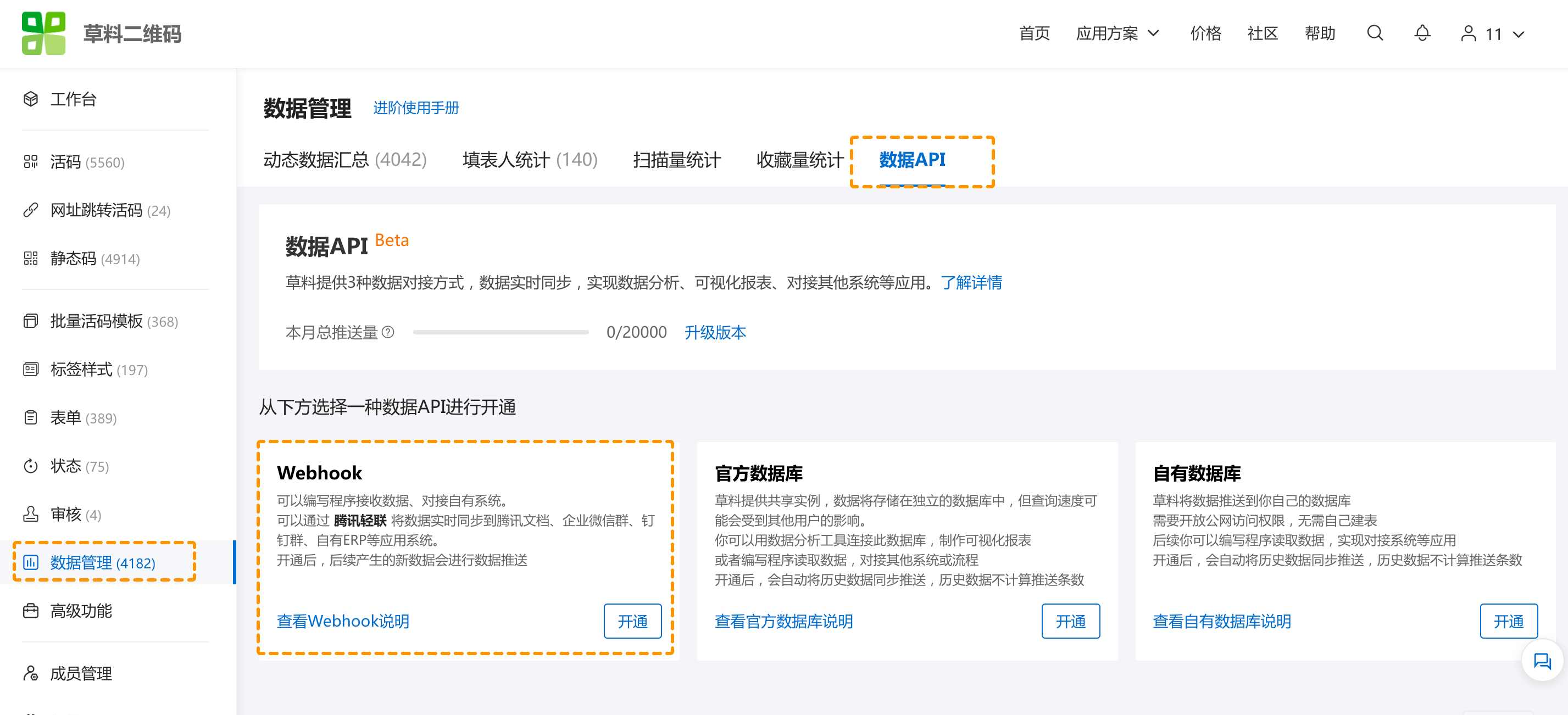
How to Activate Webhook
In the CaoLiao workbench, go to [Advanced Features] > [Data API], select [Webhook], enter the receiving URL, choose the forms to push, and save. After activation, new data will be pushed automatically.
2. Official Database
CaoLiao provides each user with a dedicated cloud database. After activation, it syncs your workbench data. You can then connect a data analytics tool to this cloud database to create data reports.
Official Database Data Pushed
Provides data tables for QR code basic info, form data, bulk sub-codes, QR code status, plan completion, recurring task results, and current todo data. View database field documentation
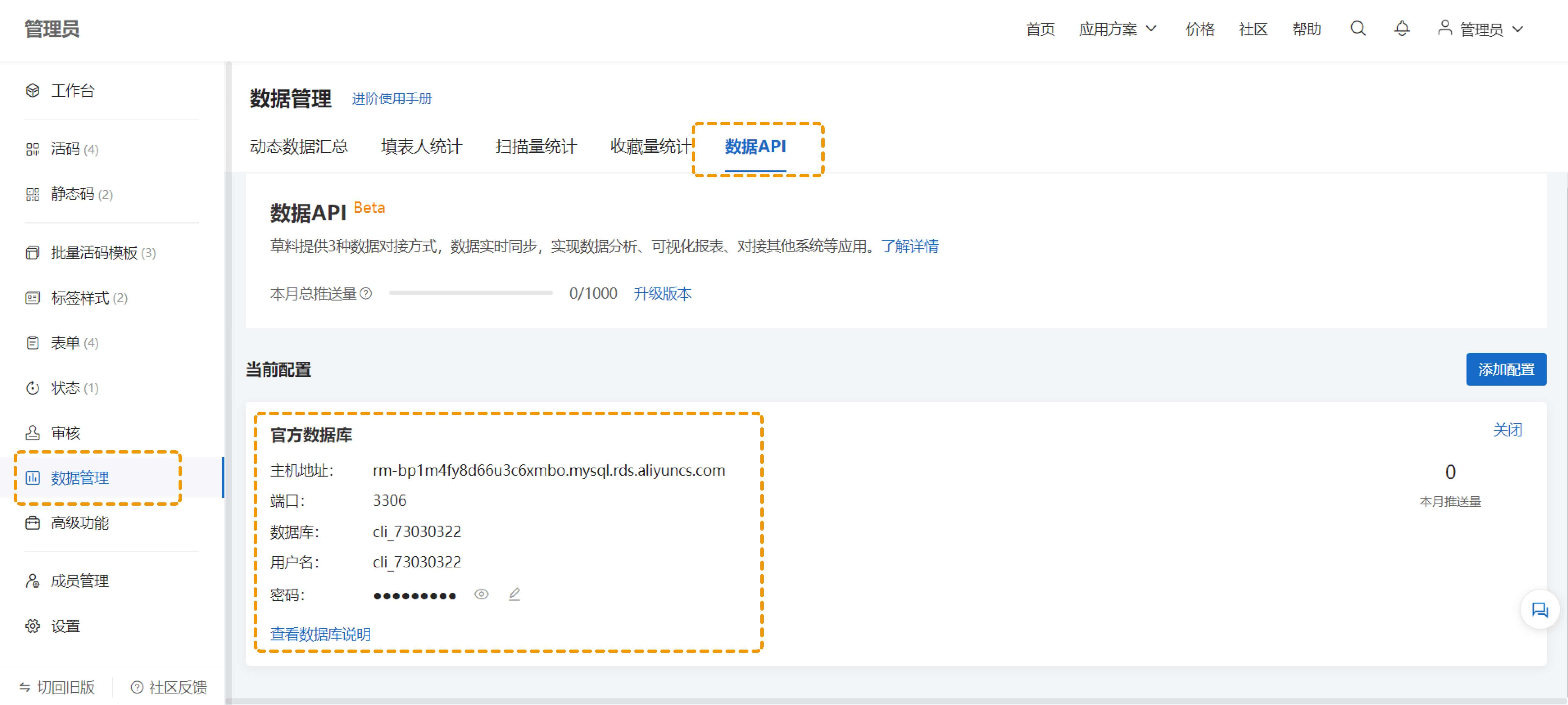
How to Activate Official Database
In the CaoLiao workbench navigation bar, go to [Advanced Features] > [Data API] and select [Official Database]. After filling in the application information, the feature will be activated automatically and data will be pushed. The initial sync needs to process existing data. Completion time depends on the data volume and sync progress.
3. Private Database
CaoLiao pushes data in real time to your enterprise database (MySQL 5.7 only). No manual table creation is needed, but the database must allow public internet access. You can then read the data freely to integrate enterprise data.
Private Database Data Pushed
Same as the official database — provides data tables for QR code basic info, form data, bulk sub-codes, QR code status, plan completion, recurring task results, and current todo data. View database field documentation
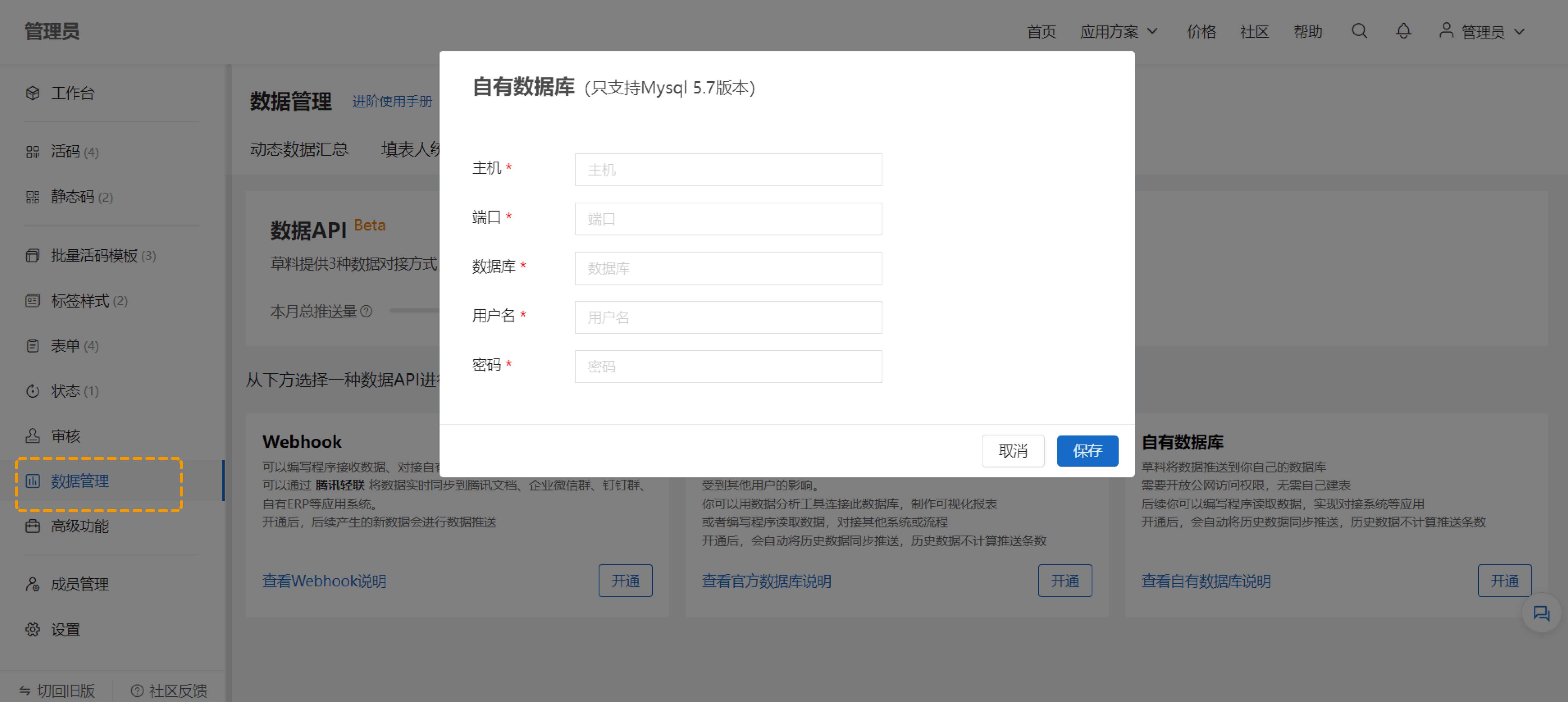
How to Activate Private Database
In the CaoLiao workbench navigation bar, go to [Advanced Features] > [Data API], select [Private Database], and enter your database host, port, credentials, and other details.
4. Group Robots
After a form is filled and submitted, the information can be instantly pushed to group chats via WeCom, DingTalk, or Feishu — enabling instant sharing and communication to improve team collaboration. View setup tutorial
5. Sync to Tencent Docs
Form data can be synced in real time to Tencent Docs smart spreadsheets. After activation, a smart spreadsheet is automatically created under the linked Tencent Docs account, historical form data is synced, and new submissions are pushed in real time for instant data sharing. View setup tutorial
Push Record Limits by Edition
Different editions have different monthly push limits for dynamic data:
- Free version, Basic Edition, Advanced Edition: first 1,000 records per month
- Flagship Edition: first 20,000 records per month
- Industry Edition: unlimited records per month
Todo current-state sync events do not count toward the data API push quota. Other data sync and service fees are not waived as a result.
Learn about data API push limits
Community
For questions about data reports, data API, and related topics, visit the CaoLiao Community to connect with data report experts. CaoLiao's official consultants and engineers check in regularly to respond.