Bulk QR Code Generation: Feature Overview
CaoLiao QR Code offers two bulk generation methods: bulk label generation and bulk dynamic QR code generation. You can create tens of thousands of QR codes at once and manage them together through a template.
Learn what bulk QR code generation can do, how the two methods differ, which one suits your scenario, and where to get started. Follow the linked tutorials for detailed steps.
1. What Is Bulk QR Code Generation?
Creating codes one by one is inefficient when you need a separate QR code for hundreds of devices, thousands of products, or a group of people. Bulk QR code generation uses "template + data" to create a large batch of QR codes with the same structure and different content at once.
A bulk template works like a "mold" for QR codes—it defines the structure of the QR code. Once the template is created, enter data in the spreadsheet or import it by uploading Excel. The system automatically fills in the corresponding positions and generates the entire batch.

Bulk QR code generation offers more than creating many codes at once. The template also manages the batch after generation:
- Reuse the template to add codes: When you add equipment, people, or products, use the existing template to generate more codes without starting over.
- Edit in bulk: Change content or label styles once and apply the changes to the whole batch, without editing codes individually.
- Lay out and download in bulk: Choose from 150+ label styles, apply a consistent layout, and download all labels in bulk, ready to print and attach.
2. Choose Between the Two Bulk Generation Methods
CaoLiao QR Code offers two bulk generation methods. Their templates and workflows are independent, so choose the right method before you start.
1. Generate Labels in Bulk: Turn Data from Your Own System into Labels
Turn a batch of product serial numbers, identifiers, URLs, or other data directly into QR code labels for printing and attachment.
The content of these codes is encoded directly from the data. Scanning returns the data itself: a URL opens the corresponding web page, while an identifier displays that identifier. These codes are also commonly used with your own system's app or dedicated scanning equipment, which recognizes the identifier and opens a business workflow in the system. The content cannot be changed after generation.
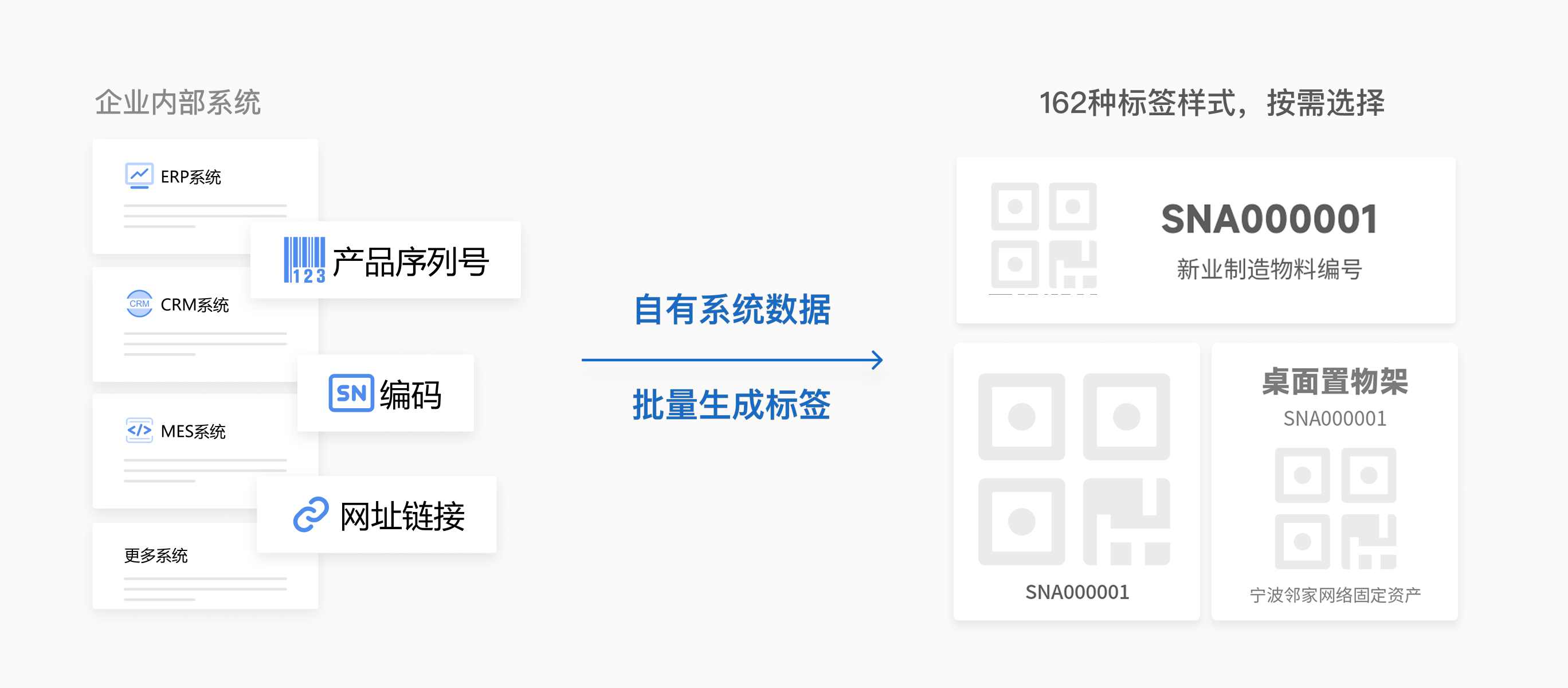
View the bulk label generation tutorial
2. Generate Dynamic QR Codes in Bulk: Build One-Item-One-Code Management with CaoLiao QR Code
Combine rich text, forms, status, and other features in a template. Each generated sub-code corresponds to one piece of equipment, person, or product. Scan to view text and image records, fill out forms, and update status.
Dynamic QR code content can be edited at any time without changing the code image. Manage the whole batch together, or use API integration to generate codes automatically.
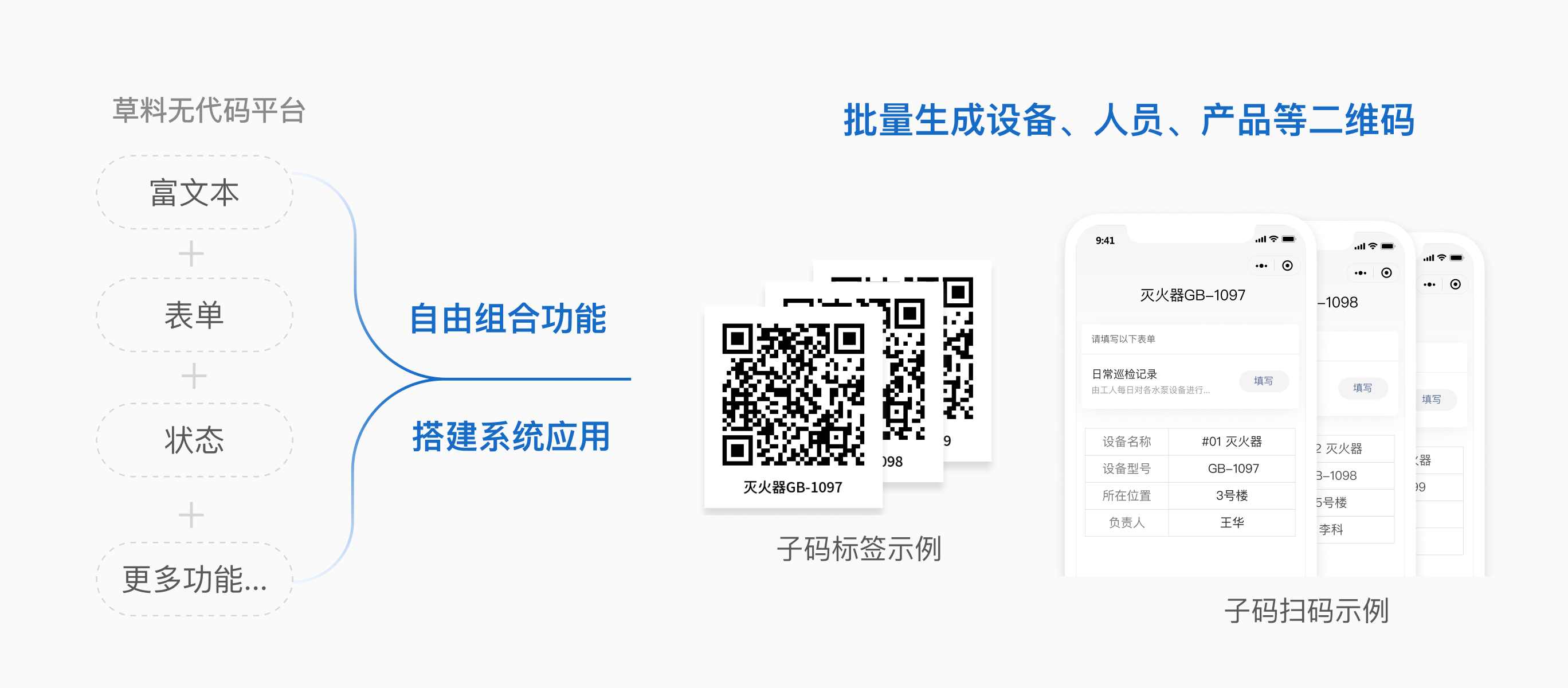
View the bulk dynamic QR code generation tutorial
3. Compare the Two Methods
| Comparison | Bulk Label Generation | Bulk Dynamic QR Code Generation |
|---|---|---|
| Content | URLs, serial numbers, identifiers, and similar data; only one column can be selected for encoding | Combine rich text, forms, status, and other features; use multiple columns of content |
| Content editing | Content is encoded directly from data and cannot be changed after generation | Content can be edited at any time without changing the QR code |
| Scanning | Dedicated equipment, dedicated apps, or general-purpose apps such as WeChat | General-purpose mobile apps such as WeChat; no additional app installation needed |
| Reuse to add codes | Reuse the configured label style at any time | Reuse the template at any time |
| Bulk management and updates | Update label styles in bulk | Update both scanned content and label styles in bulk |
| Best suited to | Codes used as identifiers with an existing system or device | Applications built with CaoLiao for one-item-one-code management |
| Tutorial | Bulk label generation | Bulk dynamic QR code generation |
To decide: use bulk label generation if the code only serves as an identifier and its content does not need updating. Use bulk dynamic QR codes if people need to view information, submit forms, and keep content up to date after scanning.
3. Typical Applications
Bulk labels are often used as identifiers with your own system: print material identifiers, asset numbers, and product serial numbers in bulk, or turn a batch of URLs into codes to attach to products and materials.
Bulk dynamic QR codes are commonly used for "one-item-one-code" and "one-person-one-code" management. Click a scenario name to view the full solution:
Find more industry applications on the Solutions home page.
4. Frequently Asked Questions
1. Can I Convert Between the Two Methods?
Not directly. The encoded content of bulk labels cannot be changed after generation. If you may need to update content or add forms, status, or other features later, choose bulk dynamic QR codes before you start.
2. How Many Codes Can I Generate at Once? Is There a Total Limit?
Each batch is capped at 20,000 codes. You can generate multiple batches, with no limit on the total number.
3. Can I Generate QR Codes for Images and Files in Bulk?
Yes. Add image or file basic fields to a bulk dynamic QR code template, then upload images or files in bulk to generate codes. See the basic fields tutorial.
4. Can I Connect My Own System Through an API to Generate Codes Automatically?
Yes. Bulk dynamic QR codes support generation through API integration. Define the data structure in advance using basic fields in the template so they can map to your system's fields one by one.
5. How Do I Manage the Batch After Generation?
Codes generated from the same template belong to that template. You can reuse it to add codes, edit content in bulk, export data in bulk, and download labels for printing in bulk. See bulk template settings and management.
6. Can AI Help Me Generate QR Codes in Bulk?
Yes. Connect CaoLiao QR Code to an AI tool that supports MCP, such as WorkBuddy, Qwen Work, or Doubao Work. Give the AI your equipment lists, product materials, and photos, and explain what codes you need. The AI organizes the materials, matches photos, generates QR codes in bulk, and configures forms and recurring form submission tasks, without requiring you to perform each step in the workbench. See the CaoLiao QR Code MCP connection instructions.
5. Get Started
Visit the bulk QR code generation page, choose the method that fits your needs, create a template, and enter data online or upload an Excel file to generate large numbers of QR codes for unified management.