Introduction to CaoLiao QR Code Platform
CaoLiao QR Code launched in 2012 as a QR code generator. After more than a decade of development, it has become a platform for building and managing business systems, with QR codes as the entry point.
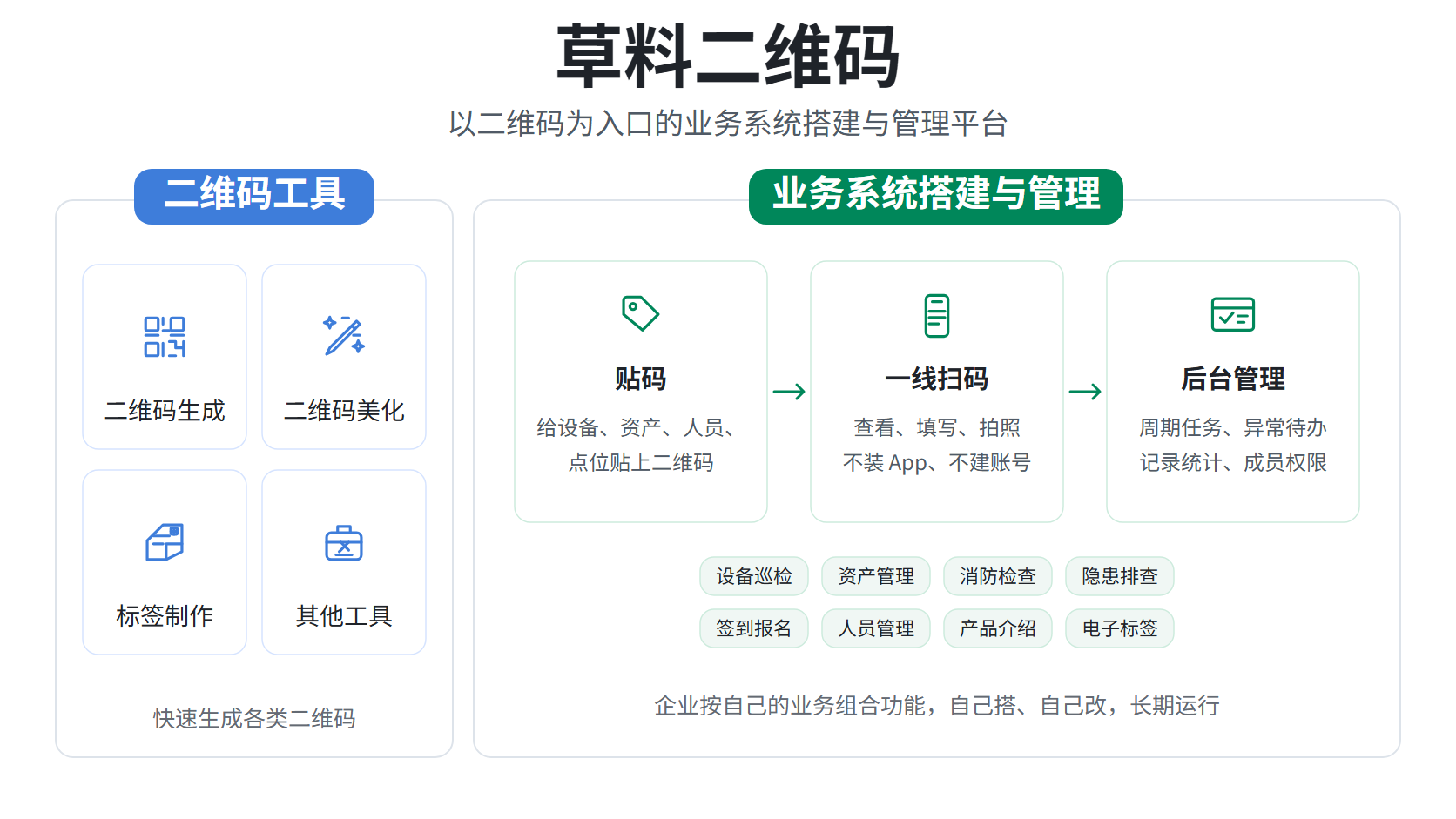
You can think of CaoLiao QR Code as two parts:
QR code tools: Anyone can generate text, URL, and other QR codes for free, with support for QR code beautification, bulk generation, and label printing.
Business system building and management platform: QR codes serve as the management entry point, attached to equipment, assets, and other managed objects. Frontline staff scan with WeChat to view information and fill in records, with no app to install and no account to create. Managers use the admin console to assign work, handle issues, and review data. Companies can build the system themselves, adjust it at any time, and keep it running for the long term.
Plenty of tools can generate a QR code. What sets CaoLiao QR Code apart is that the QR code is only the entry point. Its greater value lies in what happens after the scan: updating information, recording data, and managing the business.
What You Can Do with CaoLiao QR Code
A QR code has no fixed purpose: whatever you want people to see or do after scanning, you configure in the code. On that basis, CaoLiao QR Code has three broad types of use:
| After scanning, you want people to… | Type | Typical examples |
|---|---|---|
| View content | Display | Product information, company introductions, electronic manuals, equipment signage |
| Fill in a form once, with data summarized in the admin console | Collection | Registration and check-in, visitor registration, satisfaction surveys |
| Use one code per object to keep recording its status | One item, one code management | Equipment inspection, asset management, hazard checks, equipment repair reports |
Display: Scan to View Content, Update It at Any Time
Common uses include product introductions, business introductions, travel itineraries, and service guides. Combine text, images, videos, and files into one page and generate a QR code that anyone can scan to view. You can edit or add content at any time without changing the code, so labels, packaging, and materials that have already been printed don't need to be redone.
When there is a lot of content, you can also add navigation and categories. For example, put the images, specifications, and manuals for dozens of products into one code. Scanning opens a directory first, and people tap the product they want, much like a small mobile website.
Collection: Scan to Fill in a Form, with Data Summarized Automatically
Common uses include registration and check-in, visitor registration, and satisfaction surveys. Start by building a form, adding a field for each piece of information you want to collect: text, options, photos, and handwritten signatures are all supported. Each person scans and fills it in once, and the admin console automatically compiles the entries into one table that you can export to Excel at any time. There's no need to collect entries in a WeChat group or type them into a spreadsheet one by one.
For scenarios with stricter requirements, such as meeting check-in, you can add restrictions: people must scan on site to fill in the form, and each phone number can submit only once.
One Item, One Code Management: Keep Records Around a Single Object
Common uses include equipment inspection, asset management, hazard checks, and equipment repair reports. Unlike the first two types, where everyone views or fills in the same code, here each piece of equipment or asset gets its own code, much like an ID card. Scanning shows what it is, its current status, and what has happened to it before. You can also add new records to it: fill in a checklist, report a repair, or change its status from "Normal" to "Under Repair". Every action is stored under that code, and over time they build up into the object's complete file.
Take equipment inspection as an example. An inspector scans on site, sees the equipment information and the last inspection record, then fills in the checklist, takes photos, signs, and submits. The equipment status updates automatically. When an exception is found, an exception to-do is generated automatically and assigned to the responsible person by rule, with a due date. Overdue items are flagged in red, and once handled, a reviewer checks the result and can reject it if it doesn't meet requirements. In the admin console, managers can see which equipment has been inspected, which was missed, and which exceptions are still open. You can also set inspection cycles with automatic daily, weekly, or monthly reminders, and anything not completed on time is automatically marked as missed. Important records can use blockchain notarization, so you can later verify whether they have been altered.
These three types of use can be combined on the same code: people can view content, fill in a form, and update its status. If this is your first time, we suggest starting with the simplest single task and adding more once it works.
Why QR Codes Work as a Management Entry Point
A QR code itself is only an entry point, like a door. Scanning opens the door, and administrators configure in the admin console what's behind it, who sees it, and what data is collected. The door's value lies at both ends: it's effortless for the people using it, and it leaves complete records for the people managing it.
For Users: The Barrier Is a Single Scan
Whether a digital tool takes hold often depends on whether frontline staff actually use it. When on-site staff see equipment, an asset, a store poster, product packaging, or a registration sign, they scan with WeChat and go straight to the relevant page. There's no URL to remember, no app to install, and no system to learn first. Deploying the codes on site is easy too: labels can be plain printed paper from an office A4 printer, and with bulk QR code generation and label layout, a batch of equipment can be labeled the same day.
For Managers: Records Are Tied to the Object
On-site records break down in very specific ways: paper inspection forms can be filled in after the fact, with no way to tell whether anyone was actually there, and problems reported in a WeChat group get buried by new messages, with nobody following up on whether they were handled.
A QR code, by contrast, is attached to the object itself. Every record filled in by scanning automatically carries the time and the person who submitted it, with location and on-site photos added when needed, all stored under that object's code. Who did it, when, on which object, what evidence was left, and whether it was followed up: all of this is tied together the moment the record is submitted, without relying on memory or manual filing afterward. Records can be filtered and exported by object, time, person, or status. The ledger builds up through daily use instead of being pieced together at the end of the month.
As a result, all kinds of things on site can be managed this way:
- Attach a code to equipment, and inspections, maintenance, and repair reports all accumulate around that piece of equipment;
- Attach a code to an asset, and records of its issue, transfer, stocktaking, and repair all follow that asset;
- Attach a code to a product, and its manual, test reports, certificates, and later content updates all sit behind one entry point;
- Attach a code to a location, and patrol, rectification, and re-inspection records are kept for the long term.
This is also the difference between CaoLiao QR Code and general form tools. General form tools start from "collecting information once", while CaoLiao QR Code emphasizes "continuous records around a single object". The same code for a piece of equipment, an asset, or a product carries both information display and process records over the long term.
Systems Are Built from Standard Modules
So that frontline business staff can get started directly, CaoLiao QR Code breaks its capabilities into standard modules. With no technical background and no coding, you choose and combine modules to build a system that fits your business. There are six groups of modules:
| Module | What it does | Features included |
|---|---|---|
| Display content | Scan to view materials, with content you can update at any time | Text, image, and video display, redirect links, directory summaries, brand display, AI interpretation |
| Collect data | Scan to fill in records, with rules on how to fill them in and safeguards against falsification | Form components, AI form filling, filling restrictions, anti-fraud measures, blockchain notarization |
| Task flow | Regular inspections, exception follow-up, and approval handling | Recurring filling tasks, data approval, exception to-dos, message notifications, verification codes |
| Team collaboration | Divide the management of QR codes and data among multiple people | Designated members, advanced members, partitions, content protection, operation logs |
| Bulk applications | Generate large numbers of codes at once, and handle printing and posting | Bulk QR Code Generation, blank QR code labels, label creation, CaoLiao printing service, bulk data export |
| Connect other systems | Use it in AI, bring data into existing systems, or call CaoLiao's capabilities | CaoLiao QR Code MCP, Data API, Webhook push, WeCom integration, CaoLiao Open Platform |
How you combine the modules determines what the system looks like:
- Product introduction: Product information + images and videos + contact details + brand display
- Event registration: Event introduction + registration form + filling restrictions + data statistics
- Equipment inspection: Equipment files + inspection form + on-site verification + recurring filling tasks + exception to-dos + message reminders + permission management
Free and Paid Plans
CaoLiao QR Code has always kept the vast majority of its features free for the long term, because basic QR code capabilities should be a tool everyone can use, not a service behind a paywall. Free access gives more people the chance to start using CaoLiao QR Code, and it brings the product broader feedback and validation in real scenarios.
At the same time, the "CaoLiao brand mark" at the bottom of free QR codes spreads the word and brings in new users, a long-term return that CaoLiao QR Code values more.
Free Version: Ready to Use Once You Register
- No limit on the number of QR codes or scans, and QR codes remain valid long term;
- Unlimited image and file storage space;
- Unlimited form data collection, with long-term data retention.
The free version covers most uses by individuals and small teams.
Paid Version: More Capabilities for Deeper Needs
When your business needs go deeper, you can upgrade to a paid version on your own at any time for stronger brand image, team collaboration, and data handling.
- Remove the CaoLiao logo and watermarks;
- Multi-member collaboration with precise permissions;
- AI form filling and AI review;
- Break data export time limits, with API integration support;
- Exclusive enterprise Mini Program and other in-depth features.
CaoLiao QR Code offers 4 annual plans, priced at RMB 780, 1,280, 2,680, and 16,800 per year. You choose on your own based on the features you need, with no bundling, and you can decline to renew next year if the plan no longer fits. For specific prices and features, see the pricing page.
Who It's for, and Who It Isn't
CaoLiao QR Code is a better fit for teams that:
- Have no dedicated development team but want to move paper records, Excel ledgers, or WeChat group sign-ups online;
- Need to go live the same day or within a short time, rather than wait months for custom development;
- Have many frontline staff with high turnover, so the tool must be simple enough to use by scanning with WeChat;
- Manage objects spread across sites, such as equipment, assets, stores, warehouses, fire safety facilities, and construction points;
- Need to keep records for the long term and trace them later by object, time, person, or status.
Whether CaoLiao QR Code is a good fit depends mainly on your business needs and management approach, not on your headcount or the amount of equipment. Group companies with their own management systems can use it as the on-site data collection entry point. Companies without their own systems can also use CaoLiao to manage thousands of pieces of equipment, running it as the main system for daily inspection management for years.
It also suits any individual who just wants to generate a QR code quickly: register an account and start.
Where it isn't a fit
CaoLiao QR Code is committed to providing a standardized product that users can configure and combine according to their business needs. It does not develop dedicated systems for individual companies. Other solutions are a better choice in the following cases:
- You need custom development or private deployment: You need dedicated development for special business requirements, or you require the system and data to be deployed on your own servers or intranet.
- You need specialized features for a particular field: CaoLiao QR Code is good at daily management work such as equipment inspection, exception handling, and record tracing. If you need complex inspection route planning and staff scheduling, spare parts inventory and cost accounting, or production scheduling, a dedicated EAM or MES system is usually more suitable. CaoLiao QR Code also offers open APIs for exchanging data with these systems.
- Phones can't be used to scan on site: For example, sites with no network for long periods, sites where phones are prohibited, or sites where confidentiality requirements rule out apps such as WeChat.
How to Get Started
CaoLiao QR Code doesn't require you to install an app or desktop software. It's mainly used through the desktop web version, the WeChat Mini Program, and AI tools, so you can open the page and start right away:
- Desktop web version (https://cli.im): Supports full QR code generation, management, and system building, along with tools such as decoding and beautification;
- WeChat Mini Program (CaoLiao QR Code Mini Program): The everyday mobile tool for administrators and members, used for simple QR code generation and for viewing and managing the dynamic QR codes, forms, and data under the account;
- Use it in AI: Connect CaoLiao QR Code in AI tools that support MCP, such as WorkBuddy, Qwen Office, and Doubao Work, to create QR codes, build applications, and analyze data through conversation.
If You Just Need a Simple Code
Open the CaoLiao QR Code website or the CaoLiao QR Code Mini Program, choose a type (text, URL, file, business card, and so on), enter the content, then generate and download it.
If You Want to Build a Business Management System
We recommend working on the desktop, where the configuration options are more complete and better suited to building forms, bulk QR code generation, data management, and similar features.
More than 16 million users have used CaoLiao QR Code, building up a wealth of real-world practices in scenarios such as equipment inspection, asset management, fire safety checks, registration, and information display. CaoLiao QR Code has also organized this experience into reusable templates and solutions that you can use as soon as you register an account.
Choose from the following entry points based on your needs:
| Entry point | What you'll find | How to use it |
|---|---|---|
| Template Library | QR code templates of all kinds, ready to use | Find the template closest to your scenario, apply it, then edit the fields and content to get started |
| Application Solutions | Setup approaches organized by industry and business scenario | Good for understanding the overall approach before deciding how to configure QR codes and forms |
| Experience Articles | Management experience and selection analysis organized by scenario | Good for working out how to manage a scenario and how different approaches compare before you start |
| Customer Cases | Real practices from users in different industries | Good for seeing how peers have put it into use |
| Getting Started Guide | Basic features and first steps with CaoLiao QR Code | Start here if you're not yet familiar with CaoLiao QR Code |
| Use it in AI | Create codes directly from existing materials, build applications, and let AI analyze data | Managers who already work with AI can hand over materials such as equipment lists and let AI do the setup |
| Help Center / AI Consultation | Usage questions, feature descriptions, and tutorials | When you run into a problem, search the help documents first, or use the AI consultation at the bottom right of the page |
| Community Q&A | Specific questions from users, with answers | Others have probably run into the same problem, so search first, or ask your own question |
| Industrial Knowledge Base | Regulations, standards, industry materials, and practical experience | Good for looking up materials on compliance, on-site management, and industrial digitalization |
If you run into a problem while using the product, check the Help Center first or use the AI consultation at the bottom right of the page. If AI can't solve it, you can transfer to a human agent. Human agents can also help with matters such as bidding and government e-procurement, and paid users receive after-sales consulting support for their plan.