QR Code Beautification
CaoLiao provides basic QR code beautification settings, including logo, color, dot and eye styles, error correction level, and text overlay.
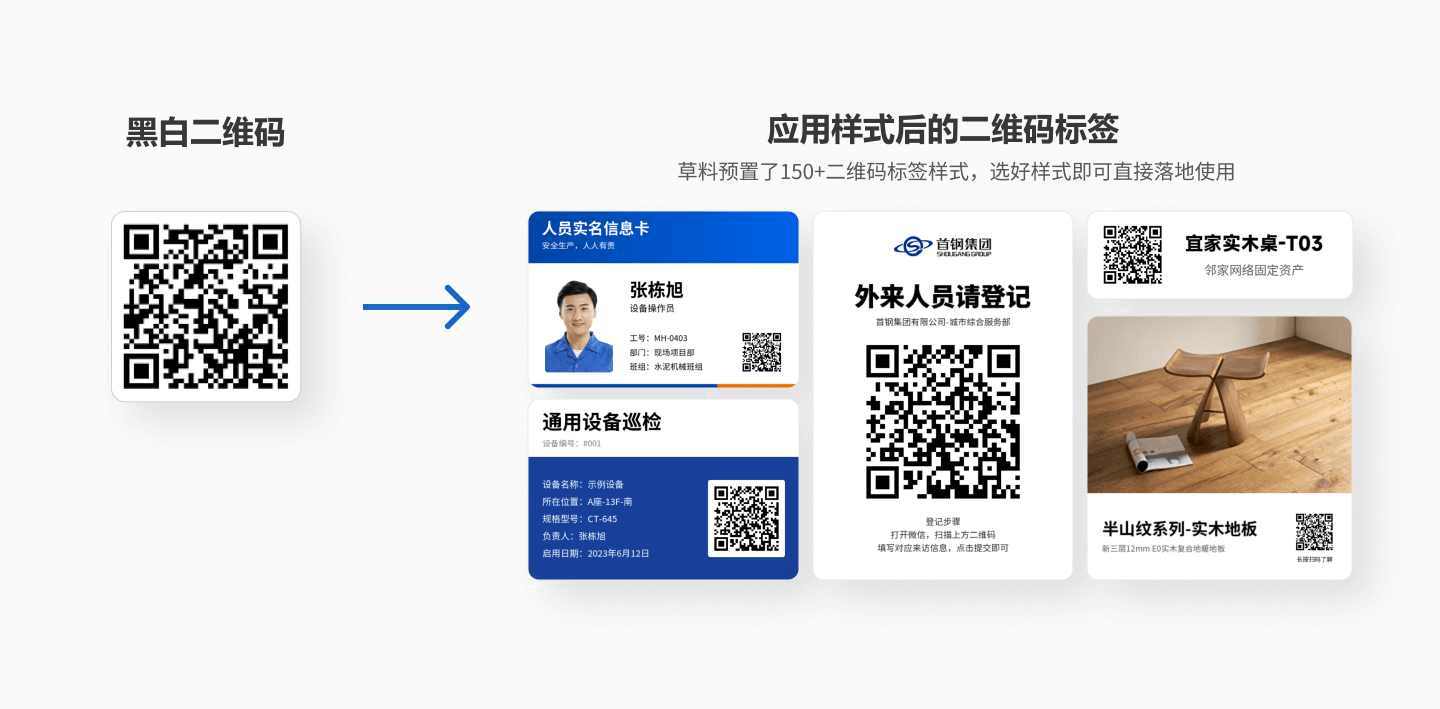
It also offers 150+ label styles where all elements — including the logo, background, and number of fields — can be customized. Styles can be saved to your account for quick reuse in batch creation.
After generating a QR code on the CaoLiao platform, click "QR Code Beautification" to configure the styling. You can also go to the CaoLiao QR Code Beautification page to enter content and generate a QR code, or upload an existing QR code image to decode it and then apply custom beautification.
Beautification Tutorials
Logo Settings
Supports uploading a local logo. We also provide a selection of generic icons and an enterprise logo library covering common companies in industries such as construction, manufacturing, and education for quick selection.
You can add different logos to the label and the QR code center. You can also make simple adjustments to the logo's shape, position, size, and shadow effect. (Freely dragging the logo position is not yet supported.)

Customize QR Code Pattern
Provides multiple QR code dot and eye shapes to choose from, and supports modifying the QR code color for flexible customization.
You can also set a background color, or upload a local background image or design one online.

Error Correction Level and Other Settings
You can also set the QR code margin to adjust the spacing between the QR code pattern and the edges. Adjust the error correction level and QR code version to control the density of the dots.

Add or Modify Text
Square QR codes support adding text above, below, or in the center of the code. Other label style templates support varying numbers of text fields, allowing you to add more text displayed in different positions.
Text font size, color, and order can also be adjusted.

A Variety of Styles to Choose From
CaoLiao provides label styles for a wide range of scenarios, ready to use as needed. The background, text, logo, and other elements on each style can be flexibly customized.
Save and Reuse Styles
You can save your configured label style to your account and reuse it directly in future batch creations. The logo, colors, background, and other elements in the style can be reused without reconfiguration. View Details

More Resources & Support
- QR Code Download | All available QR code download methods
- Custom QR Code Layout | If you are not satisfied with CaoLiao's provided styles, you can use a third-party website for layout
- A4 Layout Printing | Includes tutorials for standard A4 and A4 die-cut paper printing
- Label Printer Printing | Includes label printing and consumable recommendations
- CaoLiao Print Service | CaoLiao offers a QR code label printing service with 8 carefully selected materials to help you deploy quickly
- CaoLiao Community | Submit feedback for deep customization, API integration, or additional style requests
If you need to add more text or create more complex layouts, you can go to the label creation tool, which supports batch creation and is easier to lay out and print.