Mini Program Workbench User Guide
Overview
CaoLiao QR Code offers two ways to use the platform:
- Desktop Web Version: Supports the full range of QR code generation, management, and system-building features, as well as QR code tools such as the decoder and beautification.
- WeChat Mini Program: Serves as the mobile tool for admins and members. You can create dynamic QR codes, edit the content of existing ones, and add forms, as well as view and manage all dynamic QR codes, forms, data, and more under the account.
Accessing the Mini Program
Search for the "CaoLiao QR Code" Mini Program on WeChat, or scan the Mini Program code below.

Registration and Login
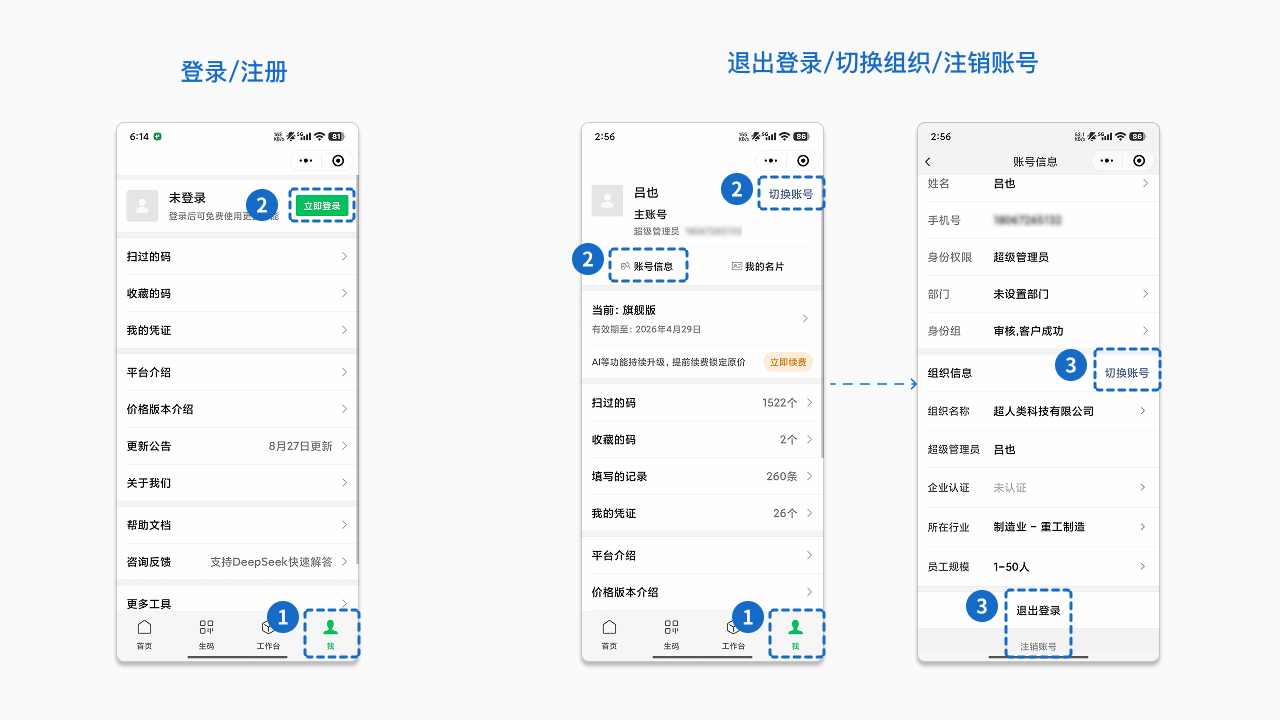
- Existing Users: Auto-login — no additional action required.
- New Users: After opening the Mini Program, tap "Log In / Sign Up" at the top of the "My" page to complete registration.
- Log Out or Switch Organization: On the "My" page, tap the account information at the top. At the very bottom of that page, you can select "Log Out" or "Switch Organization."
QR Code Generation
-
Method 1 (Quick Generation): Go to the "Generate" page in the Mini Program. At the top of the page, select a type — "Text, URL, File, Image, or Video" — and configure the basic settings.

-
Method 2 (Template Generation): Select a template at the bottom of the "Generate" page, or go to "Workbench - Template Generation" to generate sub-codes using existing bulk templates under your account.

Notes:
- The Mini Program only supports a subset of dynamic QR code features. The full feature set requires the desktop web version.
- Text and URL inputs generate static QR codes. To generate a URL redirect dynamic QR code, please use the desktop website.
- Files, images, and videos support basic configuration — such as file download permissions and image display styles — and their content can also be edited in the Mini Program after generation.
- Template generation creates bulk templates and sub-codes. Bulk templates are saved under your account for future reuse. The variable content of sub-codes can be modified on mobile, while fixed content requires the desktop web version.
- The Mini Program and desktop workbench sync in real time. All QR codes generated in the Mini Program can be viewed, edited, and managed on the desktop.
- Besides the two methods above, you can also create a dynamic QR code from scratch in the Mini Program: add image, file, and video components and forms, set form filling rules, and drag components to reorder them. The content of existing dynamic QR codes can also be edited in the Mini Program.
Workbench
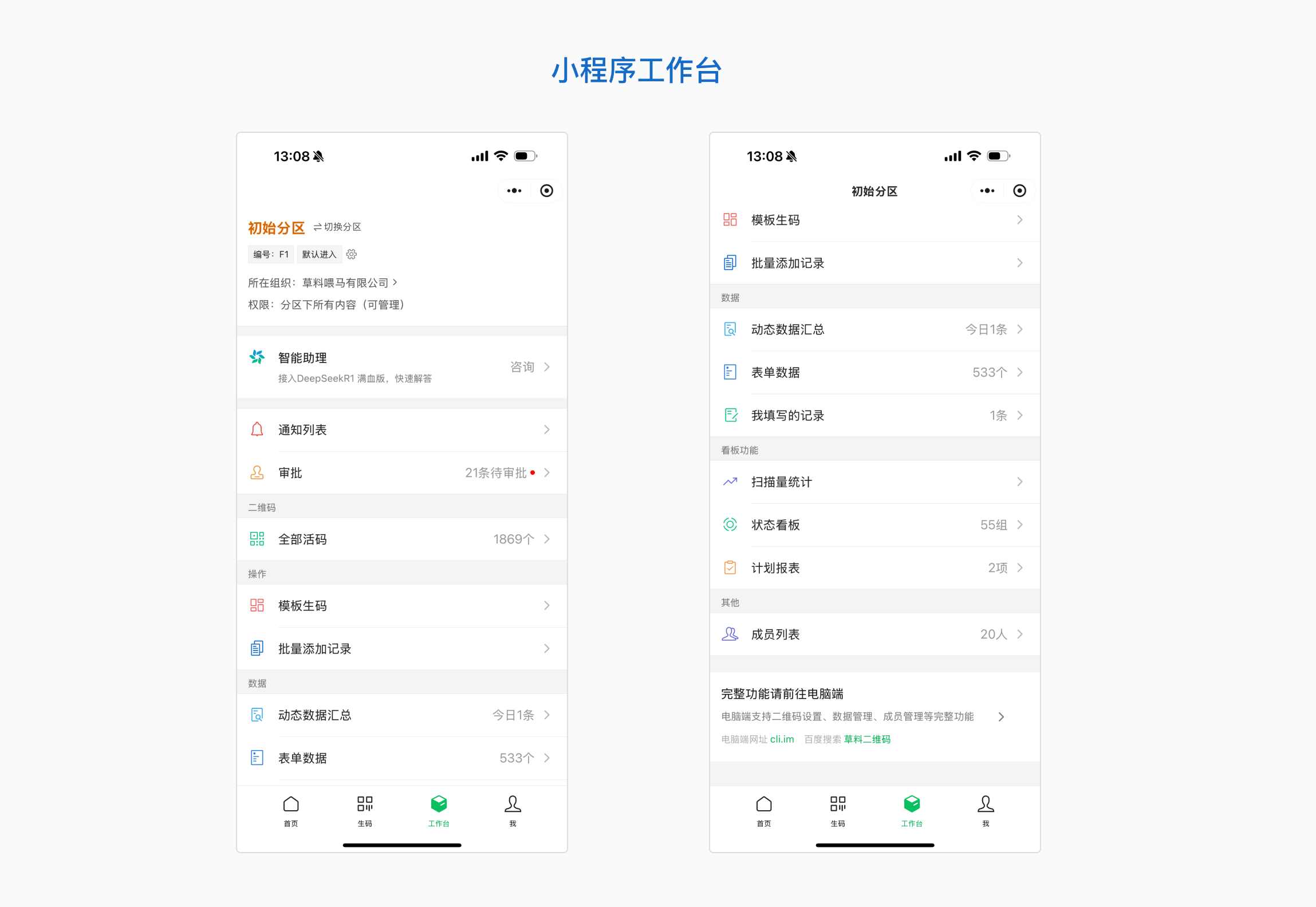
In the Mini Program workbench, you can view dynamic QR codes, dynamic data, reports, and more under your account. Admins and members have different permission levels.
Notifications
Aggregates all message notifications sent to you — such as form data submissions, follow-up actions on form data, and review messages — so you can view them all in one place.

Approvals
Centralized processing of pending approval records. Completed approval records can also be viewed here. Super admins can approve all records; advanced members can approve records within their permission scope.

All QR Codes
Admins can search, view, and manage all dynamic QR codes under the account. You can view and edit QR code content, forward it, check dynamic data, view scan statistics, download QR code images, and assign a responsible person. If a code was created using a bulk template, you can also modify the variable content of that sub-code.

Template Generation
View all bulk QR code templates and the sub-codes generated from them under your account. Supports generating a single sub-code from a template. (For bulk generation, please use the desktop.)

Batch Add Records
Add one form data record with the same content to multiple dynamic QR codes at once. Suitable for asset audits, training records, and similar tasks. Supports continuous scanning using the phone camera. View Feature Overview Added records can be viewed and exported on the dynamic data panel of the respective code, but they will not trigger review processes or message notifications. This feature is only available to admins and advanced members. A code manager can only batch-add records for the dynamic QR codes they are responsible for. Basic members cannot use this feature.

Data Management
Admins and authorized advanced members can view and manage the following data in the Mini Program:
- Dynamic Data Summary: Centrally manage all dynamic data under the account. Tap to view details with support for export, modification, and deletion. (Available to admins and authorized advanced members.)
- Form Data Management: Manage data by form unit, with export, modification, and deletion capabilities.
- My Submitted Records: View all records you have personally submitted, with options to forward, export, and more.

Dashboard
Admins and authorized advanced members can view and manage the following data in the Mini Program:
- Scan Statistics: View daily scan volume details and summary data.
- Status Dashboard: View real-time data for each status under the account. (Available to admins and authorized advanced members.)
- Plan Reports: View the completion status of plans under the account. (Available to admins and authorized advanced members.)

Member List
View and manage advanced members and basic members under the account. You can add members, modify member permissions, delete members, and more.

Features Not Yet Supported in the Mini Program
The following features require the desktop web version:
- Basic Tools: Image decoding, QR code beautification, business card QR codes, URL redirect dynamic QR codes, etc.
- QR Code Components & Settings: design library, contact info, geolocation, redirect link, directory list, navigation bar, background settings, and other components; advanced styles and brand display; QR code saving, sharing, viewing permissions, access methods settings, etc.
- Batch Creation: Bulk static QR codes and bulk dynamic QR code creation; bulk template configuration and modification; label making and print layout, etc.
- Form Settings: Post-submission page; form fill permissions, watermark, notifications settings, etc.
- System Building: Creating and managing partitions, partition homepages, permission assignment, scheduled tasks, status management, dynamic archives, anti-fraud records, blockchain evidence storage, data API integration, open platform, etc.
Note:
Desktop web version URL: https://cli.im (or search "CaoLiao QR Code Official Website" on Baidu).