Webhook Documentation
Feature Overview
CaoLiao pushes [Dynamic Data] in JSON format to a specified endpoint URL, transmitting data to another system to enable notifications and business integration. The URL must allow public internet access. Your server must return a 200 status code within 5 seconds as a response; on failure, up to 5 retries will be attempted (15s/1m/4m/16m/1h).
Currently, only form data push is supported, including: new form submissions, edited form records, form review results, and follow-up progress status updates.
Use Cases
1. Connect Third-Party Apps for Group Message Push and Spreadsheet Data Aggregation
Use Tencent HiFlow (Tencent Cloud's "app connector") to connect CaoLiao QR Code with other apps and services. This enables group message push, secondary data analysis, CRM system integration, intelligent AI, and more — breaking down data silos and putting your data to work. Learn more
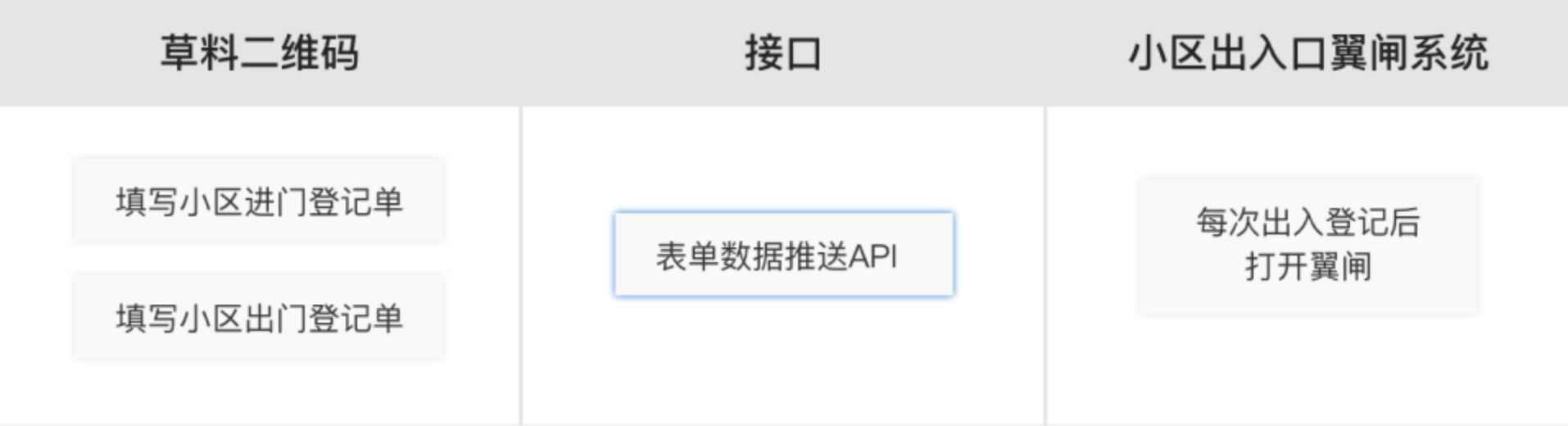
2. Integrate with Your Own Systems
Implement features such as scan-based data collection on the CaoLiao platform, then connect via API to your enterprise system's workflows. This allows enterprises to adopt CaoLiao's capabilities at minimal cost while retaining their existing systems.
Workflow
Select Data API on the form settings page to add a push URL, or add a push URL on the data API feature page and then select the forms to push.
1. Form Settings Page
On the form settings page, select [Data API], enter a name and the push URL, then click Save to complete the setup. Note: this is a global form setting and applies to all QR codes linked to this form.


2. Data API Feature Page
Go to [Data Management] > [Data API] > [Activate Webhook] in the workbench, enter the push data and select the forms to push. If already activated, click Configure to add more push entries. Note: when using Tencent HiFlow, you can only select one form here or configure it directly in the form settings, since forms cannot be selected within HiFlow itself.


Push Data Types
Currently only form record data push is supported. However, when the QR code is a bulk sub-code, in addition to the form record fields, the template name and variable content will also be included in the push. Pushing sub-code variable content alone is not yet supported.
- Regular dynamic QR code: pushes form records
- Bulk sub-code: pushes form records + bulk template name + sub-code variable content
Push Event Types
The following event types are currently supported:
- New form submission
- Edited form record
- Form review result push
- Follow-up progress status update
Push Format
Push Method
POST Content-Type: application/json
Format
All CaoLiao event requests follow this format:
{
    "time": "2022-06-30 17:06:39",
    "event": "事件标识",
    "data": {}
}
Field Descriptions:
| Field | Meaning | Type |
|---|---|---|
| time | Time the event occurred, in UTC+8 YYYY-mm-dd HH:ii:ss format | string |
| event | Event identifier; see Event Types section for enum values | string |
| data | Data; format varies by event type — refer to the specific event's documentation | object |
Event Type Identifiers
| Event | Identifier |
|---|---|
| new form data submitted | FORM_DATA_SUBMIT |
| form data edited | FORM_DATA_EDITED |
| form data reviewed | FORM_DATA_REVIEW |
New Form Data Submitted
Audio, video, and file-type data are not yet included in form event pushes.
Sample data
{
  "time": "2022-06-30 17:06:39",
  "event": "FORM_DATA_SUBMIT",
  "data": {
    "ref_data": {
      "created_at": "2022-06-30 17:06:39",
      "serial_number": "L1000001",
      "form": {
        "number": "D20",
        "name": "会议签到"
      },
      "submitter": {
        "name": "填写人A",
        "phone_number": "18888881111"
      },
      "review": {
        "state": "待审核",
        "time": "2022-06-30 17:06:39"
      },
      "process": {
        "state": "未处理",
        "time": "2022-06-30 17:06:39"
      },
      "fields": {
        "姓名": "草料",
        "手机": "18888648888",
        "微信名": "CHEN",
        "身份证号": "330200000000000000",
        "工号": "FBI100",
        "单选项": "是",
        "多选项": [
          "选项1",
          "选项3"
        ],
        "检查项": {
          "项目1": "是",
          "项目2": "否",
          "项目3": "无需填写",
          "项目4": ""
        }
      },
      "ref_qrcode": {
        "name": "测试二维码",
        "type": "CHILD",
        "code": "qAbCxZ",
        "template": {
          "name": "测试模板"
        },
        "fields": {
          "文本1填充位": "A",
          "文本2填充位": "B"
        },
        "state": {
          "状态组1": "异常",
          "状态组2": "正常"
        }
      }
    }
  }
}
Field Descriptions
| Field | Description | Type |
|---|---|---|
| time | Time the event occurred | string |
| event | Event identifier | string |
| data | Event detail data | object |
| data.ref_data | Form detail data for the event | object |
| data.ref_data.created_at | Time the form was submitted | string |
| data.ref_data.serial_number | Record serial number | string |
| data.ref_data.web_url | Record URL | string |
| data.ref_data.form | Form information | object |
| data.ref_data.form.number | Form number | string |
| data.ref_data.form.name | Form name | string |
| data.ref_data.submitter | Submitter information | object |
| data.ref_data.submitter.name | Submitter name | string |
| data.ref_data.submitter.phone_number | Submitter phone number | string |
| data.ref_data.review | Review information (only present when review is enabled) | object |
| data.ref_data.review.state | Review status: Under Review / Approved / Rejected | string |
| data.ref_data.review.time | Review time | string |
| data.ref_data.process | Follow-up closure info (only present when closure is enabled) | object |
| data.ref_data.process.state | Follow-up closure processing status | string |
| data.ref_data.process.time | Follow-up closure processing time | string |
| data.ref_data.fields | Form field (component) information | map<string, any> |
| data.ref_qrcode | QR code information | object |
| data.ref_qrcode.name | QR code name | string |
| data.ref_qrcode.type | QR code type: CHILD (sub-code) / NORMAL (regular dynamic QR code) | string |
| data.ref_qrcode.code | QR code unique identifier | string |
| data.ref_qrcode.web_url | QR code URL | string |
| data.ref_qrcode.template | Template info (sub-codes only) | string |
| data.ref_qrcode.template.name | Template name | string |
| data.ref_qrcode.fields | Sub-code variable field info (sub-codes only) | object |
| data.ref_qrcode.state | QR code status information | map<string, string> |
Form field data (data.ref_data.fields) and sub-code field data (data.ref_qrcode.fields) are both key-value pairs. The key represents the component/variable field name, and the value represents the value. The type of value depends on the component type.
Form Data Edited
Event identifier: FORM_DATA_EDITED Request data is the same as the "New Form Data Submitted" event.
Form Data Reviewed
Event identifier: FORM_DATA_REVIEW
Request data is the same as the "New Form Data Submitted" event. Use data.ref_data.review.state to get the review result.
Form Component Data Examples
Name, phone, WeChat name, ID number, employee ID, license plate, gender, single-line text, multi-line text, date, time, single-select, cascading select, and serial number fields are all pushed as strings. For example:
{
    "fields": {
        "姓名": "草料",
        "性别": "男",
        "多级选择": "浙江省/宁波市/海曙区"
    }
}
Inspection Items
Inspection items are represented as a map. For example:
{
    "fields": {
         "检查项A": "是",
         "检查项B": "否",
         "检查项C": "无需填写",
         "检查项D": "",
    }
}
Value Enum
| Value | Meaning |
|---|---|
| 是 | √ |
| 否 | × |
| 无需填写 | / |
| empty string |
Images
Image component values are objects with the following structure:
{
    "fields": {
         "图片": {
             "preview_url": "https://草料预览URL/",
              "urls": [
                "图片1下载链接",
                "图片2下载链接"
              ]
         }
    }
}
FAQ
1. Is the Webhook Feature Paid?
CaoLiao's editions have different monthly push limits for dynamic data: free version, Basic Edition, and Advanced Edition: 1,000/month; Flagship Edition: 20,000/month; Industry Edition: unlimited. See CaoLiao edition push details.
If you are using Tencent HiFlow, it has its own pricing rules. The free tier of Tencent HiFlow allows 500 tasks/month. See Tencent HiFlow pricing.
2. How Are Push Records Counted?
Each push counts as one record: new form submissions, completed review operations, follow-up status changes, and edited form records all count.
3. I've Deployed a Firewall. How Do I Configure an IP Allowlist?
To ensure stable Webhook push connectivity, if your server has a firewall policy, please add the following CaoLiao outbound IP addresses to your allowlist:
121.199.48.107 121.199.77.89 121.41.17.80 121.40.50.111 121.199.27.189 114.55.32.66 121.199.9.30 116.62.49.155 121.199.78.132 101.37.77.33 114.55.34.111 121.43.43.35 116.62.108.126 47.99.151.190 47.98.201.29 47.98.163.22 121.40.210.160 121.199.29.82 118.178.186.120 47.98.205.233
4. The Image Component Has Two URLs. Which Should I Use?
Each image component provides two URLs: xxx.urls and xxx.preview_urls.
xxx.urlsis the image URL and can be referenced to display the image directly (when there are multiple images, they cannot be displayed directly). Useful for showing images in group message pushes or for AI recognition.xxx.previews_urlsis a preview page URL where multiple images can be browsed. Present it as a hyperlink that users can click to view the image content.