AI Interpretation Feature
Hand off product manuals and operation guides to AI, letting scanners ask questions and get answers quickly on their own. This reduces the cost of manual explanation while enhancing the professionalism and brand credibility of your QR codes.
I. Feature Introduction
The AI Interpretation feature is designed for QR codes that contain a large amount of text or document content. Scanners can ask questions through a dialog box, and AI will automatically extract information from the QR code's content and answer their questions, helping them get key information faster.
- Enhance the professional image of your QR codes: make your QR codes smarter and more trustworthy, improving confidence and brand perception
- Significantly reduce the cost of manual explanation: let AI handle frequently asked questions, reducing repetitive communication
- Better scanning experience: users can scan and ask questions immediately, understand content quickly, and interact more smoothly
II. Scan Experience
Scan the QR code below to quickly experience the AI Interpretation feature:

III. Typical Use Cases and Value
| Common Questions | Business Value | ||
|---|---|---|---|
| Scenario type | Product manuals | How long does this device's battery last? | Improve customer satisfaction and conversion rates |
| Scenario type | Equipment operation manuals | The indicator light is alarming abnormally — how do I handle it? | Reduce frontline employee training costs and ensure standardized operations |
| Scenario type | Construction technical briefings | How long should concrete be cured after pouring? | Standardize construction processes and strengthen safety management |
| Scenario type | Medical patient education | When can I eat after general anesthesia? | Reduce the burden of manual explanations on medical staff |
| Scenario type | Travel itinerary introductions | What's included in the group-of-three package? | Help tourists understand trip details independently, improving conversion |
| Scenario type | Government service guides | What documents are needed to process a tax refund? | Reduce in-person inquiries at service windows and speed up processing |
IV. How to Enable AI Interpretation
This feature is currently in a gradual beta rollout, with some Advanced Edition users already having early access. You can enable it via the following paths:
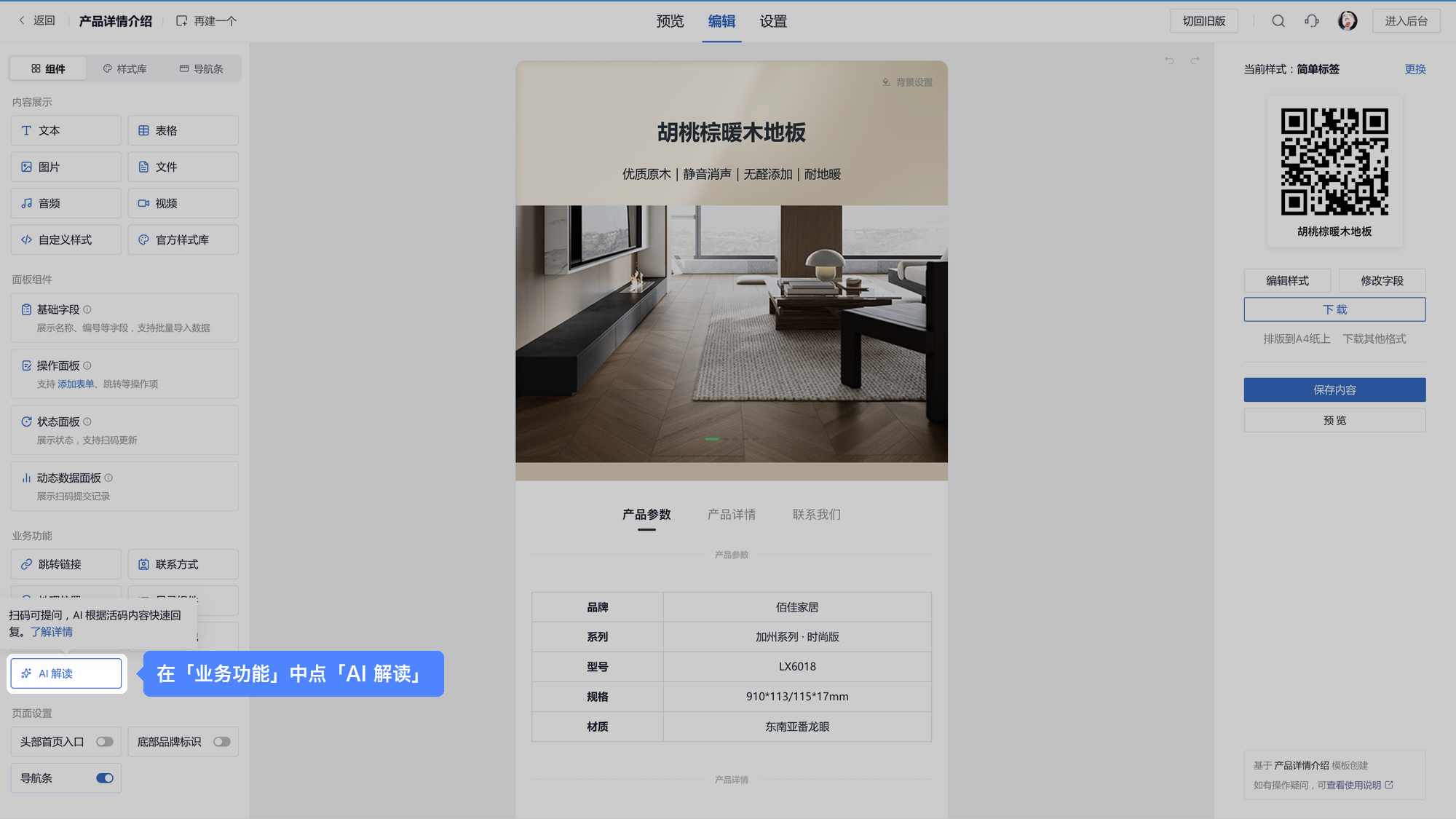
Editor Entry
- Log in to the CaoLiao workbench and go to the QR code editing page
- In the editor's left panel, under "Business features", click "AI Interpretation" to enable the Q&A feature
- After saving, scanners will see the AI Interpretation entry when they scan
Workbench Entry
- Log in to the CaoLiao workbench
- In the left menu, find the AI Console
- Enable the [AI Interpretation] feature in the AI Console
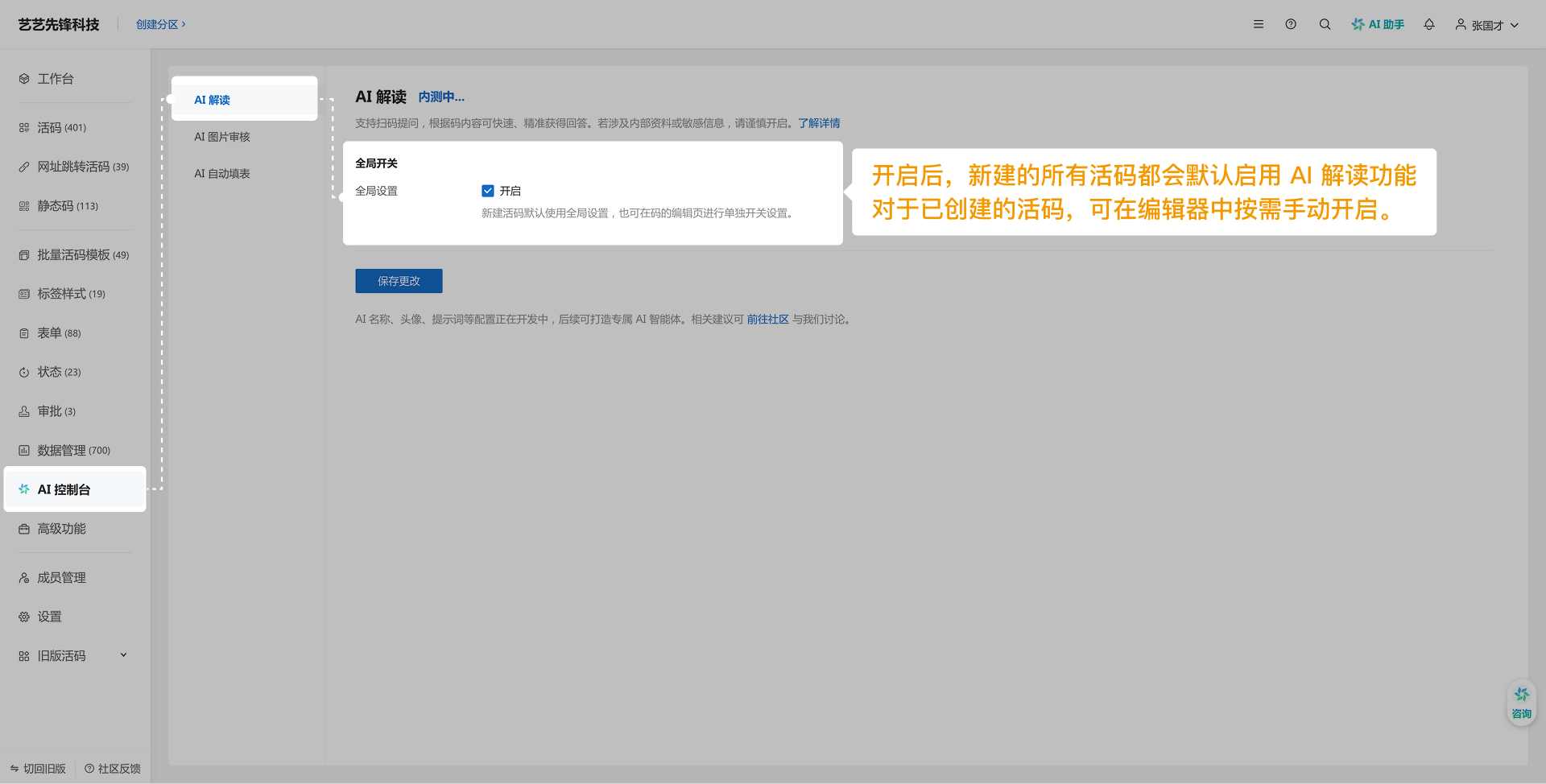
Note: Currently only supported on single codes. Bulk codes and codes configured to open via H5 are not yet supported.
V. Frequently Asked Questions
-
What content in the QR code can AI interpret?
Supported: all text content, and text within files (PDF, Word, Excel, PPT, etc.)
Not yet supported: images, videos, redirect links, and dynamic archive data (such as form submission records) -
Which AI model is used?
The DeepSeek V3 model. -
Is there a usage limit?
The AI Interpretation feature is currently in beta and open to select paid users. During the beta period, usage is unlimited — feel free to fully test the feature's performance and applicability in real-world scenarios.
VI. AI Interpretation Is Continuously Improving
The AI Interpretation feature is still under active development. We will gradually add more capabilities, such as:
- User-defined prompts: make AI Interpretation better suited to specific business scenarios
- Custom AI name and logo: align with your own brand for a more professional, trustworthy presentation
- Usage analytics dashboard: e.g., view Q&A counts and common questions from scanners
Every improvement at CaoLiao relies on real user feedback. We welcome any suggestions or questions you have during use — help us do better and better meet your actual needs. Join the CaoLiao Community ›