File QR Code — Feature Introduction
Generate a QR code from Word, Excel, PDF, and other files. Scan to preview and download online. Files can be updated at any time while the QR code stays the same. You can also control who can view the content, track who has viewed it, and combine it with images, forms, and other content for display.
I. Core Features
1. Accurate Layout Rendering — No Content Misalignment
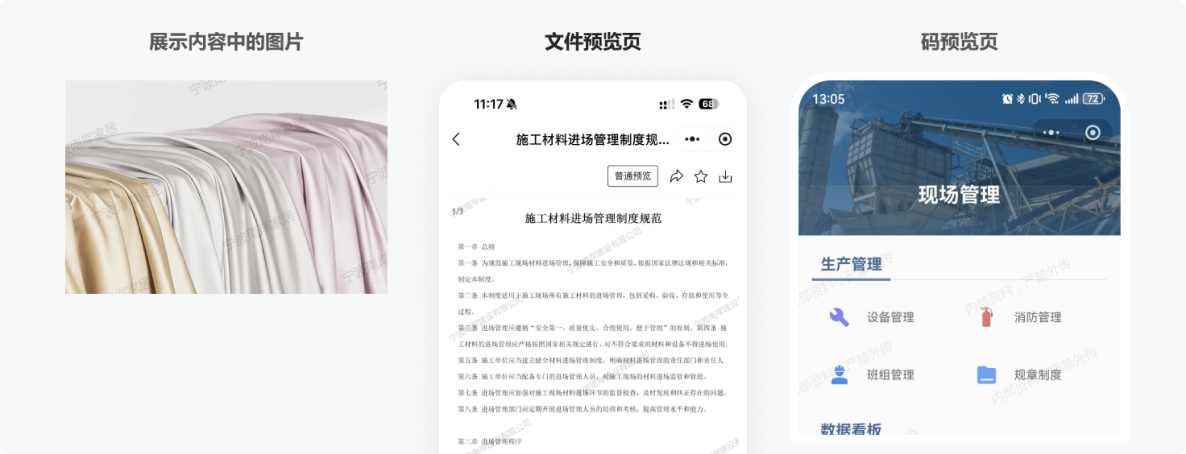
- Uses Alibaba Cloud's file preview transcoding service. After scanning, mobile devices use adaptive layouts that preserve the original formatting without misalignment.
- Supports pinch-to-zoom on files to inspect details.
2. Update Files at Any Time — QR Code Stays the Same
- Replace files directly in the workbench; the QR code pattern remains unchanged.
- Printed materials need not be discarded; shared links update automatically.
3. Flexible Viewing and Download Permission Settings
Multi-layered permission management effectively protects file privacy and prevents unauthorized distribution or leakage.
- Preview only: Allows users to view online but prohibits downloading.
- Allow download: Users can save the file to their phone or download it directly to a computer using the 2w.ma transfer tool.
- Encrypted access: Set an access password; users must enter the correct password to view.
- More access restrictions: Set a validity period, allowable viewing times, geographic/city restrictions, etc.
- Internal-only viewing: Restrict access to enterprise members only, or set specific member groups. Learn more
4. Read-and-Register — Traceable Reading History
Need to confirm whether a notice has been communicated or whether materials were read carefully?
- Reading trail: Automatically generates records of who read the file and when.
- Validity confirmation: Supports setting "reading duration" or "scroll to bottom" as the criteria for a valid read, with automatic redirection to a form for feedback after reading.
- Applicable scenarios: Suitable for company policy distribution, technical briefings, meeting notices, and similar use cases — ensuring clear accountability and a verifiable record.
5. Modular Combination — More Than Just "a File"
A file QR code is not limited to holding a single file. It supports composing content as "components":
- Combined display: Show files, images, audio/video, text descriptions, and more together in a single QR code.
- Navigation links: Turn multiple files into multiple QR codes, then link them from a single scanning entry point for browsing different document series.
II. Advanced Features Available with a Paid Plan Upgrade
When you have higher-frequency or more professional business needs, upgrading to a paid plan unlocks:
1. Enhanced Brand Image
- Remove CaoLiao logo and watermark: Removes the "CaoLiao QR Code" text at the bottom of pages and the file background watermark, restoring documents to 100% clarity and their true layout, providing a clean reading interface.
- Plan recommendation: The Basic plan (¥780/year) is recommended as a starting point and meets most everyday file storage needs. You can upgrade at any time by paying the difference, or purchase booster packs separately as your business grows.
2. Full-Screen Anti-Screenshot Watermark — More Secure Distribution
- Starting from the paid Basic plan, you can customize watermark text that covers the entire page in a diagonal pattern, reducing the risk of file screenshots being leaked externally and providing comprehensive content protection.
3. AI Interpretation — Build Your Own Brand-Exclusive AI Assistant
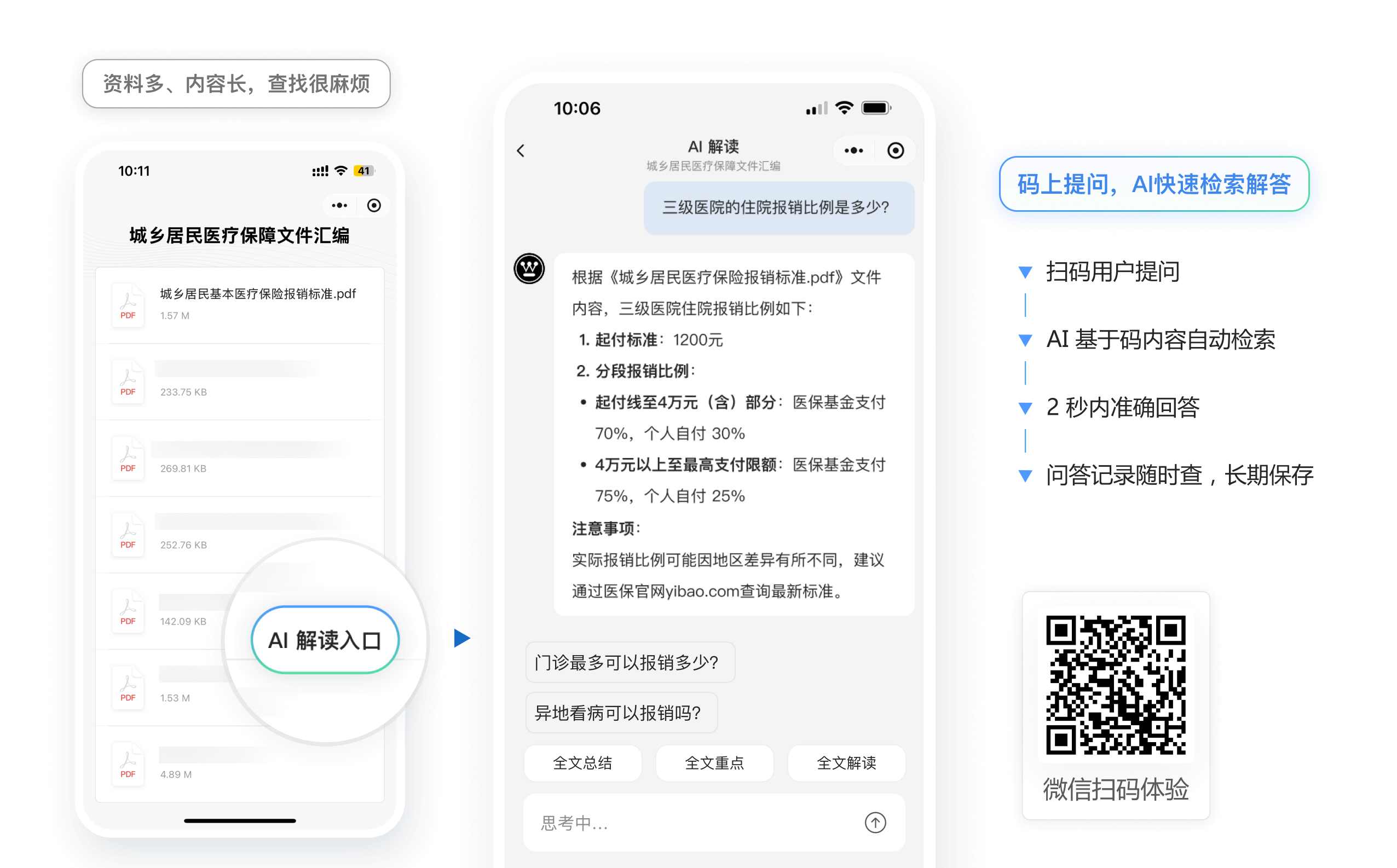
- Starting from the paid Advanced plan, you can enable the AI Interpretation feature, handing off product manuals, operation guides, and other content to AI so scanners can ask questions and get answers on their own.
- Reduces repetitive explanation and manual labor costs, significantly improves the scanning experience, and helps users efficiently get the key information they care about.
- Customize the AI name and logo to match your brand — create your own dedicated AI assistant, making your QR code more professional and trustworthy.
4. Upload Large Files
- The free version limits individual file uploads to 50 MB.
- The paid version supports individual file uploads up to 500 MB — no need to compress large files before uploading.
5. Support for More File Types
- The free version supports common document, spreadsheet, drawing, and file formats.
- The paid version supports all file formats including zip (except high-risk types). View supported formats
Paid Basic plan (starting at ¥780/year) — enhances your file preview experience with a more professional, secure presentation, and unlocks additional paid features.
III. Frequently Asked Questions
1. Why Can't Some Files Be Previewed by Scanning?
This may be due to:
- Format not supported for preview: CaoLiao only supports online preview for common formats such as Word, Excel, PDF, and PPT. Less common formats are not supported.
- File too large: Excel files have a maximum size of 3 MB; other files have a maximum size of 200 MB. Files exceeding these limits cannot be previewed.
- Uploaded in variable content — file: When bulk-building codes, files uploaded in the "variable content — file" module do not currently support opening directly after scanning.
2. How Do I Set Up Direct File Opening After Scanning?
This is only possible when the QR code contains a single file that supports online preview.
- How to set it up: In the file's [Settings], enable [Open Directly After Scanning].
- Please note: CaoLiao only supports online preview for common formats such as Word, Excel, PDF, and PPT. Other file types do not support this feature.
3. How Do I Update the File in a QR Code?
Use the "Edit QR Code" feature to delete the old file and upload a new one to update the content.
- Note: The QR code only provides online file viewing. It does not support editing file content online. If you need to modify file content in real time after scanning, consider using an online document tool such as Tencent Docs or WPS Docs.