Audio/Video QR Code
Audio/Video QR Code Creation Tutorial
Free User Limits for Audio/Video QR Codes
Audio/Video QR Code Creation Tutorial
1. Select the Audio/Video Page
Click [Audio/Video] to enter the audio/video QR code creation page, then click [Upload Audio/Video] to add the video or audio you want to generate a QR code for.

2. Generate the QR Code
After the video is uploaded, click [Generate Dynamic QR Code] to create the QR code. If you have no other requirements, you can download and use it directly.

3. Add Multiple Videos or Audio Files
If you want to display multiple videos or audio files in one QR code, or add a text description for a video, click [Advanced Edit] in the top-right corner to continue editing the QR code content.

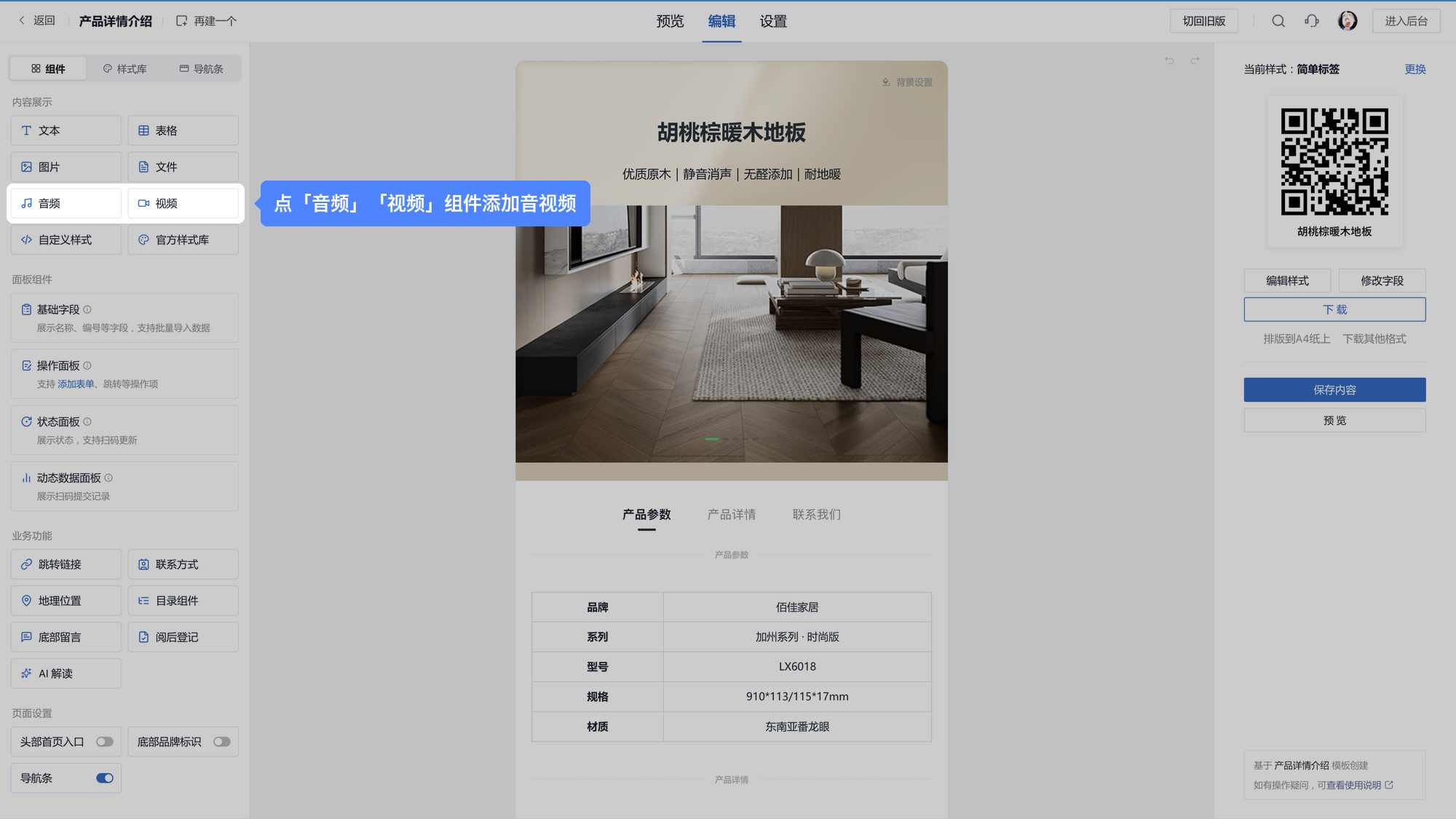
In the editor, edit the QR code name and use the "Audio", "Video", "Image", and other components on the left to add multiple videos, audio files, images, and text descriptions. After adding, click "Save content" on the right and the QR code content will update automatically.
4. QR Code Beautification
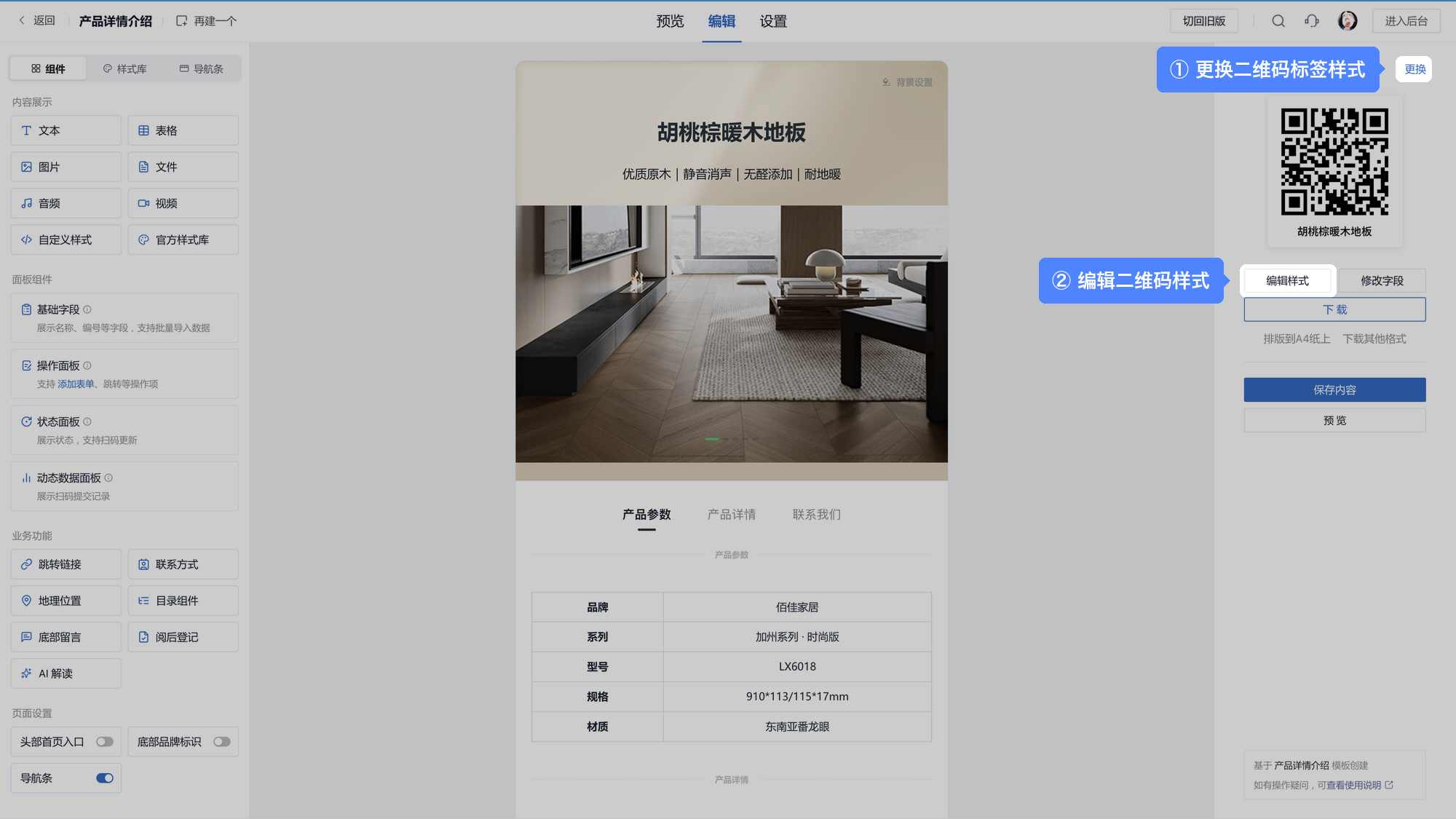
Generated QR code images are black and white by default. On the right side of the editor, click "Change" to select an appropriate QR code label style, or click "Edit style" to add your company logo, change the QR code color, and more. After beautifying the QR code, click "Download" to put it to use.
Free User Limits for Audio/Video QR Codes
The free version supports audio/video files up to 1 minute each, with unlimited viewers and plays, long-term playback, and standard-definition quality. Paid versions have no audio/video duration limit and include HD playback traffic. Playback defaults to HD while HD traffic remains.
Audio/video storage: Both free and paid users have no total storage limit for uploaded audio/video files.
HD audio and video traffic: Each playback consumes HD traffic. Once traffic is exhausted, audio/video can still be played but will switch to low-quality playback.
Add-on packs: Users on the Basic Edition and above can separately purchase image/file storage, HD audio/video traffic, and other add-on packs. View add-on pack pricing

What Is HD Audio and Video Traffic
HD audio and video traffic: For example, watching a 100 MB video in full consumes 100 MB of HD traffic. If 10 people each watch it 10 times, that consumes 100 MB × 10 × 10 = 10,000 MB ≈ 10 GB of traffic. Traffic does not expire, but once it runs out, audio/video will switch to low-quality playback.
Scan to compare resolutions

Usage Notes
Supported Audio/Video Formats:
Audio: m4a, mp3, wav, ogg, asf, au, voc, aiff, rm, m4a, svcd, vcd;
Video: mp4, flv, avi, mov.
Video Resolution Notes:
- If the uploaded video resolution is 1080P, it will play at [Ultra HD 1080P] by default after scanning;
- If the resolution is 720P, it plays at [HD 720P] by default, with the option to switch to [standard definition 480P] or [Smooth 240P];
- If the resolution is 480P, it plays at [standard definition 480P] by default, with the option to switch to [Smooth 144P];
- If the resolution is Smooth quality, it can only be played in [Smooth 144P] mode by default, which does not consume [audio/video traffic].
Is Automatic Audio/Video Playback Supported?
Sorry, this feature is not currently supported.
What Types of Audio/Video Cannot Be Made into QR Codes on CaoLiao?
The CaoLiao team is always working to maintain a healthy application environment for QR code technology, ensuring QR codes serve as tools for spreading value and positive content. All CaoLiao platform users must comply with applicable national laws and regulations, the WeChat External Link Content Management Policy, and the CaoLiao QR Code Content Management Policy. Violators may be subject to corresponding actions and will not be compensated for any resulting financial losses.