Preprinted Dynamic QR Code Label Use Cases | Deploy QR Codes Faster and More Flexibly
In many enterprise on-site deployments, QR code rollout requires waiting until all information is ready before codes can be generated and posted — slowing the entire process.
Blank QR codes were created to solve exactly this problem. You can post first, fill in later — prepare QR code labels in advance, stick them on right away, and staff scan on-site to enter or update information at any time. Overall efficiency improves dramatically.
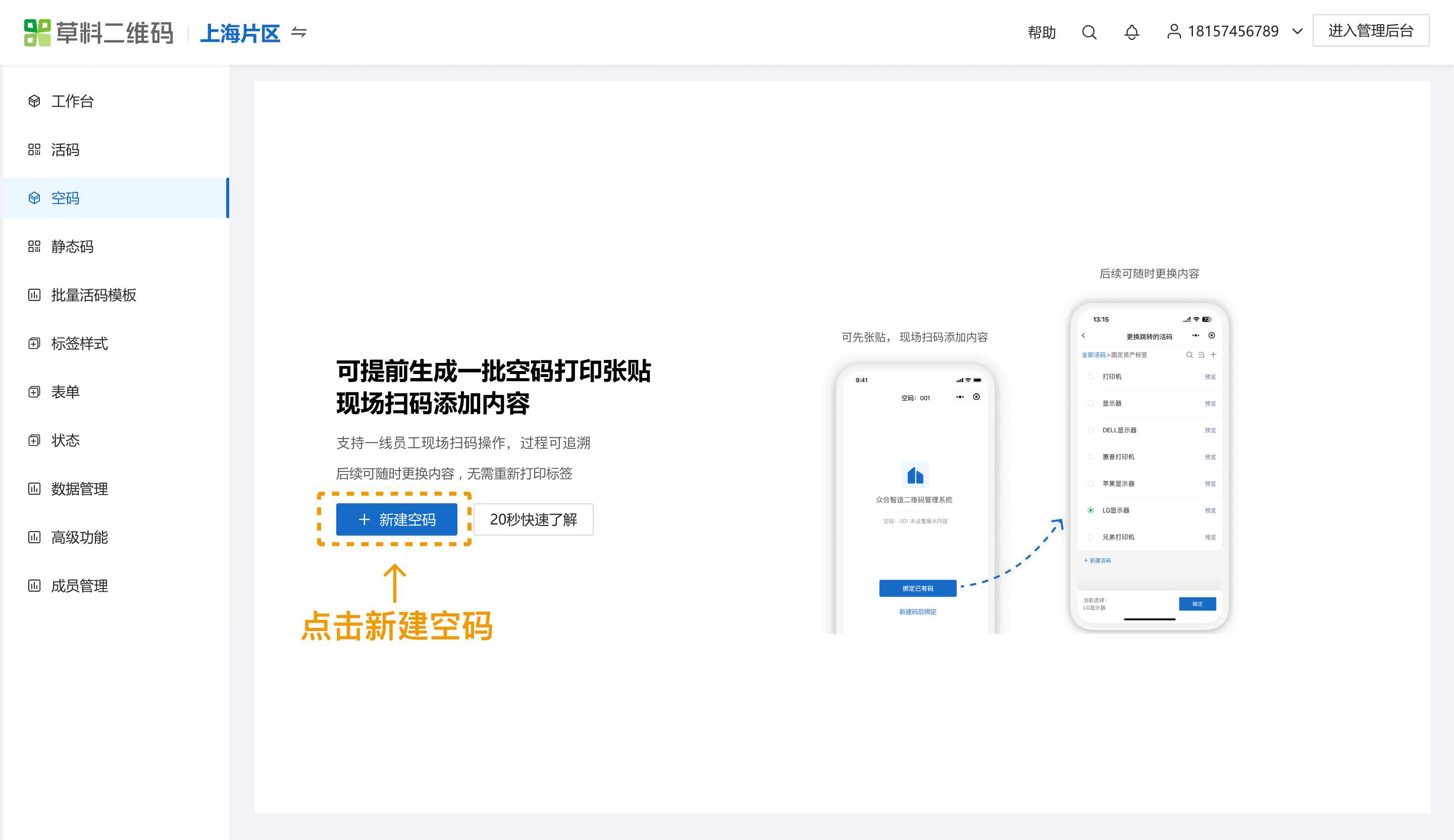
View the preprinted dynamic QR code label overview
1. What Problems Do Preprinted Dynamic QR Code Labels Solve?
- Information isn't ready yet, so rollout stalls: Print and post codes first, then scan to enter information later.
- Content changes frequently, requiring labels to be reprinted constantly: No need to reprint — just scan to rebind.
- Only admins create codes, creating a bottleneck: Enable multi-person collaboration — frontline staff scan to enter data, while the admin group sets templates and permissions.
- Temporary use cases have high maintenance overhead: Temporary ID badges, passes — generating and printing a new code each time is tedious. Preprinted labels support automatic unbinding and cycling reuse.
2. Typical Use Cases
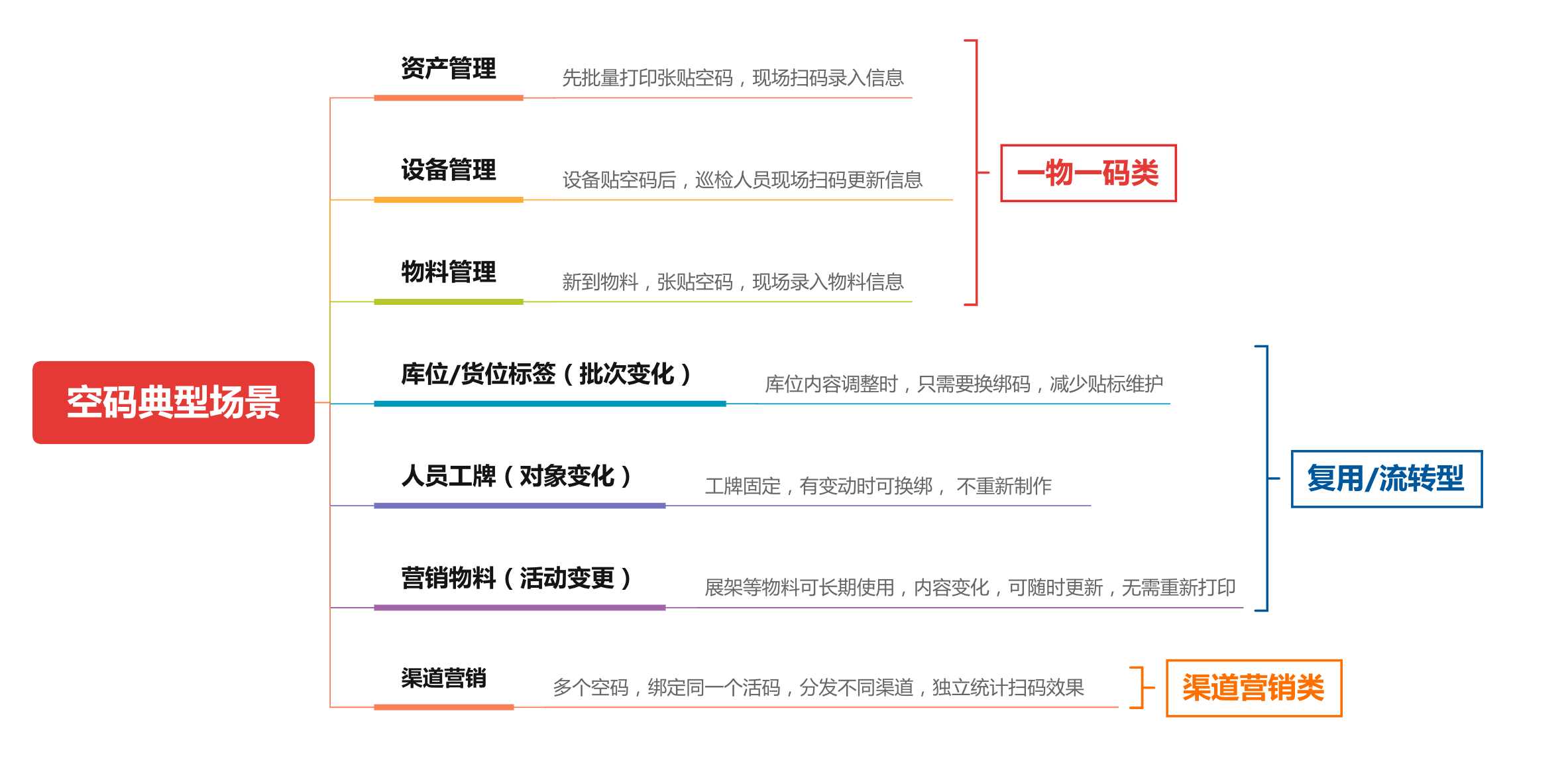
Blank QR codes are ideal for "post first, add content later" or "label stays, content changes" deployment scenarios. There are three common usage patterns:
1. One-item-one-code: For example, fixed assets, equipment inspection, and materials acceptance. Labels can be posted first, then staff scan on-site to enter information — no waiting until everything is collected.
2. Cycling reuse (label stays, content changes often): For example, storage locations and tote bins — where the label never moves but the contents change regularly. Just scan to rebind; no reprinting needed.
3. Channel marketing analytics: For example, a marketing campaign where multiple preprinted labels are all bound to the same content page, distributed across different channels, with independent scan tracking per code.
Scenario 1: Asset and Equipment Management (One-Item-One-Code)
Core pain point: Asset ledger information is complex and time-consuming to collect. Printing QR codes must wait until all details (model, serial number, location, person in charge, etc.) have been gathered — causing delays in asset intake and labeling.
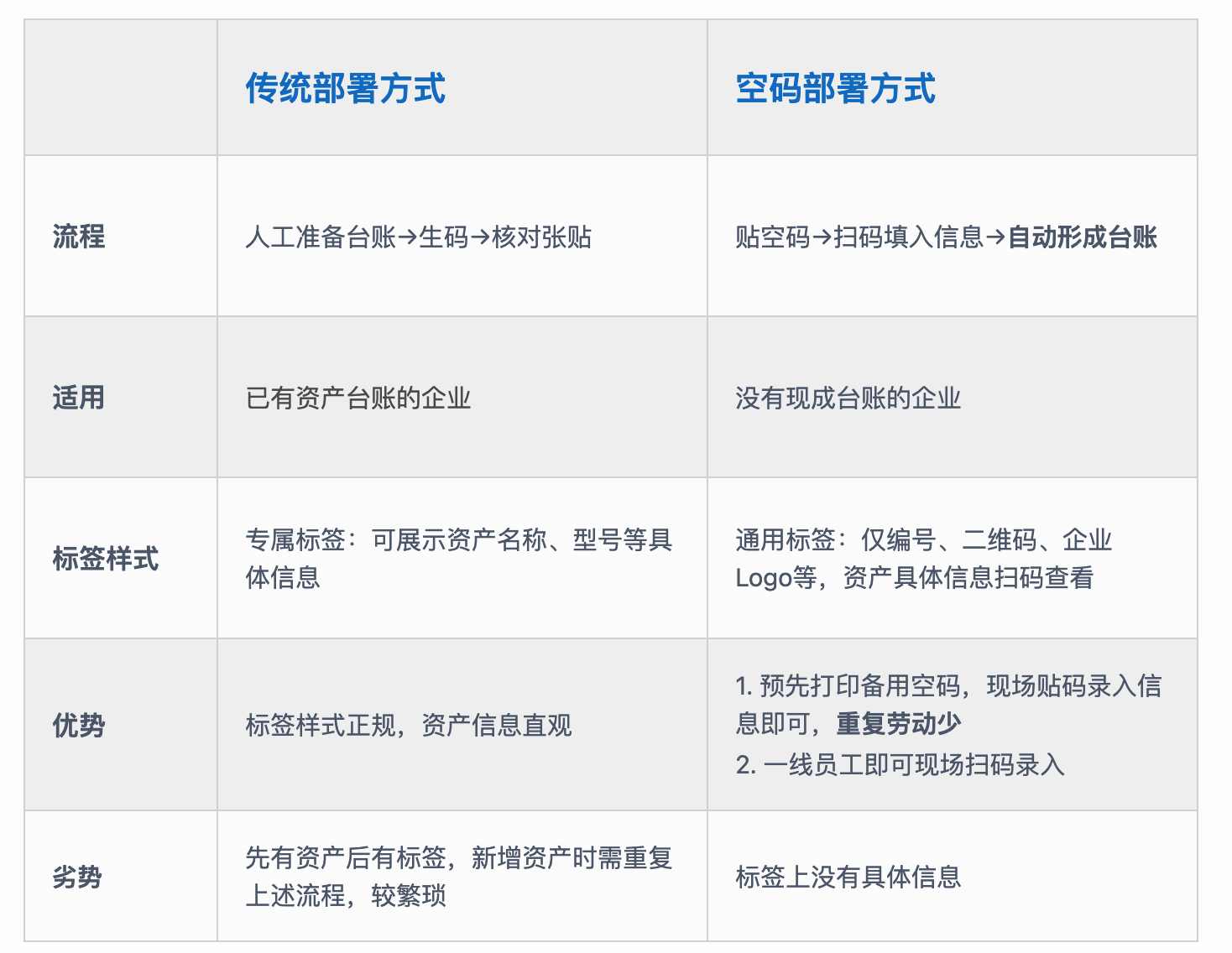
Workflow: The admin group prints preprinted labels in bulk in advance and posts them on all assets/equipment. Frontline staff simply scan the code on-site to enter asset information, and can supplement or rebind content at any time afterward.
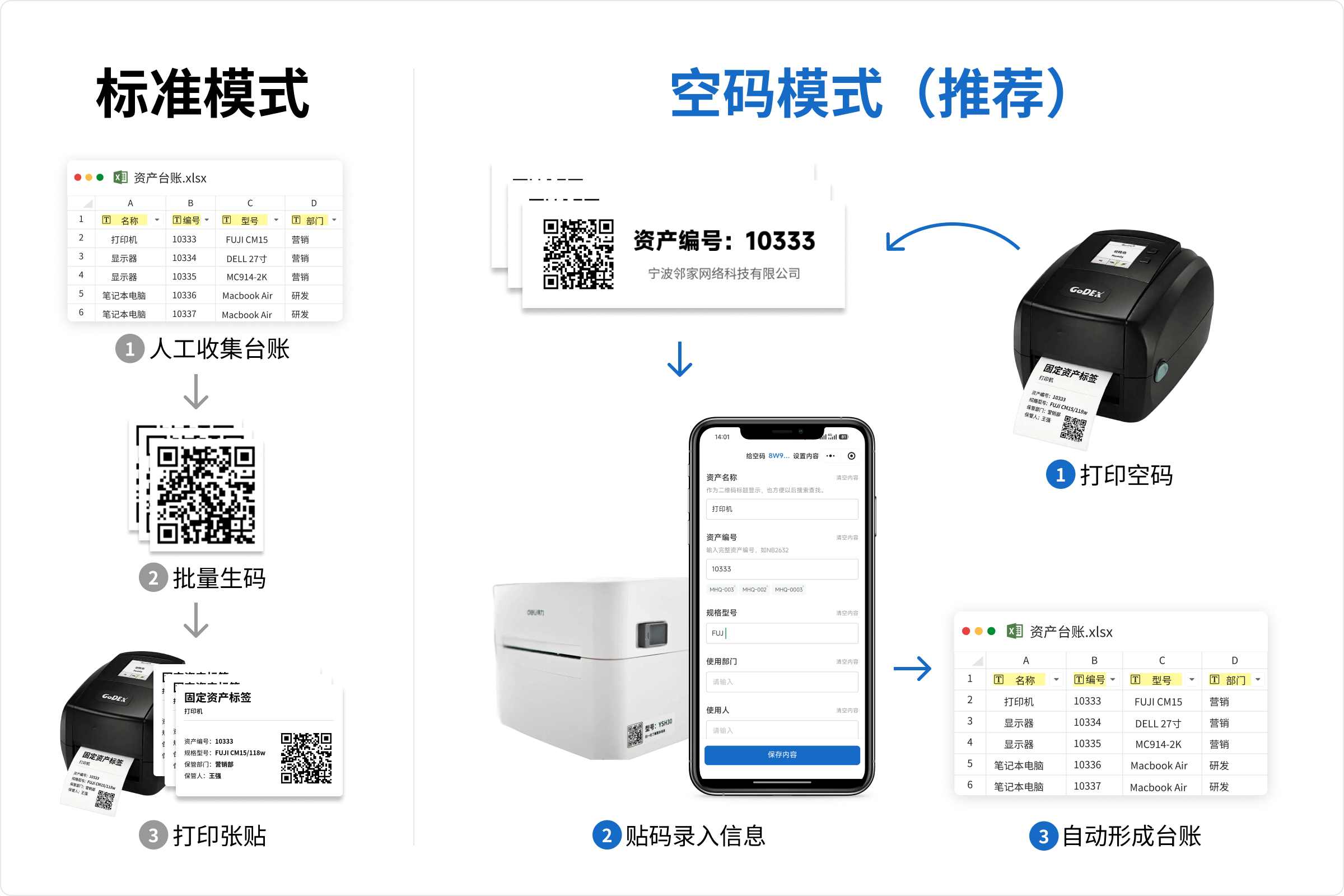
Key advantage: Blank QR codes eliminate the "wait to deploy" bottleneck by distributing data entry permissions and workload to the field, significantly reducing the admin's concentrated code-creation burden and ongoing maintenance costs.
Scenario 2: Personnel Management (One-Item-One-Code)
Core pain point: Personnel ledger information is complex and time-consuming to collect. Printing QR codes must wait until all details (name, team, job type) have been gathered.
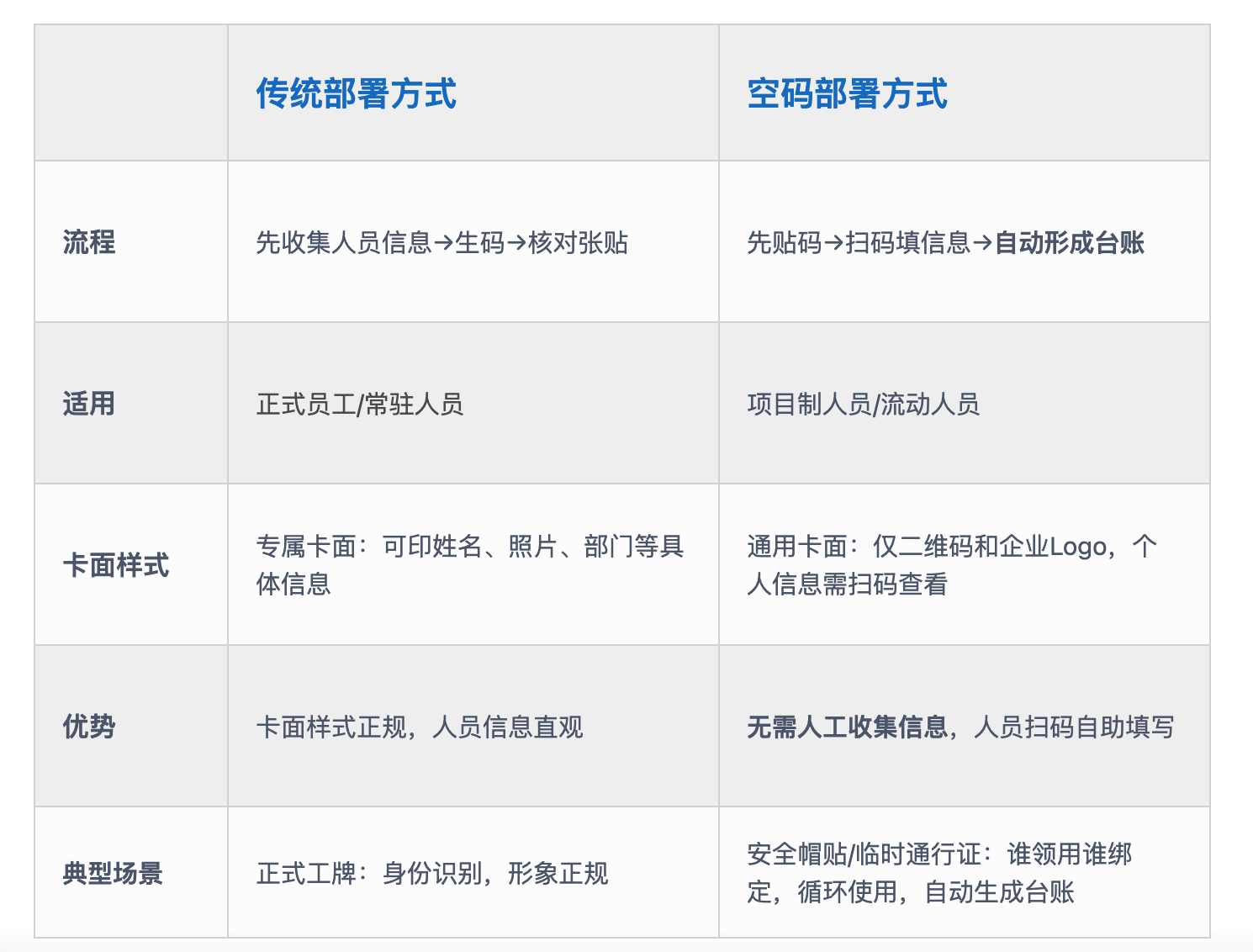
Workflow: The admin group prints preprinted labels in bulk in advance and posts them on hard hats or temporary passes. Frontline staff simply scan on-site to enter personnel information, and can supplement or rebind content at any time afterward.
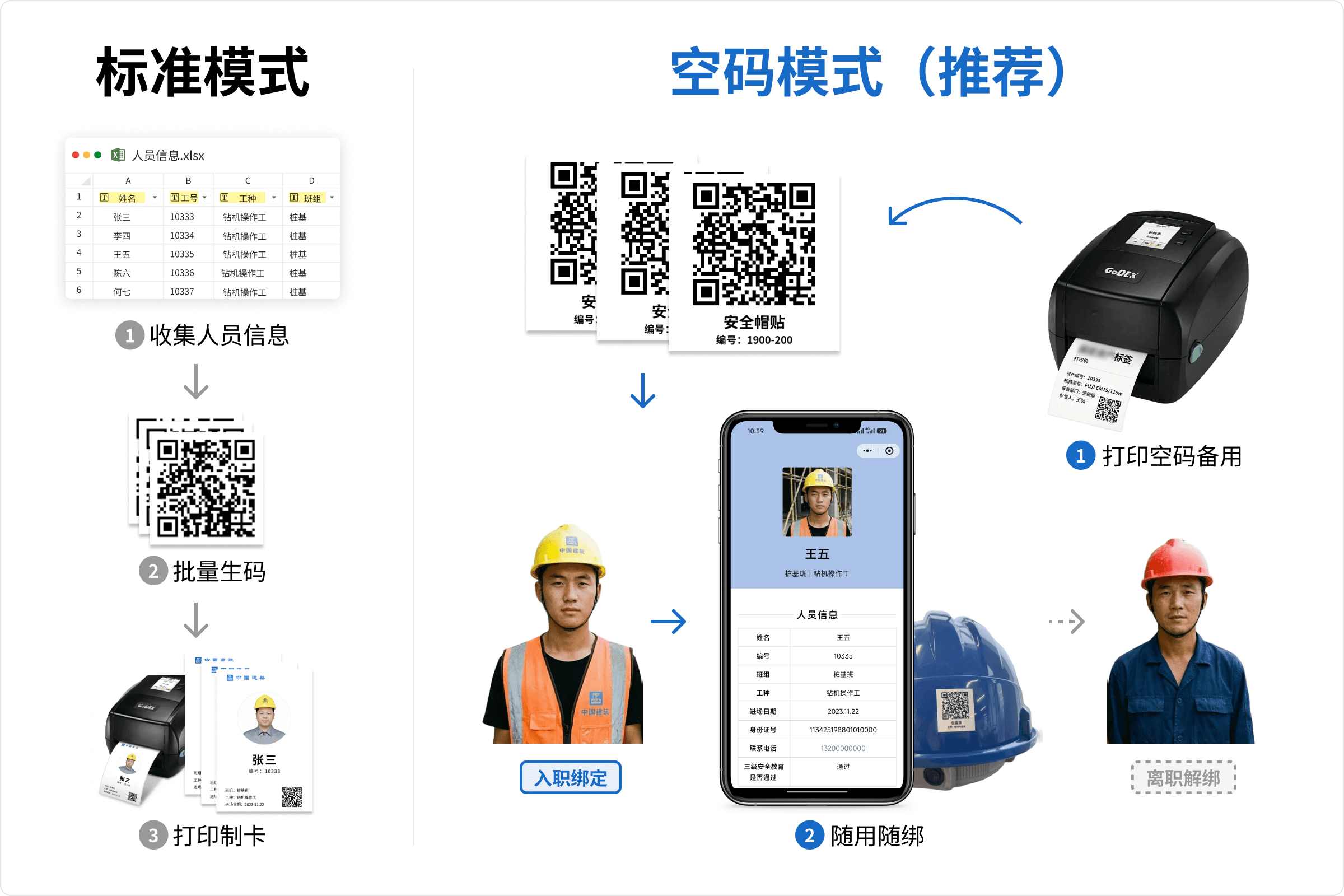
Key advantage: Blank QR codes eliminate the "wait to deploy" bottleneck by distributing data entry permissions and workload to the field, significantly reducing the admin's concentrated code-creation burden and ongoing maintenance costs.
Scenario 3: Visitor Badge / Pass Management (Cycling Reuse)
Core pain point: Temporary passes (e.g., construction site ID badges, event guest credentials, vehicle temporary passes) have strict time limits. The traditional approach requires manufacturing and printing a new card every time — a tedious, low-efficiency process.
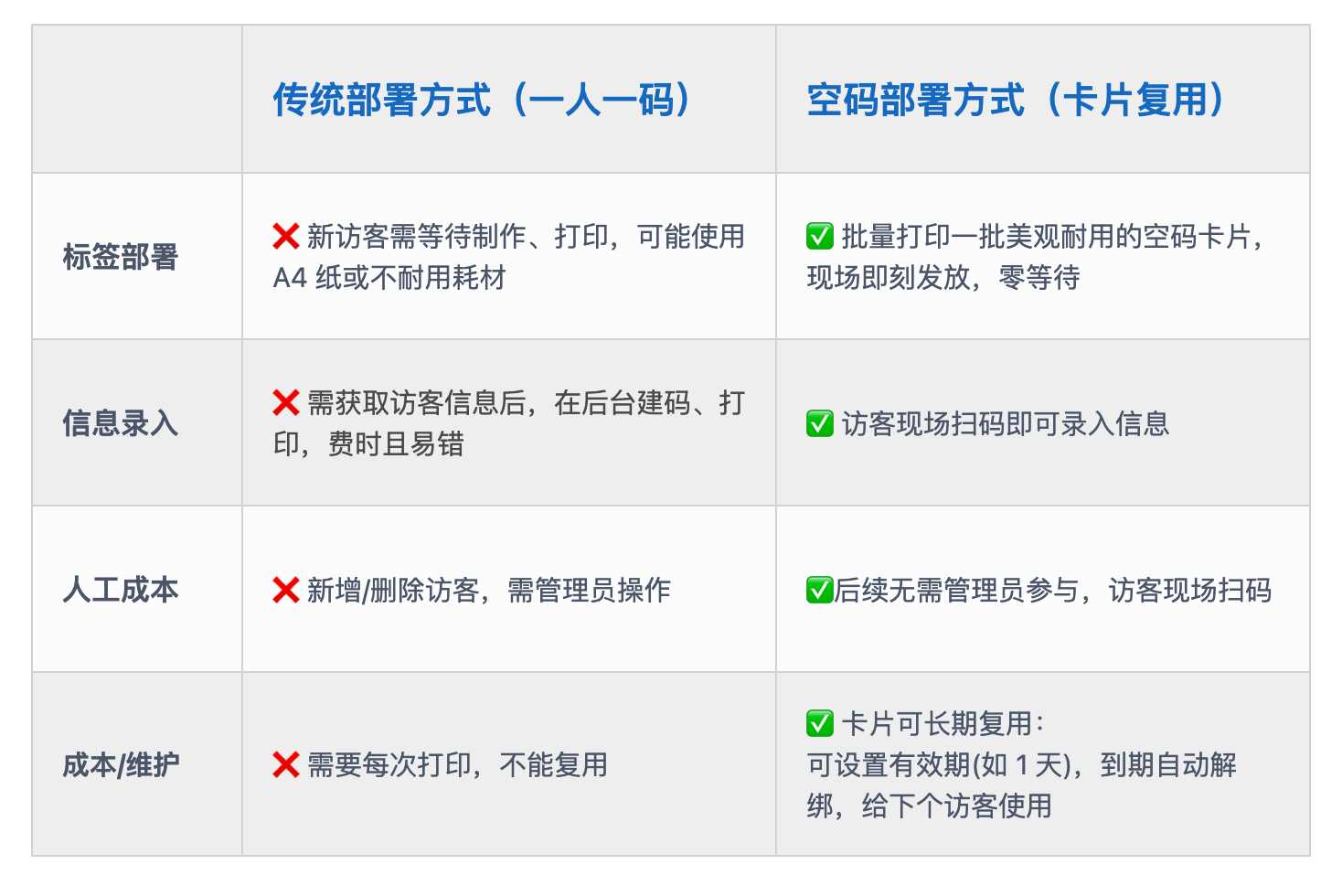
Workflow: The admin group prints preprinted label passes in bulk in advance and sets a scheduled automatic unbinding interval. When a temporary visitor arrives, hand them a card, scan to enter their information on the spot, and the code automatically unbinds after expiry — reverting to its initial state, ready for the next visitor.
Key advantage: Blank QR codes streamline the visitor badge process from end to end, eliminating the "wait" and "reprint" pain points of temporary credentials. Through a combination of well-designed cards, instant on-site binding, and automatic content unbinding, the system enables efficient, low-cost automated temporary pass management.
Scenario 4: Channel Marketing Analytics
Core pain point: To distinguish the performance of different offline promotion channels (e.g., different stores, sales reps, or poster locations), the traditional approach requires generating a separate QR code for each channel. If campaign content changes, dozens of codes must be updated individually. Once the campaign ends, materials are discarded — requiring new layouts and reprints each time. High cost, long cycle.
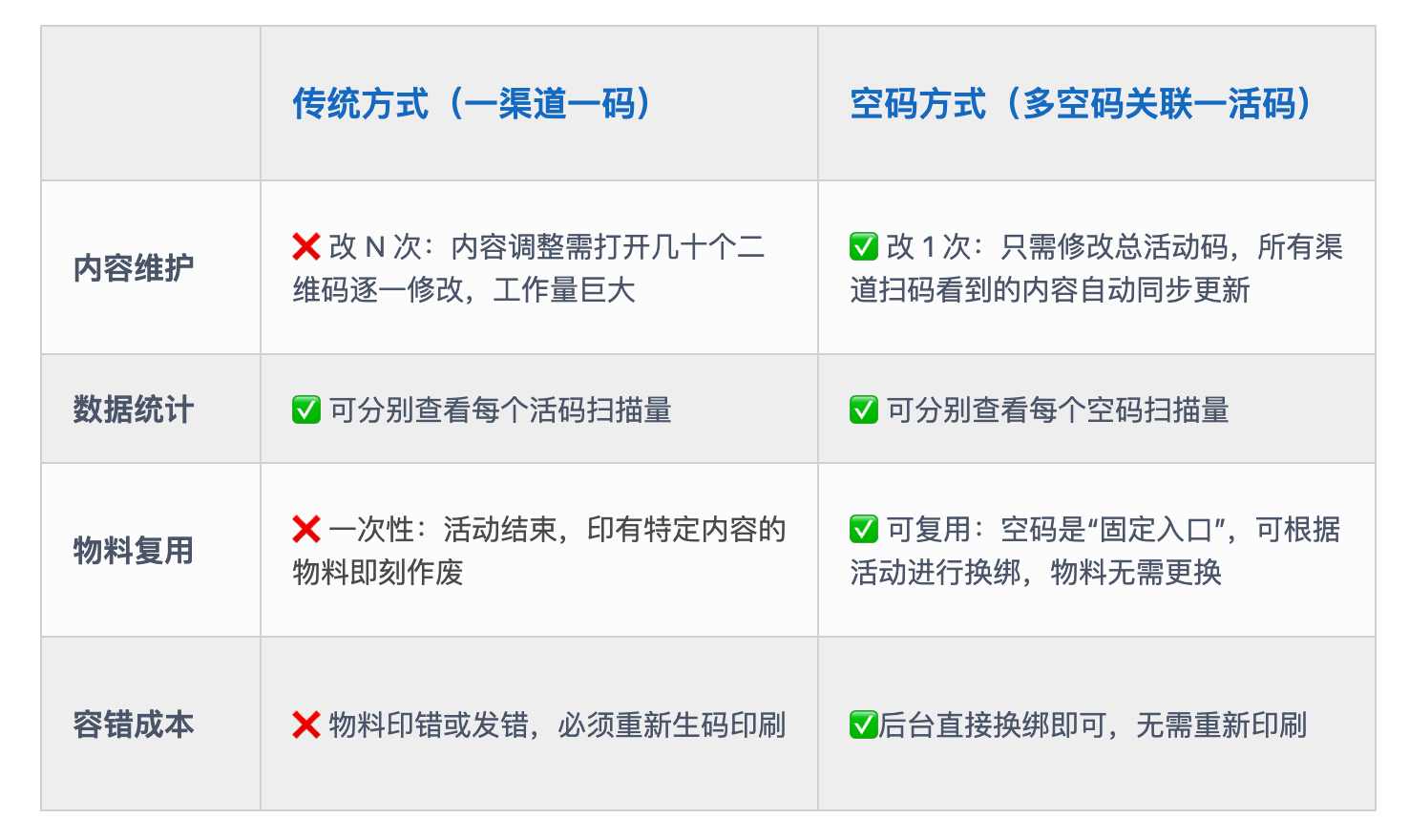
Workflow: Create the campaign content page (a dynamic QR code), print preprinted label materials in bulk and distribute them to each channel. Bind all of these preprinted labels to the campaign page. The workbench independently tracks the scan count for each preprinted label to analyze marketing performance.
Key advantage: Blank QR codes enable "unified content maintenance, independent data tracking." All channel preprinted labels point to the same campaign page — update the content once and it takes effect everywhere. Each preprinted label's scan count is tracked independently, and the physical material becomes a reusable "permanent ad placement," dramatically reducing material and maintenance costs.
3. Advanced: Automation and Brand Presentation with Preprinted Dynamic QR Code Labels
1. Display Custom Content to Users Without Binding Permissions
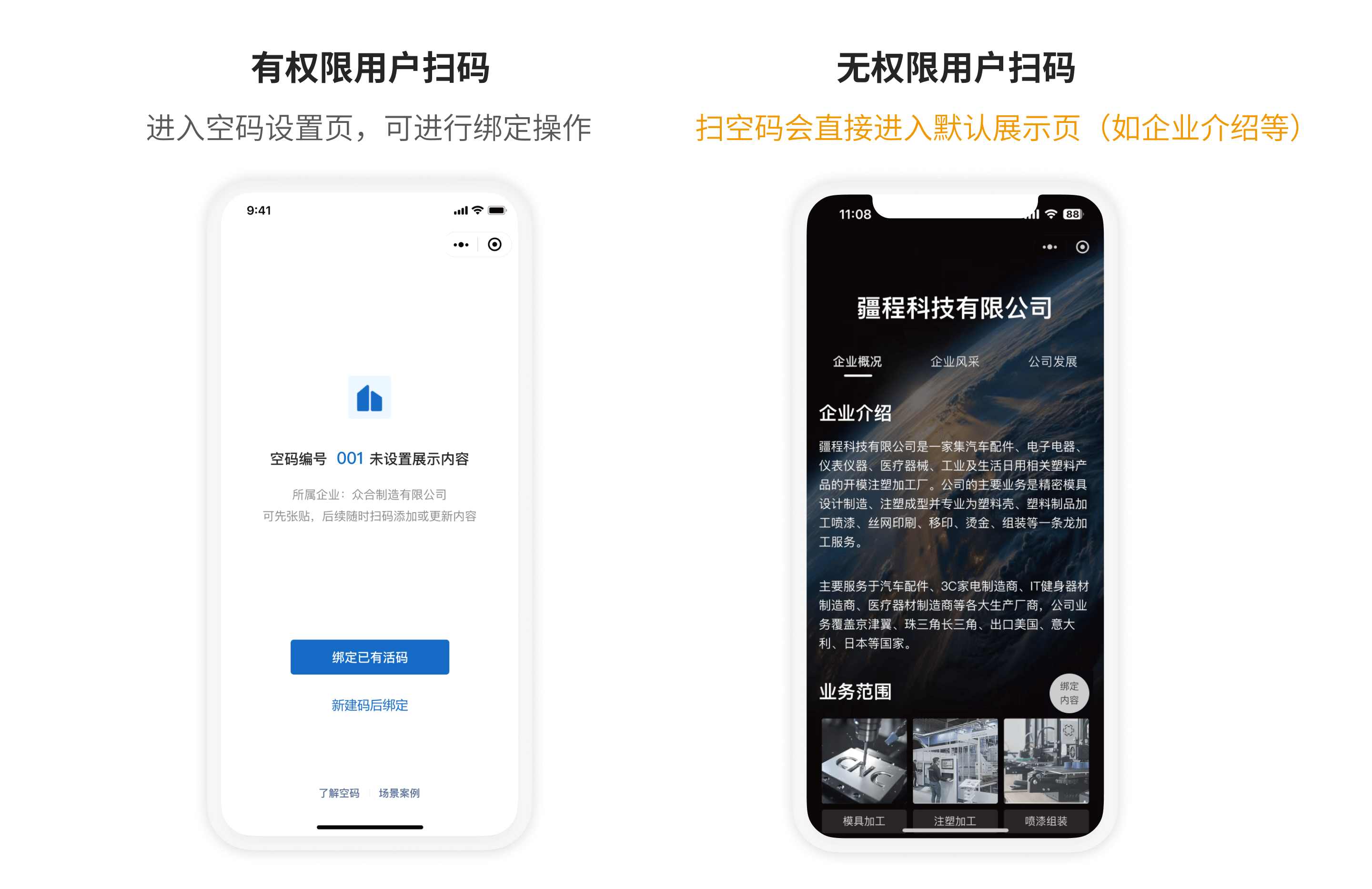
If preprinted labels have already been posted but haven't been bound to content yet, you can set a default display page.
When users without binding permissions scan the code, they see your custom content page (e.g., a company introduction, business overview, or project summary). This lets preprinted labels serve both internal management and external brand presentation at the same time.
Use cases:
- External-facing enterprise display: Preprinted labels on equipment or display stands, not yet bound to content — external customers without permissions see the company website or product page when they scan.
- Project site: Preprinted labels on construction notice boards, not yet bound to content — non-members scanning the code can view the project overview or safety guidelines.
Example: A security equipment company posts preprinted labels on demo units in their showroom. Customers scan and see the company's business introduction and contact information. Internal staff scanning the same code can access the option to configure the preprinted label's content.
2. Scheduled Automatic Unbinding
You can set an automatic unbinding interval for preprinted labels (e.g., 1 day, 3 days, 7 days, half a month). Bound preprinted labels under the template will automatically unbind according to each code's individual binding time. Rebinding resets the countdown. Automatic unbinding and reuse reduces manual maintenance and keeps preprinted labels clean and usable long-term.
Use cases:
- Warehouse and logistics cycling: Tote bins and pallets cycle through production stages, automatically resetting on schedule.
Example: A manufacturing plant posts preprinted labels on production line tote bins. Each shipment is bound to the code at dispatch; after 7 days, the code unbinds automatically, clearing old data so the bin is ready for the next cycle.
- Temporary ID badges / passes: Temporary visitors scan to register; access expires automatically after the validity period.
Example: A construction site assigns preprinted label passes to temporary workers, set to expire in 15 days. Upon expiry, the code unbinds automatically. The next group of workers can reuse the same badge — saving credential issuance time.
- Temporary assets / rental items: For example, event equipment and rental gear — the code automatically unbinds after the rental period ends, reducing manual cleanup.
Example: An event management company posts preprinted labels on 100 rented speakers. Each event binds the session information to the codes; 3 days after the event, the codes unbind automatically. The same equipment labels can be reused for the next event, saving significant printing time.
4. Creating Preprinted Dynamic QR Code Labels
Go to the "Preprinted Dynamic QR Code Labels" section in the workbench to create a batch of preprinted labels and get started. View the detailed tutorial