Form Data Confidentiality Agreement
Feature Overview
The confidentiality agreement feature is designed for forms that contain personal privacy or other sensitive information where viewers are required to take on a confidentiality obligation. Once enabled, authorized personnel must sign a confidentiality agreement the first time they scan the code to view historical records, as shown in the screenshot below.
The confidentiality agreement also supports custom editing. Every signed copy submitted by viewers is saved in the workbench, where you can view and export them via [Form Data Summary].

Setup Instructions
Step 1: Log in to CaoLiao, go to the workbench, and click [Edit] for the corresponding QR code.
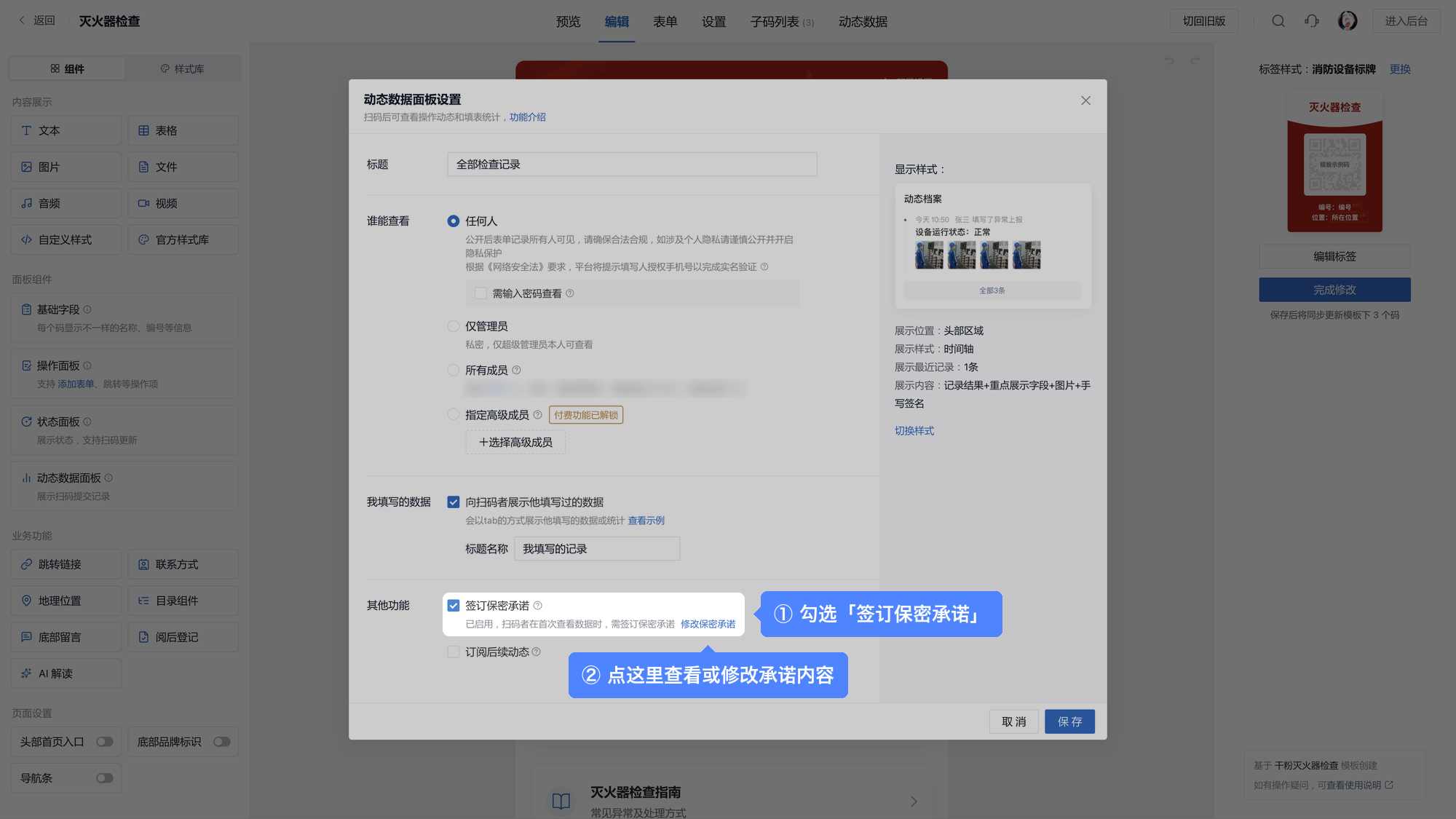
Step 2: In the editor, select the dynamic data panel, click [Settings], and check [Sign Confidentiality Agreement] under Other Features.
Step 3: Click [Edit Confidentiality Agreement] to review or edit the agreement text.

Viewing and Exporting
Step 1: Log in to CaoLiao, go to the workbench, and click [Forms] → [Form Data Summary] in the left sidebar.
Step 2: Filter the form to [Confidentiality Agreement] to see who has signed the agreement. You can also export the list as an Excel file.
