Introduction to Dynamic QR Codes and Static QR Codes
QR codes on the CaoLiao QR Code platform come in two types: static QR codes (ordinary QR codes) and dynamic QR codes.
A static QR code turns the content itself directly into a QR code, and the content is fixed after generation and can't be changed. A dynamic QR code turns a web page into a QR code: scanning opens a maintainable web page whose content can be updated in the workbench, while the QR code pattern stays the same.
In short: if the content is certain not to change and you only need a scan to read out raw content such as text, a number, or a URL, use a static QR code; if the content may change later, or you need to show images, files, audio/video, forms, statuses, and records, use a dynamic QR code.
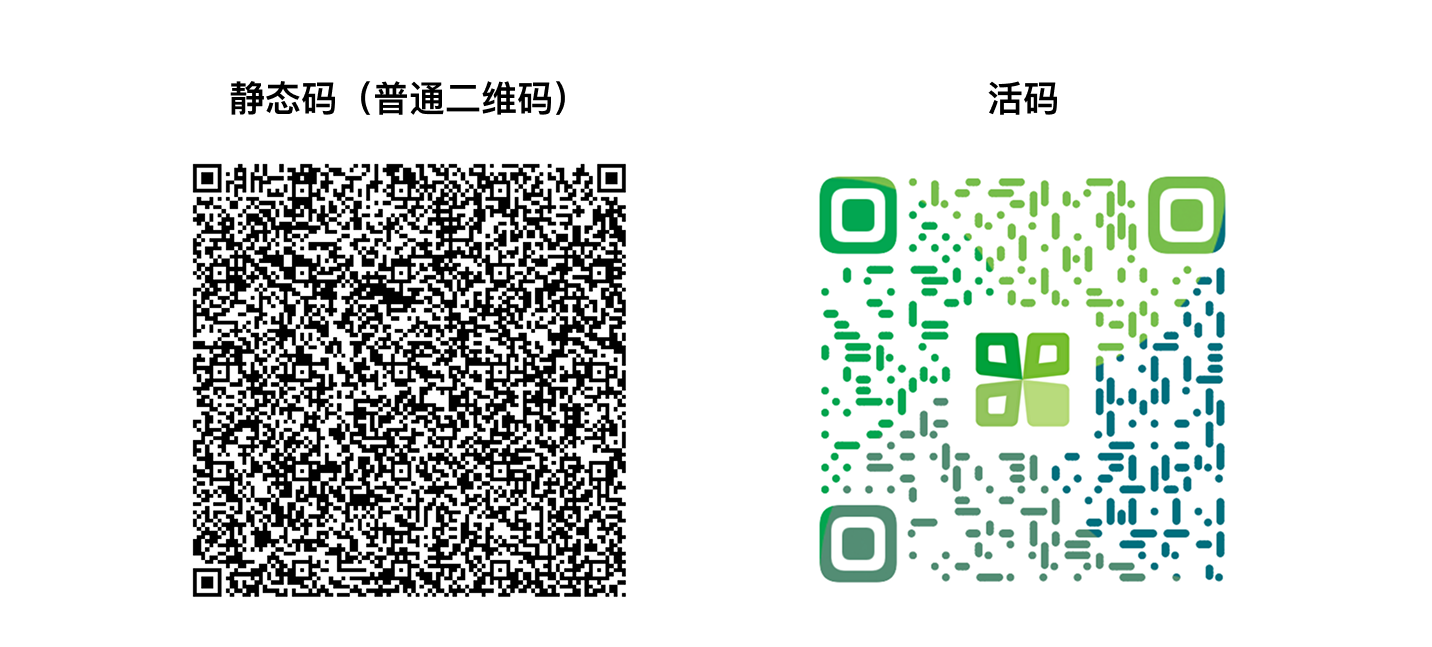
How the Two Types Work
A QR code isn't an "image container". It converts a piece of character content into a black-and-white pattern according to encoding rules. The character content can be a piece of text, a number, a string of data, or a URL.
When scanning, a phone or barcode scanner first recognizes the QR code pattern and then reads out the content written in it. The longer the content written in, the denser the pattern usually is, and the shorter the content, the cleaner the pattern usually is (Learn more about QR codes).
The QR code pattern itself can't hold images, files, video, or forms directly. To let scanners see them, you usually put them on a web page first and then turn that page's URL into a QR code.
Static QR Codes (Ordinary QR Codes)
The pattern of a static QR code holds the raw content. Whatever you enter when generating is what's in the QR code, and what you read after scanning is that content itself. For example, generate a static QR code from a device number, storage location code, product serial number, or material information, and a barcode scanner or phone can read that content directly. It doesn't go through a cloud page or need the backend to parse it further, so it can be recognized even without a network (What is a static QR code).
The limits of a static QR code come from this too: once the content is written into the pattern, the original can't be edited. If the content is wrong or needs to change later, you can only generate a new QR code and replace the old one that has been printed, posted, or forwarded.
Note: on the CaoLiao QR Code platform, QR codes generated without logging in are all static QR codes, which can't be edited or voided.
Dynamic QR Codes
The pattern of a dynamic QR code holds a short URL pointing to cloud content. When scanned, the phone first visits CaoLiao QR Code's server, which then returns the content page you configured to the scanner.
What you edit in the workbench is the cloud content page, not the short URL in the QR code pattern. As long as the short URL stays the same, the pattern doesn't need replacing, and the text and images, audio/video, files, forms, and statuses on the page can all keep being maintained.
So a dynamic QR code doesn't stuff images, files, or video into the QR code pattern. It puts that content on a web page, and the QR code just takes the scanner to that page.
The principle behind dynamic QR codes is simple but very practical. CaoLiao QR Code did not invent this technology, but many companies and individuals still face a barrier to using it well: building a stable cloud service yourself takes cost and time that not every team can accept. In 2013, CaoLiao QR Code launched its cloud QR code technology, the "dynamic QR code", and made it a service anyone can use by registering and logging in, so more people can use it without building their own system (What is a dynamic QR code).
Core Differences
| Item | Static QR code | Dynamic QR code |
|---|---|---|
| QR code pattern | The longer the content, the more complex the pattern and the harder to recognize | Simple and easy to scan |
| Can the content be changed | Can't be changed after generation | Content can be changed at any time, and the QR code stays the same |
| Scanning | No network needed (supports barcode scanners) | Needs a network to scan |
| Supported content | Only text, numbers, URLs, and similar | Text, images, files, audio/video, forms, statuses, dynamic archive records, and more |
| Scan statistics | Not supported | Scan counts, times, regions, and more can be viewed |
| After the QR code is deleted | Can still be scanned and accessed normally | Can no longer be accessed |
How to Choose Between the Two
When to Choose a Static QR Code
Choose a static QR code when the content stays fixed long-term and you don't need backend statistics or page display.
Common scenarios include:
- Generating a fixed piece of text, a number, or a code;
- Identification such as storage locations, materials, device numbers, and product serial numbers;
- Letting a barcode scanner read the raw content in the QR code directly;
- Scanning with an unstable network or none.
Static QR codes suit "what you scan is what's in it". They are simple and direct, but don't suit scenarios that need later edits, showing images and files, collecting form data, or viewing scan statistics.
When to Choose a Dynamic QR Code
Choose a dynamic QR code when the content may change later, or you need to show richer information after scanning.
Common scenarios include:
- Display: product introductions, company introductions, property introductions, where images, files, or contact details may be updated later;
- Collection: event registration, survey feedback, visitor registration, and other scenarios where people scan to fill in a form;
- One-item-one-code management: equipment inspection, asset management, hazard rectification, where you keep recording the status and handling of each object;
- Needing statistics such as scan counts, times, and regions.
The point of a dynamic QR code isn't "generating a QR code image". It turns the QR code into an entry that can be maintained long-term, so users can achieve different purposes according to their needs.
How CaoLiao Differs from an Ordinary QR Code Generator
Many tools can generate QR codes, and CaoLiao QR Code also offers free basic code generation for static QR codes such as text and URLs, as well as dynamic QR codes. The difference isn't "whether it can make dynamic QR codes" but what comes after. An ordinary QR code generator basically stops at "turning content into a QR code pattern": you enter text or a URL, download the image, and you're done. CaoLiao QR Code treats the QR code as an entry, and behind it is a whole set of management capabilities you can build without writing code.
On top of dynamic QR codes, you can:
- Combine text, images, files, and audio/video into a display page, so scanners can see product introductions, manuals, and test reports;
- Add forms so scanners can submit registrations, feedback, or inspection records, with data collected into the workbench automatically and exportable to Excel;
- Give each object that needs long-term management, such as a device, asset, or product, its own code, and keep recording its state and handling history with status and dynamic data; combine that with recurring form submission tasks, notifications, and members and permissions so several people can divide the work and take a matter from reporting to closure.
These capabilities for content display, forms, status, and dynamic data are all combinations of standard modules and need no development.
CaoLiao QR Code is a platform for building and managing business systems with the QR code as the entry. If you only need to generate fixed content once, any generator will do. If you want a QR code that can still change content after printing, show scan statistics, collect form data, or support long-term management around devices, assets, and products, CaoLiao QR Code is a better fit. Learn about the CaoLiao platform
FAQs
How Do I Tell Whether a QR Code Is a Static QR Code or a Dynamic QR Code?
You can use the decoder to parse the QR code into a link.
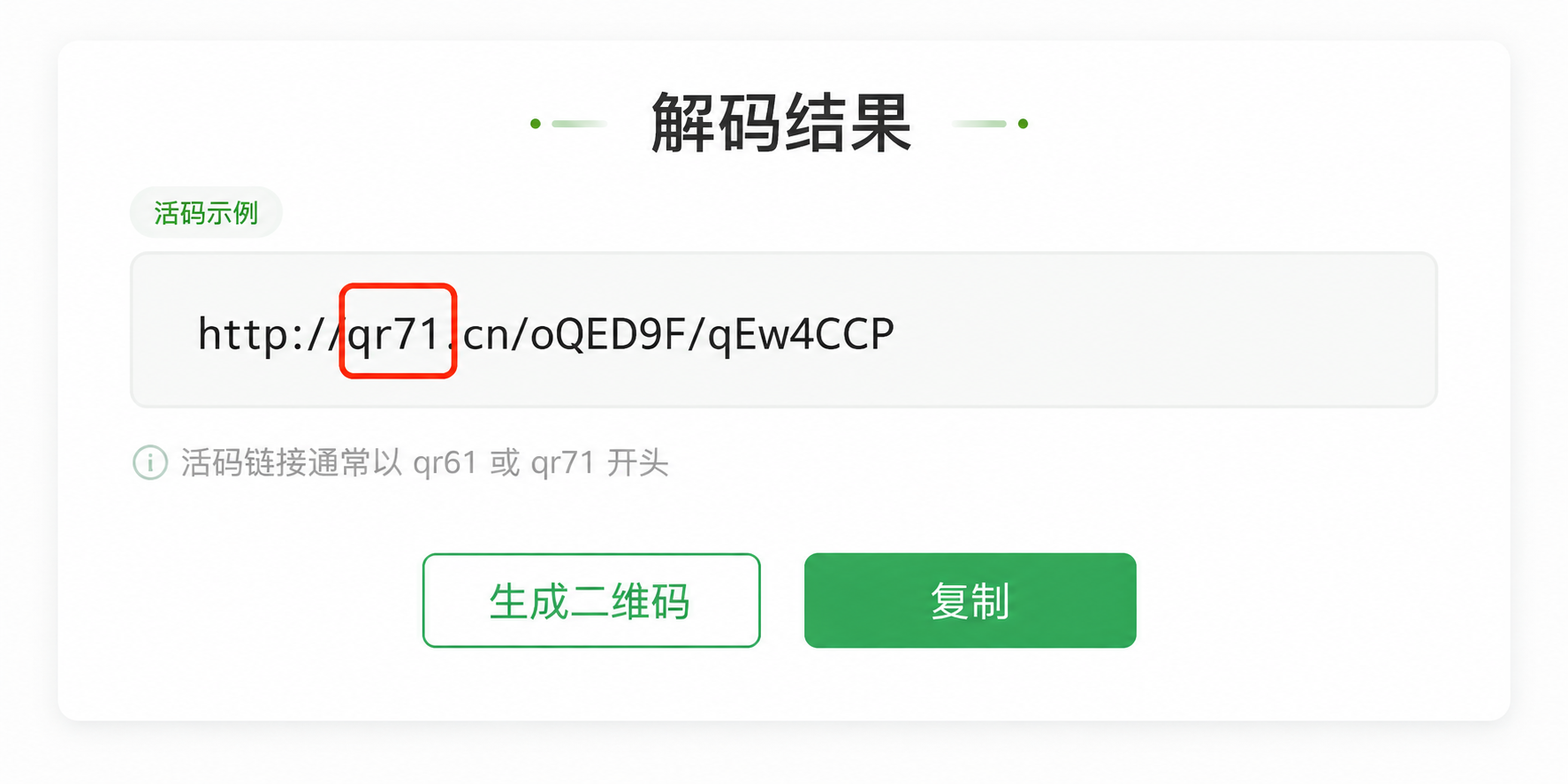
If the link starts with qr61xx or 71xx, it is a dynamic QR code; anything else is a static QR code. You can decode on desktop or on mobile. For more ways to tell, see How to Tell Static QR Codes and Dynamic QR Codes Apart.
Can I Still Change the Content After the QR Code Is Printed?
A static QR code can't be changed, but a dynamic QR code can.
The original content of a static QR code is written into the pattern, so once generated it can't be changed, and you can only generate a new QR code and replace the old one. For a dynamic QR code, you change the web page content in the workbench and the pattern stays the same, so codes that have been printed, posted, or forwarded keep working.
Does a Static QR Code Stop Working After It Is Deleted?
No. The content of a static QR code is written into the pattern, so as long as the pattern exists it can still be recognized.
Deleting a static QR code's record in the workbench doesn't invalidate a static QR code pattern you've already exported. If you want to see what is written in that QR code, you can parse it with the decoder.
How Do I Recover a Static QR Code After It Is Deleted?
After a static QR code is deleted, the original pattern doesn't stop working and can still be scanned, so there's nothing to recover. If you want the content of the original QR code, decode it with the decoder.
How Do I Choose Between a URL Static QR Code and a URL Dynamic QR Code?
If you just want to turn a fixed URL into a QR code and don't need scan statistics, a URL static QR code is enough.
If the target URL may change later, or you want to see scan counts, times, and regions, choose a URL redirect code (URL dynamic QR code). When the URL is long, the static QR code pattern gets denser, and a printed size that is too small may affect recognition, so in that case we also suggest a URL redirect code, whose pattern is cleaner.
Do I Need to Pay to Generate a Dynamic QR Code?
Dynamic QR codes can be generated for free, with no limit on the number of codes, scanners, or scans.
If you need to remove the CaoLiao logo, use more collaboration permissions, HD watermark-free display, more data export capabilities, and so on, choose a paid version based on your use. For basic display, simple collection, and everyday use, you can start on the free version to see whether it meets your needs.