Label Print Order Process
I. Order Process
1. Bulk Template Label Orders
Quick Process Overview
- On the [Bulk Dynamic QR Code Templates] page, select the bulk template whose labels you want to print.
- Select the sub-codes to print and click [Place Print Order].
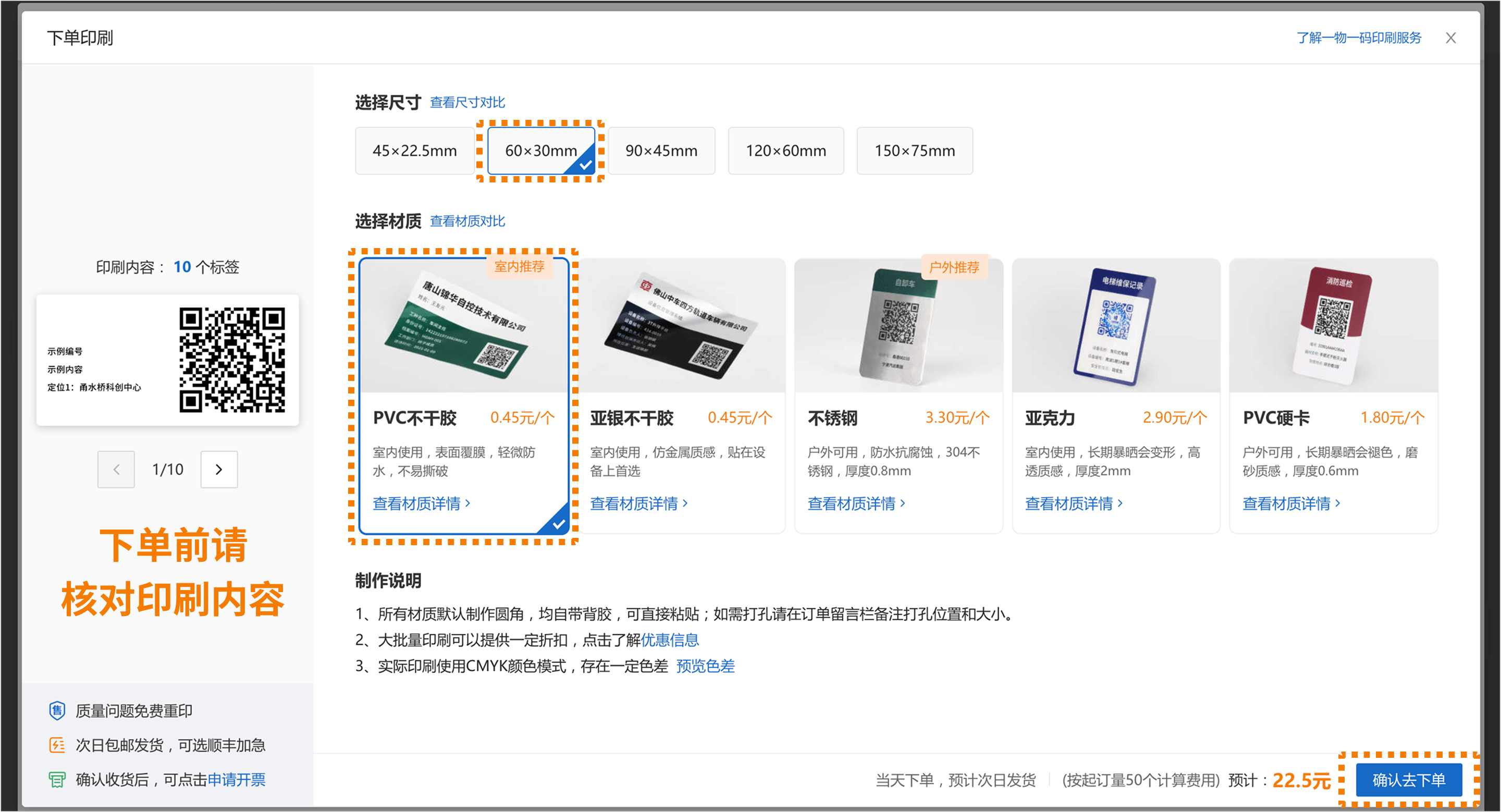
- Verify the design and quantity, select the print size and material, then confirm.
- Copy the print order number shown on the page — recommended to place the order by scanning the code on Taobao.
- (Important) On the Taobao page, enter the actual quantity to print and include the print order number in the order notes, then confirm payment.
- Wait for shipping and delivery.
Step-by-Step Guide
- Go to the bulk template detail page, select the QR code labels to print, and click [Place Print Order].
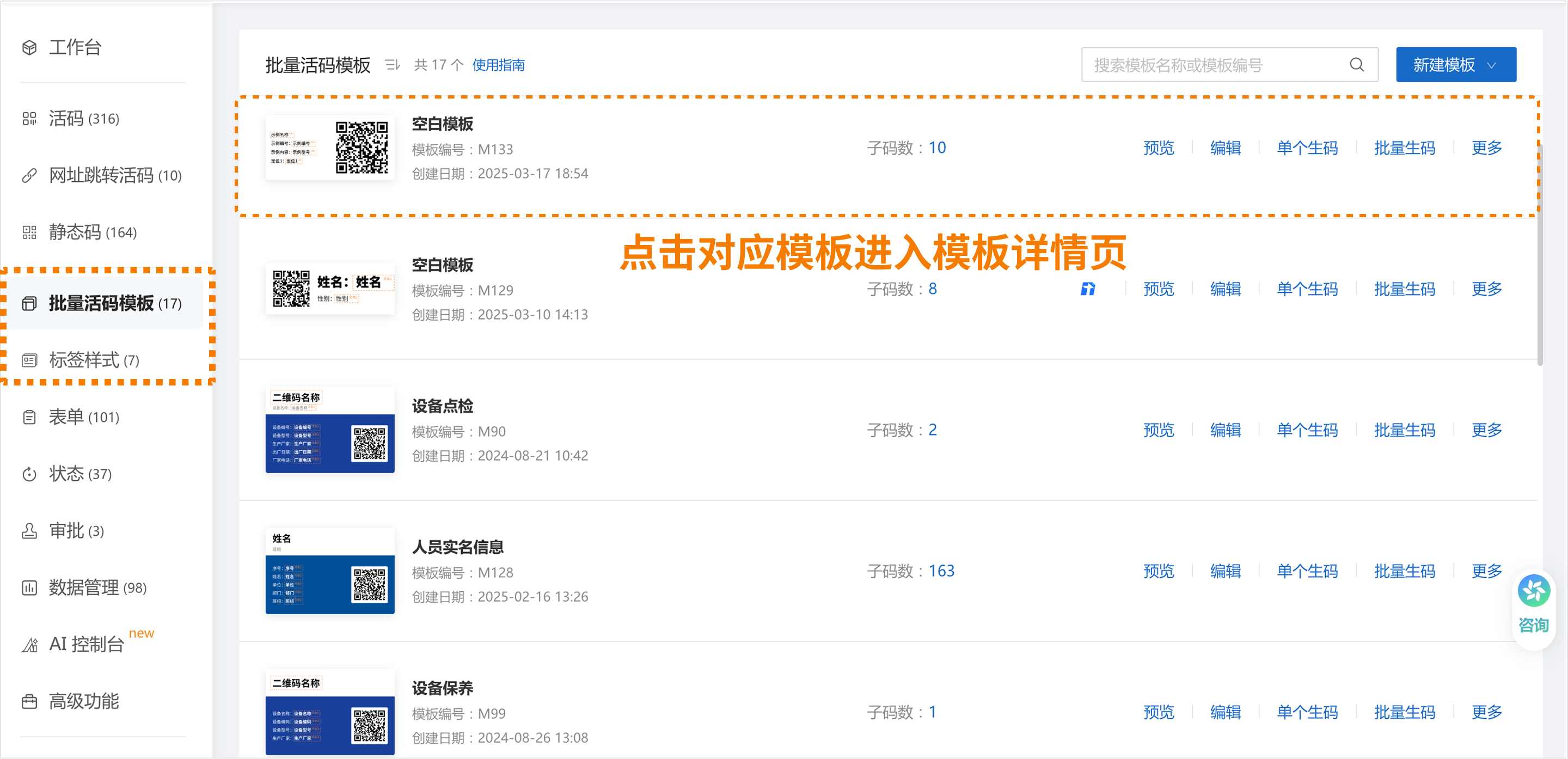
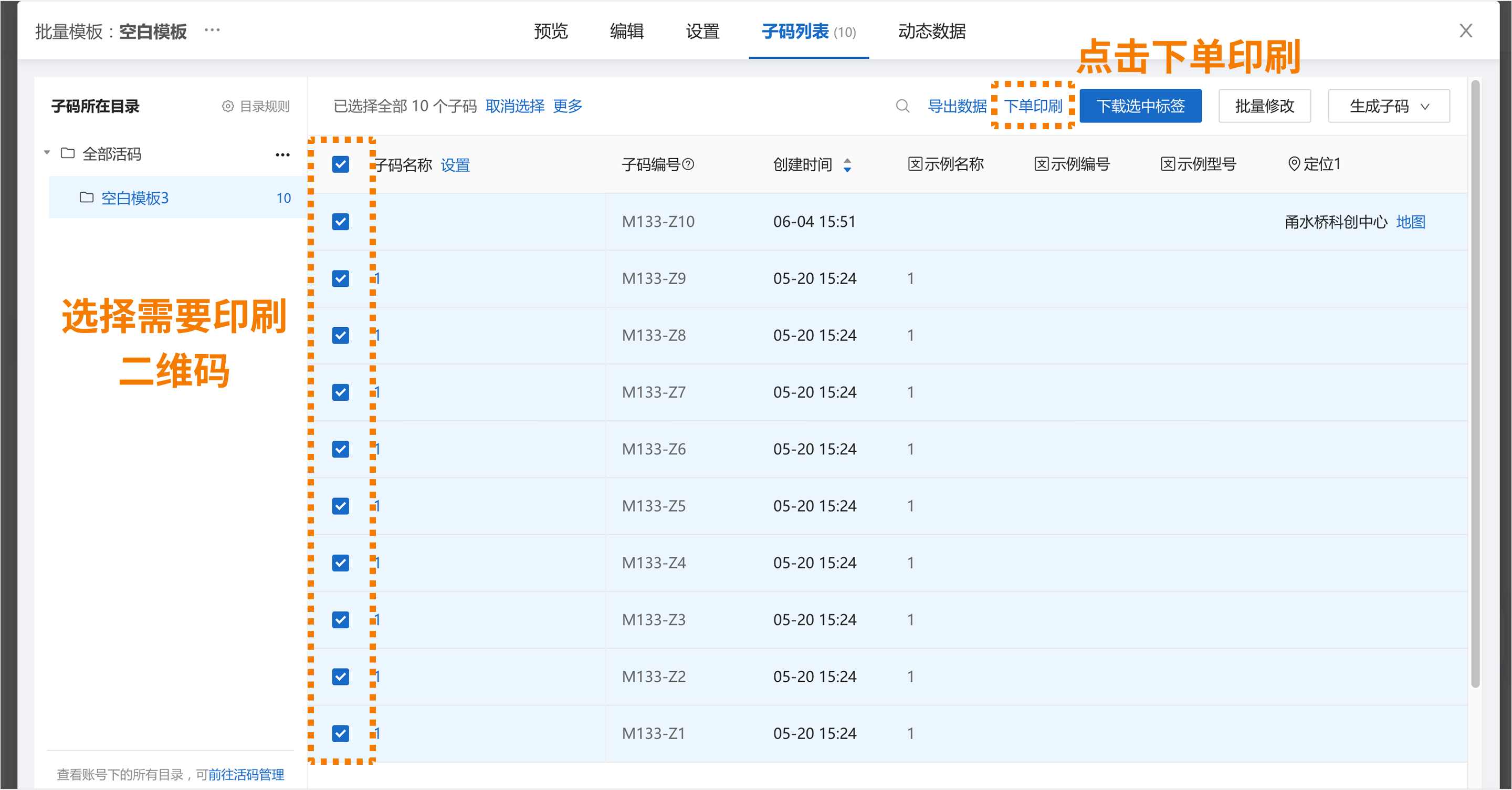
Note: If no items are selected, the default is to select all labels in that folder.
- Verify the design and quantity, select the print size and material, then click [Confirm Order].
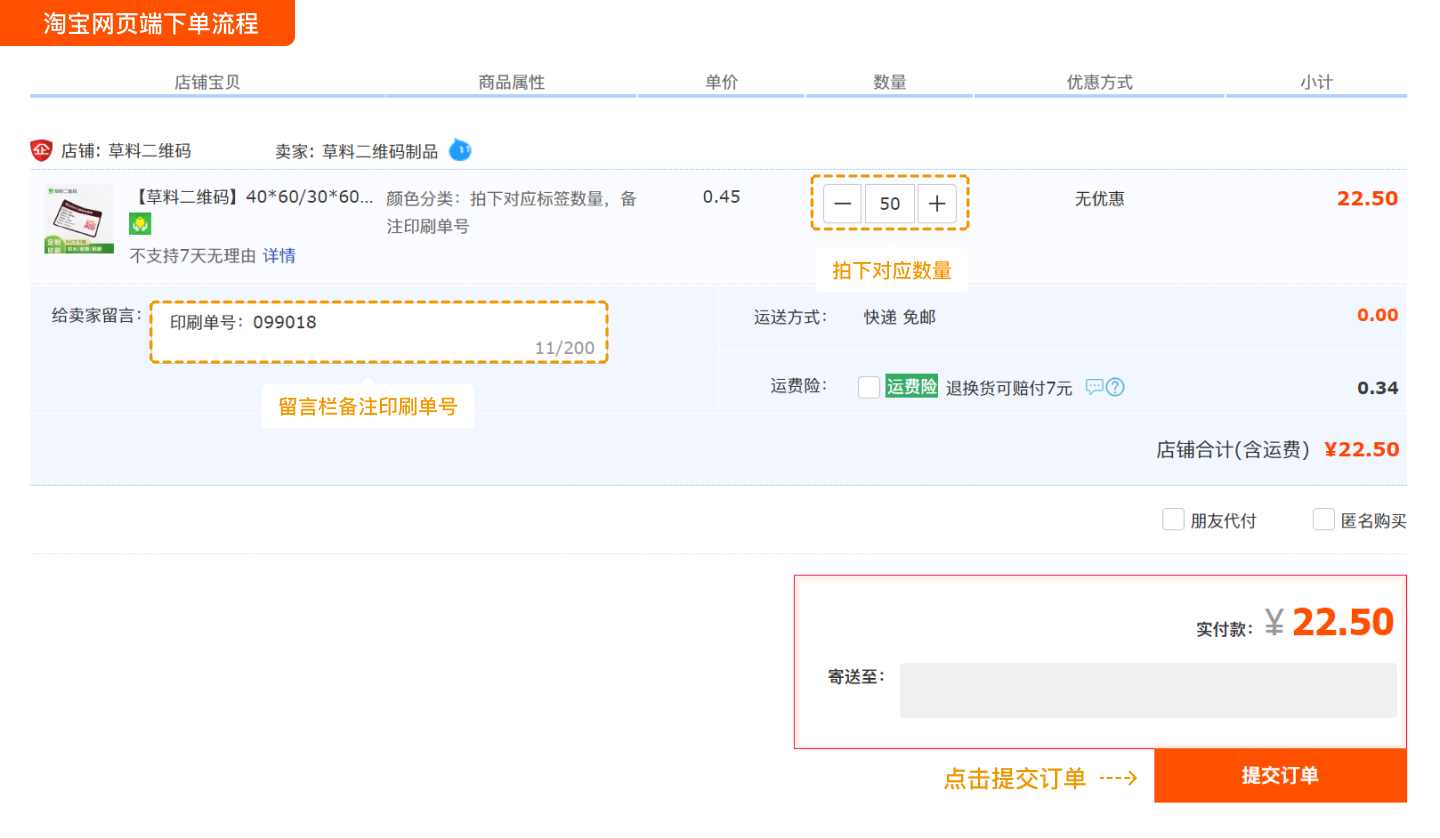
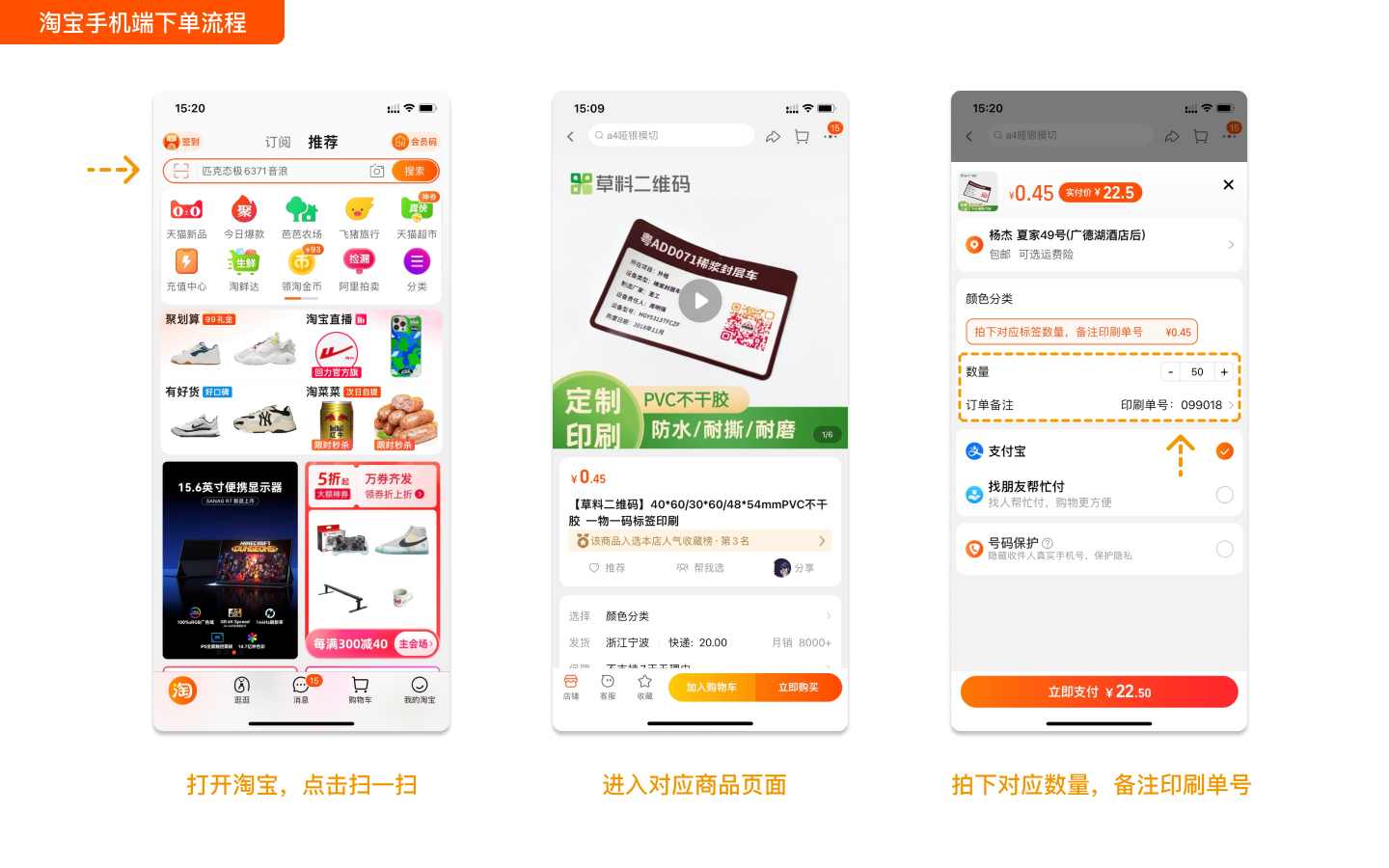
- Copy the print order number and place the order on Taobao (recommended via QR code scan).
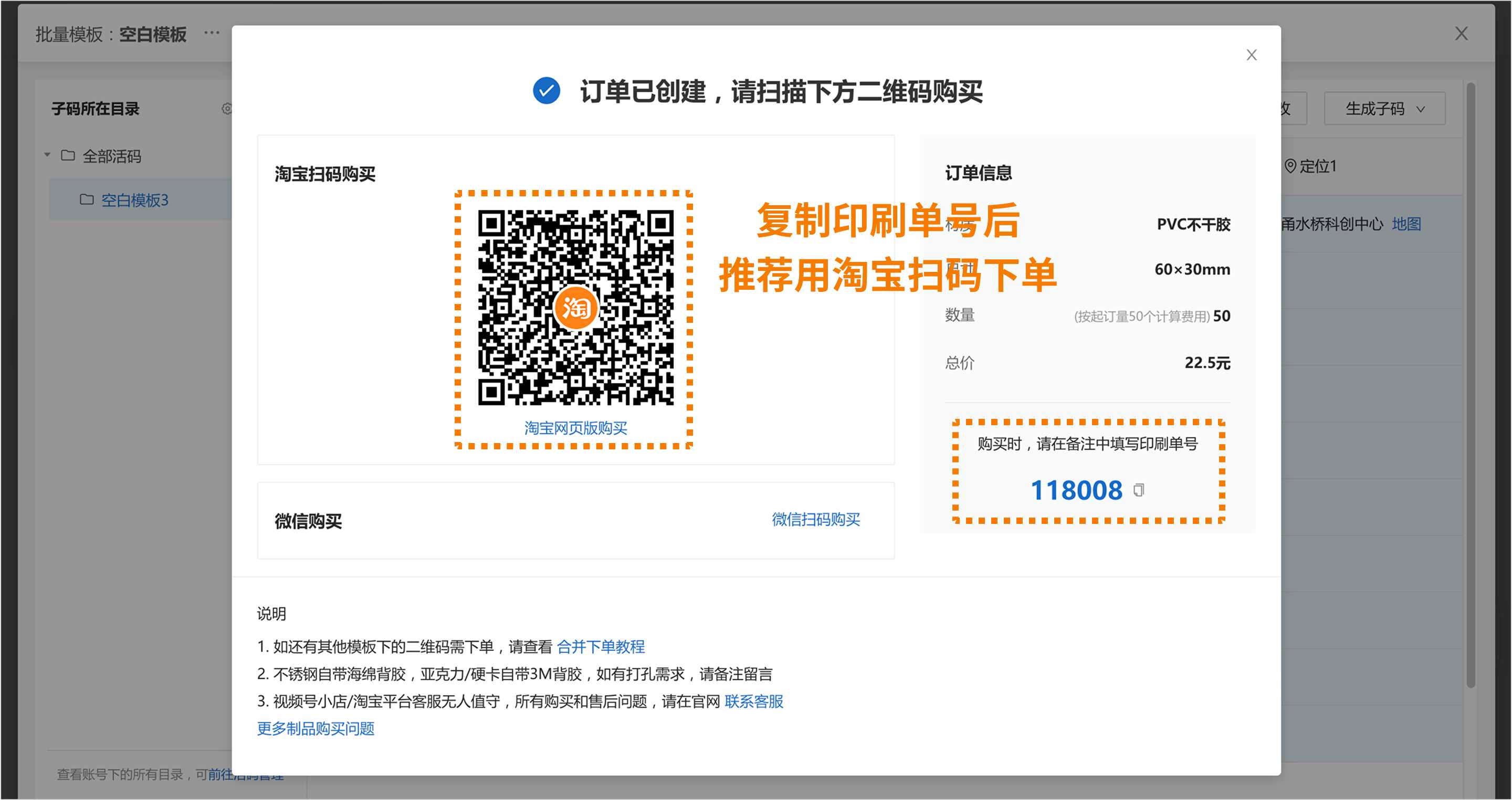
- On the product page, order the correct quantity and enter the print order number in the [Notes field]. If you have special printing requirements (e.g., "四个角打孔" (hole punching at four corners) / "不背胶" (no adhesive) / "制作直角" (square corners)), include those in the notes as well.

2. Single QR Code Label Orders
Quick Process Overview
- Click the QR code you want to print, and on the preview page, click [Other Downloads].
- In the new popup window, click [Place Print Order].
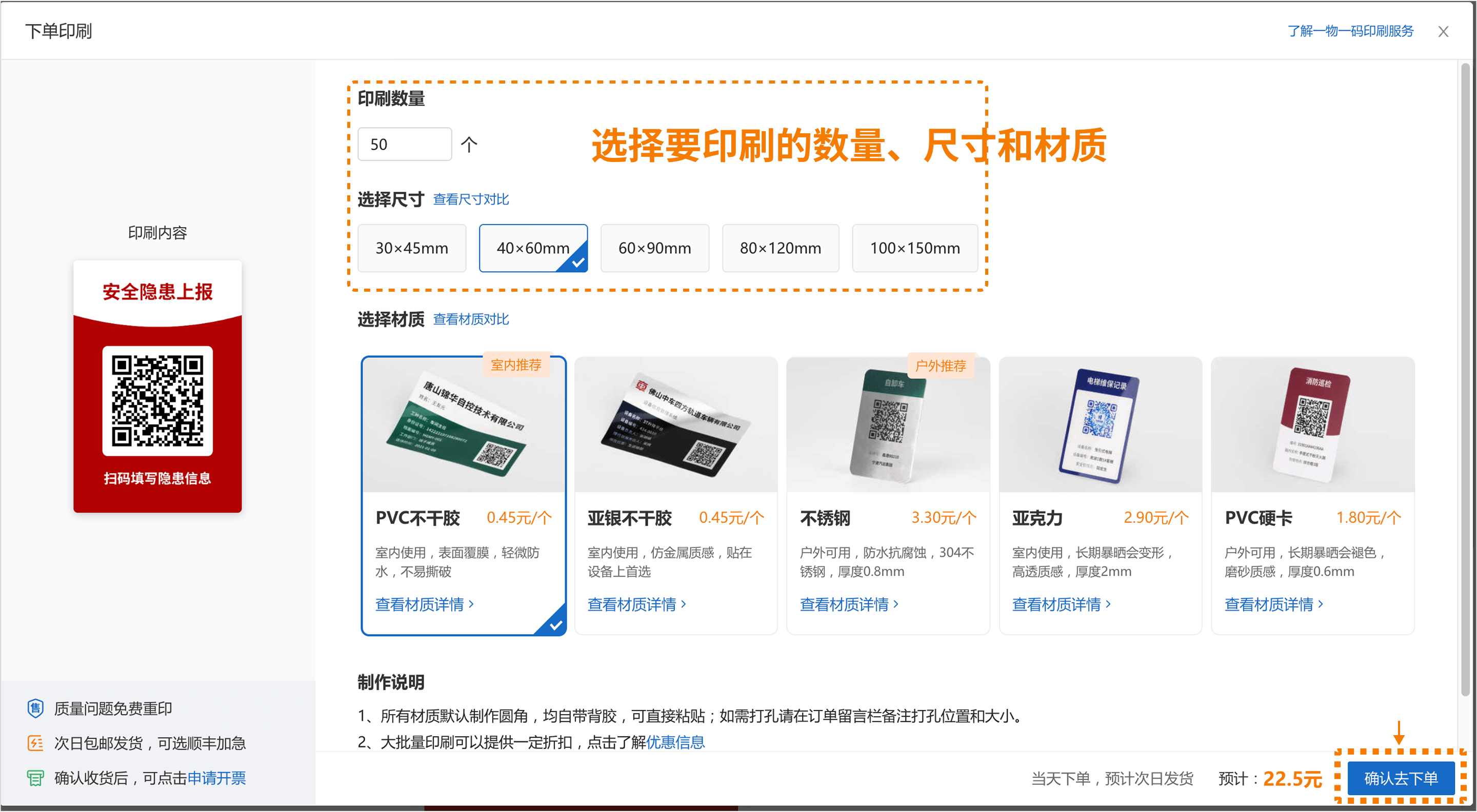
- Select the quantity, size, and material to print, then confirm.
- Copy the print order number — recommended to place the order by scanning the code on Taobao.
- (Important) On the Taobao page, enter the actual quantity to print and include the print order number in the notes, then confirm payment.
- Wait for shipping and delivery.
Step-by-Step Guide
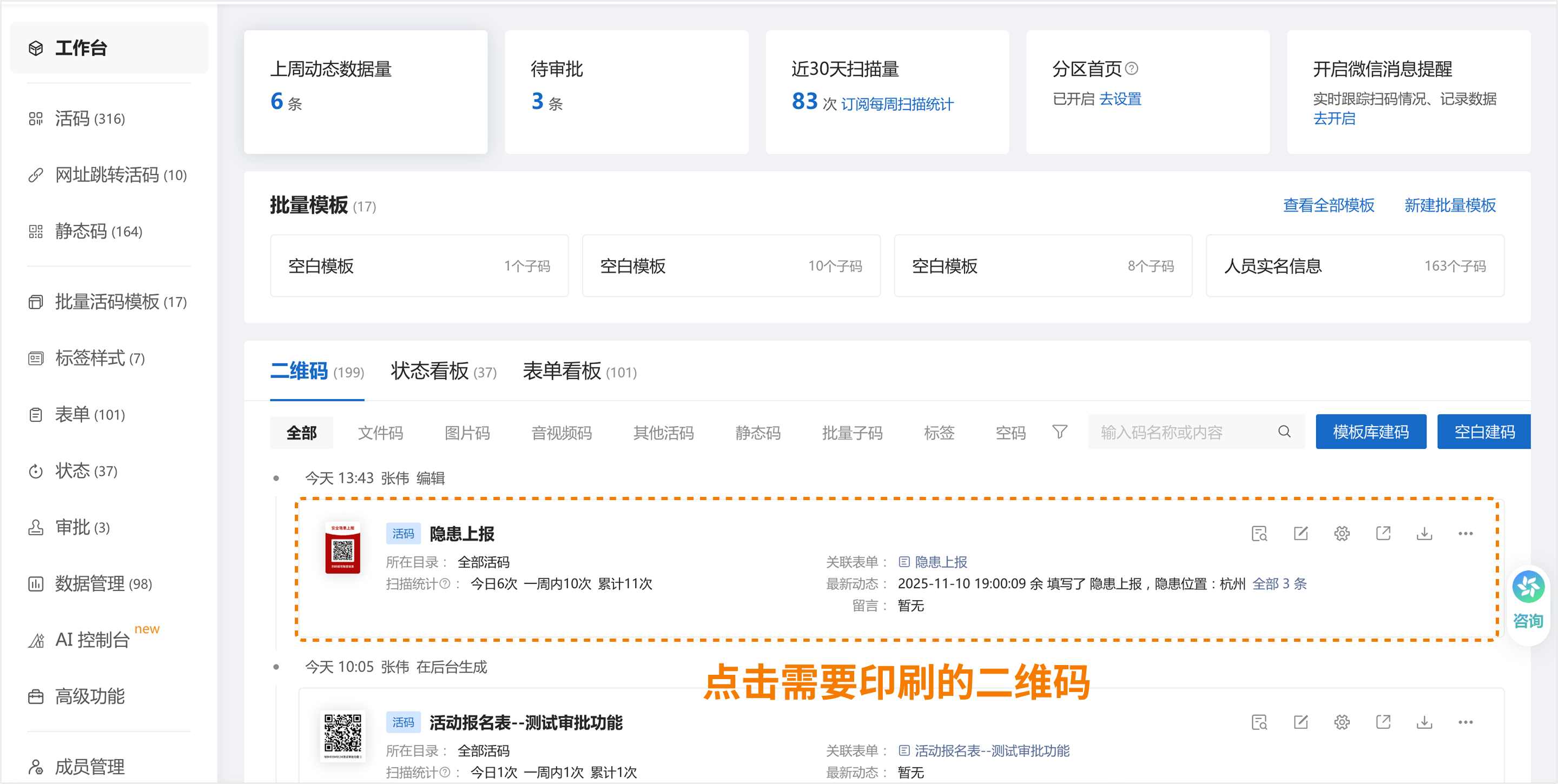
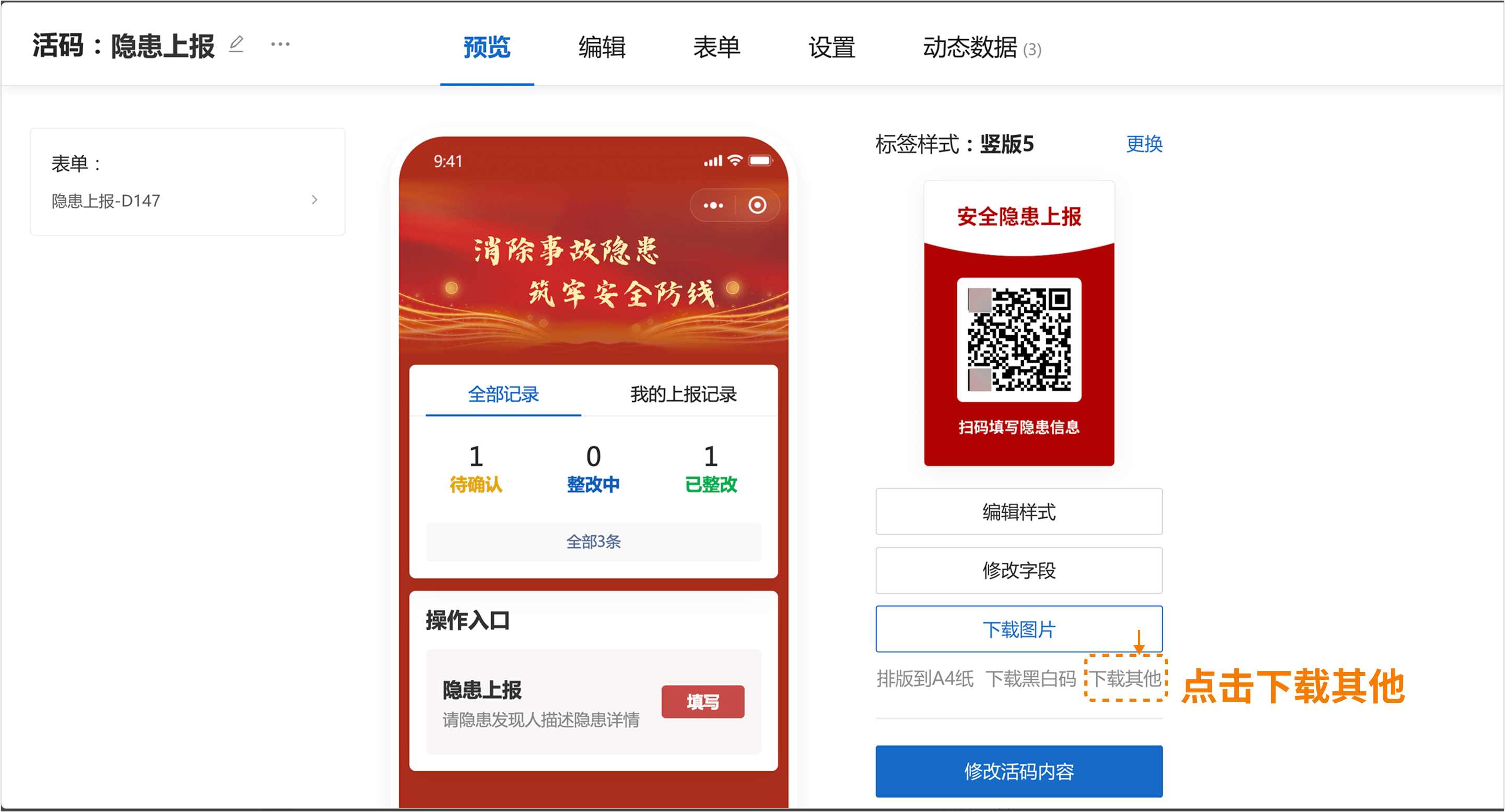
- Click the QR code you want to print. On the preview page, click "Other Downloads".
- In the new popup window, click [Place Print Order].
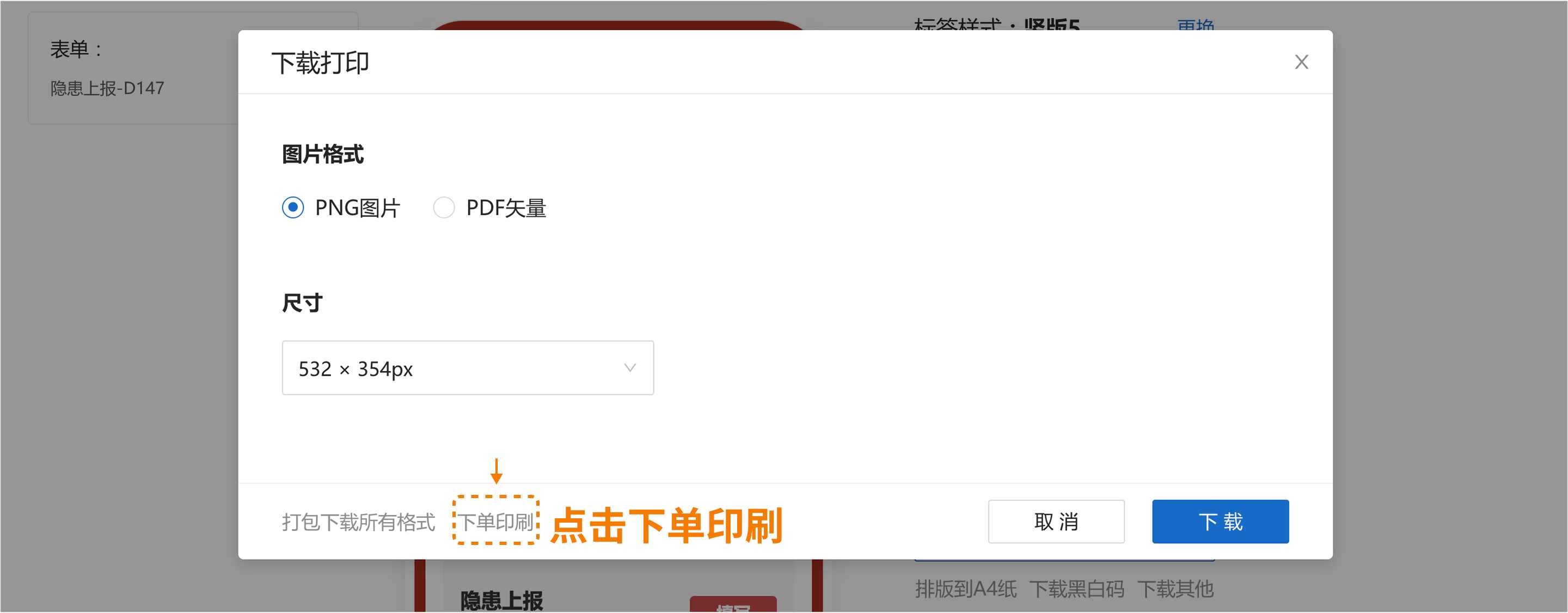
- Select the print quantity, size, and material, then click [Confirm Order].
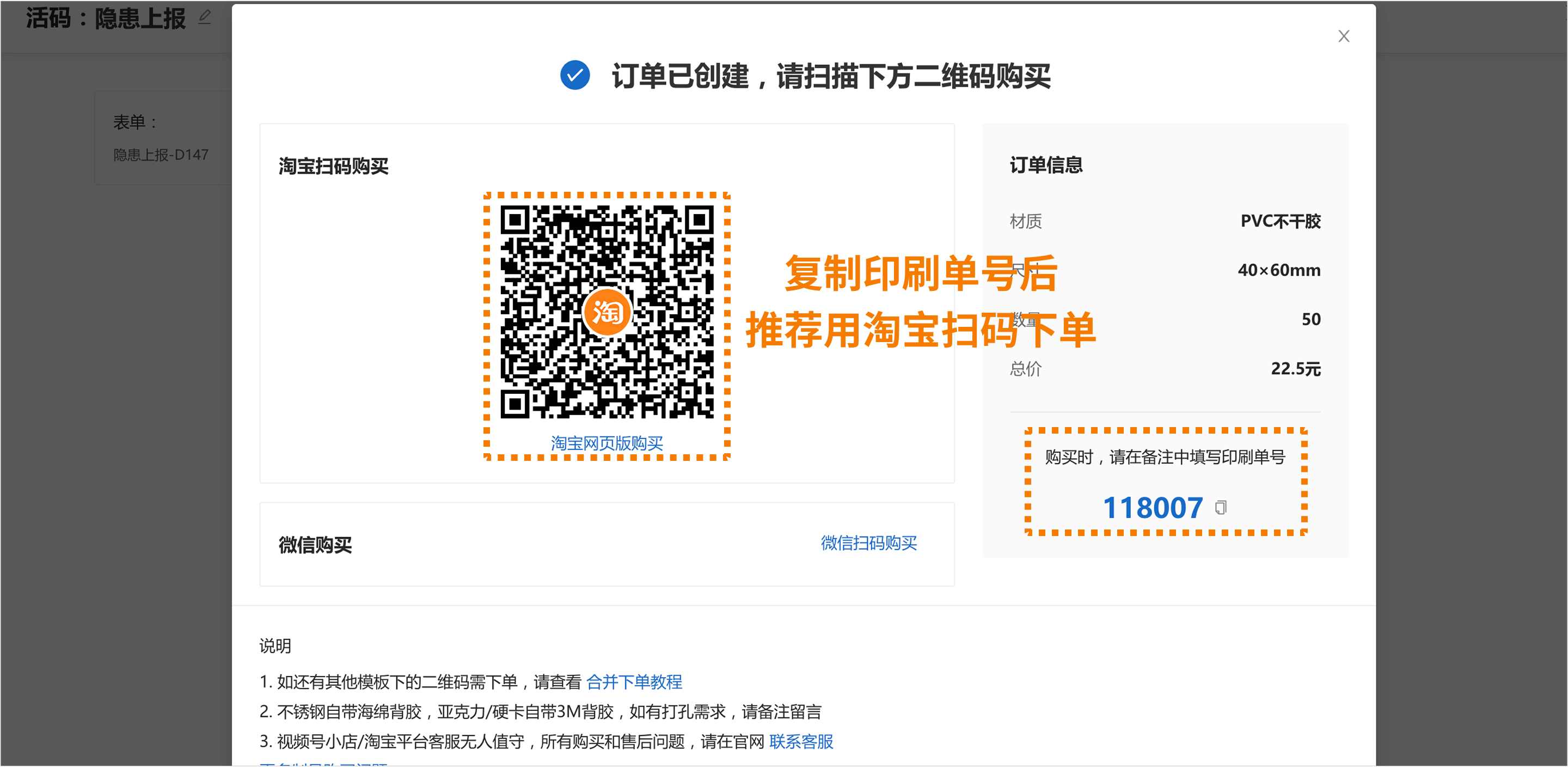
- Get the
print order number, then scan the WeChat QR code or go to Taobao to place the order (recommended). Order the correct quantity and include the print order number in the notes field. If you have special printing requirements (e.g., "四个角打孔" (hole punching at four corners) / "不背胶" (no adhesive) / "制作直角" (square corners)), include those as well.
3. Combined Order Process
Note: Combined orders are only available when the size and material are the same for all items. If sizes or materials differ, please place separate orders.
3.1. Combining Multiple Bulk Template Orders
When there are fewer than 10 bulk templates, follow this process:
- Go to each template's detail page, select the QR codes to print, and click [Place Print Order].
- Obtain and record all [print order numbers], then scan the WeChat QR code to order (recommended) or click to go to Taobao.
- Include all print order numbers in the order notes field, and order the total label count.

If there are more than 10 bulk templates, the process is more complex — follow this alternative process:
- Download all QR codes you want to print as image files or PDF files (one label per page), then zip them into a single archive.
- Send the zip file to zhipin@nears.cn with your CaoLiao account name as the email subject.
- Choose any one of the templates, go to its detail page, click [Place Print Order], select the size and material, and click [Confirm Order].
- In the popup window, open WeChat and scan the QR code to place the order, entering the total print quantity and your CaoLiao account name in the notes. Complete payment.
3.2. Combining Multiple Single QR Code Orders
If you have multiple single QR codes to print, follow this process:
- Download all QR codes as image files or PDF files (one label per page), then zip them into a single archive.
- Send the zip file to zhipin@nears.cn with your CaoLiao account name as the email subject.
- Choose any one QR code, click [CaoLiao Print Service], select the size and material, and click [Confirm Order]. 4. In the popup window, open WeChat and scan the QR code to place the order, entering the total label count and noting [邮件印刷+草料账户] (email printing + CaoLiao account) in the notes field. Complete payment.
II. Pricing and Discounts
1. Standard Pricing
- PVC / Silver adhesive sticker labels: from ¥0.35/piece; minimum order 50 pieces.
- Acrylic / Hard card / Stainless steel labels: from ¥1.2/piece; minimum order ¥200.
Note: Orders below the minimum quantity cannot be fulfilled. Refunds can be requested in such cases.

*The table shows reference prices. Final prices are subject to the order popup display.
2. Bulk Discounts
- Orders of 1,000+ pieces enjoy tiered discounts, up to 35% off.
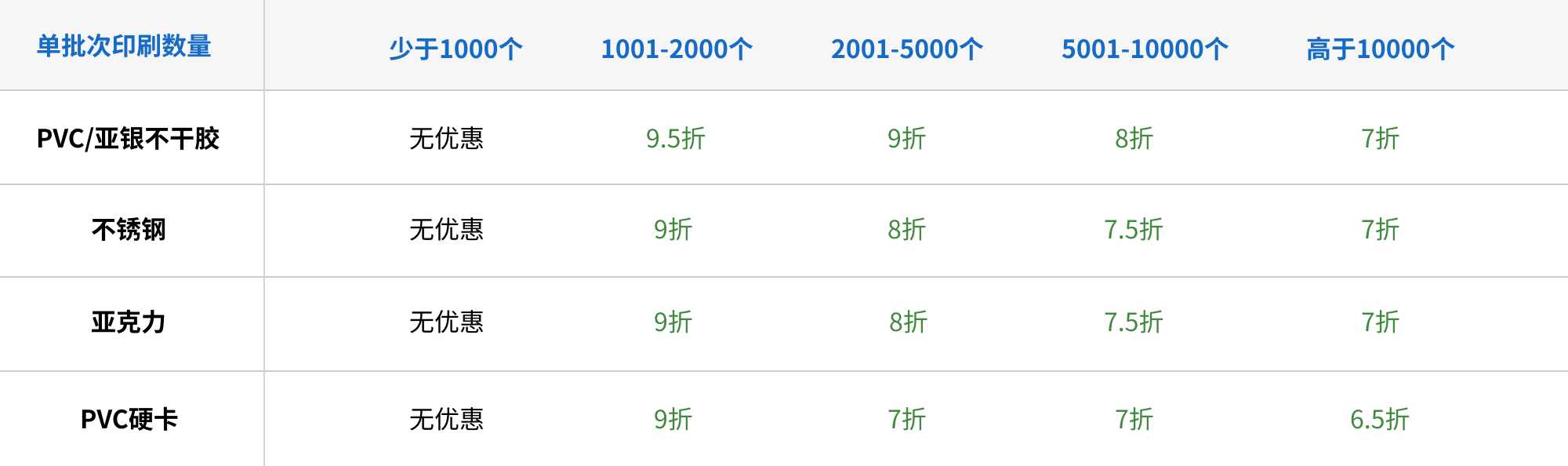
*Note: Discounts apply only to single-batch orders and do not apply to orders placed in multiple batches. Please contact the print customer service to apply discounts.
III. Shipping and After-Sales
1. Shipping Timeline
- PVC / Silver adhesive sticker labels: Orders placed before 10:00 AM ship the same day; orders after 10:00 AM ship the next day.
- Acrylic / PVC hard card / Stainless steel: Ships within 2–5 business days. Large orders (over 500 pieces) may have extended shipping times.
- No orders on Sundays; Sunday orders are processed the following Monday.
2. Shipping Method
- Default carrier: ZTO / YTO (free shipping).
- For urgent orders, note "顺丰到付" (SF Express, shipping paid by the recipient) to switch to SF Express.
3. Receiving and After-Sales
- Upon receipt, if you find damage to the package or issues with quantity, size, or quality, please contact customer service within 7 business days.
- Any quality issues found within 7 days will be reprinted for free or refunded.
Note: Once printed, label products are custom-made and cannot be resold. Changing the content, switching materials, adjusting quantities, or requesting refunds is not supported. Please carefully verify your print content, quantity, and dimensions before placing your order.
4. Surfaces Not Suitable for Adhesive Application

IV. Invoice Request
1. How to Request
Invoice Information:
- Tax rate: 1%
- Category: Printed goods — label products
- Invoice types: Digital general invoice, Digital special VAT invoice
- Processing time: Issued within 1–3 business days after order confirmation, sent to your email.

2. Invoice Samples
Digital General Invoice Example

Digital Special VAT Invoice Example
V. Frequently Asked Questions
1. Order Issues
1. What should I do if I notice an error in the content after placing the order?
Printed products are custom-made. Once an order is placed, CaoLiao immediately submits it to the factory for printing. Once printed, items cannot be resold or refunded. Please verify your print content before placing the order and confirm everything is correct before payment.
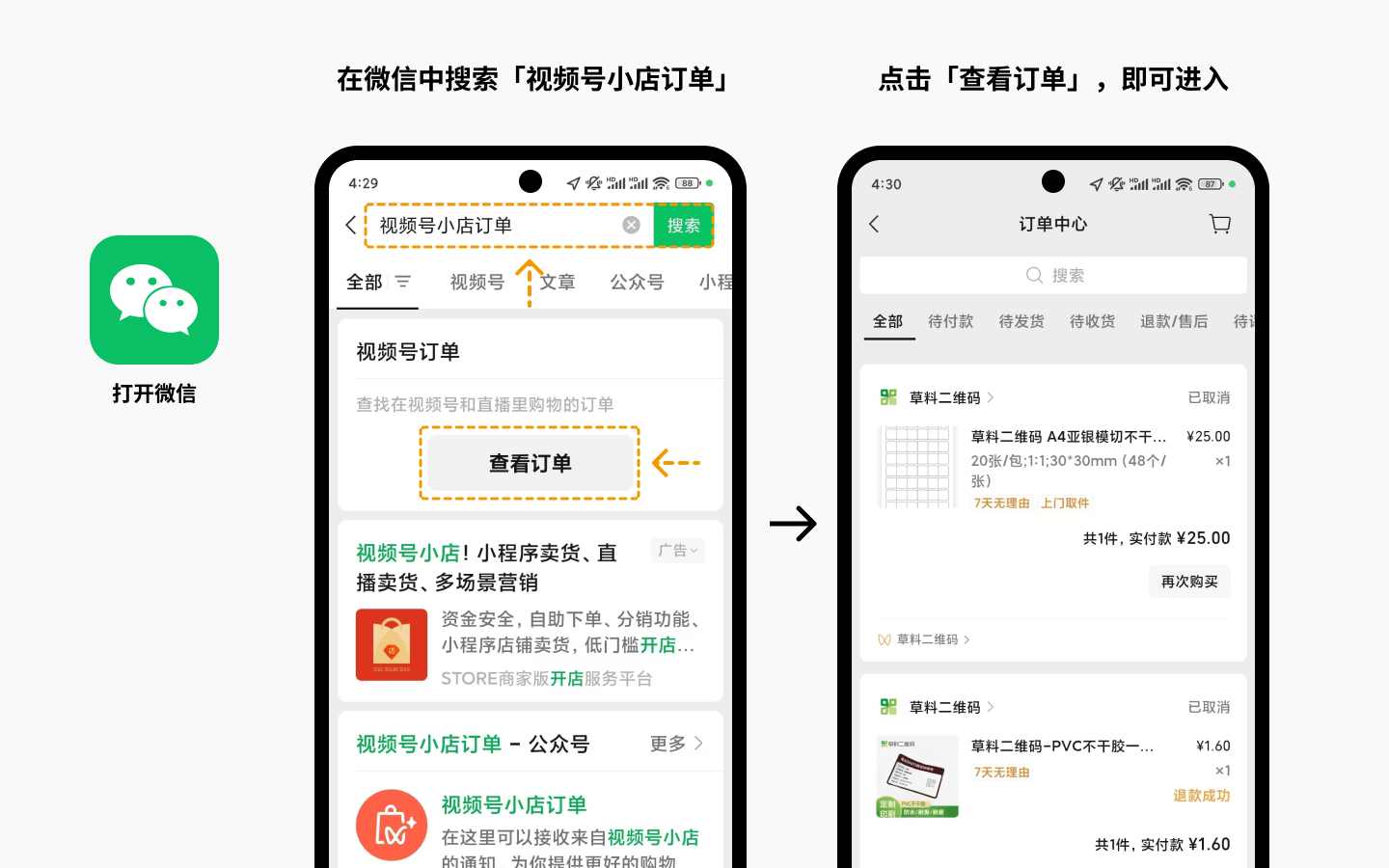
2. How can I check order status and shipping for orders placed via WeChat Channels Store?
Search for "视频号小店订单" (WeChat Channels Store Orders) in the WeChat home search bar and click "查看订单" (View Order) to check your order and shipping status.
2. Pricing and Discounts
3. Can I place an order below the minimum quantity?
PVC / silver adhesive sticker labels have a minimum of 50 pieces. If your quantity is less than 50, please order 50. Other materials have a minimum order of ¥200. Orders below ¥200 will not be shipped. Please check your order quantity and total carefully.
4. Are there discounts for large quantities?
Hi, orders of 1,000+ pieces in a single batch receive tiered discounts. For details, see Bulk Discounts. To apply a discount, contact online customer service after placing your order to have the price adjusted before payment.
Printing Requirements
5. Are labels/plates round-cornered or square-cornered?
All materials are made with round corners by default. If you need square corners, please note "直角" (square corners) in the order notes.
6. How do I order plates with hole punching?
- All materials include adhesive backing by default for direct application. PVC / silver adhesive stickers use water-based adhesive; acrylic / PVC hard cards use 3M adhesive; stainless steel uses foam adhesive.
- Stainless steel / acrylic / PVC hard cards support free hole punching with a default diameter of 3 mm. If you need holes, please specify the location in the order notes, e.g., "四个角打孔" (holes at four corners), "顶部中间打孔" (hole at top center), "上方2个角打孔" (holes at the two top corners), etc.
Note: Hole punching and adhesive backing are mutually exclusive — you cannot have both.
7. Is custom design supported?
CaoLiao does not currently offer custom design or manual layout services. You can use the QR code style editor on our website to create label designs — you can modify content, upload background images, change theme colors, upload logos, and more. For detailed steps, see QR Code Label Creation.
8. What printing process is used for labels/plates?
PVC / silver adhesive stickers use digital printing with surface lamination. Acrylic uses UV ink printing with a 2 mm thickness. Stainless steel uses UV ink printing with a 0.8 mm thickness. PVC hard cards use digital printing with a 1 mm thickness.
3. Other Questions
9. Can't reach customer service?
Hi, QR code label products follow a self-service order process as described in this article. Customer service for the WeChat Channels Store and Taobao stores is unattended. For questions, please contact our online live chat support.
10. Printing quality issues?
If there are print quality issues, CaoLiao provides free reprinting. Please inspect your order within 7 days of confirming receipt. If you find quality problems, contact online customer service with clear photos showing the issue, and we will resolve it for you.