Business Card QR Code
1. Feature Overview
Once a CaoLiao business card QR code is created, it can be shared online and saved to contacts with a single tap. You can also print the QR code on a physical business card as an extension of it.
- Free to create, with no limit on the number of cards.
- Scan to view contact information, with one-tap save to contacts.
- The card owner can scan to claim the card. Once claimed, it can be managed in the CaoLiao WeChat Mini Program, including viewing, editing, and sharing.
- View the number of times the card has been viewed and saved, in real time.
2. Business Card Preview

3. Claiming Your Business Card QR Code
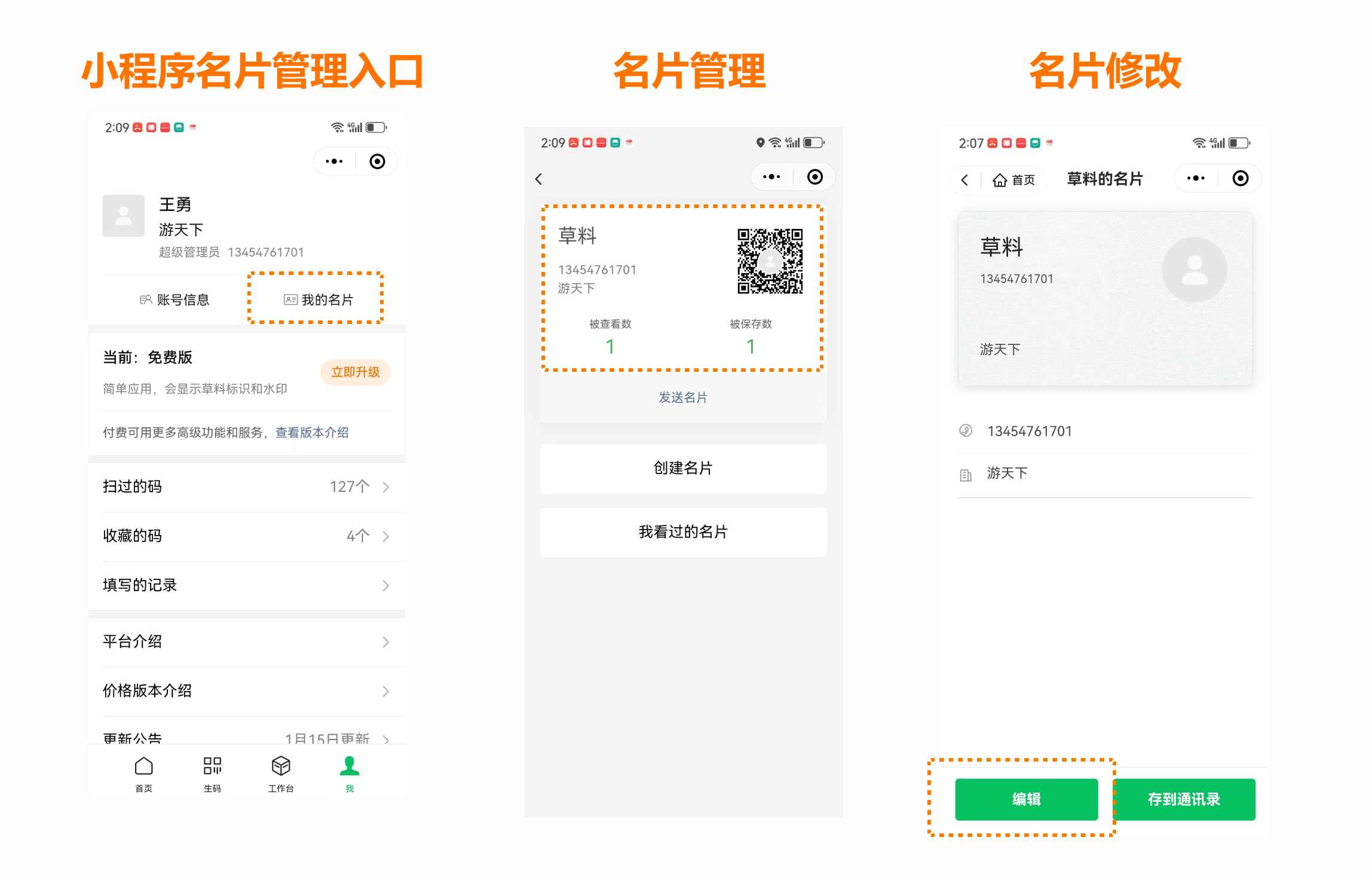
You can claim your own business card to [My Cards] in the CaoLiao QR Code Mini Program, where you can manage it — including editing content, sharing, and viewing statistics.
Claiming steps: Scan the business card with WeChat, tap Claim Card, verify your phone number, and the card will be claimed successfully. (The phone number on the business card must match the phone number linked to your WeChat account.)

4. Editing Business Card Content
Your own business card can be claimed into the Mini Program and edited there.
Open the CaoLiao Mini Program, go to [Me — My Cards] to view your card, and tap the card to edit its content. You can also view how many times the card has been viewed and saved.
Note: Editing can only be done within the Mini Program — it is not supported on the desktop. Business cards are only saved in the Mini Program and will not appear in the desktop workbench.
5. Frequently Asked Questions
1. Why Am I Getting a Phone Number Error When Creating a Business Card?
A phone number is required. Please double-check that the number of digits is correct.
Currently, only mainland China phone numbers are supported for creating business cards. We apologize for the inconvenience.
2. Can I Remove the CaoLiao Logo from the Business Card After Upgrading to a Paid Version?
No. The business card feature is currently free only, and the CaoLiao logo will always appear — even on paid versions.
3. How Do I Create a Business Card in English?
Simply enter the content in English. Other elements (such as button labels) will automatically switch to match your phone's system language.
Note: The current business card is built on WeChat Mini Program technology and only supports viewing via WeChat. If you need to open it in other apps outside China, please create a legacy business card instead.
4. Why Can't All Phone Numbers on the Card Be Saved to Contacts?
Due to WeChat Mini Program API limitations, a maximum of 3 phone numbers can be saved to contacts (including mobile and landline numbers combined).
5. How Do I Edit the Company Name?
The company name can only be modified by the organization's super administrator from the desktop workbench.
The super administrator should log in to the desktop workbench, then go to [Settings — Organization Info] to update the organization name.
6. Which Apps Support Scanning the Business Card QR Code?
Currently, only WeChat scanning is supported. Alipay, WeCom, the phone camera, and other applications are not supported.
7. How Do I Create a Corporate Business Card?
The corporate business card is a legacy feature only available to existing users. No further improvements will be made to it — it will only receive maintenance to keep existing functionality working.
8. Can the Business Card QR Code Have an Expiration Date?
No. Business card QR codes are valid indefinitely by default. If you need to invalidate one, the person who claimed the card can delete it from [Me — My Cards] in the CaoLiao Mini Program.
We are currently planning a new business card feature. If you have additional needs, please share your feedback in the Community — it helps us build a better product. Thank you!