Purchase and Renewal Process
CaoLiao paid editions are billed annually. Your paid features are activated automatically after payment. You can place orders, request invoices, and apply for contracts online. If your organization needs a quotation, contract, or invoice to approve the purchase, you can obtain them before paying.
1. Where to buy
| Where | How to buy |
|---|---|
| Pricing page | Open the pricing page and select Buy Now under the edition you want. |
| Admin console | Select Upgrade to a Paid Edition at the top. If you are already on a paid edition, open the avatar menu in the top right and select Renew or Upgrade. |
| Phone | In WeChat, search for the CaoLiao QR Code mini program. Go to Me and select Upgrade or Renew. |
The paid edition is activated for the account signed in at payment. Check the account in the top right before placing the order. See Choosing an Edition if you are unsure which edition to buy.
2. Get a contract, invoice, or quotation before paying
Your organization may need these documents for procurement approval. You can obtain each one before payment.
| Document | Where to get it | When it is ready |
|---|---|---|
| Contract | Complete the contract application. See the steps below. | Electronic contracts are ready immediately after submission. |
| Invoice | Apply for an advance invoice using the steps below. | 1–3 business days. |
| Quotation | Download it from the quotation page. It includes the standard one-year price and discounted two-, three-, and five-year prices. | Available to download immediately. |
| Business license, bank account permit, or other credentials | Contact a sales adviser. | Provided by the sales team. |
Apply for a contract
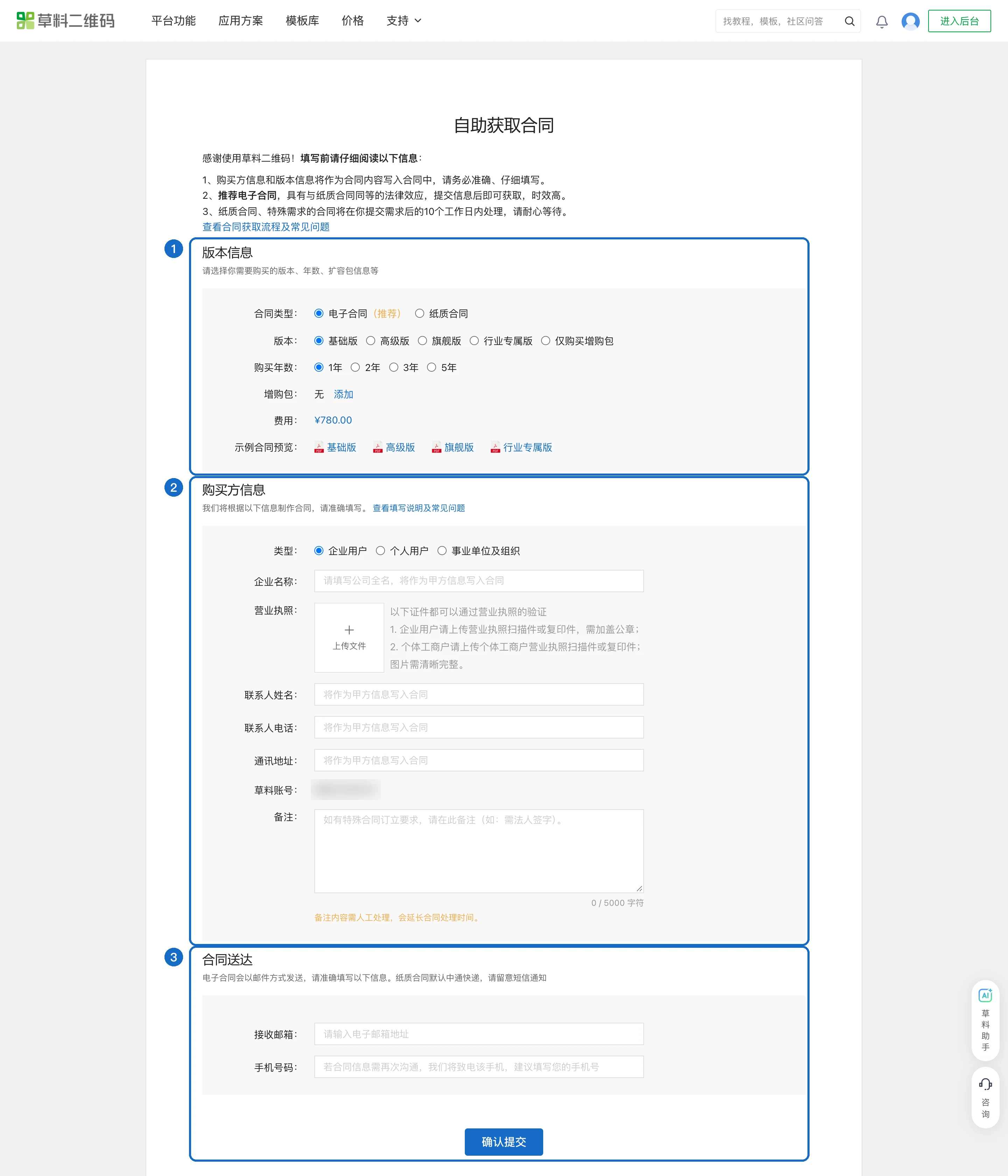
- Open the contract application. Select a contract type (electronic is recommended), an edition, a term, and any add-ons. The page calculates the total.
- Enter the buyer's details. Select a business, an individual, or a public institution or organization. Upload the required documents, such as your business license, and enter the contact person and mailing address. Check these details before submitting because they appear on the contract.
- Enter the recipient's email address and phone number, then select Confirm and Submit.
Electronic contracts bear an electronic contract seal and have the same effect as paper contracts. Paper contracts and special requests, such as amended terms, a legal representative's signature, or a nondisclosure agreement, are processed manually within 10 business days. Add special requests under Remarks.
Request an advance invoice
Invoices are normally issued after payment. If your organization needs the invoice first, apply for an advance invoice.
- Open checkout from the pricing page. Select the edition and term, then note the amount due on the right.
- Submit your billing details using the advance invoice request form. This is a WeCom collection form. On desktop, scan the sign-in code with WeChat. On mobile, open it directly in WeChat.
- The team issues the invoice manually within 1–3 business days and sends it to the email address you entered.
- Pay within 30 days of receiving the invoice. Organizations typically use a corporate bank transfer as described below. The invoice is void if payment is late.
3. Place and pay for your order
1. Select your edition and term
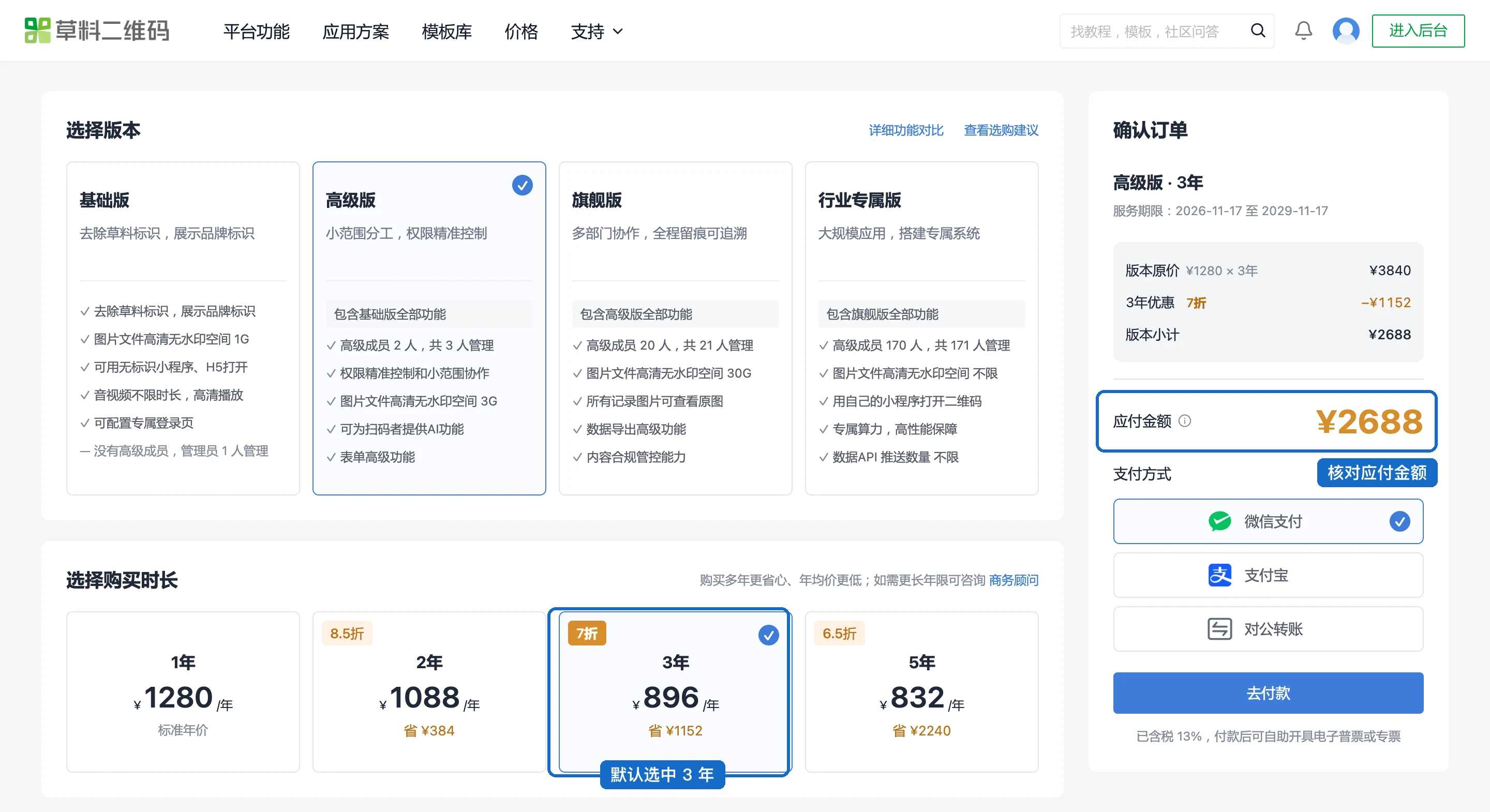
- Under Select Edition, verify the selected edition or select another one.
- Under Select Term, choose at least one year. Two years are 15% off, three years are 30% off, and five years are 35% off. Checkout selects three years by default. Choose 1 year if you only want one year.
- In Confirm Order on the right, check the edition, service period, and amount due. The price includes 13% tax.
2. Choose a payment method
| Payment method | How to pay | When your edition activates |
|---|---|---|
| WeChat Pay | Select Pay and follow the instructions. | Immediately after successful payment. |
| Alipay | Select Pay and follow the instructions. | Immediately after successful payment. |
| Corporate bank transfer | Enter the payer's name and contact phone number. Submit the order to get your dedicated remittance account and give the account details to your finance team. | Within 30 minutes of receiving payment. You will receive an SMS. |
3. Corporate bank transfer requirements
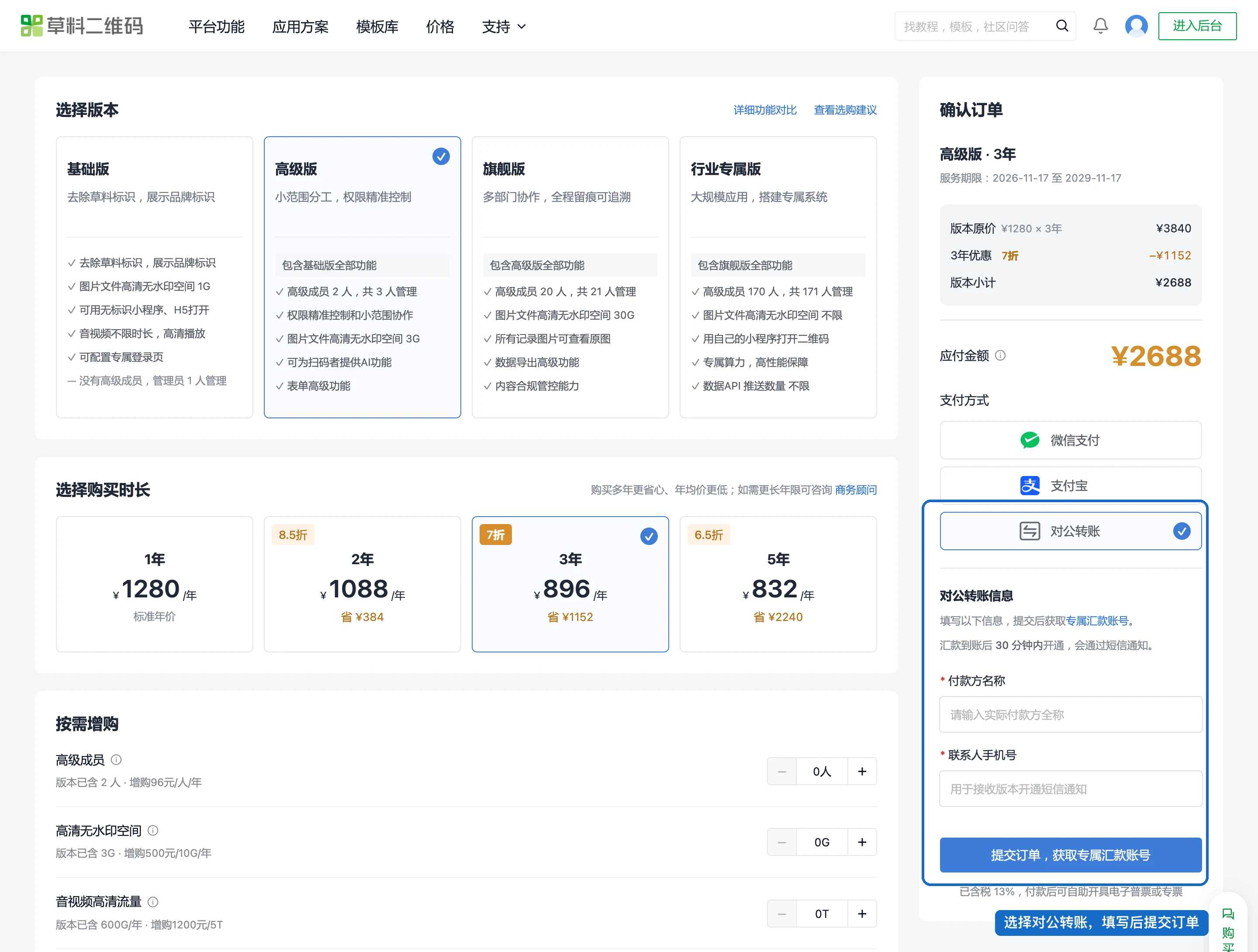
- Submit the order before transferring funds. The system cannot activate your edition automatically if you transfer funds first.
- Enter the actual payer's full legal name. Use the name on the business license for an organization or on the ID card for an individual. Confirm the account holder's name if someone else is paying.
- Transfer the exact amount due. Overpayments and underpayments require manual processing.
- Your dedicated remittance account stays valid. Each CaoLiao account has a dedicated China Merchants Bank receiving account that can be reused for renewals and add-ons. It is a bank subaccount and its number is longer than a regular account number.
- Your edition activates within 30 minutes of receipt, and you get an SMS at the number you supplied. If activation takes longer than one business day, send your receipt to a sales adviser for manual confirmation.
- Your term starts when payment arrives. If internal approval delays the transfer, you can still use the same contract.
4. Confirm activation
After payment, open the admin console. Go to Global Settings > Edition and Usage to check your current edition. The purchase appears under Order History below. If you still see the Free Edition, sign out and sign back in.
4. Request an invoice after paying
- Open the admin console and select Global Settings.
- Open Edition and Usage.
- Select Request Invoice in the top right of Order History. Enter and submit your billing details.
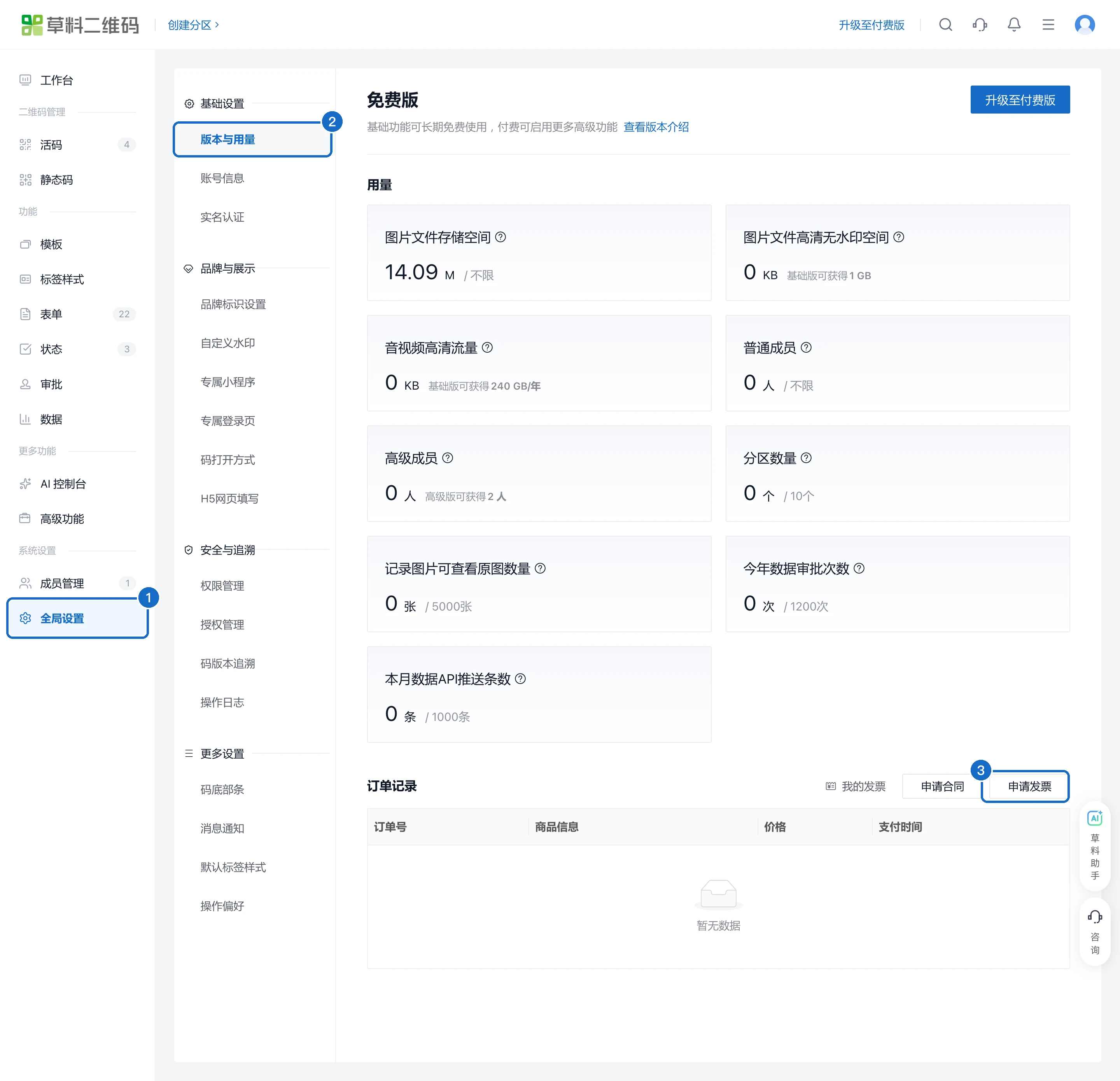
The invoice is usually emailed within 10 minutes. You can also download it later from My Invoices in the top right of Order History.
| Item | Details |
|---|---|
| Invoice types | Fully digital ordinary invoices and fully digital special invoices. |
| Invoice recipient | You can use a company name even if you paid personally. |
| Invoice item | *Software* QR Code Management System V2.0. The item cannot be changed. |
| Tax rate | 13%. |
| Time limit | You can request an invoice for an eligible paid order at any time. |
See Invoice Requests for reissuing or combining invoices. If you need a contract after paying, select Request Contract in the top right of Order History.
5. Renew, upgrade, or buy add-ons
Renew
You can renew before or after expiry. Select Renew from the avatar menu in the admin console, or buy your current edition on the pricing page. The same discounts, invoice process, and contract process apply.
After expiry, you can buy a lower edition directly. To downgrade before expiry, contact a sales adviser.
If you wait to renew, existing QR codes remain scannable and collected data remains stored. The CaoLiao logo returns and paid features stop. See What Happens After a Paid Edition Expires.
Upgrade
During your paid term you can upgrade to any higher edition by paying the difference. Open the avatar menu in the admin console and select Upgrade, then choose how the expiry date should be handled.
| Option | Amount due | New expiry date |
|---|---|---|
| Keep the expiry date | (New edition price − current edition price) ÷ 12 × remaining months | Same as before. |
| Extend the term | New edition price − (current edition price ÷ 12 × remaining months) | One year from the upgrade date. |
For example, if you buy Basic for CNY 780 on March 1 and upgrade to Advanced at CNY 1,280 on September 1, you have six months left. Keeping the expiry date costs CNY 250 and the edition still expires the following March 1. Extending the term costs CNY 890 and moves expiry to the following September 1.
Buy add-ons
If you need more storage, bandwidth, or advanced members, you can buy capacity separately on the add-on purchase page.
| Add-on | Price | Eligible editions | Validity |
|---|---|---|---|
| Advanced members | CNY 96 per person per year | Advanced and above | Expires with the edition. |
| HD watermark-free storage for images and files | CNY 500 per 10 GB per year | Basic and above | Expires with the edition. |
| HD audio and video bandwidth | CNY 1,200 per 5 TB | Basic and above | 10 years. Remaining bandwidth can still be used after edition expiry. |
| Form approvals | CNY 500 per 10,000 approvals | Flagship and above | 10 years. |
Advanced member and HD storage add-ons are prorated for the remaining months. With 10 months left, 10 GB of extra storage costs 500 × 10 ÷ 12, or about CNY 417. See Add-on Pricing.
Frequently asked questions
1. Can I try the paid edition first?
You can create codes, edit content, build forms, and generate codes in bulk on the Free Edition. Create and scan a code before deciding whether to buy. Contact a sales adviser to try premium features such as advanced members.
2. Can I get an invoice in my company's name if I pay through a personal WeChat Pay or Alipay account?
Yes. Enter the company name as the invoice recipient.
3. Where can I find my dedicated remittance account?
In the admin console, open Global Settings > Edition and Usage and select View Dedicated Account.
4. Can I choose the activation date?
Yes. Contact a sales adviser.
5. Does CaoLiao support government procurement platforms or tenders?
Yes. Organizations in regions such as Zhejiang and Hunan can buy through the government procurement platform. CaoLiao can also work with your organization's internal procurement platform. See Procurement and Bidding.
6. Are any other discounts available?
Rural revitalization teams may be eligible for 90% off the Industry Edition. See the rural revitalization discount. Contact a sales adviser for a multi-account quotation.
7. How are storage and bandwidth calculated for multi-year purchases?
HD watermark-free storage does not accumulate. A three-year Basic Edition still includes 1 GB. HD audio and video bandwidth accumulates by year, so three years of Basic include 720 GB. See Multi-year Storage and Bandwidth.
For more purchase questions, see the Purchase Guide Overview or contact a sales adviser.