Free Version Overview
Since its founding, CaoLiao QR Code has been dedicated to building an easy-to-use, professional, and cost-effective QR code product that genuinely solves real user problems. We keep the majority of features free while offering several highly cost-effective paid editions so every user can find a plan that fits.
I. Core Features — Free
1. Basic Tools
Dynamic QR codes, static QR codes, and decode/beautify tools are available for free indefinitely. QR codes generated remain valid long-term. Detailed categories are as follows:
| Type | Description |
|---|---|
| Static QR code | Encodes text information into a scannable code |
| URL static QR code | Converts a URL into a QR code; scanning opens it directly |
| Dynamic QR code | Converts a URL into a QR code; supports scan statistics |
| File QR code | Converts a file into a QR code; supports scanning to view and download |
| Image QR code | Converts images into a QR code; supports scanning to view and share |
| Business card QR code | Converts personal info into a QR code for easy sharing |
| Other tools | Upload a QR code image for automatic decoding; copy the result; supports bulk decoding on mobile |
| Other tools | Beautify QR code patterns — add logos, change styles, and more |
| Other tools | Upload data in bulk to generate a batch of QR codes with the same style but different content. CaoLiao offers 150+ styles covering sharing posters, item labels, personnel cards, and more |
| Other tools | Scan QR codes or barcodes with continuous scanning, auto-save, and Excel export — quickly collect and process large volumes of QR code data from your phone |
2. Content Display Features
For content display needs, you can reuse official templates from the design library or design content yourself using the advanced editor.
Advanced Editor
The advanced editor supports custom layout of QR code content — add files, images, audio/video, and more using a variety of content styles for a polished presentation.
View feature details: Content Editing Features
Design Library
All templates in the design library are free. Apply a template quickly, modify the content, and generate a QR code.
Browse the design library: Design Library
3. Basic Form Features
Link forms to QR codes so users can fill in and view records after scanning.
Form submissions are unlimited. Images, files, and other content collected through forms do not count against storage.
Feature overview: Forms
4. Bulk Code Generation and Label Layout
Bulk code generation lets you generate large numbers of QR codes with the same style but different content in one go. You can also arrange QR code labels in bulk for fast printing.
Feature overview: Bulk Code Generation and Label Layout
Choose the type that fits your use case:
| Type | Feature |
|---|---|
| Bulk static QR codes | Compatible with barcode scanners; suitable for product numbers and serial numbers |
| Bulk URL static QR codes | Scanning jumps directly to the target webpage |
| Bulk dynamic QR codes | Generate a batch of dynamic QR codes with the same style but different content |
| Mini Program parameter codes | Scanning jumps to a Mini Program |
5. Basic Member Collaboration
Add business-related personnel as basic members (no limit on count). They can participate in organizational collaboration on mobile — receiving message notifications, @-mentioning each other, signing organizational documents, and more.
Feature overview: Member Features
6. Other Features
In addition to the core features above, the following are also free:
-
Status Panel: add a status to each QR code — commonly used for item borrowing/returning, equipment inspection, and similar scenarios
-
Dynamic Data Panel: all operation records generated through forms and status modules are saved on the code, forming the code's dynamic data for easy lookup and traceability
-
Plan Management: create plans by cycle, track completion in real time, and avoid missed inspections or maintenance
-
QR Code Settings: configure view permissions, location and time restrictions, expiration, and scan methods for each QR code
II. Upgrade to a Paid Edition for More Advanced Features
As your business grows and use cases become more complex, upgrading to a paid edition unlocks a series of advanced capabilities to help you elevate your brand and improve team collaboration efficiency at every step.
1. Remove CaoLiao Branding — Show Your Own Brand
From Basic edition, you can remove the CaoLiao logo from the bottom of QR codes, display HD watermark-free images and files on content pages, and build a brand-exclusive Mini Program for business use.

For projects that need to be presented and deployed externally, a polished, consistent page instantly conveys your professional and reliable brand image to customers.
2. Audio/Video Features
The free version supports audio/video files up to 1 minute each, with unlimited viewers and plays, long-term playback, and standard-definition quality. To upload longer files or use HD playback, choose the Basic edition or above. Playback defaults to HD while HD traffic remains.
See detailed explanation: Audio/Video FAQ
3. Multi-Member Collaboration — More Efficient, More Secure
When working with a team or across departments, you need to delegate QR code management, fill-in permissions, and alert handling to different roles.
From Advanced edition, the advanced members feature lets you create individual accounts for each colleague and assign the appropriate permissions. This ensures clear accountability and enables fast traceability when issues arise, greatly improving collaboration efficiency and data security.
See detailed explanation: Members and Permissions
4. Integrate AI Features into QR Codes
From Advanced edition, the following AI features are available to significantly boost productivity. CaoLiao is actively developing and launching more AI features to provide simple and efficient solutions for complex data management.
4.1 AI Content Interpretation
-
Connect your QR code to a large language model with one click — users scan and ask questions, and AI automatically reads the QR code content and responds
-
Reduces repetitive explanations and manual effort, greatly improves the scanning experience, and helps users quickly get the key information they care about
-
Customize the AI's name and logo to match your brand, creating a dedicated AI assistant that makes your QR code more professional and credible

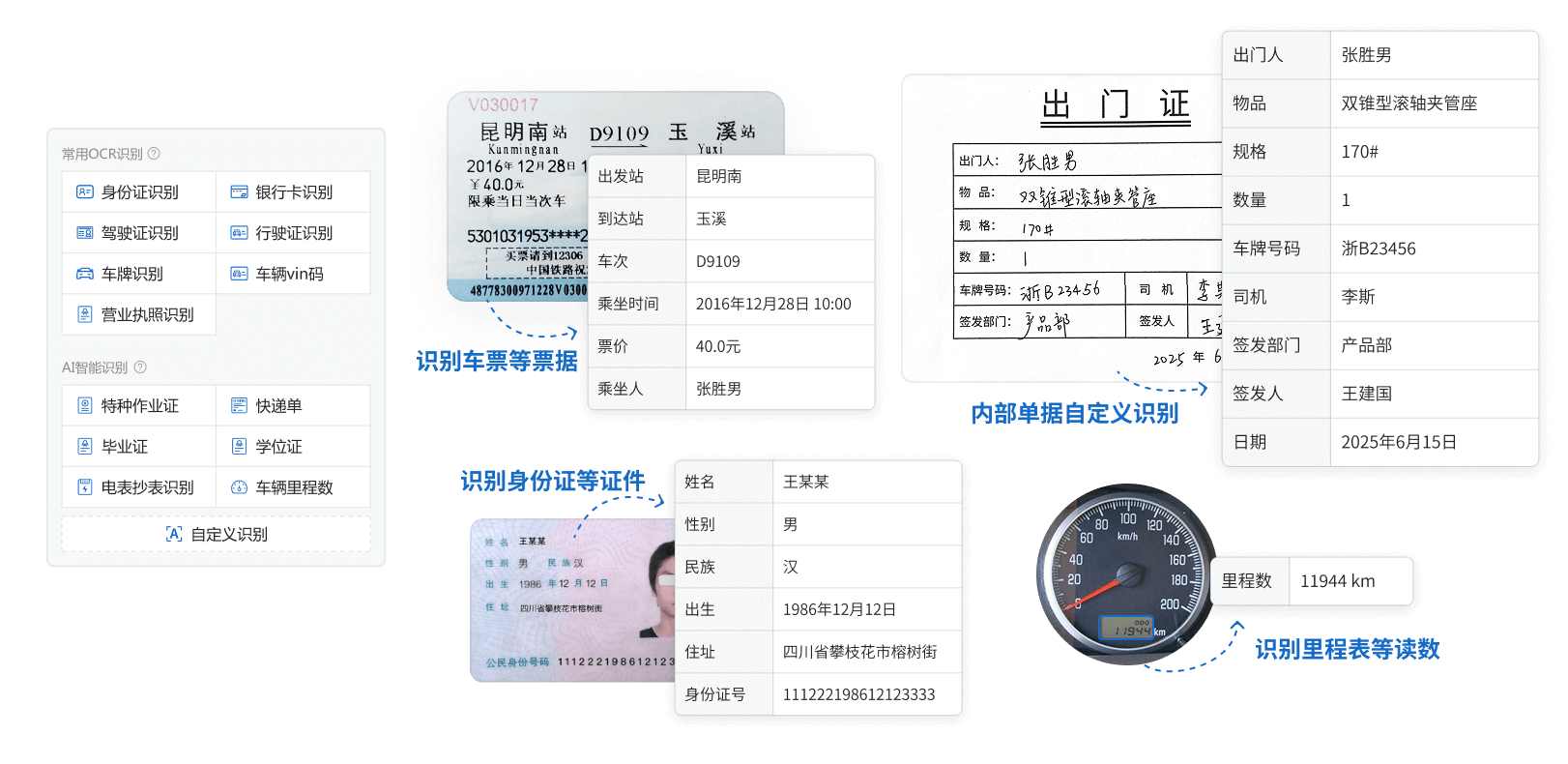
4.2 AI Form Components
-
Add AI components to forms; when filling in, OCR and AI automatically recognize and populate information for faster completion.
-
OCR recognition: ID cards, bank cards, driver's licenses, vehicle registration certificates, license plates, VIN codes, business licenses, etc.
-
AI intelligent recognition: special operation certificates, courier waybills, diplomas, degree certificates, electricity meter readings, dashboard odometer readings, etc. Supports custom recognition — set recognition fields and AI will auto-recognize when the scanner uploads an image.
-
This feature is currently free for a limited time — free and Basic edition users can try it; it will become a paid Advanced edition feature in the future.
4.3 AI Image Review
-
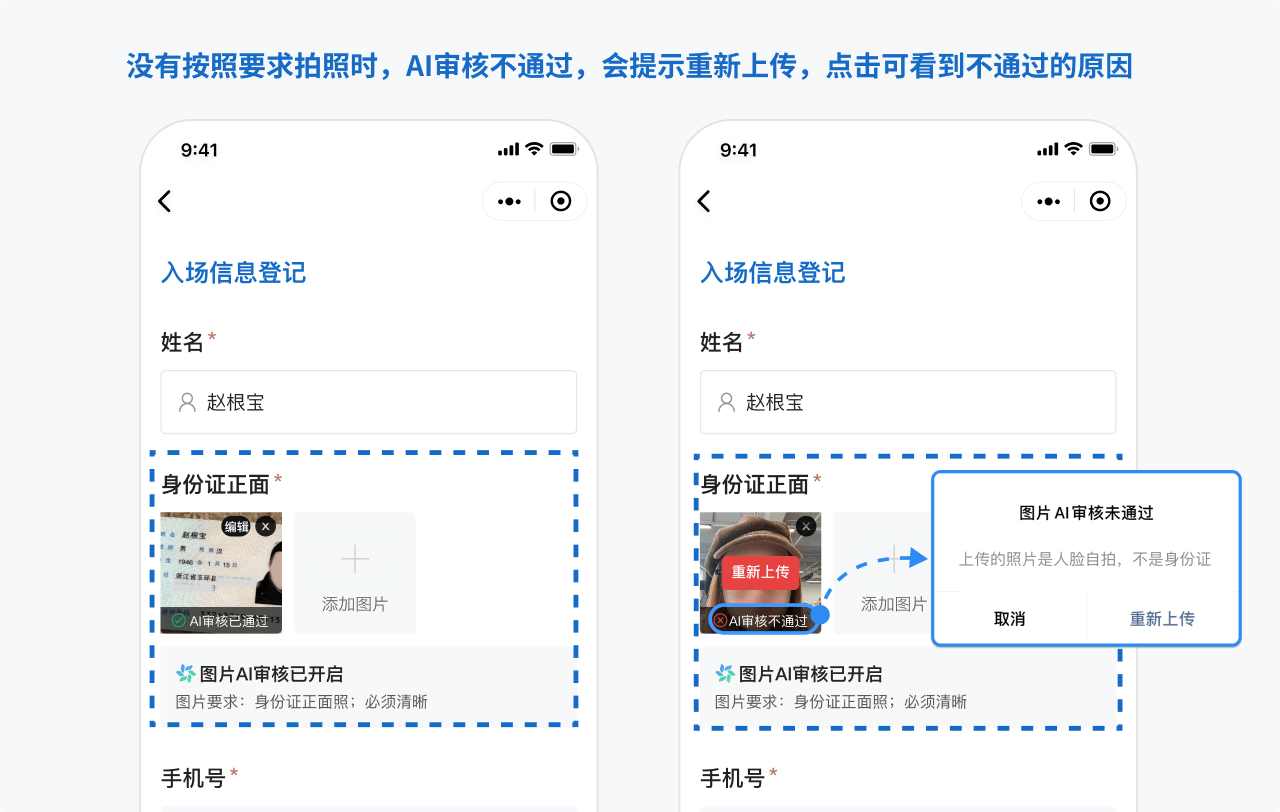
The form image component supports AI automatic review of uploaded images against specific requirements. Non-compliant images can block form submission with a prompt to correct — significantly improving the consistency of form data.
-
This feature is currently free for a limited time — free and Basic edition users can try it; it will become a paid Advanced edition feature in the future.
4.4 AI Smart Form Fill
-
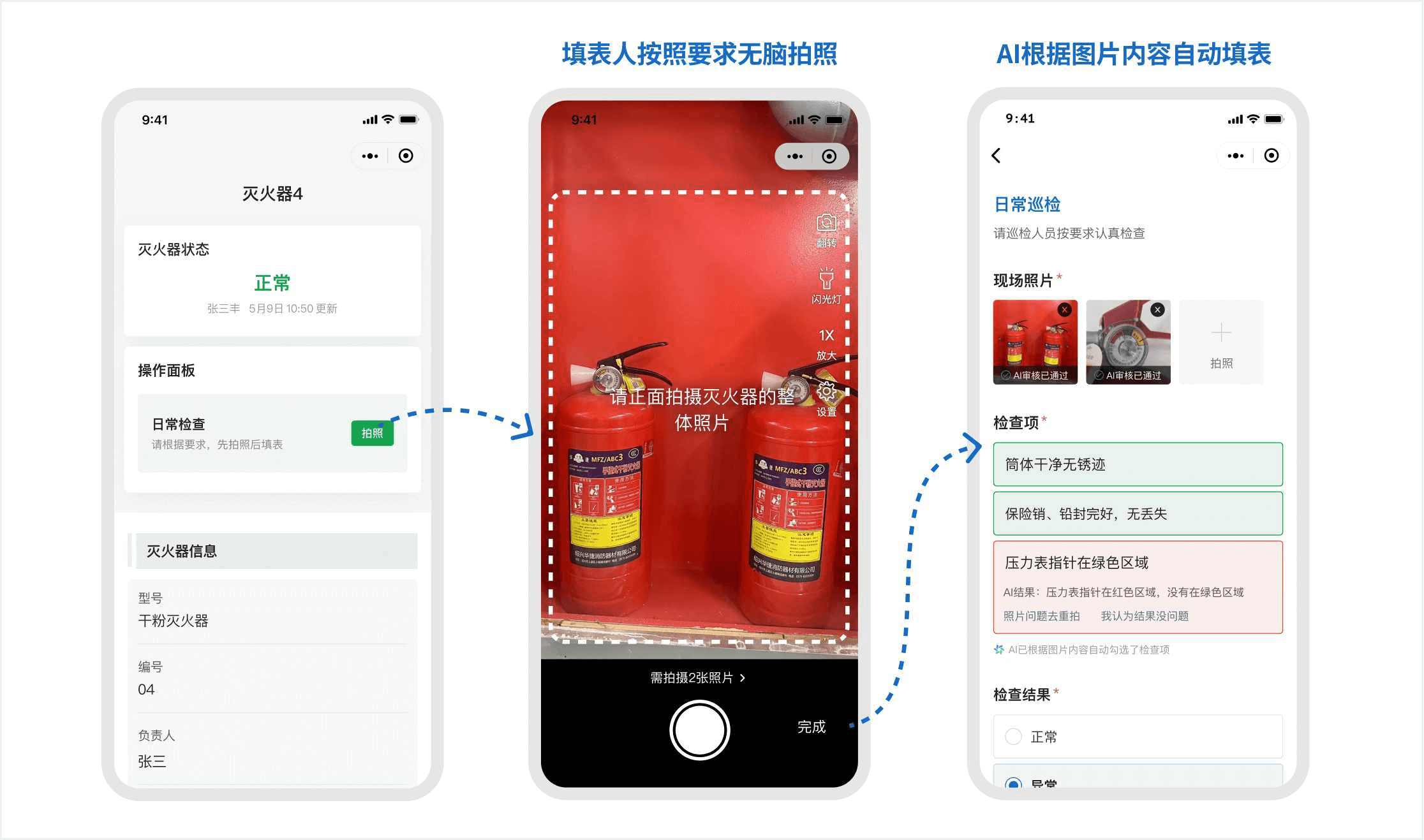
The form filler simply takes a photo as instructed; AI automatically fills in the form based on the photo content. Humans can review — intelligently boosting efficiency while ensuring accuracy.
-
Available from Advanced edition.
5. Longer Data Retention Guarantees
If you need to retain inspection records, visitor registrations, production process forms, and similar data for extended periods and export them at any time, Flagship edition and above supports unlimited data export time range — access all historical data whenever you need it. (Free version is limited to the most recent 180 days.) Learn more
If you need long-term access to original images from form record photos, Flagship edition and above gives you permanent access to original record images with no count limit. (Free version allows original image viewing for only the most recent 5,000 record images.) Learn more
Paid editions also offer higher data API push quotas to meet enterprise needs for connecting to external systems and real-time data sync — providing efficient and secure support for data querying, archiving, or cross-system collaboration. Learn more
6. More In-Depth Features for Full Process and Efficiency Gains
Beyond the capabilities mentioned above, paid editions include more in-depth features specifically designed to optimize workflows and boost efficiency across multiple scenarios:
- Multi-level form record approval
- Bulk download of record multimedia attachments
- Enterprise exclusive Mini Program (displays enterprise logo and name on scan)
- Custom login page (custom system name, logo, and background image)
III. Learn More
To purchase or compare edition features, see: Pricing Page
For edition selection advice, see: Edition Selection Guide
For detailed introductions to other editions, see:
For other purchase questions, contact a Business Consultant