Audio/Video FAQ
Overview
The free version supports audio/video files up to 1 minute each, with unlimited viewers and plays, long-term playback, and standard-definition quality. Paid versions have no audio/video duration limit and include HD playback traffic. Playback defaults to HD while HD traffic remains.
Details:
-
Validity: Both free and paid audio/video support long-term playback. Files created during the paid period remain playable after the plan expires. All other QR code content remains valid long-term.
-
Audio/video file size and duration: files do not consume storage capacity and have no file size limit. Free files can be up to 1 minute each; paid versions have no duration limit. HD playback consumes HD traffic from the account.
-
Usage restrictions: see Chapter 2.
-
Audio/video format restrictions: some format restrictions apply, but the vast majority of common formats are supported. See Chapter 4.
-
More FAQ: see Chapter 6.
Usage Restrictions
| Free version | Paid version | |
|---|---|---|
| Viewers and plays | Unlimited | Unlimited |
| Duration per file | Up to 1 minute | Unlimited |
| Playback availability | Long-term | Long-term |
| Playback quality | standard-definition; no HD traffic included | Includes HD traffic; defaults to HD while traffic remains |
| Storage consumption | No consumption | No consumption |
HD Audio and Video Traffic
-
Free audio/video plays in standard-definition, with no HD traffic included. HD playback consumes the account’s HD traffic. When that traffic runs out, playback switches to standard-definition.
-
After HD traffic is depleted, audio/video can still play, but audio quality is reduced and video plays in smooth mode. View detailed explanation.
-
Scan to experience the difference between HD and standard definition.

Supported Audio/Video Formats
Video: mp4, flv, avi, mov
Audio: m4a, mp3, wav, ogg, asf, au, voc, aiff, rm, svcd, vcd
More Settings
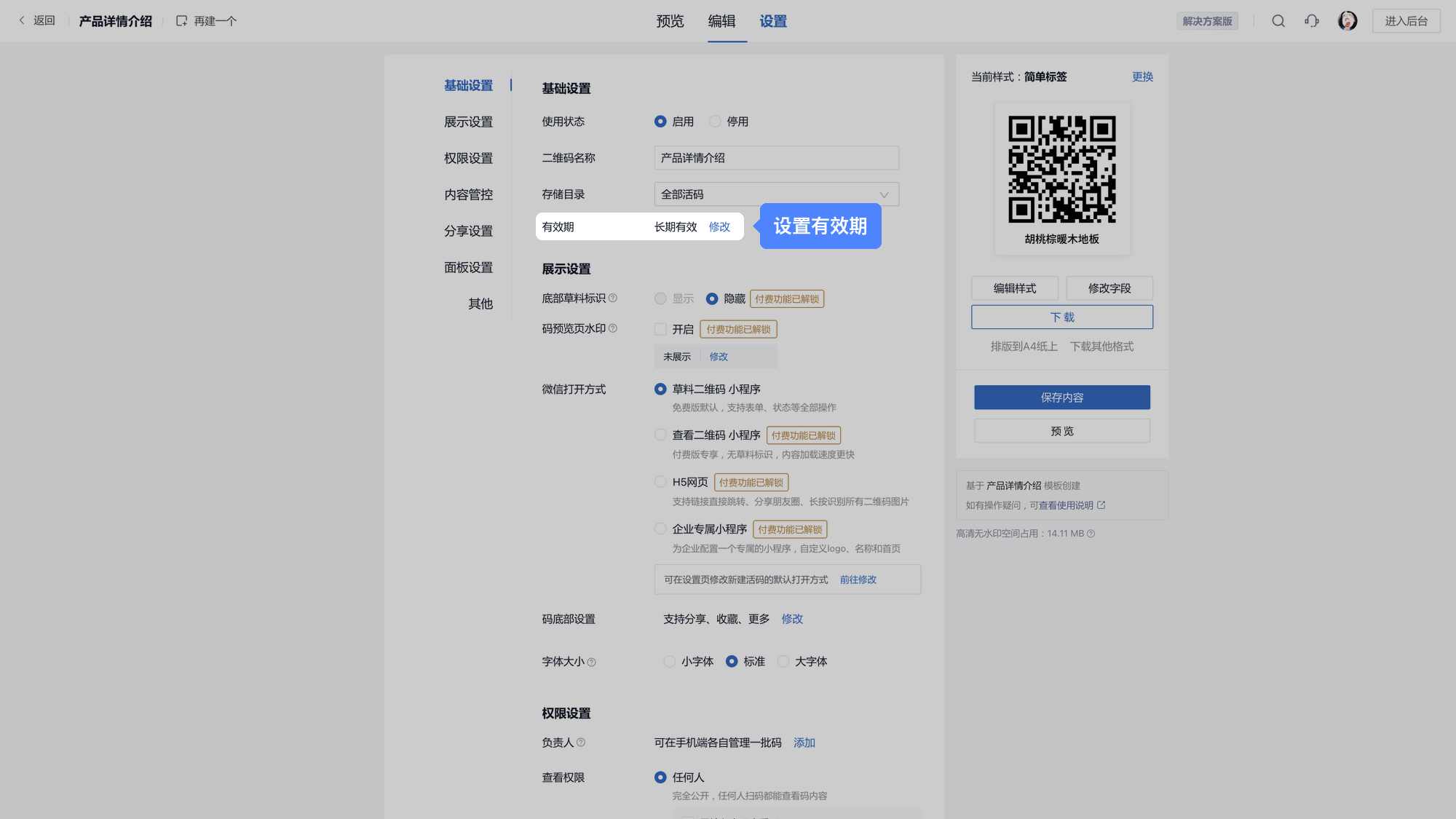
Settings Portal
Quick settings available after creating a QR code from the home page.
Configurable: video cover image, QR code period of validity, QR code viewing permission settings, and more.

Video Cover Image
The cover image can be up to 1 MB and supports PNG, JPG, and JPEG formats.
Steps: log in to the desktop workbench, find the QR code you want to modify. Click [Edit] to open the QR code editor. Hover over the video section and click [Edit] to upload or replace the cover image.

View Permissions
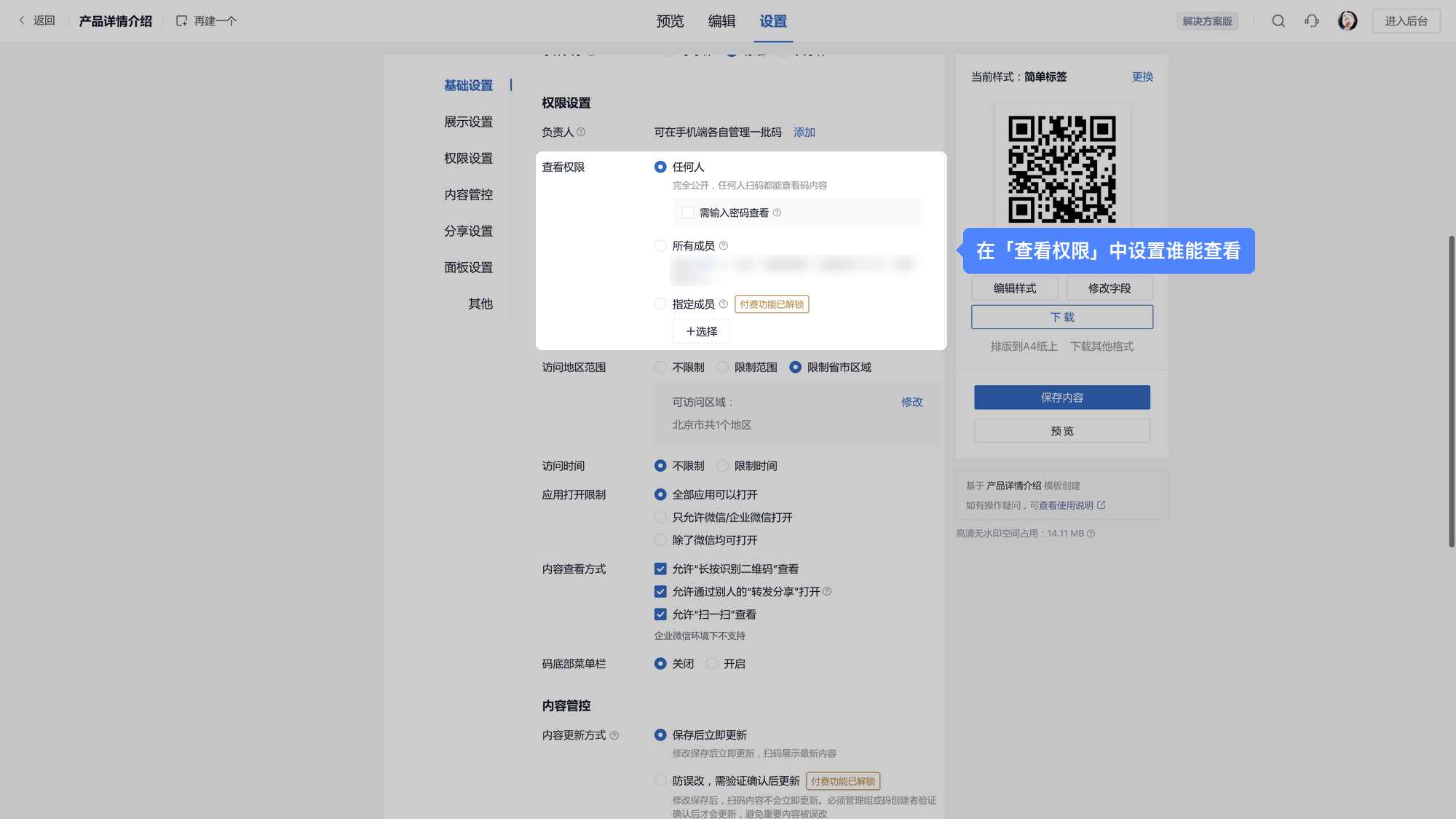
You can configure view permissions for audio/video in a QR code by setting [Period of Validity] and [View Permission], etc. Individual audio/video items within a QR code cannot be set separately.
Steps: click [Edit] to open the QR code editor, then configure in the [Settings] tab.
Modifying Audio/Video Content
You can delete existing audio/video and re-upload, or add more audio/video to the same code. This can be done at any time without changing the QR code pattern.
The settings location and method are the same as described above for the video cover.
Advanced Use Cases
Audiobook QR Codes
Print QR codes inside books and supplementary materials to replace traditional CDs — storing audio, video, and files. Readers scan with WeChat to access content anytime. View template.
Tourist Attraction Audio Guide QR Codes
Visitors scan to hear audio guides for specific attractions — a low-cost alternative to human or machine guides. Supplementary text and images can be added, and multimedia content is not limited by physical signage. View template.
Product User Manual QR Codes
Turn manuals into QR code labels, cards, or hang tags fixed to the physical product. No searching needed — just scan with WeChat to view. View application solution.
Frequently Asked Questions
1. What Happens to audio/video Playback When HD Traffic Runs Out?
Playback continues, but audio quality is reduced and video plays in smooth mode.
2. How Can I Increase HD Audio and Video Traffic?
Users with an expired edition need to renew to get more traffic. Go to renew
Users with an active paid version can purchase a traffic add-on pack separately: 1,200 CNY/5 TB. Purchase here
3. What Happens to audio/video Playback When the Paid Version Expires?
Audio/video content created during the paid period: playback count remains unlimited; remaining HD traffic is still valid and plays at high quality/resolution. If traffic is already exhausted, audio quality is reduced and video plays in smooth mode.
Audio/video newly uploaded after expiration follows free version rules: up to 1 minute per file, unlimited viewers and plays, and long-term playback. Detailed explanation.
4. How Is the Default Playback Resolution Set?
Determined by the resolution of the uploaded audio/video — cannot be customized after upload.
Paid versions default to the HD resolution supported by the uploaded file while HD traffic remains. The following options apply when the relevant playback resolutions are supported:
If the uploaded video is 1080P, it defaults to [Ultra HD 1080P] playback, with options to switch to [HD 720P], [SD 480P], or [Smooth].
720P videos default to [HD 720P], with options to switch to [SD 480P] or [Smooth].
480P videos default to [SD 480P], with an option to switch to [Smooth].
5. Can audio/video Content Be Downloaded?
Only online playback via QR code scan is supported — downloading is not available.
6. Does CaoLiao Support Auto-Play When a QR Code Is Scanned, Without Requiring a Tap?
Not supported.
7. Audio/video Content That CaoLiao QR Code Does Not Support Uploading Includes but Is Not Limited To:
-
Works that are currently airing or on sale;
-
Works published or produced by professional publishing, film, or music organizations;
-
Other works that are clearly perceived as provided without authorization;
-
Works that have already been removed pursuant to a rights holder's notice;
-
Works for which rights holders have sent CaoLiao QR Code a public notice or declaration of rights;
-
Works listed as key monitored content by copyright administrative authorities.
If such content is discovered, CaoLiao will delete the QR code content or suspend the account, among other actions. See: CaoLiao QR Code Content Management Policy.
For more FAQ, see: Audio/Video QR Code FAQ