QR Code Version Snapshots
QR code content is not something you create once and leave unchanged. It evolves as your business changes. When a team frequently updates dynamic QR code content, bulk sub-code information, or template styles, the harder question is often not how to make a change, but whether you can explain it afterward.
CaoLiao provides QR code version snapshots to address this. Enabled by default in the Flagship Edition and above, this feature automatically records snapshots and notes for key changes when you edit dynamic QR codes, sub-codes, or templates, so you can trace and review them later.
Why QR Code Management Needs Version History
Many people associate version history with document collaboration, but it matters just as much for QR code applications.
The common issue is not an inability to edit content, but the lack of a continuous record you can review after changes are made. Without that record, troubleshooting, reviews, and handovers take longer.
What Version Snapshots Record
The feature automatically records key changes as you edit QR codes and templates, without adding complicated steps. It currently covers:
| Object | What Is Recorded | What It Helps You Do |
|---|---|---|
| Dynamic QR codes and sub-codes | Content changes, style adjustments, and notes | Trace QR code changes and the reasons behind them |
| Templates | Template content, style adjustments, and notes | Review how a template has evolved |
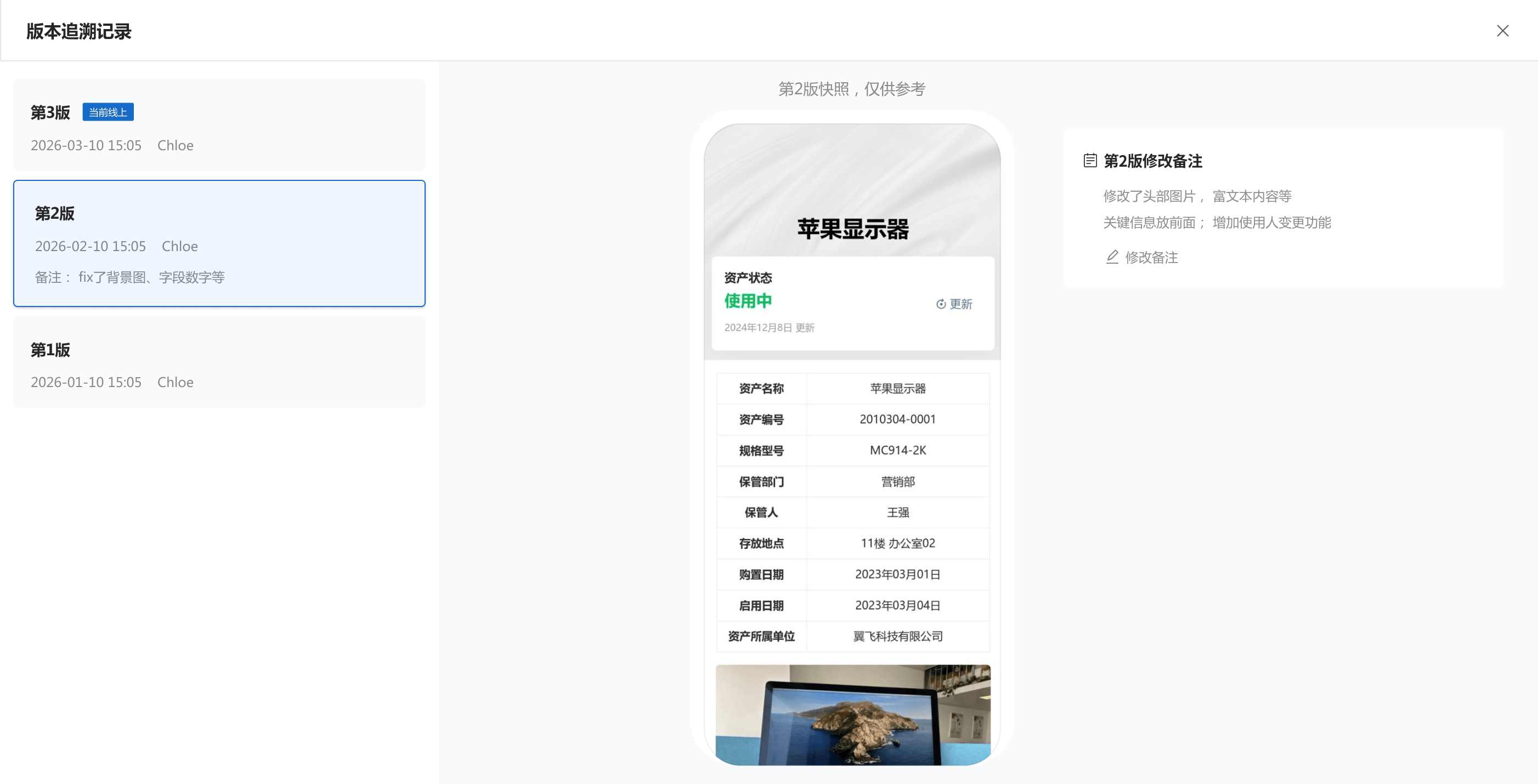
Along with each snapshot, the system records key details about the change:
- Who made it
- When it was made
- Change notes
- The corresponding version snapshot
Each content or style change to a QR code or template becomes a history entry you can look up. There is no need to keep a separate register: the system records changes automatically.
Key Benefits
1. Find Which Change Introduced a Problem
Content problems are often noticed only after a QR code has been in use for some time. For example, the page shown after scanning may have incomplete information, form instructions may become unclear, or a style change may make the content harder to read.
Version snapshots make it easier to identify what changed before and after the problem appeared, reducing repeated comparisons and verbal checks.
2. Review Team Changes Without Piecing Together Chat Messages
Many teams track changes through group messages, verbal updates, or temporary notes. Over time, that information becomes scattered.
Version snapshots keep the person, time, notes, and version content together, so anyone taking over the work or reviewing a change can see the context directly.
3. See How Templates Evolve
Templates are usually refined as they are used. Teams may add fields, adjust page layouts, or standardize styles.
Version history shows how a template has improved over time and helps the team decide whether to keep a particular adjustment.
4. Trace Management Changes and Review Their Impact
For teams that maintain QR code content over the long term, many edits are tied to on-site work, distributed materials, and consistent business information.
Reviewing past versions helps you find errors and understand:
- Why a change was made
- What impact it had
5. Combine Snapshots with Content Protection
Version snapshots let you review the history after a change takes effect. Content protection controls how changes take effect safely.
Together, they reduce the risk of incorrect edits going live immediately and let you trace what changed, who changed it, and when. Learn about content protection
When This Feature Is Most Useful
Version snapshots are especially useful when QR code content changes frequently or several people maintain it.
For example:
- Equipment inspection and maintenance: Equipment QR codes evolve as check items, instructions, and action entries change.
- One-item-one-code management: Sub-codes in the same batch are updated in stages, so versions from different points in time need to be compared.
- Template reuse: Headquarters maintains templates that stores, factories, or project teams use, often with several rounds of revisions and handovers.
- Display pages maintained over time: Promotional pages, product information pages, and registration pages often need text and style updates, with a record of each adjustment.
If you rarely change a QR code after creating it, this feature may have little impact on your work. It becomes more useful when you collaborate, make ongoing revisions, or need to trace responsibility for changes.
How Version History Is Enabled
The feature works as follows:
- Supported editions: Flagship Edition and above
- Activation: Enabled by default
- Supported objects: Dynamic QR codes, sub-codes, and templates
- Recorded information: A snapshot and notes for each changed version, along with who made the change and when
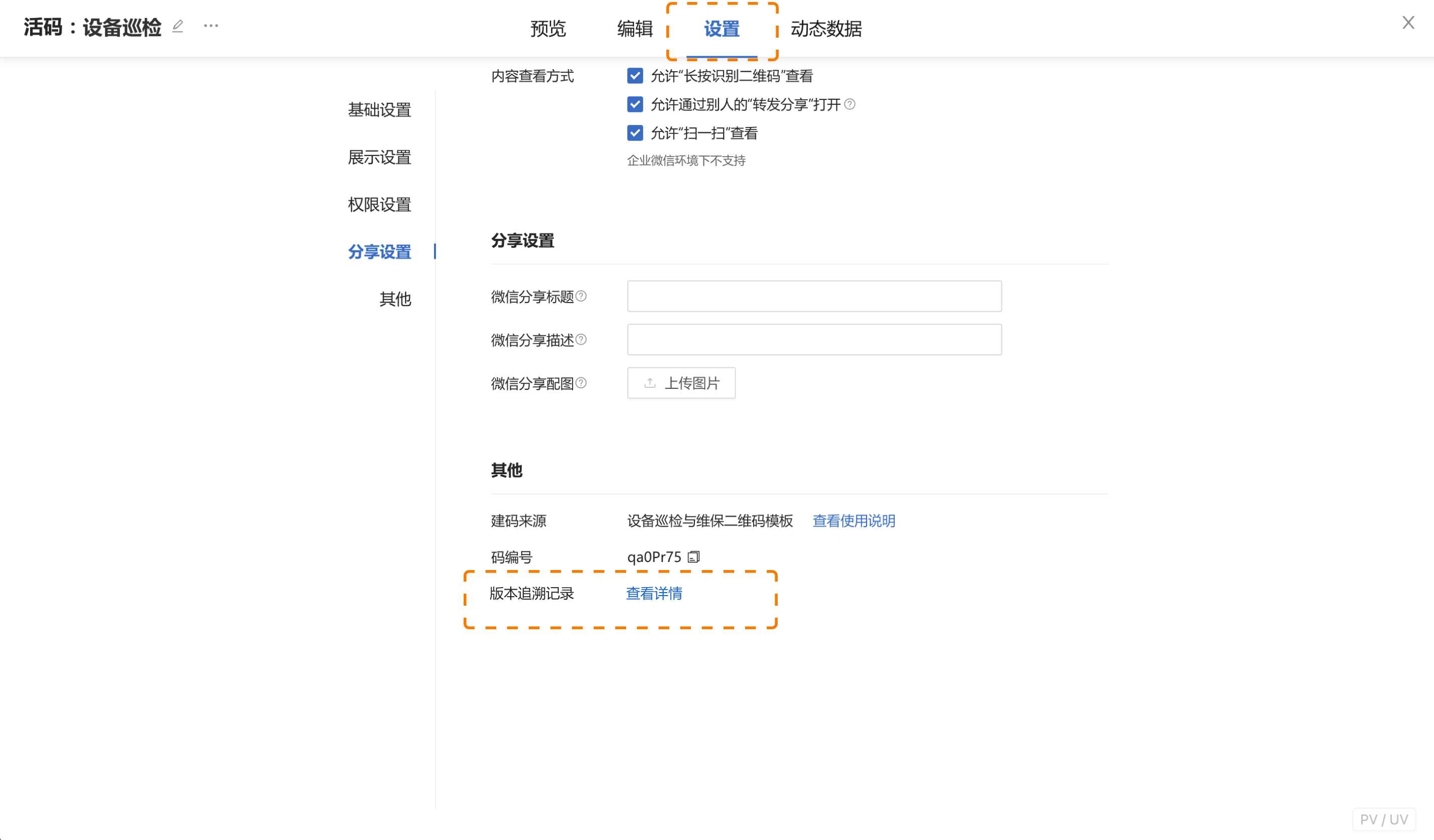
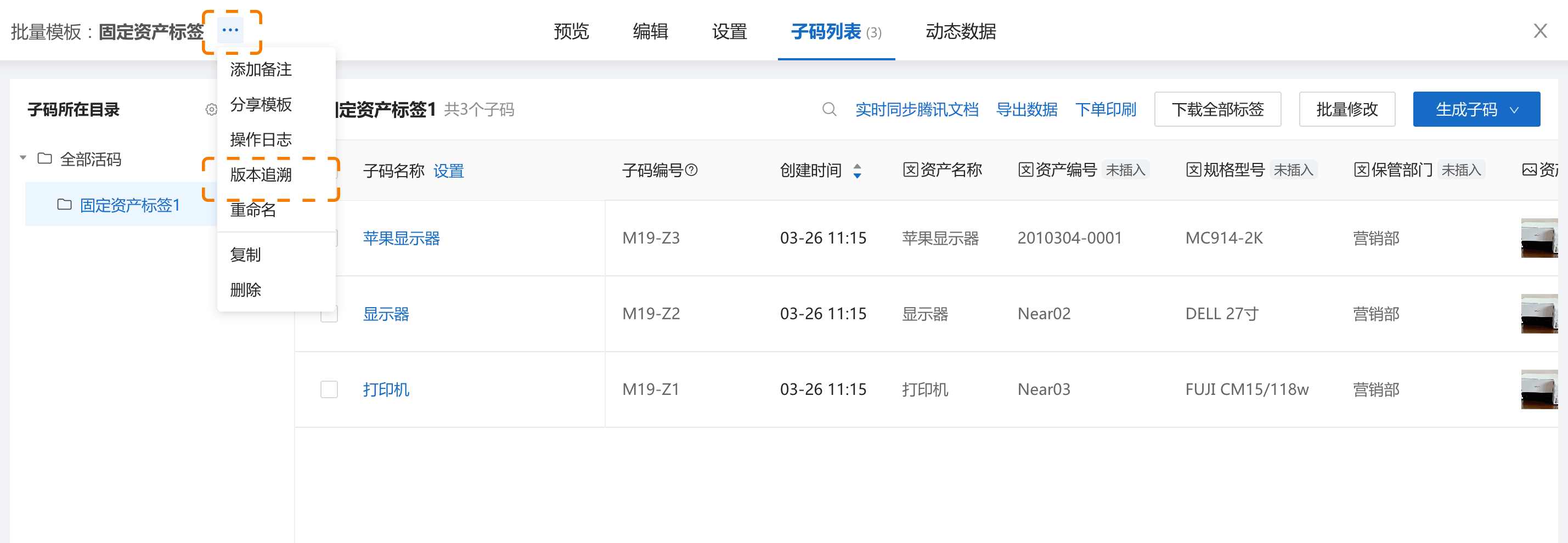
- Where to view it: The dynamic QR code settings page, sub-code preview page, and template settings page
FAQ
1. Which Objects Are Supported?
Dynamic QR codes, sub-codes, and templates are currently supported.
Whether you maintain individual QR codes, manage sub-codes in bulk, or continually refine templates, you can review these changes in version snapshots.
2. Do I Need to Enable Version Snapshots Manually?
No. The feature is enabled by default in the Flagship Edition.
When it is enabled, the system automatically records a snapshot as you edit content or adjust styles. You do not need to log changes separately.
3. What Historical Information Can I See?
Along with the snapshot, the system records who made the change, when it was made, and any notes.
You can see what changed, who changed it, when it happened, and whether they added an explanation.
4. Can I Still Use It After My Paid Version Expires?
Previously saved snapshots remain available for viewing, tracing, and comparison after your paid version expires. They will not be deleted.
However, further edits to dynamic QR codes, sub-codes, or templates will no longer generate new snapshots automatically.
Note: Changes made between expiration and renewal will not have historical snapshots created retroactively. Renew in advance to keep a record of important changes.
5. Which Teams Is This Feature For?
It is best suited to teams that collaborate on content, update it frequently, or need to trace and review changes over the long term.
Examples include equipment inspection, one-item-one-code management, store materials management, and centralized template maintenance.
6. Does It Add to Daily Maintenance Work?
No. It is designed to record changes automatically without adding extra steps.
Continue maintaining your dynamic QR codes, sub-codes, and templates as usual. The system keeps key changes in a history you can review.