Industry Edition Overview
Edition price: 16,800 CNY/year Core features: includes all Flagship Edition features, plus up to 170 advanced members for collaborative account management, use your own Mini Program and WeChat Public Platform, dedicated computing power, unlimited HD watermark-free image/file storage, ultra-large audio/video HD traffic, unlimited data API push quota, and more After-sales service: dedicated consultant and technical staff with remote training, on-site guidance, and usage consultation Recommended for: large enterprise groups, large-scale complex scenarios, and multi-business-line use cases
I. Industry Edition Features
1. Advanced Members — 170 Seats
- CaoLiao provides a member collaboration feature to address enterprise multi-member collaboration and permission control needs. Member types are: basic members and advanced members.
- Adding personnel with a certain level of management authority as advanced members enables mobile workbench advanced collaboration and multi-user collaborative management.

Learn more about Advanced Members
Advanced Member Count by Edition:
| Edition | Advanced Member Count | Add-On Supported |
|---|---|---|
| Free version, Basic Edition | 0 | Not supported |
| Advanced Edition | 2 | From Advanced Edition: add-on supported at 96 CNY/person/year |
| Flagship Edition | 20 | From Advanced Edition: add-on supported at 96 CNY/person/year |
| Industry Edition | 170 | From Advanced Edition: add-on supported at 96 CNY/person/year |
Estimate your needed advanced member count to choose the most suitable edition:
- 2–16 people: choose Advanced Edition + add-on members (if dynamic data export archiving is needed, consider Flagship Edition directly)
- 17 people or more: choose Flagship Edition + add-on members
- More than 100 people: choose Industry Edition for better value
2. Enterprise Exclusive Mini Program — Included Free
Connect and deploy an enterprise exclusive Mini Program to have an independent QR code business management platform on mobile — open QR codes, view and manage QR code data, and more with your own Mini Program.
After configuring the Enterprise Exclusive Mini Program, you gain the following advantages:
2.1 Custom Brand Identity
- Custom logo and name: every scan showcases your enterprise brand
- No CaoLiao Mini Program ratings or reviews — a personalized experience exclusively for your enterprise

2.2 Custom Mini Program Home Page
- Use it as the home page for an internal management application or an external marketing landing page — enhancing user experience.

2.3 Convenient Access:
- Accessible from WeChat's various Mini Program entry points; supports search and identity verification for entry — enhancing both security and convenience.
2.4 Bind Custom Domain:
- Bind up to 300 enterprise-owned business domains; links open directly without needing to copy the URL to a browser.
2.5 Enable Ads to Generate Revenue:
- Enable the "Traffic Publisher" feature to show WeChat ads on Mini Program launch pages and within QR code content to earn revenue.
- Ads display automatically — extremely easy to set up; earnings settled every two weeks.
- The more scans, the more revenue.
For more about the "Traffic Publisher" feature, see: WeChat Official Documentation

2.6 More Feature Extensions:
- More features such as in-Mini-Program payments will be supported in future updates — going beyond the limitations of the CaoLiao Mini Program.
For more details, see: Enterprise Exclusive Mini Program
3. Receive Message Notifications via Your Enterprise's WeChat Public Platform
Use your enterprise's WeChat Official Account to send and receive message alerts — forming an internal messaging system. Detailed features:
- Receive subscribed dynamic data via your enterprise Official Account.
- Push anomaly alerts, pending approvals, and to-do task messages via your enterprise Official Account.
- Jump directly to the Enterprise Exclusive Mini Program from the Official Account menu bar.

4. HD Watermark-Free Image/File Storage — Unlimited
All image files have the CaoLiao watermark removed by default and are displayed at original resolution.

For detailed explanation, see: Image and File Specifications
5. Approval Count — Unlimited
Forms support enabling approval workflows with one or multiple levels. From Advanced Edition, each level can have one or more designated approvers to meet different review and approval needs. Learn about Approval Features
- The approval count refers to each individual approval action on form data. For example, if a form has a two-level approval workflow, one record completing both levels counts as 2 actions.
- After reaching the limit: forms can still be filled in and submitted; admins can still view records; but approval actions will be unavailable — upgrade the edition to continue using the approval feature.
| Edition | Annual Approval Action Limit (counted by calendar year) | Add-On Pack |
|---|---|---|
| Free version / Basic Edition | 1,200/year | Not supported |
| Advanced Edition | 6,000/year | Not supported |
| Flagship Edition | 24,000/year | Add-on pack available: 500 CNY/10,000 actions |
| Industry Edition | Unlimited | Not needed |
5. Data API Push Quota — Unlimited
QR code data under the account can be automatically pushed to you for use in your applications. Learn more
Supports 5 push methods including official database, Webhook, and private database, enabling:
- Pushing form data directly to WeCom, DingTalk, and Feishu group chats
- Real-time syncing of form data to Tencent Docs smart spreadsheets
- Connecting to BI analytics tools for real-time dashboards
Data API Push Quota by Edition:
| Edition | Monthly Push Limit (resets on the 1st of each month) |
|---|---|
| Free version / Basic Edition / Advanced Edition | 1,000/month |
| Flagship Edition | 20,000/month |
| Industry Edition | Unlimited |
6. Dedicated Computing Power — High-Performance Guarantee
Reserved dedicated computing power and bandwidth — mobile QR code scanning and desktop bulk QR code generation, data export, label layout downloads, and other tasks are automatically queued at the highest priority, unaffected by processing backlogs.
In addition, all enterprise-grade security capabilities are included: CDN access acceleration, Login Security Suite (coming soon), Advanced Security Gateway, Advanced Security Compliance, and more — ensuring high-speed operation and comprehensive data security for your enterprise.
7. Integrate AI Features into QR Codes
From Advanced Edition (paid), the following AI features are available to significantly boost productivity. CaoLiao is actively developing and launching more AI features to provide simple and efficient solutions for complex data management.
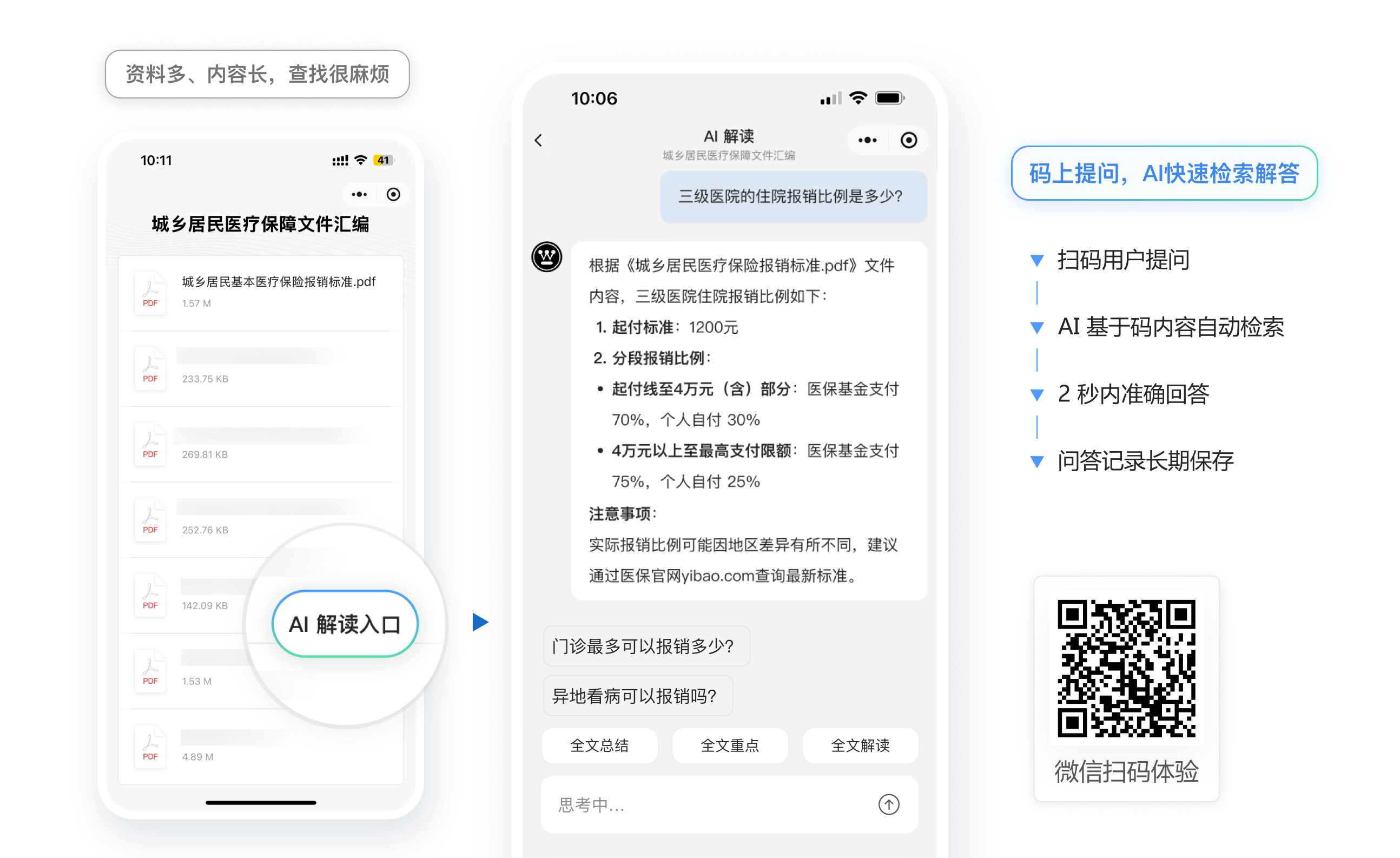
7.1 AI Content Interpretation
- Connect your QR code to a large language model with one click — users scan and ask questions, and AI automatically reads the QR code content and responds
- Reduces repetitive explanations and manual effort, greatly improves the scanning experience, and helps users quickly get the key information they care about
- Customize the AI's name and logo to match your brand, creating a dedicated AI assistant that makes your QR code more professional and credible
7.2 AI Form Components
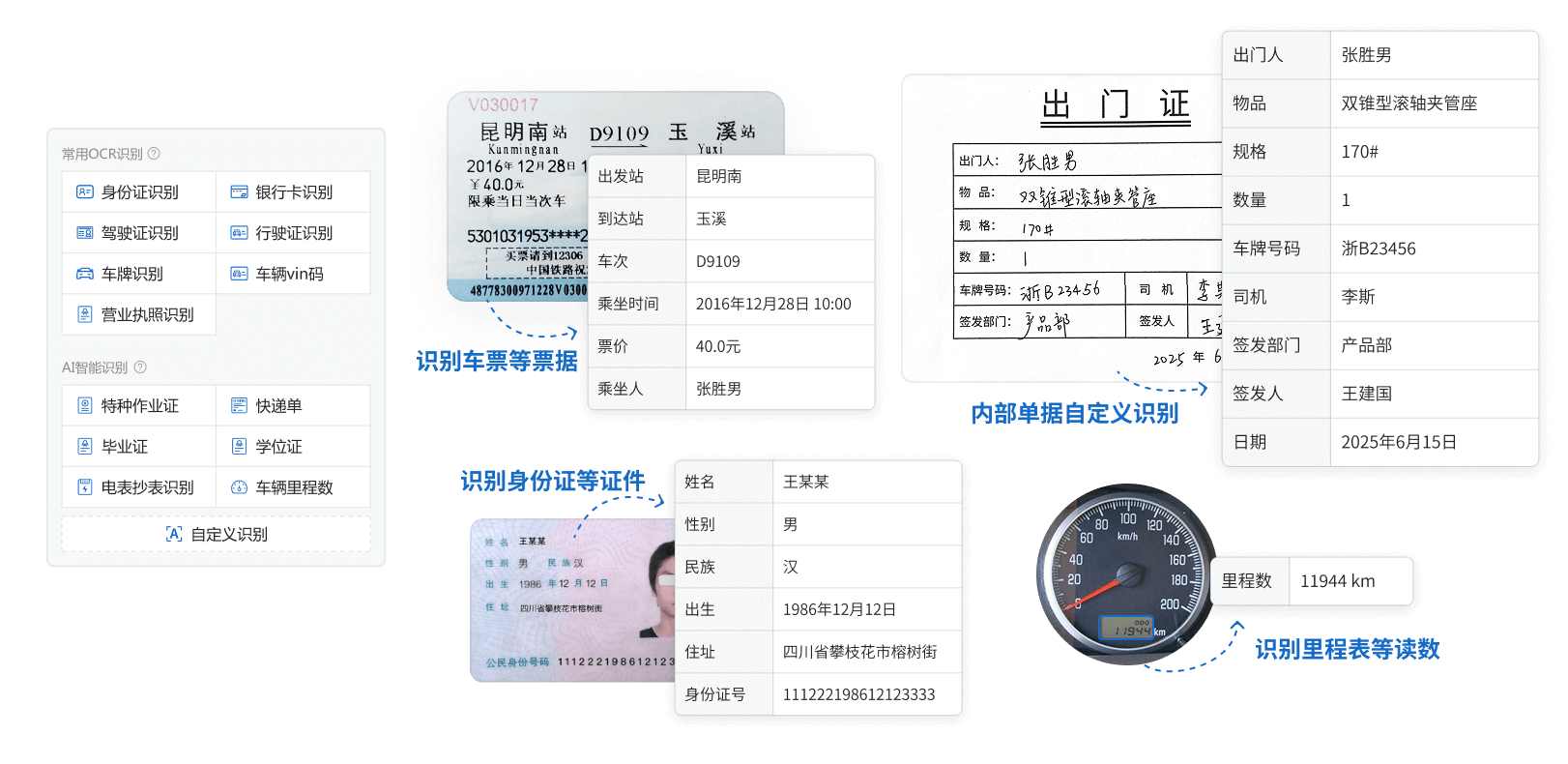
- Add AI components to forms; when filling in, OCR and AI automatically recognize and populate information for faster completion.
- OCR recognition: ID cards, bank cards, driver's licenses, vehicle registration certificates, license plates, VIN codes, business licenses, etc.
- AI intelligent recognition: special operation certificates, courier waybills, diplomas, degree certificates, electricity meter readings, dashboard odometer readings, etc. Supports custom recognition — set recognition fields and AI will auto-recognize when the scanner uploads an image.
- This feature is currently free for a limited time — free and Basic Edition users can try it; it will become a paid Advanced Edition feature in the future.
7.3 AI Image Review
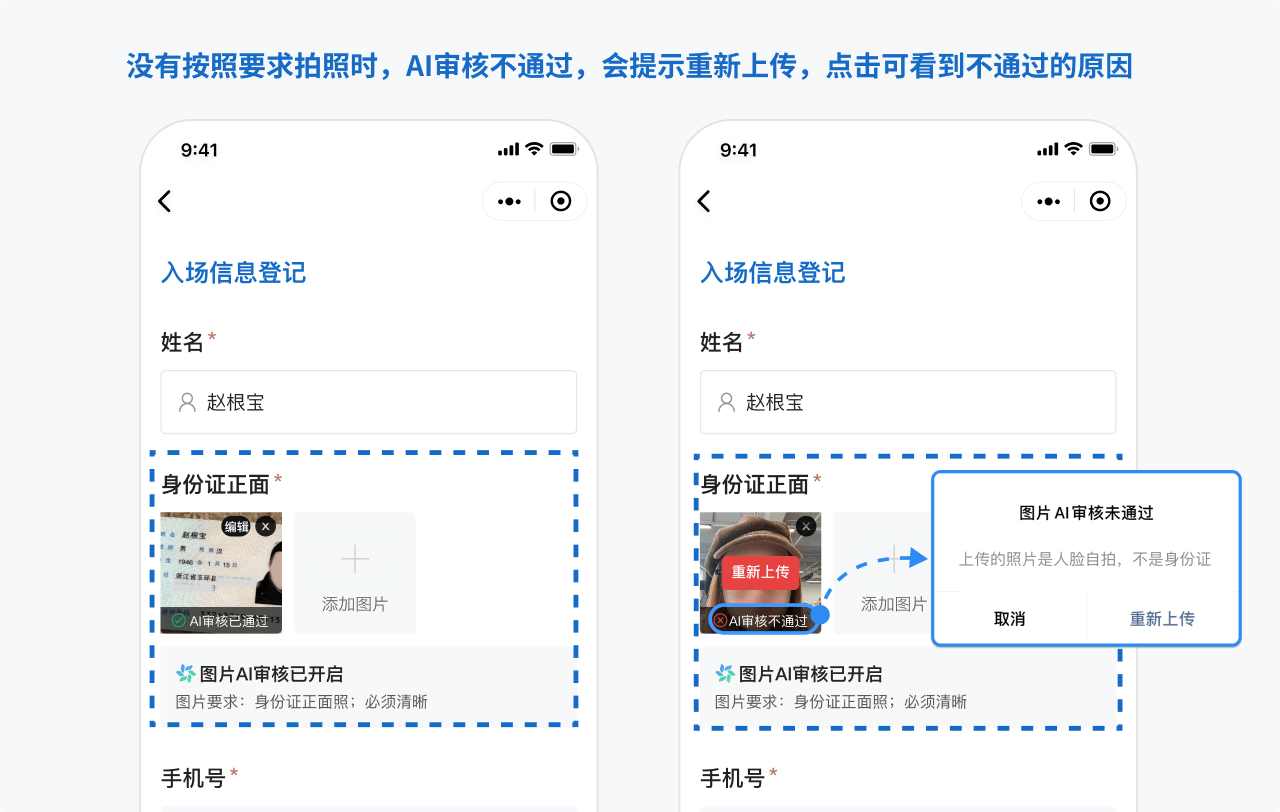
- The form image component supports AI automatic review of uploaded images against specific requirements. Non-compliant images can block form submission with a prompt to correct — significantly improving the consistency of form data.
- This feature is currently free for a limited time — free and Basic Edition users can try it; it will become a paid Advanced Edition feature in the future.
7.4 AI Smart Form Fill
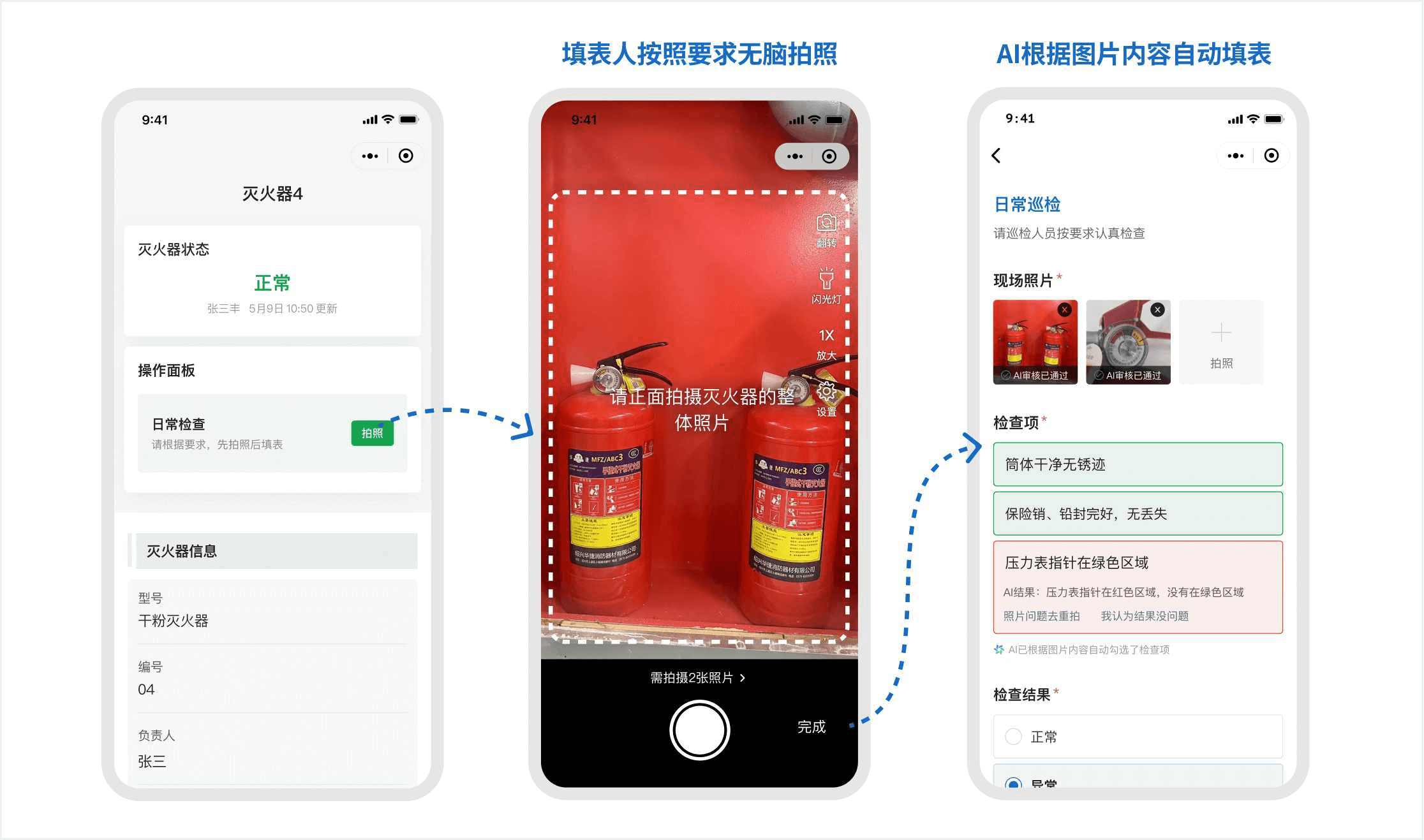
- The form filler simply takes a photo as instructed; AI automatically fills in the form based on the photo content. Humans can review — intelligently boosting efficiency while ensuring accuracy.
- Available from Advanced Edition (paid).
8. Other Features
- Unlimited dynamic data export time range: Dynamic Data Export Time Range
- Access all record images at original resolution: Form Image Access Limits
- High-speed export channel, bulk PDF export, and bulk attachment downloads: Advanced Data Export Features
- More advanced form features: Advanced Form Features
- Upload audio/video without duration limits and get HD playback traffic: Audio/Video FAQ
- Remove the CaoLiao logo and display your own brand: Remove CaoLiao Logo and Watermark
- Switch to "View QR Code" Mini Program or H5 webpage in WeChat: QR Code Open Methods
- Enhanced file features: File QR Code Feature Overview
- Use advanced styles in the design library: Advanced Display Styles
- Enable dynamic background: Background Settings
- Deleted QR code recovery service: Deleted QR Code Recovery
II. Dedicated Technical Support Team
Includes a dedicated consultant, technical staff, and dedicated service group — enjoy one-on-one exclusive service.
- Remote training: dedicated industry consultants conduct demonstrations and training remotely, with no limit on sessions.
- Dedicated service: dedicated consultants and technical staff provide online operation guidance and follow up on usage issues.
III. After Industry Edition Expires
- QR codes generated during the paid period: continue to work normally, valid indefinitely, but the CaoLiao logo will reappear.
- QR codes created or edited after expiration: can no longer enjoy paid features.
- Dynamic data under the account: will continue to be stored indefinitely, but only the most recent 180 days of data can be exported.
After expiration, the custom login page, Enterprise Exclusive Mini Program, and enterprise Official Account message reception remain available. However, features such as unlimited data API push quota and other Industry Edition capabilities are no longer available. Details below.
| Category | Feature | During Paid Period | After Expiration |
|---|---|---|---|
| Content display | HD Watermark-Free Image/File Storage | Unlimited | Image files show watermark |
| Content display | Traffic | 20,000 GB | Does not expire, can continue to be used |
| Content display | Audio/Video QR codes | Unlimited playback, retained indefinitely | QR codes created during paid period: unlimited playback, retained indefinitely Audio/video newly uploaded after expiration: up to 1 minute per file, unlimited viewers and plays, and long-term playback |
| Content display | QR code open method | Can switch to Exclusive Mini Program | QR codes created during paid period: retain their set open method QR codes created after expiration: open via CaoLiao QR Code Mini Program |
| Content display | CaoLiao logo | Not displayed | CaoLiao logo reappears on all QR codes |
| Content display | URL redirect dynamic QR codes | No security notice page | Security notice page displayed |
| Advanced features | Advanced members | 170 | Advanced member features unavailable |
| Advanced features | Advanced form features | More advanced form features unavailable | |
| Data management | Dynamic data export range | All dynamic data can be exported | Only data from the most recent 180 days can be exported |
| Data management | QR code and dynamic data export format | PDF and multimedia file export supported | Table format only |
| Data management | Data API push quota | Unlimited | Only the first 1,000 records/month pushed |
| Industry Edition features | Enterprise Exclusive Mini Program | Continues to be available after expiration | |
| Industry Edition features | Custom login domain | Does not expire after expiration, login continues normally | |
| Industry Edition features | Enterprise Official Account message alerts | Enterprise Official Account message alerts continue to be available after expiration |
IV. Purchase Consultation
To purchase the Industry Edition, please add a consultant's WeCom account to discuss.
Learn More
For purchase or renewal, see: Purchase Guide Overview
For self-service ordering and cross-edition feature comparison, see: Pricing Page
For detailed introductions to other editions, see:
- Basic Edition: Basic Edition Overview
- Advanced Edition: Advanced Edition Overview
- Flagship Edition: Flagship Edition Overview
For edition selection advice, see: Edition Selection Guide
For other purchase questions, contact a Business Consultant