Private Style API Documentation
1. Feature Overview
This API documentation applies to calling label styles saved under your account to batch-generate QR code labels with different content from your own system or web app.
After integration, you can batch-generate QR code labels directly in your own system — no need to export data and reimport it into CaoLiao. For example, connect to a product or asset management system: when new data is added, the system can automatically construct label URLs based on defined rules and batch-generate the corresponding product or asset labels.
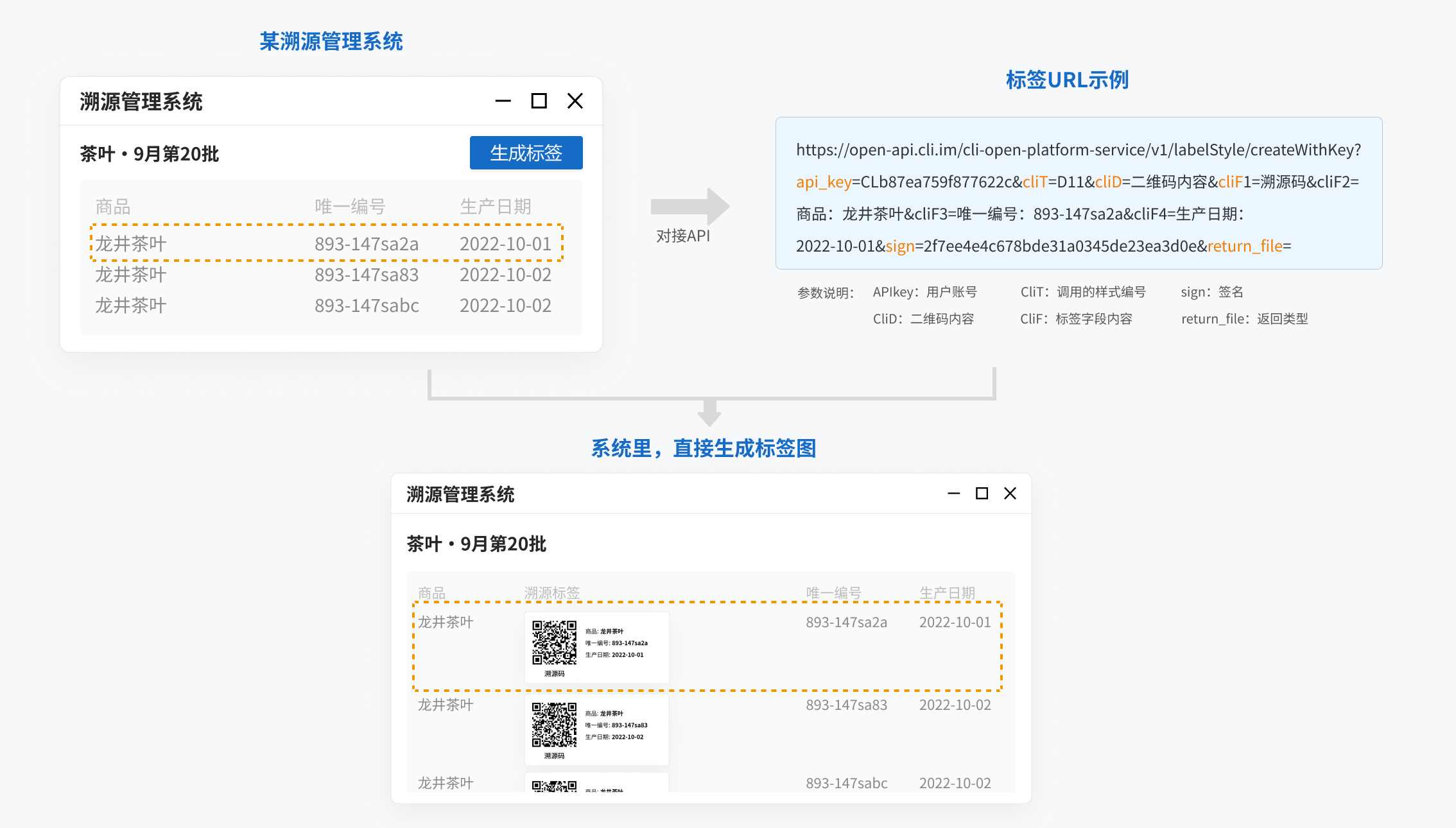
2. API Reference
URL
https://open-api.cli.im/cli-open-platform-service/v1/labelStyle/createWithKey
HTTP Method
GET
Request Parameters
| Parameter Name | Required | Type | Description |
|---|---|---|---|
| cliT | Yes | string | Label style number, e.g. D10 |
| cliD | Yes | string | QR code dynamic content. More bytes = more complex QR pattern. Recommended: within 1,500 bytes |
| api_key | Yes | string | Your account API key |
| sign | Yes | string | Signature — see the signing method below |
| return_file | No | string | Return type. If omitted, returns a binary image stream. Use base64 to return Base64-encoded image |
| cliF | No | string | Dynamic text fields required by your style. cliF denotes a plain text field. List in field display order. Example for a style with 3 text fields: cliF1=xx&cliF2=xx&cliF3=xx |
| cliP | No | string | Dynamic image fields required by your style. cliP denotes an image field. Image must be a publicly accessible static URL. Example for a style with 4 fields where the 2nd is an image: cliF1=xx&cliP2=xx&cliF3=xx&cliF4=xx |
Signing Method
Purpose: MD5-based dynamic signing generates a new signature for each request, ensuring data integrity, preventing tampering or impersonation, and improving system security.
Dynamic signing can also be disabled in the workbench — if disabled, the steps below are not required.
Step 1: Sort all request parameters alphabetically by key, then concatenate them with &. For example, using these parameters:
| Key | Value |
|---|---|
| cliT | D10 |
| cliD | Test data single label |
| return_file | |
| cliP1 | https://ncstatic.clewm.net/rsrc/2023/0331/11/823ace0e8a36e304ca8bfab683be6219.png |
| cliF2 | Jinghai First People's Hospital |
| cliF3 | Jinghai First People's Hospital |
| cliF4 | Wang Feifei |
| cliF5 | Title: Assistant Nurse |
| cliF6 | Department: Inpatient Ward |
| cliF7 | ID: NO-GT-043 |
| api_key | CLb87ea759f877622c |
After sorting and concatenating, the resulting string is:
api_key=CLb87ea759f877622c&cliD=Test123&cliF2=京海市第一人民医院&cliF3=Jinghai First People's Hospital&cliF4=王菲菲&cliF5=职务:助理护士&cliF6=科室:住院部&cliF7=编号:NO-GT-043&cliP1=https://ncstatic.clewm.net/rsrc/2023/0331/11/823ace0e8a36e304ca8bfab683be6219.png&cliT=D11&return_file=
Step 2: Append the API secret to the end of the string above. Assuming the secret is ddb42b7299b90cb5e0fd6c41e154c15d, the final string becomes:
api_key=CLb87ea759f877622c&cliD=Test123&cliF2=京海市第一人民医院&cliF3=Jinghai First People's Hospital&cliF4=王菲菲&cliF5=职务:助理护士&cliF6=科室:住院部&cliF7=编号:NO-GT-043&cliP1=https://ncstatic.clewm.net/rsrc/2023/0331/11/823ace0e8a36e304ca8bfab683be6219.png&cliT=D11&return_file=ddb42b7299b90cb5e0fd6c41e154c15d
Step 3: Apply MD5 to the above string (all lowercase) to get the signature sign:
2f7ee4e4c678bde31a0345de23ea3d0e
Response
If return_file is not provided: returns a binary image stream.
If return_file=base64: returns the image as a Base64-encoded string, suitable for embedding in a web page or transmitting to another system.
Request example:
https://open-api.cli.im/cli-open-platform-service/v1/labelStyle/createWithKey?api_key=CLb87ea759f877622c&cliT=D11&cliD=Test123&cliP1=https://ncstatic.clewm.net/rsrc/2023/0331/11/823ace0e8a36e304ca8bfab683be6219.png&cliF2=京海市第一人民医院&cliF3=Jinghai First People's Hospital&cliF4=王菲菲&cliF5=职务:助理护士&cliF6=科室:住院部&cliF7=编号:NO-GT-043&sign=2f7ee4e4c678bde31a0345de23ea3d0e&return_file=
Response Example
If return_file is not provided: returns the binary image stream below.
If return_file=base64: returns the Base64 encoding of the image below, suitable for embedding in a web page or transmitting to another system.

Error Codes
| Error Code | Message | Resolution |
|---|---|---|
| 200 | Success | Success |
| 400 | Invalid request data format | Check parameter correctness |
| 40000 | System busy, please try again later | System may be undergoing maintenance — wait and retry |
| 40001 | Parameter error | Check that parameters conform to the API specification |
3. Code Sample
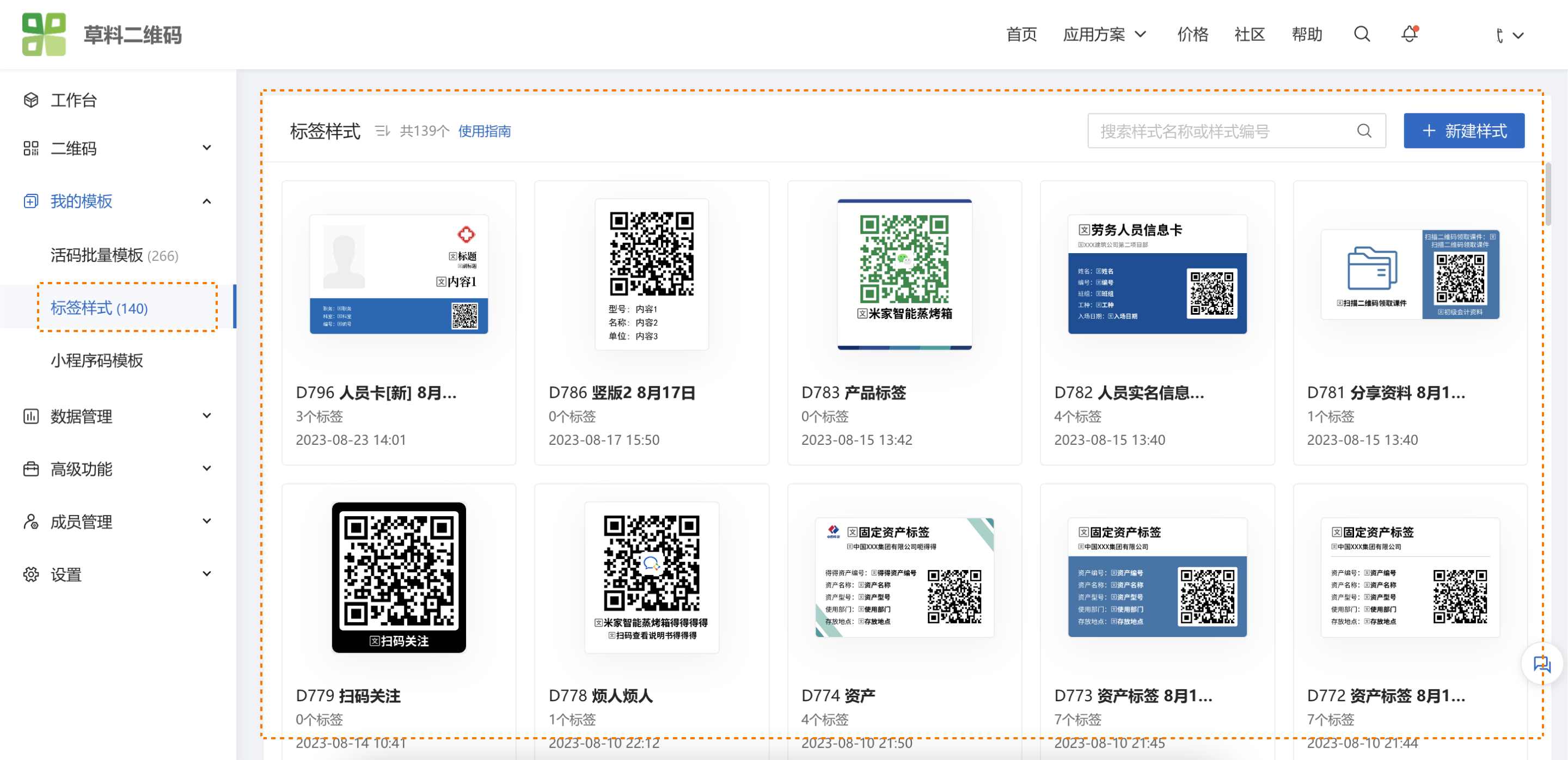
In the CaoLiao workbench, go to [Label Styles], select a saved style from "My Label Styles", enter the style detail page, and click [Call API to Create] to enable access.
If you don't have a style yet, create one first. Label creation page: https://cli.im/label
After enabling label API integration, you can obtain your API key and API secret. You can also configure allowed callers by IP or domain.
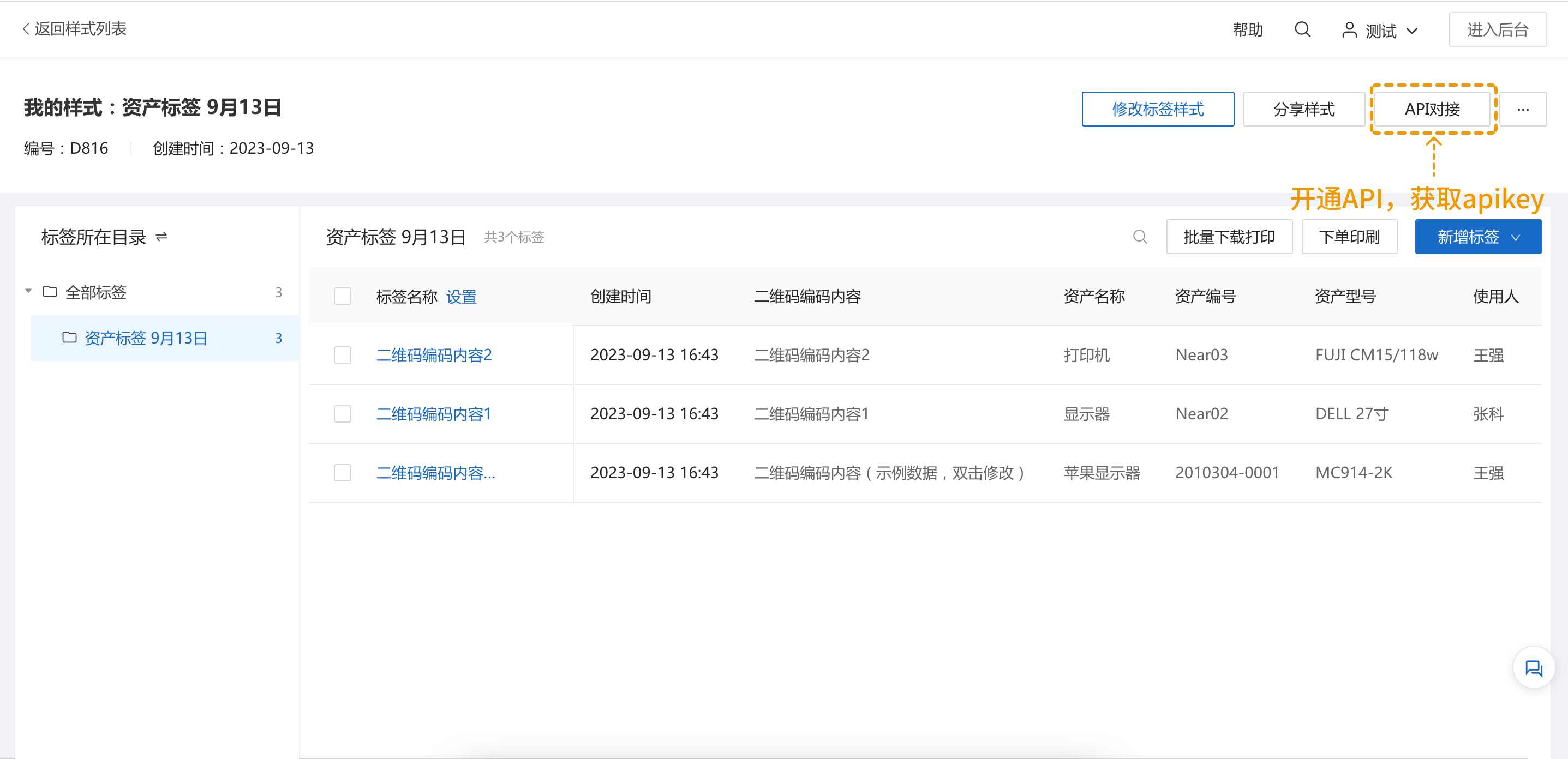
For example, the personnel style being called has 7 fields, with field 1 being an image field and the rest being text fields.
So the API dynamic fields range from cliP1 to cliF7. Sample code:
package org.cli.platform.service.util;

import org.apache.commons.io.IOUtils;

import java.io.File;
import java.io.FileOutputStream;
import java.io.IOException;
import java.io.InputStream;
import java.net.HttpURLConnection;
import java.net.URL;
import java.net.URLEncoder;
import java.nio.charset.StandardCharsets;
import org.apache.commons.codec.digest.DigestUtils;
import org.apache.commons.io.IOUtils;
import org.springframework.web.util.UriUtils;

public class CliApiV1Demo {
    public static void main(String[] args) throws IOException {
        String cliD = "Test123";
        String cliP1 = "https://ncstatic.clewm.net/rsrc/2023/0331/11/823ace0e8a36e304ca8bfab683be6219.png";
        String cliF2 = "京海市第一人民医院";
        String cliF3 = "Jinghai First People's Hospital";
        String cliF4 = "王菲菲";
        String cliF5 = "职务:助理护士";
        String cliF6 = "科室:住院部";
        String cliF7 = "编号:NO-GT-043";
        String secret = "ddb42b7299b90cb5e0fd6c41e154c15d";

        Map<String, Object> params = new HashMap<>();
        params.put("api_key", "CLb87ea759f877622c");
        params.put("cliT", "D11");
        params.put("cliD", cliD);
        params.put("return_file", "");
        params.put("cliP1", cliP1);
        params.put("cliF2", cliF2);
        params.put("cliF3", cliF3);
        params.put("cliF4", cliF4);
        params.put("cliF5", cliF5);
        params.put("cliF6", cliF6);
        params.put("cliF7", cliF7);

        String data = params.entrySet().stream().sorted(Map.Entry.comparingByKey()).map(entry -> entry.getKey() + "=" + entry.getValue()).collect(Collectors.joining("&"));
        data += secret;
        String sign = DigestUtils.md5Hex(data);

        cliD = UriUtils.encode(cliD, StandardCharsets.UTF_8.name());
        cliP1 = UriUtils.encode(cliP1, StandardCharsets.UTF_8.name());
        cliF2 = UriUtils.encode(cliF2, StandardCharsets.UTF_8.name());
        cliF3 = UriUtils.encode(cliF3, StandardCharsets.UTF_8.name());
        cliF4 = UriUtils.encode(cliF4, StandardCharsets.UTF_8.name());
        cliF5 = UriUtils.encode(cliF5, StandardCharsets.UTF_8.name());
        cliF6 = UriUtils.encode(cliF6, StandardCharsets.UTF_8.name());
        cliF7 = UriUtils.encode(cliF7, StandardCharsets.UTF_8.name());

        // Build URL request
        String query = "https://open-api.cli.im/cli-open-platform-service/v1/labelStyle/createWithKey?cliT=D11&cliD=" + cliD + "&return_file=&cliP1=" + cliP1 + "&cliF2=" + cliF2 + "&cliF3=" + cliF3
                + "&cliF4=" + cliF4 + "&cliF5=" + cliF5 + "&cliF6=" + cliF6 + "&cliF7=" + cliF7 +
                "&api_key=CLb87ea759f877622c&sign=" + sign;

        URL url = new URL(query);
        HttpURLConnection connection = (HttpURLConnection) url.openConnection();
        connection.setDoOutput(true);
        connection.setRequestMethod("GET");
        connection.connect();

        InputStream stream = connection.getInputStream();
        try (FileOutputStream out = new FileOutputStream("test.png")) {
            IOUtils.copy(stream, out);
        }
    }
}
4. Usage Notes
-
Users who enable the API during the Beta period can use it for free indefinitely.
-
API calls are rate-limited to 30 concurrent requests per second per IP. If you need a higher rate limit, post feedback in the community.
-
If you encounter issues with the label API — such as workflow or performance problems — post feedback in the community. CaoLiao's official consultants and engineers check in regularly to respond.