Public Style API Documentation
1. Feature Overview
This API documentation applies to calling public styles from CaoLiao's label design library to batch-generate QR code labels with different content from your own system or web app. No need to export data and reimport it into CaoLiao.
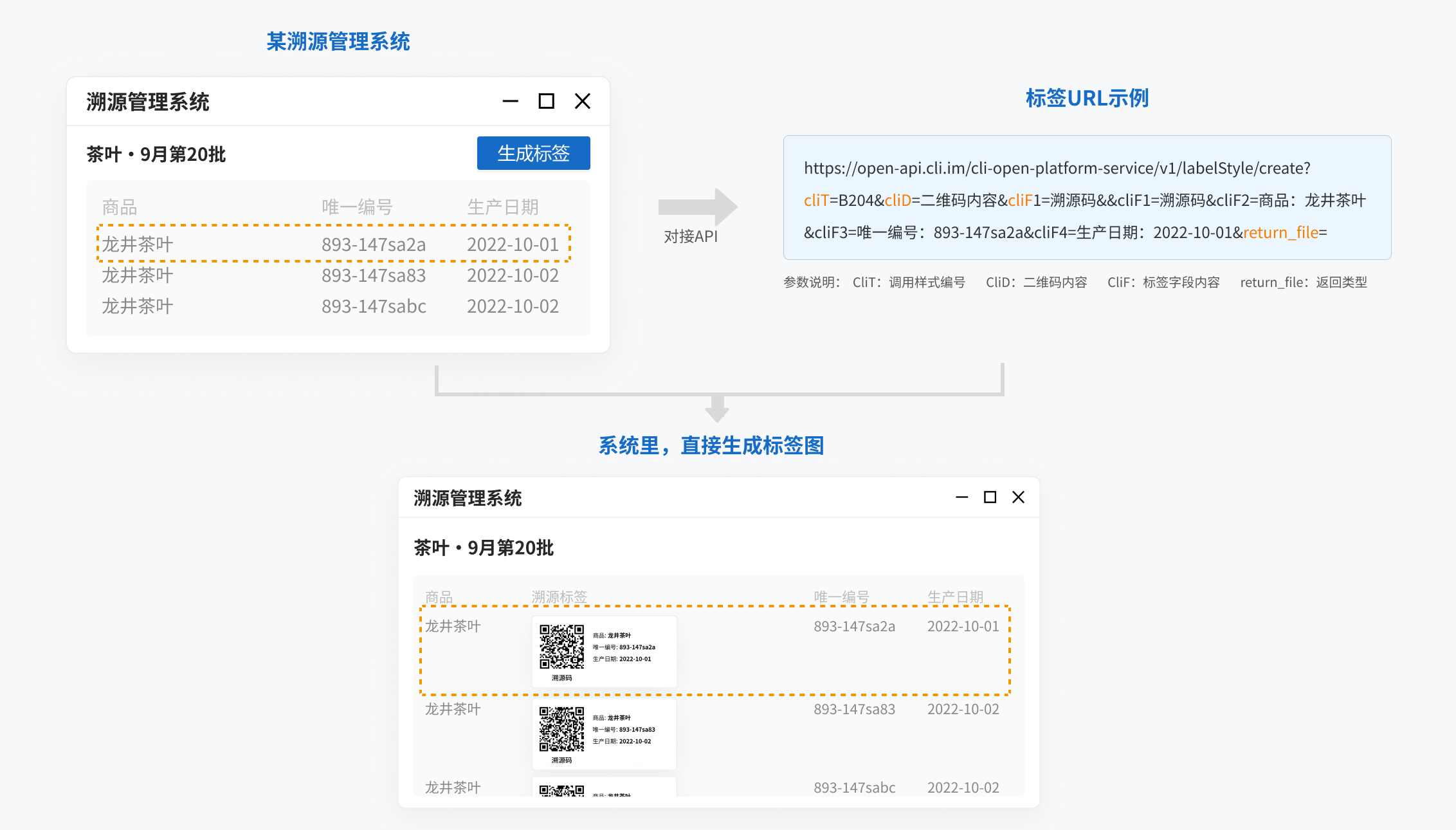
2. API Reference
URL
https://open-api.cli.im/cli-open-platform-service/v1/labelStyle/create
HTTP Method
GET
Request Parameters
| Parameter Name | Required | Type | Description |
|---|---|---|---|
| cliT | Yes | string | Public style number, e.g. B216 |
| cliD | Yes | string | QR code dynamic content. More bytes = more complex QR pattern. Recommended: within 1,500 bytes |
| return_file | Yes | string | Return type. If omitted, returns a binary image stream. Use base64 to return Base64-encoded image |
| theme_color | Yes | string | Theme color, e.g. #166BC7 |
| cliF | No | string | Dynamic text fields required by the public style. cliF denotes a plain text field. List in field display order. Example for a style with 3 text fields: cliF1=xx&cliF2=xx&cliF3=xx |
| cliP | No | string | Dynamic image fields required by the public style. cliP denotes an image field. Image must be a publicly accessible static URL. Example for a style with 4 fields where the 2nd is an image: cliF1=xx&cliP2=xx&cliF3=xx&cliF4=xx |
Response
If return_file is not provided: returns a binary image stream.
If return_file=base64: returns the image as a Base64-encoded string, suitable for embedding in a web page or transmitting to another system.
Request example:
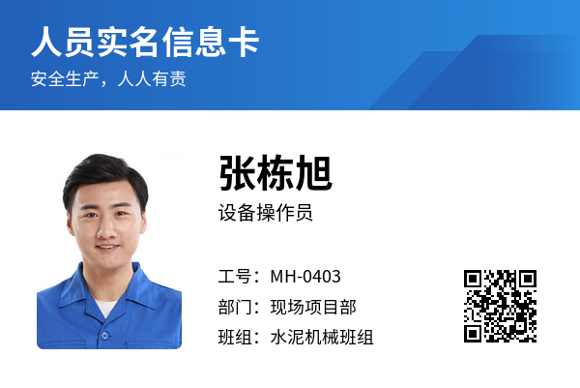
https://open-api.cli.im/cli-open-platform-service/v1/labelStyle/create?cliT=B572&cliD=图片样式二维码&cliF1=人员实名信息卡&cliF2=安全生产,人人有责&cliP3=https://ncstatic.clewm.net/rsrc/2023/0612/13/952a04c092275a684025ef0d2ed6bcce.png&cliF4=张栋旭&cliF5=设备操作员&cliF6=工号:MH-0403&cliF7=部门:现场项目部&cliF8=班组:水泥机械班组&return_file=
Response Example
If return_file is not provided: returns the binary image stream below.
If return_file=base64: returns the Base64 encoding of the image below, suitable for embedding in a web page or transmitting to another system.
Error Codes
| Error Code | Message | Resolution |
|---|---|---|
| 200 | Success | Success |
| 400 | Invalid request data format | Check parameter correctness |
| 40000 | System busy, please try again later | System may be undergoing maintenance — wait and retry |
| 40001 | Parameter error | Check that parameters conform to the API specification |
3. Code Sample
In CaoLiao's label design library, select a label to get its style number directly, or enter the style detail page and click [Enable API to Create].
Label creation page: https://cli.im/label
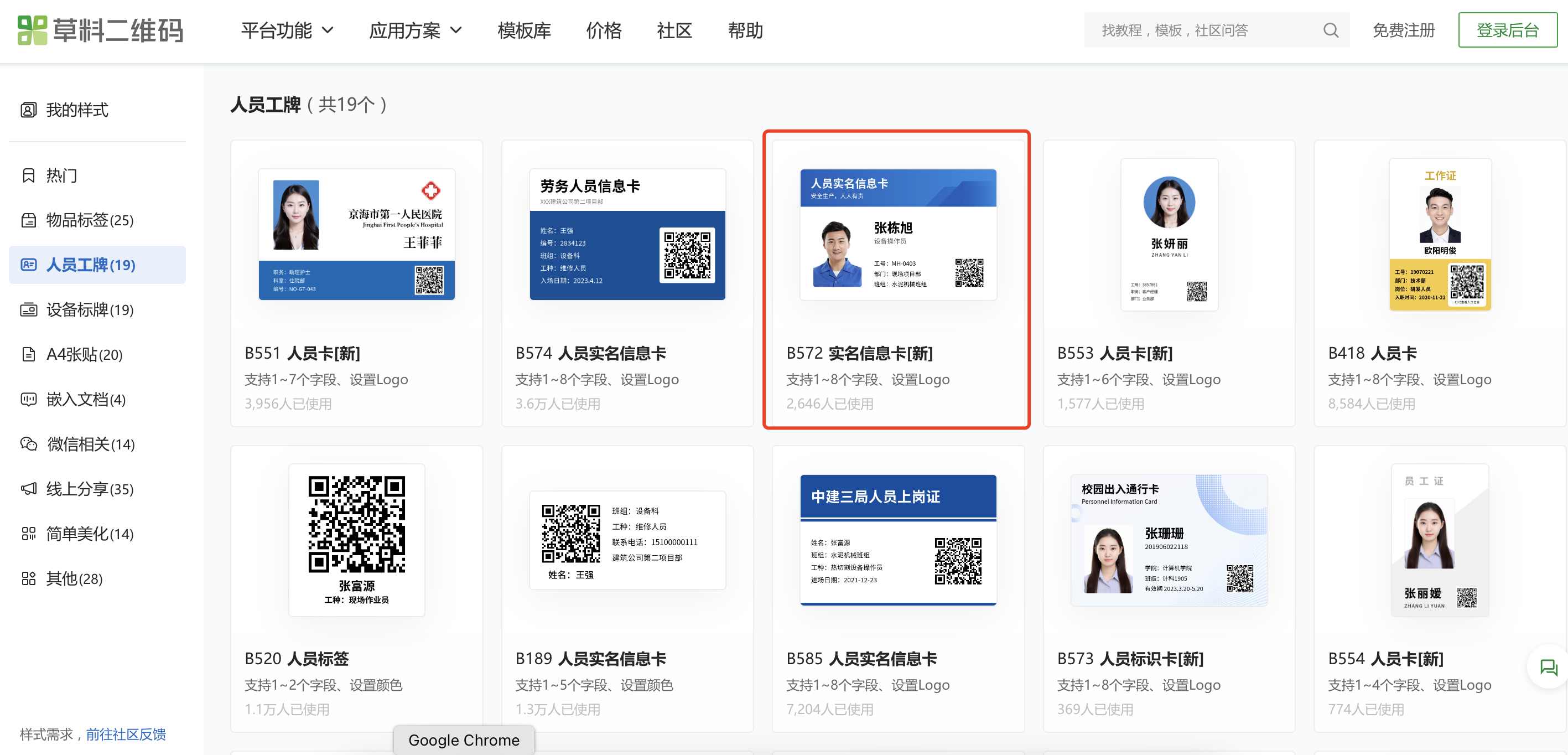
Using template B572 as an example — this style has 8 fields, with field 3 being an image field and the rest being text fields.
So the API dynamic fields range from cliF1 to cliF8, with cliP3 as the image field. Sample code:
package org.cli.platform.service.util;

import org.apache.commons.io.IOUtils;

import java.io.File;
import java.io.FileOutputStream;
import java.io.IOException;
import java.io.InputStream;
import java.net.HttpURLConnection;
import java.net.URL;
import java.net.URLEncoder;
import java.nio.charset.StandardCharsets;
import org.springframework.web.util.UriUtils;


public class CliApiV1Demo {
    public static void main(String[] args) throws IOException {
        String cliD = UriUtils.encode("图片样式二维码", StandardCharsets.UTF_8.name());
        String cliF1 = UriUtils.encode("人员实名信息卡", StandardCharsets.UTF_8.name());
        String cliF2 = UriUtils.encode("安全生产,人人有责", StandardCharsets.UTF_8.name());
        String cliP3 = UriUtils.encode("https://ncstatic.clewm.net/rsrc/2023/0612/13/952a04c092275a684025ef0d2ed6bcce.png", StandardCharsets.UTF_8.name());
        String cliF4 = UriUtils.encode("张栋旭", StandardCharsets.UTF_8.name());
        String cliF5 = UriUtils.encode("设备操作员", StandardCharsets.UTF_8.name());
        String cliF6 = UriUtils.encode("工号:MH-0403", StandardCharsets.UTF_8.name());
        String cliF7 = UriUtils.encode("部门:现场项目部", StandardCharsets.UTF_8.name());
        String cliF8 = UriUtils.encode("班组:水泥机械班组", StandardCharsets.UTF_8.name());
        URL url = new URL("http://open-api.cli.im/cli-open-platform-service/v1/labelStyle/create?cliT=B572&cliD=" + cliD + "&return_file=&theme_color=&cliF1=" + cliF1 + "&cliF2=" + cliF2 + "&cliP3=" + cliP3 + "&cliF4=" + cliF4 + "&cliF5=" + cliF5 + "&cliF6=" + cliF6 + "&cliF7=" + cliF7 + "&cliF8=" + cliF8);
        HttpURLConnection connection = (HttpURLConnection) url.openConnection();
        connection.setDoOutput(true);
        connection.setRequestMethod("GET");
        connection.connect();

        InputStream stream = connection.getInputStream();
        FileOutputStream out = new FileOutputStream(new File("test.png"));
        IOUtils.copy(stream, out);
    }
}
4. Usage Notes
-
Users who enable the API during the Beta period can use it for free indefinitely.
-
API calls are rate-limited to 30 concurrent requests per second per IP. If you need a higher rate limit, post feedback in the community.
-
If you encounter issues with the label API — such as workflow or performance problems — post feedback in the community. CaoLiao's official consultants and engineers check in regularly to respond.
-
If you want to call a label style you've customized and saved in your account, go to [Label Styles] in the CaoLiao workbench, select "My Label Styles", enter the style detail page, and enable API access. View Private Style API Documentation