Exclusive WeChat Mini Program Registration and Activation Process
1. Registration Process Overview
-
Register the Mini Program — Create an account on WeChat Public Platform with "Mini Program" as the account type. Estimated time: 1 business day.
-
Complete WeChat Verification and fill in Mini Program details — Includes name, description, categories, and enterprise verification. Estimated time: 1–2 business days. Note: Verification requires a one-time fee of 300 RMB, with annual renewal required.
-
Complete Mini Program ICP filing — The Mini Program must pass ICP filing through the Ministry of Industry and Information Technology (MIIT) before it can be published. Estimated time: 3–20 business days.
-
Coordinate publishing of the Mini Program — The Mini Program admin authorizes CaoLiao as the service provider, after which our team deploys and publishes the code. Estimated time: 2–3 business days.
-
Ongoing Mini Program management — Includes phone number quick verification component fees, profile updates, announcement monitoring, and day-to-day management.
2. Detailed Registration Process
Step 1: Register the Mini Program
On a desktop browser, open WeChat Public Platform, click Register Now > Mini Program, and follow the on-screen prompts to complete registration. 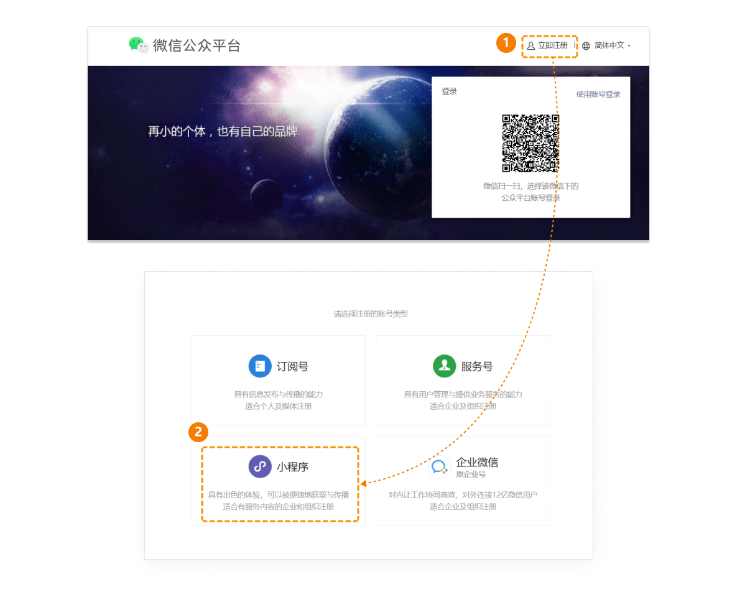
During Information Registration, the entity type must be set to Non-Individual, as our Mini Program uses enterprise-level features such as phone number authorization. Personal Mini Program applications are not supported. 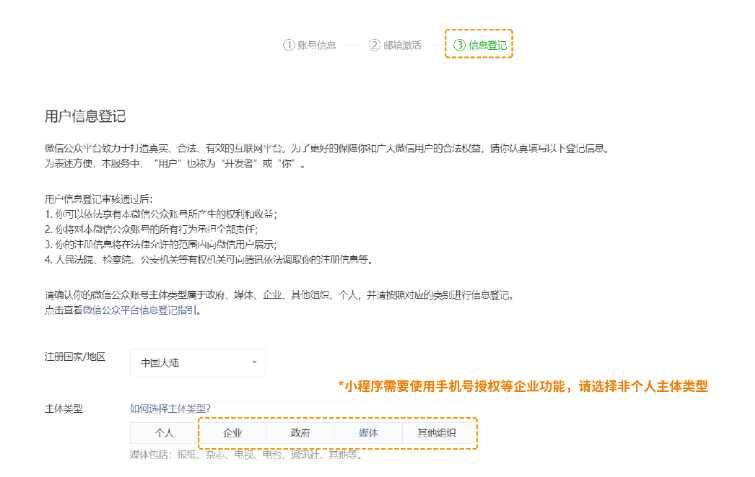
During registration, enterprises can choose either "payment verification" or "WeChat Verification." We recommend proceeding directly with WeChat Verification, since verification is required for publishing regardless, and the fee is 300 RMB/time (renewed annually). 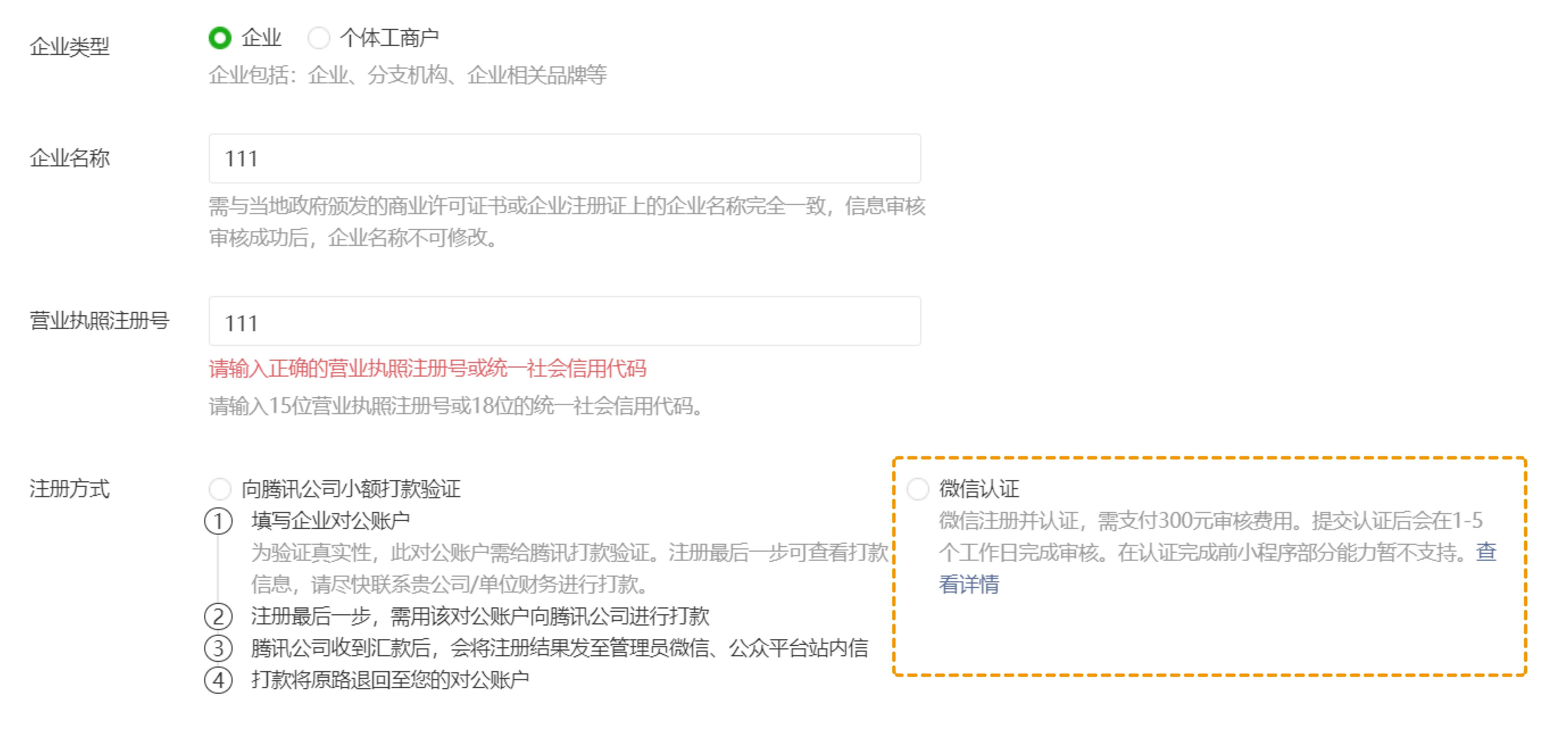
Step 2: Complete WeChat Verification and Fill in Mini Program Details
2.1 WeChat Verification
- After registration, the platform will prompt you to complete verification. Follow the steps in the WeChat Mini Program Verification Guide.
- Pay the 300 RMB one-time fee. The fee is non-refundable if verification fails. (Renewed at 300 RMB/year thereafter.)
- Official rules may be updated. Please refer to the WeChat Official Mini Program Verification Instructions for the most current information.
2.2 Fill in Mini Program Details
The following information is required:
- Mini Program name — Avoid overly generic names, as they may be rejected. For example, "Smart Engineering Management System" may not pass, but "Guizhou Academy Smart Engineering Management System" (including a company abbreviation) is more likely to succeed. The name must not exceed 20 characters and should be easy to remember.
- Mini Program icon — Size: 144×144 pixels. Avoid using too much small text in the icon, as it will be hard to read.
- Description — Briefly describe the system's purpose, e.g., "This system provides engineering inspection and management features." This field can be updated later.
- Mini Program categories — Must include Tools > Office.
Step 3: Complete Mini Program ICP Filing
- Per regulations from the Ministry of Industry and Information Technology (MIIT), Mini Programs must complete ICP filing before going live.
- For filing materials and step-by-step instructions, refer to: Mini Program ICP Filing Guide
- For official filing material examples: Click to view
Step 4: Coordinate Mini Program Publishing
4.1 Preparation
- Create the partition homepage as the Mini Program's main page: Every Mini Program has a homepage — the default page users land on when opening the Mini Program through search. This homepage content comes from your CaoLiao workbench, specifically the homepage of your initial partition.
- Steps: Go to CaoLiao Workbench > Initial Partition (if you have not used the partition feature, this is the default workbench) > Advanced Features > Partition Homepage to configure the content. The homepage typically introduces the Mini Program's features and provides key entry points.
- Content requirements: The content should be relevant to your Mini Program's description, as reviewers will check whether the homepage matches the description. Incorrect example: The description says "Smart Management System" but the summary page shows a company introduction with no relevance. Correct example: The description says "Smart Management System" and the body states: "This system is XXX Company's smart equipment inspection management system. By scanning on-site QR codes, it records inspection results for each piece of equipment and ensures safe operation. The following are common entry points."
- Important: The partition homepage can be edited after creation, but it must never be deleted. The partition homepage must not have any access restrictions — it must be fully public. Otherwise, WeChat may flag it as a violation.
4.2 Authorization and Activation (CaoLiao Technical Staff Will Handle Setup After Authorization)
- Contact us. CaoLiao will provide an authorization QR code. The Mini Program admin must scan it and complete the authorization within 30 minutes.
- After authorization, CaoLiao will submit the Mini Program for review. Estimated time: 1–3 business days.
- Once approved, the Mini Program officially goes live. The admin will receive an approval notification, and our technical team will also notify you in the group. After that, all QR codes under your account will automatically switch to open via the exclusive WeChat Mini Program.
Step 5: Ongoing Mini Program Management
After activation, the Mini Program admin can independently manage the Mini Program, including updating the name, description, viewing announcements, and managing fees.
- Phone number quick verification component fee: Starting August 26, 2023, WeChat Mini Programs began charging for the phone number quick verification feature and similar functions at 0.03 RMB per use. WeChat provides 1,000 free uses by default. Once the free quota is exhausted, users who do not top up will be unable to use features such as phone number authorization when filling out forms. Purchase price: 0.03 RMB per use. View WeChat's official announcement.
3. Frequently Asked Questions
-
Can the Mini Program name be changed later? Yes.
Steps: Log in to WeChat Public Platform, go to Settings > Basic Settings > Basic Info, click Edit next to "Mini Program Name", verify your identity, enter the new name, and submit it for review.
Restrictions on name changes:
- Each Mini Program gets two free name changes per year. Once these are used up, further changes must go through a verification-based rename. See the official WeChat documentation.
- After the Mini Program name is changed, you need to complete ICP filing again.
-
Can the Mini Program logo be changed? The logo can be changed up to 5 times per month, free of charge. Steps: Same as changing the Mini Program name.
-
Do existing QR codes need to be reprinted after activation? No. Existing QR codes can continue to be used and will automatically point to the exclusive WeChat Mini Program's content page. (QR codes set to open via H5 web page are not affected and will still open via H5.)
-
Can CaoLiao's public account message notifications be forwarded to our own service account? Yes. Contact your assigned CaoLiao technical staff to arrange this.
-
I have an existing blank Mini Program account that is already registered — can I proceed directly to authorization? Existing blank Mini Program accounts may sometimes fail to complete WeChat Verification (300 RMB/year), which would prevent code deployment. In such cases, the user would need to register a new Mini Program account. Note that the 300 RMB verification fee is non-refundable if verification fails.