Differences Between the Free Version and Paid Versions
1. Overview
Both the free version and paid versions impose no limits on the number of QR codes you can create, the number of scans, or the amount of images, files, or audio/video you can upload. All generated QR codes are valid indefinitely.
As your business grows and use cases become more complex, upgrading to a paid version unlocks a range of advanced features to help improve your brand image and team collaboration efficiency at every stage.
2. Paid Features
1. Remove the CaoLiao Logo and Display Your Own Brand
Starting from the Basic Edition, you can remove the "CaoLiao" identifier at the bottom of QR codes. Content pages can also display high-definition, watermark-free images and files. Additionally, you can build a brand-exclusive Mini Program for your business.

For projects intended for external display and promotion, a visually consistent and polished page lets clients immediately perceive your professional and trustworthy brand identity.
2. Audio/Video Features
The free version supports audio/video files up to 1 minute each, with unlimited viewers and plays, long-term playback, and standard-definition quality. To upload longer files or use HD playback, choose the Basic edition or above. Playback defaults to HD while HD traffic remains.
For more details, see: Audio/Video FAQs
3. Multi-Member Collaboration for Greater Efficiency and Security
In teams or multi-department settings, you may need to delegate QR code management, form submission permissions, and anomaly alerts to different roles.
Starting from the Advanced Edition, the advanced members feature allows you to create independent accounts for each colleague and assign specific permissions. This ensures clear accountability and enables fast root-cause analysis when issues arise, significantly improving collaboration efficiency and data security.
For more details, see: Members and Permissions
4. Integrate AI Features into Your QR Codes
Starting from the Advanced Edition, the following AI features are available, greatly boosting work efficiency. CaoLiao is actively developing and releasing more AI capabilities to provide simple and efficient solutions for complex data management.
4.1 AI Content Interpreter
- Connect your QR code to a large language model with one click. Scanners can ask questions, and the AI will automatically interpret the QR code content and provide answers.
- Reduces repetitive explanations and manual costs, significantly improving the scan user experience and helping users quickly access the information they care about.
- Customize the AI's name and logo to align with your brand and create a dedicated AI assistant — making your QR code more professional and trustworthy.

4.2 AI Form Components
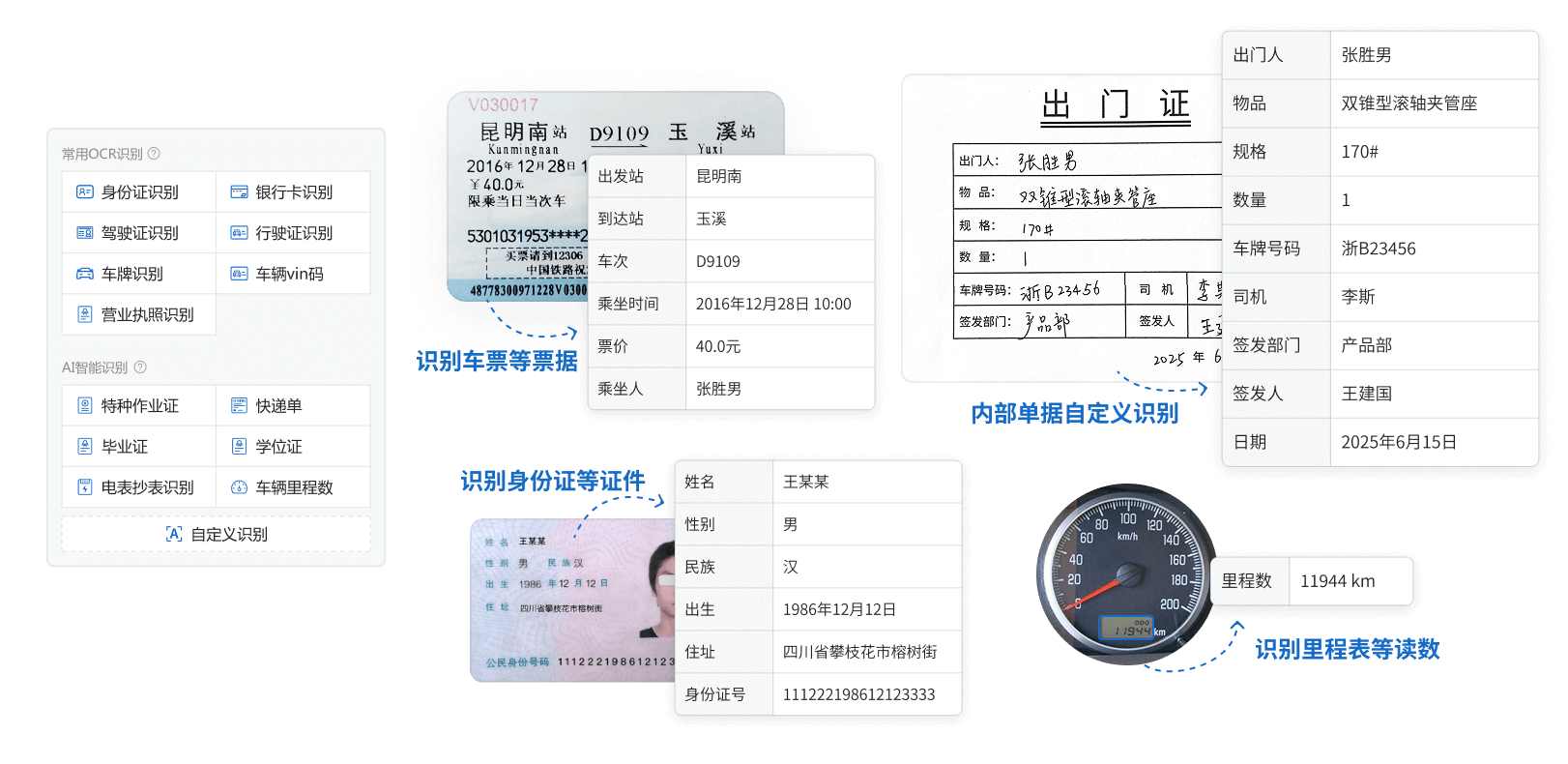
- Supports adding AI components to forms. When filling out forms, OCR recognition and AI capabilities can automatically identify and populate information, speeding up the process.
- OCR recognition: ID cards, bank cards, driver's licenses, vehicle registration certificates, license plates, VIN codes, business licenses, and more.
- AI intelligent recognition: Special operation certificates, express delivery slips, graduation certificates, degree certificates, utility meter readings, dashboard odometer readings, and more. Supports custom recognition — set the recognition fields, and the AI will automatically extract information when the scanner uploads an image.
- This feature is currently available for a limited time at no charge — free version and Basic Edition users can try it. It will later become an Advanced Edition paid feature.
4.3 AI Image Review
- The form image component supports AI-powered automatic review of uploaded images to check whether they meet specific requirements. Images that do not meet requirements can be blocked from form submission with a prompt to revise, greatly improving form data consistency.
- This feature is currently available for a limited time at no charge — free version and Basic Edition users can try it. It will later become an Advanced Edition paid feature.

4.4 AI Smart Form Filling
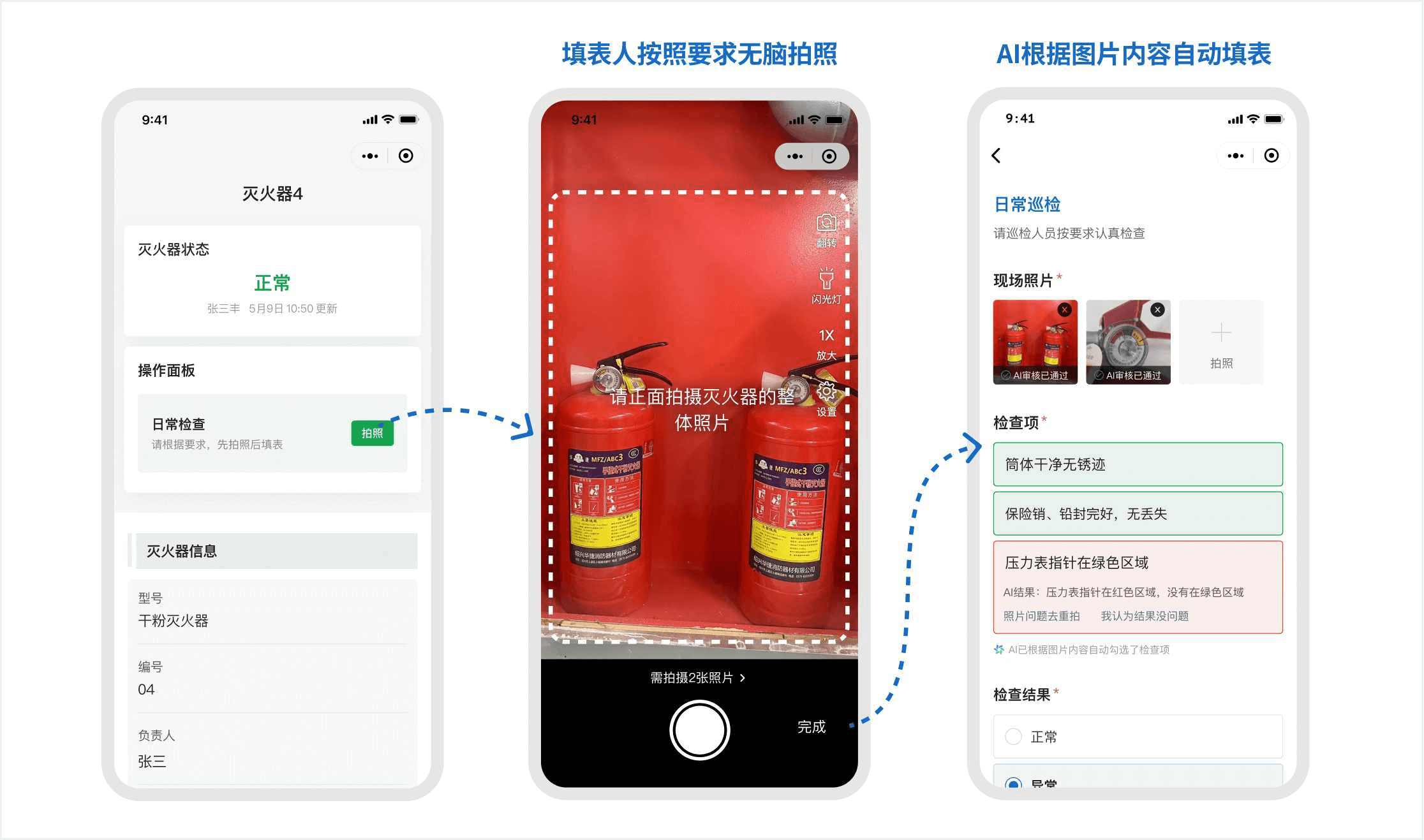
- The submitter only needs to take a photo as instructed, and the AI will automatically fill in the form based on the photo content. Human review is still possible to ensure accuracy while intelligently improving efficiency.
- Available starting from the paid Advanced Edition.
5. Longer Data Retention Guarantees
If you need to retain inspection records, visitor logs, production process forms, and similar data for long periods and export them at any time, the paid Flagship Edition and above support unlimited export time ranges, giving you access to all historical data whenever you need it. (The free version limits exports to data from the past 180 days.) Learn more
If record images need to be accessible at their original quality for extended periods, the paid Flagship Edition and above support permanent access to all record image originals with no image count limit. (The free version limits original image viewing to the most recent 5,000 record images.) Learn more
Additionally, paid versions offer higher-volume API push capabilities to meet enterprise requirements for external system integration and real-time data sync, providing efficient and secure support for data querying, export archiving, and cross-system collaboration scenarios. Learn more
6. More In-Depth Features for End-to-End Process and Efficiency Improvements
Beyond the capabilities mentioned above, CaoLiao's paid versions offer many more in-depth features specifically designed to optimize workflows and improve efficiency across a wide range of scenarios:
- Multi-level approval for form records
- Bulk download of multimedia attachments from records
- Enterprise exclusive Mini Program (displays enterprise logo and name on scan)
- Enterprise exclusive login page (custom system name, logo, and background image)
3. Learn More
To purchase or compare version features, visit: Pricing Page
For edition selection recommendations, see: Edition Selection Guide
For detailed introductions to each edition:
- Free Version Overview
- Basic Edition Overview
- Advanced Edition Overview
- Flagship Edition Overview
- Industry Edition Overview
For other purchase-related questions, contact a Business Consultant