Cosmetics Electronic Label Operation Guide
This tutorial is for companies that have already decided to build a cosmetics e-label system with CaoLiao QR Code. It covers the full process from turning on the feature, creating labels, entering information, and publishing and activating, to content locking, downloading and using, and later maintenance.
If you are still confirming pilot eligibility, requirements for information kept on the packaging, and the like, first see the Cosmetics E-Label Pilot Compliance Guide. If you want to know the system capabilities, service flow, and how to buy, see the Cosmetics E-Label Solution.
1. Know the Main Features Before You Start
- Show product information as required: Main fields such as the ingredient list, period of use, and safety warnings are preset, helping companies organize e-label content as required.
- URL encoding that meets the standard: Supports the GS1 and MA coding systems. Just enter the GTIN or MA code into the system and it generates a URL structure that meets the technical specification of the drug administration.
- Content can be locked, and changes need review: From the Flagship Edition, you can turn on "Content Lock Control". Content changes must be reviewed by the super admin, reducing the risk of mistaken or unauthorized changes.
- The original QR code stays usable after content updates: When the product identifier and URL structure haven't changed, you can update the displayed content in the workbench, which takes effect after the admin's review, with no need to replace printed QR codes.
- Operation records are traceable: The system records who created and who changed the content and when, so you can look up a label's operation records from creation to change.
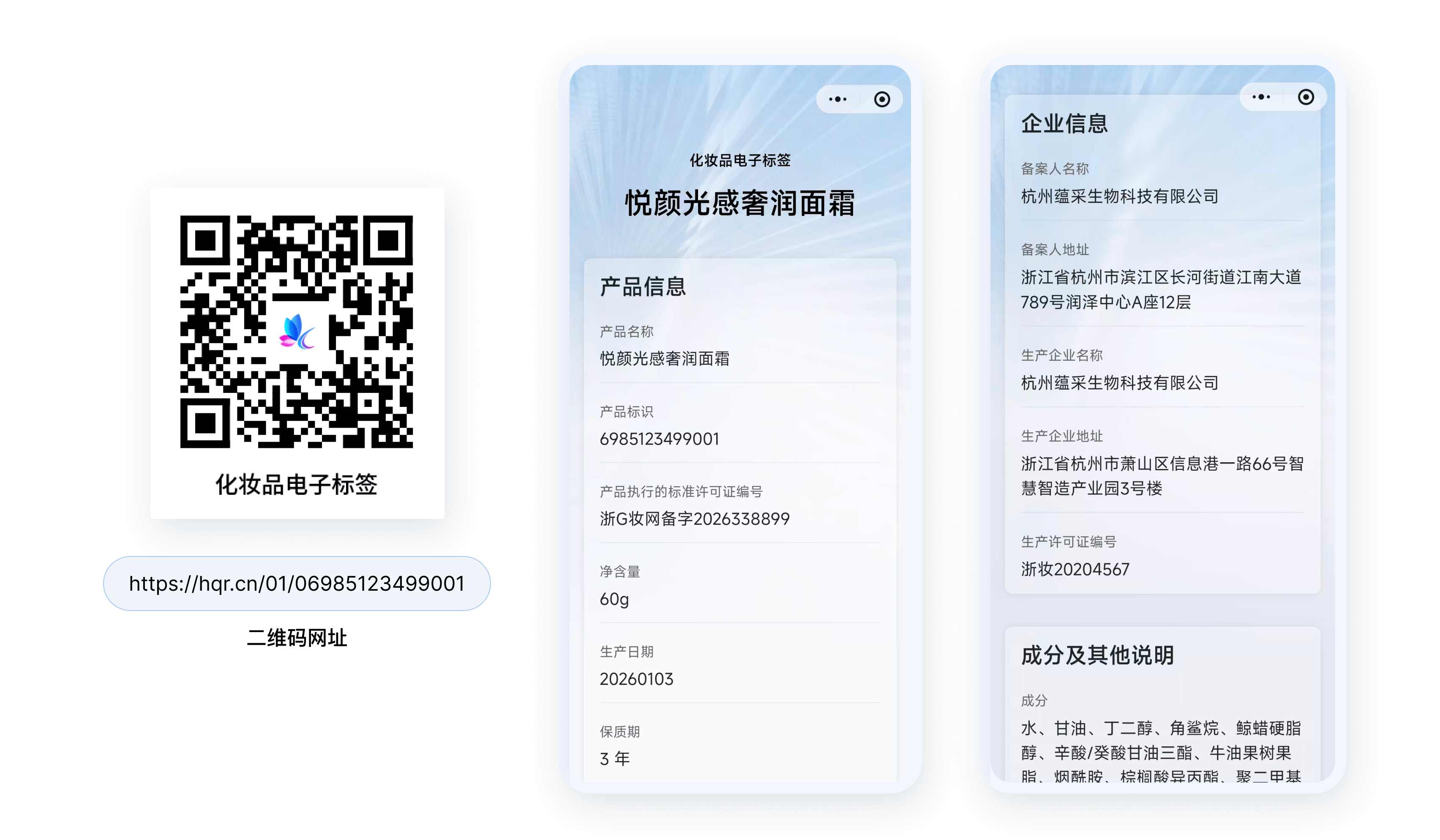
2. Steps
Step 1: Contact a Dedicated Consultant to Turn on the Feature
To reduce the time companies spend on understanding and implementation, the CaoLiao technical consultant team can provide rollout support, including:
- Turning on the feature menu for you and recommending a suitable code generation method, such as one code per product, one code per batch, or one code per item;
- Helping you configure an independent domain and a WeChat Mini Program.
Contact a consultant to turn it on
Step 2: Create the E-Label and Enter Information
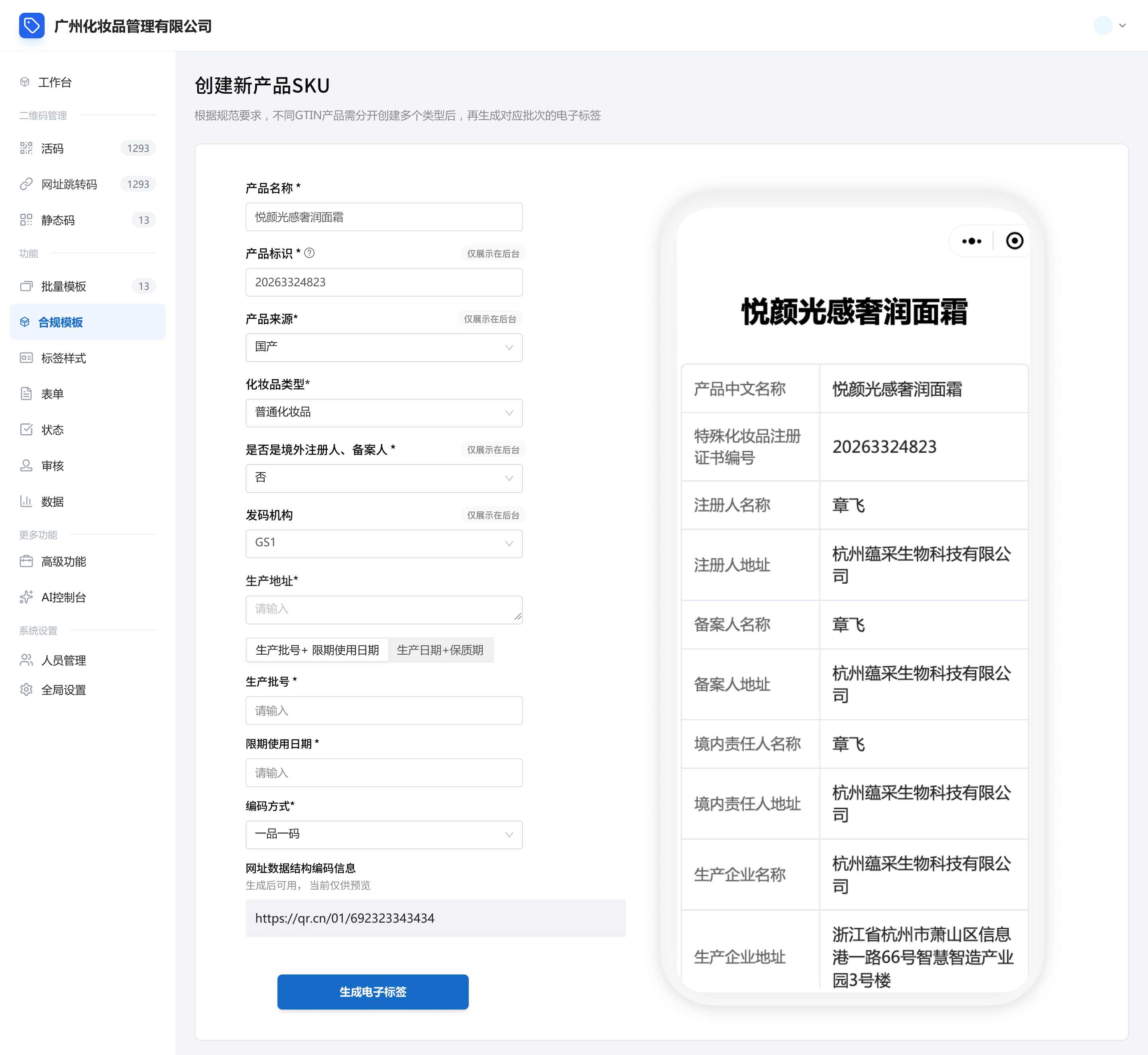
1. Create a label: Go to the CaoLiao workbench, click the [Compliance Templates] menu in the left navigation, and click [New].
2. Fill in the product information:
- Basic information: Enter the product name, the filing/registration holder, the responsible person in China, the manufacturer information, and so on.
- Core parameters: Enter the full ingredient list, net content, directions for use, and necessary safety warnings.
- Validity management: Supports entering production date + shelf life, or production batch number + use-by date.
3. Reuse templates: You can copy an existing template and then check the product identifier, production date, batch number, and other information, which cuts repeated entry.
Note: Different product identifiers need to be created separately. After the e-label is generated, you can also adjust the scan display style.
See the requirements for fields, packaging, and filing
Step 3: Publish and Activate After Confirmation
Status change: After the e-label has been created and checked, switch the code status to "Activate", and the QR code officially takes effect externally.
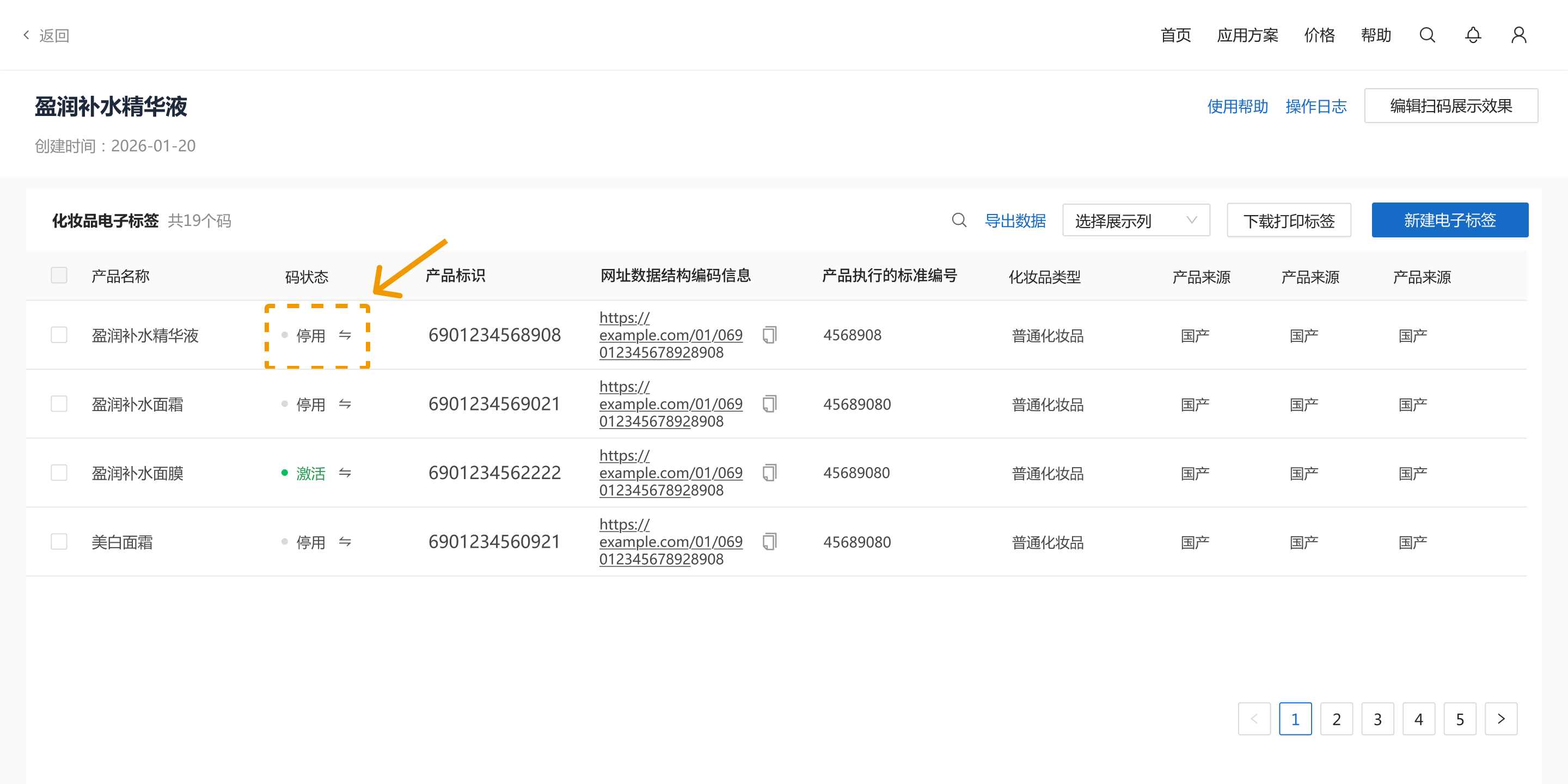
Step 4: Turn on Content Lock Control After Activation
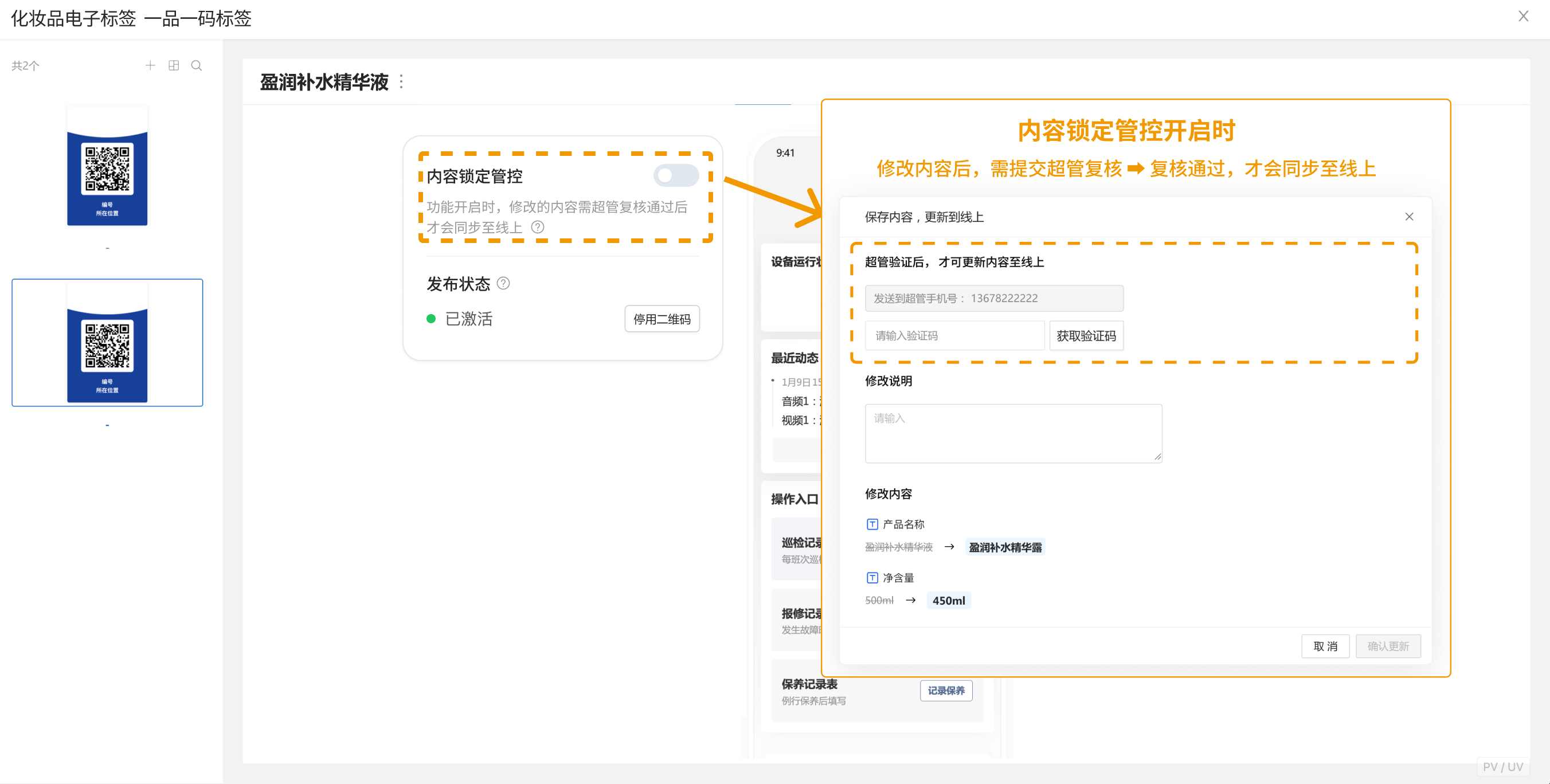
To prevent information from being changed by mistake after publishing, we recommend turning on content lock control:
- Note: This feature is exclusive to the Flagship Edition and above
- Where to set: Turn on "Content Lock Control" in the editing page.
- Flow after turning it on:
- Submit a request: Operations or production staff edit the e-label content and submit it.
- Super admin review: The super admin reviews the content and provides a verification code once it is confirmed.
- Verification passes: Only after the verification code is entered and "approved" does the new content update on the online page consumers see when they scan.
Note: Before approval, scanning still shows the content from before the edit, so unconfirmed new content isn't shown to the public directly.
Step 5: Manage and Download in One Place
- List management: On the "E-Labels" page, you can see the status and update time of all cosmetics in one place.
- Download QR codes: Supports bulk download of QR code images or vector formats for packaging printing.
- Operation log lookup: Click "Operation Log" for a product to see the whole process from creation and changes to super admin review.
Adjust the Scan Display Style
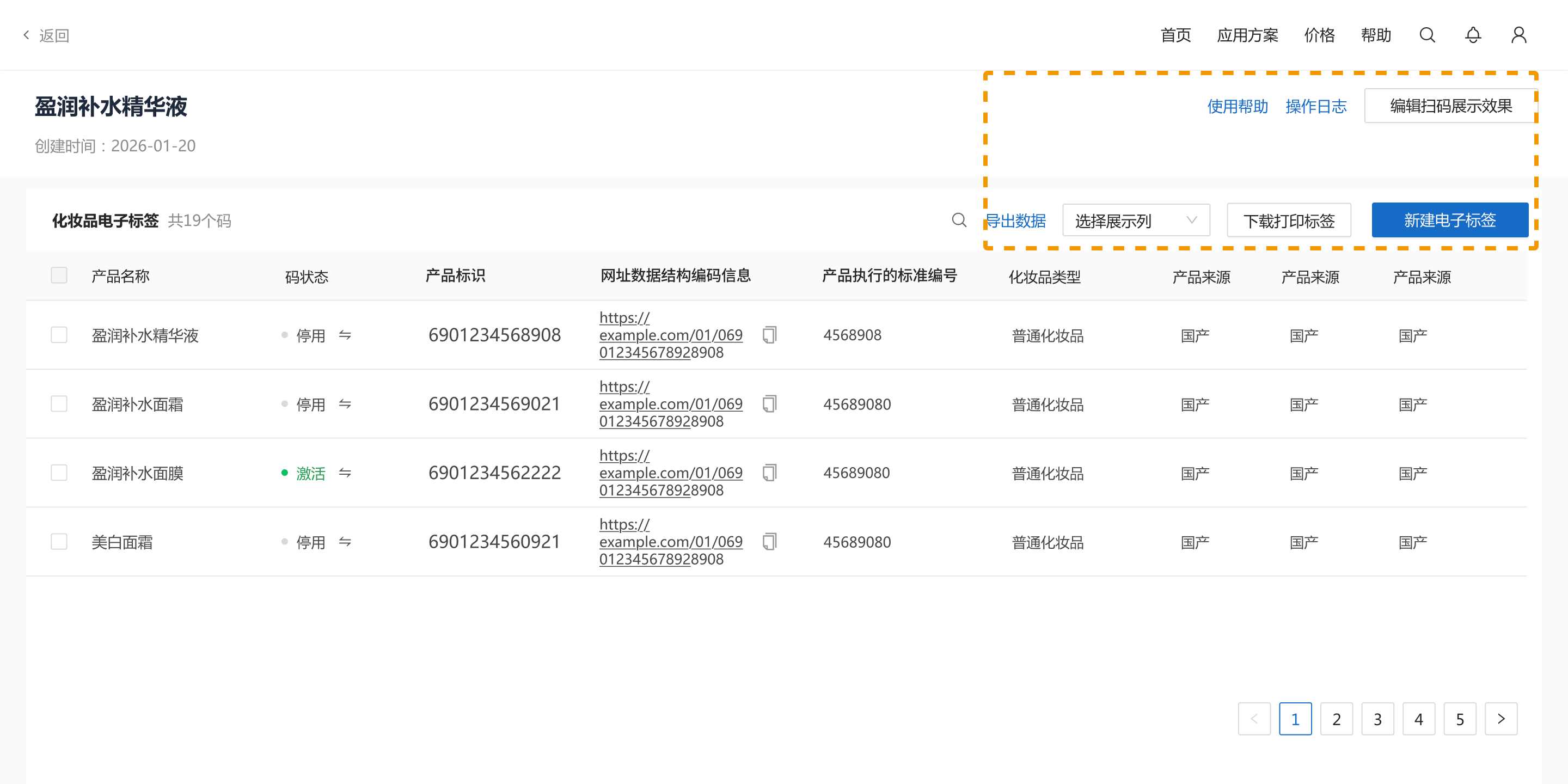
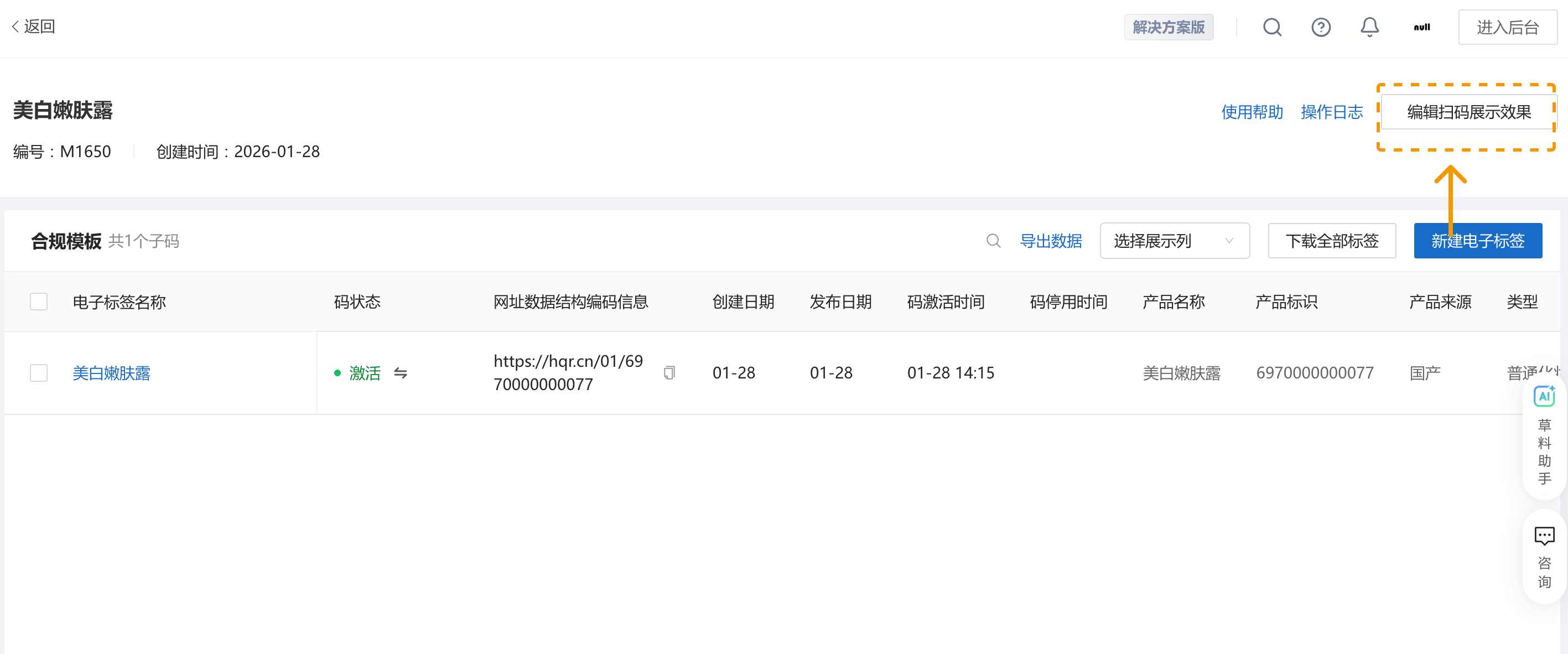
- You can adjust the scan display style, for example change the background and add product images.
- Where to find it: On the e-label detail page, click the "Edit Scan Display" button in the upper right, edit, and save.
Note: Extended content such as a company introduction and test reports should be shown on a clearly labeled secondary page and kept separate from the cosmetics e-label information.
Adding More Later
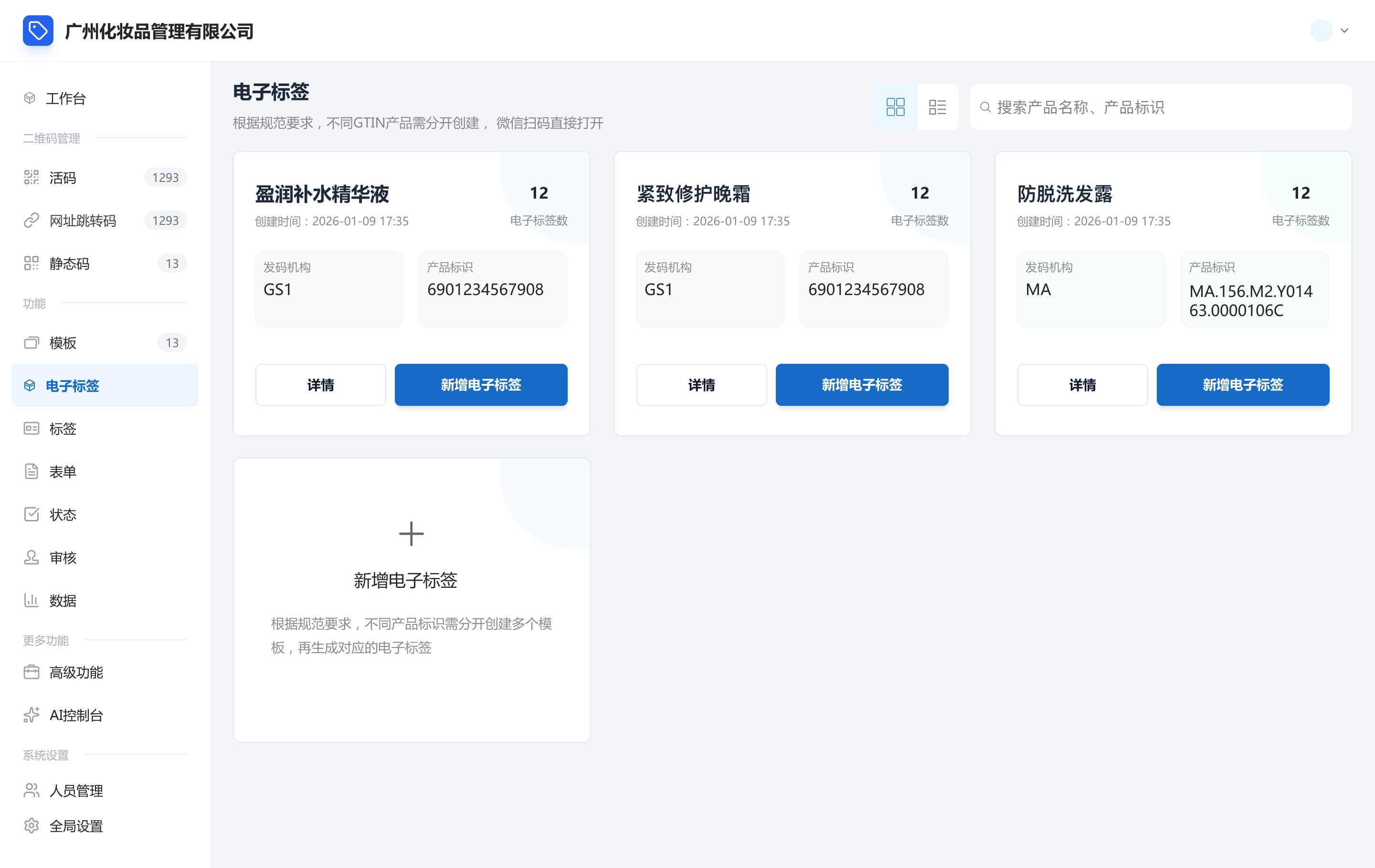
- Quick search: The search box at the top of the workbench supports finding a label quickly by "Product Name" or "Product Identifier", which makes later maintenance easier.
- When you add products of the same series or labels for new batches later, you can reuse an existing template and re-check the product identifier, production date, batch number, and other information. Different product identifiers still need to be created separately.
3. Edition and Purchase Notes
The cosmetics e-label feature requires the CaoLiao QR Code Flagship Edition. It supports e-label making, content locking, and operation log retention, with no limit on the number of QR code labels made or on scans.
Flagship Edition
- 1-year Flagship Edition: ¥2,680, for companies in an early pilot or with a short product lifecycle.
- 5-year Flagship Edition: ¥8,710, equal to 35% off, about ¥1,742 per year, for companies planning long-term use.
Brand Enhancement Service (Optional)
The brand enhancement service costs ¥2,800 per time, paid once and usable long-term. It supports configuring an exclusive Mini Program and an independent domain, for companies that want a unified brand entry and scan display experience.
The above covers the main editions and costs. For the detailed system capabilities, service flow, and how to buy, see the Cosmetics E-Label Solution.
4. FAQs
1. How Long Does It Take from Setup to Rollout?
With the material ready, taking a single product as an example, the e-label content can usually be configured within a day. The time to print QR codes and attach labels depends on the actual method, such as printing on the packaging or labeling afterward.
2. What Content Does an E-Label Need to Include?
CaoLiao templates preset the main fields such as the product name, registrant or filing holder, full ingredients, period of use, directions for use, and safety warnings. For the specific fields, physical packaging, and filing requirements, see the Cosmetics E-Label Pilot Compliance Guide.
3. Can I Show a Company Introduction or Qualification Information in the E-Label?
The cosmetics e-label home page is for showing the prescribed label information. Content such as a company introduction, qualifications, and test reports can be added through a clearly labeled secondary page, noting that this content is not part of the cosmetics e-label information.
4. Do I Need to Reprint the Code After Changing Content Such as Ingredients?
When the product identifier and URL structure haven't changed, you can change the displayed content in the workbench, and it takes effect after the super admin's review, with no need to reprint the QR code. The company also needs to complete the related information submission, depending on the change, before products using the changed e-label go on sale.
5. Related Content
- Cosmetics E-Label Solution: System capabilities, service flow, and purchase notes
- Cosmetics E-Label Pilot Compliance Guide: Pilot eligibility, label information, physical packaging, and filing requirements
- Shihuanuo Pilot Case: How one of the first pilot companies in Guangdong rolled it out in practice
6. Contact a Consultant to Build an E-Label System
To reduce the time companies spend on understanding and implementation, the CaoLiao technical consultant team can provide rollout support, including:
- Helping you sort out the fields your products need to show, so the e-label content is compliant;
- Recommending a suitable code generation method for your situation, such as one code per product, one code per batch, or one code per item;
- Helping you configure an independent domain and a WeChat Mini Program.