How to Create an Agricultural Product Compliance Certificate? Exclusive Templates + Layout and Printing Full Tutorial
As the Agricultural Product Compliance Certificate policy is now fully in effect, whether you supply to JD.com Direct, Hema, or offline supermarkets such as Lianhua or Yonghui, having a compliance certificate QR code on product packaging or delivery notes has become a hard requirement.
Faced with a wide variety of inspection standards across different platforms — how do you stay compliant without spending all day on labels?
CaoLiao has compiled the actual acceptance standards of major supermarkets and chains, and created a series of exclusive compliance certificate templates. You do not need to change your existing order management software or layout habits — just follow three simple steps to complete compliant delivery with ease.
I. Choose the Right Template
Different buyers have very different levels of strictness regarding QR code content. To help you balance "compliance" with "efficiency," the template library provides templates at different levels of strictness. Select the one that matches your supply channel requirements:
Template 1: Universal Compliance Version (Recommended)
Applicable Scenarios:
- The platform has strict requirements but allows the QR code to be used in combination with a printed paper label.
Content Features:
- This is the most versatile solution that meets national standards. The QR code does not require repeated entry of detailed product information — fields such as product name, place of origin, weight, and issuance date all default to displaying "See Packaging." You only need to ensure the compliance certificate QR code contains the correct issuance date and company seal.
- The specific product details are displayed on the printed paper label on the outer packaging, eliminating duplicate data entry and significantly reducing your workload.
Template links — click to use directly:
- If the platform requires the QR code to include the actual issuance date, use: Agricultural Product Compliance Certificate — One Code Per Day
- If you use one QR code after stamping, with "See Packaging" for field info, use: Agricultural Product Compliance Certificate — One Code Per Enterprise
Template 2: Strict National Standard Version
Applicable Scenarios:
- The platform requires "one product, one code" and explicitly requires that complete product details be visible when the QR code is scanned.
Content Features:
- Fully follows the national standard format. You need to individually fill in the actual product name, place of origin, quantity, production date, and company seal. While the initial entry is more detailed, it will 100% satisfy inspection requirements for all strict platforms.
Template link — click to use directly: Agricultural Product Compliance Certificate — Strict Version
Template 3: Minimal Version
Applicable Scenarios:
- Wholesale markets and bulk commodity buyers with lenient acceptance standards.
Content Features:
- The simplest template. One QR code is shared by the entire business. When scanned, it only displays a single image of the "Compliance Certificate" bearing the company seal.
- Note: This template only requires uploading an image containing the compliance certificate. Before using it, please confirm with your buyer whether this meets delivery and policy requirements.
Template link — click to use directly: Agricultural Product Compliance Certificate — Image Display
II. Generate and Download the QR Code Image
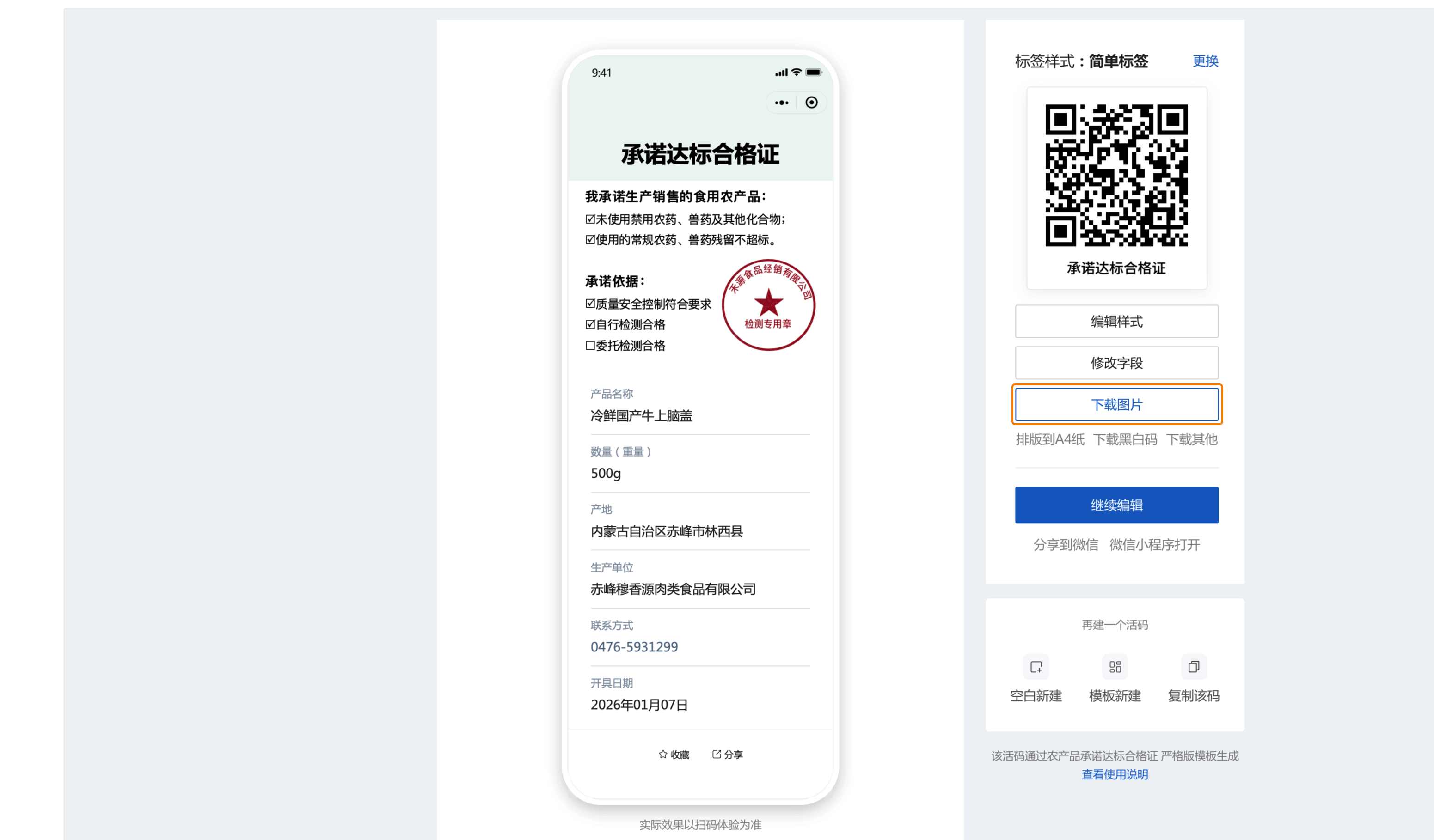
After selecting a template and filling in the information (and uploading your company seal), the CaoLiao system will generate an agricultural product compliance certificate QR code.
Click to download the QR code image and save it to your computer.
III. Layout and Printing Tutorial
Before this policy was introduced, supermarkets and chains already required suppliers to include printed labels with "product-related information" on their deliveries. So we need to combine the "agricultural product compliance certificate QR code" you just downloaded with your existing label.
Regardless of whether you use "Tomato Label," "Deli Print APP," or any other label layout software, the logic is the same:
- Open your existing label: In your layout software, open the product label template you already have (which includes product name, weight, barcode 69, and other information).
- Insert the new QR code: Find an empty area on the label template (usually the lower right corner), click the [Insert Image] function in your layout software, and place the QR code image downloaded from CaoLiao. Below the QR code, add the text: "Compliance Certificate."
- Resize: Scale the QR code image proportionally to fit the space (recommended minimum size: 1.5cm × 1.5cm — if it is too small, supermarket barcode scanners may fail to read it).
- Print directly: Once the layout is confirmed, connect your self-adhesive label printer and batch-print the stickers to affix to your packaging for smooth delivery.
Frequently Asked Questions
1. How Do I Create a Stamped Commitment Content Image?
We provide a template file. You can click to download the commitment content template file directly.
Print the file, stamp it with a red seal, and take a photo of the stamped commitment content to upload.
Alternatively, you can insert an image of the red seal directly into the file and save a screenshot. Steps: Open the file → Insert → Select and insert the image → Set the image layout to "Float Over Text" → Adjust the image size and position.
2. Can I Generate the Code on a Mobile Device?
Yes. If you don't have access to a computer, you can search for the [CaoLiao QR Code] Mini Program on WeChat. Once in the Mini Program, search for the [Agricultural Product] template in the template library to generate a code. You can also save the QR code image from there.
3. I've Never Used a Label Printer or Layout Software Before — Any Recommendations?
CaoLiao has compiled a label printer tutorial for the agricultural product compliance certificate scenario. You can choose the right label printer and label stock based on your type of agricultural product, and use the layout tutorial to get up and running quickly. /help/tutorials/agriculture-certificate/label-tutorial
4. Can I Download the QR Code First and Enter the Content Later?
Yes. After saving the template to your account, go to the Pre-generated Empty QR Codes feature page, create an empty QR code template, and link it to the compliance certificate template you just installed.
Create a batch of empty QR codes, print and attach them to your products, then scan to fill in product information or upload a compliance certificate photo — and apply it in bulk to other empty QR codes.