Agricultural Product Compliance Certificate: Label Printer Tutorial
For users who already have a printer or plan to purchase one and want to print QR code labels themselves to control costs. Note: Label printers can only print in black; visual attractiveness is generally limited.
I. Choosing a Label Printer and Label Stock
To avoid trial and error, it is recommended to follow a two-step selection process — choose your printing method first, then choose the label stock:
1. Determine the Printing Method Based on Usage Duration
- If labels are only needed for short-term use (typically ≤1 year), a thermal printer is a suitable option.
- If labels need to be preserved long-term (typically ≥1 year), a thermal transfer printer is recommended.
2. Choose the Right Label Stock Based on Your Printing Method
For Thermal Printers:
- Dry environment, minimal moisture → Three-protection thermal paper
- Wet environment, water spray, or mild oil exposure → Five-protection thermal synthetic paper
- Refrigerated or frozen → Frozen-grade thermal synthetic paper (low-temperature adhesive)
For Thermal Transfer Printers:
- Typically use thermal transfer synthetic paper + resin ribbon for long-term preservation scenarios.
CaoLiao has compiled recommended label printers and label stock for different types of agricultural products in various storage environments. Click here to view the quick-match guide.
3. Purchasing Recommendations
Choosing a Printer
- Be clear about which type of printer you need: thermal or thermal transfer.
- The maximum print width of the printer must be greater than the width of your label stock.
- Resolution selection:
- For larger labels without very small text, 203 dpi is sufficient for everyday use.
- For more detailed print content, 300 dpi is available.
Choosing Label Stock
- Be clear about the label stock material you need: thermal paper or thermal transfer synthetic paper.
- Confirm the label size you need to print.
- When purchasing label stock:
- Always include the material type in your search: three-protection thermal paper; five-protection thermal paper; frozen five-protection thermal synthetic paper; thermal transfer synthetic paper; resin ribbon.
- When purchasing thermal transfer synthetic paper, always also purchase a resin ribbon to use together.
CaoLiao's internal print testing has compiled the same brands of printers and label stock used in testing. If you prefer not to make your own selection, you can choose the same products CaoLiao used. View CaoLiao's test report
| Printing Method | Printer and Label Stock | CaoLiao-Tested Products |
|---|---|---|
| Thermal printing | Thermal printer | Same product link |
| Three-protection thermal paper | Same product link | |
| Five-protection thermal synthetic paper | Same product link | |
| Low-temperature frozen adhesive five-protection thermal synthetic paper | Same product link | |
| Thermal transfer printing | Thermal transfer printer | Same product link |
| Thermal transfer synthetic paper + resin ribbon | Synthetic paper link Resin ribbon link |
II. Printing Tutorial
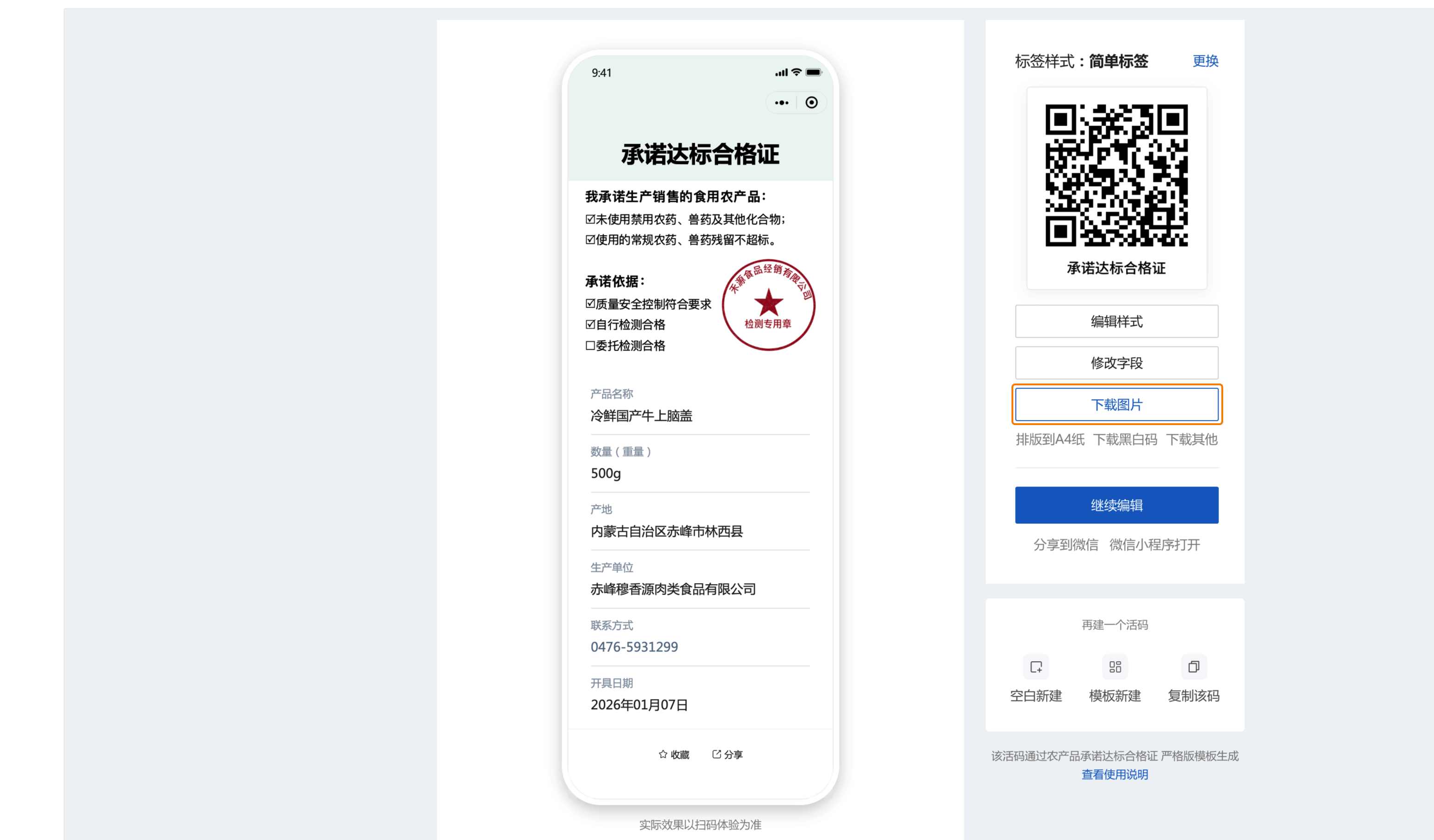
1. Download the Agricultural Product Compliance Certificate QR Code Image
After generating a code from the template, click to download the QR code image and save it to your computer.
2. Install the Printer and Layout Software
- Contact your printer supplier for the printer driver installation tutorial and layout software installation package, and install according to the instructions.
- Load the self-adhesive label stock.
3. Layout Design
3.1 Design the Print Layout
- Create a new label template in your layout software.
- Set the label template dimensions (must match the actual label stock size exactly).
- Place the QR code area on the canvas (avoid making the QR code too small, as this may affect scan readability).
- Add text areas as needed (e.g., serial numbers, notes, etc.).
3.2 Link to Excel Data
- In your layout software, select to import a data source.
- Select the Excel file downloaded in the previous step.
- Bind the QR code data field to the QR code object.
- Confirm the preview looks correct.
4. Start Printing
- Click the print icon to start printing.
- For your first print run, it is recommended to print a small batch first to review the result. Make adjustments as needed.
View the detailed illustrated tutorial
III. Frequently Asked Questions
Q1: Are There Mandatory Printing Method Requirements for Agricultural Product Compliance Certificates? Is Thermal Transfer Required?
Not necessarily. In most standard distribution scenarios, a thermal printer paired with the appropriate thermal label stock is sufficient, and thermal transfer printing is not mandatory.
Q2: Three-Protection and Five-Protection Thermal Paper Look Similar — Is Five-Protection Really Necessary?
Whether five-protection is needed depends primarily on the usage environment. When there is water spray, condensation, oil exposure, or friction, five-protection thermal synthetic paper performs more reliably.
Q3: A Label Stock Is Labeled "Waterproof" — Does That Mean It Works in All Environments?
No. "Waterproof" typically refers to brief exposure to moisture and does not mean it is suitable for submersion in water, oil exposure, low temperatures, or other complex environments.
Q4: In Refrigerated or Frozen Environments, Can Ordinary Five-Protection Thermal Paper Be Used?
Generally not recommended. Cold-chain environments should use frozen-grade thermal synthetic paper with low-temperature adhesive.
Q5: How Long Can Thermal-Printed Labels Be Preserved?
Under normal conditions — away from direct light, in a dry environment — they can typically meet usage needs for up to one year.
Q6: Must I Choose the Exact Same Label Stock Used in the Tests?
No. The tests are meant to illustrate material differences. When purchasing, refer to the same material type rather than the exact same product.
Q7: Is the Difference Between 203 Dpi and 300 Dpi Printers Significant?
For standard compliance certificates, 203 dpi is more than sufficient. For small-format or high-density QR codes, 300 dpi may be worth considering.
Q8: Is Stronger Adhesive Always Better for Label Stock?
No. Adhesive strength needs to match the surface and environment. Adhesive that is too strong may damage packaging.
Q9: Can a Single Printer Work with All Types of Label Stock?
You need to distinguish by printing method. Thermal printers can only use thermal paper; thermal transfer printers require confirming consumable compatibility.
Q10: In a Complex Environment, Should I Upgrade the Printer or the Label Stock First?
In most cases, upgrading the label stock material type is more directly effective.
IV. Contact Us
If you need help choosing a label printer and label stock, or need guidance on using layout software, scan the QR code below to contact us.
Other Printing Methods
If you do not want to purchase a label printer or prefer a better-looking print result, you can download the QR code as a PDF file and take it to a Taobao print shop or local print shop to produce finished labels. However, the cost will be higher.
More Agricultural Product Compliance Certificate Articles
- CaoLiao QR Code Supports Creating Agricultural Product Compliance Certificates
- How to Bulk-Create Agricultural Product Compliance Certificates
- How to Choose a Printer and Label Stock for Agricultural Product Compliance Certificates
- Agricultural Product Compliance Certificate: Label Stock Print Test Review