Official Database
The official database provides CaoLiao with an independent cloud database that synchronizes your backend data. You can connect data analysis software to this cloud database to generate reports or write programs to actively call data and integrate with other systems.
- The official database is read-only and cannot be edited.
- Database type: MySQL 5.7
- Synchronizes all QR code information, form records, status details, plan completion details, etc., in real time.
- Data tables are only created when bulk templates and forms are generated with submitted data. Empty templates/forms will not create tables.
Example
Type: MySQL5.7
Host: rm-bp1m4fy8d66u3c6xmbo.mysql.rds.aliyuncs.com
Port: 3306
Database: cli_202112111 (example)
Username: cli_202112111 (example)
Password: eiadk289djlgj (example)
Sample Reports
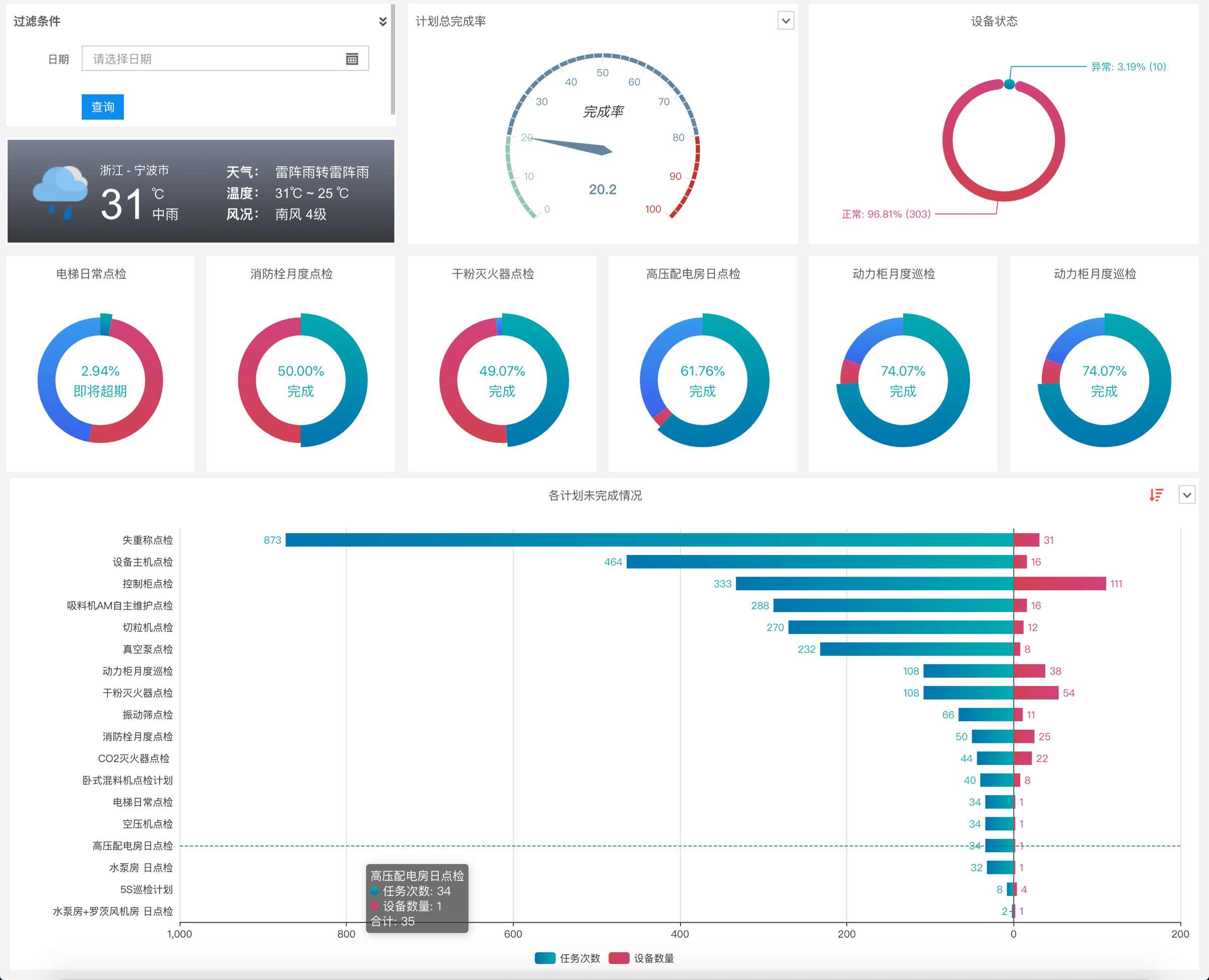
If you need to connect to the official database to create custom reports, view sample reports.
Since this involves basic database (SQL) operations and BI tool usage, it requires some technical proficiency. Please ensure you have the necessary skills before proceeding. View report creation tutorial.
Common Field Explanations
Note: These fields contain key information primarily used for linking between tables.
| Field Name | Type | Description | Example |
|---|---|---|---|
| code_id | int | Unique identifier for QR codes | 54349863 |
| tpl_code_id | int | Unique identifier for bulk templates If not generated from a template, tpl_code_id equals code_id | 54349863 |
| member_id | int | Unique identifier for members | 2091263 |
| auth_id | int | Unique identifier for form submitters | 12789054 |
| record_id | int | Unique identifier for form data | 16759806 |
Common Models
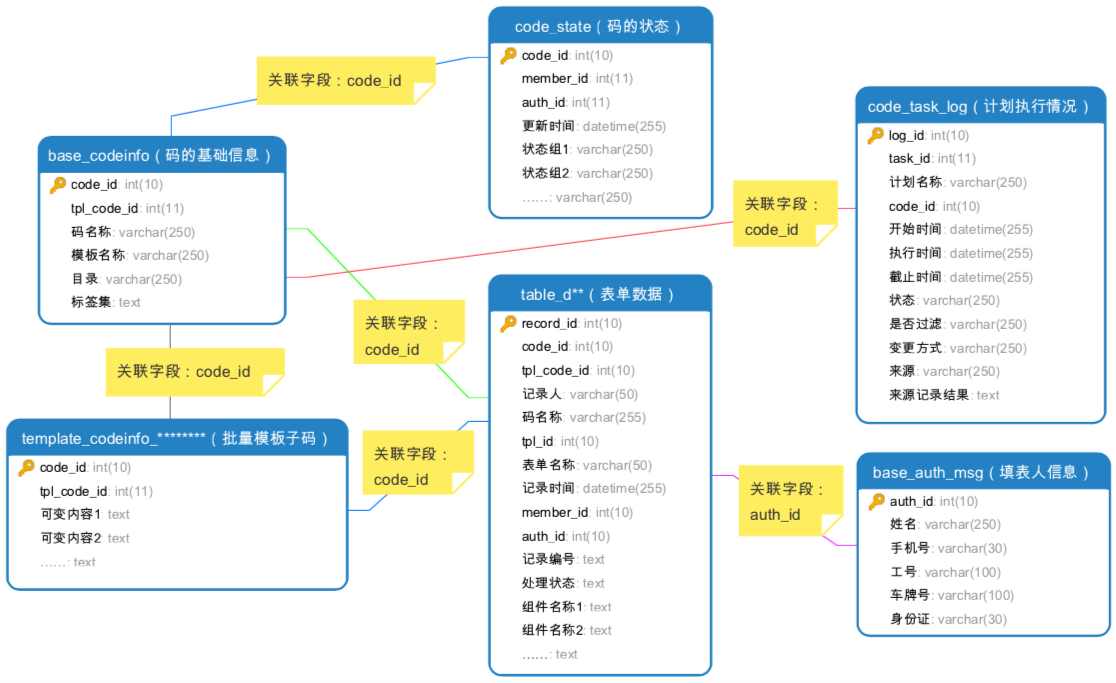
Model 1: Device Status Analysis
Link base_codeinfo (QR code basic info table) with code_state (QR code status table) to obtain device status values and update times, then analyze status distribution.

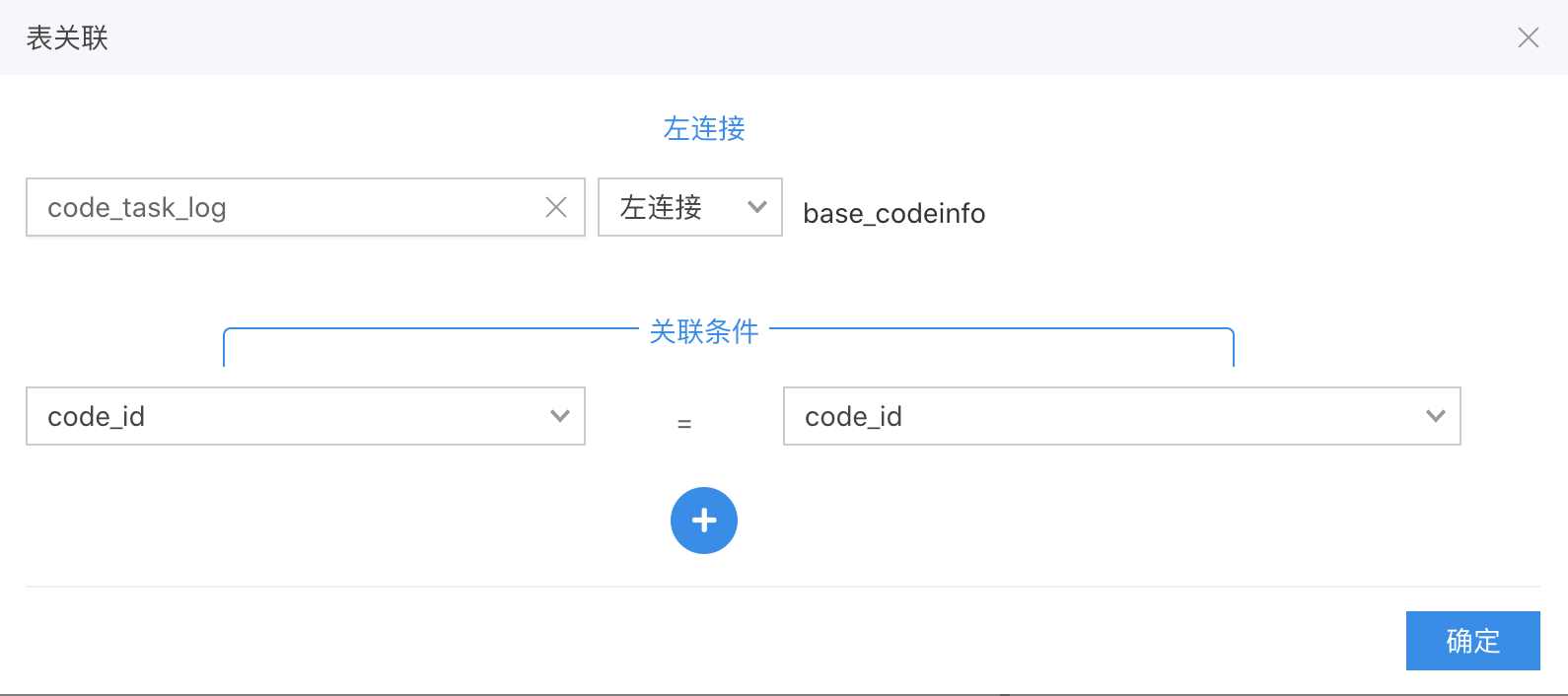
Model 2: Plan Completion Status
Left-join code_task_log (plan execution log table) with base_codeinfo (QR code basic info table) to track plan completion status along with corresponding QR code information.
Model 3: Bulk QR Code Analysis
Left-join template_XXXXXX (bulk QR code info table) with table_dXX (form data table) and code_state (QR code status table). template_XXXXXX provides variable content details for bulk QR codes.

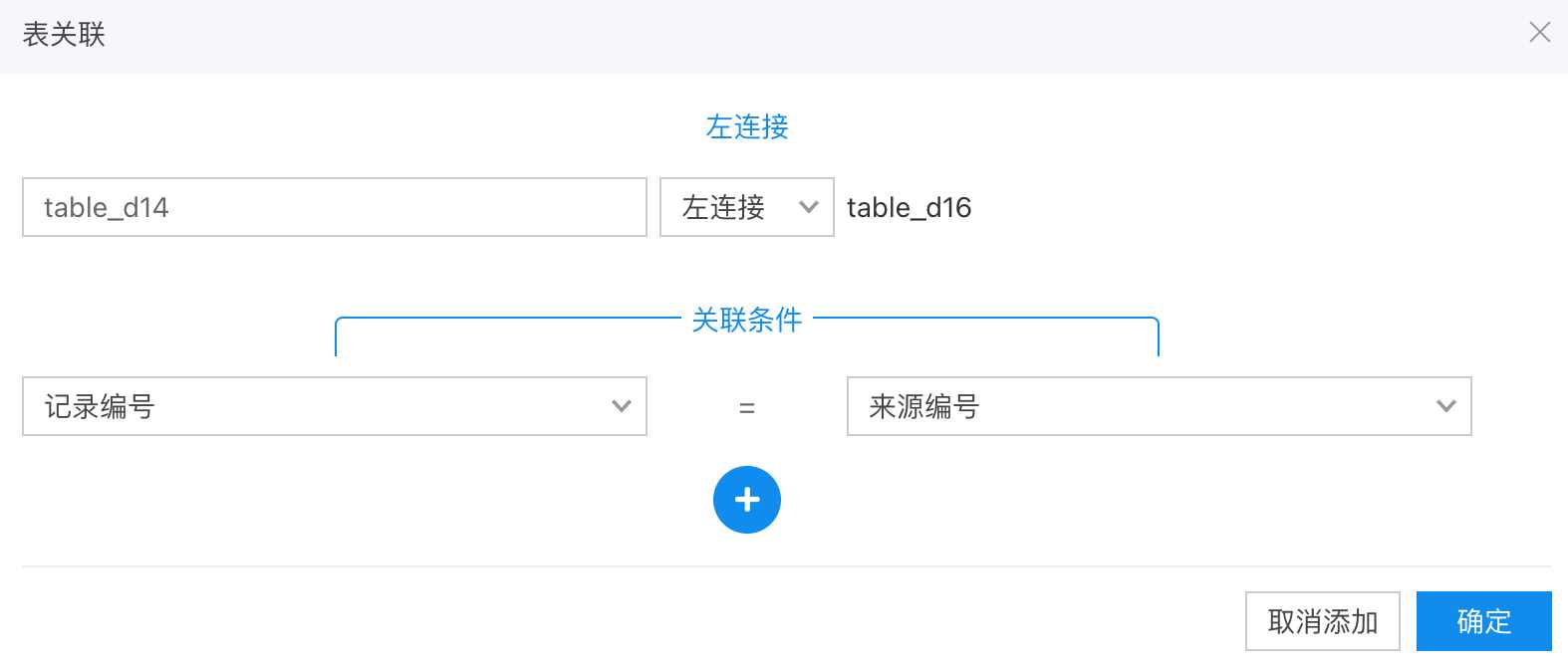
Model 4: Linking Follow-up Form Records
For example, link fault reports with maintenance records to create a complete information chain. Learn about follow-up actions
Left-join table_dxx (fault report table) with table_dxx (maintenance record table) using record IDs and source IDs. Additional follow-up forms can be linked similarly.
Field Descriptions for Data Tables
1. base_codeinfo - QR Code Basic Info Table
Description: Pushed when QR codes exist in the account, including dynamic QR codes and template sub-codes.
| Field Name | Type | Description | Example |
|---|---|---|---|
| code_id | int | Unique QR code identifier | 67654543 |
| QR Code Name | string | QR code name | Fire Hydrant 01 |
| QR Code Type | string | Types: dynamic QR code, template sub-code, template code | Template Sub-code |
| url | string | QR code URL | http://qr61.cn/o2eikt/q85Q8KL |
| tpl_code_id | int | Bulk template ID for sub-codes Non-template sub-codes match code_id | 56335353 |
| Template Name | string | Bulk template name for sub-codes Non-template sub-codes match QR code name | Fire Hydrant |
| Directory | string | Name of the lowest-level directory containing the QR code (excludes parent directories) | Fire Equipment |
| Tag Set | string | Grouping labels for QR codes | Fire, Equipment |
Directory Info: Shows only the lowest-level directory name, excluding parent directories.
2. code_state - QR Code Status Table
Description: Pushed when QR codes have associated statuses. View status feature
Historical status data before database activation is not pushed. Contact support for manual synchronization if needed.
| Field Name | Type | Description | Example |
|---|---|---|---|
| code_id | int | Unique QR code identifier | 67654543 |
| member_id | int | Unique member identifier | 2091263 |
| auth_id | int | Unique submitter identifier | 12789054 |
| Update Time | datetime | Status update time | 2020-11-20 15:00:00 |
| Example: Device Status_720 | string | Status group name ("_720" is an auto-generated suffix to prevent duplicates) | Normal |
| ...... | string | All status groups under the account are listed here | Abnormal |
3. code_state_log - QR Code Status Change Log Table
Description: Pushed when QR codes have associated statuses. Records all status changes. Historical data before activation is excluded.
| Field Name | Type | Description | Example |
|---|---|---|---|
| code_id | int | Unique QR code identifier | 67654543 |
| member_id | int | Unique member identifier | 2091263 |
| auth_id | int | Unique submitter identifier | 12789054 |
| Update Time | datetime | Status update time | 2020-11-20 15:00:00 |
| Status Group | string | Status group name | Device Status |
| Status Value | string | Current status value | Normal |
| Change Method | string | How status was changed: via form submission or manual edit | Record/Edit |
| Source | string | For form submissions, shows form data ID | 12220988 |
4. table_dXX - Form Data Detail Table
Description: Pushed when form submissions exist. Tables are named "table_d" followed by a form ID (e.g., table_d45). Each form has its own table. View forms feature

| Field Name | Type | Description | Example |
|---|---|---|---|
| record_id | int | Unique form data identifier | 12220988 |
| code_id | int | Unique QR code identifier | 67654543 |
| tpl_code_id | int | Bulk template ID for sub-codes Non-template sub-codes match code_id | 54349863 |
| QR Code Name | string | QR code name | Fire Hydrant 01 |
| tpl_id | int | Unique form identifier | 346636 |
| Form Name | string | Form name | Fire Hydrant Inspection |
| Record Time | datetime | Form submission time | 2020-11-20 15:20:00 |
| Status | string | Current record status: normal/deleted/pending review/approved/rejected | Normal/Deleted/Pending Review/Approved/Rejected |
| member_id | int | Collaborator identifier | 2091263 |
| auth_id | int | Submitter identifier | 12789054 |
| Record ID | string | Form data ID | L1234 |
| Processing Status | string | Record processing status | Pending/Completed/Not Required/Unmarked |
| Source | string | Submission method: mobile scan or follow-up action | Mobile Scan/Follow-up Note |
| Source ID | string | For follow-up notes, shows original record ID | L1235 |
| Submission ID | string | Internal submission ID | 11 |
| Status Change Time | datetime | Processing status update time | 2020-11-20 15:20:00 |
| Example: Device Name | string | Form component name | Inspection Item 1 |
| ...... | string | All form components are listed |
Form Component Push Notes:
- Number components exclude units.
- Checkbox values: 0=unfilled, 1=checked (√), 2=crossed (×), 3=unselected. Custom labels are not shown.
- Checkbox notes and images are excluded.
- Location components push three fields: address text, latitude, longitude.
- Description components push content under their title.
- Section headers are excluded.
- ID card components split into multiple fields: ID info (empty), number, name, gender, ethnicity, birthdate, address.
5. base_table_data - Form Data Summary Table
Description: Pushed when form submissions exist. Provides a summary of common fields across all form records (e.g., QR code name, submitter, form name).
Use Case: Track all check-in/out records without merging separate form tables.
| Field Name | Type | Description | Example |
|---|---|---|---|
| record_id | int | Unique form data identifier | 12220988 |
| code_id | int | Unique QR code identifier | 67654543 |
| tpl_code_id | int | Bulk template ID for sub-codes Non-template sub-codes match code_id | 56335353 |
| tpl_id | int | Unique form identifier | 346636 |
| QR Code Name | string | QR code name | Fire Hydrant 01 |
| Form Name | string | Form name | Fire Hydrant Inspection |
| Record Time | datetime | Submission time | 2020-11-20 12:01:02 |
| Submitter | string | Submitter name | John Doe |
| member_id | int | Member identifier | 2091263 |
| auth_id | int | Submitter identifier | 12789054 |
| Status | string | Record status | Normal/Deleted/Pending Review/Approved/Rejected |
| Record ID | string | Form data ID | L1234 |
6. template_codeinfo_XXX - Bulk Template Sub-code Info Table
Description: Pushed when bulk template sub-codes exist. Shows variable content for bulk-generated QR codes. View bulk generation feature
6.1 Naming Rules:
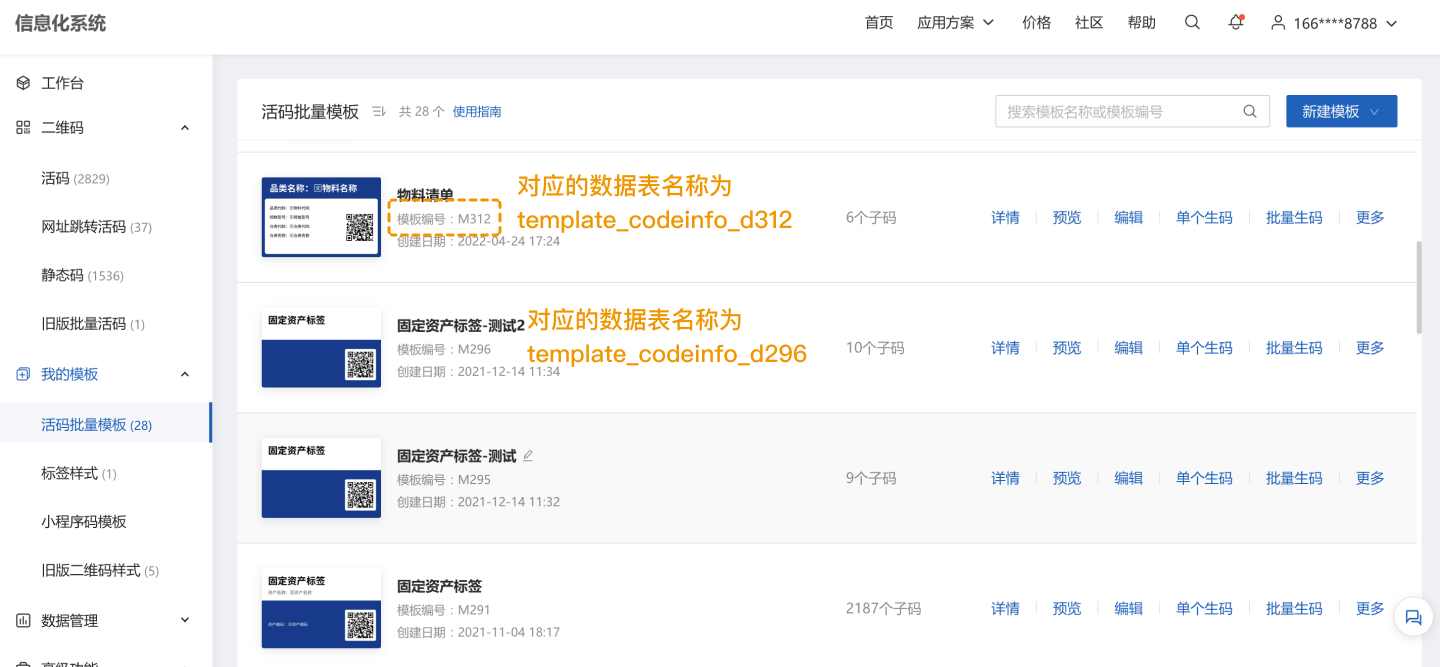
- Format 1: Suffix "dXX" (d + template ID number).
Example: Template ID M312 → table nametemplate_codeinfo_D312
- Format 2: Suffix = internal template ID (from URL).
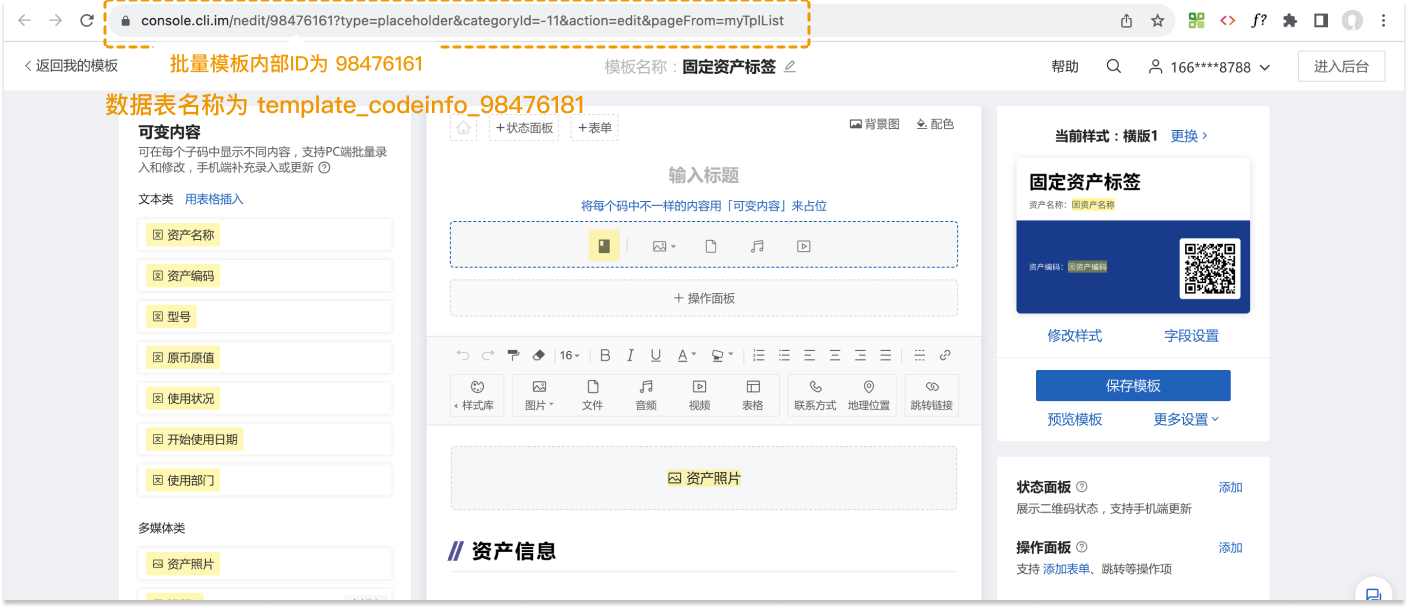
6.2 Field Descriptions:
| Field Name | Type | Description | Example |
|---|---|---|---|
| code_id | int | Unique QR code identifier | 67654543 |
| tpl_code_id | int | Bulk template identifier | 56335353 |
| Status | string | Sub-code deletion status | Normal |
| ... | string | Variable content fields from the template |
7. record_review_data - Follow-up Actions Table
Description: Pushed when follow-up actions or processing status updates exist. View follow-up feature
| Field Name | Type | Description | Example |
|---|---|---|---|
| review_id | int | Unique follow-up record ID | 67654543 |
| record_id | int | Linked form record ID | 12220988 |
| Status | string | Follow-up record deletion status | Normal/Deleted |
| Source | string | Action source | Manual Entry/Record Forward/WeCom Forward/Status Update/Form Submission/Notification/Comment Reply |
| Text Content | string | Comment details/status update text | Updated to [Completed]/@John/[Image]... |
| Key Content | string | Updated status or linked form record ID | Completed/12220988 |
| Attachments | string | Images, audio, signatures, etc. | |
| Submitter | string | Submitter name | John |
| Submission Time | datetime | Action timestamp | 2020-11-20 15:20:00 |
8. base_task - Plan Basic Info Table
Description: Pushed when plans are created and executed. View plan management
| Field Name | Type | Description | Example |
|---|---|---|---|
| task_id | int | Unique plan identifier | 33886 |
| Plan Name | string | Plan name | Monthly Fire Extinguisher Inspection |
| Description | string | Plan description |
9. code_task_log - Plan Execution Log Table
Description: Pushed when plans are executed. Only includes current/future cycles; historical data is excluded.
Link with
base_codeinfoortemplate_XXXto add QR code details.
| Field Name | Type | Description | Example |
|---|---|---|---|
| log_id | int | Unique task ID | 239168567 |
| task_id | int | Plan ID | 33886 |
| Plan Name | string | Plan name | Monthly Fire Extinguisher Inspection |
| code_id | int | QR code ID | 67654543 |
| Status | string | Execution status | Options: Completed/Incomplete/Near Deadline/ Overdue Completed/Overdue Incomplete |
| Start Time | datetime | Cycle start time | 2020-12-10 12:00:00 |
| Execution Time | datetime | Status update time | 2020-12-10 13:00:00 |
| Deadline | datetime | Cycle end time | 2020-12-10 18:00:00 |
| Filtered | string | Whether excluded by conditions | Yes/No |
| Change Method | string | How status was updated | Record |
| Source | int | For form submissions, shows record ID | 12220988 |
| Source Result | string | Form submission result | Device Normal |
10. code_tags - QR Code Grouping Table
Description: Pushed when QR codes are grouped. View grouping feature
| Field Name | Type | Description | Example |
|---|---|---|---|
| code_id | int | QR code ID | 67654543 |
| Example: Building 1 Fire Extinguishers | int | Group name (1 if QR code belongs to this group) | 1 |
| Example: Building 2 Fire Extinguishers | int | Group name | 1 |
| ...... | int | All account groups are listed |
11. base_members - Member Info Table
Description: Pushed when advanced members are added (basic members excluded). View members feature
| Field Name | Type | Description | Example |
|---|---|---|---|
| member_id | int | Unique member ID | 2091263 |
| Name | string | Member name | John |
| Phone | string | Member phone | 135xxxx8934 |
12. base_auth_msg - Submitter Info Table
Description: Pushed when forms/status updates are submitted. Shows submitter details. View submitter component
- If no form submitted, only shows
auth_id. - If form submitted without submitter component, shows
auth_idand default name ("WeChat User XXXX"). - If submitter components (name/phone/ID/etc.) are used, corresponding fields are populated.
| Field Name | Type | Description | Example |
|---|---|---|---|
| auth_id | int | Unique submitter ID | 12789054 |
| Name | string | Submitter name | Jane Doe |
| Phone | string | Submitter phone | 135xxxx8934 |
| Employee ID | string | Submitter ID | D234 |
| License Plate | string | Vehicle plate | ZJ-A12342 |
| ID Card | string | Submitter ID number | 343xxxxxxxxxxxxx |
13. record_audit_data - Approval Records Table
Description: Pushed when records require approval or are approved/rejected. View approval feature
| Field Name | Type | Description | Example |
|---|---|---|---|
| auth_id | int | Unique approval ID | 9001 |
| record |