Private Styles
1. Function Overview
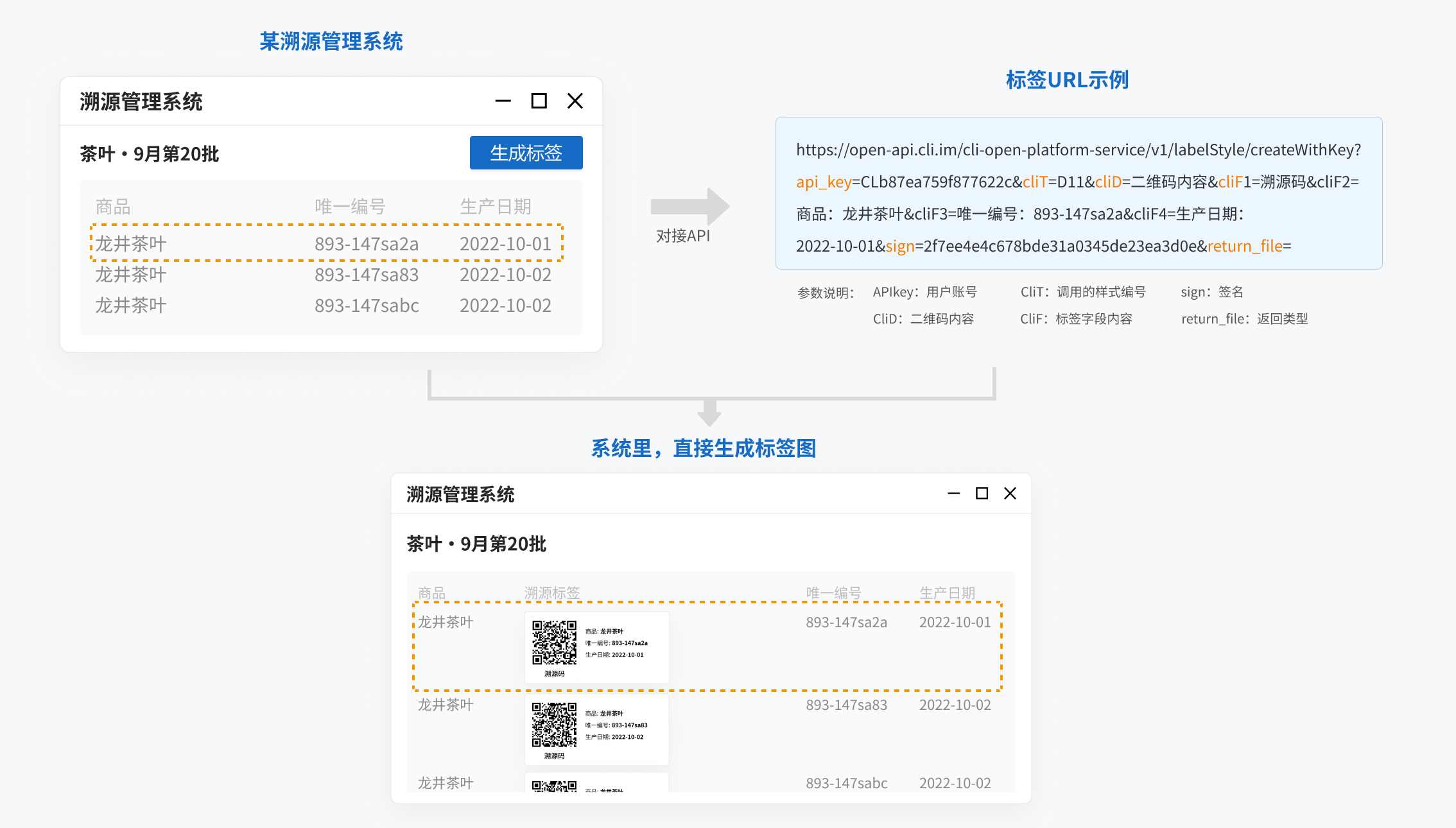
This API documentation applies to: Using saved label styles under your account to batch generate QR code labels with different content in your own system or web page.
After integration, you can batch generate QR code labels within your own system without exporting data to our platform. For example, you can connect with product or asset management systems. When new data is added, corresponding product or asset labels can be automatically generated in the system by following predefined rules.
2. API Call Instructions
URL
https://open-api.cli.im/cli-open-platform-service/v1/labelStyle/createWithKeyHTTP Request Method
GET
Request Parameters
| Parameter Name | Required | Type | Description |
|---|---|---|---|
| cliT | Yes | string | Label style ID, e.g., D10 |
| cliD | Yes | string | Dynamic content of the QR code |
| api_key | Yes | string | User account API key |
| sign | Yes | string | Signature (generation method explained in Signature Section) |
| return_file | No | string | Return type. If not provided, returns binary image stream; "base64" returns base64-encoded image |
| cliF | No | string | Dynamic fields required by the style. cliF represents text fields. cliP represents image fields. Arrange in display order. Example: If a style has 3 text fields, pass parameters as: cliF1=xx&cliF2=xx&cliF3=xx |
| cliP | No | string | Dynamic fields required by the style. cliP represents image fields. Images must be publicly accessible static URLs. Example: If a style has 4 fields where the second is an image field, pass parameters as: cliF1=xx&cliP2=xxcli3=xx&cliF4=xx |
Signature Method
Purpose: Use MD5 for dynamic signing to ensure data security and integrity by generating a new signature for each request, preventing tampering or impersonation.
Note: Dynamic signing can be disabled in the backend. If disabled, the following signing steps are unnecessary.
- Sort request parameters alphabetically by key and concatenate them with "&". Example using these parameters:
| key | value |
|---|---|
| cliT | D10 |
| cliD | Test data for single label generation |
| return_file | |
| cliP1 | https://ncstatic.clewm.net/rsrc/2023/0331/11/823ace0e8a36e304ca8bfab683be6219.png |
| cliF2 | Jinghai First People's Hospital |
| cliF3 | Jinghai First People's Hospital |
| cliF4 | Wang Feifei |
| cliF5 | Position: Assistant Nurse |
| cliF6 | Department: Inpatient Ward |
| cliF7 | ID: NO-GT-043 |
| api_key | CLb87ea759f877622c |
Sorted and concatenated string:
api_key=CLb87ea759f877622c&cliD=Test123&cliF2=京海市第一人民医院&cliF3=Jinghai First People's Hospital&cliF4=王菲菲&cliF5=职务:助理护士&cliF6=科室:住院部&cliF7=编号:NO-GT-043&cliP1=https://ncstatic.clewm.net/rsrc/2023/0331/11/823ace0e8a36e304ca8bfab683be6219.png&cliT=D11&return_file=Append the system-provided API secret (e.g., ddb42b7299b90cb5e0fd6c41e154c15d) to the string:
api_key=CLb87ea759f877622c&cliD=Test123&cliF2=京海市第一人民医院&cliF3=Jinghai First People's Hospital&cliF4=王菲菲&cliF5=职务:助理护士&cliF6=科室:住院部&cliF7=编号:NO-GT-043&cliP1=https://ncstatic.clewm.net/rsrc/2023/0331/11/823ace0e8a36e304ca8bfab683be6219.png&cliT=D11&return_file=ddb42b7299b90cb5e0fd6c41e154c15dGenerate MD5 hash of the above string (lowercase) to obtain the signature (sign):
2f7ee4e4c678bde31a0345de23ea3d0eResponse Parameters
If return_file is not provided, returns binary image data.
If return_file=base64, returns base64-encoded image data for embedding in web pages or system transmission.
Request example:
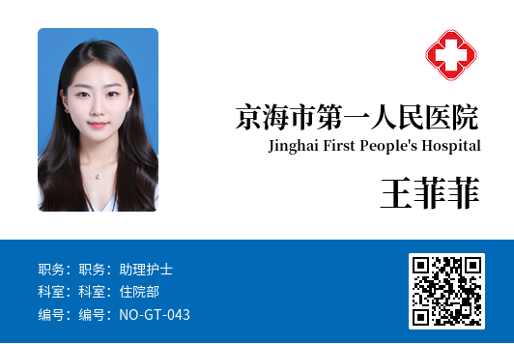
https://open-api.cli.im/cli-open-platform-service/v1/labelStyle/createWithKey?api_key=CLb87ea759f877622c&cliT=D11&cliD=Test123&cliP1=https://ncstatic.clewm.net/rsrc/2023/0331/11/823ace0e8a36e304ca8bfab683be6219.png&cliF2=京海市第一人民医院&cliF3=Jinghai First People's Hospital&cliF4=王菲菲&cliF5=职务:助理护士&cliF6=科室:住院部&cliF7=编号:NO-GT-043&sign=2f7ee4e4c678bde31a0345de23ea3d0e&return_file=Response Example
If return_file is not provided, returns binary image stream.
If return_file=base64, returns base64-encoded image data for embedding or transmission.
Error Codes
| Error Code | Description | Solution |
|---|---|---|
| 200 | Success | Success |
| 400 | Invalid request data format | Verify parameter correctness |
| 40000 | System busy, try again later | System may be under maintenance |
| 40001 | Parameter error | Check if parameters follow documentation |
3. Sample Code
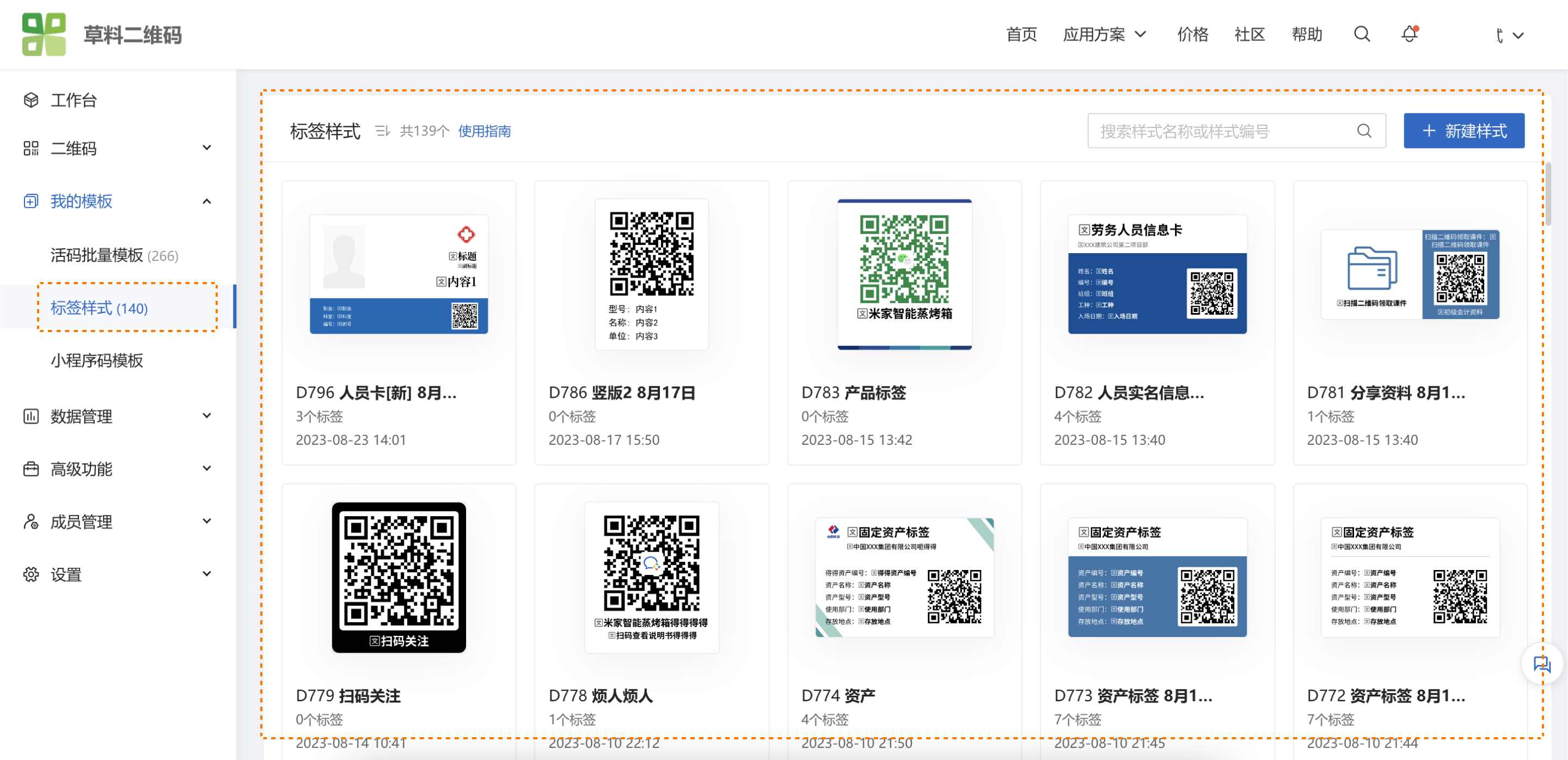
In the CaoLiao backend, navigate to [Label Styles], select your saved style, and click [Call API to Generate] to enable API calls.
If no styles exist, create one first. Label creation page: https://cli.im/label
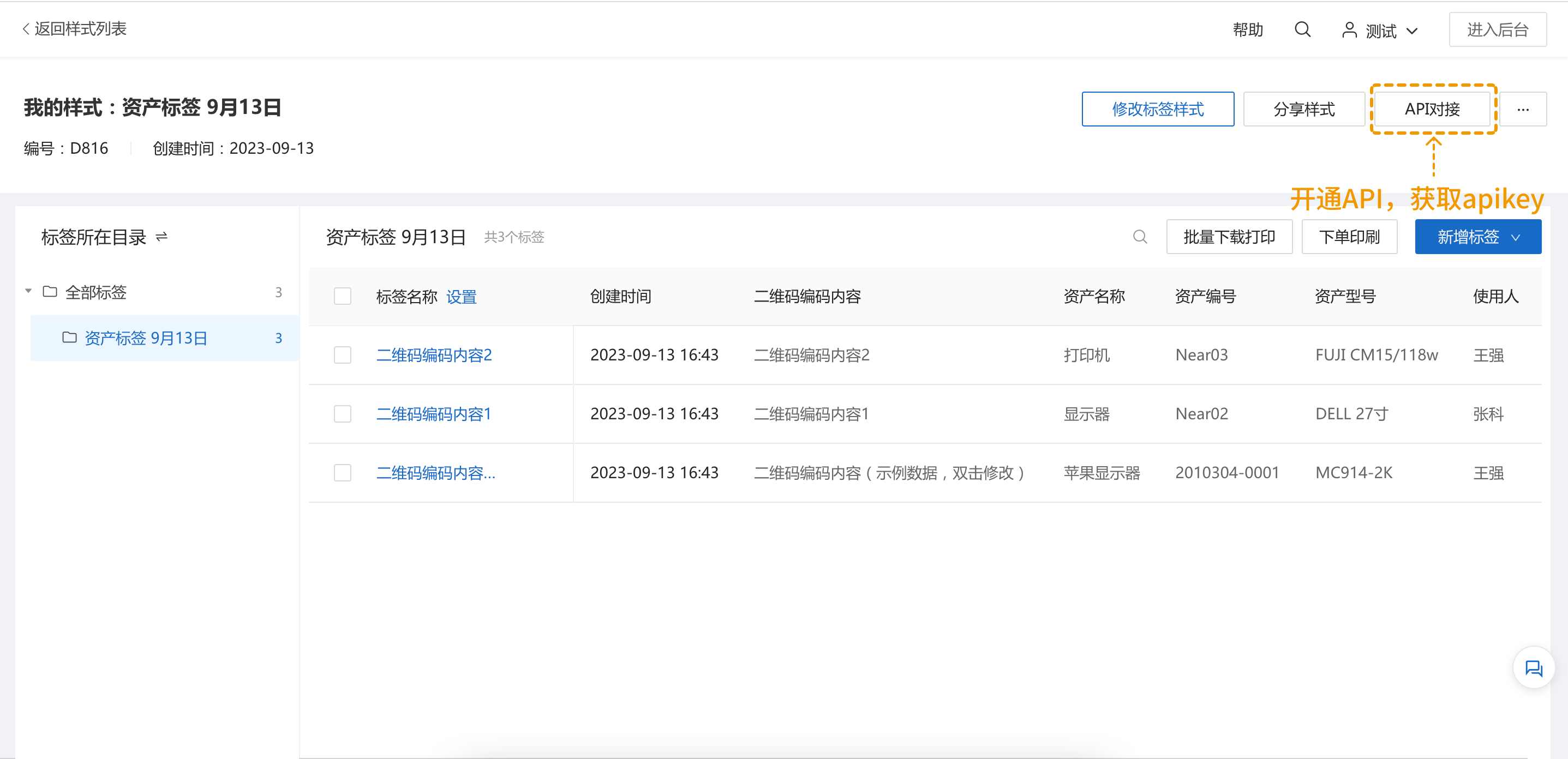
Enable API integration to obtain APIkey and API_secret. You can also set access scope (public or restricted to specific IPs/domains).
Example: A personnel style with 7 fixed fields (1 image field + 6 text fields):
API dynamic fields: cliP1 to cliF7. Sample Java code:
package org.cli.platform.service.util;

import org.apache.commons.io.IOUtils;

import java.io.File;
import java.io.FileOutputStream;
import java.io.IOException;
import java.io.InputStream;
import java.net.HttpURLConnection;
import java.net.URL;
import java.net.URLEncoder;
import java.nio.charset.StandardCharsets;
import org.apache.commons.codec.digest.DigestUtils;
import org.apache.commons.io.IOUtils;
import org.springframework.web.util.UriUtils;

public class CliApiV1Demo {
    public static void main(String[] args) throws IOException {
        String cliD = "Test123";
        String cliP1 = "https://ncstatic.clewm.net/rsrc/2023/0331/11/823ace0e8a36e304ca8bfab683be6219.png";
        String cliF2 = "京海市第一人民医院";
        String cliF3 = "Jinghai First People's Hospital";
        String cliF4 = "王菲菲";
        String cliF5 = "职务:助理护士";
        String cliF6 = "科室:住院部";
        String cliF7 = "编号:NO-GT-043";
        String secret = "ddb42b7299b90cb5e0fd6c41e154c15d";

        Map<String, Object> params = new HashMap<>();
        params.put("api_key", "CLb87ea759f877622c");
        params.put("cliT", "D11");
        params.put("cliD", cliD);
        params.put("return_file", "");
        params.put("cliP1", cliP1);
        params.put("cliF2", cliF2);
        params.put("cliF3", cliF3);
        params.put("cliF4", cliF4);
        params.put("cliF5", cliF5);
        params.put("cliF6", cliF6);
        params.put("cliF7", cliF7);

        String data = params.entrySet().stream().sorted(Map.Entry.comparingByKey()).map(entry -> entry.getKey() + "=" + entry.getValue()).collect(Collectors.joining("&"));
        data += secret;
        String sign = DigestUtils.md5Hex(data);

        cliD = UriUtils.encode(cliD, StandardCharsets.UTF_8.name());
        cliP1 = UriUtils.encode(cliP1, StandardCharsets.UTF_8.name());
        cliF2 = UriUtils.encode(cliF2, StandardCharsets.UTF_8.name());
        cliF3 = UriUtils.encode(cliF3, StandardCharsets.UTF_8.name());
        cliF4 = UriUtils.encode(cliF4, StandardCharsets.UTF_8.name());
        cliF5 = UriUtils.encode(cliF5, StandardCharsets.UTF_8.name());
        cliF6 = UriUtils.encode(cliF6, StandardCharsets.UTF_8.name());
        cliF7 = UriUtils.encode(cliF7, StandardCharsets.UTF_8.name());

        // Generate request URL
        String query = "https://open-api.cli.im/cli-open-platform-service/v1/labelStyle/createWithKey?cliT=D11&cliD=" + cliD + "&return_file=&cliP1=" + cliP1 + "&cliF2=" + cliF2 + "&cliF3=" + cliF3
                + "&cliF4=" + cliF4 + "&cliF5=" + cliF5 + "&cliF6=" + cliF6 + "&cliF7=" + cliF7 +
                "&api_key=CLb87ea759f877622c&sign=" + sign;

        URL url = new URL(query);
        HttpURLConnection connection = (HttpURLConnection) url.openConnection();
        connection.setDoOutput(true);
        connection.setRequestMethod("GET");
        connection.connect();

        InputStream stream = connection.getInputStream();
        try (FileOutputStream out = new FileOutputStream("test.png")) {
            IOUtils.copy(stream, out);
        }
    }
}
4. Usage Notes
During Beta, users with API access enjoy free long-term usage.
API calls are limited to 30 concurrent requests per second per IP. For higher limits, submit feedback here.
For issues regarding API workflow or speed, visit our community. CaoLiao consultants and engineers regularly review and respond.