WeCom Interface Details and Purchase Guide
WeCom members need to open and use the CaoLiao QR Code application within the WeCom environment, which requires purchasing an interface license. The number of interface licenses required equals the number of WeCom members who need access.
Purchasing one interface license account corresponds to acquiring an interface activation code. After the administrator purchases the interface, members must activate it on the WeCom platform before they can use the application features.
Due to WeCom's updated pricing rules, all enterprises using the CaoLiao application on WeCom must pay interface fees based on the number of active members. For details, refer to WeCom's official announcement: Interface Pricing and Guidelines.
1. Which Members and Operations Require Interface Licenses?
WeCom members performing any of the following actions within WeCom must have an interface license:
Logging into CaoLiao's desktop workbench via WeCom QR code scan.
Opening the CaoLiao application in the WeCom workbench.
Scanning QR codes to view content, submitting forms, updating statuses, accessing dynamic records, or forwarding submitted form data to colleagues within WeCom.
Viewing forms or QR codes shared by colleagues, receiving notifications, or adding follow-up actions to records.
Non-WeCom members performing scans or form submissions in WeChat do not require an interface license.
2. Interface Trial Period
WeCom provides a 90-day trial period for interfaces, starting from the date of initial application installation (not the payment date). Reinstalling the CaoLiao application does not reset the trial period.
After expiration, enterprises must purchase interface licenses to continue using CaoLiao in WeCom. Purchase methods are outlined below.
3. Purchasing Interface Licenses
For enterprises also needing to pay version fees, refer to this process.
a. Calculate Pricing Based on Required Licenses
| License Quantity Range | Price per License (Annual) |
|---|---|
| 1-5 | ¥5 |
| 6-200 | ¥4 |
| 201-500 | ¥3 |
| 501-1000 | ¥2 |
| 1001-10000 | ¥1 |
| 10001+ | Custom Quote |
Use the Fee Calculator to input the required license count and duration for automatic total cost calculation.
Reference: WeCom's Interface Pricing and Guidelines, applicable to basic accounts.
Example Calculation:
Enterprise A has 20 WeCom members requiring access for 2 years. The minimum required licenses are 20.
Total cost: (5 licenses × ¥5 + 15 licenses × ¥4) × 2 years = ¥170.
Note: Purchased licenses must be activated within 1 year of purchase. Once activated, the license remains valid for the purchased duration (e.g., 1 year).
b. Payment Methods
Payment is processed by CaoLiao on behalf of WeCom. Options include:
Alipay: zhifubao@nears.cn
Bank transfer: For corporate transfers, contact support for a dedicated account.
c. Submit Purchase and Invoice Details
Mandatory after payment:
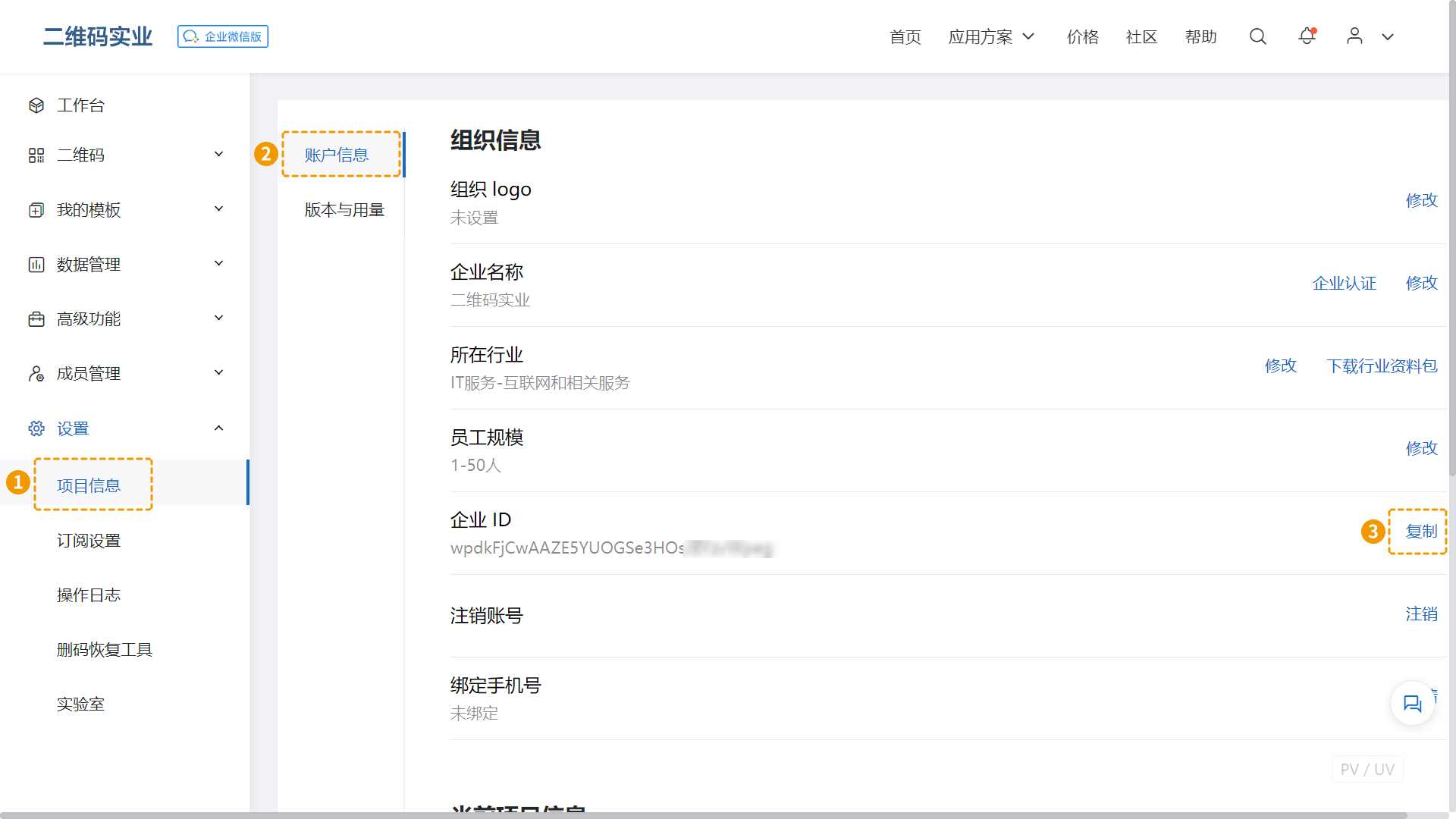
Retrieve your Enterprise ID: Log in to CaoLiao's workbench (https://cli.im/), navigate to [Settings > Project Info > Account Info], and copy the Enterprise ID.
Licenses are activated within 1–3 business days. Invoices are issued per registration details.
d. Invoice Types
Issued within 1–3 business days:
Combined with version fees: Invoice title: "Information Technology Service*QR Code Management System" (13% VAT).
Interface fees only: Invoice title: "Information Technology Service*QR Code Management System Interface Fee" (6% VAT).
e. Additional Purchases
For new members, additional licenses are priced starting from the first tier (1–5 licenses).
f. Purchase Limits
Maximum purchase duration: 5 years.
4. Activating Licenses
Default: Auto-activation
Triggers when members open CaoLiao in WeCom (e.g., via notifications, workbench access, or QR code login).
Manual activation required if encountering "Application Unavailable" errors. Members must click CaoLiao in the WeCom workbench to activate.
Licenses must be activated within 1 year of purchase. Unactivated licenses expire and become unusable.
5. License Validity Period
Starts upon activation, meaning expiration dates may vary per member.
Example: An enterprise purchases 2 licenses for 1 year.
- Member A activates on Jan 1; expires Jan 1 the following year.
- Member B activates on Feb 2; expires Feb 2 the following year.
FAQs
1. Why were interface licenses previously free but now require payment?
WeCom updated its pricing policy. Interface fees are charged by WeCom (not CaoLiao) and apply to all applications on the platform. Some apps bundle these fees into higher version costs, whereas CaoLiao separates them for transparency. Version fees match CaoLiao's official website pricing, while interface fees are paid directly to WeCom.
Reference: WeCom Interface Pricing and Guidelines
2. Does exceeding purchased licenses affect existing members?
No.
Existing members with active licenses retain access. New members cannot use the app until additional licenses are purchased.
3. Can licenses be reassigned if a member leaves?
Manual reassignment only.
Contact support to transfer an active license to another member.
4. What is "Visible Range," and how to adjust it?
Visible range defines which employees can see the app in WeCom. Adjust via WeCom admin console: Guide.
5. How to check app installation date?
Navigate to [Settings > Project Info] in the desktop workbench to view "Creation Time."
6. Are there expiration reminders?
Notifications appear 7 days before license expiration. Access is blocked post-expiry.

7. Can we purchase additional licenses later?
Yes. See fee details for incremental purchases.