Public Design Library
1. Function Description
This API documentation applies to calling public styles from CaoLiao's label design library in your own system or webpage to generate QR code labels with different content in bulk. No need to export data to our platform and re-import it for QR code generation.
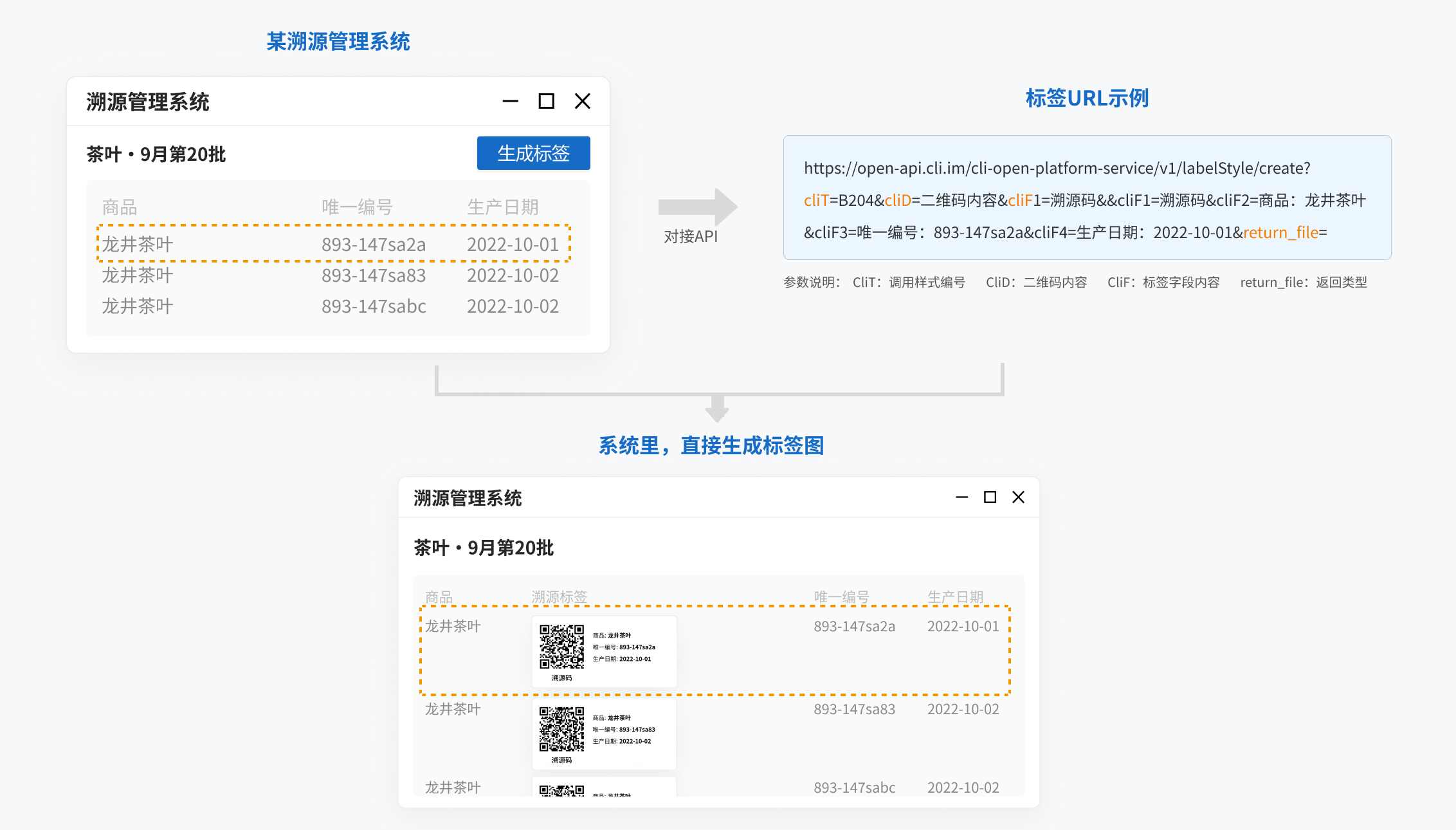
2. API Call Instructions
URL
https://open-api.cli.im/cli-open-platform-service/v1/labelStyle/createHTTP Request Method
GET
Request Parameters
| Parameter Name | Required | Type | Description |
|---|---|---|---|
| cliT | Yes | string | Public style ID, e.g., B216 |
| cliD | Yes | string | Dynamic content of the QR code |
| return_file | Yes | string | Return type. If not provided, returns binary image stream; "base64" returns base64-encoded data |
| theme_color | Yes | string | Theme color, e.g., #000000 |
| cliF | No | string | Dynamic fields for public styles. cliF represents text fields, arranged in display order. For example, if a public style has 3 text fields, the parameters would be: cliF1=xx&cliF2=xx&cliF3=xx |
| cliP | No | string | Dynamic fields for public styles. cliP represents image fields, requiring publicly accessible static URLs. Arranged in display order. For example, if a public style has 4 fields with the second being an image field, the parameters would be: cliF1=xx&cliP2=xx&cliF3=xx&cliF4=xx |
Response Parameters
When return_file is not provided, returns binary image data.
When return_file=base64, returns base64-encoded image data, which can be embedded in webpages or transmitted to other systems.
Request Example:
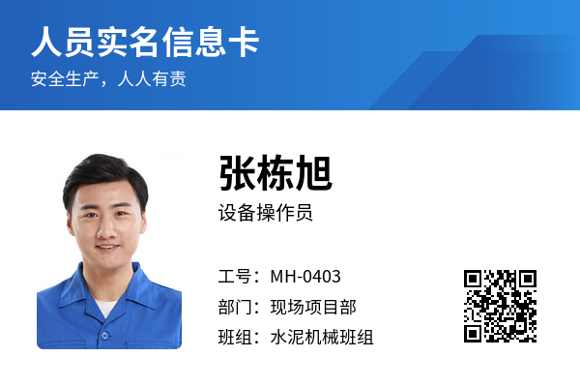
https://open-api.cli.im/cli-open-platform-service/v1/labelStyle/create?cliT=B572&cliD=QR%20code%20with%20image%20style&cliF1=Personnel%20ID%20Card&cliF2=Safety%20first,%20shared%20responsibility&cliP3=https://ncstatic.clewm.net/rsrc/2023/0612/13/952a04c092275a684025ef0d2ed6bcce.png&cliF4=Zhang%20Dongxu&cliF5=Equipment%20Operator&cliF6=Employee%20ID:%20MH-0403&cliF7=Department:%20On-site%20Project%20Team&cliF8=Team:%20Cement%20Mechanics%20Group&return_file=Response Example
When return_file is not provided, returns the following binary image stream:
When return_file=base64, returns the base64-encoded version of the following image, suitable for webpage embedding or system transmission:
Error Codes
| Error Code | Description | Solution |
|---|---|---|
| 200 | Success | Success |
| 400 | Invalid request data format! | Verify parameter correctness |
| 40000 | System busy, please try again later | System may be under maintenance; wait for recovery |
| 40001 | Parameter error | Check if parameters comply with documentation |
3. Code Examples
In CaoLiao's label design library, select a label to obtain its style ID directly, or visit the style details page and click "Call API to generate".
Label creation page: https://cli.im/label
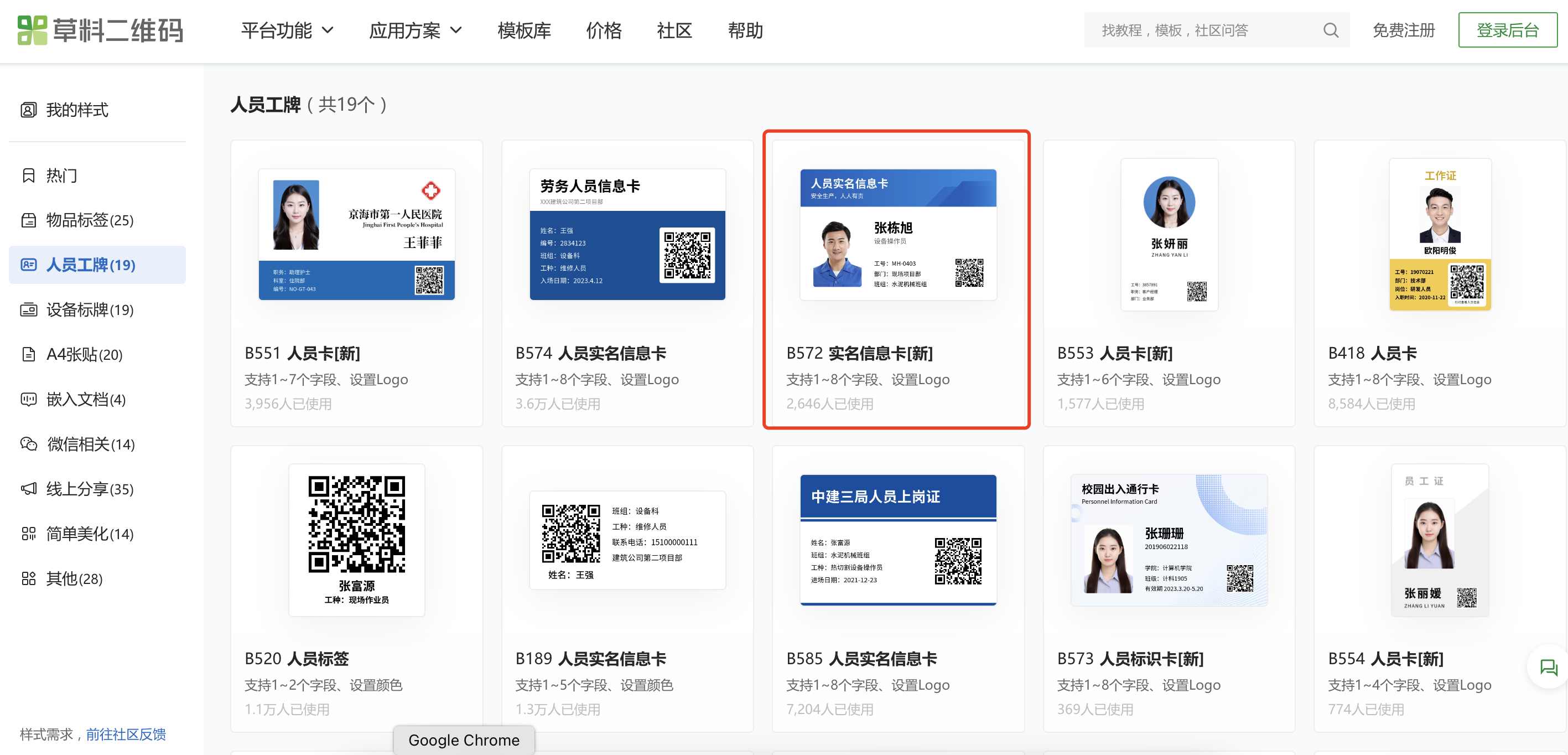
Using label B572 as an example, this template has 8 fixed fields where the 3rd is an image field and the rest are text fields.
Thus, the API dynamic fields are cliF1 to cliF8, with cliP3 for the image field. Sample Java code:
package org.cli.platform.service.util;

import org.apache.commons.io.IOUtils;

import java.io.File;
import java.io.FileOutputStream;
import java.io.IOException;
import java.io.InputStream;
import java.net.HttpURLConnection;
import java.net.URL;
import java.net.URLEncoder;
import java.nio.charset.StandardCharsets;
import org.springframework.web.util.UriUtils;

public class CliApiV1Demo {
    public static void main(String[] args) throws IOException {
        String cliD = UriUtils.encode("QR code with image style", StandardCharsets.UTF_8.name());
        String cliF1 = UriUtils.encode("Personnel ID Card", StandardCharsets.UTF_8.name());
        String cliF2 = UriUtils.encode("Safety first, shared responsibility", StandardCharsets.UTF_8.name());
        String cliP3 = UriUtils.encode("https://ncstatic.clewm.net/rsrc/2023/0612/13/952a04c092275a684025ef0d2ed6bcce.png", StandardCharsets.UTF_8.name());
        String cliF4 = UriUtils.encode("Zhang Dongxu", StandardCharsets.UTF_8.name());
        String cliF5 = UriUtils.encode("Equipment Operator", StandardCharsets.UTF_8.name());
        String cliF6 = UriUtils.encode("Employee ID: MH-0403", StandardCharsets.UTF_8.name());
        String cliF7 = UriUtils.encode("Department: On-site Project Team", StandardCharsets.UTF_8.name());
        String cliF8 = UriUtils.encode("Team: Cement Mechanics Group", StandardCharsets.UTF_8.name());
        URL url = new URL("http://open-api.cli.im/cli-open-platform-service/v1/labelStyle/create?cliT=B572&cliD=" + cliD + "&return_file=&theme_color=&cliF1=" + cliF1 + "&cliF2=" + cliF2 + "&cliP3=" + cliP3 + "&cliF4=" + cliF4 + "&cliF5=" + cliF5 + "&cliF6=" + cliF6 + "&cliF7=" + cliF7 + "&cliF8=" + cliF8);
        HttpURLConnection connection = (HttpURLConnection) url.openConnection();
        connection.setDoOutput(true);
        connection.setRequestMethod("GET");
        connection.connect();

        InputStream stream = connection.getInputStream();
        FileOutputStream out = new FileOutputStream(new File("test.png"));
        IOUtils.copy(stream, out);
    }
}
4. Usage Notes
During the Beta period, users with API access can make free calls indefinitely;
API calls are limited to 30 concurrent requests per second per IP. For higher concurrency, submit feedback in the community
For issues regarding label API call processes, speed, etc., submit feedback in the community. CaoLiao consultants and technicians will review and respond periodically.
To call label styles configured in your own account, navigate to the "Label Styles" section in CaoLiao's backend, select your custom style, and enable API access from the details page. View private style API documentation