Self-Hosted Database
Usage Notes
You provide the host/port/database/username/password, and we will push real-time data from your account to this database.
This method will automatically create tables in your database, requiring your database to allow public network access.
- Data tables are fully overwritten during updates. Partial user-added data in the same table is not supported.
- Do not create tables in the database with the same names as CaoLiao tables, as they will be identified as CaoLiao tables and fully overwritten.
- Database type: MySQL 5.7
- Synchronizes all QR code information, form records, status details, plan completion details, etc., in real time.
- Tables are only created if there are batch templates or forms with submitted data.
- If firewall or other access restrictions exist, add the IP whitelist.
Reference: Download MySQL 5.7 Database
Data Table Descriptions
1. base_codeinfo Basic QR Code Information Table
Description: Pushed when the account has QR code information, including dynamic QR codes and template sub-codes.
| Field Name | Type | Description | Example |
|---|---|---|---|
| code_id | int | Unique identifier for the QR code | 67654543 |
| QR Code Name | string | Name of the QR code | Fire Hydrant 01 |
| QR Code Type | string | Types: dynamic QR code, template sub-code, or template code | Template Sub-Code |
| url | string | QR code URL | http://qr61.cn/o2eikt/q85Q8KL |
| tpl_code_id | int | Batch template ID for sub-codes For non-template sub-codes, same as code_id | 56335353 |
| Template Name | string | Batch template name for sub-codes For non-template sub-codes, same as QR code name | Fire Hydrant |
| Directory | string | Name of the last-level directory where the QR code is located (excludes higher-level directories) | Firefighting Equipment |
| Tag Set | string | Grouping set for the QR code | Firefighting, Equipment |
Directory Information: Shows the last-level directory where the QR code is located, excluding higher-level directories.
2. code_state QR Code Status Table
Description: Pushed when QR codes have associated statuses. View Status Feature
Status data for QR codes created before enabling this feature will not be pushed. Contact customer support for manual synchronization if needed.
| Field Name | Type | Description | Example |
|---|---|---|---|
| code_id | int | Unique identifier for the QR code | 67654543 |
| member_id | int | Unique identifier for the member | 2091263 |
| auth_id | int | Unique identifier for the submitter | 12789054 |
| Update Time | datetime | Time of status update | 2020-11-20 15:00:00 |
| Example: Equipment Status_720 | string | Status group name, where "_720" is an auto-generated identifier to prevent duplicates | Normal |
| ...... | string | All status groups under the account are listed here | Abnormal |
3. code_state_log QR Code Status Change Log Table
Description: Pushed when QR codes have associated statuses. Each status change is recorded here. Historical status changes before enabling the database will not be pushed.
| Field Name | Type | Description | Example |
|---|---|---|---|
| code_id | int | Unique identifier for the QR code | 67654543 |
| member_id | int | Unique identifier for the member | 2091263 |
| auth_id | int | Unique identifier for the submitter | 12789054 |
| Update Time | datetime | Time of status update | 2020-11-20 15:00:00 |
| Status Group | string | Name of the status group | Equipment Status |
| Status Value | string | Current status of the group | Normal |
| Change Method | string | How the status was changed: via form submission or manual edit | Record/Edit |
| Source | string | For record-based changes, the unique identifier of the form data | 12220988 |
4. table_dXX Forms Data Detail Table
Description: Pushed when form data is submitted under the account. Forms data tables start with "table_" followed by a number (the form's unique ID), e.g., table_d45. Each form corresponds to one table. View Forms Feature

| Field Name | Type | Description | Example |
|---|---|---|---|
| record_id | int | Unique identifier for the form data | 12220988 |
| code_id | int | Unique identifier for the QR code | 67654543 |
| tpl_code_id | int | For template sub-codes: batch template ID For non-template sub-codes: same as code_id | 54349863 |
| QR Code Name | string | Name of the QR code | Fire Hydrant 01 |
| tpl_id | int | Unique identifier for the form | 346636 |
| Form Name | string | Name of the form | Fire Hydrant Inspection |
| Record Time | datetime | Time of form data submission | 2020-11-20 15:20:00 |
| Status | string | Current status of the record: includes whether deleted or approved | Normal/Deleted/Pending Approval/Approved/Rejected |
| member_id | int | Unique identifier for the collaborating member | 2091263 |
| auth_id | int | Unique identifier for the submitter | 12789054 |
| Record ID | string | ID of the form data | L1234 |
| Processing Status | string | Processing status of the form data | Pending/Completed/Not Required/Unmarked |
| Creation Source | string | Includes mobile scan-to-fill or manual notes | Mobile Scan-to-Fill/Manual Notes |
| Source ID | string | For manual notes, the record ID of the original record | L1235 |
| Submission ID | string | Custom submission ID from CaoLiao backend | 11 |
| Processing Status Update Time | datetime | Time of processing status change | 2020-11-20 15:20:00 |
| Example: Equipment Name | string | Name of the form component | Inspection Item 1 |
| ...... | string | All form component names are displayed |
Form Component Push Details:
- Numeric components do not display units.
- For checkbox components: 0=unfilled; 1=checked (√); 2=crossed (×); 3=unselected. Custom names for "√" or "×" are not displayed; values remain 0, 1, 2, or 3.
- Descriptions and images added to checkbox components are not pushed.
- Location components push three fields: location text, latitude, and longitude.
- Description components are pushed with the component title as the field name and the content as the value.
- Group header components are not pushed.
- ID card components are split into multiple fields: ID card info (empty), ID number, name, gender, ethnicity, birth date, and address.
5. base_table_data Forms Data Summary Table
Description: Pushed when form data is submitted under the account. This table summarizes common fields across all form records, such as QR code name, recorder, and form name.
Use Case: For example, if there are "entry" and "exit" forms, this table allows accessing all data without aggregating the two tables.
| Field Name | Type | Description | Example |
|---|---|---|---|
| record_id | int | Unique identifier for the form data | 12220988 |
| code_id | int | Unique identifier for the QR code | 67654543 |
| tpl_code_id | int | For template sub-codes: batch template ID For non-template sub-codes: same as code_id | 56335353 |
| tpl_id | int | Unique identifier for the form | 346636 |
| QR Code Name | string | Name of the QR code | Fire Hydrant 01 |
| Form Name | string | Name of the form | Fire Hydrant Inspection |
| Record Time | datetime | Time of form data submission | 2020-11-20 12:01:02 |
| Recorder | string | Name of the submitter | Li Si |
| member_id | int | Unique identifier for the member | 2091263 |
| auth_id | int | Unique identifier for the submitter | 12789054 |
| Status | string | Current status of the record: includes whether deleted or approved | Normal/Deleted/Pending Approval/Approved/Rejected |
| Record ID | string | ID of the record | L1234 |
6. template_codeinfo_XXX Batch Template Sub-Code Information Table
Description: Pushed when batch templates generate sub-codes under the account. This table mainly displays variable content for batch sub-codes. View Bulk QR Codes Generation Feature
Table names start with "template" followed by the batch template ID, which has two historical naming conventions.
6.1 Naming Rules:
- Method 1: Suffix is dXX, where XX is the batch template number.
Example: If the batch template ID is M312, the table name is template_codeinfo_D312.
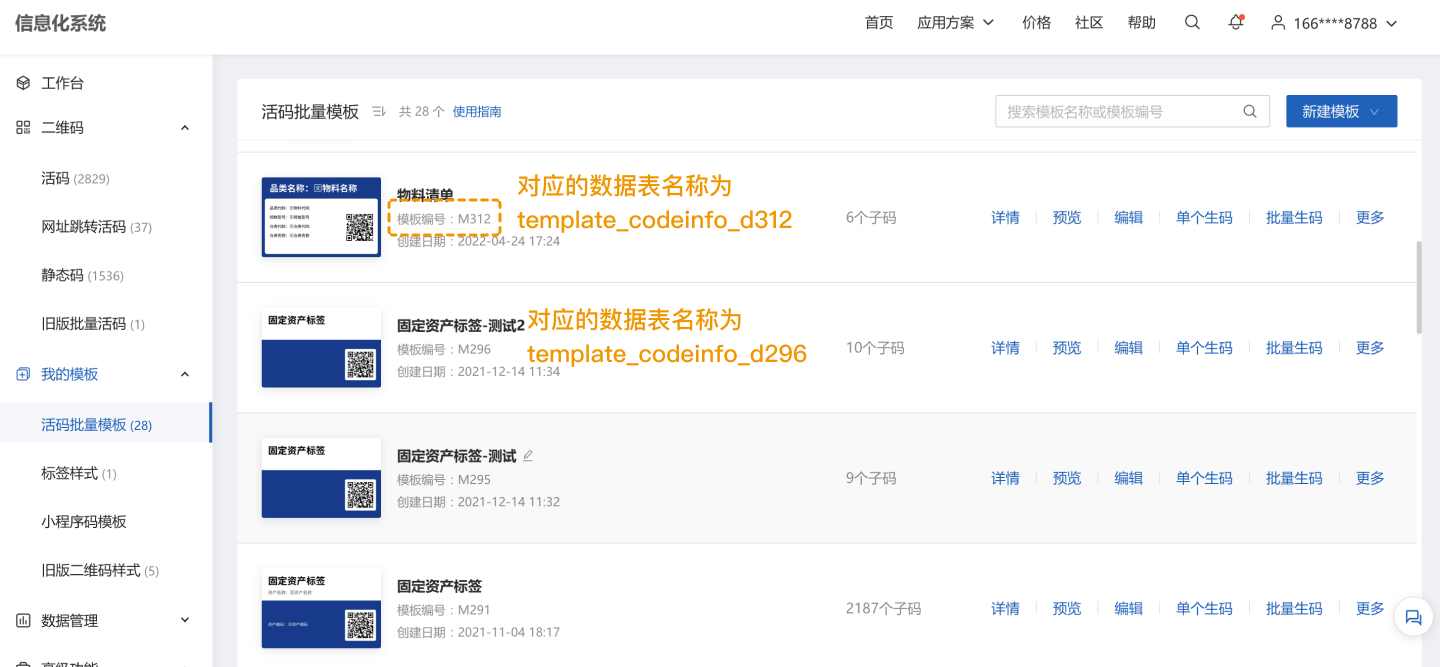
- Method 2: Suffix is the internal batch template ID.
Edit the batch template and extract the ID from the URL, as shown below:
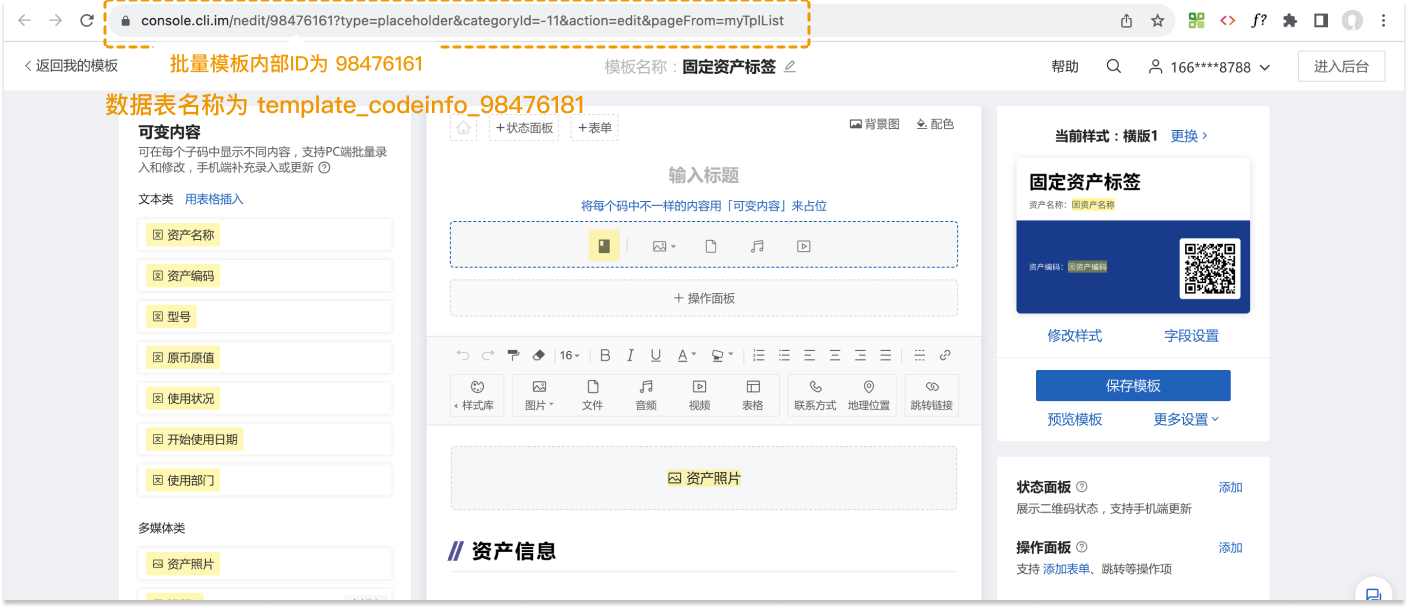
6.2 Data Field Descriptions:
| Field Name | Type | Description | Example |
|---|---|---|---|
| code_id | int | Unique identifier for the QR code | 67654543 |
| tpl_code_id | int | Unique identifier for the batch template | 56335353 |
| Status | string | Whether the sub-code is deleted | Normal |
| ... | string | Fields below represent variable content in the batch template |
7. record_review_data Follow-Up Actions Data Table
Description: Pushed when follow-up actions are added or processing statuses are marked for form records. View Follow-Up Actions Feature
| Field Name | Type | Description | Example |
|---|---|---|---|
| review_id | int | Unique identifier for the follow-up action record | 67654543 |
| record_id | int | Unique identifier for the associated form record | 12220988 |
| Status | string | Whether the follow-up action record is deleted | Normal/Deleted |
| Source | string | Source of the follow-up action | Manual Entry/Forwarded Record/Forwarded to WeCom Colleague/Status Change/Form Submission/Notification/Comment Reply |
| Text Content | string | Specific content of the comment or status change | Updated record to 【Completed】/@Zhang San/【Image】... |
| Key Content | string | Updated processing status or form data ID for follow-up form submissions | Completed/12220988 |
| Attachments | string | Multimedia files (images, audio, signatures) submitted with follow-up actions | |
| Submitter | string | Name of the submitter | Zhang San |
| Submission Time | datetime | Time of follow-up action submission | 2020-11-20 15:20:00 |
8. base_task Plan Basic Information Table
Description: Pushed when plans are created and executed under the account. Plan Management Feature
| Field Name | Type | Description | Example |
|---|---|---|---|
| task_id | int | Unique identifier for the plan | 33886 |
| Plan Name | string | Name of the plan | Monthly Fire Extinguisher Inspection |
| Description | string | Plan description |
9. code_task_log Plan Execution Details Table
Description: Pushed when plans are created and executed under the account. Only current and future cycle data are pushed; historical cycle data are not included.
This table lacks QR code names. Link with base_codeinfo or template_XXX to expand QR code information.
| Field Name | Type | Description | Example |
|---|---|---|---|
| log_id | int | Unique identifier for the current plan task | 239168567 |
| task_id | int | Unique identifier for the plan | 33886 |
| Plan Name | string | Name of the plan | Monthly Fire Extinguisher Inspection |
| code_id | int | Unique identifier for the QR code | 67654543 |
| Status | string | Execution status for the cycle | Options: Completed/Incomplete/Nearing Deadline/ Completed After Deadline/Incomplete After Deadline |
| Start Time | datetime | Start time of the plan cycle | 2020-12-10 12:00:00 |
| Execution Time | datetime | Time of status change | 2020-12-10 13:00:00 |
| Deadline | datetime | End time for the QR code in this cycle | 2020-12-10 18:00:00 |
| Is Filtered | string | Whether filtered based on "No Inspection Required" conditions | Options: Yes/No |
| Change Method | string | Method of status change | Record |
| Source | int | For record-based changes, the unique identifier of the form data | 12220988 |
| Source Record Result | string | For record-based changes, the result of the form data | Equipment Normal |
10. code_tags QR Code Grouping Table
Description: Pushed when grouping is used and QR codes are added to groups. View Group Management Feature
| Field Name | Type | Description | Example |
|---|---|---|---|
| code_id | int | Unique identifier for the QR code | 67654543 |
| Example: Building 1 Fire Extinguishers | int | Group name. If the QR code is in this group, the value is 1 | 1 |
| Example: Building 2 Fire Extinguishers | int | Group name | 1 |
| ...... | int | All groups under the account are listed here |
11. base_members Member Information Table
Description: Pushed when advanced members are added under the account. Only advanced member information is synchronized; basic member information is not pushed. View Members Feature
| Field Name | Type | Description | Example |
|---|---|---|---|
| member_id | int | Unique identifier for the collaborating member | 2091263 |
| Name | string | Name of the collaborating member | Zhang San |
| Phone Number | string | Phone number of the collaborating member | 135xxxx8934 |
12. base_auth_msg Submitter Information Table
Description: Pushed when form records are submitted or statuses are updated. Submitters are those who fill out forms or change statuses. View Submitter Component
- If no form is filled, only auth_id is displayed.
- If a form is filled but no submitter component is used, only auth_id is displayed, with the name as "WeChat User XXXX."
- If a form is filled with submitter components (name, phone, employee ID, license plate, ID card, etc.), the corresponding field data is displayed.
| Field Name | Type | Description | Example |
|---|---|---|---|
| auth_id | int | Unique identifier for the submitter | 12789054 |
| Name | string | Name of the submitter | Li Si |
| Phone Number | string | Phone number of the submitter | 135xxxx8934 |
| Employee ID | string | Employee ID of the submitter | D234 |
| License Plate | string | License plate of the submitter | ZheA.12342 |
| ID Card | string | ID card of the submitter | 343xxxxxxxxxxxxx |
13. record_audit_data Record Approval Work Order Table
Description: Pushed when records are submitted for approval or approved/rejected. View Approval Feature
| Field Name | Type | Description | Example |
|---|---|---|---|
| auth_id | int | Unique identifier for the approval work order | 9001 |
| record_id | int | Unique identifier for the associated record | 1001 |
| Status | string | Whether the work order is approved | Pending Approval/Approved/Rejected |
| Approval Title | string | Title for multi-level approval settings (empty for single-level) | Finance Review |
| Assigned Approver | string | Approver assigned by the submitter or previous approver (empty if unassigned) | Zhang San |
| Approver | string | Actual approver | Zhang San |
| Approval Time | datetime | Time of approval | 2024-09-20 15:20:00 |
| Approval Signature | string | URL of the approver's signature image (empty if unsigned) | https://ncstatic.clewm.net/rsrc/2024/1015/15/c12d5af513b275ba2465f923557a1f7c.png |
| Approval Reply | string | Approver's reply (empty if none) | Submission does not meet requirements |
| Creation Time | datetime | Time of work order creation | 2024-09-20 10:20:00 |
Event Push Details
1. Dynamic QR Codes
| Event | Pushed? | Affected Tables | Data Behavior |
|---|