How to Choose Labels and Ribbons
Buying consumables for a label printer takes three steps. First check whether your printer is direct thermal or thermal transfer: a direct thermal printer takes thermal paper only, a thermal transfer printer needs label stock plus ribbon. Then pick the material by how long and where the label will be used: labels that stay up over a year call for PET stock with resin ribbon, labels replaced within a year for three-proof or five-proof thermal paper. Finally, buy single-row rolls in the label size you download from the CaoLiao workbench. This guide walks you through those three steps from zero to printed QR code labels. It is for users who already own a label printer, or have picked a model, and are buying label stock and ribbon for the first time.
Before you start, confirm two things: your printer model (on the nameplate or in your order history), and the label size you will print (shown in the "Download Print Labels" dialog in the CaoLiao workbench; see Label Print Dimensions). If you have not bought a machine yet, read How to Choose a Label Printer first.
Note: Label printers print in black only, so the color of the stock is the color of the label. Prices in this guide are retail reference prices from JD.com, Tmall and similar platforms in November 2026. They change with promotions and specifications, so check the product page before ordering. CaoLiao has no commercial relationship with any brand or store mentioned here.
1. Confirm Your Printer Type to Know Which Consumables You Can Buy
Label printers use one of two printing methods, and the method decides what you can load. A direct thermal printer heats the paper so it develops color on its own; it takes thermal paper only and uses no ribbon. A thermal transfer printer uses a ribbon to press ink onto the label, so you buy label stock and ribbon together. The two are not interchangeable: PET stock in a direct thermal printer prints nothing, and thermal paper in a thermal transfer printer prints but wastes the ribbon and loses the durability.
How to tell which type you have:
| Look at | Direct thermal printer | Thermal transfer printer |
|---|---|---|
| Inside the machine | Only a spindle for the label roll | A label spindle plus a pair of ribbon spindles (supply and take-up) |
| Model name | Often contains D, DT or "thermal", e.g. Xprinter XP-420B, Deli GE435 | Often contains T, TT or "thermal transfer", e.g. Gprinter GP-1124T, TSC TTP-244 Pro |
| Product page specs | Print method says "direct thermal" | Print method says "thermal transfer" or "direct thermal / thermal transfer dual mode" |
| Consumables you can buy | Thermal label paper | Label stock (PET, synthetic paper, coated paper, etc.) plus ribbon; a dual-mode machine also works as a direct thermal printer with the ribbon removed |
Note: Portable direct thermal printers from NIIMBOT, DOTHANTECH, HPRT and similar brands (Bluetooth to your phone, printing from the vendor app) mostly use original label rolls with an identification chip. Third-party rolls fit, but the app may not recognize the label template and the cut position may be off. For these machines, buy rolls for your exact model from the brand's official store. You can skip the material and ribbon content in Sections 2 and 4; the size rules in Section 3 still apply.
2. Pick the Material by How Long and Where the Label Will Be Used
The material decides how long the label lasts, whether it resists water and oil, and whether it stays stuck. Get to know the common materials first, then find your situation in the scenario table.
1. Common Consumable Materials at a Glance
Desktop label printers use 7 common types of stock: three-proof thermal paper, five-proof synthetic thermal paper and freezer synthetic thermal paper for direct thermal printers; coated paper, PET, PP synthetic paper and specialty adhesive stock for thermal transfer printers. Print life ranges from 6 months to 5 years.
| Material | Printer type | Properties | Print life (reference) | Best for |
|---|---|---|---|---|
| Three-proof thermal paper | Direct thermal | Paper base with a water-, oil- and scratch-resistant coating; tears, and soaking ruins it | 6 months to 1 year away from light at room temperature | Dry indoor use, short-term labels in circulation |
| Five-proof synthetic thermal paper | Direct thermal | PP or PE synthetic base, tear-resistant, waterproof and oil-resistant, sturdier than three-proof | About 1 year away from light at room temperature | Short-term labels in damp, sprayed or lightly oily environments |
| Freezer synthetic thermal paper | Direct thermal | Five-proof synthetic paper with a low-temperature adhesive; stays stuck in refrigeration and freezing | About 1 year | Cold storage, freezers, fresh-food cold chain |
| Coated paper labels | Thermal transfer + wax or wax-resin ribbon | Paper base, high whiteness, crisp print, the cheapest option; not waterproof, tears easily | About 1 year indoors | Dry indoor use, cost-first temporary labels, carton labels |
| PET labels (matte silver / bright white) | Thermal transfer + resin ribbon | Polyester film, waterproof, oil-resistant, tear-proof and heat-resistant | 3 to 5 years indoors, 1 to 3 years outdoors | Fixed assets, equipment, fire equipment and anything that stays up over a year |
| PP synthetic paper labels | Thermal transfer + wax-resin or resin ribbon | Between coated paper and PET: waterproof and tear-resistant, cheaper and softer than PET | 2 to 3 years indoors | Waterproof labels that do not need multi-year durability, or curved surfaces |
| Specialty adhesive stock (high-tack, high-temperature, removable, etc.) | Thermal transfer + resin ribbon | PET or PP face stock with a special adhesive: high-tack for rough surfaces, high-temperature adhesive above 200°C, removable adhesive leaves no residue | Same as PET | Rough, painted or oily surfaces; hot workshop areas; temporary signs that will be peeled off |
Matte silver and bright white PET differ only in color. Matte silver has a matte silver-gray background, hides dirt and looks industrial, and is the common choice for fixed asset and equipment labels. Bright white has a white background with higher QR code contrast, better for labels with small text. For details on specialty stock, see Specialty Adhesive Sticker: Effect and Material Overview.
2. Find Your Scenario
| Your situation | Material | Printer and ribbon |
|---|---|---|
| Fixed assets, office equipment, IT equipment, indoors for over a year | PET matte silver labels | Thermal transfer printer + resin ribbon |
| Equipment nameplates, inspection tags, fire equipment, on metal or plastic housings | PET matte silver or bright white; high-tack PET on painted, matte or oily surfaces | Thermal transfer printer + resin ribbon |
| Workshops, near hot equipment (below 200°C) | High-temperature PET labels | Thermal transfer printer + resin ribbon |
| Outdoor equipment, fences, poles, in sun and rain | PET labels last 1 to 3 years; for longer, switch to metal plates from the CaoLiao printing service | Thermal transfer printer + resin ribbon |
| Warehouse shelves, totes, cartons, used under a year | Three-proof thermal paper in dry warehouses; five-proof synthetic thermal paper where damp or oily | Direct thermal printer; with a thermal transfer printer, coated paper + wax-resin ribbon |
| Produce, fresh food, meat, seafood | Five-proof synthetic thermal paper where sprayed, freezer synthetic thermal paper for refrigeration and freezing; see How to Choose a Printer and Label Stock for Agricultural Product Compliance Certificates | Direct thermal printer |
| Product packaging, retail price tags, dried goods and tea | Three-proof thermal paper if sold within a year; PET or synthetic paper for shelf lives over a year | Direct thermal printer; thermal transfer printer + resin ribbon for long-term use |
| Office organizing, file boxes, temporary materials | Three-proof thermal paper, the cheapest | Direct thermal printer |
| Rentals, exhibitions, temporary signs to be peeled off later | Removable-adhesive PET or coated paper | Thermal transfer printer + resin or wax-resin ribbon |
Tip: When in doubt, choose PET matte silver labels with resin ribbon. They cover almost every indoor scenario, cost only a few fen more per label than thermal paper, and save you from reprinting and re-sticking six months later.
The video below runs about 1.5 minutes and explains how to print PET matte silver adhesive labels, why they are durable, and where they suit:
3. Match the Specifications to Your CaoLiao Label Size
There are only two hard requirements on specifications: the roll's width × height must equal the label size you download from the CaoLiao workbench, in single-row form; and the roll width must not exceed your printer's maximum print width. Get the first wrong and the print is misaligned or clipped; get the second wrong and the roll will not fit the machine. Core size, gap and labels per roll are soft specifications; the seller's defaults almost always work.
First confirm the size in the workbench: open the bulk template details page, click Download Print Labels, and find the size you will use in the dialog.
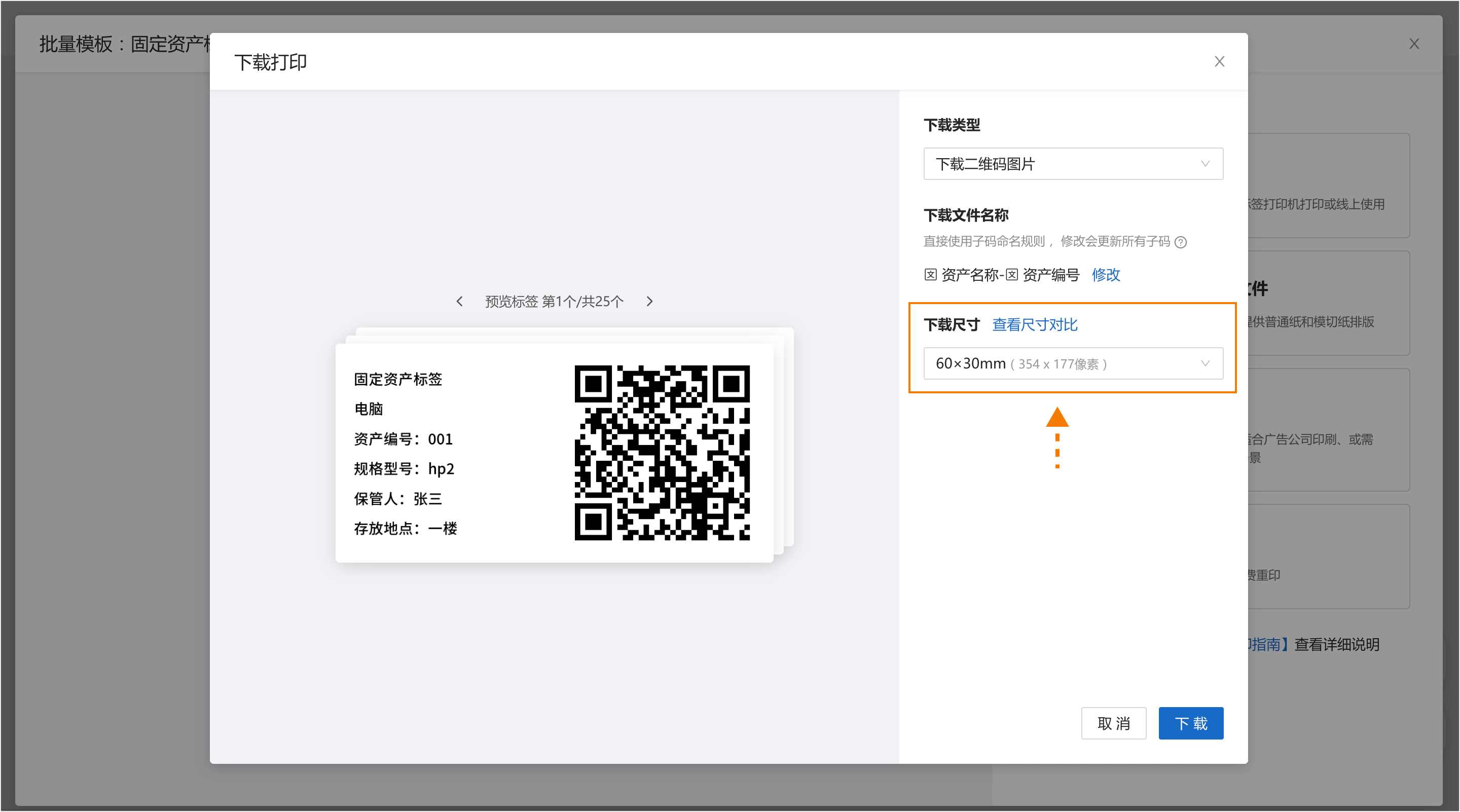
1. Two Must-Checks: Same Size, Width Fits
First check: roll size = downloaded label size, single row. For a CaoLiao 40×60 label, buy either "40×60 mm single row" or "60×40 mm single row".
- 40×60 and 60×40 are the same label wound two ways, across or along the roll. The printer driver rotates the page automatically, so the printed label is identical.
- Buy single-row rolls only. The PDF and image files downloaded from CaoLiao QR Code cannot print on two-row or multi-row rolls.
Second check: roll width + 3 mm must not exceed the printer's maximum print width. Width is the edge of the roll that runs across the print head. Narrow printers need the right winding: a 50 mm class printer only takes rolls 40 mm wide, so buy the "40 wide × 60 high" winding; 80 mm class and above take either.
- 40×60: buy it 40 wide, and any printer from the 50 mm class up can print it.
- 48×54: needs the 80 mm class.
- For the class of every other size, see How to Choose a Label Printer.
2. The Other Three: Default Specifications Are Fine
| Specification | How to choose | Example (CaoLiao 40×60 label) |
|---|---|---|
| Label type | Buy "gap" or "die-cut" labels with a 2 to 3 mm gap between labels; the printer uses the gap to position each label. In product photos, gap labels show a strip of white liner between labels. Do not buy continuous stock (no cuts along the roll) or black-mark stock (black blocks on the back of the liner) | A 2 mm or 3 mm gap both work |
| Core and roll diameter | Desktop printers usually take 25 mm or 40 mm cores and rolls up to about 110 to 127 mm in outer diameter; industrial printers take 76 mm cores. Check the printer manual or ask the seller when unsure | A single-row 40×60 roll of up to 1,000 labels fits any desktop printer |
| Labels per roll | Usually 500 to 1000 per roll; more labels mean a thicker roll. Buy 1 roll first, test it, then stock up | Start with 1 roll of 1000 |
4. Pair a Ribbon with a Thermal Transfer Printer
Direct thermal users can skip this section. For a thermal transfer printer, choose the ribbon type by label material, then the width, length and winding direction by machine. All four must match for a crisp print that does not rub off.
1. Choose the Ribbon Type by Label Material
Ribbons come in three types: wax, wax-resin and resin. The rule is that the smoother and more durable the label face, the harder the ribbon must be:
| Ribbon type | Label stock | Result | If mismatched |
|---|---|---|---|
| Wax | Coated paper | Cheapest, dense black on paper; poor scratch and solvent resistance | On PET or synthetic paper the ink wipes off at a touch |
| Wax-resin | Coated paper, PP synthetic paper | Mid-priced, moderate scratch resistance | Adhesion on PET is mediocre and rubs off over time |
| Resin (full resin) | PET, PP synthetic paper, specialty stock | Best scratch, heat and solvent resistance, highest price | Works on coated paper too, just a waste of money |
2. Choose Width, Length and Winding by Machine
- Width: wider than the label liner, but no wider than the printer's maximum print width. Common widths are 40, 50, 60, 70, 80, 90 and 110 mm. For 40×60 labels the liner is about 43 mm wide, so choose a 50 or 60 mm ribbon; for 60×40 labels on an 80 mm class printer, choose 70 mm. When unsure, buy the ribbon that matches the printer's maximum print width, e.g. 110 mm for a 110 mm class machine.
- Length and core: desktop and industrial printers mostly take 300 m ribbons on a 1 inch (25.4 mm) core; small thermal transfer printers such as the NIIMBOT M2 take 70 m or 90 m ribbons on a 0.5 inch (12.7 mm) core. Check the "ribbon specifications" entry in the printer manual, or give the seller your model.
- Winding direction (ink in / ink out): with the ink side facing inward the ribbon is "ink in"; facing outward it is "ink out". Most domestic desktop printers use ink out, some Zebra models use ink in, and a ribbon loaded the wrong way prints blank. If the manual does not say, ask the seller, or buy a "universal ink in/out" ribbon. If you cannot tell which side carries the ink, press a short strip of clear tape onto the ribbon and peel it off; the side that leaves black on the tape is the ink side, and it should face the label when loaded.
- How much: one 300 m ribbon prints roughly 5000 to 7000 60×40 labels, enough for 5 to 7 rolls of 1000 labels. For a first order, 1 roll of labels and 1 ribbon are enough.
5. Check Prices, Choose a Brand, Place the Order
1. Market Reference Prices
In November 2026, a roll of 40×60 mm three-proof thermal paper costs about 5 to 20 RMB, a roll of PET matte silver labels about 20 to 60 RMB, and a 110 mm × 300 m domestic full-resin ribbon about 90 to 150 RMB. The table is compiled from actual 2024 to 2026 selling prices at JD.com self-operated stores and Tmall brand stores; unbranded sellers and coupon prices run lower. Prices vary a lot with size and labels per roll, so go by the product page.
| Consumable | Specification | Reference price | Cost per label |
|---|---|---|---|
| Three-proof thermal paper | 40×60 mm, 500 to 1000 per roll | About 5 to 20 RMB per roll | About 0.5 to 2 fen |
| Five-proof / freezer synthetic thermal paper | 40×60 mm, 800 per roll | About 10 to 20 RMB per roll | About 1 to 3 fen |
| Coated paper labels | 40×60 mm, 1000 per roll | About 3 to 10 RMB per roll | About 0.5 to 1 fen (ribbon not included) |
| PET matte silver / bright white labels | 40×60 mm, 1000 per roll | About 20 to 60 RMB per roll | About 2 to 6 fen (ribbon not included) |
| Wax ribbon | 110 mm × 300 m | About 15 to 30 RMB per roll | Under 1 fen per label |
| Wax-resin ribbon | 110 mm × 300 m | About 40 to 80 RMB per roll | About 1 fen |
| Resin ribbon (domestic brands) | 110 mm × 300 m | About 90 to 150 RMB per roll | About 1 to 3 fen |
| Resin ribbon (Ricoh B110CR) | 110 mm × 300 m | About 120 to 130 RMB per roll | About 2 fen |
| Small ribbon rolls | 110 mm × 70 m | Wax about 7 to 10 RMB, resin about 20 to 40 RMB | As above |
All in, a 40×60 PET matte silver label including ribbon costs about 3 to 8 fen, and a three-proof thermal label about 0.5 to 2 fen. "60*40" and "40×60" on product pages are the same label wound two ways, at the same price. For quantities up to 1,000 labels, total consumable spend tops out around 200 RMB, so the difference is small. Choosing the right material for your scenario matters more than saving a few dozen RMB.
2. Brands You Can Buy Directly
For PET labels choose Avery Dennison, Deli, TANGO or Nuomark; for thermal paper Nuomark, Xinwei, Deli, Laitelaili or Medico; for ribbon Ricoh, Deli, PRINT-RITE or Sinmark. Any one brand within a material type will do; you do not need a specific product number. These brands were tested by CaoLiao QR Code or rank among the best sellers, and all are available on the major platforms.
| Consumable | Brands | Notes |
|---|---|---|
| PET labels, synthetic paper | Avery Dennison, Deli, TANGO, Nuomark | Avery thermal transfer synthetic paper survived heavy scratching without ink loss in CaoLiao's agricultural label stock print test; Deli and TANGO are sold by JD.com itself, so returns are easy |
| Three-proof / five-proof thermal paper | Nuomark, Xinwei, Deli, Laitelaili, Medico | CaoLiao test results: in dry environments every brand of three-proof paper is stable, so pick the cheapest; in damp or freezing environments choose five-proof synthetic paper, and Medico performed well in freezing |
| Ribbon | Ricoh, Deli, PRINT-RITE, Sinmark | Ricoh B110CR is the common choice for full-resin ribbon and B110A is wax-resin; Deli and PRINT-RITE full-resin ribbons cost about half to 70% of Ricoh's |
| Original rolls for portable printers | NIIMBOT, DOTHANTECH, HPRT | Buy from the brand's official store for your exact model; the wrong model will not fit or will not be recognized |
| Printer makers' own consumables | TSC, Zebra, Gprinter, Xprinter, Postek | Each official store sells ribbon and label stock matched to its own machines; the specs are guaranteed to fit, at a slightly higher price |
Tip: Search with combined keywords such as "PET matte silver labels 40×60 single row", "three-proof thermal labels 40×60 single row" or "full resin ribbon 60mm×300m ink out". They are far more precise than searching for "label paper" alone.
3. Send This Message to the Seller Before Ordering
State the printer model, material, size and ribbon specification in one go so the seller can check them for you. Adapt the template below to your situation:
I use a Gprinter GP-1124T thermal transfer printer and need to print 40×60 mm QR code labels.
Please put together:
1. PET matte silver labels, 40 mm wide × 60 mm high, single row, gap labels, 25 mm core, 1 roll of 1000;
2. Full resin ribbon, 60 mm wide, 300 m long, 1 inch core, ink out (if unsure, please confirm against this printer model).
Will the two work together?
Direct thermal users only need item 1, with the material changed to "three-proof thermal paper" or "five-proof synthetic thermal paper". Check these 7 items before ordering. The first 3 are hard requirements, and getting any one wrong means nothing prints:
- Material matches the printer: thermal paper for direct thermal, label stock + ribbon for thermal transfer
- Size matches the label size downloaded from the CaoLiao workbench (40×60 and 60×40 both work), single row
- Roll width + 3 mm does not exceed the printer's maximum print width
- Gap labels, not continuous or black-mark stock
- Core and roll outer diameter fit the printer
- Ribbon type matches the label face stock, and the ribbon is wider than the liner
- Ribbon length, core and ink in/out match the printer manual
6. Test Print When the Consumables Arrive
Print 1 label first and confirm your choice with the 4 steps below before printing the batch:
- Load the labels and ribbon: load them as the printer manual shows, close the lid and let the printer calibrate by feeding labels (on most machines, hold the feed button, or click "Calibrate" in the printer properties of the driver). When it feeds 1 or 2 blank labels and stops, gap detection is working.
- Print 1 label: download the "single vector PDF" from the CaoLiao workbench and print only page 1 using method 1 in Label Printer Printing. Set Paper size to the label size you bought; if it is not listed, create one in the printer properties (if the print comes out rotated 90 degrees, switch between portrait and landscape in the print dialog). Steps are in Label Printer Tutorials and FAQs.
- Inspect the label: a phone scans the QR code normally; no edge is clipped and no text runs off the label; scratching the code area hard with a fingernail removes no ink; on PET and synthetic paper, wipe off a drop of water and the print stays intact.
- Leave it stuck for 24 hours: apply it to the actual surface. If no corner lifts after a day and peeling takes real effort, the adhesive is right too.
If all 4 pass, you bought the right consumables and can set the page range to "All" and print the batch. For misalignment, blur, ribbon wrinkles or blank output, troubleshoot with Label Printer Tutorials and FAQs; the cause is usually the paper size setting, the ribbon direction or a ribbon type mismatch.
7. FAQ
1. Can a Direct Thermal Printer Use PET Matte Silver Labels?
No. A direct thermal printer has no ribbon and relies on the paper to develop color. PET stock has no thermal coating, so it prints blank. For durable PET labels you need a thermal transfer printer.
2. Can Resin Ribbon Print on Coated Paper? Can Wax Ribbon Print on PET?
Resin ribbon on coated paper works, it just costs more than it needs to. Wax ribbon on PET does not work: the ink does not adhere and rubs off at a touch. Choose the ribbon by the label face stock, not by price.
3. Matte Silver or Bright White PET?
Same material, print life and price; only the color differs. Matte silver hides dirt and blends in on equipment, so it is common for fixed asset and equipment labels. Bright white gives the QR code higher contrast, so choose it for labels with small text or long scanning distances.
4. Can I Buy Two-Row or Multi-Row Label Rolls?
Not for direct use. The PDF and image files from CaoLiao QR Code are laid out for single rows only and will misalign on two-row stock. If you must use multi-row stock, export to Excel and lay the labels out again in the printer's layout software; see Excel + Layout Software Printing Tutorial.
5. Can Portable Printers Such as NIIMBOT or DOTHANTECH Use Third-Party Rolls?
They fit, but most models read a chip on the roll to identify the size and template, so third-party rolls may not be recognized and the cut position may be off. For everyday use, buy original rolls for your model from the official store.
6. How Long Do Consumables Keep, and How Should I Store Them?
Use thermal paper within 1 year and store it away from light, moisture and heat, since heat and light make it darken early. PET labels and ribbon keep about 2 years sealed at room temperature. Do not stock up on too much thermal paper at once.
7. The Labels Will Be Peeled Off Later. How Do I Avoid Adhesive Residue?
Buy PET or coated paper labels with removable (also called low-tack) adhesive. PET labels with ordinary permanent adhesive tend to leave residue when peeled, which takes alcohol or adhesive remover to clean.
8. What If I Want Color Labels or a Logo Background?
Label printers print in black only. For color, buy "pre-printed" label rolls with the color background and logo already printed, then print the QR code in the blank area. For small quantities, or if you would rather not bother, order from the CaoLiao printing service directly; adhesive labels ship the same day.
Related Tutorials
- How to Choose a Label Printer: if you have not bought a machine, pick a type by scenario and a print width by CaoLiao label size first
- Label Printer Printing: once the consumables arrive, how to choose among the three printing methods and print the PDF directly
- Label Printer Tutorials and FAQs: troubleshooting misalignment, blur, ribbon wrinkles and more
- Agricultural Product Compliance Certificate: Label Stock Print Test Review: test records of thermal paper brands under water, oil, freezing and abrasion
- Common Print Material Overview: acrylic, PVC cards, metal plates and other materials beyond adhesive labels