Hazard Reporting
QR Code System
Create a hazard reporting QR code so anyone can scan and report a hazard with photos.
Notify the responsible person automatically and keep reporting and rectification in one record.
Suitable Scenarios
Suitable for distributed sites with many people, where everyone should be able to spot and report hazards


How a Hazard Report Is Handled
1Create a Hazard Reporting QR Code and Assign Responsible People
- Collect all hazard reports with one QR code: Post it on a notice board or team board, or share it in a work group so everyone can scan to report
- Assign responsible people by area and hazard type: The relevant person is automatically notified when a problem is reported

2Spot a Problem, Scan, and Report It with a Photo
- Report by scanning with WeChat: No app download is needed; employees, contractors, and cleaning staff can all use it
- Explain the problem with photos: Select a hazard type and take photos on site, with optional text or voice descriptions

3Automatically Assign Reports and Check Progress Anytime
- Automatically notify the responsible person: Route the problem to the right person based on the area and hazard type
- Check progress anytime: See at a glance whether a report is pending, in progress, or completed

4Submit Rectification Photos and Automatically Notify the Reporter
- Record the rectification result directly: The responsible person records the work and uploads photos in the original record, without filling in another form
- Automatically notify the reporter on completion: The reporter can see whether the problem is resolved without repeatedly asking
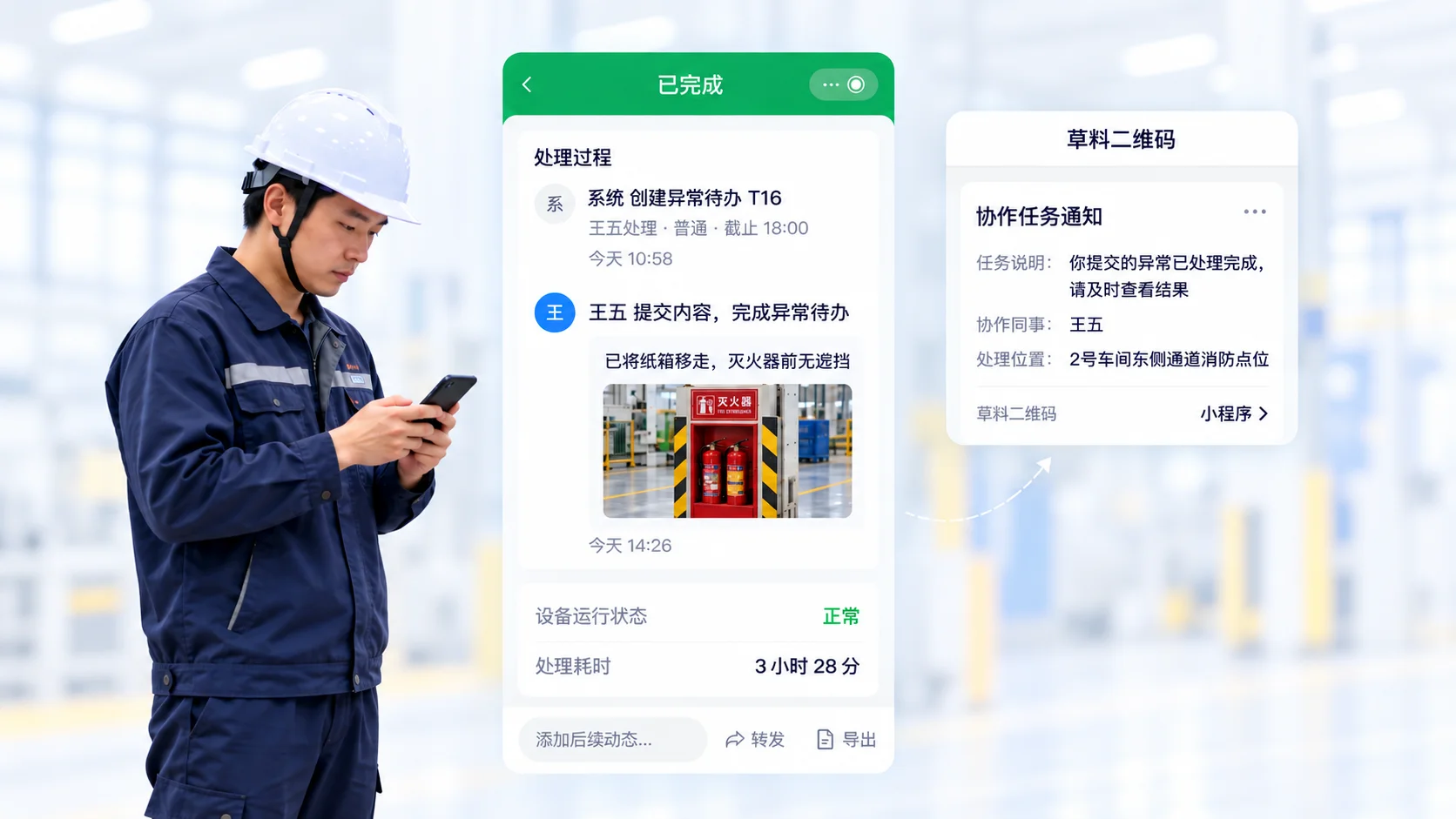
5View Reports Together in the Workbench and Export Records Anytime
- See the handling status at a glance: Check hazards awaiting rectification, overdue hazards, and completed hazards anytime
- Keep records in one place: Reporting and rectification records are stored in the workbench and can be filtered by time, area, and status, then exported to Excel

Responsibilities by Role
Everyone spots and reports hazards, responsible people handle rectification, and safety officers oversee progress
Reporters (Everyone)
- 01Spot a hazard and scan
- 02Take photos and describe the problem
- 03Receive the handling result
People Responsible for Rectification
- 01Receive hazard notifications
- 02Rectify the hazard on site
- 03Add handling details and photos
Safety Officers and Supervisors
- 01Set up reporting QR codes and responsible people
- 02Check rectification progress
- 03View and export the hazard ledger
How Do QR Codes Improve Traditional Reporting?
| Comparison | Traditional Reporting | CaoLiao QR Code |
|---|---|---|
| Reporting | Pass information on verbally or in group chats | Scan to submit photos and automatically create a record |
| Task assignment | Fill in a rectification notice or call the responsible person | Automatically assign the task to the relevant responsible person |
| Rectification progress | Ask and follow up manually | Check progress in real time, with automatic completion-rate and handling-time statistics |
| Rectification feedback | Send updates to a group, where messages can be missed | Automatically notify the reporter when rectification is complete |
| Record keeping | Organize and compile scattered records manually | Keep records together and export them anytime |
Customer Stories
Employees scan on site to report hazards with photos. The system notifies the responsible person automatically, reducing hazard rectification time from 3 days to 0.9 days.
Teams replaced paper hazard reports with scanned text and photo reports. Anti-fraud settings prevent staff from hastily filling in records just to prepare for an inspection.
Safety officers manage reporting QR codes by community area. They receive prompt notifications of reported hazards and can check on their phones which hazards are resolved and which are being rectified.
Choose a Version for Your Hazard Management Needs
Basic hazard reporting and rectification are free; upgrade as needed for multiple areas and collaboration
- Unlimited reporters and reports
- Automatically notify administrators when a hazard is reported
- Keep a record of rectification, with progress and photos in the original record
- View data long term and export records from the past 180 days
- Manage multiple areas separately, with each responsible person seeing only their own hazards
- Collaborate across people and departments to follow up on rectification
- Store original photos and view or export records anytime
- Keep data trustworthy with blockchain notarization and image watermarks
Frequently Asked Questions
Can external staff, contractors, and residents report hazards? Do they need an app?
Yes. Anyone with the reporting QR code can scan it with WeChat to report a hazard. No app download is needed.
How can I make sure someone handles a reported hazard?
Configure recipients by area and hazard type in notifications. The relevant responsible person is notified after submission. Unresolved hazards remain in the todo list and turn red when overdue, making follow-up easier.
Can a supervisor review the rectification before the todo is marked complete?
Yes. Enable approval on the rectification form. Submission starts an approval process, and the todo is completed only after approval. If rejected, the responsible person edits and resubmits it. Multi-level approval is available when several people need to review it in sequence.
Can general and major hazards be handled separately?
Yes. Add a hazard level field to the reporting form. General hazards can trigger a rectification notification directly, while major hazards can also require approval at each level before closure.
How do I prevent off-site reports or the use of old photos?
Enable location restrictions so submissions are allowed only within the specified area. Require photos to be taken on site and add watermarks with the time and location. See anti-fraud settings for details.
Can I export the hazard ledger for safety inspections?
Yes. Exports include rectification records, with each report and its rectification in one row. Filter by time, area, and status. The free version can export the past 180 days; the Flagship Edition has no time limit.
Start Building Your Hazard Reporting QR Code
Start with a ready-made template and adapt the areas and hazard types to your needs