Directory List
"Directory List" is a component in the dynamic QR code editor that displays all dynamic QR codes from a directory on a single QR code page. When QR codes in the directory are added, modified, or deleted, the directory list updates automatically without manual maintenance.
1. Use Cases
- Retail and Trade: Product catalogs, product manual collections, FAQ compilations
- Tourism: Tour route compilations, guesthouse room introductions, travel guide directories
- Education and Training: Course material collections, such as music course compilations or safety training course compilations
- Manufacturing: Emergency response plans, equipment documentation collections, project materials
- Government and Public Institutions: Service guides, sample documents, document templates

2. How to Access
In the dynamic QR code editor's left panel, under "Business Features", click "Directory Component" to add the component.
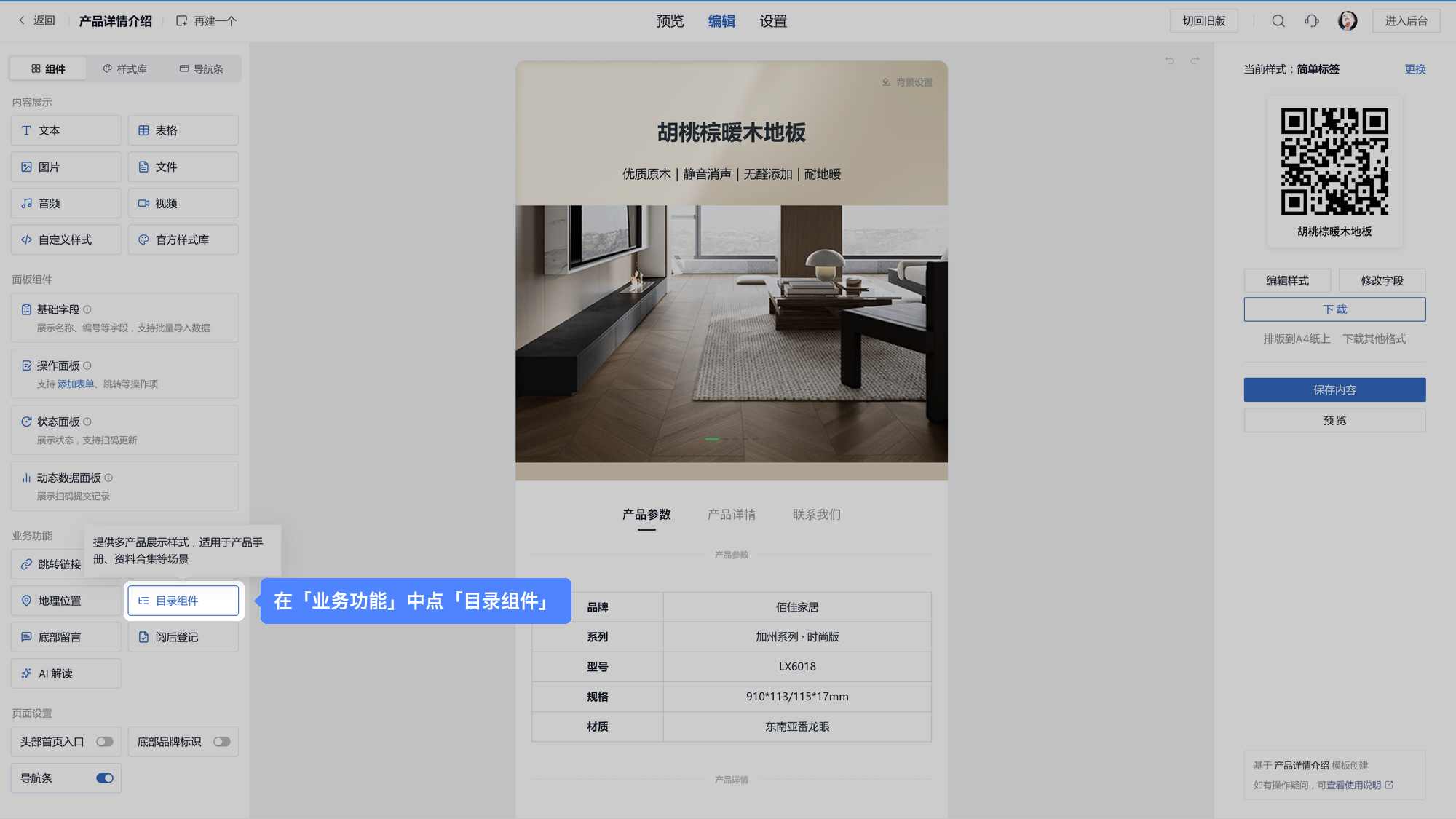
Tip: If you already have a QR code, find it in the workbench and click "Edit" to enter the editor. If you don't have one yet, you can create one using "Create Blank" or "Create from Template".
3. Setup Steps
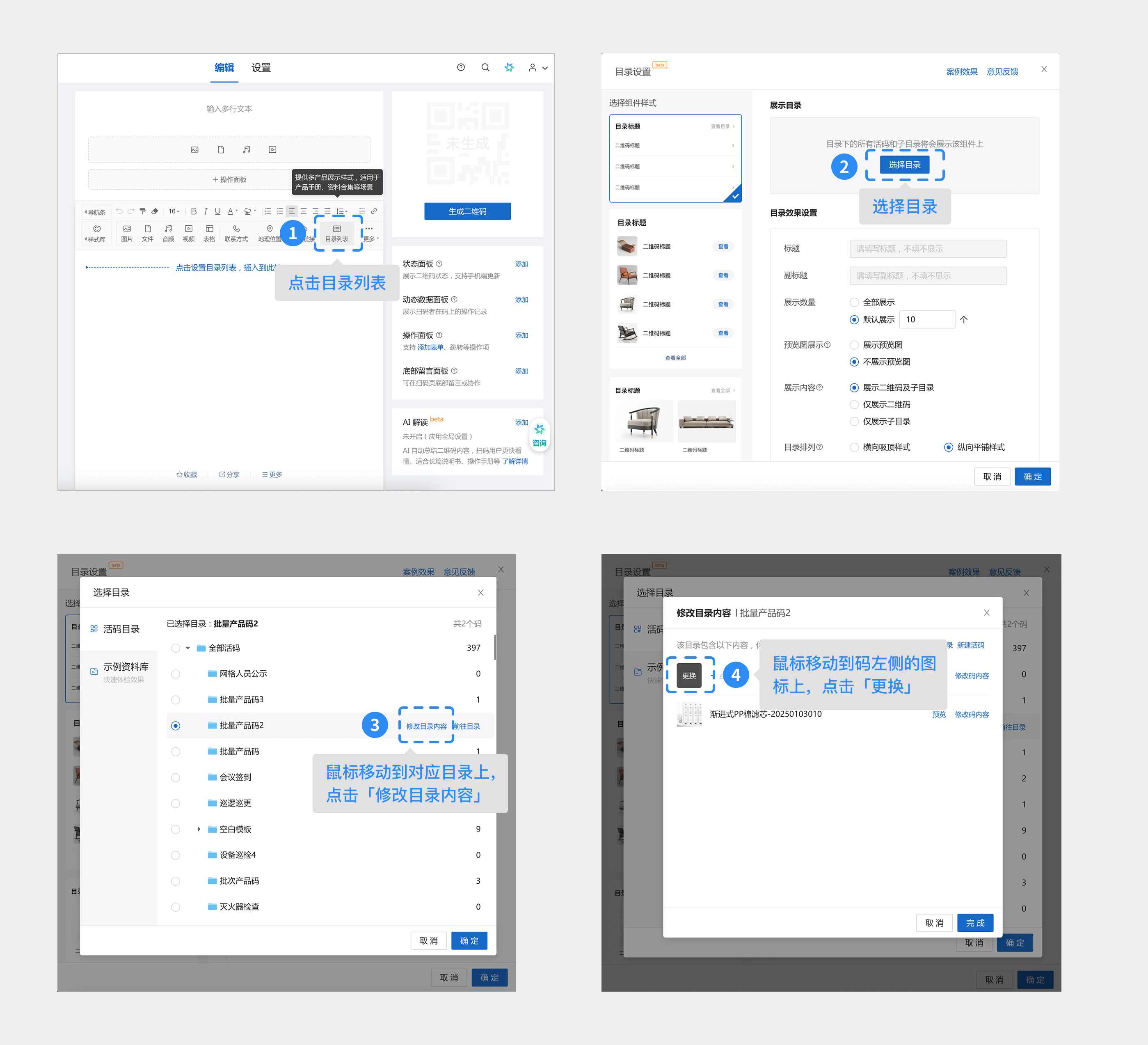
- Select Component Style: Choose a list style based on your display needs
- Select Directory: Choose the directory you want to display
- Configure Display Settings: Set the title, preview image, sorting order, and more

4. FAQs
1. What Is the Difference Between the Directory List Component and Redirect Links?
The Directory List component automatically syncs with changes in the directory. When QR codes are added or removed, the component updates automatically without manual maintenance.
Redirect links require you to manually specify each link target. If a linked dynamic QR code is deleted, you need to manually remove the corresponding link. The display effect of redirect links also needs to be configured individually.
If you have many QR codes and plan to add more over time, the Directory List component is recommended for higher efficiency and lower maintenance costs.
2. What Is the Difference Between the Directory List Component and a Directory Summary QR Code?
A directory summary QR code is essentially an automatically generated dynamic QR code that contains only a directory list. It can be used immediately without manual editing, but you cannot add other content to it, and style options are limited.
If you only need to consolidate the QR codes in a directory into a single entry point, a directory summary QR code is faster. If you also want to add additional content (such as introductory text or contact information), use the Directory List component instead.
3. Can the Default Folder and QR Code Icons Be Changed?
Yes, you can replace the default icons by setting a "Preview Image":
- Directory preview image: Workbench -> "Dynamic QR Codes" in the left menu -> find the directory -> click "..." on the right side of the directory -> "Preview Image Settings"

- QR code preview image: Workbench -> "Dynamic QR Codes" in the left menu -> find the QR code -> click "..." on the far right -> "Preview Image Settings"

4. Can QR Code Thumbnails Be Changed in Bulk?
Yes. When adding the Directory List component, click "Select Directory", choose the target directory, hover over it, and click "Edit Directory Content" on the right. A dialog will display all QR codes in the directory. Hover over the thumbnail on the left side of each QR code to replace it.