Formula Calculation
1. Feature Overview
The number component has a built-in formula engine. By configuring a formula, the form can automatically pull values from other components (such as number or date fields), perform logical calculations, and output the result directly. This reduces manual calculation and entry, improving data accuracy and collection efficiency.

2. Supported Calculation Types
- Basic math: Addition, subtraction, multiplication, and division (+, -, *, /) combining multiple number components.
- Time difference: Extract two date/time components from the form, automatically calculate the interval, and output the result to a number component.
3. Typical Use Cases
Scenario A: Overtime Hours Calculation (Time Difference)
Formula: Overtime duration = End time − Start time
Result: After the submitter enters the start and end times, the system automatically calculates the number of minutes or hours of overtime — no manual conversion needed.
Scenario B: Pipeline Pressure Gradient Inspection (Basic Math)
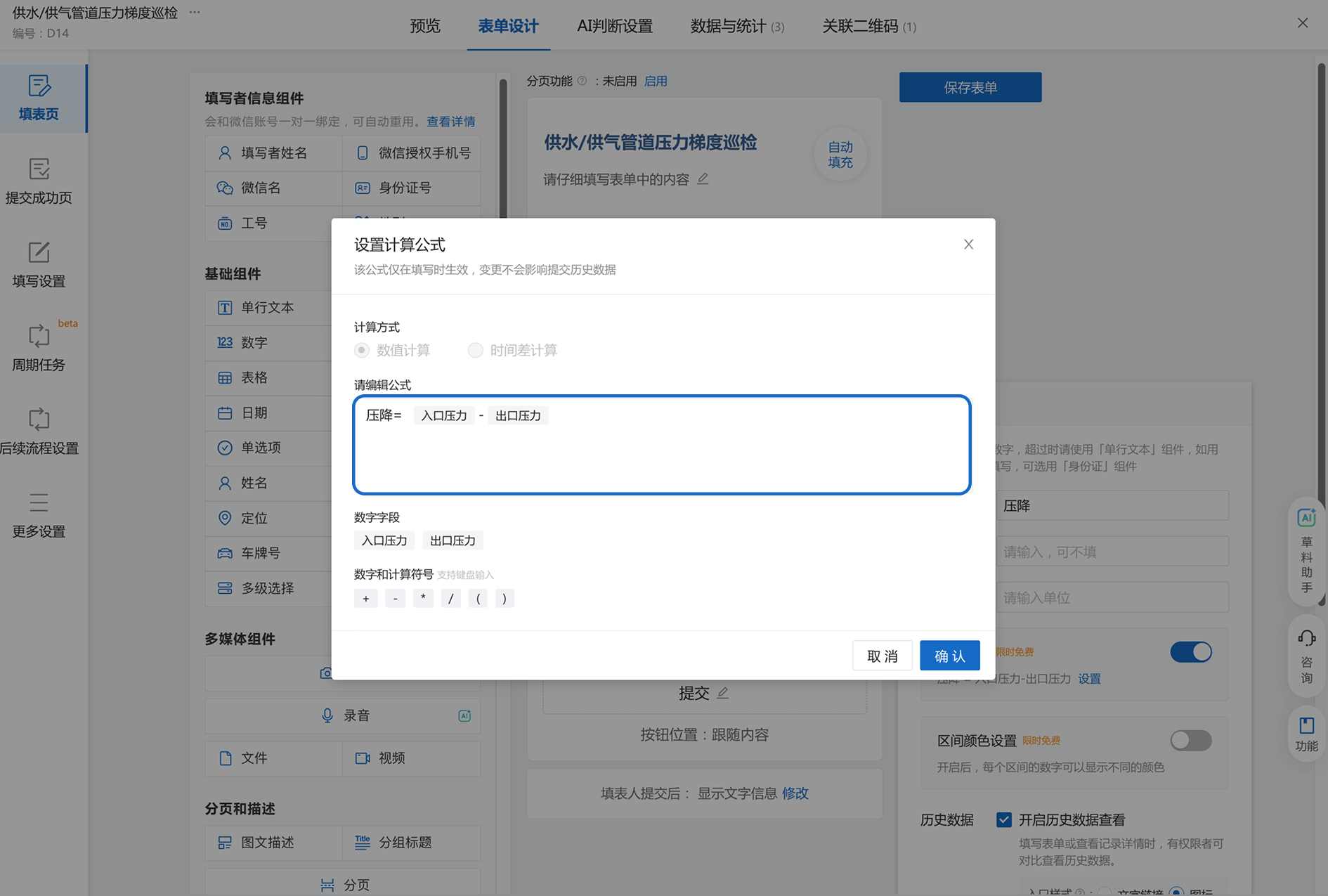
Formula: Pressure drop = Inlet pressure − Outlet pressure
Result: After the submitter fills in the inlet and outlet pressure values, the system instantly calculates and displays the pressure drop.
4. Setup Tutorial
Using the "Pipeline Pressure Gradient Inspection" scenario as an example:
Step 1: Add the input components
On the form design page, drag in two number components and name them "Inlet Pressure" and "Outlet Pressure."
Step 2: Add the result component
Drag in another number component, name it "Pressure Drop," and enable Formula Calculation for this component.

Step 3: Write the formula
Set the formula to: Inlet Pressure − Outlet Pressure.
Note: For time duration scenarios, add two date/time components first, then set the formula here to calculate the time difference.
5. Important Notes
Once a formula is configured, the number component becomes read-only by default — its value is calculated automatically and cannot be manually modified by the submitter. This ensures the logical integrity and tamper-resistance of the data.