How to Enable Direct URL Redirect in Dynamic QR Codes?
1. Why Can't the URL Redirect Directly?
If the QR code's open method is set to Mini Program, WeChat platform restrictions prevent Mini Programs from directly opening web links. Scanners need to copy the link and open it in a browser.

2. How to Enable Direct Redirect?
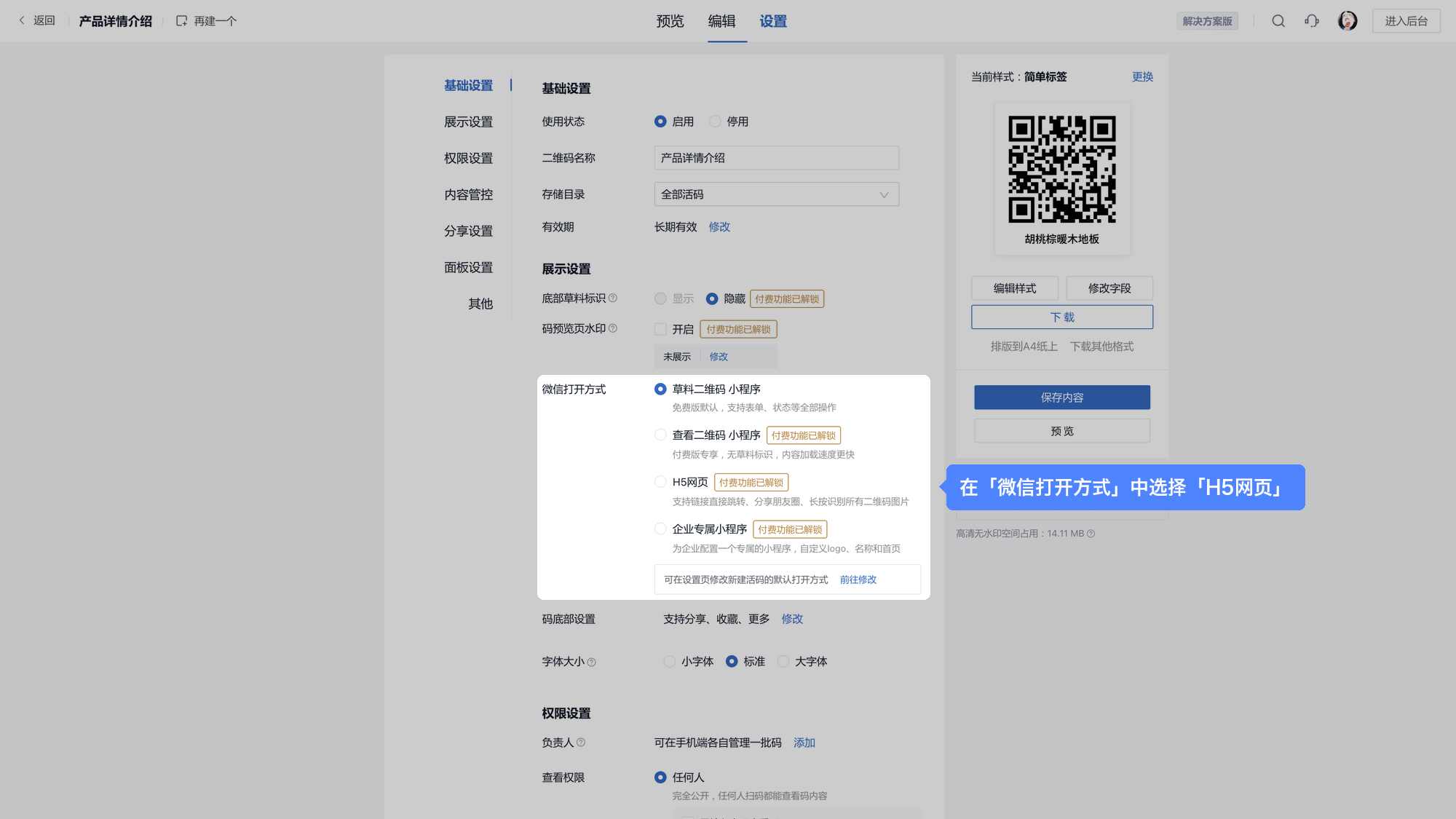
Switch the QR code's open method from "Mini Program" to "H5 Web Page" (available with the paid version). After scanning, URLs in redirect links will open directly: click "Settings" at the top of the editor, choose "H5 Web Page" under "WeChat Open Method" in "Display Settings", and save.

3. What Are the Limitations of Legacy Dynamic QR Codes in Redirect Links?
Due to WeChat Mini Program restrictions, the following features are unavailable when opening legacy dynamic QR codes within a Mini Program:
- Long-pressing to scan QR codes embedded in legacy dynamic QR codes
- Directly redirecting to other links from within legacy dynamic QR codes
- Sharing to WeChat Moments
Switching the current QR code's open method to H5 Web Page removes all of the above limitations.