Asset Management QR Codes
Generate asset QR code labels in bulk so staff can scan to view asset information, check out items, conduct simple inventory counts, and submit repair requests—with the ability to periodically export an asset ledger. The system is simple to build, quick to deploy, and delivers efficient asset management at low cost. Especially suitable for item check-out, equipment repair requests, inbound/outbound registration, and item borrowing/return tracking.
Primary Uses
Asset management often suffers from a lack of clarity about what assets are on hand—missing accurate information about quantities, statuses, and locations. To solve this, a fixed asset management system can be built on the CaoLiao platform. By generating a unique QR code for each asset, it enables standardized "one-item-one-code" management:
- Asset information display: View and update asset information in real time.
- Check-out registration and inbound/outbound management: Record asset circulation.
- Fault reporting: Quickly report and handle asset faults.
- Data statistics and reporting: Supports data export and analysis to aid management decisions.
Core Features
1. One-Item-One-Code — Scan to View Asset Information
Each asset can have its own QR code, affixed directly to the asset or equipment. After scanning, users can:
- View basic asset information: including name, status, department using the asset, person in charge of the asset, usage instructions, purchase date, and more.
- Update asset status: When the user or department changes, scan to edit and update the information—no need to reprint labels.
- Access usage instructions: View usage methods and precautions at any time to reduce misuse.
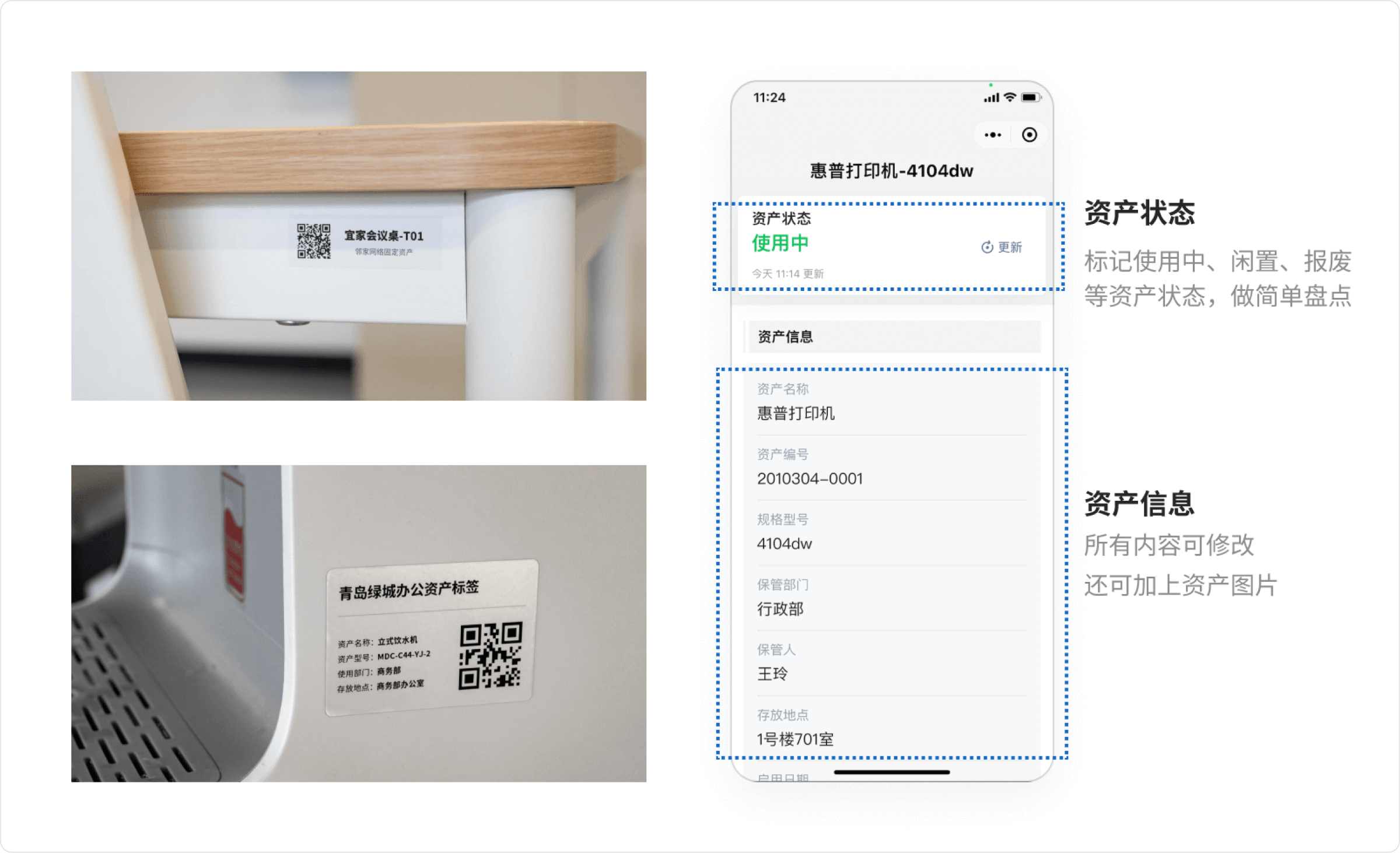
2. Batch Label Production for Rapid Deployment
To accommodate different asset management situations, two deployment modes are available: the standard generation mode and the preprinted dynamic QR code label binding mode (recommended):
| Standard generation mode | Manually prepare ledger → generate codes → verify and affix | Companies with an existing asset ledger | Custom labels: can display asset name, model, and other specific information | Labels are professional and asset information is immediately visible | Assets come before labels; new assets require repeating the entire process, which is cumbersome |
| Preprinted dynamic QR code label binding mode (recommended) | Affix preprinted labels → scan to enter information → ledger forms automatically | Companies without a ready-made ledger | General labels: only a number, QR code, and company logo; scan to view specific asset details | Print spare preprinted dynamic QR code labels in advance; when adding a new asset, simply affix a code and enter the information—minimal repetitive work | Labels cannot display specific asset information |
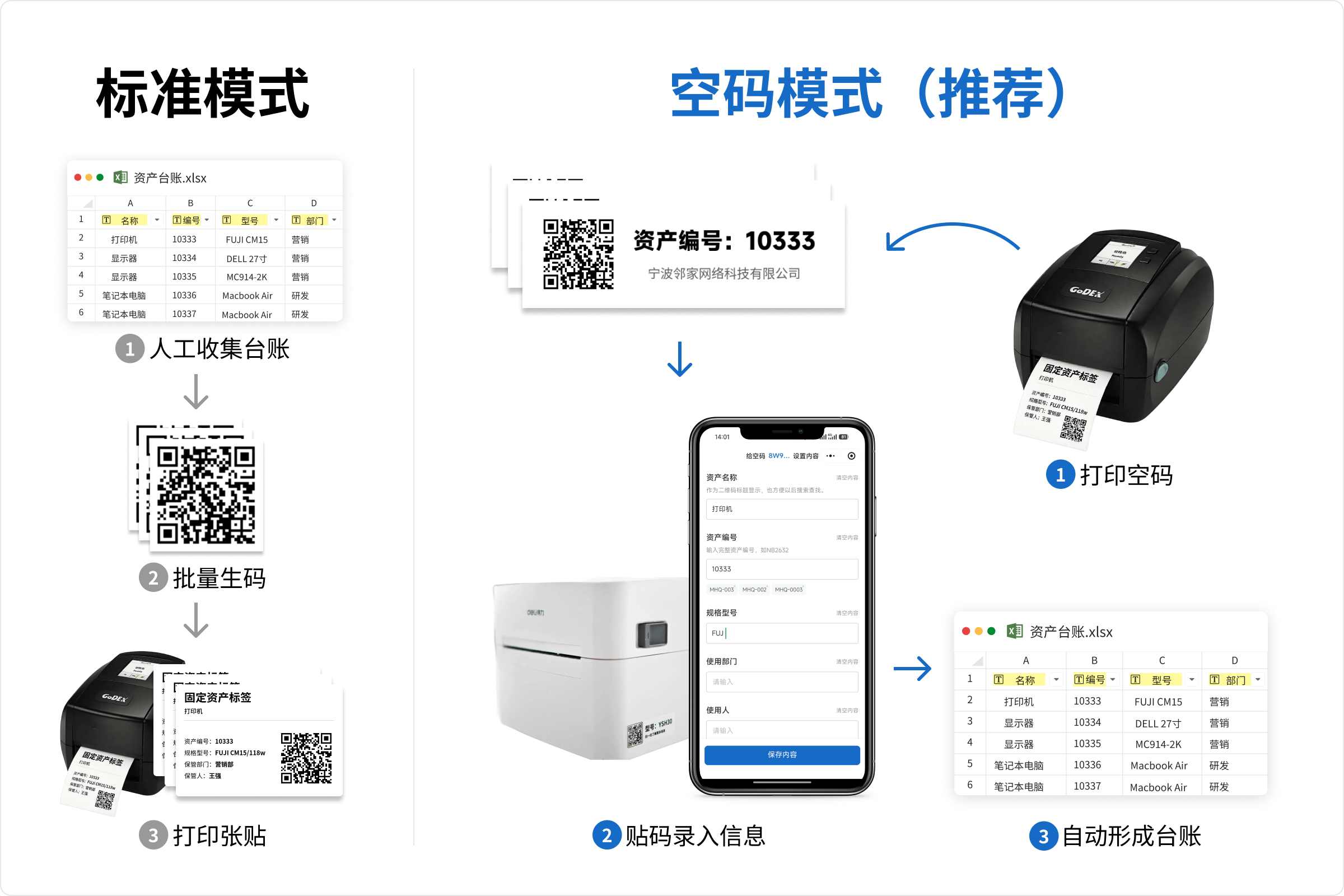
Usage consultation: If you have questions about the preprinted dynamic QR code label mode concept or use cases, scan the QR code below to inquire.

For large-scale asset management, we also provide:
- Bulk QR code generation: Use bulk templates to generate QR codes for a large number of assets at once.
- Label Creation API: An API interface that supports integration with internal enterprise systems to automatically generate and update QR code labels. View bulk QR code generation features
3. Centralized Management for Easy Record-Keeping
To improve management efficiency and collaboration, we support:
- Summary page navigation management: Within the same account, QR codes, directories, status dashboards, and other modules can be assembled on a summary page for app-style navigation to quickly jump to the required features.
- Batch record addition to reduce repetitive entry: For item check-out, inbound/outbound operations, and similar actions, the batch record addition feature lets you fill in the information once and apply the same record to all related assets.
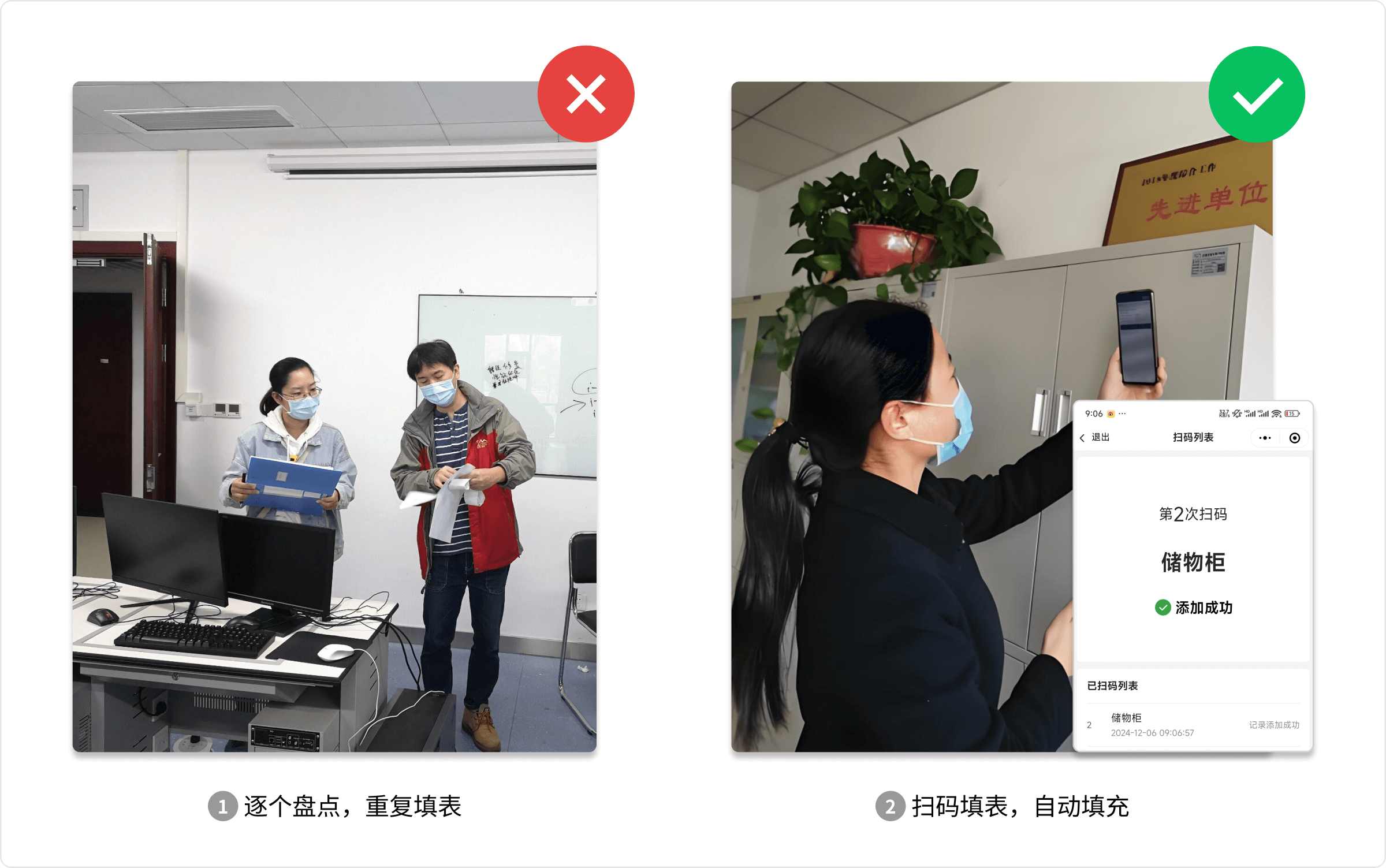
4. Data Statistics and Reporting
Authorized administrators can:
- View and export asset data: Review all asset records in the workbench and export as Excel or PDF files for archiving and sharing.
- Create visual reports: CaoLiao provides a data push feature for building visual reports on asset management, displaying key data such as asset distribution and utilization to support management decisions. View data push features
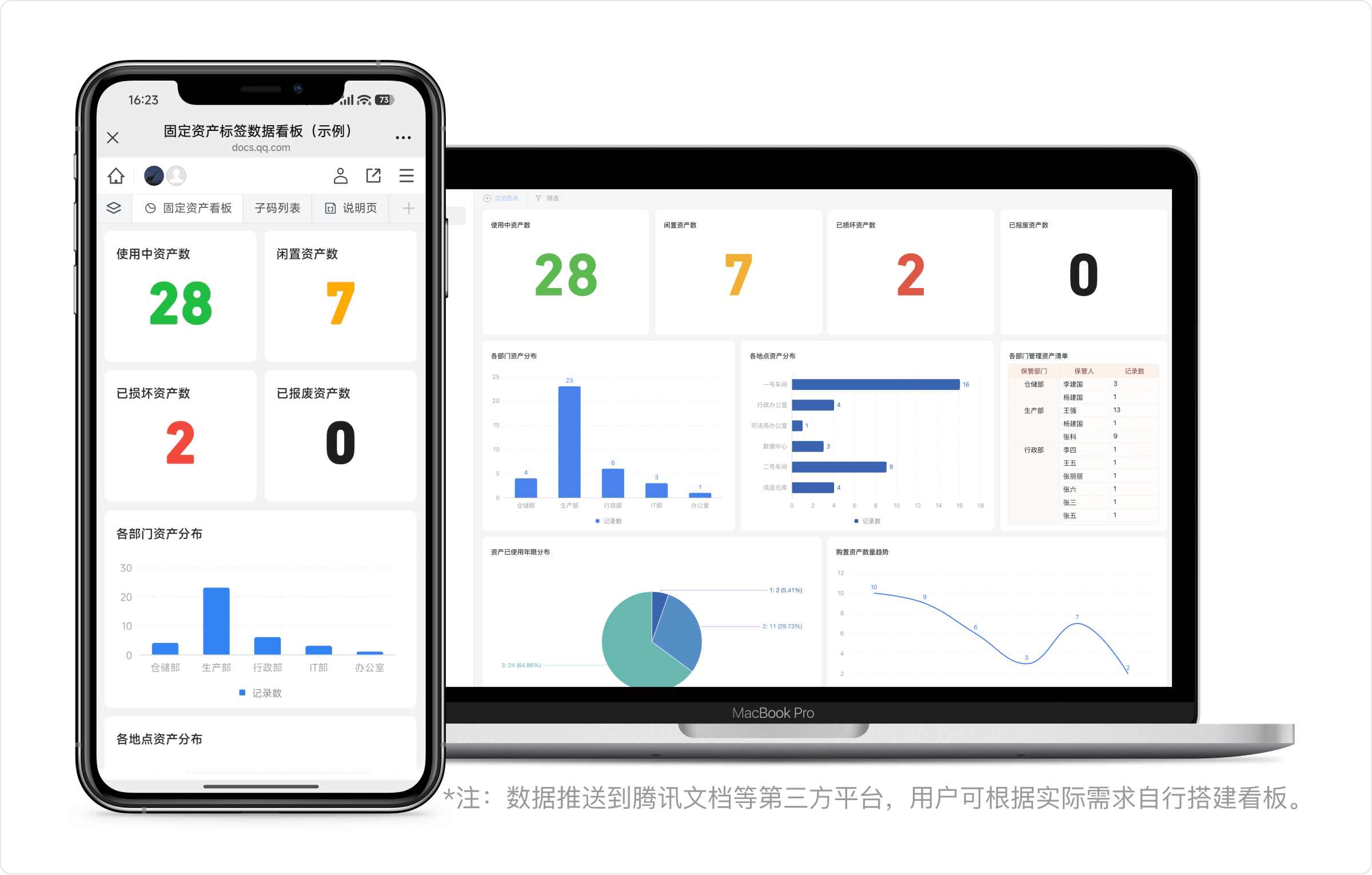
Free vs. Paid Version
Free Version
Meets the basic needs for using QR codes to manage fixed assets. No limits on the number of assets, people scanning, or scans.
Paid Version
For organizations looking to roll this out company-wide, the paid version provides better implementation results, including but not limited to:
- Precise Management with Clear Accountability
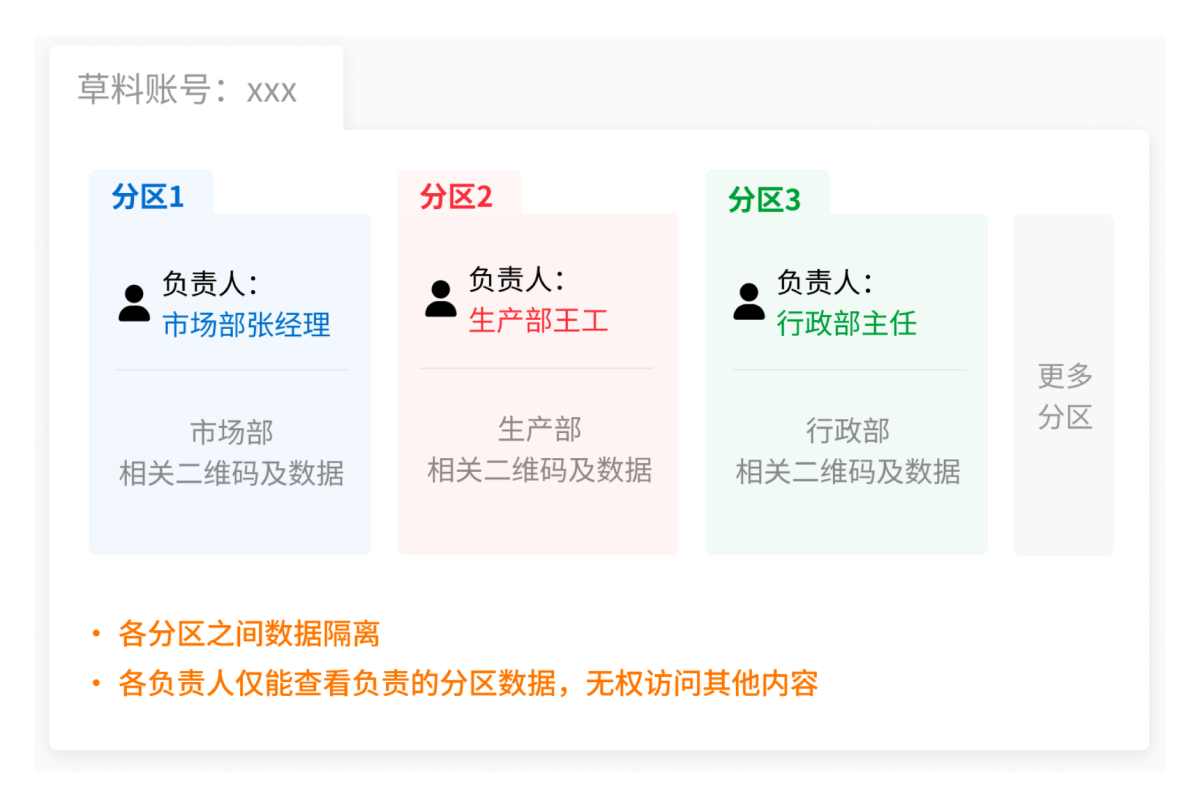
- Dedicated responsibilities: Starting from the Advanced Edition, responsible persons can be assigned by department or other dimensions to achieve division of management, data isolation, and clear accountability—reducing the burden on the super admin.
- Permission assignment: Starting from the Advanced Edition, different operation permissions can be set for asset QR codes based on personnel identity or department—for example, allowing only inventory personnel to fill out inventory forms, or only managers to view inbound/outbound records—ensuring operational security.
- Efficient Approvals with Standardized Processes
- Multi-level approvals: Starting from the Advanced Edition, multi-level approval workflows can be configured—for example, a materials check-out request first goes to the department head for approval and then to the asset management department for final sign-off, ensuring approvals are efficient and compliant.
- Data Integration and Extended Applications
- Unlimited data export by date range: Starting from the Flagship Edition, data exports are not restricted by time range, meeting long-term data comparison needs such as annual asset inventory.
- Data push and integration: Via the data API, inspection records can be pushed to external systems for statistics, reporting, and visualization. Monthly push limits vary by edition: 1,000 records (free version, Basic Edition, and Advanced Edition), 20,000 records (Flagship Edition), and unlimited for the Industry Edition.
Our recommendations:
- Free trial: Start by creating QR codes for free to experience the basic asset management workflow.
- Pay as needed: Later, select a paid version based on your specific asset management requirements—for example, whether department-based division of management is needed or whether multi-level approvals are required. View pricing plans
Scan and Try
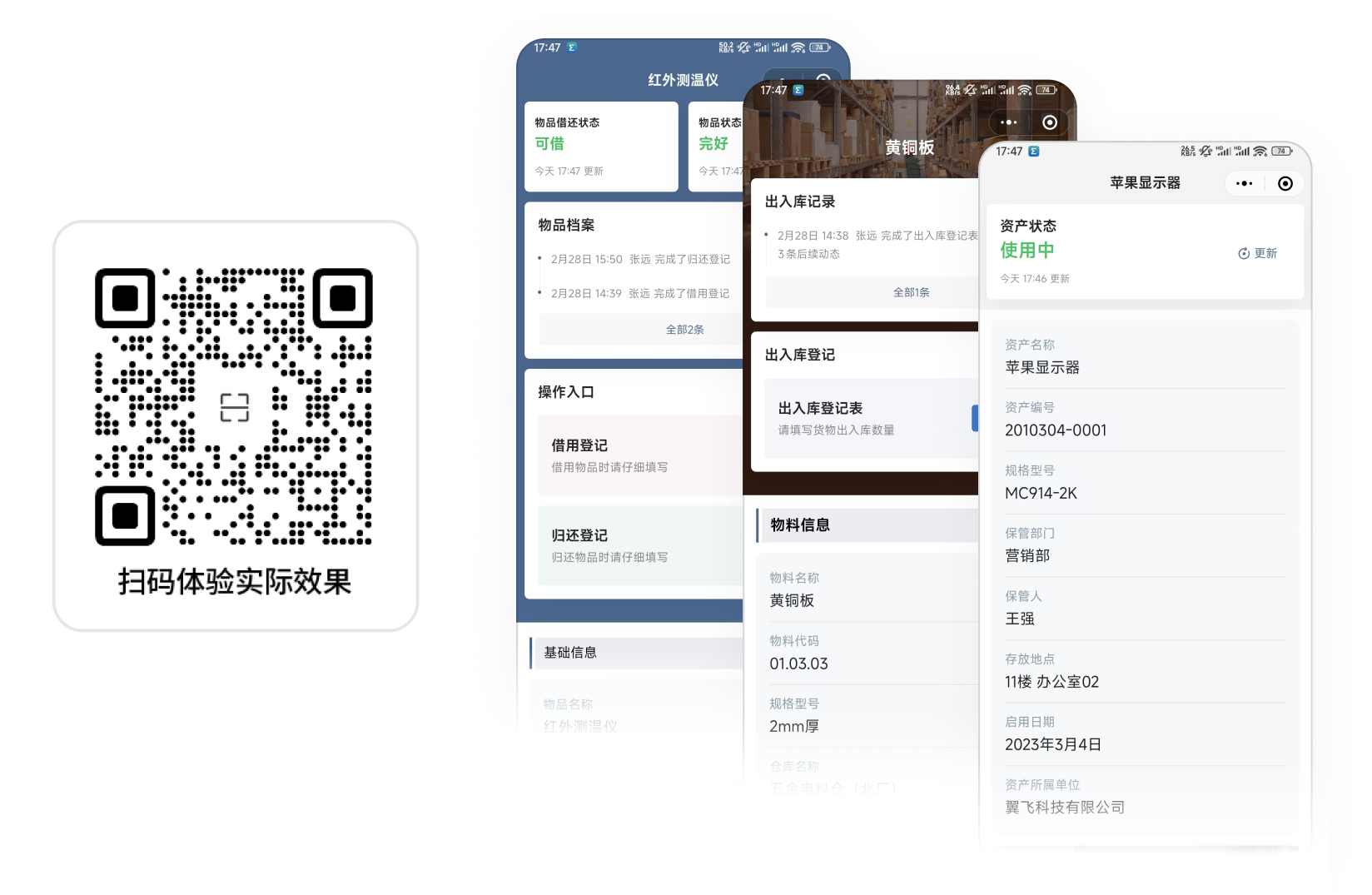
We have curated a selection of QR codes from real users. Scan freely to experience the features—change item status, add check-out records, and more:
Peer Success Stories
-
Ningbo Automotive Transport Group
Used QR codes to record daily inspection data for engineering vehicles, solving problems with data authenticity and synchronization efficiency. View details -
Baogaofu Expressway Shunping South Maintenance Section
Produced QR code identifiers in bulk for physical assets to track and implement maintenance measures. View details -
Ningbo Jiangbei Municipal Administration
Bridges in Jiangbei District, Ningbo now have QR codes for traceability and repair reporting. View details
Frequently Asked Questions
- We don't have an IT department. Can we build this ourselves?
- Absolutely. The CaoLiao platform is designed for frontline managers. No programming or coding knowledge is required—users simply drag and drop the modules they need, adjust the settings, and the system is ready. Anyone can use it.
- Will my asset data be stored permanently?
- Yes, data is stored permanently and can be viewed in the workbench at any time.
- How do I get started?
- Click the Template Library below, choose a template suited for fixed assets, modify the content and configuration to match your needs, and save to generate your QR code.
Start Building
The following templates are based on real user practice to help you quickly draw on peer experience and significantly reduce setup costs.
- Fixed Asset Labels: Quickly produce asset QR code labels in bulk with multiple style options.
- Inbound/Outbound Registration: One item, one code—scan to add inbound/outbound records.
- Item Borrowing/Return Registration: Scan to update the borrowing and return status of an item and add reasons.