Fire Safety QR Codes
Solution Overview
Affix a unique QR code to each fire protection device, facility, or area and use it as a digital record to capture basic information about the fire protection equipment and all inspection and rectification activities. This helps you handle routine fire safety work more conveniently and in compliance with regulations.
- Inspection personnel: Scan with WeChat, check off inspection items, and take an on-site photo—no training required to get started.
- Managers: Data is no longer scattered. Use dashboards to see which devices have missed an inspection or are showing abnormalities, and records can be exported to Excel for statistics or visual reporting.
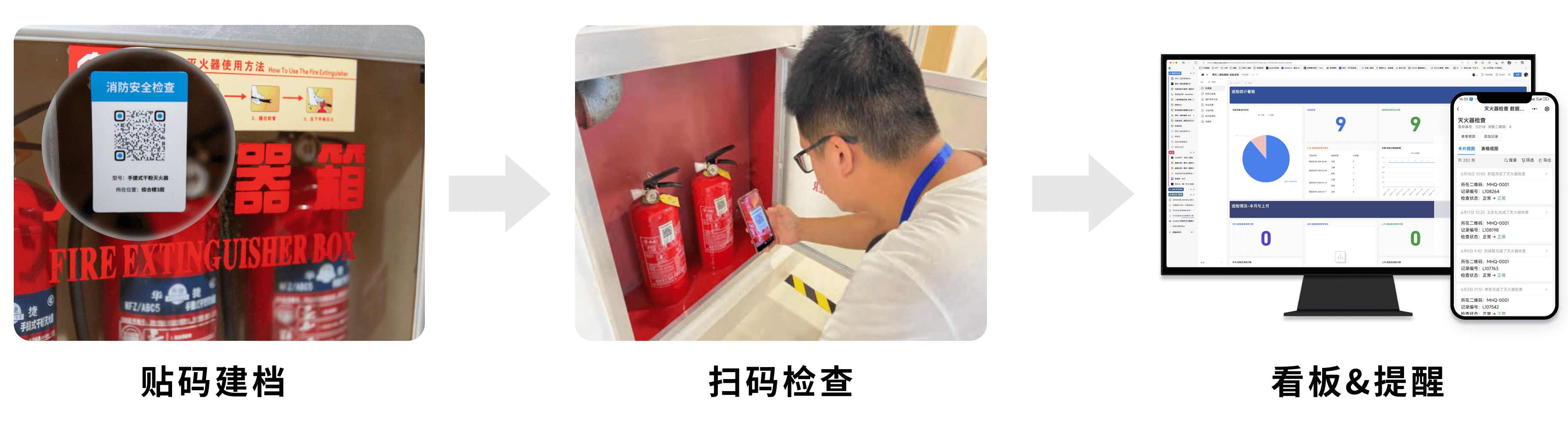
This solution is fast to deploy, low-cost, and requires no training for frontline staff—ideal for small and medium-sized enterprises looking to quickly digitize their daily fire safety management.
If you are already familiar with what the solution can do, you can jump directly to the setup tutorial and start building your fire inspection QR code system.
Solution in Action

1. For Managers: Standardize Inspection Data and Improve Management
Before Inspection
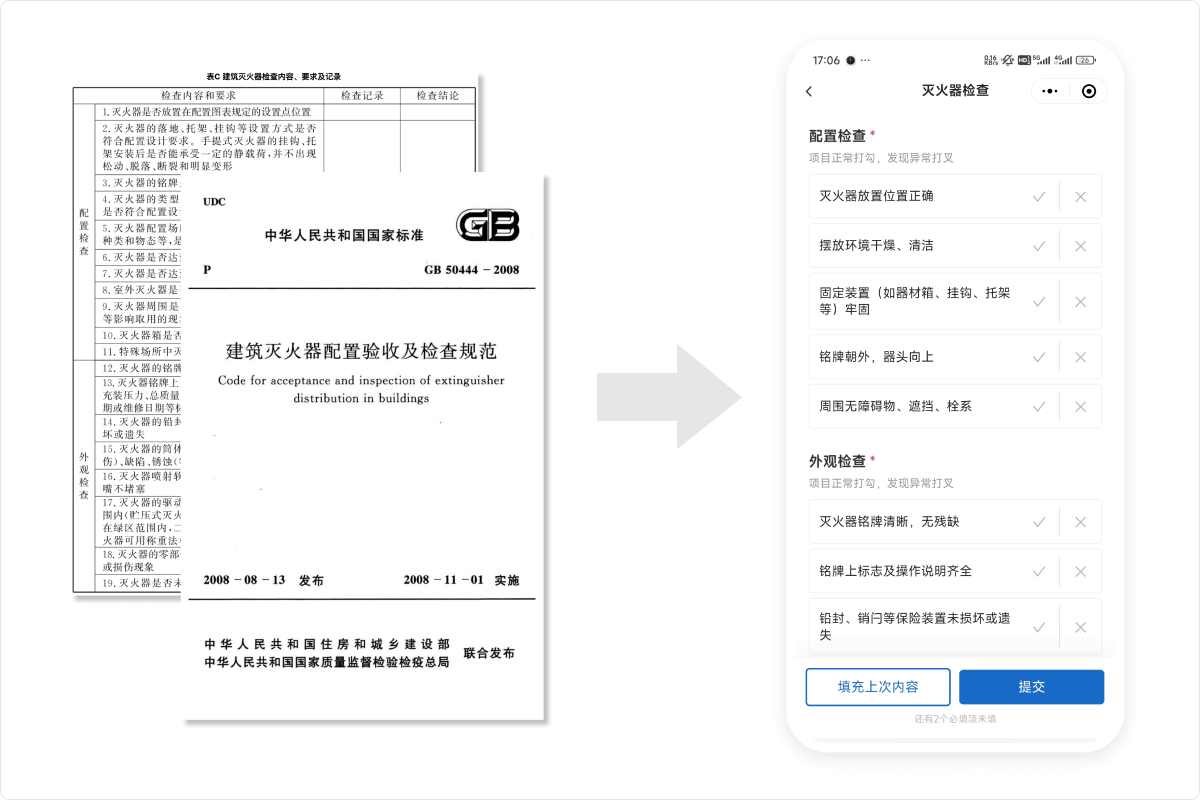
- Standardized templates: Templates created in accordance with relevant national standards and industry specifications—including GB50444-2008 (Code for Acceptance and Inspection of Fire Extinguisher Installation in Buildings), GB55036-2022 (General Code for Fire Protection Facilities), and GA95-2015 (Fire Extinguisher Maintenance)—can be used without modification, improving compliance.
- Automated task scheduling: Set inspection cycles and generate inspection plans with one click to reduce missed tasks.
- Clear division of roles and permissions: Inspection and management roles are strictly separated—who can view and who can fill in forms is tightly controlled.
- AI auto-fill: Starting from the Advanced Edition, preset photo rules can be configured so AI automatically identifies and fills in inspection items to assist with inspections. What is AI auto-fill?
During Inspection
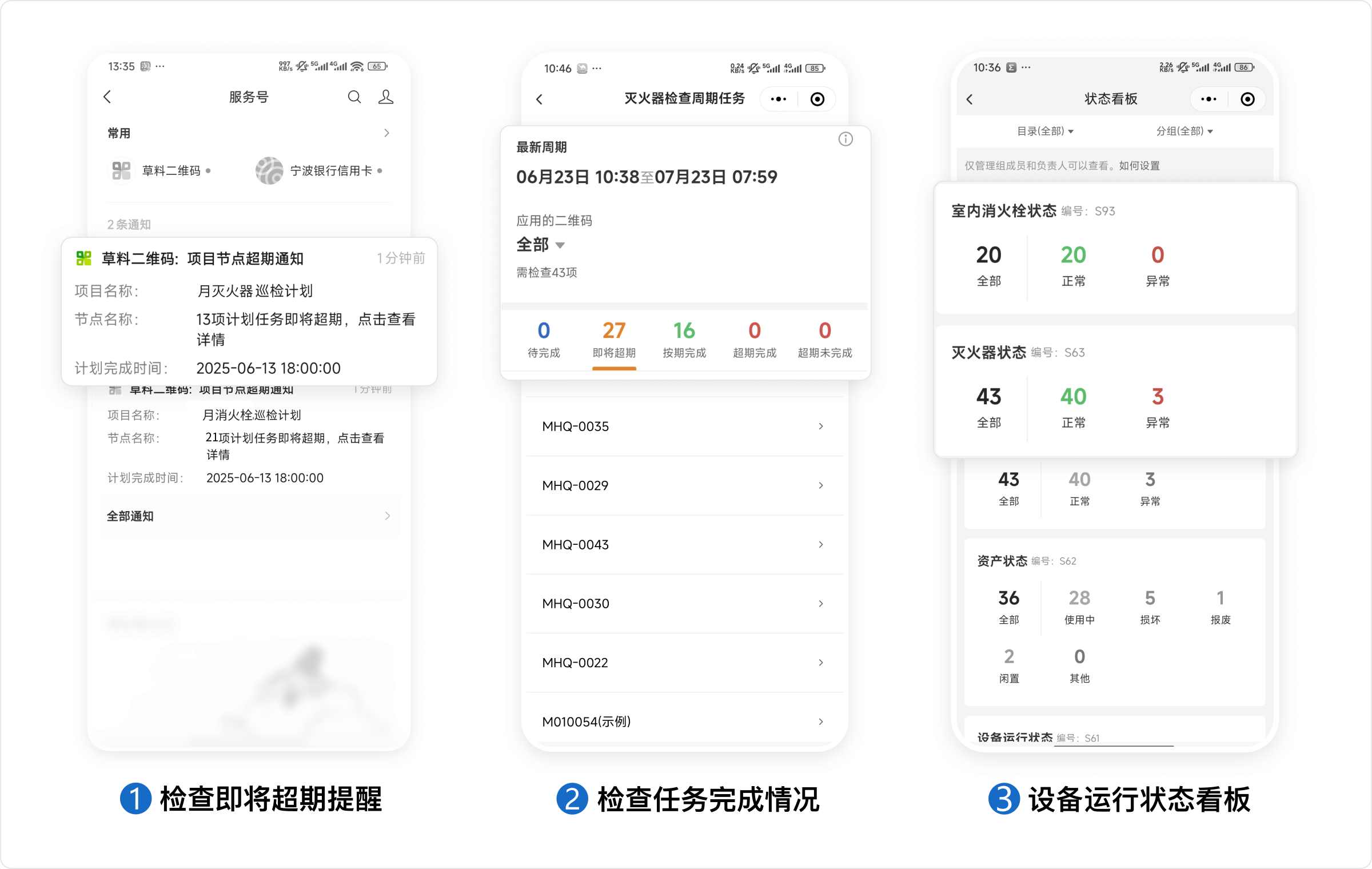
- Overdue inspection alerts: When an inspection task is approaching its deadline, the system automatically notifies managers.
- Mobile visibility at all times: Check overall task completion on a phone to catch any omissions.
- Full situational awareness: QR codes display the latest device status in real time—the mobile workbench shows the condition of all devices at a glance.
After Inspection
- Permanent record storage: Cloud archiving, export to Excel by cycle, and zero-barrier statistics for archiving.
- No-code visualization: Connect data to visualization tools in 5 minutes. After you set up a dashboard, charts are generated automatically, saving time on reporting.

2. For Inspection Staff: Scan and Work—Less Resistance from Employees
- WeChat scan-to-inspect: Devices have QR codes affixed. No paper forms to carry, no app to install.
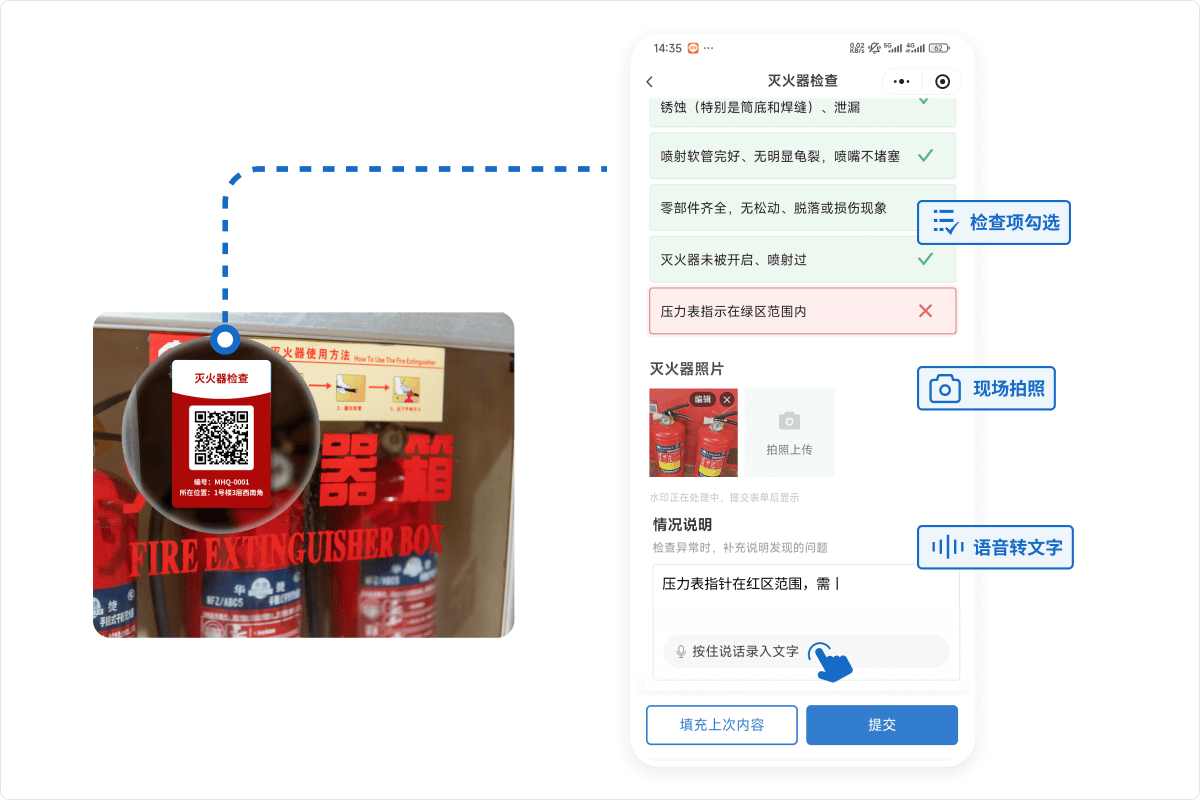
- Standardized inspection item fill-in: Normal items just need a checkmark; issues require additional detail—saving time while ensuring quality.
- Photo documentation: Forms support on-site photo uploads to visually record the condition of the equipment.
- Easy to fill in: Repeated content auto-fills; voice-to-text is available when written explanations are needed, eliminating the need to type.
Anti-Fraud Measures
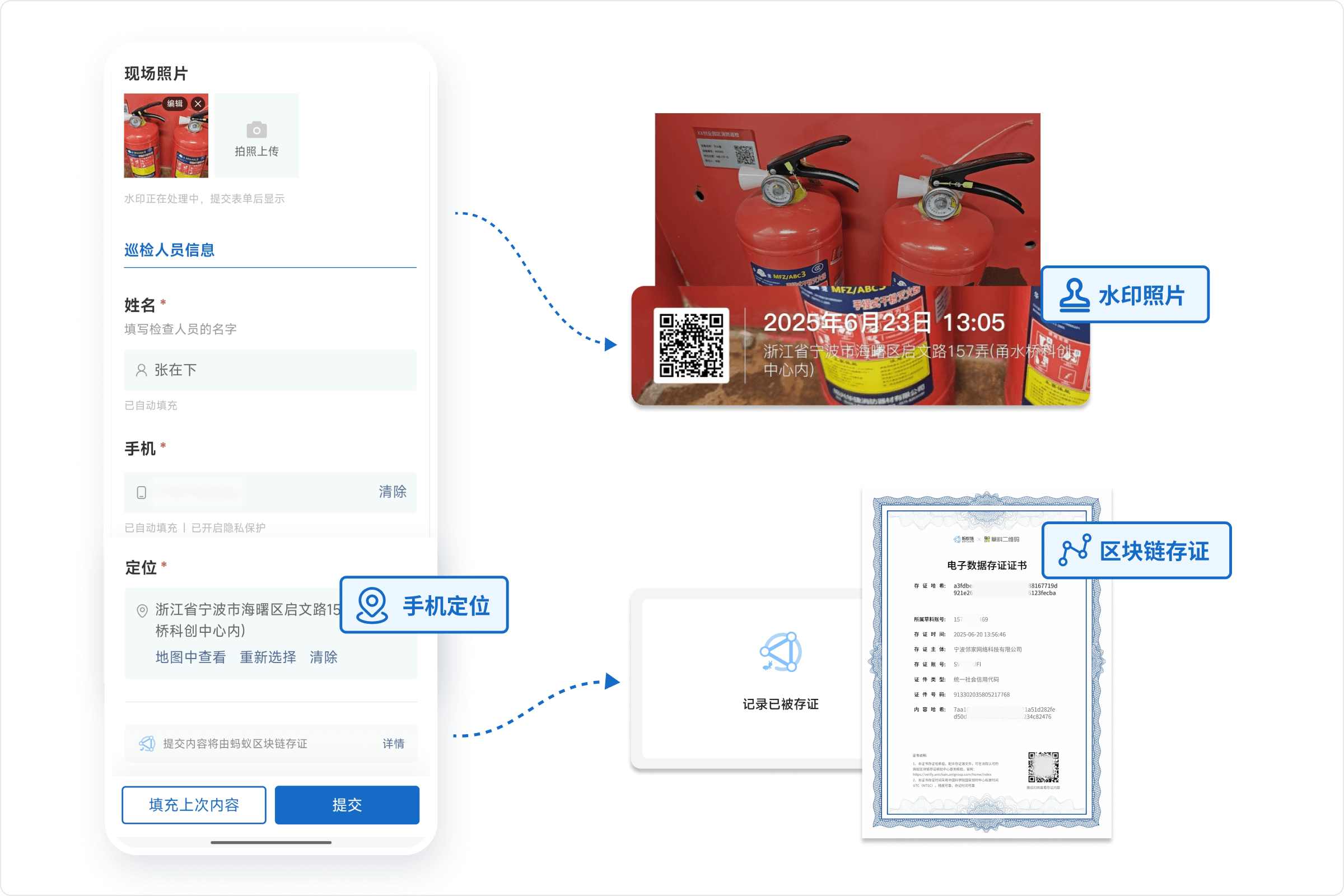
- Location restriction: If inspectors move beyond a set distance from the device, they cannot open the QR code—on-site inspection is mandatory.
- Mandatory on-site photos: Device photos can only be taken on the spot; uploading from the phone gallery is not allowed.
- Photo watermarks: The system automatically embeds the inspection time, inspector name, and phone location into the photo as proof.
- Blockchain notarization (optional): Inspection data is stored on-chain and cannot be tampered with. It can serve as a reference for judicial evidence in future traceability needs.
Solution Cost
Our recommendations:
- Free trial: For pilot phases or small-scale use, start with the free version to experience the basic scan-to-inspect workflow.
- Pay as needed: Upgrade to a paid version when the number of fire protection devices increases or you begin a wider rollout—for example, when specific needs arise such as "fault notifications need to be pushed to designated personnel" or "monthly inspection volumes are large and require bulk original image viewing."
| Requirement | Free Version | Advanced Edition | Flagship Edition |
|---|---|---|---|
| Scan to inspect, complete the workflow | No limits on QR code count, scan count, or record count | ||
| Different responsible persons per device | - | ✅ | ✅ |
| Real-time fault notifications | One admin only | Can notify maintenance team | Can notify maintenance team |
| Original device photos | Most recent 5,000 | Most recent 5,000 | Unlimited |
| AI auto-fill | - | ✅ | ✅ |
| Recommended for | Single-person management, small-scale pilot | Small teams with fewer devices and fewer managers | Campuses, residential communities, office buildings, etc. with many fire protection devices and multiple managers |
| Price | - | ¥1,280/year | ¥2,680/year |
For a detailed version comparison and purchase recommendations, view pricing plans.
Setup Tutorial
The following step-by-step tutorials will help you build your fire safety QR code system from scratch.
1. Basic Workflow
The basic workflow for completing fire protection equipment inspections with QR codes involves 4 steps. Follow these steps to build and use a simple fire protection equipment inspection system.

We have prepared a basic fire safety reference package to help you quickly get up to speed: Click to download
In accordance with relevant national standards and industry specifications, we have created QR code templates for common fire protection equipment inspections and fire hazard patrols to help you build faster and more compliantly.
Follow the setup tutorial and select a suitable fire safety template from the Template Library below to begin.
2. Advanced Usage
The following are advanced features available after completing the basic workflow. Configure them as needed.
| Step | Tutorial |
|---|---|
| Create inspection plans | View |
| Define role-based division of work | View |
| Add anti-fraud measures | View |
| Real-time fault notifications | View |
| Data visualization for reporting | Sync to Tencent Sheets, Sync to other visualization tools |
More Application Scenarios
Beyond fire protection equipment inspection, the following fire safety-related scenarios can also benefit from CaoLiao QR Code to improve management efficiency, including but not limited to:
Fire Safety Education and Awareness
Turn fire safety knowledge, video cases, or operating procedures into an information page and post it on team notice boards or near equipment. Staff scan to learn, and content can be updated without changing the QR code.
Training and Drill Sign-In
Place a sign-in QR code at in-person training sessions or emergency drills. Staff scan with WeChat to check in—name, time, and department are automatically recorded. Export reports with zero manual effort.
Fire Safety Quizzes
After training, distribute a quiz QR code with auto-scored single-choice and true/false questions.

User Stories
-
Wenzhou Central Hospital
Created "digital ID cards" for hospital fire protection equipment to standardize inspection procedures. View details -
China Energy Engineering Group Guangdong Thermal Power Engineering
Conducted safety inspections of large construction machinery, fire suppression equipment, and construction tools in key areas. View details -
Yuhuan Second People's Hospital
Equipped fire extinguishers and fire hydrants with "ID cards" to add another layer of technical protection for fire safety. View details
Frequently Asked Questions
-
We don't have an IT department. Can we build this ourselves?
Absolutely. The CaoLiao platform is designed for frontline managers. No programming or coding knowledge is required—users simply drag and drop the modules they need, adjust the settings, and the system is ready. Anyone can use it. -
Will my fire inspection records be stored permanently?
Yes, data is stored permanently and can be viewed in the workbench at any time. -
Can I try it for free first and purchase a paid version after the pilot succeeds? Will there be any negative impact?
Yes. Upgrading your CaoLiao version only adds more benefits—it will not negatively affect QR codes already in use. As long as you do not delete them yourself, all filled-in inspection records are stored permanently and will not be lost.
Start Building
The following templates are based on real user practice to help you quickly draw on peer experience and reduce setup costs.
- Fire Extinguisher Inspection: One code per group of extinguishers—scan to record inspection findings.
- Daily Fire Safety Patrol: Conduct fire patrols by area to identify fire hazards promptly.
- Indoor Fire Hydrant Inspection: Scan to record fire hydrant status with real-time notifications for anomalies.