GB 7718-2025 explicitly encourages digital labels for prepackaged foods and takes effect in March 2027. Use ready-made templates to generate digital label QR codes showing food names, ingredients, nutrition tables, storage conditions, and more. Bulk generation is supported in the free version.
I. Overview
1. Regulatory requirements
The policy path for prepackaged food digital labels is clear. Original standards and announcements are collected in CaoLiao's knowledge base:
Implementation requirements: In July 2025, the National Health Commission and State Administration for Market Regulation jointly issued an announcement further clarifying digital label implementation requirements
Effective date: The standard takes effect on March 16, 2027; the period until then is the preparation window for businesses
Current role: The standard encourages digital labels without requiring replacement of paper labels. Using digital and paper labels together is currently the prudent option
Technical details: The national standard General Technical Requirements for QR Codes on Digital Labels of Prepackaged Foods is seeking comments, with details still being developed
2. Solution results
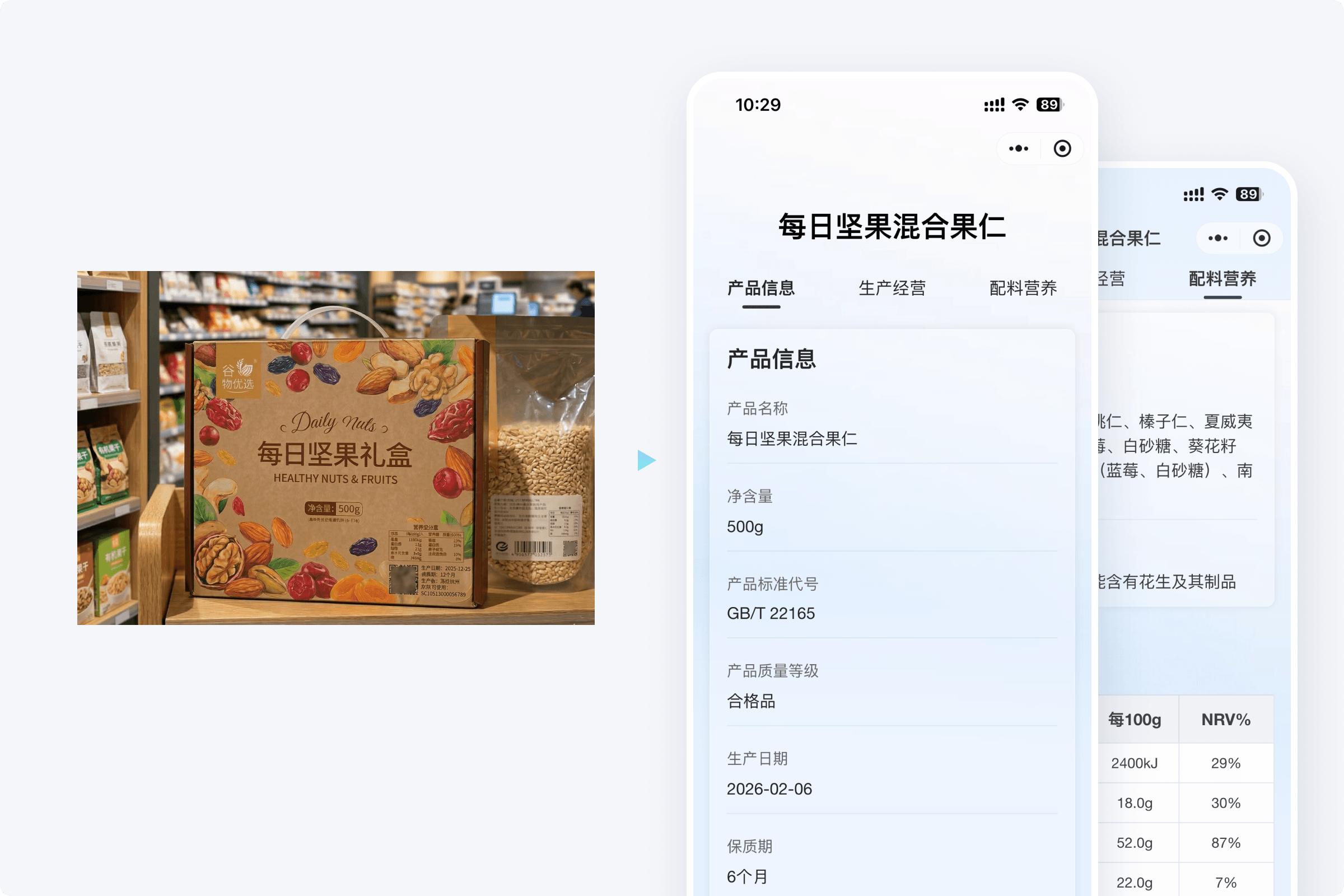
Digital labels turn information traditionally printed on packaging into standards-based scan pages. CaoLiao provides the tool; the business is responsible for content. Consumers see the following after scanning:
The food digital label shows product details, production information, ingredients, and nutrition in tabs, including a clear nutrition table with NRV%
Turn small packaging text into a full scan page
Read food names, ingredient lists, nutrition tables, and storage conditions clearly after scanning.
Enter data to generate codes without development
Templates have a standards-based display structure; enter food data to use them.
Unlimited bulk generation
Enter product data online or import Excel to generate all codes together.
Update content without changing the code image
Update ingredient lists in the workbench without reprinting packaging QR codes.
II. Setup and Bulk Generation
1. Set up label content in the template first
The display structure already follows the standard
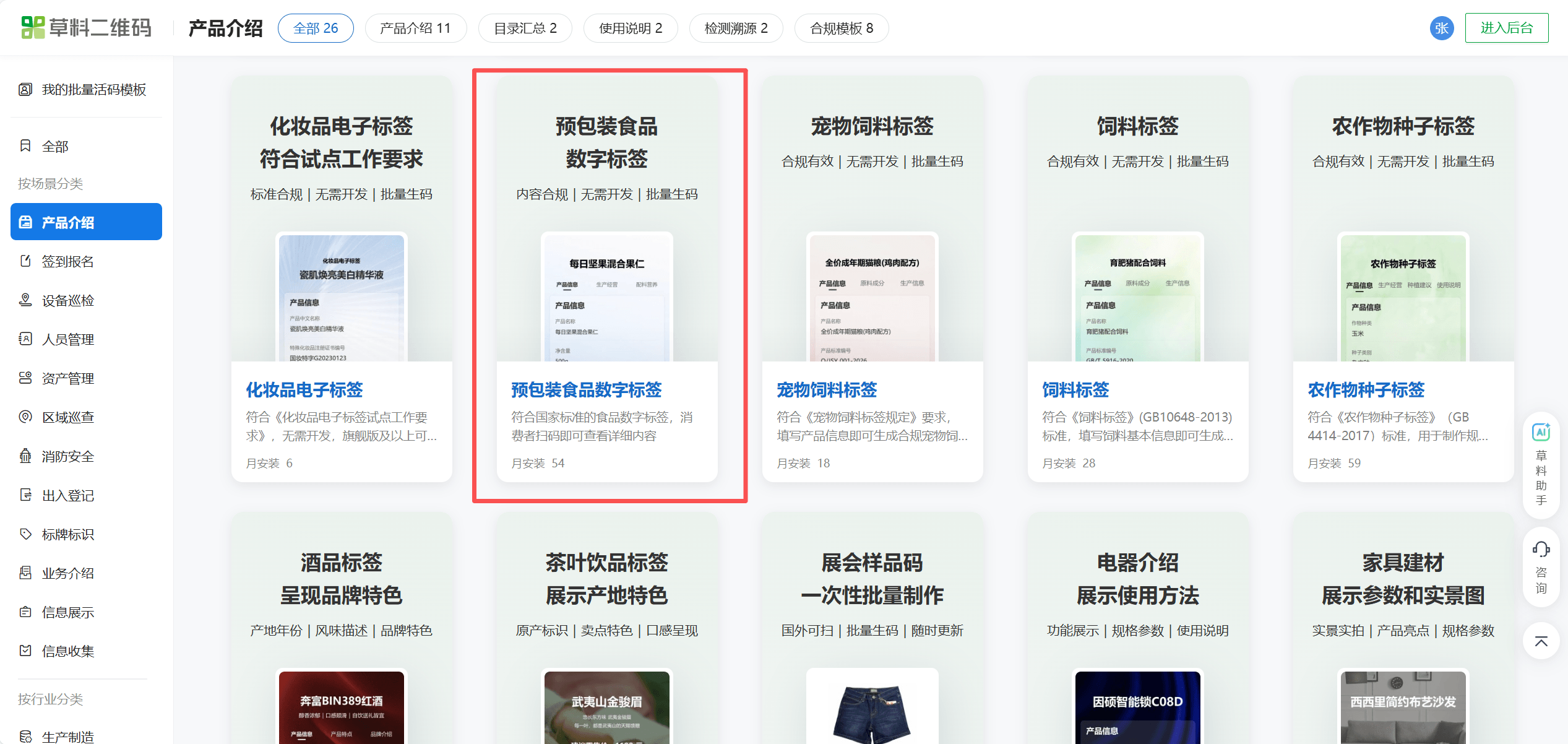
CaoLiao's Prepackaged Food Digital Label template includes editable modules for food names, ingredients, nutrition tables, consumption instructions, storage conditions, and manufacturer information. Click "Use Template to Generate Codes" to save it to your account, then adjust fields and styles for your products.
The Prepackaged Food Digital Label template in the Product Introduction category, with a standards-based display structure
Add trust-building information beyond required fields
Include test reports, company introductions, brand stories, and product videos on scan pages, giving consumers more than label information.
2. Generate codes for all your products together
Enter information online or upload Excel
Enter different products in an online spreadsheet or upload prepared Excel data, then use bulk QR code generation to generate digital label QR codes for every product, with no quantity limit.
Check generated codes before use
Sample-scan to confirm that food names, ingredients, and nutrition tables match packaging and filing information, then download code images for packaging design.
III. Printing and Maintenance
1. Use alongside paper labels
Add the code to packaging and retain the paper label
The standard encourages digital labels without requiring them to replace paper labels. Adding codes alongside paper labels is currently the prudent approach and prepares for implementation in 2027.
Scannable with mainstream apps
WeChat, Douyin, DingTalk, phone cameras, and other mainstream apps can open the page, avoiding access problems for consumers.
2. Update and protect content after printing
Update content while keeping the QR code image
If ingredients or nutrition tables change after packaging is printed, update content in CaoLiao's workbench without reprinting codes. Consumers see the latest content after scanning.
Blockchain notarization (enabled by default)
After product information is submitted, it automatically undergoes blockchain notarization, keeping tamper-resistant records for regulatory inspections and making scanned information more trustworthy for consumers.
IV. Implementation Costs
Digital label QR codes are free to create in the free version. Actual costs mainly involve packaging layout adjustments and printing.
Upgrading preserves existing QR codes and content. For a detailed comparison, see pricing plans.
V. Frequently Asked Questions
Where does this solution apply, and where does it not apply?
Suitable for food digital label QR code creation, bulk generation, packaging printing and related activities by food manufacturers and brands preparing for digital labels. Not suitable for replacing paper packaging labels, or system integration with regulatory platforms.
Can digital labels completely replace paper packaging labels?
GB 7718-2025 currently encourages digital labels without requiring complete replacement. Detailed implementation rules follow subsequent official announcements. Using digital labels alongside existing paper labels is currently the prudent approach.
Will not using digital labels before 2027 have an impact?
GB 7718-2025 takes effect on March 16, 2027. Before that date, we recommend preparing in advance to avoid rushed adjustments affecting normal sales, especially as reworking printed packaging costs more.
Can many products be generated in bulk? Is there a limit?
Bulk QR code generation is supported, with no quantity limit. Enter information in an online spreadsheet or upload Excel to generate codes in bulk.
What if ingredients change after packaging is printed?
Update content directly in CaoLiao's workbench. The QR code itself does not need reprinting, and consumers see the latest updated content after scanning.
Start Building
The template's display structure follows the national standard. Enter food data to generate codes: