TSG 31-2025 requires traceable digital identification on quality certificates for industrial piping components. Use ready-made templates to generate traceability QR codes, link stamped certificates, and display material grades, heat/batch numbers, delivery conditions, and more after scanning. Bulk generation is supported in the free version.
I. Overview
1. Regulatory requirements
TSG 31-2025 Safety Technical Regulation for Industrial Pressure Piping adds traceable digital identification requirements to factory documents. Key QR code provisions include:
Effective date: TSG 31-2025 Safety Technical Regulation for Industrial Pressure Piping took effect on January 1, 2026
Digital identification: Quality certificates for industrial piping components must bear traceable digital identification (including QR codes or barcodes) and the manufacturer's quality inspection stamp (Section 2.2.1.4)
Separate physical markings: Components must still have clear, durable factory stamps or other traceable markings in prominent positions. This is a separate requirement from digital identification; neither replaces the other
Six traceability fields: Material manufacturer, material grade, specification, heat/batch number, delivery condition (heat treatment condition), and quality certificate issue date
Retention period: Quality certification documents must be kept for at least the pipeline's service life
Technical details: The regulation does not specify minimum code size, symbology, or error-correction level. Set internal specifications based on general standards, customer requirements, and on-site scanning conditions
2. Solution results
The manufacturer is responsible for printing identification and ensuring content authenticity. CaoLiao provides the tool: generate traceability codes from templates, link stamped quality certificates and other factory documents, and print codes on certificates delivered with products. During shipment, acceptance, installation, and operation, staff scan with WeChat, Alipay, or other tools to verify sources, destinations, and responsibilities:
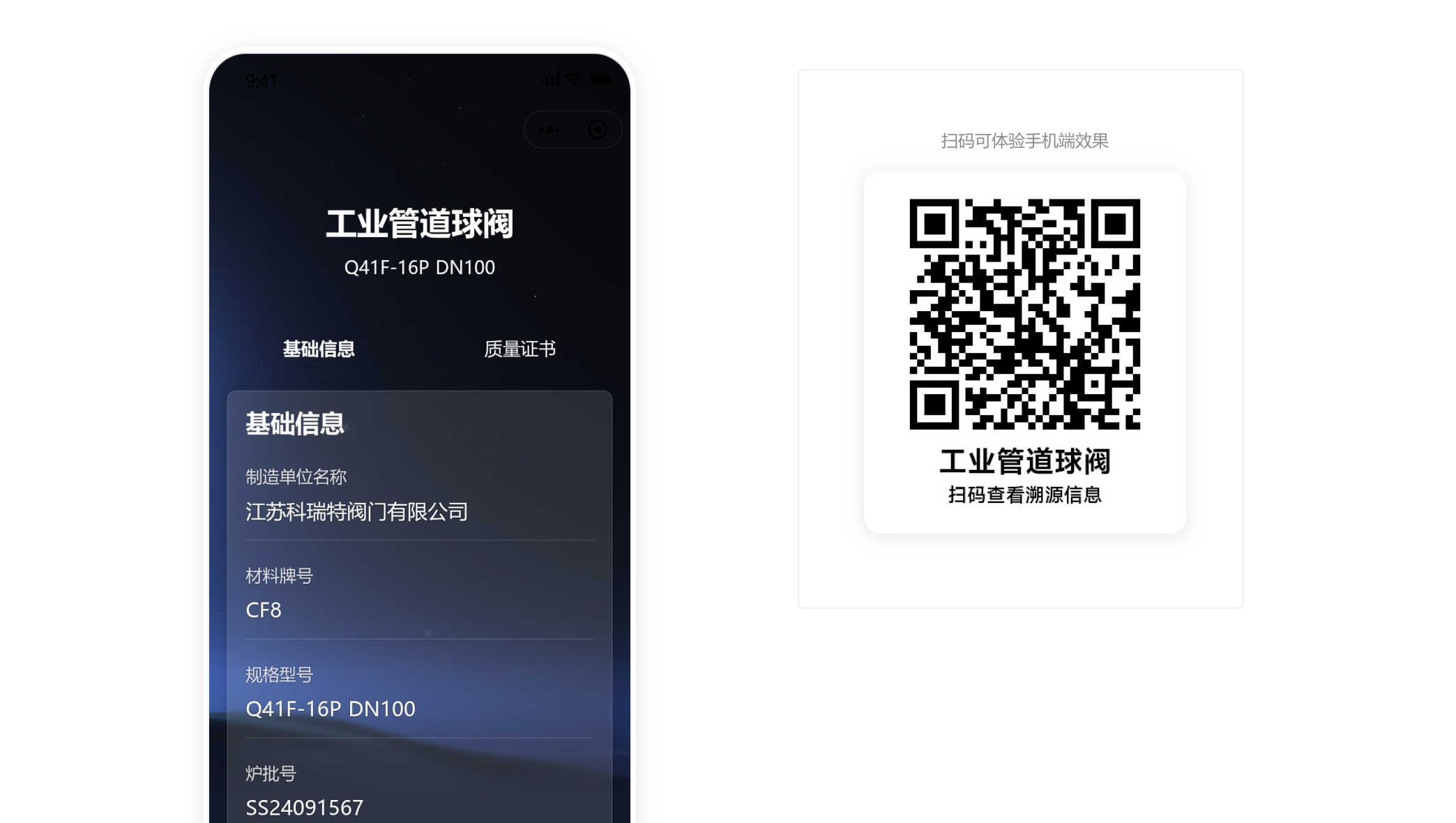
Industrial ball valve example: scan to view manufacturer, material grade, specification, and heat/batch number. View quality certificates in their tab; scan the code on the right to try it
Compare traceability information on one screen
Six traceability fields appear on the first screen for buyers to compare against paper certificates during acceptance.
Scan to view supporting documents
Link stamped quality certificates, material reports, and supervision inspection certificates to codes.
Lock content and retain change records
Lock published content. Administrator review is required for edits, and changes are recorded automatically.
Factory documents remain online long term
Store documents centrally online for retrieval and verification throughout the pipeline's service life.
II. Setup and Bulk Generation
1. Set up traceability information and quality documents in the template
Preset fields follow the regulation; configure them in half a day
CaoLiao's Industrial Piping Component Traceability template has a preset structure based on TSG 31-2025, with one code per product. Adjust display content for your product types as needed. Retain specifications, material grades, heat/batch numbers, delivery conditions, quality certificate numbers, and issue dates, as these are key regulatory inspection items.
Convert certificates and reports to PDF or images before uploading
Organize product certificates and material reports, convert them to PDF or images, and upload them. Link supplementary documents such as supervision inspection certificates as well. To reduce acceptance disputes, prioritize scans of documents bearing the quality inspection stamp and keep them consistent with paper deliverables.
Include raw material quality certificates in the same code
A component's heat/batch number comes from its raw material quality certificate. Upload that certificate to the finished product's code so receivers can compare the number against the original document without requesting it from upstream suppliers. Check consistency before uploading.
2. Generate codes in bulk for multiple items in a batch
Decide two things before generating codes
Define unique coding rules first to avoid mixing batch and item codes later. Choose one code per item or batch according to buyer requirements; when unspecified, one code per item is safer. Use separate templates for different product types.
Generate individual codes or import Excel in bulk
Enter information to generate dynamic QR codes and download their images. For multiple components in a delivery batch, organize traceability information in Excel and import it with bulk QR code generation instead of creating codes one at a time.
III. Printing and Maintenance
1. Test on site, then print codes on delivered certificates
Sample-scan before delivery
Check that pages open correctly, information is complete and clear, and files can be previewed and downloaded. Sample tests before shipment should cover different phones and lighting conditions.
Print on quality certificates or accompanying labels
Print codes on paper quality certificates or accompanying labels and deliver them with the products. Choose label materials for the environment, including water, oil, or heat resistance as needed.
2. Change management and viewing permissions
Update content while keeping the QR code image
After shipment, add attachments, correct fields, or add change notes directly in the workbench without reprinting certificates. For certificate revisions, retain a read-only old version, publish a new one, and record the changes and time.
Content locking and change records
After publishing traceability information, enable content update protection to lock it. Updates require administrator review, and each edit supports version tracing with automatic operation records to prevent unauthorized changes.
Limit access to sensitive information
Set passwords, region or time restrictions, or member-only access to prevent exposure of commercially sensitive information. Use file QR code settings to control online viewing and downloading of quality certificates.
After-sales service and branding
Show contacts, phone numbers, and after-sales entries on the scan page for follow-up communication. For stronger branding, use an exclusive enterprise WeChat Mini Program to display scan pages.
IV. Implementation Costs
Traceability QR codes are free to create in the free version. Actual costs mainly involve certificate printing and label consumables.
Upgrading preserves existing QR codes and content. For a detailed comparison, see pricing plans.
V. Frequently Asked Questions
Where does this solution apply, and where does it not apply?
Suitable for traceability QR code creation, bulk generation, certificate printing and related shipping activities by piping component manufacturers, suppliers, and user organizations needing verification and archiving. Not suitable for replacing factory markings such as physical stamps, or system integration with regulatory platforms.
Are physical stamps still required with a QR code?
Yes. Physical markings and digital identification are separate requirements that cannot replace each other: components need stamps or other traceable marks in prominent positions, and quality certificates need printed digital identification.
One code per item or per batch?
Follow buyer requirements. When unspecified, one code per item is safer. Define unique coding rules before generating codes to avoid mixing batch and item codes later.
What if certificate content needs revision?
Edit it in the workbench without changing the code image or reprinting the certificate. We recommend retaining the old version as read-only and publishing a new one, with change notes and timestamps for later verification.
Are code size and symbology specified?
The regulation does not quantify minimum size, symbology, or error-correction level. Set internal specifications using general standards, customer requirements, and scanning conditions. Before shipment, test different phones and lighting conditions.
How long must factory documents be retained?
Quality certification documents must be retained for at least the pipeline's service life. Centralized online storage supports retrieval, verification, and archiving throughout that period, reducing scattered or missing paper documents.
Must quality certificates be linked?
The regulation requires complete quality certification documents. Uploading them is recommended. Prioritize scans bearing the quality inspection stamp and keep them consistent with paper deliverables.
Can files be viewed online without allowing downloads?
Yes. Use file QR code settings to control online viewing and download permissions for quality certificates and other documents.
Can template fields be changed?
Yes. Expand or simplify them for business needs while retaining core traceability fields. Changes to QR code display content take effect without replacing the code.
Start Building
Preset fields follow TSG 31-2025. One person can complete basic setup in half a day without development: