Generate certificate QR codes from ready-made templates and attach them to packaging or existing labels. Buyers, consumers, and regulators can scan to view product information, origin, commitments, and issue dates. Bulk generation is supported in the free version.
I. Overview
1. Regulatory requirements
The Measures for the Administration of Agricultural Product Quality and Safety Certificates of Commitment to Compliance (Ministry of Agriculture and Rural Affairs Order No. 4 of 2025) took effect on February 1, 2026. See the full measures. Key provisions directly related to certificates include:
Issuers: Producers and farmers' professional cooperatives issue certificates by production batch at the place of origin; individual farmers are encouraged to follow this practice. Purchasers must reissue certificates when reselling mixed or repacked products (Articles 8, 9, and 11)
Collection requirements: Certificates must be collected during purchasing; products without them must not be purchased. Online sales must include certificates (Articles 10 and 13)
Certificate contents: Commitments, their basis, product name, quantity, origin, issue date, issuer, and contact details. Information already on packaging need not be repeated (Article 14)
Issuing and attaching: Digital, printed, and handwritten certificates are all permitted. For packaged products, attach the certificate to or place it inside each sales package; for unpackaged products, provide it by production batch (Articles 15 and 16)
Retention and penalties: Keep issuing records and collected certificates for at least six months. Failure to issue required certificates or provide complete content, if not corrected within the specified time, is subject to a fine of RMB 100 to RMB 1,000 (Articles 8, 10, and 18)
Article 15 of the Measures for the Administration of Agricultural Product Quality and Safety Certificates of Commitment to Compliance
Certificates of commitment to compliance may be issued digitally, in print, or by hand. Digital issuance is encouraged. When using a QR code, prominently display the words "Certificate of Commitment to Compliance" around or in the center of the code. The code may be combined with agricultural product quality and safety traceability labels and quality marks.
2. Solution results
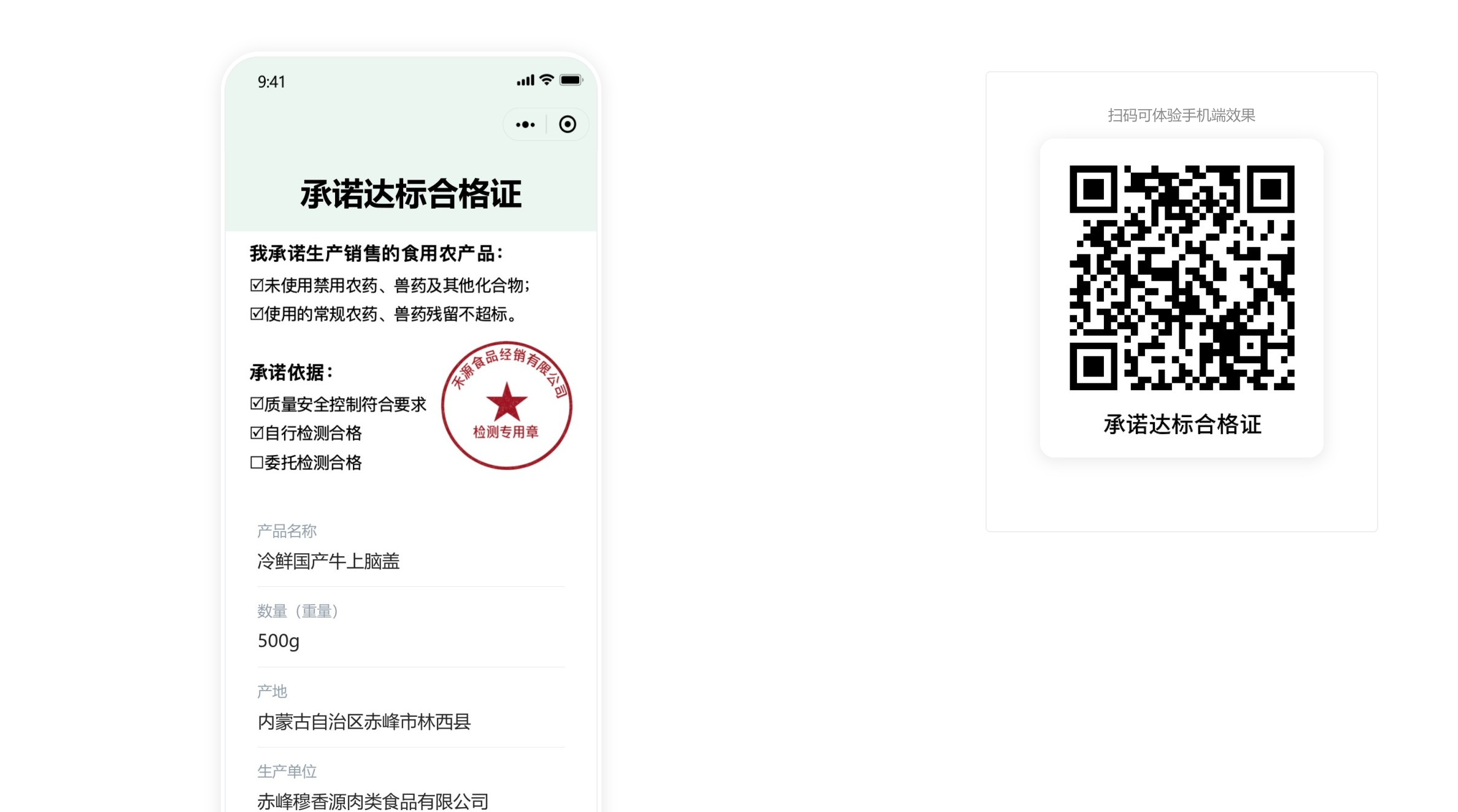
You issue the certificate yourself; handwritten, printed, and digital formats are all permitted. CaoLiao provides the QR code: display certificate information through it, attach it to packaging or an existing label, and scan to view:
The certificate page shows commitments, stamped testing details, product information, and origin together. Scan the code on the right to try it
Generate codes for any number of shipment batches
Fill in template fields to generate codes, or use Excel to generate them in bulk for many batches.
Fit complete information into limited label space
A single code on paper opens a page with complete fields, stamped images, and test reports.
Work on site without a computer
Use WeChat to scan, enter information, assign content, and manage codes at harvesting and shipping sites.
Keep records ready for inspection
Certificate content is saved in the workbench. Buyers and regulators can scan to view it, and records can be searched and exported.
II. Setup and Bulk Generation
1. Choose a template for your shipment arrangements
Four common situations, each with a ready-made template
First confirm acceptance requirements with the local authority, buyer, or sales platform: whether a stamp is needed, whether each product needs its own code, whether "see packaging" is permitted, and whether the actual issue date must be shown. Then select a template:
Wholesale markets and bulk goods with simpler acceptance requirements
When no specific requirements apply
Try the One Code per Day or Strict Version template first. One is simpler, while the other provides more information. Choose according to your channel's requirements.
2. Adapt the fields to your requirements
Add or remove fields according to acceptance requirements
Click "Use Template to Generate Codes" to save the selected template to your account and adjust its fields. The template includes commitments, their basis, product name, origin, issuer, and issue date as required by the measures. Remove information already shown on packaging to avoid duplication, and add test reports, farm photos, product catalogs, or company information as needed.
Upload a stamped image when a stamp is required
Use the ready-made commitment template file, print and stamp it, then upload a photo. Alternatively, insert a stamp image in the document, select "In Front of Text" for its layout, and save a screenshot. Scanning then shows the stamped statement.
Follow the receiving party's requirements
The displayed fields and format must meet the requirements of the local authority, buyer, or sales platform. For strict channels, confirm acceptance with a small sample before printing in bulk.
3. Enter information to generate codes, or generate them in bulk for many batches
Generate codes directly for defined batches
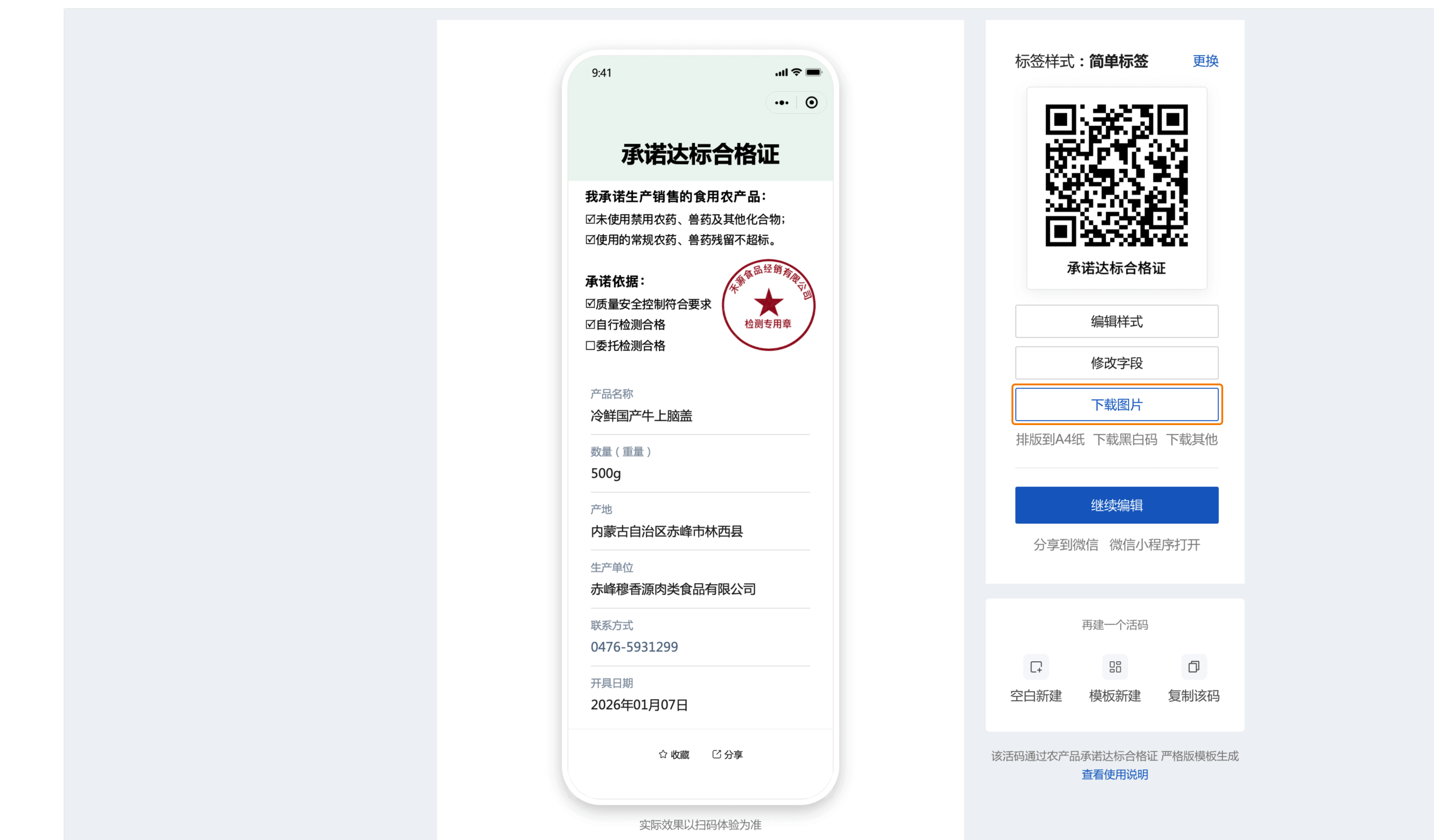
When product batches are defined, enter the product name, quantity, origin, issuer, contact details, and issue date to generate certificate QR codes. Download the code images for layout and printing.
After generating codes with the Strict Version template: the certificate page appears on the left, with code image download and A4 printing options on the right
Use bulk QR code generation for many shipment batches
Organize each batch in Excel or an online spreadsheet. Each row generates one code. Use bulk QR code generation to create them together instead of filling in each one separately.
III. Printing and Maintenance
1. Add the code to existing labels for layout and printing
Add the code to your current label without redesigning the packaging
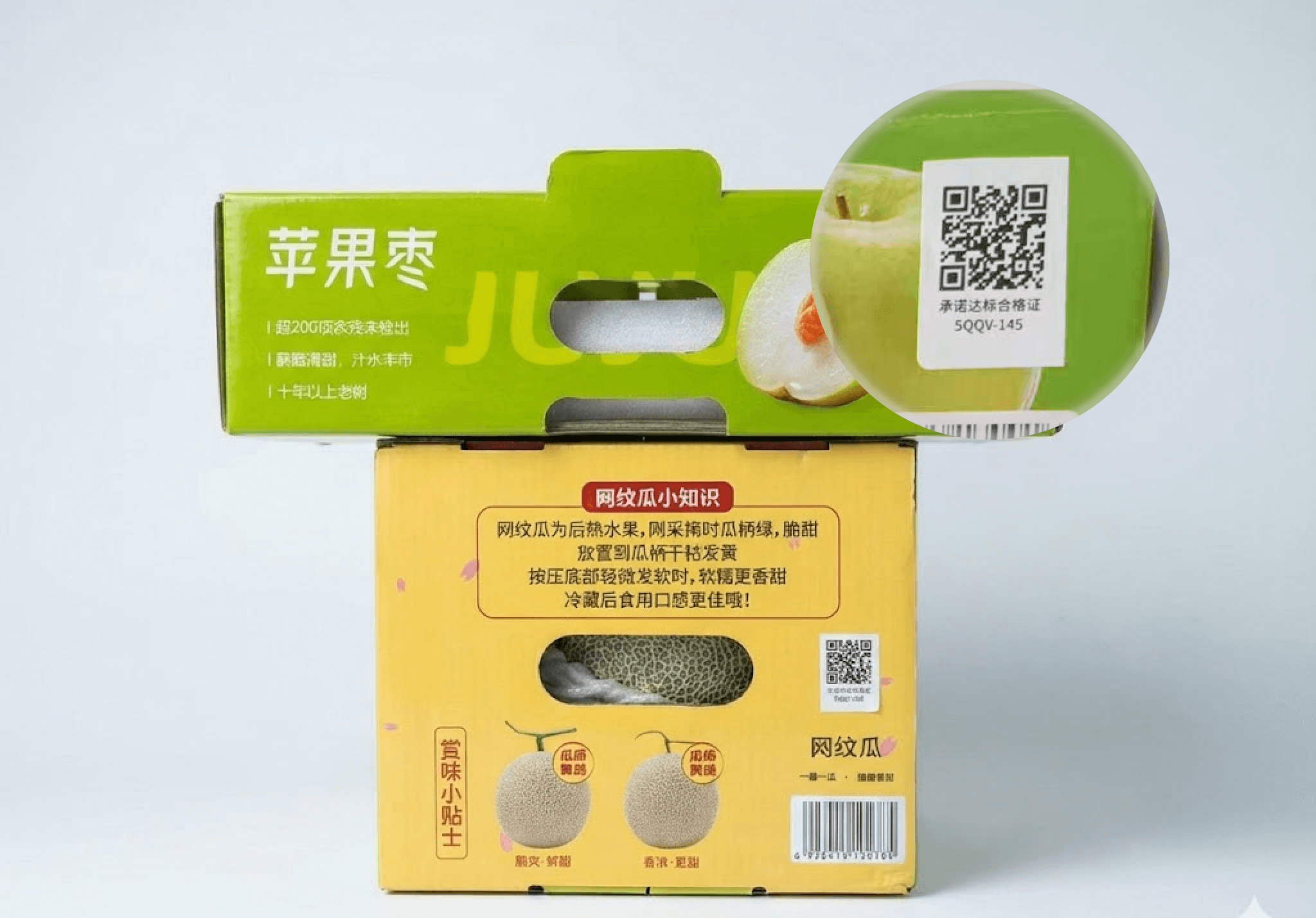
Many businesses already include product names, weight, and barcodes on labels. Add the certificate QR code to the same layout and print it together. Template-generated labels include "Certificate of Commitment to Compliance" to meet the measures' QR code labeling requirements. A size of at least 1.5cm × 1.5cm is recommended, as scanners may struggle with smaller codes. For layout instructions, see the agricultural product certificate layout and printing tutorial.
On a packaging box: the certificate QR code is integrated into the original layout, with "Certificate of Commitment to Compliance" below it
Print large quantities continuously with a label printer
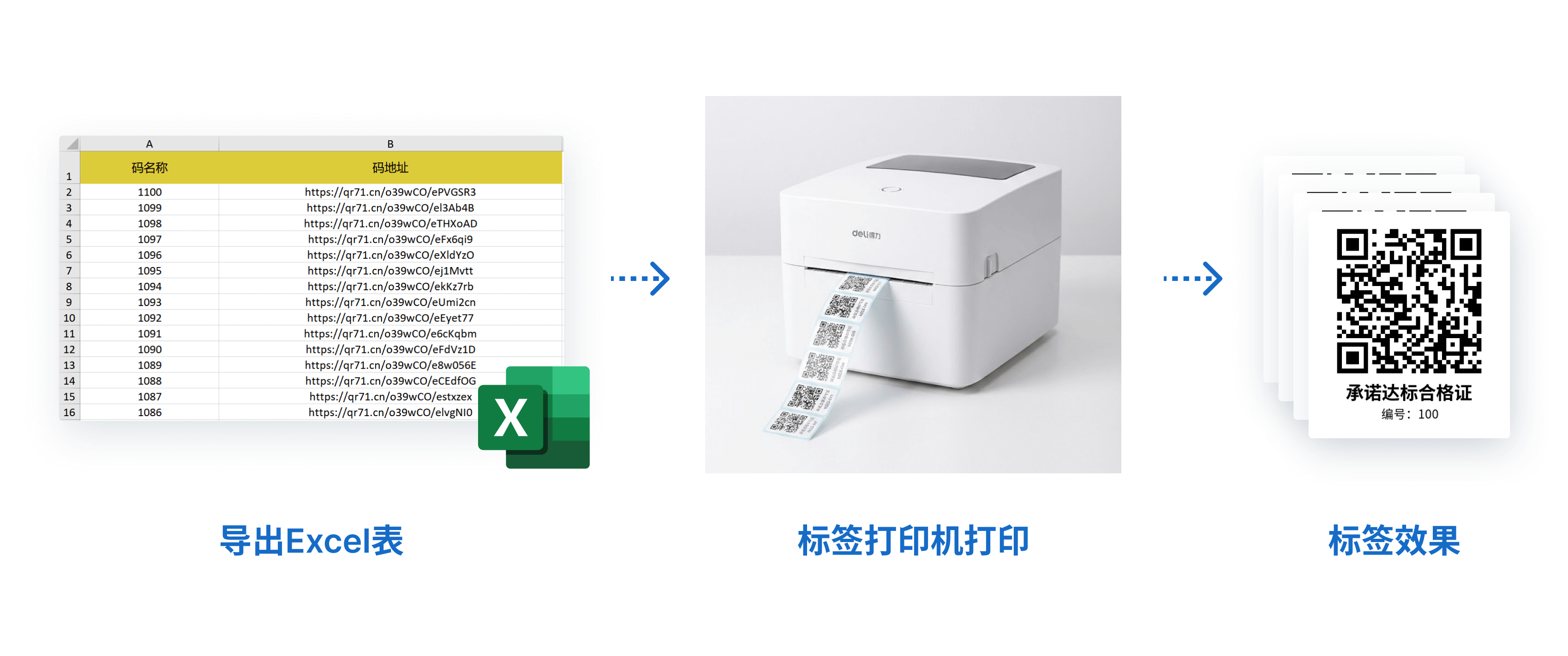
For small quantities, arrange labels on A4 paper. For larger shipments, export the generated codes in bulk and use a label printer with label paper to produce certificates ready to attach.
Bulk printing: export the code list to Excel and print certificate labels continuously with a label printer
Choose label paper for the operating conditions
Label paper requirements vary by environment. Choosing the right material can significantly reduce costs. One user reduced each label's cost to RMB 0.001; the method is described in this experience report. For printer and consumable selection, see the agricultural product certificate label printer tutorial:
Three-proof thermal paper for ordinary dry packaging boxes with little moisture and room-temperature circulation
Five-proof thermal paper for fruit, vegetables, and aquatic products exposed to moisture or light oil contamination
Freezer-grade thermal synthetic paper for cold chains, low-temperature storage, and frozen transport
Thermal transfer synthetic paper + resin ribbon when labels must last longer or packaging surfaces are subject to friction
2. Scan to inspect, with records retained in the workbench
Buyers, consumers, and regulators can scan to check
Scan with WeChat to open the certificate page. View products, origin, commitments, issue dates, stamped images, and test reports without checking paper documents.
Keep certificate content in the workbench and export it with one click
The content associated with each code is saved in CaoLiao's workbench for searching and exporting. This helps retain issuing records as required by the measures and avoids lost or disorganized paper stubs.
IV. Implementation Costs
Creating certificate QR codes is free and supported in the free version. The main costs are label printing and consumables, which can be kept low by choosing suitable materials and printing methods. See the layout and printing section above.
Upgrading preserves existing QR codes and certificate records. For a detailed comparison, see pricing plans.
V. Frequently Asked Questions
Where does this solution apply, and where does it not apply?
Suitable for certificate QR code creation, bulk labeling, scan-based inspection and other shipping activities by family farms, farmers' cooperatives, agricultural businesses, and purchasing organizations supplying supermarkets, e-commerce channels, or wholesale markets. Not suitable for channels accepting only original stamped paper certificates, or system integration with regulatory traceability platforms.
Will regulators and buyers accept certificate QR codes created with CaoLiao?
The measures explicitly allow digital certificates and QR code identification. CaoLiao provides a tool for generating QR codes and displaying information. You prepare the commitments, stamp, and issue the certificate yourself, and the issuer remains responsible for compliance. The scan page must cover fields required by regulators and buyers, such as product name, origin, issuer, contact details, issue date, and commitments. The label must also display "Certificate of Commitment to Compliance". Confirm the format with the local authority or buyer before bulk use.
Does every product batch need its own code?
Not necessarily. For strict channels, one code per product or batch is generally recommended. If packaging already shows complete product information and the buyer permits it, you may use One Code per Day, One Code per Business, or the Image Display Version. Check acceptance requirements before selecting a template.
How do I handle certificates that require a stamp?
Prepare an image of the stamped commitment and upload it as a certificate field. If you already have a stamped paper certificate, use the Image Display Version to show a photo of the stamped certificate after scanning.
What if on-site staff cannot use a computer?
Use a phone: WeChat supports scan-based data entry and management, so a computer is not always necessary. You can also create codes on a phone: search WeChat for the "CaoLiao QR Code" Mini Program, then search its template library for "agricultural products".
Do I need a new design if I already have packaging labels?
Usually not. Add the certificate QR code to your existing label and print it with the product name, weight, and barcode. This avoids major packaging changes and speeds up implementation.
How long must certificate data be kept?
The measures require issuing records to be retained for at least six months, and purchasers must also keep collected certificates for at least six months. After generating codes with CaoLiao, the workbench saves their content for later searching and exporting.
Start Building
The four templates below include fields and styles for common certificate acceptance requirements. Choose the closest match, adapt it to your products, and generate codes for labeling. For full illustrated instructions, see the agricultural product certificate tutorial: